
App Survey Questions: 40 Examples for Mobile and SaaS
Most app survey questions collect polite sentences nobody can act on. “How can we improve?” hands the respondent your whole roadmap and gets “it’s fine” back. The 40 questions below are built the other way round: each one asks one audience about one recent thing they did in your app, at the moment they can still remember it, so the answer points at a decision.
They’re grouped by moment, from onboarding to cancellation, with a set for mobile apps (crashes, notifications, permissions, purchases) and the 4 standard metric questions with their exact wording. This is a bank, not a form. Pick 1 to 3 for any single prompt.
- Platform boundary: Apple’s system review prompt shows at most 3 times per user in 365 days, and Google Play bans incentivized or forced ratings. Research surveys are a separate thing; keep them separate.
- Timing rule: an in-app survey is useful when a product event that just happened gives the question its context.
- Prompt limit: 1 to 3 questions per prompt for an uninvited survey. Refiner’s 2025 data found 4 to 5 questions respond best, and the section on timing explains when that applies.
Jump to: question map · onboarding · activation · mobile · cancellation · pricing · NPS, CSAT, CES, PMF · timing · templates
Which App Survey Questions Should You Ask?
Start from the decision you need to make, then pick the trigger, then the question. The table maps the 40 questions to the moment each one belongs to.
| Research goal | Best trigger | Questions |
|---|---|---|
| Onboarding friction | After a step is abandoned or setup is completed | 1-5 |
| Activation and adoption | After a meaningful product event | 6-10 |
| Mobile app experience | After a crash, slow screen, permission, purchase or beta build | 11-18 |
| Churn and cancellation | During cancellation or after expiry | 19-23 |
| Pricing and value | After value has been experienced | 24-28 |
| Satisfaction after a task or support event | After a completed task, a resolved ticket or a bug | 29-36 |
| Standard metrics (NPS, CSAT, CES, PMF) | On a schedule, after activation | 37-40 |
If the problem is the onboarding flow itself, fix the sequence before adding prompts to it. The 7-stage SaaS onboarding process shows where feedback belongs and where product guidance belongs.
What Should You Ask About Onboarding Friction?
Ask these after a user completes onboarding, abandons a step, or comes back after failing to finish. Never while they’re still trying.
- What were you trying to set up today?
- Which step took more effort than you expected?
- What information did you need but couldn’t find?
- What almost stopped you from finishing setup?
- Before signing up, what did you expect to happen first?
Questions 2 and 4 sound similar and diagnose different things. “More effort” finds friction. “Almost stopped” finds a failure severe enough to threaten activation.
For multiple-choice answers, build the options from observed behavior, support tickets and session recordings. 4 neat options invented in a meeting rarely match what users actually hit.
What Should You Ask After Activation or Feature Use?
Activation isn’t “logged in twice”. It’s the first event that strongly suggests the user reached real value, and that is the moment to ask.
- What did you accomplish with [feature] today?
- What did you expect [feature] to do that it didn’t do?
- What would make you use this feature again next week?
- Which part of this workflow do you still complete somewhere else?
- If this feature disappeared tomorrow, what would you use instead?
Question 9 is the one to keep if you keep only one. It finds work that still lives in a spreadsheet, an inbox, a chat tool or a competitor’s product, and that gap usually matters more than the next feature request.
A product-led growth model only works when product events stand for real customer progress. Survey answers supply the “why” behind the event.
What Should You Ask Mobile App Users?
A mobile app has failure points a web app doesn’t: crashes, slow screens, notification fatigue, permission prompts, offline use and store purchases. Each of these questions fires on the event it names, which is the only way the answer stays specific.
- What were you doing when the app crashed or froze? (after a crash is logged, on the next launch)
- Which screen feels slowest to load? (after a screen exceeds your load-time threshold twice)
- Which notifications would you turn off first? (after the user opens notification settings, or 2 weeks after opt-in)
- What made you decline the [camera / location / contacts] permission? (after a permission is denied)
- What did you need to do while offline that didn’t work? (after the app reconnects following offline use)
- What stopped you from completing the purchase? (after an in-app purchase sheet is dismissed)
- What broke or felt unfinished in this build? (TestFlight or Play beta testers, after 3 sessions)
- Which text, button or gesture was hard to read or reach? (after the user changes text size or enables an accessibility setting)
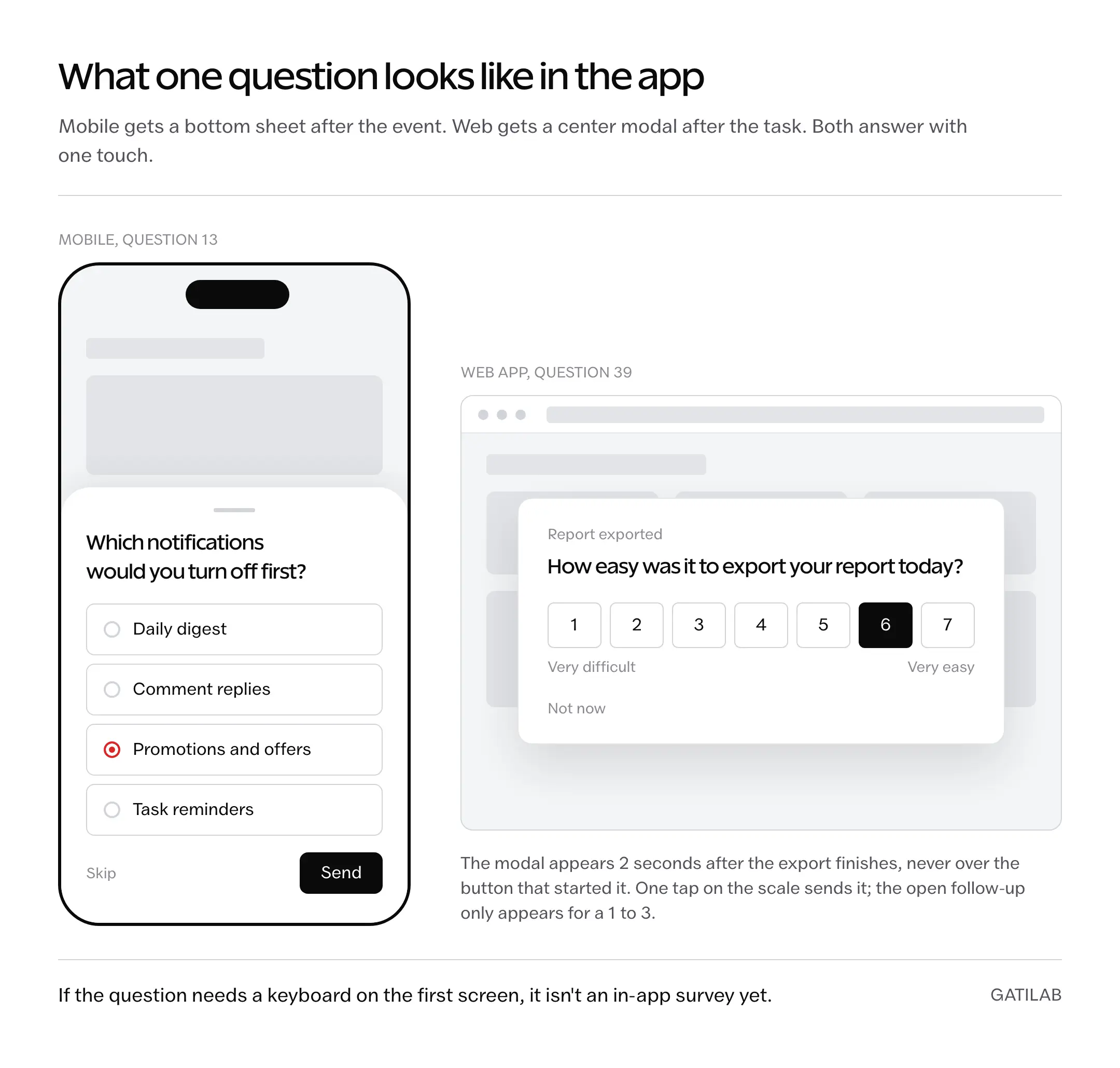
Question 13 is the one most teams skip and most users want to answer. People rarely uninstall over a feature; they uninstall over the 4th notification in a day. Make it multiple choice, listing your actual notification types, and act on the top answer within the month.
Keep question 16 away from the store rating flow. It asks about a purchase inside your app, which is your data to collect. A rating prompt asks for a public review, which Apple and Google control, and the rules for those are in the timing section.
What Should You Ask When a Customer Cancels?
Cancellation surveys fail when they’re designed to defend the product. The goal is to learn what changed, not to win an argument in a modal.
- What is the main reason you are canceling today?
- What job will you use another product or process to complete?
- When did you first feel this product wasn’t the right fit?
- What would have made the subscription worth keeping?
- Would you consider returning? If yes, what would need to change?
Make question 19 multiple choice with an “Other” field, and keep the list short:
- The product didn’t solve my problem
- It was too expensive for the value
- It was too difficult to use
- A required feature was missing
- I switched to another tool
- I no longer need it
- Technical or reliability problems
“Too expensive” is where the analysis starts, not where it ends. It can mean weak value, poor timing, the wrong plan or a price the customer genuinely can’t afford, and each of those has a different fix.
Compare the stated reasons with your actual SaaS churn rate by plan, tenure and acquisition source before anything changes. One loud answer should not rewrite the roadmap, and the playbook for churn reduction in a bootstrapped SaaS depends on the pattern, not the anecdote.
What Should You Ask About Pricing and Willingness to Pay?
Ask pricing questions after the user understands the product. A new signup asked what they’d pay for value they haven’t seen yet produces imaginary economics.
- Which result makes this product worth paying for?
- Which feature or limit most affects the plan you would choose?
- At what price would this feel too expensive to consider?
- At what price would you question whether the product is credible?
- What would you need to see before choosing a higher plan?
Questions 26 and 27 are 2 of the 4 questions in the Van Westendorp Price Sensitivity Meter: a price can feel too high, and it can also feel suspiciously low. The full method adds “expensive but worth it” and “a bargain”, and needs a real sample before the crossing points mean anything.
Don’t turn the answers into a price by averaging them. Segment by customer type and compare stated willingness with real upgrade, downgrade and retention behavior.
What Should You Ask After a Completed Task or Support Event?
Satisfaction questions work when they’re tied to one specific experience. Questions 29 to 33 follow a completed task; 34 to 36 follow a resolved ticket, a help-article visit or a bug report.
- How easy or difficult was it to complete [task] today?
- What was the most useful part of this workflow?
- What took longer than it should have?
- What is the one thing you would change about this experience?
- May we contact you for a 15-minute follow-up about this answer?
- Did this article answer your question? (yes / partly / no, on the help article itself)
- How well did the support reply solve your problem? (after a ticket is marked resolved)
- What were you trying to do when the error appeared? (attached to a bug report form)
Question 33 isn’t a feedback question. It’s the bridge from shallow survey data to a real conversation, and the users who describe a recent, specific problem make better interview candidates than the ones selected by account size.
Which Standard Metric Questions Should You Use?
Everything above is task-specific on purpose. These 4 are the opposite: fixed wording, asked on a schedule, so the number can be tracked over time and compared with other products. Use them for trends, and pair each with 1 open follow-up for the reason.
- NPS: How likely are you to recommend [product] to a friend or colleague? 0 to 10. Score = % of 9-10 minus % of 0-6. Ask quarterly, after activation, never in week 1.
- CSAT: How satisfied are you with [feature or interaction]? 1 to 5. Ask right after the interaction it names; a general CSAT measures mood.
- CES: How easy was it to [complete task] today? 1 to 7, very difficult to very easy. A good predictor of whether someone will do the task again.
- PMF: How would you feel if you could no longer use [product]? Very disappointed / somewhat disappointed / not disappointed. The Sean Ellis test; 40% “very disappointed” among active users is the usual bar.
The limit of all 4 is the same: they tell you a number moved and not why. In Refiner’s 2025 data NPS surveys also got the lowest response rate of any type, 21.71% against 26.29% for CSAT, which is one more reason to keep them rare and keep the task questions frequent.
Which Question Types Work in an In-App Survey?
The format decides how fast someone can answer with 1 thumb, which decides whether they answer at all.
- Rating scale (1-5, 0-10, stars): for the metric questions and anything you’ll chart. 1 tap.
- Likert (agree to disagree): for a statement you want to test, such as “I understood what to do after signing up.” Keep it to 5 points.
- Single choice with “Other”: for reasons (cancellation, permission denial, notification type). Build the options from real data.
- Ranking: for priority among 3 to 5 known items. Painful on a phone beyond 5.
- Open text: for the “why” after a scale, and for questions 1, 4, 7, 9 and 32. Always optional, never first on mobile.
When Should an In-App Survey Appear?
Timing is part of the question. The same words asked at the wrong moment produce a different, worse answer.
Trigger After an Event
Show the survey after the user:
- Completes a core task
- Abandons a critical setup step
- Uses a new feature twice
- Hits the same error more than once
- Downgrades or cancels
- Resolves a support interaction
- Returns to the app after a crash
Avoid Interruption
Don’t cover the button the user is trying to press. Don’t ask on first launch. Don’t show the same survey every session.
Apple’s StoreKit review guidance says to make the request at a time that doesn’t interrupt what someone is trying to achieve, for example at the end of a sequence of events they successfully complete, and its own sample code waits 2 seconds after that event before asking. A research survey isn’t a rating request, but the timing principle holds, and I trust Apple’s documentation over survey-tool blogs for this behavior because Apple controls the prompt system.
Cap the Frequency
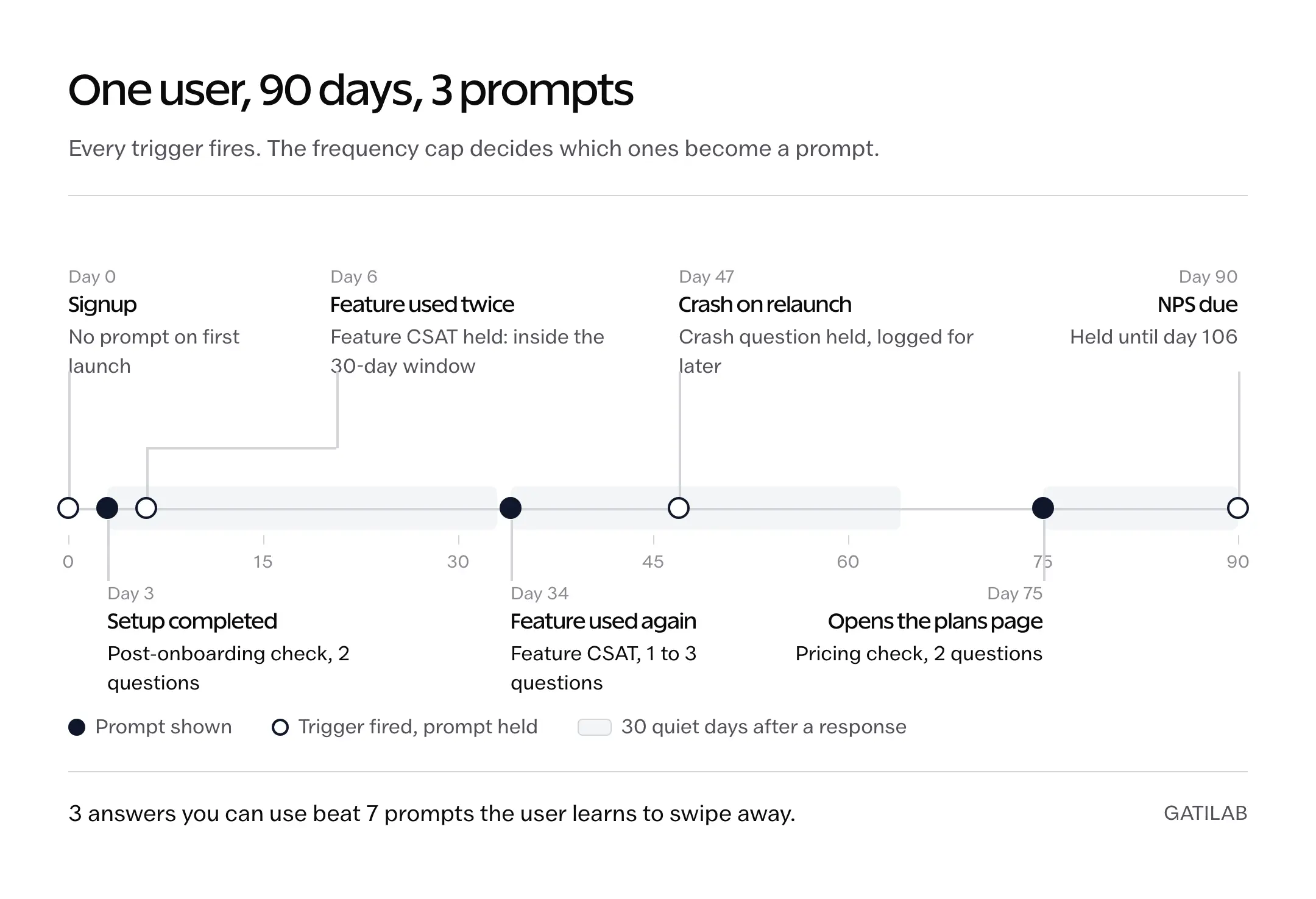
Over-surveying is the fastest way to train users to dismiss every prompt, including the one that matters. A working set of rules:
- After a response: no survey of any kind for 30 days.
- After a dismiss: no survey for 14 days, and never the same survey again for 90.
- Per user: at most 1 prompt a week across all surveys, however many triggers fire.
- Per survey: once per user, ever, unless the question is a scheduled metric.
- Rating prompts: Apple’s system shows them at most 3 times per user in 365 days, and that cap is enforced by iOS, not by you. Don’t spend one of the 3 in week 1.
What Response Rate to Expect
The only sizeable public dataset is Refiner’s 2025 report on its own customers’ surveys, so treat these as one vendor’s numbers and not an industry standard. Across 1,382 in-app surveys the typical response rate was 27.52% and completion 24.84%. Mobile apps did better than web apps, 36.14% against 26.48%. By type, CSAT surveys got 26.29% and NPS 21.71%. On web, a center-screen modal returned 42.6% across 254 surveys, and a top-center placement 47.8% on a sample of only 17. On mobile, bottom-of-screen prompts averaged 34.8%.
The same report found surveys with 4 to 5 questions responded best, which looks like it contradicts the 1-to-3 rule. It doesn’t. Those longer surveys are the ones users opted into after a clear invitation. An uninvited prompt that lands after a task is a different contract: 1 question, maybe 2, and an optional third. Use 4 or 5 only when the first screen told the user what they were agreeing to and how long it takes.
Keep Ratings Separate From Research
An App Store rating answers “How do you feel about this app?” Product research asks “What happened while you tried to do this job?” The 2 should never share a prompt.
Don’t route happy respondents to a public review while sending unhappy ones to a private form. Google Play’s ratings and reviews policy bans incentivized ratings, forced pop-ups and any other manipulation of ratings, and its listed examples include offering a discount for a high rating. A survey that filters who gets asked to rate is manipulation by design, whether or not the policy spells out the word “gating”.
Which Survey Questions Create Bad Data?
These patterns sound harmless and quietly bias, blur or weaken the answer.
“How much do you love this feature?”
It assumes the sentiment and makes disagreement socially awkward.
Use: How useful was this feature for the task you just completed?
“Would you use our amazing automation feature?”
It sells the feature inside the question.
Use: Which part of this task would you prefer to automate?
“What features should we build?”
Users are good at describing problems and workarounds. They aren’t responsible for designing your product.
Use: What are you still unable to do?
“Why didn’t you convert?”
“Convert” is your funnel language, not theirs.
Use: What stopped you from completing the purchase?
Two questions joined together
“Was setup quick and easy?” can’t tell you it was quick and confusing.
Use 1 question per concept.
How Do You Turn Survey Answers Into Product Decisions?
Collection is the easy part. Interpretation is where teams start telling themselves stories.
- Tag the answer by product stage and task.
- Separate observed facts from opinions.
- Group repeated obstacles in the respondent’s own words.
- Compare answers with product events, support tickets and retention.
- Estimate reach, severity and strategic fit.
- Decide whether the response needs a bug fix, a copy change, a workflow change, an interview, or nothing.
If the response rate is low, check placement and friction before changing the question. The rules of form optimization apply: fewer fields, a stated reason, good timing and no needless interruption. And the step after a survey is usually a conversation, which is where SaaS customer success work starts.
Copy-Ready In-App Survey Templates
4 surveys assembled from the bank, each with its trigger and suppression rule, so they can go into a survey tool as they are. Replace the bracketed parts and tell users what happens to the response; collect no personal data you don’t need.
Post-Onboarding Check
- Trigger: setup completed, or a setup step abandoned and the user returns within 48 hours.
- Prompt: Help us improve [workflow]. 2 questions, 30 seconds.
- Q1: What were you trying to set up today? (open)
- Q2: What almost stopped you from finishing? (single choice from your top 5 observed blockers + Other)
- Suppression: once per user; nothing else for 30 days after a response.
Feature CSAT
- Trigger: second use of [feature], at least 1 day after the first.
- Q1: How satisfied are you with [feature]? (1 to 5)
- Q2: What did you expect it to do that it didn’t? (open, shown only for 1 to 3)
- Q3: Which part of this workflow do you still complete somewhere else? (open, optional)
- Suppression: once per feature per user; 90 days before any other feature CSAT.
Cancellation
- Trigger: the cancel button, before the confirmation, with a working skip link.
- Q1: What is the main reason you’re canceling today? (single choice, the 7 options above + Other)
- Q2: What would have made the subscription worth keeping? (open)
- Q3: May we contact you about this? (yes / no)
- Suppression: none needed; it fires once by definition. Never block the cancellation on it.
Pricing Check
- Trigger: 30 days after activation, or on the first visit to the plans page after activation.
- Q1: Which result makes this product worth paying for? (open)
- Q2: Which feature or limit most affects the plan you’d choose? (single choice from your plan limits)
- Suppression: once per user; never during a trial’s first week.
Which Tools Run In-App Surveys?
Any of the dedicated tools will do what this page describes: event triggers, 1-question prompts, suppression rules and a bottom sheet on mobile. PostHog is the one to start with if you already use it for analytics, because its free tier includes 1,500 survey responses a month on the same event data you’d trigger from, as of its pricing page on October 2, 2026. Refiner, Survicate, Sprig and Userpilot are the specialist options; their prices change often enough that you should read the current page rather than a table here. Most of the SaaS onboarding tools also ship surveys, so check what you’re already paying for before adding another script to the app.
FAQs on App Survey Questions
What are good survey questions for an app?
The good ones name a thing the user just did. “What were you trying to set up today?” after onboarding, “Which screen feels slowest?” after a slow load, “What is the main reason you’re canceling?” on the cancel button. “How can we improve?” is the bad one: it has no event behind it, so the answer has no decision in front of it.
How many questions should an app survey have?
1 to 3 for a prompt the user didn’t ask for. Refiner’s 2025 data found 4 to 5 questions got the best response rate, but those were surveys users opted into after an invitation that said how long it would take. An uninvited prompt after a task gets 1 question, 1 optional follow-up, and nothing else.
What is a good response rate for an in-app survey?
Refiner’s 2025 report across 1,382 surveys puts the typical in-app response rate at 27.52%, with mobile apps at 36.14% and web apps at 26.48%. That is one vendor’s customer base, so treat 25 to 35% as a sane range and anything under 10% as a placement or timing problem rather than a wording problem.
How often can you show an in-app survey?
Tie every prompt to an event, then cap it: nothing for 30 days after a response, nothing for 14 days after a dismiss, at most 1 prompt a week per user across all surveys, and each survey once per user unless it is a scheduled metric. App Store rating prompts have their own cap: iOS shows them at most 3 times per user in 365 days.
Should I use NPS in an in-app survey?
Only as a scheduled metric after activation, never as the first thing a new user sees. NPS had the lowest response rate of any survey type in Refiner’s 2025 data, 21.71%, and it tells you a number moved without saying why. Pair it with 1 open follow-up and keep the task-specific questions as your main source.
What is the best first question to ask?
What the user was trying to accomplish. That answer gives every other response its context, and it is the question users find easiest to answer because they were just doing it.
Are in-app surveys the same as app-review prompts?
No. Surveys are private product research you control. Review prompts ask for a public App Store or Google Play rating, Apple controls when its prompt appears, and Google Play bans incentivized or forced ratings. Keep the purpose, wording and timing separate, and never use a survey to decide who gets asked for a review.
What is the best free tool for in-app surveys?
PostHog, if you already use it for analytics: its free tier includes 1,500 survey responses a month, as of its pricing page on October 2, 2026, and the surveys trigger from the same events. If you run a dedicated onboarding tool, check whether it already includes surveys before adding another one.
Final Remarks
Pick 1 moment you don’t understand yet, wire 1 question from the bank to the event that marks it, and read the first 50 answers yourself before anyone builds a dashboard. That one survey will change a decision. 40 questions on every screen will change your response rate, in the wrong direction.
Tell Google you want more of this.
Add Gatilab as a preferred sourceOne tap, and this site shows up more often in your own Top Stories, AI Overviews and AI Mode. Remove it any time.