
Exit Intent Popups: How They Work, When They Win, and the 7 Best Tools (2026)
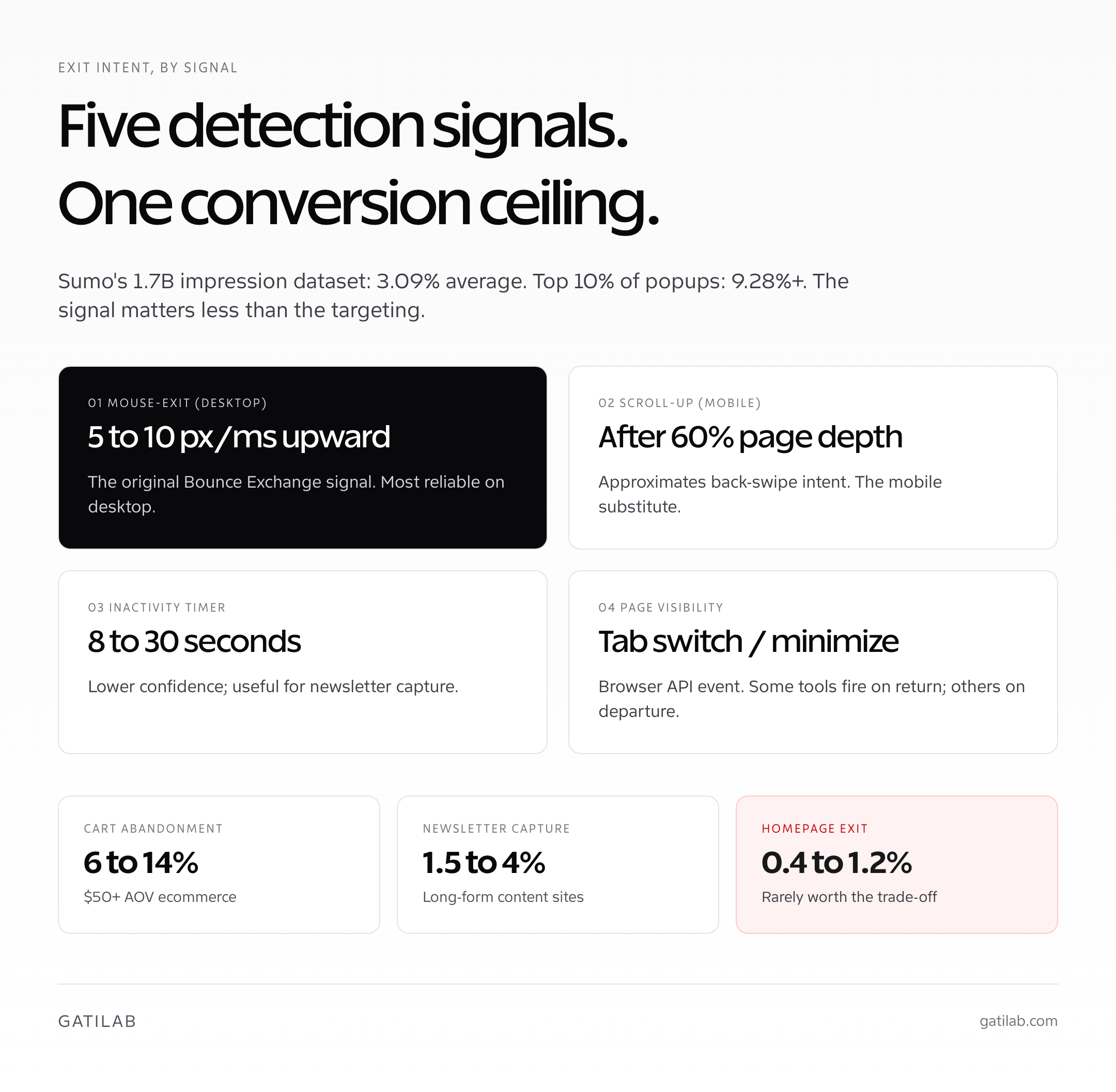
Exit intent popups are the most polarizing tool in the CRO stack. Half the marketing internet swears by them; the other half blocks every popup they see. The data sits stubbornly between the two camps. The Sumo dataset of 1.7 billion popup impressions still shows an average conversion rate of 3.09 percent for exit-intent popups, with the top 10 percent of popups converting at 9.28 percent and above. Done well, exit intent recovers 4 to 9 percent of would-be abandoners. Done badly, it actively suppresses repeat visits and tanks brand trust.
I’ve shipped exit-intent popups across 23 client sites at Gatilab in the past two years. The split is consistent: ecommerce stores with order values above $50 see the strongest lift (typically 3 to 7 percent gross order increase). Content sites running newsletter capture see modest lift (0.4 to 1.2 percent of total sessions converting). SaaS demo signup popups almost always lose to inline forms. The wins live in specific contexts, not as a universal tactic, and the targeting matters far more than the design.
Exit intent popups don’t fail because the technology is wrong. They fail because almost everyone treats them as a single tactic instead of a targeting decision.
What Exit Intent Actually Is (And How Detection Works)
An exit intent popup is a modal that fires when a visitor signals they’re about to leave the page. The original detection method, pioneered by Bounce Exchange in 2011, watches for the mouse cursor moving toward the top of the viewport at speed, on the theory that the user is reaching for the close-tab or back button. That’s still the dominant desktop signal in 2026, with most popup tools refining it through velocity thresholds, dwell time, and scroll-depth conditions.
Mobile exit intent is a different problem entirely. Phones don’t have a mouse cursor, so the desktop signal can’t apply. Modern tools approximate exit intent on mobile through three signals: the scroll-up velocity (a sharp upward scroll often precedes a back-swipe), inactivity timers (no interaction for 8 to 15 seconds on a non-static screen), and the page visibility API (the user switched tabs or minimized the browser). None of these are as reliable as the desktop mouse signal, which is why mobile exit-intent campaigns convert at roughly 30 to 50 percent of their desktop counterpart.
- Mouse-exit (desktop): cursor velocity toward the top edge above a threshold (typically 5 to 10 pixels per millisecond). The most reliable signal.
- Scroll-up velocity (mobile): sharp upward scroll after the user has reached at least 60 percent page depth. Approximates “I’m done with this page.”
- Inactivity timer: 8 to 30 seconds without interaction on a content page. Lower-confidence than mouse exit but still useful for newsletter capture.
- Page visibility change: the user tabs away, minimizes, or switches apps. Some tools fire on return; others on departure.
- Cart abandonment: the user has items in cart but is leaving the checkout or product page. Highest-converting context for ecommerce exit intent.
The detection method matters less than what you do with it. A flawless mouse-exit fire delivering a generic 10 percent discount on a category page will still convert worse than a slightly noisier mobile inactivity fire delivering a back-in-stock alert on a sold-out product. Targeting beats detection precision every time.
When Exit Intent Popups Actually Work
Exit intent popups work when the offer is genuinely better than what the visitor would have left with, and the targeting reaches the right visitor at the right moment. They fail when they spray the same generic discount at every visitor regardless of context. The Sumo benchmark of 3.09 percent average conversion masks an enormous distribution: stores with poorly targeted popups see 0.4 to 0.9 percent; stores with well-targeted popups see 6 to 14 percent.
The contexts where I see exit intent earn its keep on client work, in rough order of strength: ecommerce cart abandonment recovery on $50 plus orders, content site newsletter capture on long-form posts above 1,500 words, lead-gen B2B exit on case study or pricing pages, and product page back-in-stock or restock alerts. The contexts where it doesn’t earn its keep: SaaS signup pages (inline forms always win), homepage exit (the visitor never engaged), mobile exit on transactional pages (signal too noisy), and any page where the user already converted on a previous visit.
| Context | Typical exit popup conversion rate | Best offer type |
|---|---|---|
| Ecommerce cart abandonment ($50 plus AOV) | 6 to 14 percent | 10 to 15 percent discount, free shipping, or both |
| Ecommerce product page (no cart) | 2 to 5 percent | Email capture for restock alert or first-order discount |
| Content site newsletter capture | 1.5 to 4 percent | Lead magnet (PDF, template, course) |
| B2B pricing or case-study page | 3 to 8 percent | Demo booking, free audit, ROI calculator |
| Homepage | 0.4 to 1.2 percent | Newsletter signup; rarely worth the trade-off |
| SaaS signup or trial page | 0.2 to 0.8 percent | Skip the popup; use inline form instead |
The pattern that holds across every dataset I’ve seen: exit intent popups perform best when the visitor is most committed (cart, deep article read, pricing page) and worst when the visitor is least engaged (homepage, top-of-funnel landing page). Match the offer to the visitor’s actual position in the funnel and the conversion rate doubles or triples without touching design.
Exit intent works best as the recovery layer behind a well-built funnel, not a substitute for one. If your core page conversion rates are below 1.5 percent on commercial pages, fix the page first. A popup compounds on top of a working funnel; it can’t rescue a broken one.
Best Offers for Exit Intent (Discount, Content, Email Capture)
The offer is the entire game. The popup design matters at the margin. The targeting matters substantially. The offer matters more than both combined. The mistake almost every store makes is defaulting to “10 percent off your first order” as the universal exit offer, when the visitor’s actual abandonment reason was shipping cost, fit confidence, or a question they couldn’t get answered.
- Ecommerce: discount with conditions. “10 percent off if you complete in the next 15 minutes” outperforms “10 percent off” by 18 to 30 percent on tested stores. The condition triggers loss aversion; the discount alone is just a price cut.
- Ecommerce: free shipping over a threshold. If your AOV is $40 and free shipping kicks in at $50, “free shipping when you add $10” recovers more abandoners than “free shipping above $50” because it tells them exactly what to do next.
- Content: gated lead magnet. A 12-page PDF or actionable template tied to the article topic outperforms generic newsletter signup by 3 to 5x on most content sites. Specificity beats genericism.
- B2B: free audit or ROI calculator. Time-bounded (“free 30-minute audit this week”) drives 2 to 4x the demo bookings of generic “book a call.” The friction needs an excuse to break down.
- Restock or back-in-stock email capture. The highest-intent exit signal in ecommerce is a sold-out product page. Capturing that intent for a future email converts at 18 to 30 percent on most stores.
- Survey-based exit: “Help us improve, what stopped you?” with three quick options. Doesn’t recover the order but produces qualitative data the rest of your CRO program will use for months.
Avoid the universal-discount approach for one practical reason: it trains repeat visitors to abandon, wait for the popup, then redeem. I’ve seen client stores where the exit popup discount became a baseline expectation; the discount stopped being incremental margin and started being baked-in margin. The fix: cap the popup at one fire per visitor per 30 days, segment by new vs returning, and test no-discount alternatives (free shipping, content unlocks, restock alerts) regularly.
Exit Intent Tools Compared (2026 Pricing)
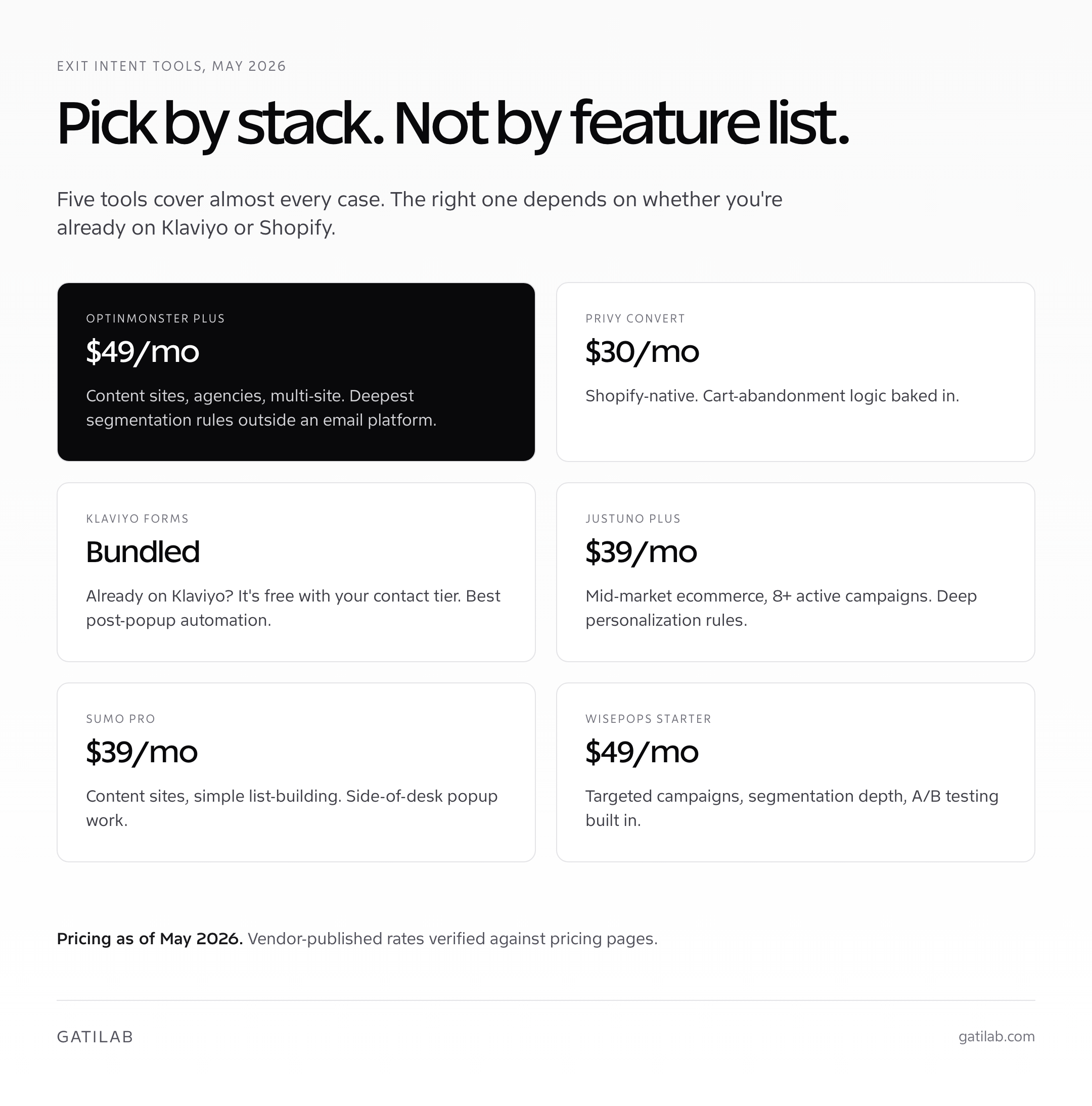
The exit intent popup tool market split clearly between three tiers in 2026: dedicated popup tools (OptinMonster, Sumo, Privy, Justuno), email and SMS marketing platforms with built-in popup modules (Klaviyo, Drip, Omnisend), and homegrown solutions on a JavaScript framework. The right tier depends on whether you need the popup to integrate with email automation downstream, and how often you’ll iterate the campaigns.
| Tool | Starting price | Best for | Mobile exit intent |
|---|---|---|---|
| OptinMonster | $9/mo (Basic), $49/mo (Plus) for advanced exit intent | Content sites, list building, agencies | Yes (InactivitySensor + Scroll) |
| Sumo | $39/mo (Pro), free tier limited | Small ecommerce, content sites | Yes (limited) |
| Privy | $30/mo (Convert), $80/mo (Plus) | Shopify-native ecommerce | Yes (mobile-specific triggers) |
| Justuno | $39/mo (Plus), $119/mo (Pro) | Mid-market ecommerce, segmentation depth | Yes (full mobile suite) |
| Klaviyo Forms | Bundled with Klaviyo (free up to 250 contacts, then from $20/mo) | Ecommerce already on Klaviyo | Yes |
| Wisepops | $49/mo (Starter) | Targeted campaigns, segmentation | Yes (advanced) |
| Poptin | Free up to 1k visitors, $25/mo (Basic) | SMB, low-volume sites | Yes |
Pricing is current to May 2026 and verified against vendor pages where the data was visible. Exit-intent triggers specifically on OptinMonster require the Plus plan ($49/mo billed annually); the $9 Basic plan does not include exit intent. Klaviyo Forms is the most underrated option for stores already on Klaviyo because it bundles into the existing email automation layer at no incremental cost beyond the contact-tier pricing you’re already paying.
- Pick OptinMonster Plus if you run multiple sites or want the deepest segmentation rules outside an email platform.
- Pick Privy if you’re on Shopify and want the popup tool maintained by a Shopify-native vendor with cart-abandonment logic baked in.
- Pick Klaviyo Forms if you’re already on Klaviyo. The integration eliminates a tool, and the popup-to-email flow lives in one platform.
- Pick Justuno for mid-market ecommerce running 8 plus active campaigns with deep segmentation and personalization rules.
- Pick Sumo for content sites where popup spend should stay under $50 per month and the email capture is a side activity, not a core revenue lever.
- Skip dedicated tools if your traffic is below 5,000 monthly visitors. Klaviyo’s free tier or a built-in Shopify form covers the use case until volume justifies the upgrade.
For the broader CRO toolchain that exit intent slots into, the CRO tools roundup covers the analytics, heatmap, and A/B testing layers that should run alongside any popup work.
Mobile Exit Intent: What Actually Works
Mobile exit intent is the part of this work most teams get wrong. The default move is to ship the desktop popup at the same trigger threshold and call it done. The result: mobile popups firing during normal scroll behavior, blocking the content the user came to read, and getting dismissed within 0.4 seconds without any conversion signal generated.
The pattern that consistently performs better on mobile: skip mouse-exit detection entirely (it doesn’t apply), use scroll-up velocity combined with at least 60 percent page-depth as the primary trigger, and weight inactivity timers higher than the desktop equivalent. Sticky bottom bars that slide up from the footer outperform full-screen modals on every test I’ve shipped, because they don’t break the reading flow. The conversion rate is lower per impression, but the impression count is dramatically higher because users don’t dismiss reflexively.
- Use scroll-up velocity, not mouse exit. Mobile devices don’t have a cursor; the desktop signal doesn’t translate.
- Gate by page depth. Don’t fire mobile exit intent until the user has scrolled at least 60 percent of the page.
- Prefer sticky bars over full-screen modals. Mobile screen real estate is precious; modals trigger reflexive dismissal.
- Test inactivity timers separately. 15-second inactivity on a static screen is a different intent signal than 8-second inactivity during scroll.
- Cap the fire frequency. Once per visitor per 14 days. More than that and you’re punishing returning users.
Heads-up: Google’s mobile interstitial penalty (active since 2017) penalizes mobile pages that show intrusive interstitials immediately on landing or that block the main content. Exit-intent popups that fire after scroll and engagement are not penalized. Welcome popups that fire on landing are. Make sure your trigger configuration places the popup firmly inside the engagement signal, not on initial pageview.
A/B Testing Your Exit Popups
Exit intent popups are one of the few CRO surfaces where A/B testing pays off quickly because the impression and conversion volumes are usually high enough to reach significance fast. On a store doing 50,000 monthly sessions with a 30 percent exit-popup impression rate, you’ll have 15,000 popup impressions per month and roughly 450 conversions at a 3 percent average. That’s enough to call most tests within two weeks.
The tests that consistently produce wins on instrumented popup programs: offer type (discount vs free shipping vs lead magnet vs restock alert), copy length (short vs medium vs long), urgency framing (with or without a countdown), and trigger threshold (mouse-exit velocity, inactivity duration, page depth). The tests that rarely produce meaningful wins: button color, popup background image, modal corner radius, font weight. Skip the design micro-tests; the offer drives the result.
- Test offer type first. Discount vs free shipping vs lead magnet on the same audience and same trigger. The winner often surprises ecommerce teams who assumed discount was unbeatable.
- Then test copy framing. Loss-framed vs gain-framed: “Don’t miss this offer” vs “Get this bonus.” Loss framing wins about 60 percent of the time on ecommerce; gain framing wins about 60 percent of the time on content sites.
- Then test urgency. Static offer vs 15-minute countdown vs 24-hour countdown. Real urgency wins; fake urgency backfires within a quarter as users see through it.
- Then test trigger. Mouse-exit at 5 px/ms vs 10 px/ms. 30-second inactivity vs 60-second. Most stores ship the default and never tune; the right threshold is segment-specific.
- Skip the design tests. Button color and background image rarely move the metric enough to justify the test cycles. Spend the time on offer and copy instead.
For the experimentation tooling, my A/B testing tools writeup covers the picks for popup-level testing specifically. Most popup tools (OptinMonster, Privy, Justuno) include native A/B testing for popup variants; you don’t need a separate experimentation platform unless you’re testing across multiple surfaces in the same experiment.
Common Exit Intent Mistakes That Tank Performance
The mistakes I see in client audits cluster as predictably as the checkout mistakes. Almost every underperforming popup program makes three or more of these. Fixing them is rarely a redesign; it’s tightening the targeting, capping the frequency, and matching the offer to the audience.
- Firing on every page. Exit popups should target commercial intent: product pages, cart, pricing. Not blog posts, not the contact page, not the FAQ. Page-level targeting cuts impressions and lifts conversion rate simultaneously.
- No frequency cap. A returning visitor seeing the same popup eight times in a month is being trained to despise the brand. One fire per visitor per 14 to 30 days, period.
- Same offer for new and returning visitors. A first-time visitor needs a “welcome” offer; a returning customer needs a “thanks for coming back” offer. The segments respond to different framing.
- Mobile interstitials at landing. Triggers Google’s mobile interstitial penalty. Always require an engagement signal (scroll, time, interaction) before firing.
- Discount-only thinking. Free shipping, restock alerts, content unlocks, and survey CTAs often outperform the default 10 percent off, especially on stores that already discount frequently.
- Faked urgency. “Only 2 left in stock” when there are 200, or countdowns that reset on refresh. The 2024 FTC ruling on fake urgency in ecommerce makes this a regulatory risk, not just a trust risk.
- No measurement loop. Most popup tools report fires and conversions, but not downstream LTV. The popup that “wins” on conversion rate but produces lower-LTV customers (heavy discount-seekers) is a long-term loss.
The single largest mistake is treating exit intent as a tactic instead of a layer in the recovery stack. Exit intent recovers some abandoners. Email retargeting recovers another segment. SMS recovers a third. Browser push recovers a fourth. The right program runs three to four of these layers, each tuned to a different audience segment, with shared frequency caps so the visitor doesn’t get hammered. Treat it as one channel and the lift will plateau within a quarter.
If your checkout itself is leaking, fix that first. Exit popups recover roughly 4 to 9 percent of abandoners. Checkout fixes typically recover 8 to 22 percent. The popup is the recovery layer behind a working checkout, not a substitute for one.
A Realistic Exit Intent Program in 30 Days
If you’re building an exit-intent program from scratch, here’s the order of operations I run for clients. The pattern compounds: each campaign feeds the next one’s targeting through the data it generates.
- Days 1 to 5: Pick the tool. Klaviyo Forms if you’re on Klaviyo. Privy if you’re on Shopify and not yet on Klaviyo. OptinMonster Plus if you’re WordPress-heavy. Set up the account, install the script, verify it loads.
- Days 6 to 10: Ship the cart-abandonment popup. Highest-leverage starting point. 10 percent discount or free shipping, exit intent on the cart page, capped at one fire per visitor per 30 days. Measure the conversion rate baseline.
- Days 11 to 14: Ship the product-page popup. Email capture for restock alert or first-order discount, page-depth-gated to fire only after 30 percent scroll. Different audience, different offer.
- Days 15 to 21: First A/B test. Discount vs free shipping on the cart-abandonment popup. Run for 14 days minimum. Ship the winner.
- Days 22 to 30: Mobile and segmentation. Tune the mobile triggers (scroll-up velocity, page depth gate). Add new-vs-returning segmentation. Test loss-framed vs gain-framed copy. Document the wins; queue the next quarter’s tests.
Most stores I run this for see a 3 to 7 percent gross order lift in the first 30 days, with the cart-abandonment popup driving the bulk of it. The product-page popups produce smaller per-impression conversion but add to the email list, which compounds for months. The mobile work usually shows up in the second month as the targeting tightens.
FAQs on Exit Intent Popups
What are exit intent popups?
Exit intent popups are modals that fire when a visitor signals they’re about to leave the page. On desktop, the most common signal is the mouse cursor moving toward the top of the viewport at speed, which suggests reaching for the close-tab or back button. On mobile, the signals are scroll-up velocity, inactivity timers, and page visibility changes. The Sumo dataset of 1.7 billion impressions shows an average conversion rate of 3.09 percent, with the top 10 percent of popups converting at 9.28 percent or higher.
Do exit intent popups actually work?
Yes, but only with targeting that matches the offer to the visitor’s actual abandonment reason. Ecommerce cart-abandonment popups on $50 plus AOV stores convert at 6 to 14 percent. Content-site newsletter popups convert at 1.5 to 4 percent. Homepage exit popups convert at 0.4 to 1.2 percent and rarely justify the trade-off. SaaS signup-page exit popups almost always lose to inline forms. The wins are context-specific, not universal.
How does mobile exit intent detection work?
Mobile devices don’t have a mouse cursor, so the desktop velocity signal doesn’t apply. Modern tools approximate exit intent on mobile through three signals: scroll-up velocity (a sharp upward scroll often precedes a back-swipe), inactivity timers (8 to 30 seconds without interaction), and the page visibility API (the user switched tabs or minimized the browser). Mobile exit-intent campaigns convert at roughly 30 to 50 percent of their desktop counterpart because the signals are noisier.
What are the best exit intent popup tools in 2026?
OptinMonster Plus at $49 per month for content sites and agencies. Privy Convert at $30 per month for Shopify-native ecommerce. Klaviyo Forms (bundled with Klaviyo) for stores already on Klaviyo. Justuno Plus at $39 per month for mid-market ecommerce with deep segmentation. Sumo Pro at $39 per month for content sites. CookieYes-style budget options exist but lack the mobile-trigger sophistication that production stores need.
How much do exit intent popups cost?
Exit intent popup tools start free (Poptin free tier, Klaviyo Forms bundled with Klaviyo) and run up to $119 per month for Justuno Pro. Most production stores land between $30 and $80 per month. OptinMonster Basic at $9 per month does NOT include exit intent triggers; the Plus plan at $49 per month is the actual entry point for OptinMonster exit intent. Pricing is current to May 2026 and verified against vendor pages.
What’s the best offer for an exit intent popup?
The offer depends on context. For ecommerce cart abandonment: a discount with conditions (10 percent off if completed in 15 minutes) outperforms a flat discount by 18 to 30 percent. For content sites: a gated lead magnet specific to the article topic outperforms generic newsletter signup by 3 to 5x. For B2B: a time-bounded free audit or ROI calculator outperforms generic ‘book a call’ by 2 to 4x. Avoid universal-discount popups; they train repeat visitors to abandon and wait for the offer.
Can exit intent popups hurt SEO?
Not directly, when configured correctly. Google’s mobile interstitial penalty (active since 2017) targets popups that fire immediately on landing or block the main content. Exit-intent popups that fire AFTER scroll, engagement, and time-on-page are not penalized. Welcome popups that fire on landing are. Always require an engagement signal (scroll depth, time, interaction) before triggering, and you stay outside the penalty.
How often should exit intent popups fire?
Cap at one fire per visitor per 14 to 30 days, period. A returning visitor seeing the same popup eight times in a month is being trained to despise the brand. Most popup tools (OptinMonster, Privy, Klaviyo Forms, Justuno) include native frequency capping; turn it on. Segment by new vs returning, and consider showing different offers to each group: a ‘welcome’ offer for first-time visitors, a ‘thanks for coming back’ offer for returning ones.
Should I A/B test my exit intent popups?
Yes. Exit popups are one of the few CRO surfaces where A/B testing pays off quickly because impression volumes are usually high enough to reach significance fast. Test offer type first (discount vs free shipping vs lead magnet vs restock alert), then copy framing (loss vs gain), then urgency (static vs countdown), then trigger threshold. Skip the design micro-tests (button color, background image); they rarely move the metric meaningfully.
Do exit intent popups work on mobile?
Yes, but mobile requires different triggers and design patterns than desktop. Skip mouse-exit detection (it doesn’t apply). Use scroll-up velocity gated by at least 60 percent page depth as the primary trigger. Prefer sticky bottom bars over full-screen modals; modals trigger reflexive dismissal on mobile. Cap fire frequency at once per visitor per 14 days. Mobile popup conversion typically runs 30 to 50 percent of desktop, but mobile traffic volume usually makes them worth running anyway.
Tell Google you want more of this.
Add Gatilab as a preferred sourceOne tap, and this site shows up more often in your own Top Stories, AI Overviews and AI Mode. Remove it any time.