
Halloween Marketing Ideas for Small Businesses
Halloween marketing ideas get awkward when you sell something that doesn’t belong in a costume shop. A pumpkin on a WordPress maintenance plan gives it a seasonal color scheme. It still doesn’t explain why someone should buy it this week.
The better opportunity is already in your customer’s working day: leads that disappear, subscriptions that keep charging, shopping carts left behind and projects nobody wants to open. Give one of those problems a Halloween story, then sell the useful ending. A “Ghost Lead Clinic” gives a website audit a purpose that “Spooktacular Savings” never will.
For a small business starting from scratch, I’d build the first campaign with MailerLite. Its forms, landing pages and email campaigns cover the path from an interested visitor to a follow-up. If that path already lives in WordPress, Fluent Forms and FluentCRM are worth considering together: collect the inquiry on your site, then organize the contact and follow-up there.
Choose Your Halloween Campaign
A strong Halloween campaign gives the reader something specific to do: find a problem, choose a solution, book a slot or buy a useful package. Start with that action. The story should make the action more interesting and easier to understand.
| Business | Campaign Idea | Offer | Useful Tools |
|---|---|---|---|
| WordPress agency or freelancer | Ghost Lead Clinic | Form audit or repair appointment | Fluent Forms, FluentCRM, FluentBooking |
| Blogger or affiliate publisher | Software Graveyard | Subscription review and a focused tool shortlist | MailerLite, Kit |
| Online store | Build Your Treat Box | A complementary product bundle | FluentCart, Omnisend on a supported store |
| Educator or course creator | Unfinished Course Rescue | A study plan, workbook or small learning bundle | Kit, Fluent Forms, FluentCart |
| Local service business | Pick Your Halloween Treat | A relevant bonus with an appointment | FluentBooking, Canva |
| Digital product seller | Halloween Starter Kit | A useful product and matching resources | SeedProd, FluentCart |
These are campaign concepts you can adapt, not case studies or promises of a particular sales result. Choose the idea that gives your existing audience the shortest path to something they want.
The Ghost Lead Clinic
The Ghost Lead Clinic turns a familiar website problem into a sellable service: someone fills out a form, sees a success message and never hears back. The business owner thinks nobody is interested. The visitor thinks the business doesn’t care. Both are waiting for the other person to do something.
That is a better Halloween story than a haunted server, because you can show the reader how to resolve it. Your campaign could offer a fixed-scope contact-form check, with a repair service for problems that need more work.
Here’s a landing-page opening you can adapt:
Your next customer may have already tried to reach you. This Halloween, give your contact form a proper check: submission, notification and reply. Book a Ghost Lead Clinic and find out where an inquiry goes after someone clicks Send.
The offer should tell buyers what the appointment includes:
- Submit an inquiry from a phone and a desktop.
- Check whether the entry is stored and the notification reaches the right mailbox.
- Review the confirmation message and expected response time.
- Deliver a short findings note, with repair work priced separately if it falls outside the appointment.
Fluent Forms is a natural product recommendation when the form itself needs replacing or extending. Its form-building and conditional-logic features let you ask relevant follow-up questions without giving every visitor a long questionnaire. FluentCRM serves a different job: contact management and email follow-up. It doesn’t replace a properly configured mail delivery service.
Use FluentBooking for the appointment. A reader who has just recognized a problem should be able to choose a time while that problem is still on their mind. The guide to missing WordPress form submissions can support the campaign with practical troubleshooting.
The Software Graveyard
The Software Graveyard is a useful Halloween marketing idea for bloggers, consultants and affiliate publishers. Ask readers to open their subscription list and identify software they pay for but no longer use. The story has a recognizable villain: the renewal that arrives for a project abandoned months ago.
Offer a simple exercise before recommending replacements. Our software purchase planner includes a CSV you can open in a spreadsheet and use to compare costs. Fill in the current tool, next renewal and the work it actually handles.
Your campaign could use this copy:
Some software subscriptions have outlived the projects that needed them. Open your last card statement, find the tools still charging and give each one a job. Keep the tools doing that job. Cancel the ones waiting for a project that isn’t coming back.
Then recommend products against the gaps readers uncover:
- A newsletter that never gets sent: MailerLite combines email campaigns with forms and landing pages, making it a sensible starting point for a small business that needs the whole setup.
- A creator newsletter with different reader interests: Kit provides forms, tags and visual automations. It suits a creator who wants to separate, for example, course readers from consulting prospects.
- A WordPress business that wants contact follow-up in its dashboard: FluentCRM keeps that workflow close to the site.
The commercial strength comes from the diagnosis. A reader who discovers that 2 overlapping subscriptions still leave their welcome email unsent has a reason to choose a better setup. A list of 30 unrelated discounts leaves them with more homework.
The Treat Finder
A Treat Finder helps readers choose a resource or product without working through your entire catalog. It works particularly well when you serve several audiences, such as students, self-learners and course creators, who need different things from the same website.
Build a short form in Fluent Forms and use conditional logic to show relevant questions. Keep the outcome modest and useful. This is a recommendation form, not a scientific assessment.
For an education campaign, the form could ask:
- What are you working toward? Finishing a course, preparing for an exam or building a course.
- What is getting in the way? Choosing material, making time or organizing delivery.
- What would help this week? A study planner, a focused resource list or a course-building checklist.
Each result should lead to a different page or resource. A student who needs help finishing a course should see a study plan before being offered another course. A creator building their first lesson could see a recording checklist and a suitable paid starter kit.
“Pick the treat your next project needs” is enough Halloween flavor. Explain what the visitor receives beside the form, and make newsletter signup a clear choice. That also gives you a more useful November audience: people grouped by their stated needs, instead of everyone being labeled “Halloween lead.”
The Useful Halloween Bundle
A bundle works when the products help someone finish a task together. For a digital business, that could be a landing-page template, a welcome-email sequence and a campaign planning sheet. For a self-learner, it could be a short course, its practice workbook and a study schedule.
I prefer a task-based bundle to a collection of leftover downloads. The buyer should be able to explain the result in a sentence: “This helps me launch my first newsletter.”
FluentCart is an option for selling your own digital products through a WordPress store. Build the offer around resources you own or have permission to distribute. If you’re an affiliate, send readers to the merchant’s approved offer and add your own resource only where the affiliate program permits it.
The product page needs enough detail to make the package tangible:
- Name each included item and its format.
- Show a useful sample, such as a worksheet page or a template section.
- Explain the order in which the buyer should use the items.
- State the actual price, access period and support scope.
A Halloween bonus can be attractive without a discount. A setup checklist may help someone get value from a product faster; another percentage badge cannot do that. If you advertise savings, compare the bundle with genuine separate selling prices.
The Relevant Giveaway
A giveaway should attract the same person who might later buy from you. A WordPress course seller could offer course access and a project review. A stationery store could offer a study kit. A general-purpose gadget may attract more entries while telling you very little about future customers.
RafflePress provides a WordPress giveaway builder with entry actions. Use it when the giveaway needs a dedicated entry experience rather than a normal inquiry form.
Try a theme such as “Rescue Your Unfinished Project.” Ask entrants what they want to finish, then make the prize relevant to that work. You gain language for future campaigns as well as entries: “I can’t finish my first lesson” is a more useful signal than “I want free stuff.”
Publish the prize, eligibility, closing time, selection method and applicable terms on the entry page. Newsletter permission should be clear. After choosing the winner, give the remaining entrants a useful next step, such as a free planning sheet or an invitation to the paid product the prize came from.
The Halloween Website Clinic
A website clinic gives service businesses a focused seasonal offer without reducing the price of an entire project. Choose a narrow problem that you can inspect and explain within the appointment: a slow landing page, a broken booking flow or an unclear checkout.
FluentBooking can handle the appointment selection. The page should name the deliverable, such as a recorded walkthrough or a written action list, so the customer knows what they’re buying before choosing a slot.
For a performance clinic, show the difference between the possible remedies:
- ShortPixel is relevant when oversized images need compression or optimization.
- WP Rocket is relevant when a WordPress site needs caching and front-end optimization.
- A broken checkout script needs debugging. Neither of those purchases is a substitute for finding the error.
The seasonal copy can still have personality: “Your website shouldn’t make customers wait until the next full moon.” Follow that with the appointment scope and a booking button. The joke earns its place because it leads directly to a service the reader understands.
Halloween Creative With Canva and OpenArt
A small set of consistent campaign images is more useful than a different Halloween design on every channel. Choose a main visual, then adapt it for the landing page, email header and social post while keeping the same offer and call to action.
Canva is a practical choice for arranging campaign graphics, adding readable text and producing social formats. OpenArt adds AI image creation when you want an original scene instead of another pumpkin cutout.
For the Software Graveyard campaign, an illustration of abandoned software boxes on a dusty office shelf gives you a recognizable idea. For the Ghost Lead Clinic, an unopened envelope under a desk lamp is enough. The image should leave space for the headline rather than compete with it.
Keep these design decisions simple:
- Put prices, coupon codes and the main CTA in editable text.
- Use an actual product image when buyers need to inspect the product itself.
- Give text strong contrast against the background.
- Check the smallest social crop and the email’s mobile view before exporting every variation.
An AI illustration can set the mood. It shouldn’t invent a product interface, testimonial or before-and-after result. If you’re selling a course, show an actual lesson preview beside the seasonal artwork.
Build the Campaign Page
The landing page should continue the exact promise that made someone click. If your email offers a software planner, the first useful action on the page should get them the planner. Sending that visitor to a general shop page makes them find the promise again.
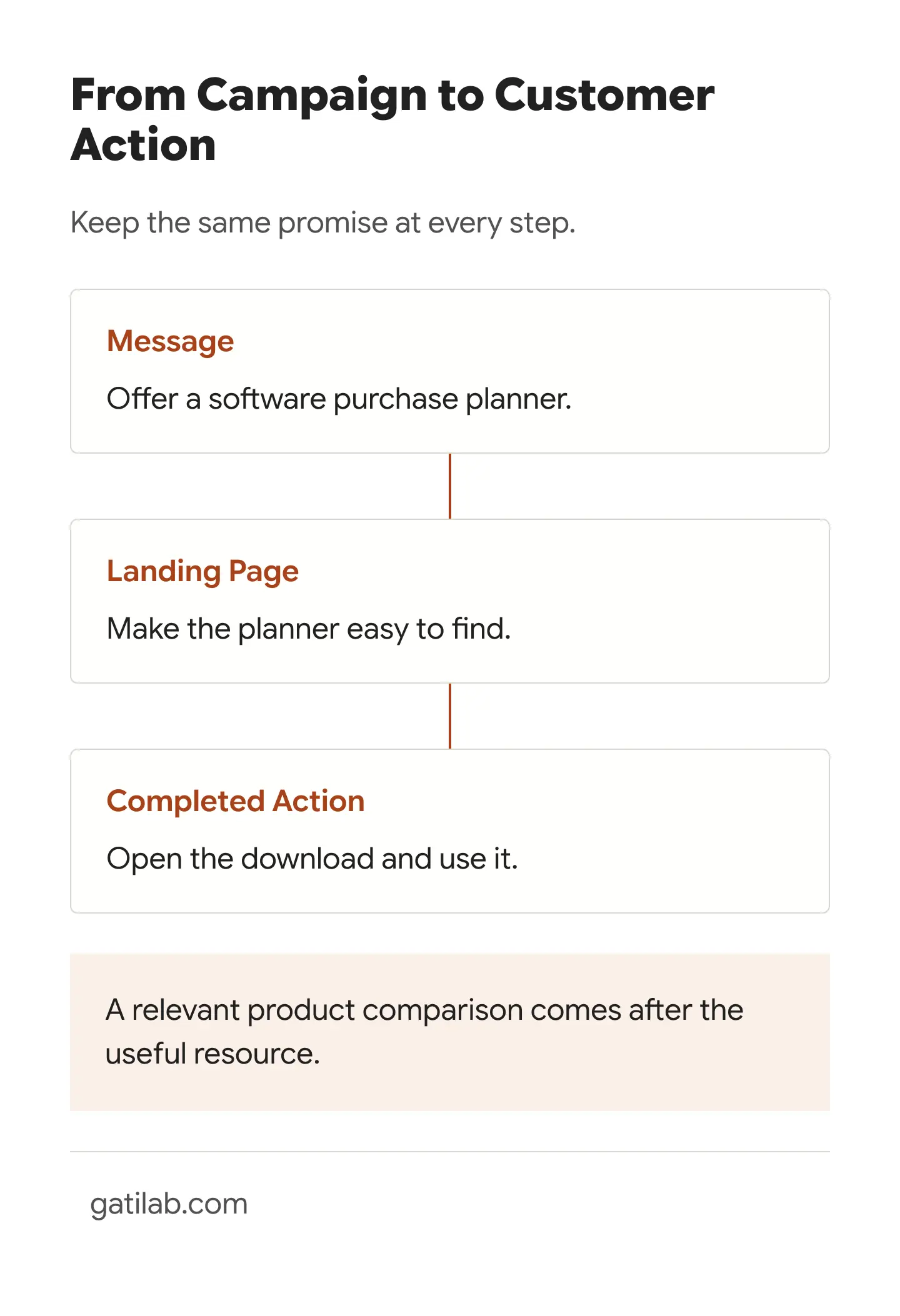
SeedProd is worth considering when you want a dedicated WordPress landing-page builder. Build a focused page with the offer, a sample or demonstration, the terms that affect the decision and one main action.
OptinMonster serves a separate purpose: targeted opt-in campaigns, including popups and floating bars. A campaign shown on a relevant article can invite readers to get the related Halloween resource. Avoid covering the page before they’ve had a chance to read the advice that brought them there.
A useful page order is:
- Promise: “Find the subscriptions your next project actually needs.”
- Useful preview: Show a completed example row from the planner, clearly labeled as an example.
- Action: Download the sheet, choose the bundle or book the appointment.
- Decision details: Explain formats, access, price and what happens next.
- Follow-up: Deliver the promised resource and suggest the next relevant step.
Track the completed action as well as the button click. A download click, successful form submission, booked appointment and paid order represent different levels of progress.
Choose Your Email Platform
Your email platform should fit what happens after the first click. For a small business with a simple signup and follow-up, I’d start with MailerLite. For a WordPress business organizing inquiries and customer emails on its own site, I’d look at FluentCRM. Kit is a better match when the campaign grows out of a creator newsletter.
An online store may need a different setup. Omnisend focuses on ecommerce email and SMS workflows, including cart recovery. Choose it when your store has a supported integration and can pass the purchase and cart events your campaign needs. Don’t assume an email platform knows someone has bought just because both systems have the same address.
Use the Halloween email templates to turn the chosen campaign into a launch, a useful follow-up and, where there is a genuine deadline, a last call. The templates include affiliate, giveaway, bundle and cart-recovery examples, so you can start with the message closest to your offer.
Your Halloween Launch Plan
Start early enough to deliver something useful before asking for a sale. For a campaign running in the final week of October, this is a workable schedule:
- Early October: Choose the audience, offer and primary action. Build the resource or package before advertising it.
- Mid-October: Publish the campaign page and supporting article. Connect the form, delivery email and purchase or booking flow.
- About a week before Halloween: Send the opening story and show the useful offer. Publish matching social posts.
- A few days later: Answer the question most likely to delay the purchase: fit, contents, setup time or delivery.
- At the actual closing point: Send a short last-call email to eligible non-buyers. Remove buyers from the repeated sales sequence.
For an evergreen checklist with no closing date, replace the last call with a worked example. You can keep selling the next useful step without pretending the download disappears at midnight.
Carry the Campaign Into Black Friday
Halloween can tell you what your November audience wants. Someone who chose a study planner is giving you a different signal from someone who booked a WordPress audit. Keep those interests separate when you prepare Black Friday and Cyber Monday emails.
In 2026, the practical sequence is to finish the Halloween promise first, then invite interested readers to the relevant November list. A simple preference message can offer choices such as WordPress tools, learning resources and creator software.
Build the November offers around what you learned:
- Software Graveyard readers: Show replacements for the specific jobs their current tools aren’t doing, with renewal costs beside introductory prices.
- Clinic customers: Recommend the next repair or implementation service from their findings, rather than another generic audit.
- Students and self-learners: Offer resources that fit their subject and available study time.
- Course creators: Recommend tools for the stage they’re at, such as recording, selling or following up with learners.
Halloween is a good reason to start the conversation. The useful result gives you a reason to continue it. Pick the campaign you can deliver properly, build its page and use the matching email template to make the first offer.
Tell Google you want more of this.
Add Gatilab as a preferred sourceOne tap, and this site shows up more often in your own Top Stories, AI Overviews and AI Mode. Remove it any time.