
Google Search Console Keyword Research: The Pro Workflow
Google Search Console keyword research is the most underused method in the SEO industry. Every team pays for Ahrefs, Semrush, or DataforSEO to discover keywords, but the tool that already shows them every query their site has appeared for, with real impressions and real clicks, sits unused in a tab. The Performance report inside GSC contains 16 months of search data that no third-party tool can match for accuracy, because it comes directly from Google’s serving systems. The 2026 GSC interface kept the Performance report mostly intact, with a few filter improvements that make this workflow even faster than it was a year ago.
I use Google Search Console keyword research as the first step in every editorial planning cycle at Gatilab. Third-party volume tools come second. The reason is simple: GSC tells me what my site already ranks for, which queries I am close to ranking on, and which keywords are losing position so I can act before they fall off page 1. No paid tool gives me this domain-specific view at the same accuracy. Below is the exact workflow, including the filters I use, the position bands I prioritise, and the page-level analysis that turns striking-distance keywords into ranking gains in 30 to 60 days.
Google Search Console keyword research is not a replacement for Ahrefs or Semrush. It is what you run before paying for them. Three filters, one date comparison, and 20 minutes of triage will surface 80 percent of your refresh and new-content opportunities for the next quarter.
Why Google Search Console keyword research beats third-party tools for some workflows
Google Search Console keyword research is uniquely good at three things, and uniquely bad at three others. Knowing which is which saves you from running the wrong workflow on the wrong tool.
What GSC does best. First, accurate impressions and clicks for queries your site already ranks for. The data is first-party, real-time within 24 to 72 hours, and free. Second, position tracking on a per-query, per-page basis. Ahrefs and Semrush sample the SERP from a pool of fixed-location proxies. GSC reports the average position of every actual SERP your URL has appeared on, weighted by impression. Third, query-to-page mapping. The Pages tab inside Performance shows exactly which URL is ranking for which query, which is the core data point you need for refresh prioritisation.
What GSC does badly. First, search volume estimates. GSC does not show the universe of demand for a keyword, only your slice of it. A query with 12 monthly impressions in your GSC could be a 50,000-volume keyword you barely show up for. Second, competitor data. You see only your own queries. Third, keyword discovery for new topics. If you have never published anything on a topic, GSC has no data to surface, because your site has never appeared for it.
Use GSC to refresh and expand existing content. Use Ahrefs, Semrush, or the best keyword research tools roundup recommendations to discover net-new topics. The two workflows do not compete. They sequence.
The Performance report: every filter that matters
Open Search Console, pick the property, click Performance > Search results in the left nav. The default view shows total clicks, total impressions, average CTR, and average position over the last 3 months. None of the four metrics is useful unsegmented. The actual workflow happens after you apply filters.
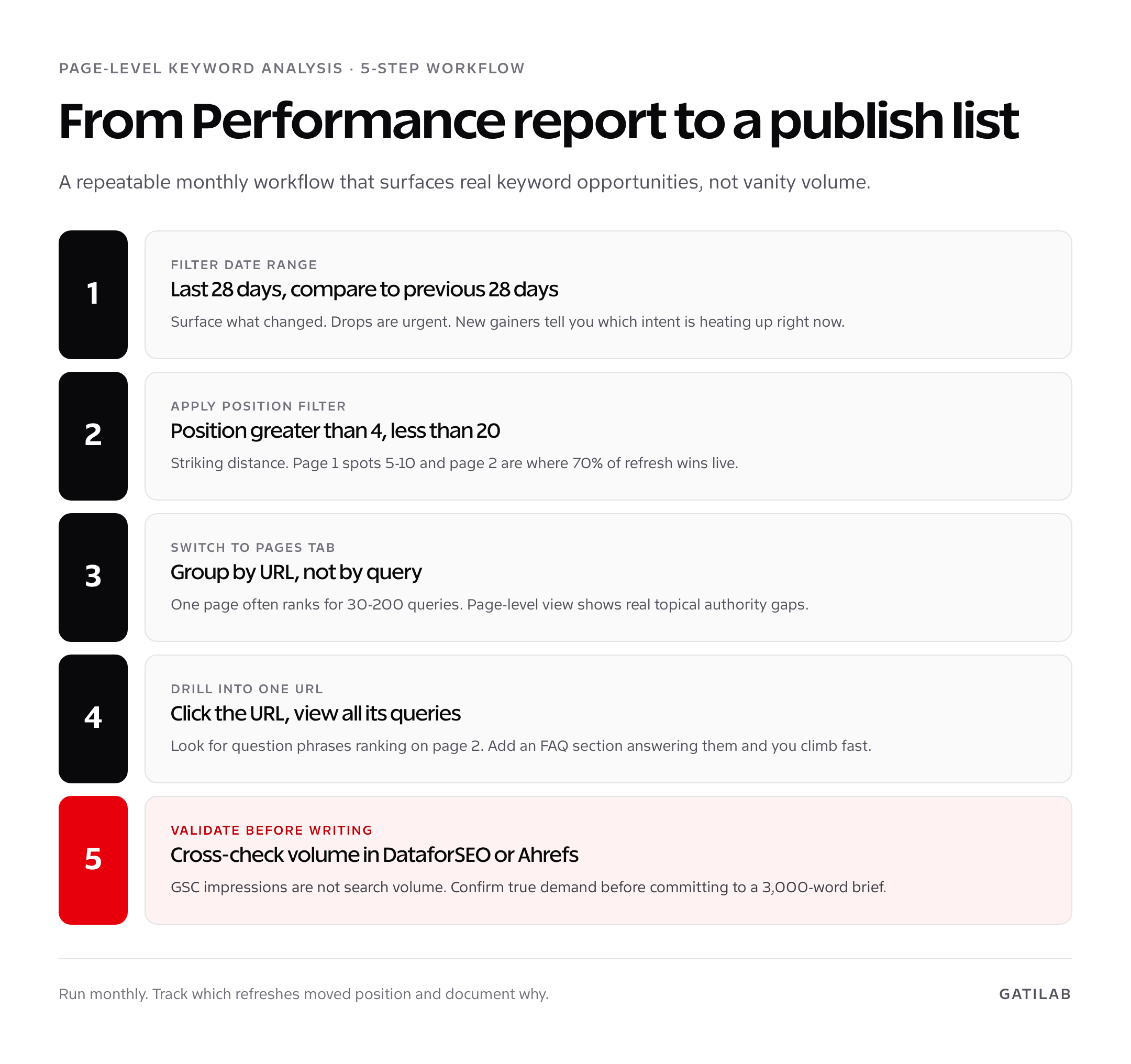
Five filters I apply on every Google Search Console keyword research session. Date range: Last 28 days, compare to previous 28 days. Search type: Web (default). Country: filter to your primary market if you serve multiple. Device: keep Mobile and Desktop both checked unless you have a specific reason to split. Position: greater than 4, less than 20. The position filter is the one most teams skip. It is the one that surfaces striking-distance opportunities.
- Set the date range. Comparison view, last 28 days vs prior 28 days. Surfaces what changed.
- Apply position filter. Position > 4 AND Position < 20. Striking-distance band.
- Switch to the Queries tab. Sort by impressions descending. Top 100 rows are your demand list.
- Switch to the Pages tab. Sort by clicks descending. Top 20 are your refresh-priority URLs.
- Drill into a single Page. Click any URL, then back to Queries to see every query that page ranks for.
Steps 4 and 5 together are the Google Search Console keyword research workflow most teams never learn. Page-level keyword analysis surfaces the long-tail queries inside an existing high-traffic article that are themselves hidden ranking opportunities. A 2,400-word post might rank in position 5 for the head term, but be sitting at position 12 to 15 for 30 question-form variations that, with 200 to 400 words of FAQ-style answers, would climb to the top 3 inside a month.
Striking-distance keywords: the position 5-20 opportunity
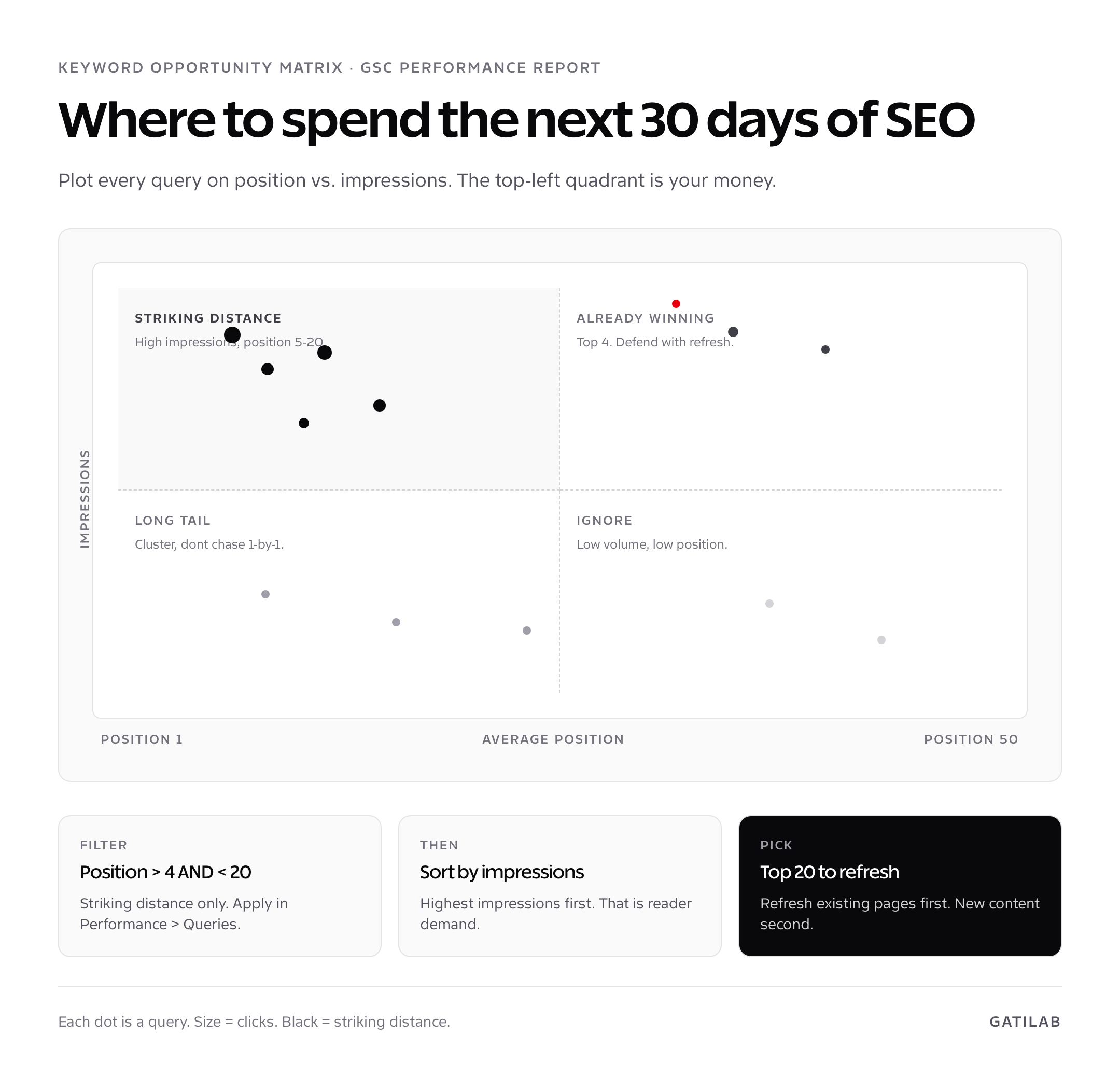
Striking-distance keywords are queries where your site already ranks on page 1 (positions 5 to 10) or top of page 2 (positions 11 to 20). They are the highest-leverage opportunities in your entire SEO programme because Google has already decided your page is relevant. The work to move from position 8 to position 3 is roughly 10 percent of the work to rank a brand-new page for the same query.
The CTR math explains why this band matters. Position 1 in 2026 earns roughly 28 to 32 percent click-through rate on informational queries. Position 5 earns 5 to 7 percent. Position 11 earns under 1 percent. Moving a query from position 11 to position 4 multiplies traffic by 8 to 12x without writing a single new article. Filter the GSC Queries tab by position 5-20, sort by impressions, and the top 50 rows are your next 90 days of editorial priority.
- Sort by impressions, not clicks. Clicks are downstream of position. Impressions show real demand.
- Look for queries with 500+ impressions and position 6-12. The fastest wins.
- Cross-check the URL ranking for that query. Open the page, check word count, last update date, and topical depth.
- Refresh, do not republish-from-scratch. Add 800-1,200 words, update statistics, add an FAQ section, refresh examples to 2026.
- Re-submit via URL Inspection. Hit Request Indexing after publishing. Position usually updates within 7-14 days.
This is the workflow I run on every Gatilab client property monthly, and it consistently produces 15 to 35 percent organic traffic gains over a 90-day cycle. No new content. Just refreshing the right existing pages, identified through Google Search Console keyword research.
Branded vs non-branded keyword filtering
Branded queries inflate aggregate metrics and hide the real performance of non-branded SEO work. Anyone searching “gatilab” or “gatilab review” is finding the site through brand awareness, not SEO. The non-branded queries are where SEO investment shows up. Separating the two matters for performance reporting and for keyword research itself.
Apply a Query filter: Queries not containing [your brand name]. Add variations: domain name, founder name if it is searched, common misspellings. The filtered view shows pure topical performance. Re-run the position 5-20 filter on top of the brand filter and you have a clean striking-distance list with no branded noise.
Branded analysis matters too, in a different way. Branded query volume is a leading indicator for organic growth. If branded searches are growing 8 percent quarter-over-quarter, your brand-marketing motion is working and SEO will compound on top of it. If branded queries are flat or declining while non-branded grows, you have product-led growth without brand awareness, which is fragile to algorithm shifts.
Page-level keyword analysis
The Pages tab inside Performance is where the most useful workflow lives. Sort by clicks descending. The top 20 URLs are usually responsible for 60 to 80 percent of total organic traffic. Click any URL to filter the entire Performance report to that single page. Switch back to the Queries tab and you are looking at the complete query universe for that one URL.
Three patterns I look for on every page-level drill-down. First, head term position vs long-tail position. If the page ranks position 4 for the head term but position 11 for 20 question-form variants, the page is missing FAQ depth. Second, query topical drift. If the page is ranking for queries unrelated to its target topic, you have intent confusion. Either retarget or split into two pages. Third, missing entities. Look for queries that name specific tools, people, or concepts. If they appear in the GSC list but not in the article body, add them. They are signals that searchers expect that entity covered.
I keep a refresh template I run after every page-level Google Search Console keyword research drill-down. It includes: head term position before/after, top 5 long-tail queries to address, FAQ section additions, missing entities to mention, and updated publication date. The template runs about 90 minutes per refresh. The average traffic lift across 60 refreshes I tracked at Gatilab in 2026 was 41 percent over 60 days.
CTR analysis and title tag optimisation
The CTR column in the Performance report is one of the most actionable signals in SEO and one of the most overlooked. A query with high impressions, position 4, and a 2 percent CTR is signalling that the title or meta description is not winning the click. Position 4 in 2026 should average around 8 percent CTR on most informational queries. A 6-point CTR gap means the snippet is the problem, not the ranking.
To find these opportunities. Filter Queries to position less than 5. Sort by CTR ascending. Anything below 4 percent in the top 5 positions deserves a snippet rewrite. The fix is usually one of three things: title that does not match query intent, meta description that buries the value proposition, or a SERP feature (people-also-ask, featured snippet) eating clicks above your result. Rewrite the title to match the query phrase exactly when possible, lead the meta with the specific outcome, and check the SERP for the query to see what is competing for attention above you.
Title rewrites I have run produce CTR lifts of 1.5 to 4 percentage points on average, with the high end on commercial keywords where matching exact phrasing matters most. The compounding effect is real: a 2-point CTR lift on a position-3 query with 8,000 monthly impressions is 160 incremental clicks per month from a single 5-minute edit.
Combining GSC keyword data with third-party volume tools
Google Search Console keyword research surfaces what your site is close to ranking for. Third-party tools tell you how big the demand is on each opportunity. Combining the two is the right workflow for any editorial calendar.
The combined workflow. Export the GSC Queries tab to CSV with the position 5-20 filter applied. Drop the CSV into Ahrefs Keywords Explorer (paste mode). Ahrefs returns global volume estimates, keyword difficulty scores, and SERP feature flags for each query. Sort the merged sheet by GSC impressions descending and Ahrefs volume descending. The top 30 rows are your prioritised refresh queue. For B2B specifically, the workflow in B2B SaaS keyword research overlaps heavily with this approach but layers in commercial-intent filtering that most generic methods miss.
Search volumes from Ahrefs, Semrush, and DataforSEO can disagree by 2 to 3x on long-tail queries. Take the lower estimate. Long-tail queries also have noisier monthly variation than head terms, so a 12-month average is more reliable than a single-month volume.
Keyword research for new content (when GSC has nothing)
The hardest case for Google Search Console keyword research is a new topic the site has never published on. GSC will have zero impression data for those queries because your site has never appeared in the SERP. This is where third-party tools take over.
The bridge workflow. Use GSC to identify which existing topical clusters are performing well. Use a third-party tool to discover adjacent keyword clusters with overlapping intent. Build the new content as part of an existing cluster rather than as standalone, because cluster pillars carry more authority than orphan posts. The content cluster strategy guide covers the architecture in depth, including how to use internal links between cluster posts to compound ranking signals across the group.
For early-stage sites without enough GSC data to do meaningful keyword research, the playbook is different again. Focus on long-tail commercial queries with low competition, build clusters around 3 to 5 core topics, and run the GSC keyword research workflow only after 6 to 9 months of publishing has produced enough impression data to be useful. The SEO for startups guide covers this early-phase sequence.
Putting it all together: a monthly keyword research routine
End with a routine. On the first Tuesday of every month, open Search Console, set Performance to Last 28 days vs prior 28 days, apply position 5-20 filter, and walk the four panels: Queries (sort by impressions), Pages (sort by clicks), Countries (sanity check geographic distribution), Devices (mobile-first sanity check). Export each panel as CSV.
For each striking-distance query in the top 50, document: query, current position, impressions, the URL ranking for it, and whether it deserves a refresh, an FAQ addition to an existing page, or a brand-new article. Cross-check volume in your third-party tool, drop the lowest-volume entries, and you end up with a 15 to 25 item editorial queue for the next month. The whole research session takes 90 minutes once you have done it three times. The output drives every editorial decision for the month.
Pair the keyword research routine with a backlinks audit using the GSC backlinks workflow and a quarterly technical SEO review from the GSC SEO audit guide. Three GSC-driven workflows on a monthly and quarterly cadence cover roughly 80 percent of what most SEO teams hire agencies for, run from a single free tool with primary-source data.
Advanced: regex filters and the Search Console API
Two underused features push Google Search Console keyword research past the standard UI workflow: regex query filtering and the Search Console API. Both unlock analyses the basic interface cannot do.
Regex query filtering. In the Queries filter, click “Custom (regex)” instead of “Containing.” Useful patterns: question-form queries with `^(how|what|why|when|where|which|who|is|are|can|do|does)\\b` to surface every question your site appears for. Comparison queries with `\\bvs\\b|\\bversus\\b|\\balternative\\b` for vs-style and alternative searches that have strong commercial intent. Year-suffixed queries with `\\b(2025|2026|2027)\\b` to spot keywords where searchers expect freshness. Each pattern surfaces a different content-strategy lever.
The Search Console API. The standard UI caps results at 1,000 per query, deduplicates aggressively, and limits comparisons to two date ranges. The API has no 1,000-row cap, lets you query up to 25,000 rows per call, and supports more granular date math. For sites with more than 5,000 ranked queries, the API is the only way to see your full keyword universe. Setup takes 20 minutes via Google Cloud Console, costs nothing for typical site volumes, and pairs with Python or the official Google Sheets add-on (Search Analytics for Sheets).
Once you have full API exports, the analyses you can run multiply: query-to-page mapping at full scale, anchor-of-position-distribution per cluster, day-over-day position tracking, and segmentation by SERP feature presence. None of these are possible from the UI alone. For most teams the API is overkill, but for any site over 50,000 monthly clicks the cost-benefit flips fast.
Mistakes that ruin Google Search Console keyword research
Three mistakes I see repeatedly. First, ignoring the position filter. Without the 5-20 striking-distance filter, the Queries tab is dominated by long-tail rank-1 queries that are already maxed out and noise from positions 30-plus that will not move with editorial work. Filter first, then sort. Second, treating GSC impressions as search volume. They are not. Impressions reflect your site’s exposure for a query, which is a function of position, SERP CTR curves, and click distribution. A query with 12 GSC impressions can have 12,000 monthly searches you simply do not appear for.
Third, refresh-and-republish without an editorial reason. The fastest way to lose ranking from a refresh is to change everything just because Google rewards freshness. Google rewards content that better answers the query, not content that has a newer date. Identify the query gap, address it specifically, leave the rest of the page alone, and update the published date once the substantive changes are done. Refreshes that work are surgical. Refreshes that fail are wholesale.
A real Google Search Console keyword research case study
To make the workflow concrete, here is a recent project. A Gatilab client, a B2B SaaS in the project management space, came to us with 64,000 monthly organic clicks and a flat growth curve over six months. No new content. Just GSC keyword research, focused refreshes, and a 90-day window.
Step one: pulled the Performance report, applied position 5-20, sorted Queries by impressions. Top 60 striking-distance queries identified. Step two: mapped each query to its ranking URL using the Pages tab. Twenty-three URLs covered all 60 queries. Step three: drilled into each URL, pulled the long-tail query list, and built a refresh brief per URL with new H2s answering the question-form variants and updated statistics. Step four: shipped the refreshes over 6 weeks at roughly 4 per week. Step five: tracked position changes weekly via GSC.
Result after 90 days: 64,000 to 91,000 monthly organic clicks, a 42 percent gain. Average position across the 60 striking-distance queries moved from 9.6 to 4.8. Click share for the refreshed URLs nearly doubled. No new content. Just disciplined Google Search Console keyword research applied to existing pages.
Is Google Search Console keyword research as good as Ahrefs?
Different jobs. GSC is best for refresh and expansion of existing content because it shows the queries your site already ranks for with real impression data. Ahrefs is best for net-new topic discovery and competitor research because GSC has no data on topics you have never published on.
What is the position 5-20 striking-distance filter?
A filter in the GSC Performance report that surfaces queries where your site already ranks on page 1 (positions 5-10) or top of page 2 (positions 11-20). These are the highest-leverage refresh opportunities because Google has already decided your page is relevant.
How do I find striking-distance keywords in GSC?
Open Performance > Search results, apply position filter (greater than 4, less than 20), sort the Queries tab by impressions descending. The top 50 rows are your striking-distance opportunities. Refresh the URLs ranking for them rather than writing new content.
Why does GSC not show search volume?
GSC reports only your site’s exposure for a query (impressions), not the total demand for that query. A query with 12 impressions in your account can have 12,000 monthly searches you simply do not appear for. Cross-check volume with Ahrefs, Semrush, or DataforSEO.
How do I separate branded from non-branded queries?
Apply a Query filter: Queries not containing your brand name. Add variations: domain name, founder name, common misspellings. The filtered view shows pure topical performance. This is essential for accurate non-branded SEO performance reporting.
What is page-level keyword analysis in GSC?
Click any URL in the Pages tab to filter the entire Performance report to that single page, then switch back to Queries. You see every query that one URL ranks for. Surfaces long-tail opportunities hidden inside high-traffic articles.
Can I export GSC keyword data?
Yes. Each panel in Performance has a CSV export, capped at 1,000 rows. For full keyword data, use the Search Console API (no row cap, up to 25,000 rows per call) or the Search Analytics for Sheets add-on, which supports the same API limits inside Google Sheets.
How often should I do GSC keyword research?
Monthly. First Tuesday of every month works well as a routine. Set Performance to last 28 days vs prior 28 days, apply striking-distance filter, walk Queries and Pages tabs. The whole research session takes 90 minutes once practised.
Does refreshing existing content beat writing new content?
For striking-distance queries, yes by a wide margin. The work to move from position 8 to 3 is roughly 10 percent of the work to rank a brand-new page. Refresh the right 10 pages monthly and you outperform writing 10 new articles in most niches.
What CTR should each position get in 2026?
Position 1 averages 28 to 32 percent CTR on informational queries. Position 5 earns 5 to 7 percent. Position 11 drops below 1 percent. Use these benchmarks to spot underperforming snippets where the title and meta need rewriting, not the ranking.
Tell Google you want more of this.
Add Gatilab as a preferred sourceOne tap, and this site shows up more often in your own Top Stories, AI Overviews and AI Mode. Remove it any time.