
10 Best Programmatic SEO Tools for 2026 (Pricing + Use Case)
Programmatic SEO tools are the small, opinionated set of platforms that let one team produce, sync, and ship thousands of pages without hand-coding each one. The right stack depends on program size, technical comfort, and how often the dataset changes. The wrong stack burns six weeks of build time and produces pages that don’t index. I’ve shipped programmatic SEO programs across all three stack patterns in the last 18 months, and most failures I audit aren’t tool failures, they’re tool-selection failures.
This guide covers 10 named tools across four categories: data sources, page builders, sync and automation, and scraping. Pricing is current as of May 2026, pulled from each vendor’s pricing page. I’ll walk through what each tool is best at, what it isn’t, and which combinations actually work in production. The decision tree at the end maps program size to recommended stack.
I run client programs ranging from 800 service-area pages on Webflow to 47,000 currency pages on a Next.js plus Postgres stack. The verdict at the end of each tool entry is what I would recommend to a paying client today.
How I evaluate programmatic SEO tools
Five criteria decide whether a tool earns a slot in my recommended programmatic SEO tools stack. Skip any one of them and the program runs into a wall during scale-up.
- Dataset capacity. Can the tool hold the number of rows your program needs? Webflow CMS caps at 10,000 items per collection. Notion struggles past 5,000 rows in a single database.
- Sync model. Does the tool support two-way sync, scheduled imports, or webhook-triggered updates? Programs with daily-changing data need true sync, not nightly cron.
- Template flexibility. Can the template render proper HTML tables, JSON-LD schema, and FAQ blocks? Some no-code tools fight you on schema injection.
- Indexation friendliness. Server-side rendered HTML beats client-side rendered React. Sitemap generation should be automatic and shardable.
- Cost trajectory. Some tools price per row or per CMS item. A program that scales from 1,000 to 50,000 pages can see costs go from $50 to $5,000 per month if you pick wrong.
For the broader playbook these tools fit into, see my programmatic SEO complete guide. For the plain-English version, see what is programmatic SEO.
The four categories of programmatic SEO tools
Every programmatic SEO stack has tools in at least three of these four categories. The fourth (scraping) is optional but common.
1. Data sources
The dataset of rows that becomes your URLs. Airtable for visual-first teams, Google Sheets for fast prototyping, Notion for tiny programs, Postgres or BigQuery for engineering builds. The data source is the single most important choice; it determines the ceiling of the whole program.
2. Page builders and CMSes
Where the templates live and where pages get rendered. Webflow CMS for designer teams, WordPress plus ACF for editorial teams, Next.js for engineering teams, Bricks Builder for code-light WordPress builds.
3. Sync and automation
The middleware that moves data from source to CMS. Whalesync for two-way sync, Make for scheduled automations, WP All Import for CSV-to-WordPress, Zapier as a fallback. Without proper sync, you’re hand-publishing 5,000 pages, which defeats the purpose.
4. Scraping and data enrichment
How you build the dataset in the first place. Apify and Phantombuster for headless-browser scraping, Browse.ai for visual web scraping, Bright Data for residential proxies. Most programs need scraping at the dataset-build stage even if they don’t need it ongoing.
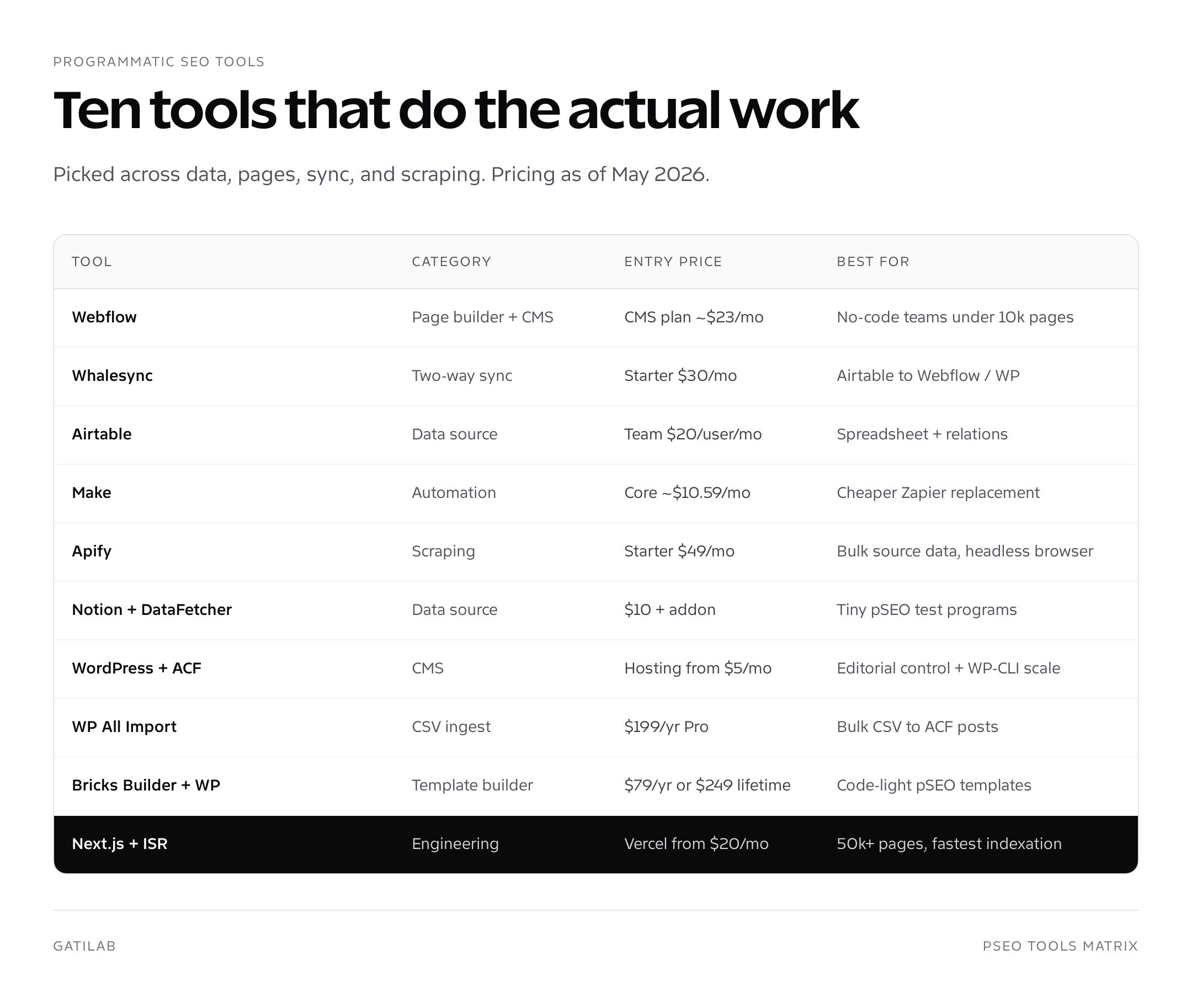
10 best programmatic SEO tools reviewed (with 2026 pricing)
My current shortlist. Pricing pulled from each vendor’s published pricing page in May 2026; verify before purchase since SaaS pricing changes.
1. Webflow
URL: webflow.com. The category leader for designer-led programmatic SEO. CMS Collections cap at 10,000 items, which sets the practical ceiling. Server-side rendered HTML, fast indexation, automatic sitemap generation.
Pricing as of May 2026: Webflow’s CMS plan starts around $23/mo (annual billing), Business plan around $39/mo, with workspace seats priced separately. Best for: 500 to 10,000 page programs where design matters. Verdict: my default no-code recommendation if the team has Webflow comfort.
2. Whalesync
URL: whalesync.com. Two-way sync between Airtable and Webflow (also Notion, Postgres, Bubble). Whalesync changed the no-code programmatic SEO category by making bidirectional sync trivial.
Pricing as of May 2026: Starter at $30/mo, Grow at $100/mo, Business at $350/mo, scaled by row count. Best for: any Airtable-to-Webflow program. Verdict: indispensable if you’re on Stack A; no real competitor at this maturity.
3. Airtable
URL: airtable.com. Visual relational database that doubles as a programmatic SEO data source. Strong API, formulas, lookups, and rollups make it more capable than a spreadsheet.
Pricing as of May 2026: Free tier (1,000 records per base), Team at $20/user/mo (50,000 records per base), Business at $45/user/mo (125,000 records per base). Best for: 500 to 100,000 page programs where the dataset has relations. Verdict: my default for Stack A.
4. Make
URL: make.com. Workflow automation, formerly Integromat. Cheaper than Zapier with more granular control over data transformations between steps. Critical for programs that ingest from one source and post to a CMS.
Pricing as of May 2026: Free tier (1,000 ops/mo), Core ~$10.59/mo, Pro ~$18.82/mo, Teams ~$34.12/mo (annual billing); operations are the metering unit. Best for: scheduled imports, deduplication, REST API posts. Verdict: pick over Zapier for cost-sensitive programs.
5. Apify
URL: apify.com. Web scraping platform with a marketplace of pre-built actors (scrapers). Headless Chromium, residential proxies, and a Python or Node SDK for custom scrapers.
Pricing as of May 2026: Free tier ($5 in monthly platform credit), Starter $49/mo, Scale $499/mo, Business $999/mo. Best for: building the initial dataset, especially for [Tool] vs [Tool] or [Brand] alternatives programs that need competitor data. Verdict: easiest path to scraped data, but watch the proxy and compute costs at scale.
6. Notion + DataFetcher
URL: notion.so + thedatafetcher.com. Notion as the visual data source, DataFetcher as the API-fetching add-on that pulls live data into Notion databases. Tiny but workable for sub-1,000-page programs.
Pricing as of May 2026: Notion Plus around $10/user/mo, DataFetcher around $9 to $25/mo by tier. Best for: prototype programmatic SEO programs and content teams already on Notion. Verdict: don’t scale this past 1,000 pages, but it’s the cheapest way to validate a pSEO concept.
7. WordPress + ACF
URL: wordpress.org + advancedcustomfields.com. The editorial-friendly programmatic SEO stack. ACF gives you typed fields per CPT, WP-CLI gives you batch operations, REST API gives you programmatic publishing. WordPress holds about 43 percent of the web in 2026 and has the deepest plugin ecosystem.
Pricing as of May 2026: WordPress is free, ACF Free works for most pSEO use cases, ACF Pro adds repeaters and clone fields at $59/year per site. Hosting from $5 to $250/mo depending on traffic. Best for: 5,000 to 50,000 page programs with editorial control. Verdict: my default for Stack B.
8. WP All Import
URL: wpallimport.com. The CSV-to-WordPress pipeline. Drag-and-drop mapping from spreadsheet columns to ACF fields, scheduled re-imports, and update rules. Pairs perfectly with WordPress + ACF for Stack B builds.
Pricing as of May 2026: Pro single site around $199/year, with elite tiers higher; the official add-ons (ACF, Yoast, etc.) ship as part of the bundles. Best for: ingesting a 10,000-row CSV into custom post types. Verdict: the right tool when WordPress is already chosen.
9. Bricks Builder
URL: bricksbuilder.io. Modern WordPress page and template builder, lighter than Elementor, with built-in dynamic data tags that map cleanly to ACF fields. Good fit for programmatic templates that need designer-level control without dropping to PHP.
Pricing as of May 2026: 1-site licence around $79/year, unlimited sites around $179/year, lifetime around $249. Best for: WordPress programs that want a visual template builder. Verdict: pick over Elementor for performance-sensitive programs.
10. Next.js + ISR (engineering stack)
URL: nextjs.org. The engineering stack for programs above 50,000 pages. Incremental Static Regeneration generates pages on demand and revalidates on a schedule. Vercel hosts at the edge with sub-100ms TTFB. Postgres or BigQuery as the data layer.
Pricing as of May 2026: Vercel Hobby free, Pro starts at $20/user/mo plus usage, Enterprise quoted. Database costs separate (Neon, Supabase, RDS). Total for a 200,000-page program lands $200 to $2,000/mo plus engineering time. Best for: programs that need daily-fresh data and the absolute lowest indexation latency. Verdict: only choose this if you have engineers; pSEO without engineering on Next.js is a project graveyard.
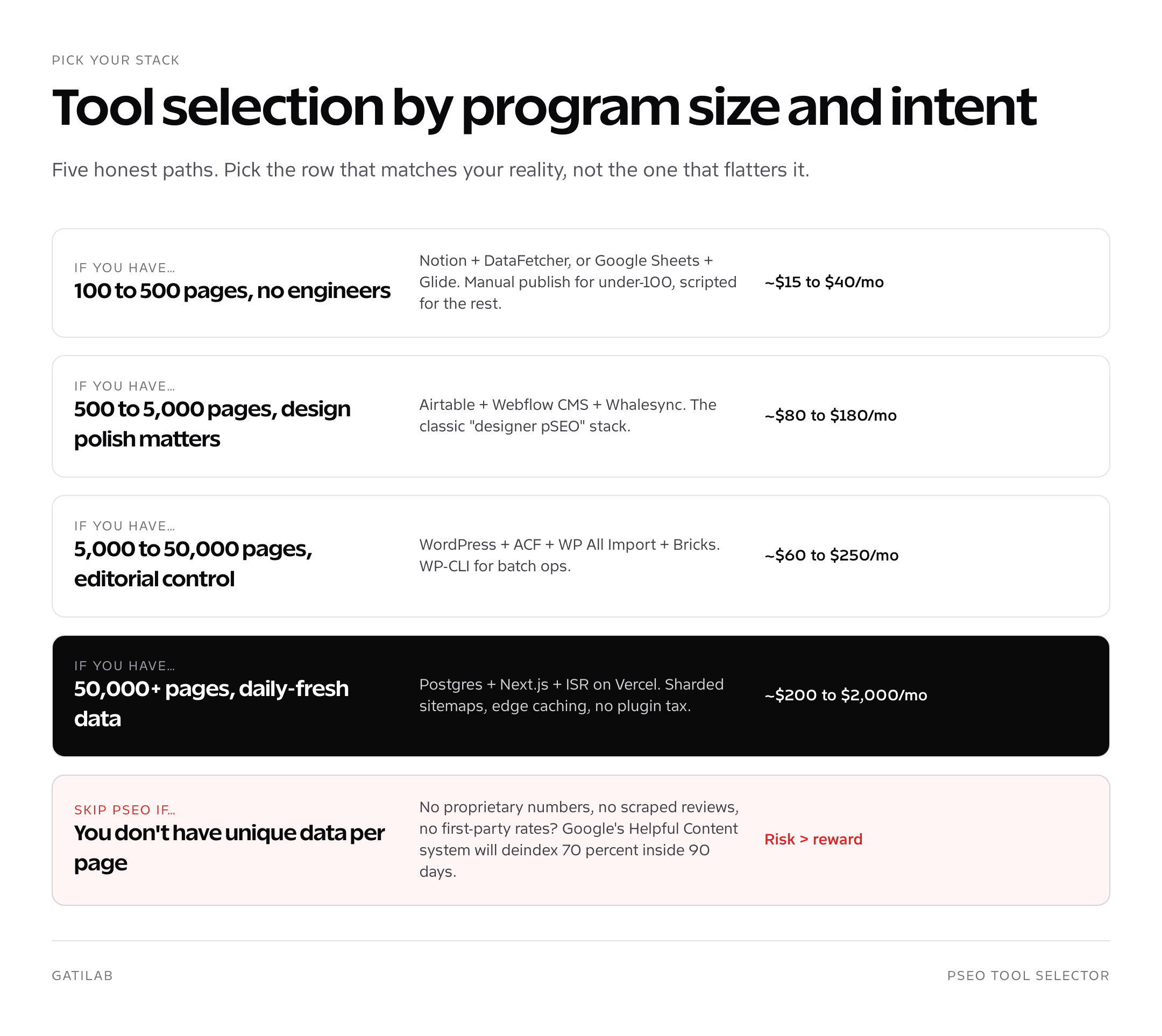
Three workflows that combine these programmatic SEO tools into a working program
Each workflow names the specific tools and the order data flows through them.
Workflow A: Airtable + Whalesync + Webflow (no-code, 1,000 to 5,000 pages)
Build the dataset in Airtable. Connect Whalesync to sync rows to a Webflow CMS collection. Webflow CMS template renders one page per row with merge fields. Submit a sharded sitemap to Search Console. Total time to live: 2 to 6 weeks for a 2,000-page program. Total cost: ~$130/mo.
Workflow B: Google Sheets + WP All Import + WordPress + ACF (5,000 to 30,000 pages)
Build the dataset in Google Sheets, export as CSV. WP All Import maps CSV columns to a custom post type with ACF fields. The WP theme renders single-{cpt}.php with the merge fields. Schedule the import nightly so dataset edits propagate. Total time to live: 3 to 8 weeks for a 15,000-page program. Total cost: ~$80 to $250/mo plus the one-time WP All Import licence.
Workflow C: Postgres + Make + Next.js + Vercel (50,000+ pages, daily-fresh)
Postgres holds the dataset, populated by Make jobs that scrape Apify or pull vendor APIs. Next.js [slug].tsx route reads from Postgres at build time and at revalidation. Vercel deploys on push, sitemap shards generated by a build script. Total time to live: 6 to 12 weeks for the first 50,000 pages. Total cost: $200 to $2,000/mo plus engineering.
| Workflow | Page range | Build time | Monthly cost | Best for |
|---|---|---|---|---|
| A: Airtable + Webflow | 1k to 5k | 2 to 6 weeks | ~$130 | Designer-led, no engineers |
| B: Sheets + WordPress + ACF | 5k to 30k | 3 to 8 weeks | ~$80 to $250 | Editorial control |
| C: Postgres + Next.js | 50k+ | 6 to 12 weeks | $200 to $2,000+ | Daily-fresh data |
programmatic SEO tools I don’t recommend (and why)
Three categories of tools I see overhyped for programmatic SEO that don’t survive client projects.
- All-in-one pSEO platforms (e.g., generic ‘pSEO generators’). They lock you into their CMS, their template format, and their sitemap rules. The moment you outgrow them, migration is a full rebuild.
- Pure AI content generators with no dataset layer. The output passes a draft check and fails the Helpful Content gate. You ship 5,000 pages and 70 percent get demoted in 90 days.
- Generic site builders without proper CMS collections (Wix, Squarespace). They handle 50 to 200 templated pages reasonably. Above that, the indexation, sitemap, and schema controls aren’t deep enough.
If a tool’s marketing leans on the words “AI-generated programmatic SEO at scale” without showing the data source, walk away. The shortcut they’re selling is the failure mode I clean up on audits.
Pair the right tools with the right strategy
The best programmatic SEO tools list in the world won’t save a program with the wrong strategy. Before picking tools, lock in the strategic frame: pillar content for head terms, programmatic for the long tail, GEO for AI search.
My recommended reading order if you’re starting from zero. First, what is programmatic SEO for the plain-English definition. Second, the complete programmatic SEO guide for the engineering walkthrough. Third, content cluster strategy for how programmatic fits with editorial pillars. Fourth, generative engine optimization for AI search. Fifth, SaaS SEO if you’re a B2B SaaS. Sixth, the B2B SaaS keyword research guide for the head-term selection step. Once traffic arrives, best CRO tools covers conversion.
Bottom line on programmatic SEO tools in 2026
There are 10 tools in this list and only three stack patterns that consistently ship in production. Stack A (Airtable + Whalesync + Webflow) for under 5,000 pages, Stack B (WordPress + ACF + WP All Import) for 5,000 to 50,000, Stack C (Postgres + Next.js) for 50,000+. Pick the simplest stack that matches your program size, not the most ambitious one. Most failed pSEO programs failed at tool selection, not at execution.
My current default for a paying client: Stack A under 5,000 pages, Stack B above. I only recommend Stack C when daily-fresh data or sub-100ms TTFB is mission-critical, because the engineering cost dominates the rest of the budget. Pick programmatic SEO tools that match your team’s reality, ship 500 pages, see what indexes, then ramp.
Picking between WordPress and Webflow for programmatic SEO
This is the most common decision I help clients make. Both are credible. The right answer depends on three variables: program size, design importance, and whether the team already runs WordPress or Webflow for the rest of the marketing site.
Webflow wins when the team is design-led, the program is under 10,000 pages, and the existing marketing site runs on Webflow. The CMS Collection cap is the binding constraint: 10,000 items per collection in 2026. Above that you’d need to split into multiple collections, which complicates internal linking and breaks the pSEO model.
WordPress wins when the team is editorial or engineering-led, the program is above 10,000 pages, or the marketing site already runs on WordPress. Custom post types scale into the millions. WP-CLI gives you batch operations that aren’t available in Webflow. The plugin ecosystem solves edge cases (schema, sitemap shards, custom rewrite rules) that Webflow doesn’t expose.
Cost is roughly comparable for medium-sized programs. A 5,000-page Webflow program runs $80 to $130/mo all-in. A 5,000-page WordPress program runs $60 to $100/mo plus the labour to set up ACF and WP All Import. The bigger cost difference is at scale: a 50,000-page Webflow program isn’t possible without splitting collections; a 50,000-page WordPress program runs roughly $150 to $300/mo.
How indexation latency differs across the three stacks
Indexation latency, the time between publishing a page and Google indexing it, varies meaningfully by stack. The differences compound across thousands of URLs.
Stack A (Webflow) indexation latency: median 7 to 14 days for pages with internal links from already-indexed hubs. The median jumps to 30 to 60 days for orphan pages. Webflow’s rendering is server-side, sitemap is automatic, and the platform’s domain-level indexation signals are reasonable but not exceptional.
Stack B (WordPress + ACF) indexation latency: median 5 to 10 days for linked pages, 14 to 30 days for orphans. WordPress benefits from the platform’s age and Google’s familiarity with WordPress sitemap patterns, plus the ability to ship custom indexing API integrations through Rank Math or Yoast.
Stack C (Next.js with ISR on Vercel) indexation latency: median 3 to 7 days for linked pages, 10 to 20 days for orphans. Vercel’s edge serving means Googlebot encounters fast TTFB and immediate render, which improves crawl-rate. ISR with on-demand revalidation also keeps the dateModified honest, which is the single biggest signal for crawl prioritisation.
If indexation latency is mission-critical (e.g., your dataset has time-sensitive data like event listings, exchange rates, or job postings), Stack C is worth the engineering investment. If your dataset is stable, Stack A or B is fine.
The tool I keep on standby for pSEO emergencies
When client programs hit indexation problems mid-build, three tools come out of my emergency kit.
Screaming Frog SEO Spider for crawl-graph audits. Run a full crawl of the program, look at the depth distribution, identify orphan pages, find broken internal links. Roughly $250/year per user as of 2026. The free tier crawls up to 500 URLs, enough for a stack-level diagnostic on Stack A programs.
Sitebulb for content uniqueness checks. Sitebulb’s content-similarity algorithm flags pages that are above 80 percent similar to others in the crawl. Rule of thumb: if more than 10 percent of pages in your program are above 80 percent similar to another page, your dataset has a uniqueness problem. Pricing: from around $13.50/mo (annual billing) for the Lite plan.
IndexNow integrations (via Rank Math, Yoast, or a custom Cloudflare Worker). IndexNow pushes new URLs to Bing and Yandex on publish, which doesn’t help with Google but cuts indexation latency on Bing and Yandex by 50 to 80 percent. Free, ~30 minutes to set up.
How to budget your first programmatic SEO build
Three honest cost ranges based on the last six client programs I shipped.
Small program (500 to 1,500 pages): $5,000 to $15,000 build cost, $80 to $200/mo ongoing. Build time: 4 to 8 weeks. Realistic month-six traffic: 1,500 to 5,000 monthly sessions. Best stack: Stack A.
Medium program (5,000 to 15,000 pages): $20,000 to $60,000 build cost, $150 to $400/mo ongoing. Build time: 8 to 14 weeks. Realistic month-six traffic: 8,000 to 30,000 monthly sessions. Best stack: Stack B.
Large program (50,000+ pages): $80,000 to $400,000 build cost, $500 to $5,000/mo ongoing including engineering. Build time: 12 to 30 weeks. Realistic month-six traffic: 50,000 to 500,000 monthly sessions. Best stack: Stack C.
These ranges include labour, which is usually the dominant cost line. Tooling rarely exceeds 15 percent of total program cost in the first year, and drops to under 5 percent in steady-state.
Frequently asked questions about programmatic SEO tools
What’s the best tool for programmatic SEO in 2026?
There’s no single best tool, only best stacks. For under 5,000 pages, Airtable plus Whalesync plus Webflow is my default. For 5,000 to 50,000 pages, WordPress plus ACF plus WP All Import. For 50,000 plus pages, Next.js with ISR plus Postgres on Vercel.
Can I do programmatic SEO without coding?
Yes, for programs under 5,000 pages. The Airtable plus Webflow plus Whalesync stack runs entirely no-code. Above 5,000 pages, you’ll usually need a developer for at least the template work, even on WordPress.
How much does programmatic SEO cost monthly?
Stack A around $80 to $180/mo for under 5,000 pages, Stack B around $60 to $250/mo for 5,000 to 50,000 pages, Stack C around $200 to $2,000+/mo plus engineering for 50,000+ pages. Add scraping costs (Apify $49/mo and up) if you need them.
Is Webflow good for programmatic SEO?
Yes, up to roughly 10,000 pages per CMS collection, which is Webflow’s hard cap. For larger programs, WordPress or Next.js is the better choice.
What’s the difference between Whalesync and Zapier for pSEO?
Whalesync is purpose-built for two-way sync between databases and CMSes. Zapier is one-way automation. For pSEO, Whalesync wins because dataset edits in Airtable need to propagate to Webflow, and Webflow edits need to propagate back.
Do I need a scraper for programmatic SEO?
Sometimes. If you can buy or license the dataset (e.g., a Crunchbase export), no. If you’re building the dataset from competitor data or public review sites, yes. Apify and Browse.ai are the two I use most.
Can I use ChatGPT to write programmatic SEO content?
Yes for the unique-content layer (intros, FAQ answers, summary paragraphs). Not as a substitute for the dataset. The Helpful Content system finds and demotes pure AI output without grounded facts.
Is WordPress better than Webflow for programmatic SEO?
Above 10,000 pages, yes. Below that, Webflow is faster to ship and produces better-looking pages out of the box. WordPress wins on editorial control, plugin ecosystem, and WP-CLI scriptability.
What’s the cheapest programmatic SEO stack?
Notion plus DataFetcher for the dataset, Astro or Eleventy on Cloudflare Pages or Vercel free tier for rendering. Total under $20/mo for a 500-page test program.
How long does it take to build a programmatic SEO program?
Stack A: 2 to 6 weeks to first 1,000 pages. Stack B: 3 to 8 weeks to 15,000 pages. Stack C: 6 to 12 weeks to 50,000 pages. Indexation adds another 30 to 90 days before pages start ranking.
Tell Google you want more of this.
Add Gatilab as a preferred sourceOne tap, and this site shows up more often in your own Top Stories, AI Overviews and AI Mode. Remove it any time.