
Google Search Console Backlinks: How to Read the Links Report
Google Search Console backlinks data is both the most authoritative and the most frustrating link source available to SEO teams. It is authoritative because the numbers come from Google’s own crawl, the same crawler that decides what ranks. It is frustrating because the report caps at 1,000 sample links per category, hides full anchor-text counts, and updates only every few days. Knowing what the report can and cannot tell you separates SEO teams that use GSC well from teams that swap to Ahrefs the second their domain rating dips.
I have run link audits on 60-plus sites at Gatilab in the last 18 months, and the Google Search Console backlinks report is always step one. Not because it is comprehensive, but because it shows what Google itself has chosen to count. If a link does not show up here, Google does not know about it yet, and any third-party tool counting it is feeding you ranking-irrelevant data. Below is exactly how to read every panel of the Links report in the 2026 GSC interface, what to filter for, and where the report falls short of paid alternatives.
Google Search Console backlinks are not a complete inventory. They are a representative sample, ranked by Google’s internal scoring of relevance and authority. Treat them as ground truth, then use Ahrefs or Semrush to see the volume and quality your competitors built.
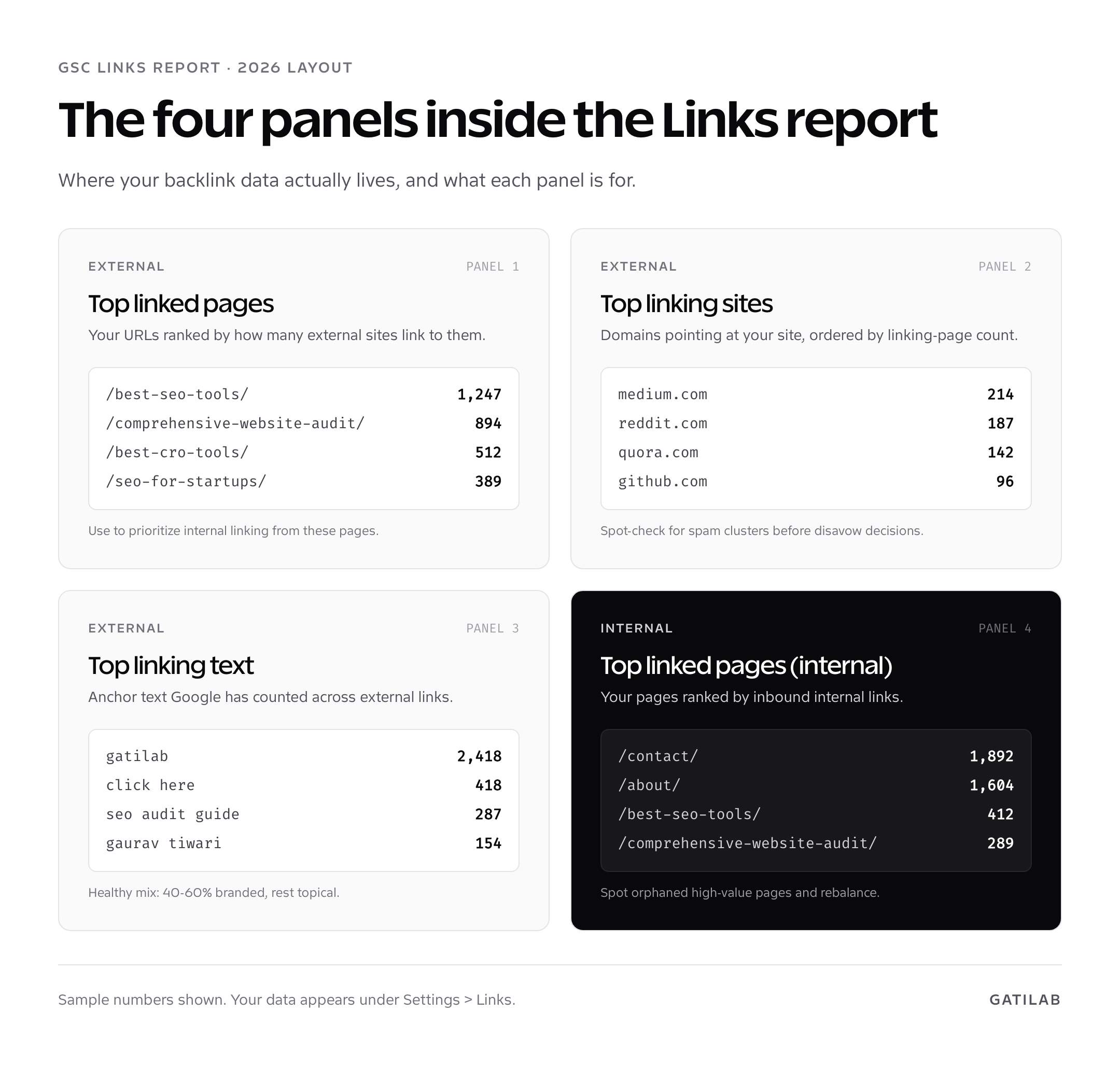
Where Google Search Console backlinks data actually lives
Open Search Console, pick the property, and scroll to Settings > Links in the left nav. The Links report opens in a single view with four panels: Top linked pages (external), Top linking sites, Top linking text, and Top linked pages (internal). The 2026 redesign collapsed the previous two-tab layout into a single dashboard, so all four panels load in one screen now. Click “More” on any panel to drill into the full sample list.
The Google Search Console backlinks report uses two different counting models depending on the panel. Top linked pages counts unique linking pages per target URL on your domain. Top linking sites counts unique referring domains, deduplicated, ranked by linking-page volume. Top linking text counts anchor-text occurrences, capped at the top 1,000 phrases. The internal panel counts internal links only, which is the most underused datapoint in the entire product.
Two limitations to know up front. First, the export is capped at 1,000 rows per panel, even via CSV. For sites with more than 5,000 referring domains, this means you are looking at a top-tier sample, not the whole picture. Second, GSC excludes nofollow and rel=”ugc” links from the external counts, which makes the number look lower than Ahrefs reports. The exclusion is correct from a ranking-signal perspective, but you will get questions from clients comparing the two numbers.
Top linked pages: prioritising internal links by external authority
The Top linked pages panel ranks your URLs by external link count, descending. This is the cheapest way to find which pages on your site have authority worth distributing. The mistake most teams make is reading this list and feeling pleased. The right move is to read it and ask: am I linking from these pages to the pages I actually want to rank?
Pull the top 20 most-linked pages. For each one, count internal outbound links to your money pages, your pillar content, and your highest-converting product pages. If the most-linked page on your site is a 2019 listicle that links nowhere except your homepage and the WordPress comment author archive, you are leaking authority. The fix is editorial: open the post, add 4 to 8 contextual internal links to current high-priority pages, and republish.
- From most-linked listicle to product pages. Listicles attract the bulk of organic backlinks. Use them as authority hubs.
- From research-style posts to commercial pages. Research drives links. Commercial pages drive revenue. Bridge them.
- From “ultimate guide” pages to recently published cluster posts. The guide is the pillar. Each cluster post should link back to the pillar and laterally to siblings.
For more on this internal-linking architecture, the content cluster strategy guide breaks down the pillar-and-cluster model in depth. The Google Search Console backlinks report is how you find which pages have the link equity worth redistributing.
Top linking sites: domain-level link auditing
Top linking sites is the panel I use most for spam audits. It lists every referring domain, ranked by the number of pages on that domain linking to yours. A healthy site shows a long-tail distribution: a handful of high-authority domains with 1 to 3 linking pages each, then a wider tail of single-link domains. An unhealthy profile shows clusters: 14 domains all with exactly 47 linking pages, or 200 domains hosting near-identical anchor text.
To audit, sort by linking pages descending and walk the top 50 domains. For each one, ask: is this a real site I would expect to link to me? Most spam clusters are obvious within 90 seconds: PBN-style domains with thin content, scraper sites that re-publish your articles with a credit link, expired-domain spam, and translated-content scrapers from Russian, Vietnamese, or Indonesian top-level domains. None of them help your rankings. Most of them carry small risk in 2026, because Google ignores most spam by default. A small fraction trigger algorithmic suppression and need disavowing.
Do not disavow on instinct. Google’s official guidance is to disavow only when you have a manual action or strong reason to believe a link is harming you. Most disavows submitted in 2026 are unnecessary and reduce link equity. Use the disavow file as a scalpel, not a chainsaw.
Top linking text: anchor-text health and over-optimisation
The Top linking text panel reports the anchor text used by external links, ranked by frequency. A healthy anchor profile in 2026 looks like this: 40 to 60 percent branded (your company or domain name), 15 to 25 percent navigational (“click here”, “this article”, “more info”), 15 to 25 percent topical (descriptive phrases naturally written by linking authors), and 5 to 15 percent exact-match keyword. The exact-match band is where over-optimisation penalties live. Keep it under 15 percent.
If your top anchor is a commercial keyword like “best WordPress hosting” with 600 occurrences, and your branded anchor count is 200, you have an inverted profile that screams paid links to Google. The natural fix is to publish more linkable content (research, original data, opinion pieces) that earns branded anchors. The unnatural fix is to disavow exact-match links, which is occasionally necessary but rarely the right first move.
Watch for non-English anchor text on English domains. Heavy clusters of Cyrillic, Chinese, or Vietnamese anchors usually indicate scraper traffic and warrant a closer look. Do not disavow them unless they are tied to a manual action. Google ignores them in scoring most of the time.
Internal links: the most underused panel
Top linked pages (internal) tells you which of your pages have the most internal links pointing to them. This is the page-importance signal you are sending to Google. Compare it to your business priority list. If /contact/ is the most internally linked URL on your site but your money page is /pricing/, you have an internal-link-architecture problem.
Three checks I run on this panel. First, do my top 5 commercial pages appear in the top 20 most internally linked URLs? If not, every navigation menu, footer, sidebar, and contextual link in the body of high-traffic posts is a candidate for adjustment. Second, are there orphaned high-value pages with under 5 internal links? Pull the list, run a content review, and add contextual links from related posts. Third, is the homepage receiving fewer internal links than a single random blog post? On a healthy WordPress site this happens because the menu is dynamic and the report counts hard-coded body links separately. Worth checking.
For sites with thousands of pages, internal link auditing is faster with Screaming Frog or Sitebulb, which crawl every link on every page. The Google Search Console backlinks panel for internal links samples 1,000 pages, so larger sites need a full crawler to see the complete graph.
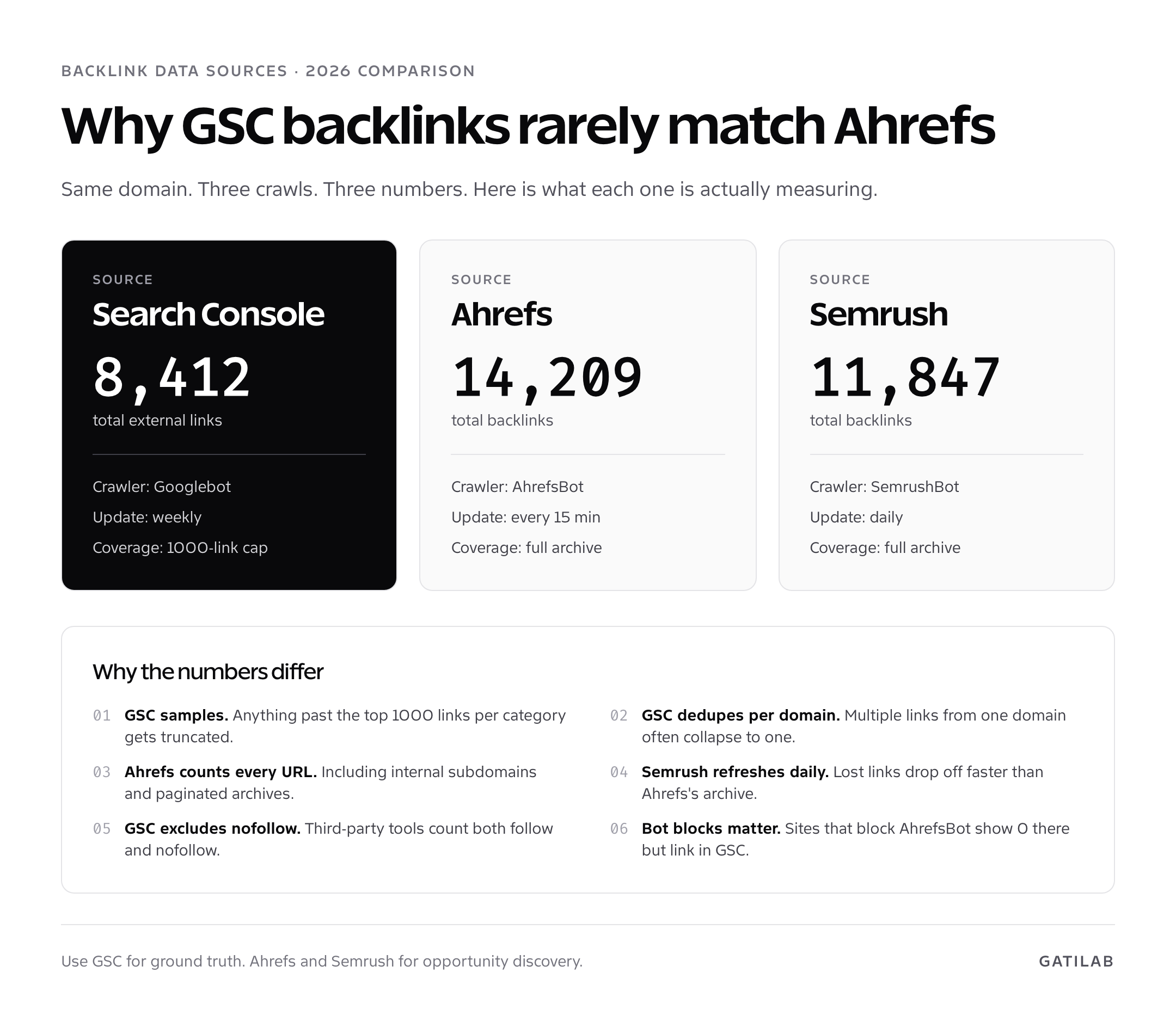
GSC backlinks vs Ahrefs vs Semrush: why the numbers never match
Run a domain through Search Console, Ahrefs, and Semrush in the same session and you will get three different backlink counts. This confuses every client I have ever onboarded. The discrepancy is methodological, not a bug.
Google Search Console backlinks are sampled, deduplicated per domain, and exclude nofollow links. Ahrefs counts every URL its crawler has seen, including paginated archives and sitewide footer links. Semrush refreshes daily and drops links faster than Ahrefs’s cumulative archive. The result: same domain, three numbers that can differ by 30 to 60 percent.
| Source | Strength | Weakness | Best for |
|---|---|---|---|
| Google Search Console | Primary-source data, free, ranking-relevant | 1,000-row cap, slow refresh, no competitors | Audit accuracy, manual-action triage |
| Ahrefs | Largest crawl, fast refresh, competitor data | $129+/month, can over-count | Opportunity discovery, competitor links |
| Semrush | Daily refresh, good toxic-link scoring | $140+/month, smaller archive | Daily monitoring, anchor-text auditing |
| Majestic | Trust Flow / Citation Flow scoring | UX feels dated, smaller dataset | Quality scoring at the domain level |
Use Search Console as ground truth for what Google is counting. Use Ahrefs or Semrush for what your competitors built. Cross-reference both before any disavow decision or link-building campaign. For more on link-building strategy in 2026, see SEO for startups, which covers links as part of the broader early-stage SEO motion.
When and how to use the disavow tool
The disavow tool is a separate URL: search.google.com/search-console/disavow-links-tool. It is intentionally hard to find because Google’s official position since 2020 is that most sites should not use it. Algorithmic systems handle most spam links automatically. The disavow tool is for manual action recovery and a small set of edge cases.
The cases I disavow in 2026 are: an active “Unnatural links to your site” manual action, a pattern of obvious paid-link buying from a previous SEO agency that I can document, a clear PBN cluster with hundreds of similar domains all linking with the same anchor, and recovery from a confirmed Penguin-style algorithmic suppression. Outside those, I leave the link profile alone.
The disavow file format is plain text, one domain or URL per line. Domain-level disavows (`domain:spamsite.com`) are almost always preferable to URL-level entries because they catch every page on the bad domain. Submit the file via the disavow tool, wait 4 to 12 weeks for Google to recrawl the disavowed domains and propagate the change, and only then submit a reconsideration request if a manual action exists. Submitting reconsideration before the recrawl wastes the request.
Monitoring backlinks proactively
Search Console backlinks update on a 1 to 3 day cadence, which means a sudden spam-link influx will not be visible until 24 to 72 hours after it starts. For real-time monitoring, set up an Ahrefs or Semrush alert on new backlinks, scoped to your domain, and review weekly. The combination is reliable: GSC for the authoritative count, third-party tools for the early warning.
What I track monthly on every Gatilab client property: total external linked pages (top-line health), unique linking sites count (link diversity), top 20 anchor text distribution (over-optimisation check), and new links delta (acquisition rate). All four pull from the Google Search Console backlinks report directly. The fifth metric, lost links, requires Ahrefs or a similar tool, because GSC does not surface link removals.
Pair the link-monitoring routine with a quarterly content audit. The same approach I lay out in the comprehensive website audit guide applies. Links without good content to support them rarely move rankings. Content without link signals to support it ranks slowly, if at all. Both matter. Audit both.
Common Google Search Console backlinks mistakes
Three mistakes I see repeatedly. First, treating the 1,000-link cap as a real number. Sites with strong link profiles often have 50,000 or more referring URLs. Looking only at the GSC export and concluding “we have a small link profile” is misreading the report. Second, panic-disavowing on volume. Spammy-looking links rarely matter. Manual review of 50 random samples is faster than blanket disavow and produces a better result. Third, ignoring the internal-link panel. It is the single most actionable report in the entire product, and most teams never open it.
Pair this Google Search Console backlinks workflow with a regular SEO audit using the full GSC audit checklist and a keyword research workflow that surfaces the queries your linked pages should expand to cover. The GSC keyword research guide is the natural next step. For B2B context specifically, see B2B SaaS keyword research, which uses GSC data as one of three primary inputs.
A repeatable monthly link-audit routine
End with a routine. On the first Monday of every month, open Search Console, navigate to Settings > Links, and walk the four panels in order. Top linked pages first: identify the top 10 by external link count, audit their internal outbound links. Top linking sites second: spot-check the top 50 domains for spam clusters or unfamiliar referrers. Top linking text third: chart anchor distribution and confirm branded share is above 40 percent. Internal links fourth: confirm your top 10 commercial URLs appear in the top 30 internal-link list.
Document delta from last month in a single sheet. New referring domains, lost referring domains (cross-checked with Ahrefs), anchor distribution shifts, and any new internal-link orphans. The whole audit takes 25 to 40 minutes once you have done it three times. The delta is what surfaces problems fast, before they show up in ranking drops.
Exporting Google Search Console backlinks for analysis
The export options in the Links report are limited but useful. Each panel has an Export button at the top right that ships either CSV, Excel, or Sheets. The CSV includes the same 1,000-row sample you see in the UI, no more. For larger sites you have two options: the Search Console API or the BigQuery bulk export. Both bypass the 1,000-row cap and give you the full sample Google has indexed.
The API endpoint for backlinks specifically is /webmasters/v3/sites/{siteUrl}/searchAnalytics/query, but for link data you want the Indexing API and the URL Inspection API combined with a separate scrape of the four Links panels. The bulk BigQuery export, available since 2023, ships the full link sample Google maintains for your property and is the right path for sites over 50,000 URLs. Setup takes 20 minutes and costs effectively nothing for sites under a million URLs.
Once exported, I run the data through a simple Google Sheet that flags: domains that appeared in the last 30 days, domains lost in the last 30 days, anchor-text distribution against the 40/20/20/15 healthy benchmark, and internal-link counts per priority page. The sheet is 4 tabs and a couple of pivot tables. No specialist tooling required.
When the GSC backlinks report contradicts third-party data
This happens often enough that it deserves its own section. Ahrefs reports 12,000 referring domains. Semrush reports 9,500. Search Console shows 4,200. Which is right? All three. They are measuring different things and you should care about different ones at different points in the workflow.
For ranking signal, Google Search Console backlinks data is the only count that matters. If a link is not in GSC, Google has not counted it for ranking purposes. For competitive analysis, Ahrefs is more useful because it shows you links your competitors have that you do not. For toxic-link review, Semrush’s Backlink Audit tool gives you a toxicity score per domain that GSC does not provide. The three together cover the full link analysis stack. Picking one and ignoring the others is the actual mistake.
For practical budget allocation: if you can only pay for one paid tool, Ahrefs covers the most ground. If you have a $50/month budget and not $129, Ubersuggest, Mangools (LinkMiner), or Moz Link Explorer all show competitor links well enough for a small site. Pair any of them with GSC for free, and you have a workable link audit stack. For more on this trade-off, see the best keyword research tools guide, which covers both link and keyword tooling at different budget tiers.
Spotting negative SEO attacks in the GSC backlinks data
Negative SEO is rarer than panic-posting on SEO forums suggests, but it does happen, and the GSC Links report is where you would notice it first. The signal pattern is unambiguous: a sudden 5x to 50x spike in linking pages from low-quality domains, often originating from the same TLDs (.tk, .pw, .top), often using identical anchor text. The pattern is so distinctive that one minute of triage tells you whether it is real.
If you see the pattern, the response is calibrated. First, do not panic-disavow. Google’s spam systems detect this exact pattern and discount the links algorithmically more than 95 percent of the time in 2026. Second, document the spike with screenshots and CSV exports. Third, monitor ranking and traffic for 30 days. If neither moves, the algorithmic systems handled it and no action is needed. If rankings drop materially, then disavow the cluster as a single domain-level entry per TLD pattern.
The other signal worth watching: hacked outbound links from your own site appearing as inbound in the Top linking sites panel. If your domain shows up linking to itself with anchor text you did not author, you have been compromised. Run a security audit immediately, rotate every credential, and clean the database. The Google Search Console backlinks report is sometimes the only place this pattern surfaces before the rankings drop confirms the breach.
Why does Google Search Console show fewer backlinks than Ahrefs?
GSC samples links and caps at 1,000 rows per panel, deduplicates per domain, and excludes nofollow. Ahrefs counts every URL its crawler has seen. The numbers measure different things: GSC reports what Google counts for ranking, Ahrefs reports total link inventory.
How do I export Google Search Console backlinks?
Click the Export button at the top right of any panel in the Links report. CSV, Excel, and Google Sheets are supported. Each export ships the same 1,000-row sample shown in the UI. For full data, use the Search Console API or BigQuery bulk export.
How often does the GSC Links report update?
Every 1 to 3 days, depending on how active your link profile is. Sudden link influxes can take up to 72 hours to appear. For real-time monitoring, pair GSC with an Ahrefs or Semrush new-backlink alert.
Should I disavow links I see in the GSC Links report?
Only if you have a manual action, a documented history of paid links, or a clear spam cluster. Most spammy-looking links are ignored by Google automatically. Mass disavow tends to hurt more than it helps in 2026.
What is a healthy anchor text distribution in 2026?
40 to 60 percent branded, 15 to 25 percent navigational (‘click here’, ‘this article’), 15 to 25 percent topical descriptive phrases, and 5 to 15 percent exact-match keyword. Exact-match above 15 percent is an over-optimisation signal.
Does the GSC Links report include nofollow backlinks?
No. Google Search Console backlinks data excludes nofollow and rel=’ugc’ links from the external link counts. This is correct from a ranking-signal perspective but makes GSC totals lower than tools that count both follow and nofollow.
What is the internal links panel for in the Links report?
It ranks your pages by inbound internal links. This is the page-importance signal you send Google. Compare it to your business priority list. If your top commercial pages do not appear in the top 20 internal-link list, you have an internal-link-architecture problem.
Can I see lost backlinks in Google Search Console?
No. GSC does not surface link removals. For lost-link tracking you need Ahrefs, Semrush, or Majestic. The combination of GSC for current state and a third-party tool for delta tracking is the standard professional setup.
How do I submit a disavow file?
The disavow tool lives at search.google.com/search-console/disavow-links-tool. Submit a plain text file with one domain or URL per line. Domain-level disavows (‘domain:spamsite.com’) are usually preferable. Wait 4 to 12 weeks for Google to recrawl before submitting reconsideration.
Are no-follow links useless for SEO?
No, but they are not direct ranking signals. Nofollow links from authoritative sites (Wikipedia, Reddit, major news outlets) drive referral traffic, brand awareness, and often correlate with follow links from secondary sources. They are valuable, just not the same as follow links.
Tell Google you want more of this.
Add Gatilab as a preferred sourceOne tap, and this site shows up more often in your own Top Stories, AI Overviews and AI Mode. Remove it any time.