
Google Consent Mode v2 Setup: GA4, GTM, and CMP Integration (2026 Guide)
Google Consent Mode v2 is mandatory for any site running Google Ads, GA4, or Google Marketing Platform tags that serves traffic from the European Economic Area, the UK, or Switzerland. The deadline was March 2024. Sites still not on Consent Mode v2 have been silently losing remarketing audiences, conversion modeling, and personalized advertising eligibility ever since. The numbers I see in client audits are consistent: properties that haven’t migrated lose 15 to 40 percent of measurable conversions in regulated regions, and the lost data does not retroactively backfill.
I’ve shipped Google Consent Mode v2 across 19 client sites at Gatilab in the last 14 months: WordPress installs running Cookiebot, OneTrust, Iubenda, and Complianz, plus Shopify and a handful of custom Next.js builds using Klaro and CookieYes. The setup looks complicated on the docs page and is actually straightforward in practice once you understand what the four required parameters do, how Basic and Advanced mode differ, and which CMP integrations have the GTM template wired correctly versus which need manual fixes.
Google Consent Mode v2 is not a privacy feature; it is a measurement-recovery feature. It tells Google’s tags how to behave when a visitor declines tracking, so you don’t lose every modeled conversion the moment somebody clicks “Reject all.”
What Google Consent Mode v2 Is
Google Consent Mode v2 is the framework Google uses to receive consent signals from your cookie banner and adjust the behaviour of Google tags (GA4, Google Ads, Floodlight, Campaign Manager 360) accordingly. When a visitor has not given consent, Google tags either send anonymized “cookieless pings” (Basic mode) or send full event data without storing identifiers (Advanced mode). Either way, Google’s machine learning models the behavioural conversions and back-fills the missing data inside your reports, with measurable accuracy when the volume is sufficient.
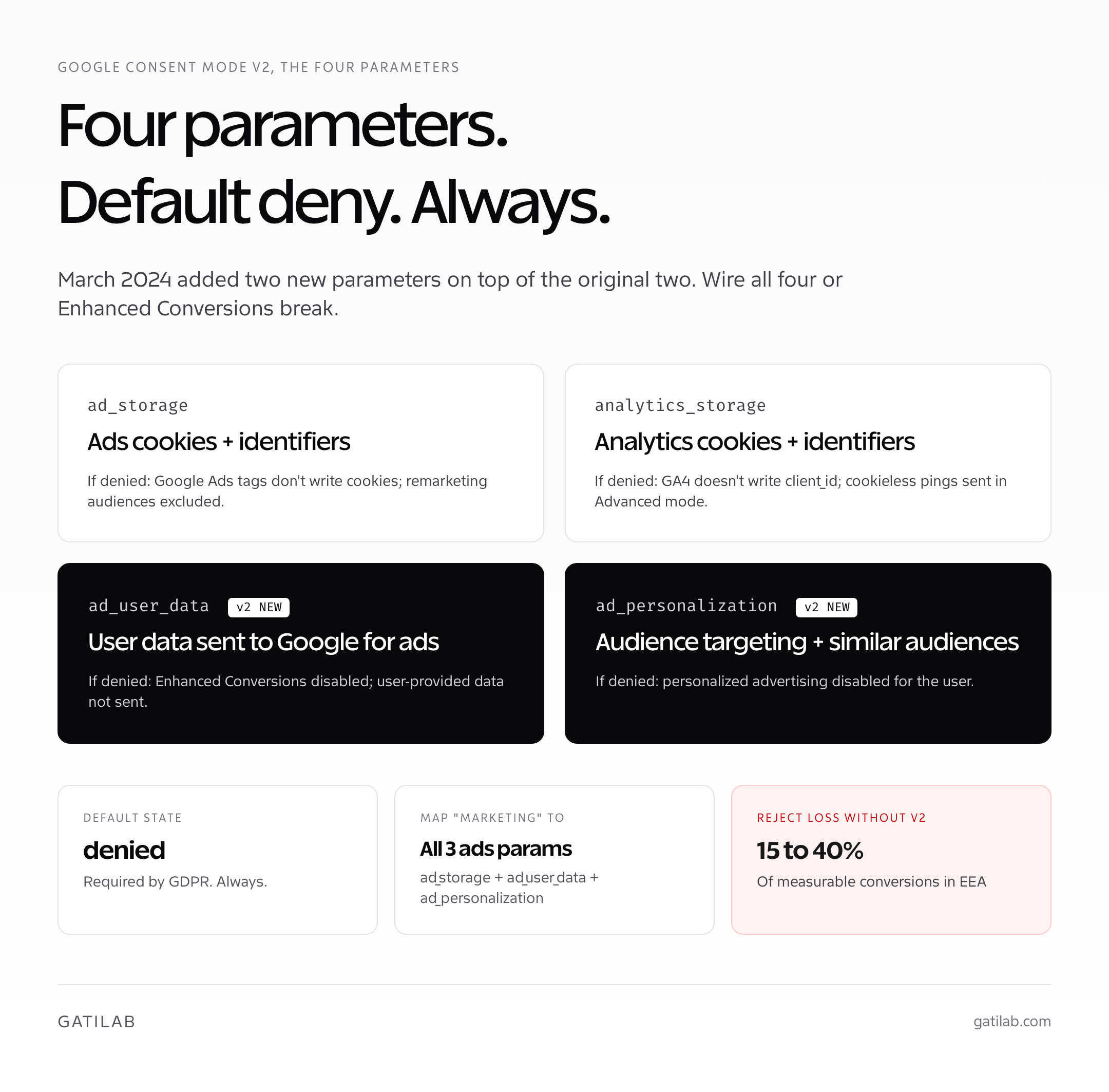
The “v2” in Google Consent Mode v2 refers to the March 2024 update that added two new parameters (ad_user_data and ad_personalization) on top of the original two (ad_storage and analytics_storage). Sites running the original Consent Mode (sometimes called “v1”) are no longer compliant for advertising features in regulated regions and will see remarketing list freezing, suppressed conversion modeling, and warnings inside Google Ads. Migration is not optional if you advertise with Google in the EEA.
- Required for: Any site using Google Ads, GA4, Floodlight, Campaign Manager 360, or Google Marketing Platform tags AND serving EEA, UK, or Swiss traffic.
- Recommended for: Any site running Google tags globally, even outside the EEA, because the modeling improves overall data quality.
- Not required for: Sites with no Google tags and no Google advertising. If you’re 100 percent organic and run only Plausible or Fathom, Consent Mode v2 doesn’t apply.
- Two implementation modes: Basic (block tags until consent) and Advanced (load tags in cookieless mode pre-consent). Most sites should run Advanced.
The cost of not running Consent Mode v2 in regulated regions: GA4 reports drop 15 to 40 percent of conversions in countries with high reject-rates (Germany typically 50 percent plus, France 35 to 45 percent, Italy 25 to 35 percent). Google Ads remarketing audiences shrink to the fraction of users who explicitly opted in. Conversion modeling for Smart Bidding stops back-filling. Performance Max stops getting the modeled signals it needs to optimize. The compounding loss across 6 months of campaigns is significant.
Basic vs Advanced Mode (And Which to Pick)
Basic and Advanced Consent Mode behave fundamentally differently. The choice has measurement implications, legal implications, and technical implications. Most sites should run Advanced; some sites cannot for legal reasons. Knowing which applies depends on your DPO’s risk tolerance, your traffic mix, and the specific guidance your jurisdiction’s regulator has published.
| Mode | Pre-consent behaviour | Modeling quality | Legal risk profile |
|---|---|---|---|
| Basic | Google tags do not load. No data sent until consent given. | Lowest. No data to model from for visitors who reject. | Lowest. No data leaves the browser pre-consent. |
| Advanced | Google tags load and send anonymized cookieless pings. Full event data sent without identifiers. | Highest. Google can model conversions for rejecting users. | Higher than Basic. Some EU regulators have flagged the cookieless ping as still being a data transfer. |
The practical answer for most sites: run Advanced mode unless your legal team specifically requires Basic. Advanced gives Google the cookieless event data it needs to model the missing conversions, recovering 15 to 40 percent of the lost reporting accuracy. The data sent in Advanced mode is genuinely anonymized (no user identifiers, no client ID), but some regulators (notably France’s CNIL in 2023) have flagged the cookieless ping as a data transfer that requires consent or legitimate interest justification.
Heads-up: the legal landscape around Consent Mode Advanced is unsettled. France’s CNIL has issued mixed guidance; Italy’s Garante has been more permissive; Germany’s regulators vary by Länder. If you serve regulated jurisdictions and your DPO can’t get clear guidance, run Basic mode and accept the modeling loss until the rules clarify. The ad-spend trade-off is real, but a fine for non-compliance is worse.
The Four Required Consent Parameters
Google Consent Mode v2 reads four consent parameters from your cookie banner. Each parameter has two possible values (granted or denied), and the combinations control how Google tags behave. Understanding what each parameter does prevents the most common implementation mistake: setting them all to a single value when the visitor’s actual consent is more nuanced.
| Parameter | Controls | If denied |
|---|---|---|
ad_storage | Cookies and identifiers used for advertising | Google Ads tags don’t write cookies; remarketing audiences excluded |
analytics_storage | Cookies and identifiers used for analytics | GA4 doesn’t write client_id cookie; cookieless pings sent in Advanced mode |
ad_user_data (v2 new) | Sending user data (e.g., email, phone) to Google for advertising | Enhanced Conversions disabled; user-provided data not sent |
ad_personalization (v2 new) | Use of data for ads personalization (audience targeting, similar audiences) | Personalized advertising disabled for the user |
The default state for all four parameters before consent is collected should be denied. Once the visitor interacts with the cookie banner and selects categories, the parameters update to reflect their choice. Most CMPs map their consent categories to these parameters automatically, but the mapping is the most common source of misconfiguration. Always verify the mapping in Google Tag Assistant after deployment.
- “Strictly necessary” cookies: typically don’t map to any of the four parameters. They’re consent-exempt under GDPR.
- “Statistics” or “Analytics”: maps to
analytics_storage. - “Marketing” or “Advertising”: maps to
ad_storage,ad_user_data, ANDad_personalization(all three together). - “Preferences” or “Functional”: usually doesn’t map to Google’s parameters; controls non-Google cookies.
The most common mistake I see in client audits is mapping “Marketing” to ad_storage only, without also mapping it to ad_user_data and ad_personalization. The result: Enhanced Conversions silently break and audience personalization stops working without any visible error in GA4 or Google Ads. Verify all three are wired during the GTM debug session.
CMP Integration: Cookiebot, OneTrust, Iubenda, Complianz
The Consent Management Platform (CMP) is the cookie banner that collects the visitor’s consent and updates Google’s parameters. Four CMPs dominate the market for SMB and mid-market sites in 2026, each with different strengths around Consent Mode v2 integration depth, pricing, and regulatory coverage.
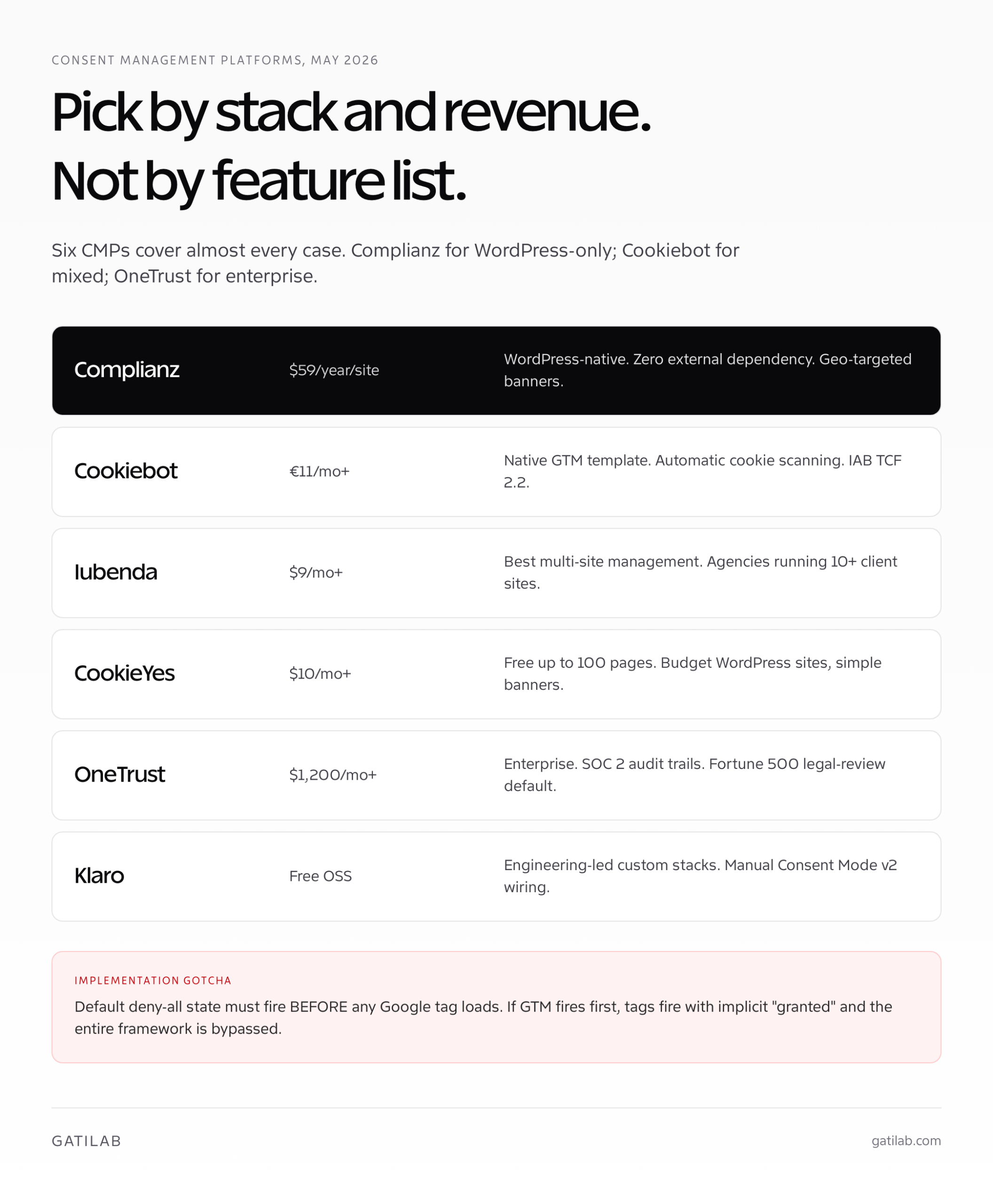
| CMP | Pricing (May 2026) | Consent Mode v2 integration | Best for |
|---|---|---|---|
| Cookiebot | Free up to 50 pages; from €11/mo (Premium) | Native GTM template, automatic mapping, IAB TCF 2.2 | SMB and mid-market WordPress sites |
| OneTrust | Quote-only (typically $1,200+/mo) | Enterprise-grade, IAB TCF 2.2, GPC support, full audit trails | Enterprise, regulated industries, Fortune 500 |
| Iubenda | From $9/mo (Pro), $29/mo (Advanced) | Native Consent Mode v2 toggle, IAB TCF 2.2 | SMB ecommerce, agencies managing multiple sites |
| Complianz | Free; Premium from $59/year/site | WordPress-native, automatic Consent Mode v2 wiring, geo-targeted banners | WordPress sites wanting native plugin (no external dependency) |
| CookieYes | Free up to 100 pages; from $10/mo | Native Consent Mode v2 in Pro plans, IAB TCF support | Budget WordPress sites, simple cookie banners |
| Klaro | Free (open-source) | Manual configuration; Consent Mode v2 wiring requires custom adapter | Engineering-led teams, custom stacks, privacy-first defaults |
Pricing is current to May 2026 and verified against vendor pages. Cookiebot is the default pick for most WordPress sites because the GTM template is solid and the IAB TCF 2.2 integration is reliable. Complianz is the strongest WordPress-native plugin and ships Consent Mode v2 wiring out of the box without external scripts. OneTrust is overkill below $50M annual revenue but is the right pick for regulated industries because the audit trails and consent log retention pass enterprise legal review.
- Pick Complianz if you’re WordPress-only and want zero external script dependency. The premium plugin handles geo-targeted banners, Consent Mode v2, and DSGVO/CCPA in one install.
- Pick Cookiebot if you’re WordPress or mixed-stack and want the deepest GTM integration plus automatic cookie scanning. The free tier covers most blog-scale sites.
- Pick Iubenda if you run an agency or manage 10 plus client sites; the multi-site management UI is the best in market.
- Pick OneTrust if you’re enterprise, in a regulated industry, or your legal team requires SOC 2 audit trails on consent logs.
- Pick Klaro or Cookie Consent Manager (free, open-source) if you have engineering bandwidth and want full control over the banner UI and Consent Mode v2 mapping. Requires more setup time.
The single largest implementation gotcha across all CMPs: the default deny-all state must fire before any Google tag loads. If your CMP loads asynchronously and the GA4 tag fires first, the consent state defaults to “granted” until the CMP catches up, which is both legally non-compliant and produces phantom conversions in GA4 that disappear when the CMP overrides. Always test load order with the GTM Preview console.
GA4 and GTM Setup Step-by-Step
The Google Tag Manager setup for Consent Mode v2 has five concrete steps. Most CMPs ship a GTM template that handles steps 2 and 3 automatically; the remaining steps are manual regardless of which CMP you use. Run through them in order and verify with GTM Preview before publishing.
- Enable Consent Overview in GTM. Admin > Container > Consent Overview. Toggle “Add consent overview” on. This surfaces consent state on every tag in the workspace.
- Set the default consent state. Add a Consent Initialization tag (or use the CMP’s GTM template) that sets all four parameters to
deniedby default, fired on the Consent Initialization – All Pages trigger. - Update consent on user choice. The CMP’s GTM template (Cookiebot, Iubenda, OneTrust all ship one) listens for the consent decision and pushes the updated parameters into the dataLayer.
- Configure tag-level consent settings. Each Google tag (GA4 Configuration, Google Ads Conversion, Floodlight) has a “Consent Settings” section. Set them to “Require additional consent for tag to fire” and add the relevant parameters (analytics_storage for GA4, ad_storage + ad_user_data + ad_personalization for Ads).
- Verify with GTM Preview. Open the site in Preview mode, decline cookies, refresh. Check Tag Assistant: tags should show “Cookieless ping” status if Advanced mode, or “Blocked by consent” if Basic. Then accept cookies and verify tags fire normally.
For GA4 specifically, ensure “Behavioral modeling for consent mode” is enabled in your GA4 property settings (Admin > Data Display > Reporting Identity > Reporting Identity must be set to “Blended”). Without this setting, GA4 won’t model the cookieless pings into reportable conversions and the entire Advanced mode benefit is lost.
If you’re not yet on GA4 or your attribution setup is patchwork, fix that first. Consent Mode v2 sits on top of properly configured GA4 + Google Ads tagging. Without the foundation, the modeling has nothing to model from.
WordPress Implementation
WordPress sites have three viable paths to Google Consent Mode v2: a CMP plugin (Complianz, CookieYes, Cookiebot’s WP plugin), a CMP plus a tag manager plugin (any CMP plus GTM4WP), or a fully custom GTM container with the CMP loading via direct script. The right path depends on whether you already use GTM and how much customization the cookie banner needs.
- Path 1: Complianz Premium ($59/year/site). Native plugin handles cookie scanning, consent banner, Consent Mode v2 wiring, and geo-targeting. No GTM required for basic GA4 + Ads. The simplest path for most WordPress sites under $5M revenue.
- Path 2: Cookiebot or CookieYes plus GTM4WP. CMP plugin handles the banner; GTM4WP injects GTM with proper consent integration. Best for sites that already use GTM for non-Google tags or run multiple advertising platforms.
- Path 3: Custom GTM container with CMP loaded via scripts plugin. Full control, more flexibility, more setup time. Right for development teams that want the CMP banner styled to match brand precisely.
- Avoid: any “free GDPR” plugin that hasn’t been updated since 2023. Most don’t ship Consent Mode v2 support and silently break the parameters Google now expects.
The WordPress-specific gotcha: if you use a caching plugin (LiteSpeed Cache, WP Rocket, W3 Total Cache) with HTML minification, the inline consent script that sets the default deny-all state can be reordered or stripped. Verify the consent script appears in the rendered HTML before the GTM container script after caching is enabled. Most caching plugins have an “Exclude from minification” setting for the consent script tag.
Validation: Proving Consent Mode v2 Works
Validation is the step most teams skip and shouldn’t. A misconfigured Consent Mode v2 setup looks identical to a working one in GA4 reports for the first two to three weeks; the symptoms appear gradually as remarketing audiences shrink, conversion modeling silently fails, and Performance Max campaigns lose signal. Verify on day one, not in week six when the campaign performance review surfaces the problem.
- Run Google Tag Assistant. Visit the site, decline cookies, click around. Tag Assistant should show all four parameters as
deniedand Google tags as “Cookieless ping” (Advanced) or “Blocked” (Basic). - Use Chrome DevTools Network panel. Filter for
collect?v=2(GA4) andgoogleadservices.com. Verify the requests includegcs=G100(denied) orgcs=G111(granted) parameters in the URL. - Check the GA4 Consent State debug report. Admin > Data Settings > Behavioral Modeling. After 7 days, this report shows the percentage of sessions with consent granted vs denied vs modeled.
- Check Google Ads diagnostics. Tools > Conversions > (your conversion) > Diagnostics. Should show “Consent Mode v2 detected” and no warnings about missing parameters.
- Test on multiple browsers and devices. Safari iOS, Chrome Android, Firefox Desktop. Some CMPs handle ITP differently; verify the consent state survives ITP tracking restrictions.
The validation tooling is free; the only cost is 30 minutes of careful checking on the day you ship. Skip it and you’ll spend three weeks debugging missing conversions later.
Common Consent Mode v2 Mistakes
The mistakes I see in client audits cluster predictably. Almost every misconfigured Google Consent Mode v2 setup makes three or more of these. None are difficult to fix; all are easy to ship by mistake.
- Default state set to “granted” instead of “denied.” The most common single mistake. Sites assume Consent Mode v2 is opt-out; it’s opt-in. Default deny is required by GDPR.
- Mapping marketing consent to
ad_storageonly. The v2 update addedad_user_dataandad_personalization; both must be wired or Enhanced Conversions break silently. - Loading GTM before the CMP. If GTM fires before the CMP sets the default state, tags fire with implicit “granted” and the entire framework is bypassed. CMP must load first.
- Behavioral modeling not enabled in GA4. Even with Advanced mode firing correctly, GA4 won’t model conversions unless the property setting is on. Most teams ship the GTM side but never check the GA4 side.
- Geo-targeting set incorrectly. Most CMPs let you show the banner only to EEA traffic. If you accidentally exclude UK or Switzerland (which are not in the EEA but are subject to UK GDPR / FADP), you’re non-compliant for those visitors.
- Caching plugin breaking consent script order. Tested in dev, broken in prod after caching enabled. Always verify after enabling cache.
- Not testing the “Reject all” path. Most teams test “Accept all” and call it done. The Reject path is where the actual Consent Mode v2 logic activates; that’s the test that matters.
The single most expensive mistake is not running validation on day one. The framework looks identical when broken vs working for the first 14 to 21 days because GA4’s own data buffer absorbs the gap. By the time the symptoms surface, you’ve lost three weeks of properly modeled data and there is no retroactive backfill mechanism.
If your site sells in regulated regions, run a full website audit alongside the Consent Mode v2 work. The audit catches the broader privacy and compliance gaps (cookie scans, third-party trackers, fingerprinting scripts) that the CMP banner alone won’t cover.
A 7-Day Consent Mode v2 Implementation Plan
If you’re starting from a non-Consent-Mode-v2 setup and need to ship in a week, here’s the order I run with clients. The pattern is sequential because each step depends on the previous one being verified.
- Day 1: CMP selection and install. Pick from the table above. Install on staging. Configure the cookie scan, set categories, define the deny-all default state.
- Day 2: GTM consent integration. Add the CMP’s GTM template. Wire the four parameters. Configure tag-level consent settings on every Google tag.
- Day 3: GA4 configuration. Enable behavioral modeling. Set Reporting Identity to Blended. Verify the property is receiving cookieless pings in DebugView.
- Day 4: Validation on staging. Run Tag Assistant, DevTools, and the Consent State debug report. Test Accept all, Reject all, and Customize paths. Fix any misconfigurations.
- Day 5: Production deploy. Push to production during low-traffic window. Re-run validation immediately. Verify caching plugin didn’t break script order.
- Day 6: Multi-browser test. Safari iOS, Chrome Android, Firefox Desktop. Verify ITP and FF anti-tracking don’t break the consent state.
- Day 7: Document and monitor. Document the configuration in a shared file. Set a calendar reminder for 14 days out to check the GA4 Consent State report and Google Ads diagnostics.
Most sites I run this for have working Consent Mode v2 in 4 to 7 days, with the longest delay usually being the legal review of the cookie banner copy and category mapping. Once shipped, the modeling kicks in within 7 to 14 days as GA4 accumulates enough cookieless data to back-fill the rejected sessions.
FAQs on Google Consent Mode v2
What is Google Consent Mode v2?
Google Consent Mode v2 is the framework Google uses to receive consent signals from your cookie banner and adjust the behaviour of Google tags (GA4, Google Ads, Floodlight, Campaign Manager 360) accordingly. The v2 update from March 2024 added two new parameters (ad_user_data and ad_personalization) on top of the original two (ad_storage and analytics_storage). Sites running v1 are no longer compliant for advertising features in regulated regions.
Is Google Consent Mode v2 mandatory?
Yes, for any site using Google Ads, GA4, Floodlight, Campaign Manager 360, or Google Marketing Platform tags AND serving traffic from the European Economic Area, the UK, or Switzerland. The deadline was March 2024. Sites still not on Consent Mode v2 lose remarketing audiences, suppressed conversion modeling, and Performance Max signal quality. The lost data does not retroactively backfill once you migrate.
What’s the difference between Basic and Advanced Consent Mode?
Basic mode blocks Google tags from loading until the visitor consents; no data leaves the browser pre-consent. Advanced mode loads tags in cookieless mode and sends anonymized pings even before consent, which Google then uses to model conversions for users who reject. Advanced gives the highest modeling quality and recovers 15 to 40 percent of the reporting accuracy lost to consent rejection. Basic gives the lowest legal risk profile because no data transfer happens pre-consent.
Which mode should I pick: Basic or Advanced?
Most sites should run Advanced unless their legal team specifically requires Basic. Advanced gives Google the cookieless event data it needs to model the missing conversions. The legal landscape around Advanced mode is unsettled: France’s CNIL has issued mixed guidance, Italy’s Garante has been more permissive, and Germany’s regulators vary by Länder. If your DPO can’t get clear guidance for your jurisdictions, run Basic and accept the modeling loss until the rules clarify.
What are the four Consent Mode v2 parameters?
ad_storage controls cookies and identifiers used for advertising. analytics_storage controls cookies and identifiers used for analytics. ad_user_data (new in v2) controls sending user data like email or phone to Google for advertising; controls Enhanced Conversions. ad_personalization (new in v2) controls use of data for ads personalization, audience targeting, and similar audiences. All four default to denied before consent. Map your CMP’s ‘Marketing’ category to ad_storage AND ad_user_data AND ad_personalization (all three together).
Which CMP should I use for Google Consent Mode v2?
Complianz Premium ($59/year/site) for WordPress-only sites wanting zero external dependency. Cookiebot (€11/mo+) for WordPress or mixed-stack sites wanting the deepest GTM integration. Iubenda ($9/mo+) for agencies managing 10 plus client sites. OneTrust (quote-only, typically $1,200/mo+) for enterprise and regulated industries needing SOC 2 audit trails. Klaro (free, open-source) for engineering-led custom stacks willing to wire Consent Mode v2 manually.
How do I set up Google Consent Mode v2 in GTM?
Five steps: 1) Enable Consent Overview in GTM (Admin > Container > Consent Overview). 2) Add a Consent Initialization tag that sets all four parameters to denied by default, fired on Consent Initialization – All Pages. 3) Use the CMP’s GTM template to listen for consent decisions and push updated parameters into the dataLayer. 4) Configure tag-level consent settings on every Google tag (GA4, Ads, Floodlight) requiring the relevant parameters. 5) Verify with GTM Preview: decline cookies, refresh, check Tag Assistant for Cookieless ping (Advanced) or Blocked status (Basic).
How do I enable behavioral modeling in GA4?
Go to GA4 Admin > Data Display > Reporting Identity. Set Reporting Identity to Blended. Then Admin > Data Settings > Behavioral Modeling and toggle modeling on. Without this setting, GA4 won’t model the cookieless pings that Advanced Consent Mode sends, and the entire Advanced mode benefit is lost. Most teams ship the GTM side correctly but forget the GA4 side; the result is technically compliant but produces no modeled conversions.
How do I validate Google Consent Mode v2 is working?
Run Google Tag Assistant on the live site, decline cookies, click around. Tag Assistant should show all four parameters as denied and Google tags as ‘Cookieless ping’ (Advanced) or ‘Blocked’ (Basic). Open Chrome DevTools Network panel and filter for collect?v=2 (GA4) requests; verify they include gcs=G100 (denied) or gcs=G111 (granted) URL parameters. Check the GA4 Consent State debug report after 7 days. Check Google Ads diagnostics for ‘Consent Mode v2 detected’ status.
What happens if I don’t implement Consent Mode v2?
Properties that haven’t migrated lose 15 to 40 percent of measurable conversions in regulated regions, and the lost data does not retroactively backfill. Specifically: GA4 reports drop conversions in countries with high reject-rates (Germany typically 50 percent plus, France 35 to 45 percent, Italy 25 to 35 percent). Google Ads remarketing audiences shrink to opt-in only. Conversion modeling for Smart Bidding stops back-filling. Performance Max stops getting modeled signals. Google has flagged non-compliant accounts with warnings inside the Ads UI since mid-2024.
Tell Google you want more of this.
Add Gatilab as a preferred sourceOne tap, and this site shows up more often in your own Top Stories, AI Overviews and AI Mode. Remove it any time.