
Google Search Console vs Google Analytics: When to Use Which
Google Search Console (GSC) and Google Analytics (GA4) answer different questions about the same website, which is why people keep confusing them. GSC shows what happens before someone clicks a Google search result: the query they typed, the impression your page got, the click-through rate. GA4 shows what happens after they land on your site, regardless of where they came from: pages viewed, scroll depth, purchases, sessions, channel mix.
Use GSC for search performance, indexing, and technical SEO. Use GA4 for on-site behavior, conversions, and attribution across all traffic sources. Connect them to get the full story from search query to final action.
The one-sentence difference
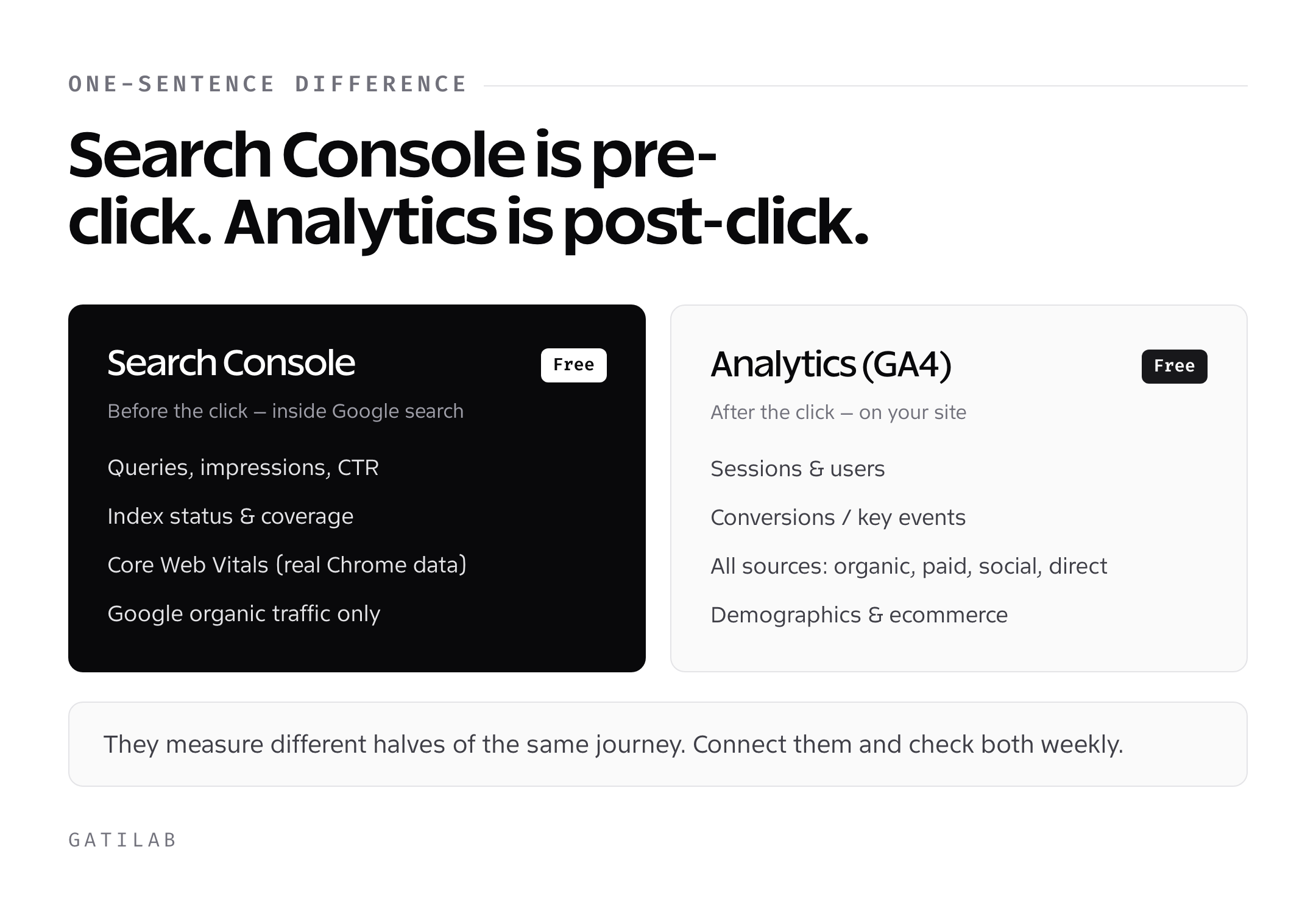
GSC is a pre-click tool. GA4 is a post-click tool.
Everything that happens on Google’s search results page (a user typing a query, seeing your page, deciding whether to click) lives inside GSC. Everything that happens after they arrive on your site (scrolling, clicking a link, filling a form, buying something) lives inside GA4. That single split explains 90% of the confusion between the two tools.
GSC is free, owned by Google Search, and only measures organic traffic from Google itself (not Bing, not ChatGPT, not direct links from newsletters). GA4 is free, owned by Google Analytics, and measures every traffic source that lands on your pages, including direct, email, referral, paid, and organic from every search engine.
What Google Search Console tracks
GSC is the mirror Google holds up to your website. It shows you how Google itself sees your pages: what queries you rank for, how often your pages appear in results (impressions), how often people click (clicks), what position you hold (average position), and whether Google can technically crawl and index your content.
Core reports inside GSC in 2026:
- Performance > Search results: queries, pages, countries, devices, and search appearance, with clicks, impressions, CTR, and average position for each.
- Indexing > Pages: which URLs are indexed, which aren’t, and why (soft 404, redirect, canonical issue, crawl error).
- Experience > Core Web Vitals: LCP, INP, CLS measured from real Chrome users (CrUX data).
- Enhancements: structured data validation (FAQ, Product, How-To, Article, Review, Breadcrumb schemas).
- Links: internal and external links Google has discovered, with anchor text.
- Sitemaps: submit and monitor XML sitemap status.
- URL Inspection: check any specific URL’s index status, request indexing, and see rendered HTML as Googlebot sees it.
What GSC cannot tell you: which traffic converted, which pages users bounced off, what happened in the session after the click, whether the visitor came back. None of that. GSC’s visibility ends the moment the user leaves Google’s search results.
Data retention: GSC stores 16 months of search performance data. Export to BigQuery if you need longer.
What Google Analytics (GA4) tracks
GA4 is the mirror your website holds up to itself. It tracks every visitor interaction once they land, regardless of source. Where GSC sees only Google organic traffic, GA4 sees all eight default channel groupings: Direct, Organic Search, Paid Search, Organic Social, Paid Social, Email, Referral, Display, and Paid Other.
Core reports inside GA4:
- Reports > Acquisition: user and session counts by source/medium/channel.
- Reports > Engagement: pages, events, conversions (called “key events” in GA4 since 2024).
- Reports > Monetization: ecommerce revenue, purchases, subscriptions.
- Reports > Retention: cohorts, user lifetime value.
- Reports > Demographics: age, gender, interests (estimated from Google Signals).
- Reports > Tech: device, browser, OS, screen resolution.
- Explorations: custom funnel, path, segment overlap, and cohort analyses.
- Admin > DebugView: real-time event debugging.
GA4’s event-based model is a break from Universal Analytics. Every interaction is an event (page_view, scroll, click, file_download, video_start, purchase). You can build custom events for anything specific to your business (newsletter_signup, demo_requested, pricing_viewed).
What GA4 cannot tell you: which search queries drove the traffic. Google hides query-level data from Analytics for privacy reasons. You’ll see “organic search” as a channel, but the actual keywords are stripped unless you connect GSC to GA4.
Data retention: GA4 retains event-level data for 2, 14, or 26 months depending on the setting in Admin. Default is 2 months, which is almost always too short. Change this the day you create the property.
Why the numbers never match
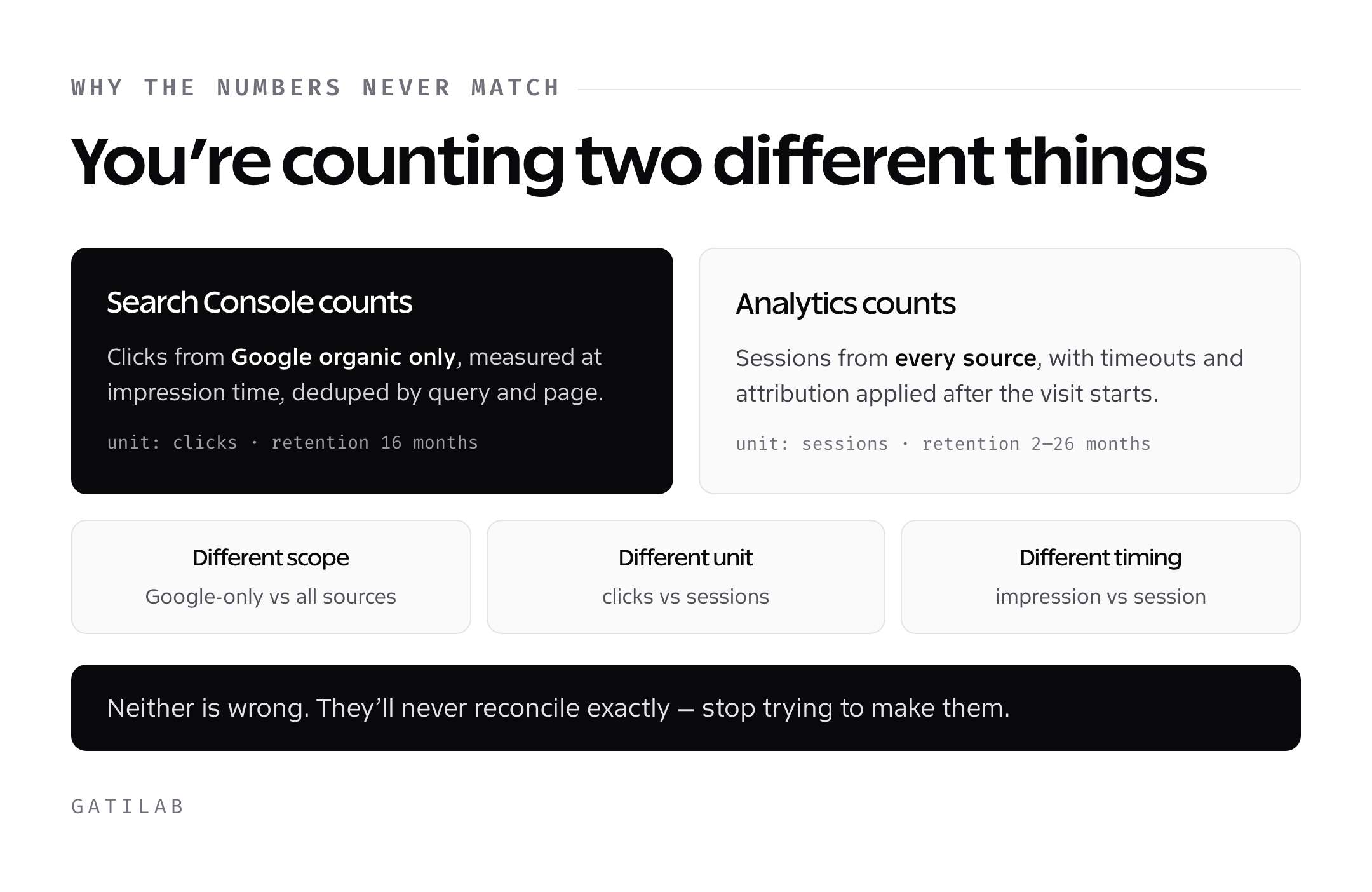
Every SEO sees this eventually. GSC says 12,400 clicks from organic in the last 28 days. GA4 says 9,800 organic search sessions. The numbers don’t match. Both are correct. They measure different things.
Five reasons the numbers diverge:
- Attribution windows. GSC logs a click the moment it happens. GA4 logs a session, which can include multiple clicks from the same user in 30 minutes and gets attributed to the first source.
- Bot filtering. GA4 strips bot traffic aggressively by default. GSC includes some automated clicks that GA4 excludes.
- Cookie consent. If a user lands on your page from Google organic but rejects cookies, GA4 doesn’t log the session. GSC doesn’t care about cookies and still logs the click.
- JavaScript errors and ad blockers. GA4 relies on a JavaScript tag firing. Ad blockers and broken tags silently kill GA4 data. GSC measures from Google’s side and isn’t affected.
- Sampling. Both tools sample under high traffic, but with different thresholds and methods.
The gap is almost always 10-30% between GSC clicks and GA4 organic sessions, with GSC showing more. If the gap is above 40%, check for missing GA4 tags, aggressive cookie banners, or misconfigured filters.
How the data is structured differently
GSC organizes data by query and page. Every row in the Performance report is a query, a page, a device, a country, or a combination. You can filter by any dimension, but you can’t slice by session or user. There’s no concept of a user journey in GSC.
GA4 organizes data by user, session, and event. Every row represents a user’s interaction or a session’s summary. You can follow a single user across sessions (if they accept cookies), track a funnel from landing to conversion, and build cohorts by acquisition date.
The practical implication: GSC answers “what query drove what page?” while GA4 answers “what did the visitor do after landing, across every source?” They’re complementary, not competing.
When to use Google Search Console
Reach for GSC when the question is about Google Search specifically:
- Which queries drive traffic to my page? Performance report, filter by URL.
- Why isn’t this page showing up in Google? URL Inspection, check index status and coverage.
- Which pages got a traffic drop after the last Google update? Performance report, compare date ranges.
- Is my schema markup valid? Enhancements reports for FAQ, Product, How-To, Article.
- Are my Core Web Vitals passing? Experience > Core Web Vitals, with field data from Chrome users.
- Which internal links does Google see? Links > Internal links.
- Did Google crawl my updated content? URL Inspection > last crawl date.
- Is my sitemap submitted and processed? Sitemaps report.
GSC is also the only tool that reliably shows impression-level data. If you want to know which queries you almost rank for (positions 11-20, getting impressions but few clicks), GSC is the only source.
When to use Google Analytics (GA4)
Reach for GA4 when the question is about on-site behavior or non-Google sources:
- How much revenue did the newsletter drive last quarter? Reports > Acquisition > Traffic acquisition, filter by Email source.
- What’s the conversion rate from LinkedIn vs Twitter? Reports > Acquisition > User acquisition, compare Social channels.
- Where do users drop off in the signup funnel? Explorations > Funnel exploration.
- What’s the lifetime value of a user acquired via paid search? Reports > Monetization > Overview, segment by channel.
- How long does the average user stay on the pricing page? Reports > Engagement > Pages and screens.
- Which pages have the highest scroll depth? Custom event (scroll) in Engagement > Events.
- Are mobile users converting at a lower rate than desktop? Reports > Tech > Overview, compare device categories with conversions.
Anything involving conversion tracking, ecommerce attribution, or multi-channel comparison lives in GA4.
Connect GSC to GA4 for the full picture
The full pre-click to conversion view requires both tools, connected. The connection (called “Search Console linking” in GA4) is free and takes 5 minutes.
Steps:
- In GA4, go to Admin > Product links > Search Console links.
- Click “Link,” choose your GSC property, select the web data stream.
- Enable the link. Two new reports appear: “Queries” and “Google organic search traffic.”
Once connected, GA4 gets query-level data for organic sessions. You can now see which exact Google search queries led to which conversions. This is the single most valuable connection most site owners haven’t set up.
GSC on its own: “the query WordPress caching drove 2,400 clicks to /wp-cache.” GA4 alone: “organic search drove 8,900 sessions and 140 conversions.” GSC + GA4: “the query WordPress caching drove 2,400 clicks, 2,180 sessions, 42 conversions, and $1,680 in revenue.”
That last view is how you decide which queries to double down on.
Common mistakes with both tools
Most GSC and GA4 errors come from treating them as interchangeable. They’re not. A few others show up often enough to name:
- Not verifying the right GSC property. If you use HTTPS, verify the HTTPS version. If you have www and non-www, verify both or use a domain property that covers all variants.
- Leaving GA4 data retention at 2 months. Change to 14 months on day one. The 2-month default is almost never enough for year-over-year analysis.
- Ignoring bot filtering in GA4. Enable IP exclusions for your office, your home, and any internal testing devices.
- Comparing GSC clicks directly to GA4 users. Clicks are not users. A single user can generate multiple clicks (they bounce and come back). Always compare clicks to sessions, not users.
- Not setting up conversions in GA4. Without marking key events as conversions, you have no way to measure acquisition ROI.
- Relying only on “Not set” data. GA4’s “not set” values mean missing data. Debug with DebugView before trusting conversion numbers.
- Filtering internal traffic with cookies. Cookie-based filters break when users clear cookies. Use IP-based filters in Admin > Data filters.
Search Console vs Analytics feature matrix
| Feature | Google Search Console | Google Analytics (GA4) |
|---|---|---|
| Cost | Free | Free (Google Analytics 360 for enterprise) |
| What it measures | Google search behavior (pre-click) | All website behavior (post-click) |
| Traffic sources covered | Google organic only | All sources (organic, paid, social, direct, email, referral) |
| Query data | Yes, with impressions and CTR | No (unless linked to GSC) |
| Session and user data | No | Yes, core feature |
| Conversion tracking | No | Yes, via key events |
| Ecommerce tracking | No | Yes, via purchase event |
| Demographics | Country and device only | Age, gender, interests (via Google Signals) |
| Data retention | 16 months | 2, 14, or 26 months (configurable) |
| Core Web Vitals | Yes, real Chrome user data | No (use Lighthouse or web-vitals library instead) |
| Index status | Yes, core feature | No |
| Structured data validation | Yes, via Enhancements | No |
| Sampling threshold | Very high traffic only | 10 million events per query (standard) |
| Custom reports | Limited filters | Explorations with free-form and funnel |
| API access | Yes, Search Console API | Yes, Data API and Admin API |
| Bot filtering | Partial | Automatic, aggressive |
| BigQuery export | Free, unlimited | Free for standard GA4 |
The right setup: both tools, connected, checked weekly
For any site that wants to grow organic traffic and convert it into business outcomes, both tools are mandatory. Set them up in this order on day one:
- Create a GA4 property. Install the tag via Google Tag Manager or gtag.js.
- Verify the domain in GSC using a DNS TXT record (covers all subdomains and protocols).
- Submit the XML sitemap to GSC.
- In GA4 Admin > Product links, connect GSC.
- In GA4 Admin > Data retention, change to 14 months.
- Mark key events (purchase, signup, demo_requested) as conversions.
- Set up internal IP filters.
Check GSC weekly for query trends, index issues, and Core Web Vitals regressions. Check GA4 weekly for channel mix, conversion rate changes, and top landing pages. Do a monthly deep-dive with both tools side by side: match top queries to top converting pages, and look for mismatches (pages that get clicks but no conversions, queries that bring sessions but no revenue).
Frequently asked questions
Is Google Search Console the same as Google Analytics?
No. GSC measures Google search behavior before someone clicks (queries, impressions, clicks, CTR, position). GA4 measures all website behavior after someone lands on your site (sessions, events, conversions, revenue). They answer different questions and should be used together.
Why don’t GSC clicks match GA4 sessions?
Because they measure different events. GSC logs a click the moment it happens on Google’s results page. GA4 logs a session, which requires the GA4 tag to fire on your page. Ad blockers, cookie rejections, JavaScript errors, and attribution differences cause a typical 10-30% gap, with GSC always showing higher numbers.
Can GA4 show me which keywords drive traffic?
Only if you connect GSC to GA4 through Admin > Product links > Search Console links. Without that connection, GA4 shows organic search as a channel but strips all query data for privacy reasons. The linked view shows queries, clicks, impressions, and how they map to GA4 conversions.
Which is more accurate, GSC or GA4?
Both are accurate for what they measure. GSC is more accurate for organic search click counts because it measures from Google’s side and isn’t affected by ad blockers or cookie consent. GA4 is more accurate for on-site behavior, conversions, and non-Google traffic sources. Use each for its strength.
Do I need both Google Search Console and Google Analytics?
Yes, if you care about both search performance and on-site behavior. GSC alone won’t tell you if the traffic converted. GA4 alone won’t tell you which search queries drove it. Together they give you query-to-conversion visibility. Both are free, so there’s no reason to skip either.
How often should I check GSC and GA4?
Weekly for quick scans (query trends, index issues, channel mix, conversion rate). Monthly for deep dives that match top queries to conversion pages. Daily checks are usually overkill unless you’re running a campaign or investigating a traffic drop.
Can I use GA4 without GSC?
Yes, but you’ll miss query-level data for organic search. GA4 will show that organic search drove sessions, but you won’t know which keywords. For any site that cares about SEO, skipping GSC leaves meaningful insight on the table.
Does Google Analytics cost money in 2026?
No. Google Analytics 4 is free for standard use up to 10 million events per month with default sampling. Google Analytics 360 (the enterprise tier) starts at $150,000 per year and adds higher limits, BigQuery integration benefits, and enterprise support. Most sites never need 360.
Treat them as one system, not two tools
The best SEO teams don’t argue about which tool is better. They treat GSC and GA4 as two halves of one system: the pre-click half (what Google shows, what gets clicked) and the post-click half (what users do, what converts). The friction point most businesses hit is that they install one and ignore the other, which means they optimize either for rankings they can’t monetize or for conversions they can’t attribute.
Connect both. Check both. Use each for what it’s built for. The data is free. The insight is not, but it’s sitting in those two dashboards waiting for someone to actually read it.
Tell Google you want more of this.
Add Gatilab as a preferred sourceOne tap, and this site shows up more often in your own Top Stories, AI Overviews and AI Mode. Remove it any time.