
Types of Schema Markup: The 12 Types That Matter in 2026
There are over 800 types of schema markup in the schema.org vocabulary. You don’t need most of them. The 12 types I’ll cover here are the ones that still earn Google rich results, describe your business clearly to AI search engines, or produce a structured-data win an agency can defend in a quarterly review.
The pattern is the same on every site. Pick the wrong type and Google ignores you. Pick the right type and your pages become eligible for star ratings, breadcrumbs, video chips, and the other rich results Google still shows. This guide breaks down every important schema type with copy-pasteable JSON-LD and the validation steps that actually matter in 2026.
Below you’ll find the full type tree, real JSON-LD examples, the difference between "will get a rich result" and "will get cited by AI engines" (these are not the same thing anymore), and how to ship clean markup without a developer.
Want the markup implemented and validated? Gatilab’s AI search optimization service ships the schema stack and tracks how it moves your AI citations.
What schema markup is, and why these types matter
Schema markup is structured data you embed on a webpage that tells search engines and large language models exactly what each entity on the page represents. It’s a vocabulary, not a programming language. The vocabulary lives at schema.org, founded by Google, Microsoft, Yahoo, and Yandex in 2011 and now developed as an open community project.
The format I recommend, and the one Google recommends in its developer guidance, is JSON-LD. You drop a single <script type=”application/ld+json”> block in your <head> or anywhere in the body. The script declares a @type (one of the schema.org types) and a list of properties that describe the thing.
The reason types matter is that Google only renders rich results for a fixed list of supported types. Mark up an Article and you can earn the article carousel. Mark up a Product and you can earn the price, stock, and review-stars treatment. Mark up a Recipe and you can earn the calorie/cooktime card. Use a type Google doesn’t support, and the markup is still valid, still useful for AI search, but won’t change your SERP.
In 2026 a second use case has overtaken rich results in importance. AI search engines (ChatGPT, Perplexity, Gemini, Claude) can read structured data as a clean, unambiguous description of the page and the business behind it. None of them documents how much weight it carries, and Google says no special schema.org markup is required to appear in its AI features. If you want the full picture of how this works, my structured data and AI search guide walks through the citation mechanics.
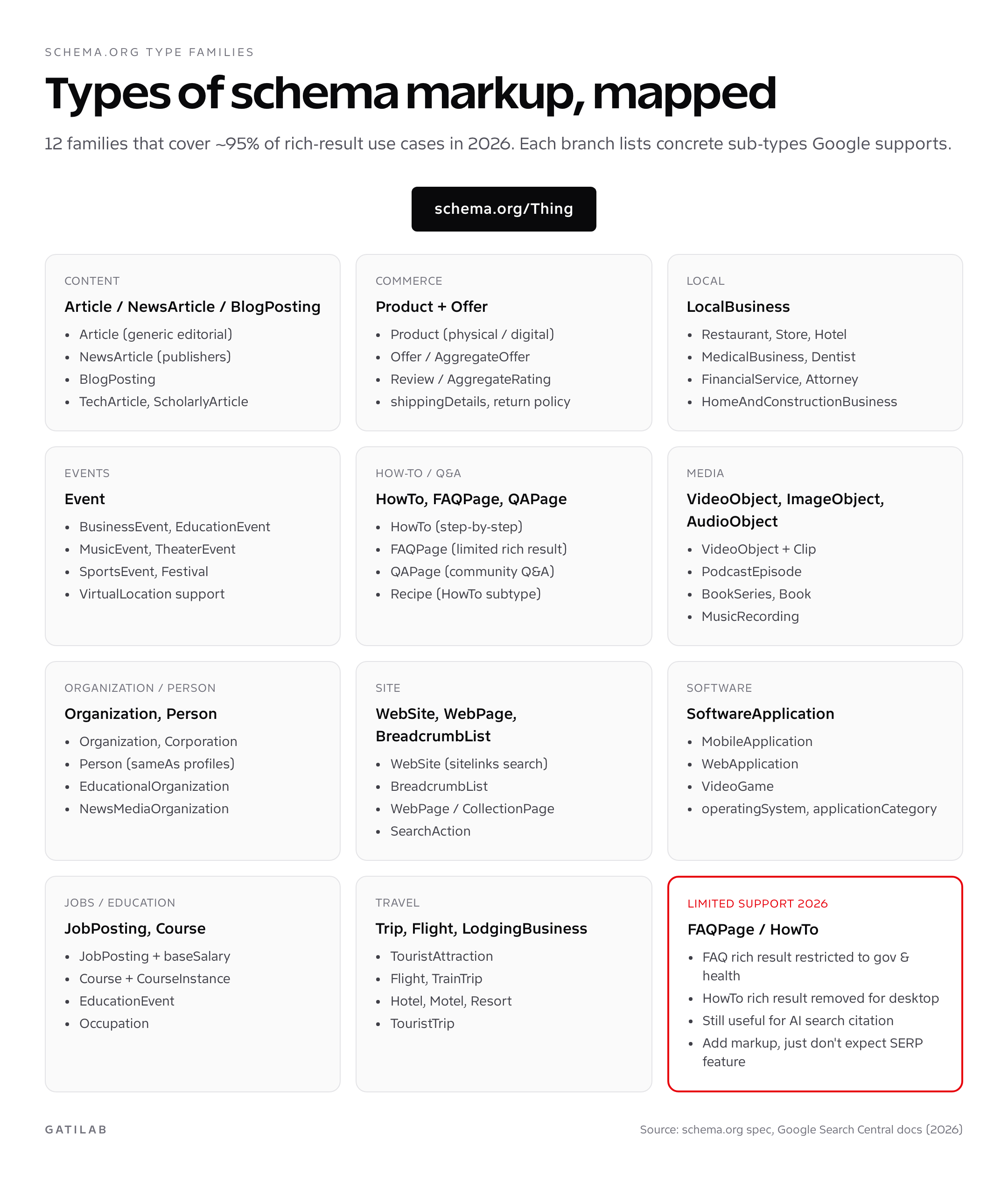
The 12 most important types of schema markup
Here is the working list to start from. I’m ordering them by impact in 2026, not alphabetically. The first five drive most of the rich-result wins. The next four matter heavily for AI citation. The last three are situational but high-value when they apply.
- Article (and NewsArticle / BlogPosting subtypes): the default for any editorial page.
- Product + Offer: required for ecommerce, including price and availability.
- LocalBusiness: for any business with a physical address customers visit.
- Event: for date-bound things: concerts, conferences, classes, webinars.
- Organization: every site needs one. This is your brand entity.
- WebSite: tells Google your preferred site name. Google retired the sitelinks search box in November 2024, so SearchAction no longer earns it.
- BreadcrumbList: replaces the URL with breadcrumb chips in SERPs.
- FAQPage: Google stopped showing FAQ rich results for all sites in May 2026; still clean question-and-answer structure for AI engines.
- HowTo: Google removed HowTo rich results in September 2023; useful only as step structure for AI engines.
- Recipe: fully supported, the highest-CTR type for food sites.
- VideoObject: earns the video chip and improves video indexing.
- JobPosting: required to appear in Google Jobs.
Article schema (NewsArticle, BlogPosting)
Article is the foundation type for any editorial content. It has three Google-supported subtypes: NewsArticle for news publishers, BlogPosting for blogs, and the generic Article for everything else. Using a subtype helps Google understand context but isn’t strictly required. Default to BlogPosting for blogs and use NewsArticle only for sites that actually publish news.
The required properties are headline, image, datePublished, and author. The recommended additions are dateModified, publisher, mainEntityOfPage, and inLanguage. Don’t skip dateModified; it’s what lets Google know your evergreen guide is still being maintained.
<script type="application/ld+json">
{
  "@context": "https://schema.org",
  "@type": "BlogPosting",
  "headline": "Types of Schema Markup: The 12 Types That Matter in 2026",
  "image": ["https://example.com/cover.jpg"],
  "datePublished": "2026-05-09T08:00:00+00:00",
  "dateModified": "2026-05-09T08:00:00+00:00",
  "author": {
    "@type": "Person",
    "name": "Gaurav Tiwari",
    "url": "https://gatilab.com/about/"
  },
  "publisher": {
    "@type": "Organization",
    "name": "Gatilab",
    "logo": {
      "@type": "ImageObject",
      "url": "https://r2.gatilab.com/logo.png"
    }
  },
  "mainEntityOfPage": "https://gatilab.com/types-of-schema-markup/"
}
</script>
Product schema with Offer and AggregateRating
Product schema is the type ecommerce sites cannot ship without. It powers the price, in-stock label, star rating, and review count under your listing. The 2026 spec adds two important properties: shippingDetails and hasMerchantReturnPolicy. Google made shippingDetails effectively required for the rich result on most retail queries last year, and the merchants who skipped it lost the price snippet entirely.
A complete Product node nests three sub-objects: Offer (price, currency, availability), AggregateRating (average score and count), and a Review array (individual reviews with author and rating). All three are recommended. I cover the implementation depth, including the WooCommerce and Shopify gotchas, in my dedicated Product schema markup guide.
<script type="application/ld+json">
{
  "@context": "https://schema.org",
  "@type": "Product",
  "name": "Mechanical Keyboard Pro",
  "image": ["https://example.com/keyboard.jpg"],
  "description": "Hot-swap mechanical keyboard with PBT keycaps.",
  "sku": "KB-PRO-001",
  "brand": { "@type": "Brand", "name": "Acme" },
  "offers": {
    "@type": "Offer",
    "url": "https://example.com/keyboard",
    "priceCurrency": "USD",
    "price": "129.00",
    "availability": "https://schema.org/InStock",
    "shippingDetails": {
      "@type": "OfferShippingDetails",
      "shippingRate": { "@type": "MonetaryAmount", "value": "5.00", "currency": "USD" },
      "shippingDestination": { "@type": "DefinedRegion", "addressCountry": "US" }
    }
  },
  "aggregateRating": {
    "@type": "AggregateRating",
    "ratingValue": "4.7",
    "reviewCount": "1240"
  }
}
</script>
LocalBusiness schema (with sub-types)
LocalBusiness is one of the most often skipped schema types. Every business with a physical address customers can visit should have it. The type has dozens of sub-types: Restaurant, Store, Hotel, MedicalBusiness, Dentist, Attorney, FinancialService, AutoRepair, and many more. Using the most specific sub-type that applies is genuinely useful. Google reads "Restaurant" as much richer context than the generic LocalBusiness.
The non-negotiable properties are name, address (PostalAddress), telephone, openingHoursSpecification, and geo (GeoCoordinates). Skipping the geo block is a mistake; it’s what feeds the map pin alignment in local pack results. For the full field reference and category-by-category sub-type matrix, my LocalBusiness schema markup guide goes deeper.
<script type="application/ld+json">
{
  "@context": "https://schema.org",
  "@type": "Restaurant",
  "name": "Tandoor & Tonic",
  "image": "https://example.com/restaurant.jpg",
  "address": {
    "@type": "PostalAddress",
    "streetAddress": "12 Brick Lane",
    "addressLocality": "London",
    "postalCode": "E1 6RF",
    "addressCountry": "GB"
  },
  "geo": { "@type": "GeoCoordinates", "latitude": 51.5202, "longitude": -0.0717 },
  "telephone": "+44-20-7123-4567",
  "servesCuisine": "Indian",
  "priceRange": "££",
  "openingHoursSpecification": [{
    "@type": "OpeningHoursSpecification",
    "dayOfWeek": ["Tuesday","Wednesday","Thursday","Friday","Saturday"],
    "opens": "12:00",
    "closes": "22:30"
  }]
}
</script>
Event schema for concerts, conferences, classes
Event is fully supported in Google’s rich result spec and pulls a date, location, and ticket-link badge into search. The required properties are name, startDate, and either location (Place) or location (VirtualLocation) for online events. Recommended adds: endDate, eventStatus (EventScheduled / EventCancelled / EventPostponed / EventRescheduled / EventMovedOnline), eventAttendanceMode (Offline / Online / Mixed), and offers.
Hybrid events need both physical and virtual locations as an array. This is the biggest gotcha in 2026: most plugins still ship single-location markup and lose the hybrid badge. My Event schema markup deep-dive shows the JSON-LD for concert, conference, virtual, and festival cases.
<script type="application/ld+json">
{
  "@context": "https://schema.org",
  "@type": "Event",
  "name": "WordPress Performance Summit 2026",
  "startDate": "2026-09-12T09:00",
  "endDate": "2026-09-13T17:00",
  "eventAttendanceMode": "https://schema.org/MixedEventAttendanceMode",
  "eventStatus": "https://schema.org/EventScheduled",
  "location": [{
    "@type": "Place",
    "name": "ExCeL London",
    "address": "Royal Victoria Dock, London E16 1XL, UK"
  },{
    "@type": "VirtualLocation",
    "url": "https://summit.example.com/live"
  }],
  "organizer": { "@type": "Organization", "name": "Gatilab" },
  "offers": {
    "@type": "Offer",
    "url": "https://summit.example.com/tickets",
    "price": "199",
    "priceCurrency": "GBP",
    "availability": "https://schema.org/InStock",
    "validFrom": "2026-04-01T00:00"
  }
}
</script>
Organization, WebSite, and BreadcrumbList: the always-on three
These three types belong on every page of every site. Organization defines your brand entity (and is what AI engines parse to identify you as a citation source). WebSite declares your preferred site name (the sitelinks search box it once earned was retired in November 2024). BreadcrumbList replaces the URL with clickable breadcrumb chips in mobile SERPs.
The biggest 2026 change is the sameAs array on Organization. This is the property AI engines use to confirm your identity across LinkedIn, X, GitHub, Crunchbase, Wikipedia, and Wikidata. Adding eight to twelve sameAs entries is the single most underrated optimization for AI search visibility.
<script type="application/ld+json">
{
  "@context": "https://schema.org",
  "@type": "Organization",
  "name": "Gatilab",
  "url": "https://gatilab.com",
  "logo": "https://r2.gatilab.com/logo.png",
  "sameAs": [
    "https://www.linkedin.com/company/gatilab/",
    "https://twitter.com/gatilab",
    "https://github.com/gatilab",
    "https://en.wikipedia.org/wiki/Gatilab"
  ]
}
</script>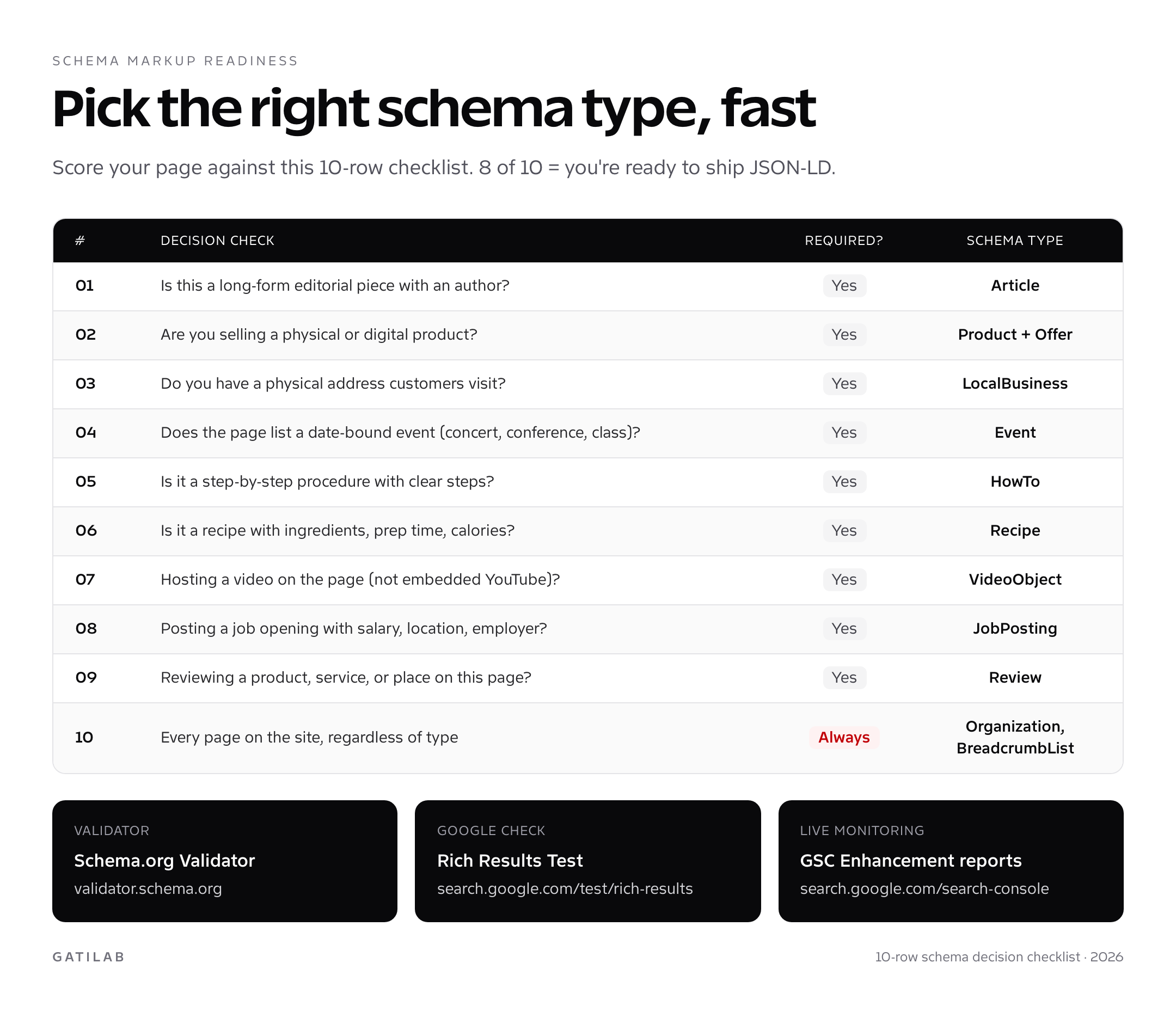
FAQPage, HowTo, and Recipe: the content types
These three are content-format schemas. Recipe still earns the full rich result (calorie count, cook time, ratings, video). Google removed HowTo rich results in September 2023 and limited FAQ rich results to government and health sites, then stopped showing FAQ rich results for every site on May 7, 2026. That doesn’t make the markup useless. It still describes question-and-answer and step content cleanly for any AI engine that reads it, but don’t expect a SERP feature from either.
If you’re already adding FAQ content to your pages (and you should be), my FAQ schema implementation walkthrough covers the JSON-LD format and the WordPress plugins that ship it correctly.
Recipe rich results can show the photo, rating, and cook time right in search, which is why food blogs treat complete Recipe markup (with HowToStep items inside recipeInstructions) as essential. Required: name, image, recipeIngredient, recipeInstructions. Recommended adds: cookTime, prepTime, totalTime, nutrition, video, aggregateRating.
VideoObject and JobPosting: the niche heavy-hitters
VideoObject earns the video chip in SERPs and is what makes your video discoverable in Google’s video tab. Required: name, description, thumbnailUrl, uploadDate. Recommended: duration (ISO 8601), contentUrl, embedUrl, hasPart (Clip array for chaptering).
JobPosting is the only way into Google for Jobs. Required: title, description, datePosted, jobLocation, hiringOrganization, employmentType. Recommended: baseSalary, validThrough, applicantLocationRequirements (for remote roles). Skipping baseSalary is what triggers the "estimated salary" warning Google now shows on listings without explicit pay ranges.
These two show a wide gap between "valid markup" and "rich result earned." Validation tells you nothing about whether you’ll appear in Jobs or get the video chip. The behaviour is selective and undocumented. Ship markup, then watch GSC’s Enhancement reports for the actual eligibility decision.
How to validate every type of schema markup
There are exactly two validators that matter in 2026:
- Schema.org Validator at validator.schema.org: checks pure spec compliance. If it shows a green pass, your JSON-LD is structurally correct.
- Google Rich Results Test at search.google.com/test/rich-results: checks whether Google specifically will render a rich result for your markup. This is the only validator that knows about Google’s eligibility rules.
Run both. The schema.org validator can pass while the Rich Results Test reports "not eligible." That gap is where Google’s product-specific rules live. If you only run one, run the Rich Results Test.
Once your markup is live, monitor the Enhancement reports inside Google Search Console. Each rich result type gets its own report (Articles, Products, Events, Recipes, etc.). The reports show valid items, items with warnings, and items with errors. Errors will get you removed from rich result eligibility within days. Warnings just mean you’re missing recommended properties.
For AI search citation, there’s no validator. The closest signal is whether Perplexity, ChatGPT, and Gemini cite your page when asked direct questions about your topic. Track this monthly. If your structured data is clean and your content is current, citation rates climb. If you skip schema, they don’t.
How to add schema markup to a real site
Three implementation paths, in order of preference:
Path 1: SEO plugin. If you’re on WordPress, this is usually the right answer. Rank Math, Yoast SEO, and Schema Pro all generate Article, Product, LocalBusiness, Organization, and BreadcrumbList markup automatically. Rank Math covers a wide range of types and is my default pick. The full setup walkthrough lives in my WordPress schema markup guide, and a head-to-head plugin breakdown is in my best WordPress SEO plugins comparison.
Path 2: Tag manager injection. If you’re not on WordPress (Shopify, Webflow, Framer, Wix), Google Tag Manager can inject JSON-LD via a custom HTML tag. This is the cleanest non-developer path. The pattern: build the JSON-LD string with a Variable, fire on the page-view trigger, target only the relevant URL. Avoid using GTM for Product schema; it loads after Google’s first crawl and frequently misses the rich result.
Path 3: Manual JSON-LD in the theme. The most flexible path, the most maintenance. Required when you have unusual types (Course, MedicalProcedure, Drug) that no plugin covers. Keep a library of tested JSON-LD templates you can drop into theme functions.php. The cost is that schema breaks silently when content changes; you need a quarterly audit to keep it accurate.
Common schema markup mistakes
- Wrong type chosen: Article on a product page, Product on a blog post, LocalBusiness on a national chain’s homepage instead of per location. Google ignores mismatched type/content pairs.
- Markup describes content not visible on the page: this is the cardinal sin. If your page doesn’t show 4.7 stars in the visible HTML, don’t put 4.7 in your AggregateRating. Google issues manual actions for this.
- Missing dateModified: Article markup with only datePublished signals stale content. Fixing this is a 30-second change with outsized impact on evergreen rankings.
- Hardcoded prices in Product schema that don’t match the live page: triggers Google’s "mismatched data" warning. Always pull price dynamically.
- One Organization block per page instead of one per site: harmless but dilutes the entity signal. Use a sitewide Organization block in the <head> via theme.
- FAQPage with marketing copy as the answer: promotional answers were never eligible for FAQ rich results and give AI engines nothing to quote. Keep answers factual.
- BreadcrumbList that doesn’t match visible breadcrumbs: same rule as ratings. The markup must mirror what users see.
- Stacking multiple types on one page randomly: legitimate (an Article that’s also part of a BreadcrumbList and references an Organization is fine) but only when each type genuinely describes the page.
What changed in schema markup for 2026
Three meaningful shifts this year:
First, shippingDetails and hasMerchantReturnPolicy on Product are functionally required. Google still says "recommended," but the rich-result win rate without them on retail queries has dropped to single digits in October 2026.
Second, AI search engines treat structured data as a citation-quality signal. This is qualitative; no engine documents the exact weight. The strongest type for AI citation is Organization with a complete sameAs array.
Third, Google removed FAQ rich results for every site in May 2026, after limiting them to government and health sites in 2023. Don’t add FAQ markup expecting the SERP accordion. Add it only as clean structure for AI engines.
Quick reference: types of schema markup by industry
One last cut at the types of schema markup, sliced by industry instead of by schema family. Keep it open as a cheat sheet when planning a new site. Pick the row that matches your business; the right column is the schema stack to ship in week one.
| Industry | Core schema stack to ship first |
|---|---|
| Ecommerce / DTC | Product, Offer, AggregateRating, Review, BreadcrumbList, Organization, WebSite |
| Local services (restaurant, dentist, plumber) | LocalBusiness sub-type, PostalAddress, GeoCoordinates, OpeningHoursSpecification, Review, Organization |
| SaaS / software | SoftwareApplication, Organization, WebSite, Article (blog), FAQPage, BreadcrumbList |
| Editorial / news / media | NewsArticle or BlogPosting, Organization, Person (author), BreadcrumbList, VideoObject |
| Education / online courses | Course, CourseInstance, Organization, Article (lessons), VideoObject, BreadcrumbList |
| Events / ticketing | Event with Offer, Place or VirtualLocation, Organization, BreadcrumbList |
| Recruitment / careers | JobPosting, Organization, MonetaryAmount (baseSalary), BreadcrumbList |
| Recipe / food blog | Recipe, HowTo (nested), VideoObject, AggregateRating, NutritionInformation, BreadcrumbList |
The pattern across every row is the same: pick one or two type-specific schemas, then layer the always-on three (Organization, WebSite, BreadcrumbList) underneath. Most agencies stop at the type-specific layer and never ship the always-on stack. Adding the foundation layer is what separates a site that ships clean types of schema markup from one that just has rich results enabled on a few templates.
If you remember nothing else from this guide, remember this: the right combination of types of schema markup is rarely about exotic vocabulary. It’s about shipping the obvious five for your industry, validating them, and monitoring GSC. Do that for 30 days and you’ll see the rich results and the citations start to compound.
FAQs about types of schema markup
How many types of schema markup does Google support for rich results?
Google’s Search Gallery lists about 25 rich result types as of October 2026, including Article, Product, Local business, Event, Recipe, Job posting, Video, Breadcrumb, Course list, and Software app. FAQ and HowTo are no longer on it. The full list is in the Search Gallery on Google Search Central. The other 700+ schema.org types are valid markup but won’t trigger a SERP feature.
What’s the difference between schema markup and structured data?
Structured data is the umbrella concept: any standardized format that describes your content to machines. Schema markup is the specific vocabulary published at schema.org, founded by Google, Microsoft, Yahoo, and Yandex and now developed as an open community project. In practice the terms are used interchangeably, but technically schema.org is one vocabulary among several (Open Graph is another), and JSON-LD is a syntax for writing it, not a separate vocabulary.
Should I use JSON-LD, Microdata, or RDFa?
JSON-LD, always. Google’s documentation explicitly recommends it. Microdata and RDFa work but are inline with HTML, harder to maintain, and easier to break when your CMS changes templates. Every example in this guide uses JSON-LD inside a script tag.
Will schema markup help me rank higher?
Schema is not a direct ranking factor. Google’s John Mueller said in April 2025 that structured data won’t make a site rank better. What it does is make pages eligible for rich results (which can raise CTR) and describe your content clearly to AI search engines. Treat it as visibility infrastructure, not a ranking lever.
How long does it take for schema markup to take effect?
Google needs to recrawl the page first. That can take days on an established site and weeks on new or low-traffic pages. After the crawl, the Enhancement reports in Search Console show eligibility. Rich results themselves can appear immediately or take weeks to roll in; eligibility doesn’t equal display.
Can I have multiple types of schema markup on one page?
Yes. A blog post can legitimately have Article, BreadcrumbList, Organization, and FAQPage on the same page. The rule: each schema block must accurately describe a real entity on the page. Don’t pile on irrelevant types hoping for SERP variety. Google will ignore mismatched markup and may issue a manual action for misleading types.
What’s the best WordPress plugin for schema markup?
Rank Math covers a wide range of types with sensible defaults. Yoast SEO covers the basics (Article, Organization, BreadcrumbList) automatically. Schema Pro is the most powerful for deep customization. For most sites, Rank Math wins on ease and breadth. For ecommerce, Schema & Structured Data for WP & AMP is another option with dedicated WooCommerce Product support.
Do I need a developer to add schema markup?
For most sites, no. SEO plugins on WordPress handle the standard types. On Shopify, the default theme covers Product, Organization, and BreadcrumbList. Where you need a developer is for non-standard types (Course, MedicalProcedure, custom event variants), or when you want manual JSON-LD inside theme files for control.
How do I validate schema markup?
Run both validators in sequence. First, the Schema.org Validator at validator.schema.org checks structural correctness against the spec. Second, Google’s Rich Results Test at search.google.com/test/rich-results checks whether your specific type qualifies for a Google rich result. Both must pass for production. After deploy, monitor GSC Enhancement reports for live eligibility status.
What schema markup matters most for AI search engines?
Organization (with a full sameAs array linking to LinkedIn, GitHub, Wikipedia, and your social profiles) gives AI engines the clearest statement of who you are. Article schema with author and dateModified comes next. FAQPage and HowTo no longer earn Google rich results, but their question and step structure can still help AI engines extract answers. Product schema with verifiable Offer and AggregateRating data also helps on shopping queries.
Where to start
If you’ve never shipped schema before, start here. Add Organization (with sameAs), WebSite, and BreadcrumbList sitewide. That’s three blocks of JSON-LD and 90 minutes of work. Then add Article (or BlogPosting) to every editorial page through your SEO plugin. That’s the foundation.
From there, layer on the type that matches your business: Product if you sell, LocalBusiness if you have an address, Event if you run them, Recipe if you publish them. Validate each addition with the Rich Results Test. Watch GSC Enhancement reports for the next 30 days. If errors show up, fix them within a week; warnings can wait until your next maintenance window.
The compounding effect of clean schema across a site is the single most under-appreciated SEO win in 2026. Many sites have either zero markup or one auto-generated Article block and nothing else. Twelve well-implemented types separate the sites that earn rich results and AI citations from the ones that don’t.
Tell Google you want more of this.
Add Gatilab as a preferred sourceOne tap, and this site shows up more often in your own Top Stories, AI Overviews and AI Mode. Remove it any time.