
Blog Commenting for SEO: Does It Still Work?
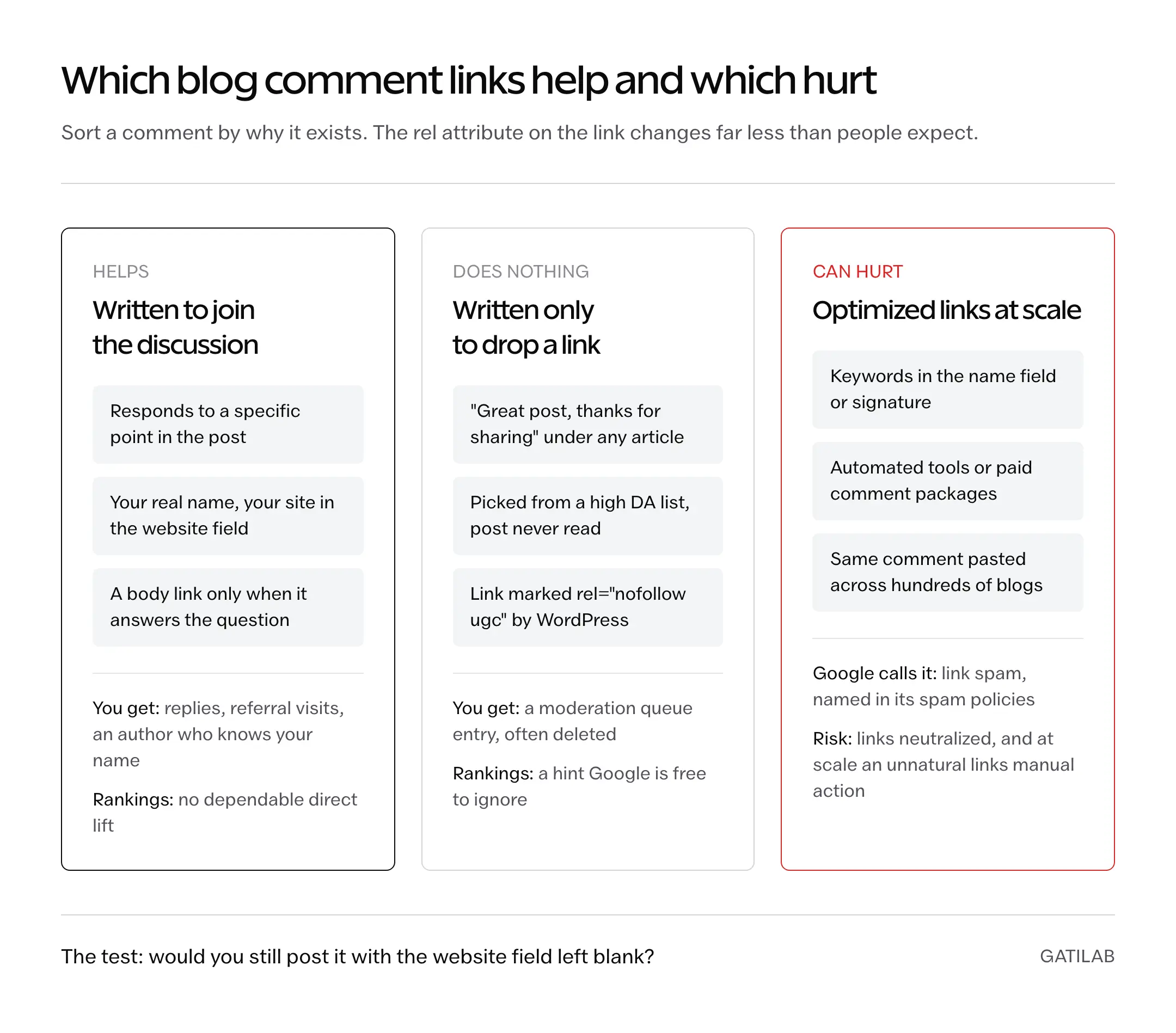
Blog commenting for SEO no longer works as a way to build ranking backlinks. WordPress marks comment links rel="nofollow ugc" by default, Google treats those attributes as hints it is free to ignore and Google’s own spam policies list optimized comment links as link spam. What blog commenting still does well is indirect: it puts your name in front of an author and a relevant audience, and that can turn into visits, conversations and the kind of links that do count.
Most blog commenting advice still sells the old version. People buy lists of “high DA instant approval” blogs, paste the same 2 lines under hundreds of posts and wait for rankings that never move. The comments get deleted and, done at scale, the pattern matches what Google describes as link spam. The better route is to comment only where you have something to add and to build links through work that gives other sites a reason to cite you.
I want to make sure one idea is clear before the details, because everything else follows from it. Google weighs links that another publisher chose to give. A comment link is one you placed yourself.
Does Blog Commenting Still Work for SEO?
For direct ranking value, the answer is no in almost every case. For visibility and relationships, blog commenting still works if done properly. Most of the confusion comes from mixing those 2 jobs up.
The direct value is close to zero for 3 reasons:
- Since WordPress 5.3 (late 2019), comment links and comment author URLs get
rel="nofollow ugc"by default, and most blogs leave that alone. - Google treats
nofollow,ugcandsponsoredas hints, so the link carries no guaranteed ranking credit. - Even a rare followed comment link is still a self-placed link. Google defines link spam as links created primarily to manipulate rankings, and its link spam systems are designed to neutralize unnatural links.
The indirect value is where blog commenting earns its time:
- Referral visits from readers who liked your answer and clicked your name.
- A relationship with the author, which is where guest post invitations, mentions and citations usually start.
- Content ideas from the questions readers ask in the thread and the gaps nobody answers.
- Recognition in a small niche, where the same few names show up under every good post.
None of these show up as a ranking jump, so you should measure them on their own terms. A comment link in the Search Console Links report only tells you Google found it, never that it moved anything.
What Google Says About Comment Links
Google has written down its position on comment links in 3 places. Most blog commenting guides skip them, which is a pity, because together they settle most of the arguments.
The first is Google’s documentation on qualifying outbound links with rel attributes. It gives site owners 3 values to describe a link:
rel="ugc"marks user-generated content. Google says it recommends this value for links in comments and forum posts.rel="sponsored"marks ads and paid placements.rel="nofollow"covers the rest, when you don’t want Google to associate your site with the linked page.
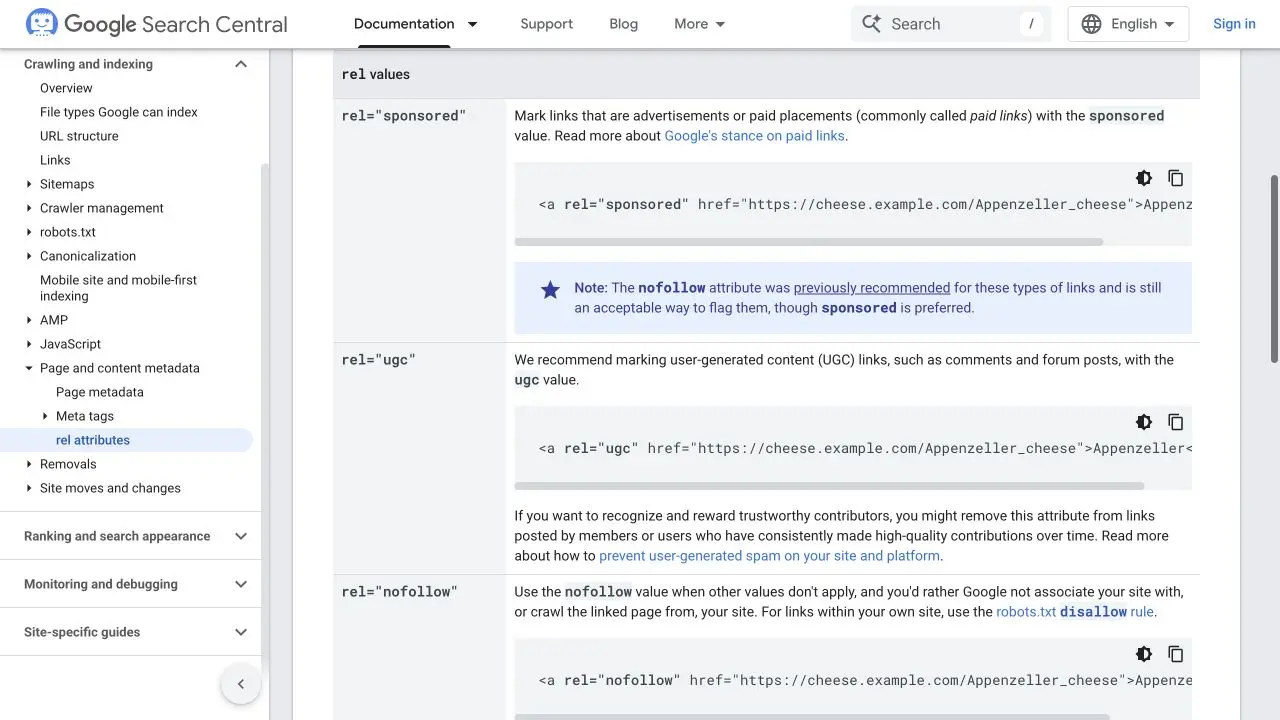
The same page says owners may drop ugc for members with a long record of high-quality contributions. That is the only legitimate form of “dofollow commenting”, and the owner decides it, after watching you contribute.
The second is the hint model. When Google announced ugc and sponsored on September 10, 2019, it also changed what all 3 attributes mean. Before that, nofollow meant no ranking credit at all. Since then, all 3 work as hints for ranking, and from March 1, 2020 for crawling and indexing too. Many people read “hint” as “Google might count it after all”. The safer reading is that Google can use the link to understand the web without treating it as an endorsement.
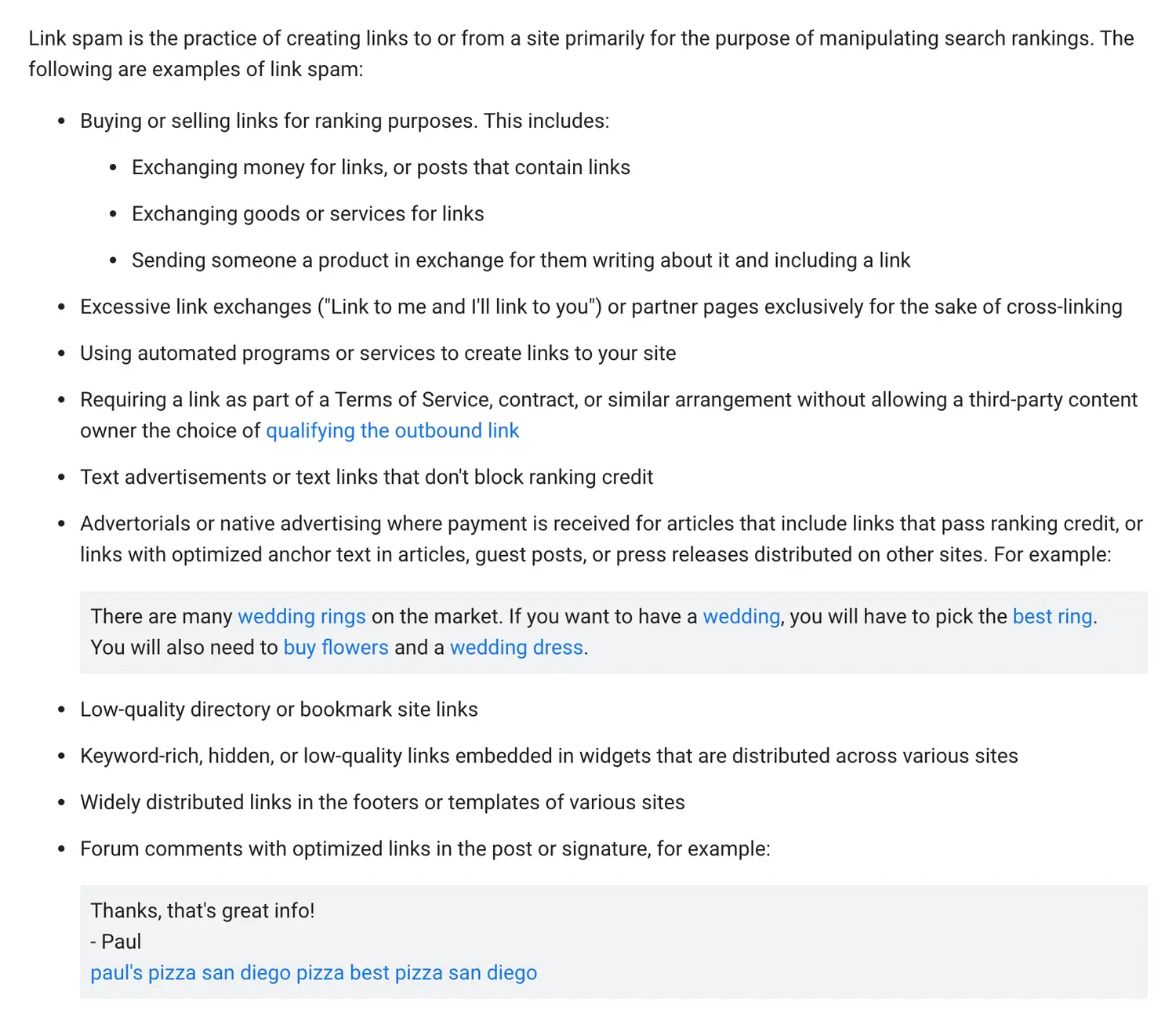
The third is the spam policy, and it is the one that should end the debate. Google’s spam policies define link spam as creating links primarily to manipulate search rankings, and the list of examples includes “forum comments with optimized links in the post or signature”. The example Google uses is a comment that says thanks, signs off with a name and adds a string of pizza keywords as links.
On December 14, 2022, Google announced a link spam update powered by SpamBrain, its AI-based spam prevention system. Google said SpamBrain can now detect both sites buying links and sites used to pass outgoing links, and that the goal is to neutralize the impact of unnatural links. Neutralizing a link carries no penalty by itself, but the credit you hoped for never arrives, which makes a 500-comment campaign a slow way to get nothing.
Manual actions are a separate layer. Google’s manual actions documentation splits the risk by who is involved:
- Unnatural links to your site applies to the site that benefits from a pattern of manipulative links. A large paid comment campaign pointing at your site falls here.
- User-generated spam applies to the site hosting the spam, such as a blog whose comment section is full of keyword links it never cleaned up.
A few genuine comments with your site in the website field carry no realistic risk. The risk starts when comments become a link-building system.
How Comment Links Lost Their Value
Blog comment links passed ranking credit until spammers buried comment sections in keyword links. Google answered with rel="nofollow" on January 18, 2005, in a post titled “Preventing comment spam”. The April 24, 2012 webspam update, later known as Penguin, went after link schemes. In September 2019 Google added ugc and sponsored, and WordPress 5.3 made nofollow ugc the default on comment links that November. The December 2022 link spam update brought SpamBrain to bear on bought and passed-through links. Every one of those steps made the comment link weaker as a ranking tactic. A good comment is still as useful for meeting people as it was in 2005.
Are Dofollow Blog Commenting Sites Lists Worth It?
No. Lists of “dofollow”, “high DA” or “instant approval” blog commenting sites rank well, especially in India, and I understand the appeal. But a list picked for its link attribute is the exact pattern Google’s spam policy describes, and the lists have practical problems too:
- DA is a third-party score from SEO tool vendors. Google doesn’t use it, and a high score says nothing about a comment buried under an old post.
- “Instant approval” means nobody moderates the thread, so your link sits next to casino and pharma spam.
- The owner can add
nofollowor delete the thread at any time, and you won’t be told. - Nobody reads those threads, so you don’t even get referral visits.
Check a few “dofollow” entries in your browser’s developer tools before believing any list. Those lists must be having a very generous idea of what “dofollow” means.
How to Find Blogs Worth Commenting On
A blog is worth your comment when its readers are the people you want to reach and the author still answers. Domain metrics tell you neither. Look for:
- Posts you would read even if the comment form had no website field.
- Recent replies from the author, not only from other commenters.
- A moderated thread with no keyword-name spam left standing.
- Topics where you can add a fact, a question or a correction from your own work.
Search operators help you find candidates. Put your topic in quotes and pair it with a phrase that comment forms print (the old + between terms does nothing now):
"your topic" "leave a comment"finds posts with an open comment form."your topic" "notify me of follow-up comments"finds many WordPress blogs with active threads."your topic" inurl:blognarrows results to blog URLs.
Follow the good ones in an RSS reader such as Feedly. An early comment on a fresh post is far more likely to get an answer from the author than comment number 80 on a 3-year-old post.
To see what a blog does with your link, right-click your name after the comment is published, choose Inspect and read the rel value.
Writing a Useful Comment
A useful comment refers to one specific point in the post and adds something the post didn’t have: a missing condition, a follow-up question, a source or a correction you can back up. The examples below are illustrative, written for this guide, not quotes from real readers.
Moderators delete this without reading twice:
Great article, very informative. Thanks for sharing this valuable information, keep it up! – Best SEO Company Mumbai
It could sit under any post, the name field is a keyword and nothing shows the writer read the article. It is Google’s pizza example with a different city.
This one gets a reply:
Your migration steps cover importing posts but not the media library. Does the old site need to stay online until the image import finishes, or can it be switched off once the XML file is downloaded?
It names a real gap, the author can answer it in 2 lines and it helps every later reader. The website field already says who you are, so it needs no link.
Respectful disagreement works the same way: name the claim, say what you saw and under which conditions and ask what setup the author used. If you haven’t measured something, don’t put a number on it. Authors notice.
Mistakes That Get Comments Removed
Most deleted comments treat the thread as ad space. These 5 habits get a comment removed, and often get your name filtered on that blog for good:
- A keyword in the name field. “Best SEO Agency” isn’t a name.
- Links pasted into the comment text. WordPress can hold comments with links for moderation, and many owners delete them on sight. A body link belongs only where it answers the question and the rules allow it.
- The same comment on many blogs. Bloggers in a niche read each other, and so do spam filters such as Akismet.
- Automated tools and paid comment packages. You lose control over where your name appears, and the volume is what turns commenting into a link scheme.
- Leaving after the link appears. An unanswered reply from the author ends the one useful thing the comment could have started.
Blog Commenting vs Guest Posting and Other Link Building
Blog commenting competes for the same hours as the work that actually produces links. Commenting is networking. The others are ways of earning a citation.
| Activity | What It Produces | Direct Ranking Value | Main Limit |
|---|---|---|---|
| Thoughtful blog comments | Conversations, referral visits, author relationships | Little to none | Slow, and the link itself is a hint |
| Guest posts | An article and link on another publication | Can be real when the editor chooses the link | Optimized anchors or paid posts fall under link spam |
| Outreach for a resource you have | A link from a page that genuinely cites you | Real when the link is editorial | Editors decline most pitches |
| Original research or a free tool | A page other sites want to reference | Strongest over time | Takes real work before any link arrives |
My recommendation is to build the useful page first and treat comments as the relationship work around it. An author who knows your name from months of good comments reads your outreach email differently. These backlink examples that moved rankings are a better model than any commenting list, our guide to link building strategies that still work covers the rest and it is wise to vet guest posting services before paying anyone.
Blog commenting makes sense when you are new to a niche, when there are a handful of bloggers you want to work with or when you need to hear what readers ask. As your main link-building plan, it is a poor use of limited SEO hours.
Should You Keep Comments on Your Own Blog?
Many people searching for blog commenting for SEO are really asking the owner’s question. Comments should stay open when they bring useful questions and you can moderate them, and be closed or restricted when moderation costs more than the discussion is worth. Enabling comments gives you no SEO advantage by itself.
Google’s manual actions documentation says too much spammy user content can affect its overall assessment of a site, so the comment section should be maintained like the rest of the page:
- Keep WordPress’s default
nofollow ugcon comment links. Google’s own advice on preventing user-generated spam recommends nofollow or ugc on links in untrusted content. - Use the moderation options in the WordPress Discussion settings, such as holding comments that contain links.
- Run an anti-spam filter. Our guide to stopping comment spam in WordPress covers the owner-side setup.
- Review old approved comments when you update a post, since a link that was fine years ago can now point to an expired domain.
A Practical Commenting Routine
Blog commenting works best as a small weekly habit on a short list of blogs. This is the routine I would follow:
- Pick 10 to 15 blogs whose readers are your readers, and follow them by RSS or email.
- Read the full post and the existing replies so you don’t repeat someone above you.
- Find one thing to add: a question, a missing step, a source or a measured result from your own work.
- Check the comment and linking rules, then post under your real name with your site in the website field.
- Come back for replies and continue the conversation when you have something useful to say.
- Check referral traffic by source every month or two, and keep the blogs that send readers or replies. Keep UTM parameters for links you control, since a tagged URL in the website field looks like tracking to moderators.
Don’t credit a ranking change to a comment just because it happened afterward. A nofollow ugc link is the least likely cause.
The simplest test before you post: would you still leave this comment if the website field didn’t exist? If yes, post it. If no, that time belongs to the page you want people to link to. And if you’d rather have links built for you that hold up under Google’s spam policies, our link building services are built on earned placements and editorial links.
FAQs on Blog Commenting for SEO
Do nofollow or ugc comment links count for anything at all?
Google can use them as hints to discover and understand pages, but they carry no dependable ranking credit. Their practical value is the reader who clicks through.
Can blog commenting get my site penalized?
A handful of genuine comments won’t. A large automated or paid campaign of optimized comment links can get those links neutralized and, at scale, lead to an “Unnatural links to your site” manual action in Search Console.
Should I disavow spammy comment links pointing to my site?
Usually not. Google’s disavow tool is meant for sites with a manual action for unnatural links, or a real risk of one from links they built or paid for. Our guide on when to disavow backlinks covers the cases where it is worth doing.
Can I add a link inside the comment itself?
Only when the link answers a question in the thread better than a sentence could and the blog’s comment policy allows it. Many owners hold or delete any comment with a link, so the website field is the safer place for your site.
Does the same apply to forum posts and community comments?
Yes. Google recommends rel=”ugc” for forum posts as well as blog comments, and the example in its spam policy is specifically about forum comments with optimized links in the post or signature.
Tell Google you want more of this.
Add Gatilab as a preferred sourceOne tap, and this site shows up more often in your own Top Stories, AI Overviews and AI Mode. Remove it any time.