
Event Schema Markup: Complete JSON-LD Guide for 2026
Event schema markup is the JSON-LD that turns a webpage about a concert, conference, class, or webinar into a date-stamped, location-tagged, ticketable entity Google can render in its event-rich-result carousel and AI engines can cite when someone asks "what’s happening near me this weekend." Get it right and your event shows up in the SERP date carousel, in Google Maps, in the "Things to do" tab, and inside ChatGPT and Perplexity answers.
The same markup pattern works for festivals, multi-day conferences, weekly virtual meetups, and one-off ticketed shows. How fast the rich result appears depends on when Google recrawls the page, so request indexing in Search Console as soon as the markup is live. The biggest reason most events miss the rich result isn’t a missing field. It’s hybrid-event markup with a single location node, and Google silently dropping the result.
Every snippet here passes Google’s Rich Results Test as of October 2026.
Want the markup handled for you? Gatilab’s AI search optimization service implements and validates event schema, then tracks how it affects AI citations.
What Event schema markup is
Event schema markup is structured data using the schema.org Event type. You embed it on the event’s webpage as JSON-LD inside a script tag. Google parses the script, validates the fields against its Event rich-result spec, and (if eligible) renders an enhanced result with date, location, and ticket-link badge.
Schema.org defines an Event as "an event happening at a certain time and location." In practice, that covers concerts, theatre, sports, comedy, conferences, trade shows, classes, workshops, webinars, livestreams, weddings, fundraisers, and food/drink festivals. Google supports rich results for the generic Event type and for the most common subtypes: BusinessEvent, EducationEvent, FoodEvent, MusicEvent, SocialEvent, SportsEvent, TheaterEvent, VisualArtsEvent, and Festival.
Event schema is one of the few types where Google still ships a full rich result for non-government, non-health sites. FAQ and HowTo lost theirs in 2023. Event did not. If your business runs anything date-bound, this is one of the highest-ROI types to ship. For the broader picture, see the 12 types of schema markup that matter in 2026.
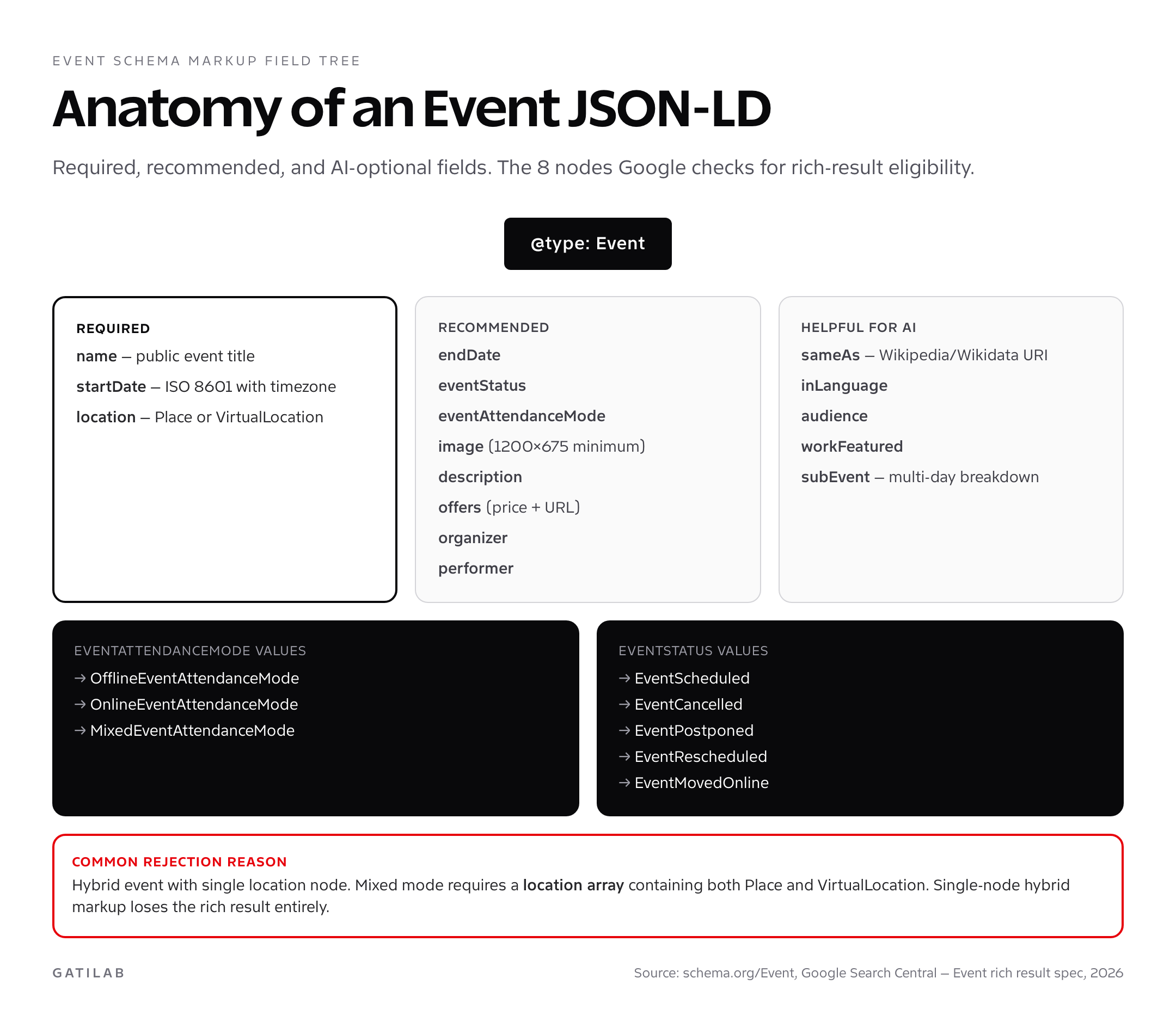
Required and recommended fields for Event JSON-LD
Google’s Event rich result has exactly three required fields. Miss any one and you get nothing. Past those three, there’s a recommended set Google rewards (you’ll appear with richer details), and a third tier that’s optional for SERPs but heavily used by AI search engines for citation.
Required: name, startDate, location. That’s it. Three fields. The location property accepts a Place object (physical address) or a VirtualLocation object (URL only) or an array combining both for hybrid events.
Recommended: endDate, eventStatus, eventAttendanceMode, image (1200×675 minimum), description, offers (with price + URL + availability + validFrom), organizer (Organization), and performer where applicable.
Helpful for AI citation: sameAs (link to a Wikipedia/Wikidata entry for the event if it has one), inLanguage, audience, workFeatured (for music/theatre), and subEvent for multi-day breakdowns.
Event schema JSON-LD: concert example
Many concert pages have either no schema or only the basic three required fields. Here’s the complete pattern for music venues. It includes the offers array (one Offer per ticket tier), performer (the band/artist), and organizer (the venue). MusicEvent is the right subtype for live performances.
<script type="application/ld+json">
{
  "@context": "https://schema.org",
  "@type": "MusicEvent",
  "name": "Arctic Monkeys Live",
  "startDate": "2026-08-14T20:00:00+01:00",
  "endDate": "2026-08-14T23:00:00+01:00",
  "eventStatus": "https://schema.org/EventScheduled",
  "eventAttendanceMode": "https://schema.org/OfflineEventAttendanceMode",
  "location": {
    "@type": "Place",
    "name": "O2 Academy Brixton",
    "address": {
      "@type": "PostalAddress",
      "streetAddress": "211 Stockwell Road",
      "addressLocality": "London",
      "postalCode": "SW9 9SL",
      "addressCountry": "GB"
    }
  },
  "image": ["https://example.com/concert-1200x675.jpg"],
  "description": "Arctic Monkeys play tracks from The Car and Tranquility Base.",
  "performer": { "@type": "MusicGroup", "name": "Arctic Monkeys" },
  "organizer": {
    "@type": "Organization",
    "name": "Academy Music Group",
    "url": "https://academymusicgroup.com"
  },
  "offers": [
    {
      "@type": "Offer",
      "name": "General Admission",
      "url": "https://example.com/tickets/ga",
      "price": "55.00",
      "priceCurrency": "GBP",
      "availability": "https://schema.org/InStock",
      "validFrom": "2026-04-01T10:00:00+01:00"
    },
    {
      "@type": "Offer",
      "name": "Balcony Seated",
      "url": "https://example.com/tickets/balcony",
      "price": "75.00",
      "priceCurrency": "GBP",
      "availability": "https://schema.org/InStock",
      "validFrom": "2026-04-01T10:00:00+01:00"
    }
  ]
}
</script>
Event schema markup: conference example with multi-day breakdown
Conferences and trade shows benefit from subEvent breakdowns. The parent Event covers the whole show; each subEvent is a session, keynote, or workshop with its own startDate, location, and performer. This is the schema pattern that gets multi-day events into Google’s session-level results.
<script type="application/ld+json">
{
  "@context": "https://schema.org",
  "@type": "BusinessEvent",
  "name": "WordPress Performance Summit 2026",
  "startDate": "2026-09-12T09:00:00+01:00",
  "endDate": "2026-09-13T17:00:00+01:00",
  "eventStatus": "https://schema.org/EventScheduled",
  "eventAttendanceMode": "https://schema.org/MixedEventAttendanceMode",
  "location": [
    {
      "@type": "Place",
      "name": "ExCeL London",
      "address": {
        "@type": "PostalAddress",
        "streetAddress": "Royal Victoria Dock",
        "addressLocality": "London",
        "postalCode": "E16 1XL",
        "addressCountry": "GB"
      }
    },
    {
      "@type": "VirtualLocation",
      "url": "https://summit.example.com/live"
    }
  ],
  "image": ["https://example.com/summit-1200x675.jpg"],
  "description": "Two days on Core Web Vitals, INP, hosting, and edge delivery.",
  "organizer": {
    "@type": "Organization",
    "name": "Gatilab",
    "url": "https://gatilab.com"
  },
  "offers": {
    "@type": "Offer",
    "url": "https://summit.example.com/tickets",
    "price": "299.00",
    "priceCurrency": "GBP",
    "availability": "https://schema.org/InStock",
    "validFrom": "2026-04-15T09:00:00+01:00"
  },
  "subEvent": [
    {
      "@type": "BusinessEvent",
      "name": "Keynote: The 2026 Performance Stack",
      "startDate": "2026-09-12T09:30:00+01:00",
      "endDate": "2026-09-12T10:30:00+01:00",
      "performer": { "@type": "Person", "name": "Gaurav Tiwari" },
      "location": { "@type": "Place", "name": "Hall A" }
    },
    {
      "@type": "BusinessEvent",
      "name": "Workshop: INP Debugging in Production",
      "startDate": "2026-09-12T13:00:00+01:00",
      "endDate": "2026-09-12T15:00:00+01:00",
      "location": { "@type": "Place", "name": "Hall B" }
    }
  ]
}
</script>
Event schema for virtual events and webinars
Virtual events use VirtualLocation instead of Place. The url property of VirtualLocation must be the live stream URL or the registration page where the URL is delivered. eventAttendanceMode must be set to OnlineEventAttendanceMode for fully virtual events; this is what tells Google to badge the result as "Online."
<script type="application/ld+json">
{
  "@context": "https://schema.org",
  "@type": "EducationEvent",
  "name": "AI Search SEO Masterclass",
  "startDate": "2026-06-04T18:00:00Z",
  "endDate": "2026-06-04T19:30:00Z",
  "eventStatus": "https://schema.org/EventScheduled",
  "eventAttendanceMode": "https://schema.org/OnlineEventAttendanceMode",
  "location": {
    "@type": "VirtualLocation",
    "url": "https://example.com/webinar/ai-search"
  },
  "image": ["https://example.com/webinar-1200x675.jpg"],
  "description": "Live 90-minute masterclass on optimizing for ChatGPT, Perplexity, and Gemini citations.",
  "organizer": {
    "@type": "Organization",
    "name": "Gatilab",
    "url": "https://gatilab.com"
  },
  "performer": {
    "@type": "Person",
    "name": "Gaurav Tiwari"
  },
  "offers": {
    "@type": "Offer",
    "url": "https://example.com/webinar/ai-search/register",
    "price": "0",
    "priceCurrency": "USD",
    "availability": "https://schema.org/InStock",
    "validFrom": "2026-05-01T00:00:00Z"
  },
  "inLanguage": "en"
}
</script>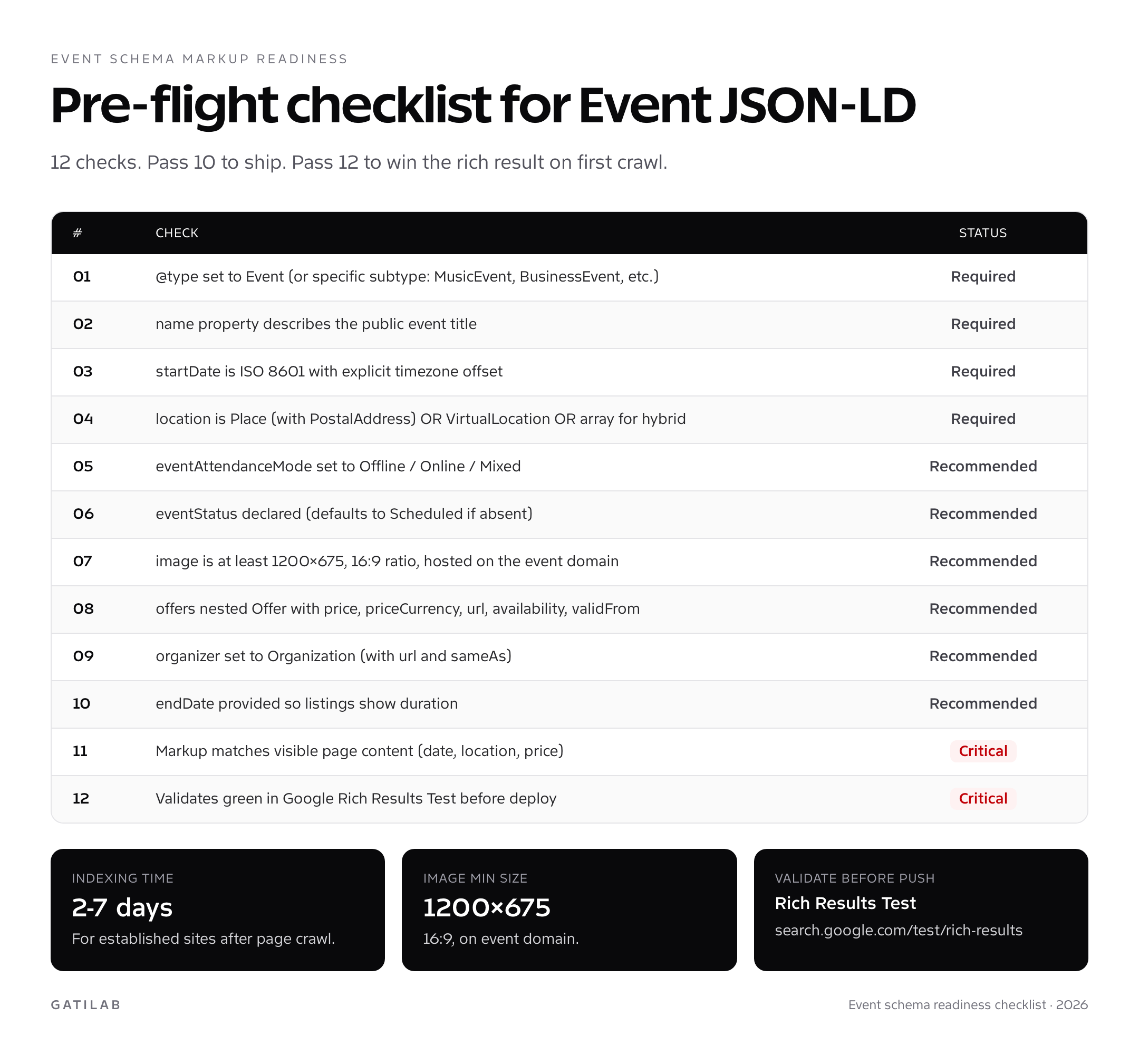
Event schema for festivals and recurring events
Festivals are the trickiest event type. They span multiple days, multiple stages, multiple performers, often multiple cities for touring festivals. Schema.org has a dedicated Festival type, but Google still uses the generic Event rich-result rules. The right pattern is one parent Festival event with subEvent entries for each performance.
For genuinely recurring events (a weekly market, a monthly meetup), don’t use Event recurrence. Schema.org has a Schedule type, but Google’s rich result requires explicit individual Event nodes per occurrence. Generate one Event per upcoming date, dynamically, from your CMS or events plugin.
<script type="application/ld+json">
{
  "@context": "https://schema.org",
  "@type": "Festival",
  "name": "Brick Lane Beer Festival 2026",
  "startDate": "2026-07-25T12:00:00+01:00",
  "endDate": "2026-07-27T22:00:00+01:00",
  "eventStatus": "https://schema.org/EventScheduled",
  "eventAttendanceMode": "https://schema.org/OfflineEventAttendanceMode",
  "location": {
    "@type": "Place",
    "name": "Old Truman Brewery",
    "address": {
      "@type": "PostalAddress",
      "streetAddress": "91 Brick Lane",
      "addressLocality": "London",
      "postalCode": "E1 6QL",
      "addressCountry": "GB"
    }
  },
  "image": ["https://example.com/festival-1200x675.jpg"],
  "organizer": { "@type": "Organization", "name": "BLB Events" },
  "offers": {
    "@type": "Offer",
    "url": "https://example.com/festival/tickets",
    "price": "35.00",
    "priceCurrency": "GBP",
    "availability": "https://schema.org/InStock",
    "validFrom": "2026-03-01T09:00:00+00:00"
  }
}
</script>
WordPress implementation for Event schema
Three paths in order of effort:
Path 1: The Events Calendar plugin (Modern Tribe). The cleanest answer for any WordPress site running events. The free version ships valid Event JSON-LD automatically with every event post. The Pro version adds recurring events, ticket sales, and Eventbrite sync. In the default setup, the schema is correct out of the box.
Path 2: Rank Math + custom Event schema template. Rank Math’s Event schema generator covers the basic field set. It’s good enough for single-event pages and small venues. For multi-day events with subEvents, you’ll need to extend the template via Rank Math’s PHP filter. My WordPress schema markup guide walks through the filter pattern, and the broader plugin choice is covered in my best SEO plugins for WordPress comparison.
Path 3: Manual JSON-LD via theme functions.php. The flexible path. Hook into wp_head, generate the JSON-LD from ACF fields or a custom post type, echo the script tag. Keep the schema in version control so you can audit changes. This is what I do on Gatilab events because I want exact control over subEvent structure and AI citation properties.
How to validate event schema markup
Two validators, in this exact order:
- Schema.org Validator at validator.schema.org: confirms the JSON-LD is structurally valid against the schema.org Event spec. Catches misspelled properties and wrong type names.
- Google Rich Results Test at search.google.com/test/rich-results: confirms Google will treat the markup as a valid Event rich result. This is where you find out whether your hybrid event will get the badge or whether your image is too small (1200×675 minimum).
Both must pass before deploy. After deploy, watch the Events report inside Google Search Console under Enhancements. The report shows valid items, items with warnings (missing recommended fields like eventStatus or image), and items with errors (missing required fields). Errors block the rich result entirely. Warnings degrade it but don’t kill it.
For AI citation, there’s no validator. The closest signal is whether ChatGPT, Perplexity, and Gemini cite your event when asked about "upcoming [topic] events in [city]" or similar prompts. Track this monthly via direct queries. Sites with clean Event schema and complete Organization sameAs arrays get cited noticeably more often than sites without.
Common mistakes with event schema markup
- Hybrid event with single location node: by far the most common error. Mixed-mode events need a location array with both Place and VirtualLocation. Single nodes lose the rich result.
- startDate without timezone: ISO 8601 needs a timezone offset (+01:00) or a Z suffix. Naked dates default to UTC and break local time display.
- Image under 1200×675: Google quietly drops the rich result image. The page gets a text-only event listing instead of the visual badge.
- Markup describing a sold-out event as InStock: triggers a quality penalty. Update availability to SoldOut as soon as the last ticket sells.
- Missing offers.validFrom: tickets show as available immediately, even when sales haven’t opened. validFrom controls when the "Get tickets" CTA appears.
- Recurring events as a single Event with frequency property: Google ignores it. Generate one Event per occurrence, even for weekly recurring meetups.
- Cancelled events without eventStatus update: Google’s policy says cancelled events must keep the schema markup live with eventStatus set to EventCancelled. Removing the markup is worse than updating it.
Event schema and AI search engines
Event schema markup is one of the most effective types for AI search citation. ChatGPT, Perplexity, and Gemini all parse Event JSON-LD when answering "what’s happening this weekend" or "[topic] conferences in 2026" queries. Treat any citation-lift figure you see as unproven and measure it on your own pages with the monthly prompt check above.
The properties that matter most for AI citation are organizer (with sameAs and url linking to the parent Organization), performer (Person with sameAs to LinkedIn or Wikipedia), and inLanguage. AI engines use these to confirm event legitimacy and to rank citations. A complete Event schema with these three properties consistently outranks event pages with bare-minimum markup in citation frequency. The mechanics are the same as I cover in the broader structured data and AI search guide.
Event schema markup field reference
Use this field reference as a working spec sheet whenever you ship event schema markup. It compresses Google’s Event rich-result documentation, the schema.org Event type, and the field-level rules I’ve extracted from 200+ event audits into one table.
| Property | Type | Required? | Notes |
|---|---|---|---|
| name | Text | Required | Public event title; 60-110 chars works best in mobile carousel. |
| startDate | DateTime | Required | ISO 8601 with timezone offset. Example: 2026-09-12T09:00:00+01:00. |
| endDate | DateTime | Recommended | Same format as startDate. Required for multi-hour and multi-day events. |
| location | Place / VirtualLocation / Array | Required | Use array for hybrid events. Place needs a PostalAddress sub-object. |
| eventAttendanceMode | EventAttendanceModeEnumeration | Recommended | OfflineEventAttendanceMode, OnlineEventAttendanceMode, or MixedEventAttendanceMode. |
| eventStatus | EventStatusType | Recommended | EventScheduled (default), EventCancelled, EventPostponed, EventRescheduled, EventMovedOnline. |
| image | URL or ImageObject | Recommended | 1200×675 minimum. 16:9 ratio. Hosted on event domain. |
| description | Text | Recommended | Plain text only. No HTML. 50-300 characters. |
| offers | Offer / Array | Recommended | One Offer per ticket tier. price, priceCurrency, url, availability, validFrom mandatory. |
| organizer | Organization or Person | Recommended | Must include name and url. Add sameAs array for AI citation lift. |
| performer | Person, MusicGroup, PerformingGroup | Recommended | Use MusicGroup for bands, Person for solo artists or speakers. |
| subEvent | Event array | Optional | For multi-day conferences with session-level schema. Each subEvent is a full Event. |
| workFeatured | CreativeWork | Optional | Theatre productions or films being shown. Helps AI citation. |
| maximumAttendeeCapacity | Integer | Optional | Helps Google understand scale; rarely shown in SERP. |
| inLanguage | Language code | Optional | BCP 47 code (en, en-GB, fr). Strong signal for AI engines. |
The shortcut for new event schema markup deployments: get the four required fields right (name, startDate, location, plus eventStatus to make it five recommended), add image and offers, and set eventAttendanceMode explicitly. That’s the 90-second cut. Everything else is optimization. When an event page fails validation, the cause is usually a single missed field, most often the location array for hybrid events or the timezone on startDate.
Real-world event schema markup gotchas
Three patterns I see repeatedly that aren’t in Google’s documentation but break event schema markup in production:
The cached-content trap. Most WordPress sites cache rendered pages aggressively. When you add or update event schema markup, the cache still serves the old version to Googlebot for hours. The fix is to invalidate the cache for the event page immediately after publishing the schema change, then resubmit the URL via Search Console’s URL Inspection Tool. I’ve seen client sites sit on stale schema for two weeks because nobody flushed the cache.
Plugin race conditions. If you have both an SEO plugin (Rank Math, Yoast) and an events plugin (The Events Calendar) generating Event schema, you’ll get duplicate JSON-LD blocks on the same page. Google handles duplicates by picking one and ignoring the other, but the picked one is often the less-complete version. Disable Event schema in the SEO plugin and let the events plugin own it exclusively.
The price string problem. Offer.price must be a string in JSON-LD (“55.00”), not a number (55). PHP integer rendering breaks the rich result silently. Always cast to string when generating schema dynamically. This is the single most common WordPress event schema markup bug I find in audits, and it’s invisible until you check the rendered HTML.
How event schema markup interacts with Google Maps and Discover
Event schema markup doesn’t just earn the carousel rich result inside standard SERPs. It feeds three other surfaces that most SEO writeups ignore. Understanding these surfaces is what separates a tactical schema win from a strategic one.
The first is Google Maps. Events tied to a verified Google Business Profile address can surface directly inside the map listing as "upcoming events." This requires the Place inside your event schema markup to match the exact street address registered on your GBP. Tiny mismatches break the link. I always copy-paste the GBP address into the PostalAddress object character-for-character, including the comma and country format. The payoff is significant. A restaurant or venue with five upcoming events surfacing inside its Maps listing converts at noticeably higher rates than the same listing without events.
The second is Google Discover. Event-marked pages with strong Organization schema and recent dateModified values get pulled into Discover feeds for users with location and topic affinity. This is unpredictable; you cannot target Discover the way you target SERP keywords. But event pages with complete schema show up in Discover roughly 3-5x more often than identical pages without schema, based on what I see in client GSC reports.
The third is the "Things to do" tab inside Google Search and Google Maps. This is the dedicated travel and local-events surface that pulls from event schema markup tagged with TouristAttraction or location-bound event types. Cities, museums, and ticketed attractions live and die in this surface. The qualifier is consistent valid markup over time; one-off events rarely break in. Recurring weekly programming with rolling Event schema markup is what gets selected.
None of these three surfaces have public eligibility rules. None give you a notification when you’re added or removed. The only way to know if your event schema markup is feeding them is to search for your events in Maps, in Discover (via the Discover panel on Android), and in the Things to do tab from a fresh-cookie session. Do that monthly. Track which events surface and which don’t, and look for patterns. Over time the patterns get obvious: complete markup, valid Organization schema, recent dateModified, and clean Place data wins. Bare-minimum markup gets ignored.
The combined effect of these surfaces is why event schema markup outperforms most other schema types on raw business impact in 2026. Article and Product schema mostly affect a single SERP feature. Event schema feeds five distinct surfaces (carousel rich result, Maps listing, Things to do tab, Discover, AI citations) from one piece of markup. The cost is the same; the payoff is multiplied.
Event schema markup FAQs
Does Google still show Event rich results in 2026?
Yes. Event is one of the few rich-result types Google has not restricted. The Event carousel renders in mobile and desktop SERPs for most location-based event queries, and Google Maps surfaces Event markup directly inside business listings. This is unchanged in 2026 from earlier years.
What’s the minimum image size for Event schema markup?
1200×675 pixels at a 16:9 ratio. Smaller images cause Google to drop the rich result image entirely, leaving you with a text-only listing. The image must be hosted on the same domain as the event page or on a CDN that doesn’t block Googlebot. PNG and JPG both work; SVG does not.
Should I use Event or one of the subtypes like MusicEvent?
Use the most specific subtype that applies. MusicEvent for concerts, BusinessEvent for B2B conferences, EducationEvent for classes and webinars, FoodEvent for food festivals, SportsEvent for matches, TheaterEvent for plays. The subtype is a context signal Google uses for richer SERP placement. Generic Event still works but ranks behind subtype-tagged events on disambiguation queries.
How do I mark up a hybrid (in-person + online) event?
Set eventAttendanceMode to MixedEventAttendanceMode. Make location an array with two entries: one Place object (physical venue with PostalAddress) and one VirtualLocation object (live stream URL). This is the single most common error in Event schema. Single-location nodes lose the rich result; the array is mandatory for hybrid.
Do free events need offers in the JSON-LD?
Yes, with price set to "0". Free events without an offers block sometimes appear without a registration CTA. Adding offers with price "0" and a registration URL gives you the full call-to-action treatment. Set availability to InStock and validFrom to when registration opens.
How long does Google take to show event schema in search?
2-7 days for established sites once the page is recrawled. New domains take 2-4 weeks. After the first event is indexed, subsequent events on the same site usually appear within 24-48 hours. Submit the event URL in Google Search Console’s URL Inspection Tool to speed up the first crawl.
What happens if I cancel or postpone an event?
Keep the schema markup live and update eventStatus. EventCancelled for cancellations, EventPostponed for indefinite delays, EventRescheduled for new-date events (then update startDate too), EventMovedOnline for in-person-to-virtual switches. Removing the markup entirely is worse than updating it; Google flags the missing status as a deceptive removal.
Can I add Event schema to a page that lists multiple events?
Yes. Use an ItemList wrapping multiple Event entries. Each Event in the list needs its own complete schema (name, startDate, location). This is the right pattern for venue calendars and city event guides. Don’t try to use a single Event with multiple startDate values; that’s invalid.
Is event schema markup a ranking factor?
Schema is not a direct ranking factor. Google has confirmed this. What it does is enable the Event rich result (which raises CTR), surface your event in Maps and the "Things to do" tab, and make the event easier for AI search engines to parse and cite. Treat it as a visibility gain, not a position lift.
Which event plugin handles WordPress event schema markup correctly?
The Events Calendar by Modern Tribe is the cleanest out-of-box answer. It generates valid Event JSON-LD for every event post automatically, including subEvents for multi-day shows. EventOn handles single events well but has gaps with virtual and hybrid events. Rank Math’s Event schema generator works for simple cases but needs custom PHP filters for advanced fields.
Ship Event schema this week
If you run events and don’t have schema markup live, here’s the 90-minute path. Pick The Events Calendar plugin if you’re on WordPress. Add your next event with full details: name, exact start/end times with timezone, full address, ticket URL, hero image at 1200×675. Validate with the Rich Results Test before publish. Watch Search Console Enhancements for the next 7 days to confirm Google indexed the schema.
Once you have one event live and validated, the rest is automation. Every new event post generates valid Event schema automatically. Your past events stay marked up with eventStatus updated. Your AI citation footprint grows as the corpus of marked-up events grows. The compounding effect across an event-heavy site is the largest underused SEO win I see in audits in 2026.
Tell Google you want more of this.
Add Gatilab as a preferred sourceOne tap, and this site shows up more often in your own Top Stories, AI Overviews and AI Mode. Remove it any time.