
GT Performance Free WordPress Cache Plugin
Reduce repeated work without losing the customer session.GT Performance is a free WordPress cache plugin with page caching, Cloudflare integration, frontend optimization, and cache diagnostics. It is designed to serve eligible public pages efficiently while keeping supported cart, checkout, account, and other customer-specific requests out of shared page cache.
Start by deciding which system owns each layer. Page caching, object caching, script delay, and CSS reduction solve different problems. Turning them all on at once makes a broken form or stale checkout harder to explain, so a staged setup is the more useful approach.
Purchases and downloads are handled by gauravtiwari.org.

- Platform
- WordPress
- Download & Account
- gauravtiwari.org
What GT Performance Does
Choose the capabilities that support your actual workflow. Each has a different job to do.
Origin and Edge Caching
Cache eligible public responses at the origin and coordinate supported HTML caching with Cloudflare Free. Managed rule inspection and targeted purges help keep those layers aligned. Cloudflare APO or Workers are not required for this integration.
Frontend Controls With Recovery
Generate reduced CSS on your own server, manage safelists and stylesheet exclusions, and choose a rollout level. JavaScript minification, defer, and selected-script delay are separate controls. Preserve scripts required by consent, forms, and purchasing.
Diagnostics and Supporting Tools
Inspect cache decisions with Explain This Page and review purge receipts. Optional tools cover media, fonts, CDN rewriting, and Redis object caching. Redis requires a reachable server; enabling a setting does not provide one.
Inside the Product
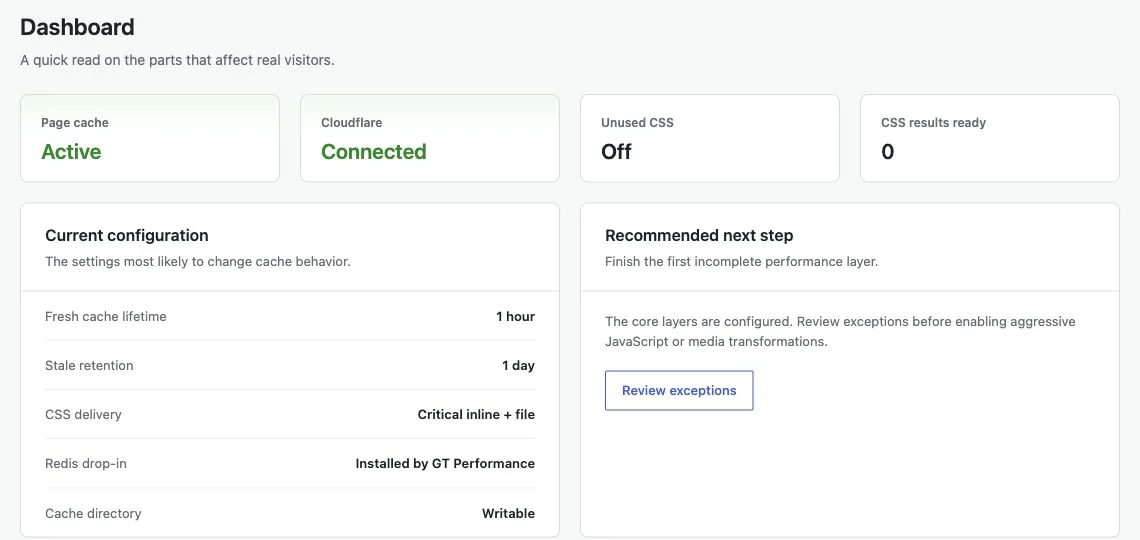
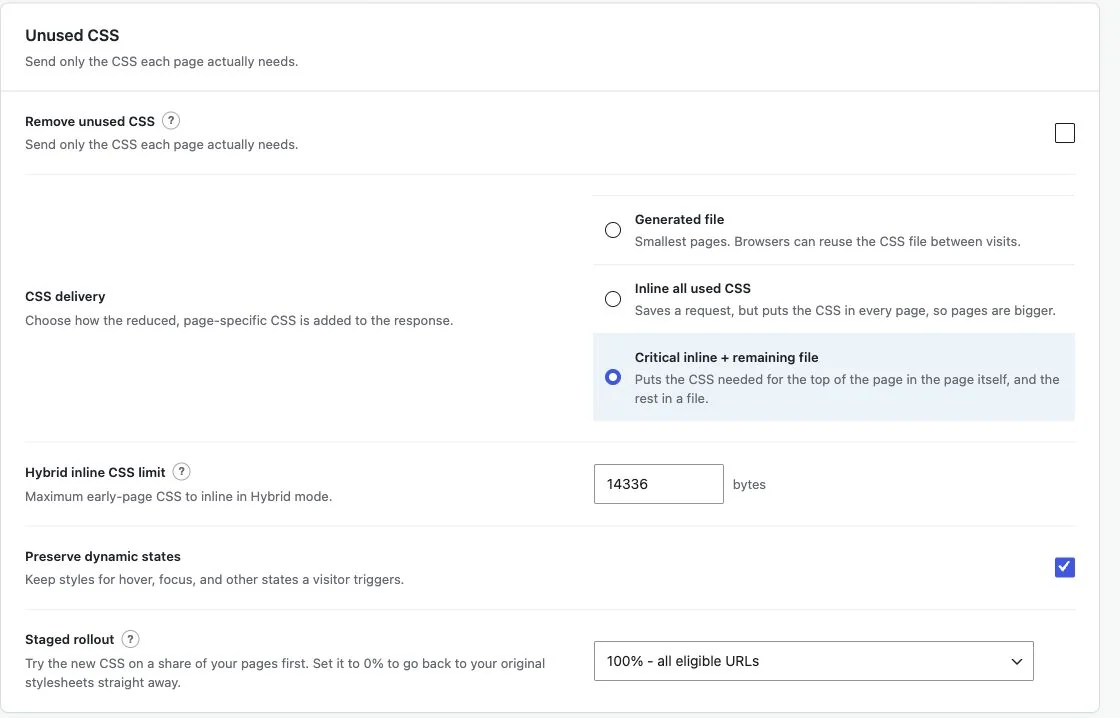
Select an image to view it at full size.
A Content Site With a Small Store
Consider a publication with long articles and a few downloadable products. The article page can often reuse a public cached response. The customer’s cart and account cannot safely reuse another customer’s state. Set up the page-cache layer first and review the actual routes used by the store.
Next, address a visible bottleneck. A video embed may benefit from click-to-load behavior; a large stylesheet may justify CSS reduction. Check each change against the site features that depend on it. Dynamic menus, popups, and form validation can need explicit CSS safelists or script exclusions.
The plugin includes adapters for WooCommerce, FluentCart, and Easy Digital Downloads, but custom endpoints and payment flows still need their own review. A fast article is not enough if the customer cannot finish an order.
The best optimization is one you can explain, verify, and reverse when the site changes.
How to Get Started
Start with a staging copy and a representative task, then extend the setup once the complete path makes sense.
Inventory Cache Ownership
Identify the host cache, Cloudflare rules, existing caching plugins, and active drop-ins. Give each overlapping optimization one owner.
Enable Public Page Caching
Configure the page-cache layer on staging. Review lifetimes and exclusions before extending caching to additional contexts.
Address the Next Bottleneck
Choose the next bottleneck and enable the relevant control. Keep the original CSS available and retain a clear recovery path.
Review Visitor and Customer Flows
Check logged-out content, forms, login, cart, checkout, and account pages. Use diagnostics to explain unexpected bypasses or stale responses.
Before You Go Live
Use these checks for the parts of the workflow this product affects.
- Do not let two plugins replace the same cache drop-in.
- Keep customer-specific responses outside public caches.
- Confirm background jobs run before relying on CSS generation.
- Back up before database cleanup; deletion is a separate decision.
Is It Right for Your Site?
Consider the working requirements alongside the design or feature list.
When It Fits
GT Performance suits single-site WordPress installations that need caching plus practical controls for the next performance bottleneck. It is useful for owners who want to understand cache behavior rather than chase a single score.
Know the Limits
Multisite is not supported. Image conversion depends on the available image editor, Redis needs server support, and dynamic components can require exclusions. No cache plugin guarantees a performance score on every hosting setup or repairs slow third-party services by itself.
Requirements
Requires WordPress 6.6 or newer and PHP 8.1 or newer. Review server storage, scheduled jobs, existing drop-ins, and any optional Cloudflare or Redis configuration before enabling those features.
Download and License Details
The plugin is free through gauravtiwari.org. The store package includes a protected updater; its automatic-update entitlement is separate from GPL usage rights. Choose the appropriate store entitlement for the installation you are maintaining.
Gatilab explains the product and its practical use. The original product page on gauravtiwari.org handles the current offer, checkout or installation route, account access, and product support.
GT Performance installation guide
Need help implementing the site around it? Explore Gatilab’s performance optimization services. Implementation work is separate from the product download or license.
Common Questions
A few remaining details before you choose the product.
Is CSS processing sent to an external service?
No. Stylesheet collection, analysis, and generation run on your WordPress server. That means local resources, background jobs, and exclusions affect processing.
Can I keep another optimization plugin?
Only with clearly separated responsibilities. Do not let two plugins own the same page-cache or object-cache drop-in, and avoid applying the same script optimization twice.
Will it make a store safe to cache automatically?
The supported commerce adapters add exclusions for known routes and sessions. You still need to review custom endpoints, payment methods, and the actual customer flow before production rollout.
Start With Public Page Caching
Establish a working baseline, then add the layer that addresses your next measured bottleneck.
Continue to the original product page for the current offer and next steps.