
GSC URL Inspection Tool: The Complete Diagnostic Guide
The GSC URL inspection tool is the single most powerful diagnostic surface inside Google Search Console. Drop any URL from a verified property into the search bar at the top of the dashboard and Google returns its full indexing record: whether the page is in the index, when it was last crawled, which canonical Google selected, what the rendered DOM looks like, what the live HTTP response says right now, and any structured-data or mobile-usability issues attached to it. It is the only place outside server logs where you can see your site exactly the way Googlebot sees it.
Most teams use it for one purpose: requesting indexing on a new post. That is the least valuable thing it does. The real value is the Coverage breakdown, the Live Test, and the rendered HTML viewer, all of which expose problems that no third-party tool can see. I run a URL inspection on every new client property within the first hour, and I run one any time a published page silently disappears from search. This guide walks through the entire surface, including the API access most people miss.
What the GSC URL inspection tool actually does
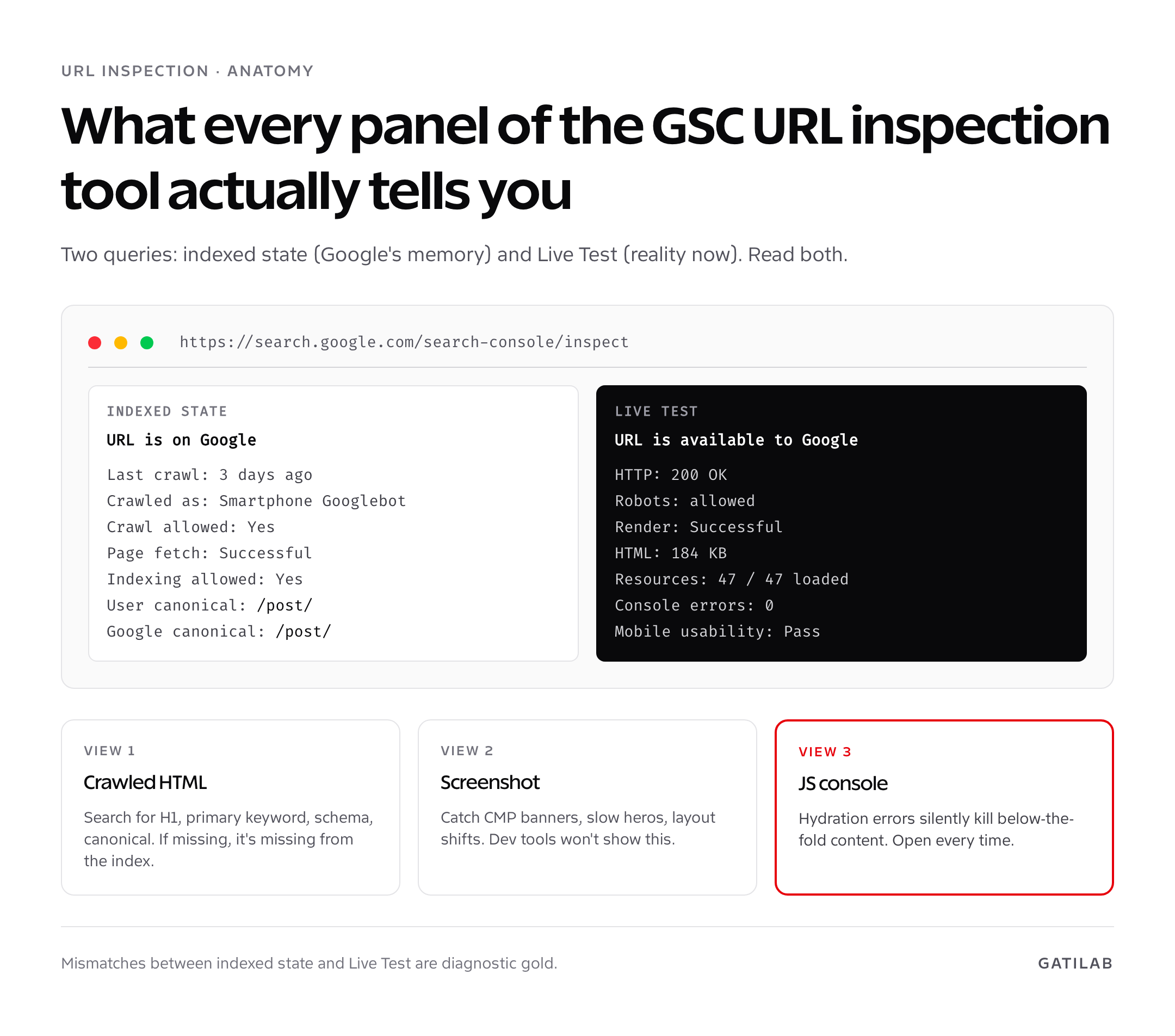
The URL Inspection report runs two distinct queries against Google’s systems. The first is the indexed-state query, which returns whatever Google last stored about the URL the most recent time it crawled and processed it. The second is the Live Test, which sends Googlebot to your URL right now and returns the HTTP response, the rendered HTML, the resource-load list, and any blocking errors found during fetch. Both queries return data on canonicals, indexing eligibility, structured-data validation, and mobile usability.
The inputs are restricted. You can only inspect URLs that belong to the property you have verified in Search Console. A domain property covers every subdomain and protocol; a URL-prefix property covers only the exact prefix. Inspecting a competitor URL or a URL outside your property returns “URL is not on Google” with no useful detail.
Indexed status vs Live Test: read both, in that order
The default view in Search Console URL inspection is the indexed state. The big green tick that says “URL is on Google” only tells you that Google has stored a version of the URL, not that the version Google holds is the version live on your server. The two can drift apart by weeks. Read both, and read them in this order: indexed first, live second.
- Indexed state shows you Google’s memory. Last crawl date, the canonical Google chose, the user-declared canonical you sent, the rendered HTML at crawl time, and any issues stored against that crawl.
- Live Test shows you reality now. Server status, robots directives, rendered DOM, page resources, and a fresh canonical assessment based on the current page.
- Mismatches are diagnostic gold. If the indexed state says canonical is page A and the live test says canonical is page B, you have a deployment that changed your canonical strategy and you need to remove the override or wait for re-crawl.
A common pitfall: founders inspect a URL the day after publishing, see “URL is not on Google”, and panic. Google has not crawled the URL yet. The indexed state is empty because there is nothing in the index. Run a Live Test, confirm the URL is reachable, request indexing, and move on. New pages typically appear within 1 to 14 days depending on crawl budget.
The Coverage section explained, line by line
The Coverage drawer is where the URL inspection tool earns its keep. Every line is a discrete signal. Read each one and treat any deviation from the expected value as a real problem.
| Field | What it means | Diagnostic value |
|---|---|---|
| Discovery | Where Google first found the URL: sitemap, referring page, manual submission | Catches URLs Google found from a referring page but you forgot to add to the sitemap |
| Last crawl | Date and time of the last successful crawl | Identifies stale URLs not picked up by Googlebot recently |
| Crawled as | Smartphone Googlebot or desktop Googlebot | Mobile-first indexing means you should see Smartphone for almost every URL |
| Crawl allowed | Yes / No / Not applicable | If No, robots.txt is blocking. Fix it before anything else. |
| Page fetch | Successful, Soft 404, Server error, Redirect error | The most actionable line. Anything other than Successful needs server-side investigation. |
| Indexing allowed | Yes / No | If No, a meta robots noindex or X-Robots-Tag header is blocking. |
| User-declared canonical | The canonical URL declared by your page | Should match the URL you want indexed. |
| Google-selected canonical | The canonical Google actually chose | If different from user-declared, Google overrode your signal. Investigate duplicate content, hreflang conflicts, parameter issues. |
The two canonical lines are the most under-read fields in Search Console. A user-declared canonical of example.com/post/ with a Google-selected canonical of example.com/post/?utm_source=newsletter means parameter handling is broken. A user-declared example.com/post/ with a Google-selected example.com/different-post/ means Google has consolidated two pages and only one is going to rank. Both situations need fixing at the URL or sitemap level.
Running a Live Test the right way
Click “Test live URL” in the top right of the inspection panel. The test runs in 5 to 15 seconds and returns a clean panel of crawl, render, and indexing diagnostics. Three sub-tabs are worth opening every time.
- View Crawled Page > HTML. The raw HTML Googlebot received from your server. Search this for the strings you expect: your H1, primary keyword, schema markup, canonical tag. If a string is missing, it is missing from the served response, full stop.
- View Crawled Page > Screenshot. The rendered viewport as Googlebot sees it. Slow-loading hero images and shifted layouts show up here before users notice.
- More info > Page resources. A complete list of every CSS, JS, image, and font request, with status code. Any blocked resource (robots.txt-blocked or 4xx-returning) that affects rendering should be unblocked.
The screenshot is the most overlooked panel. I have audited four sites in the last year where the live page rendered correctly to humans but the Googlebot screenshot was a blank cookie banner because a misconfigured CMP was blocking until consent. None of those sites had any other diagnostic indicating the problem. Always look at the screenshot.
The fourth panel worth opening is “More info > JavaScript console messages”. Googlebot logs every console error and warning during render. A single uncaught exception during hydration can prevent below-the-fold content from rendering, and that content will then be missing from the indexed HTML. The console messages panel surfaces these errors without you needing to open a browser dev-tools session.
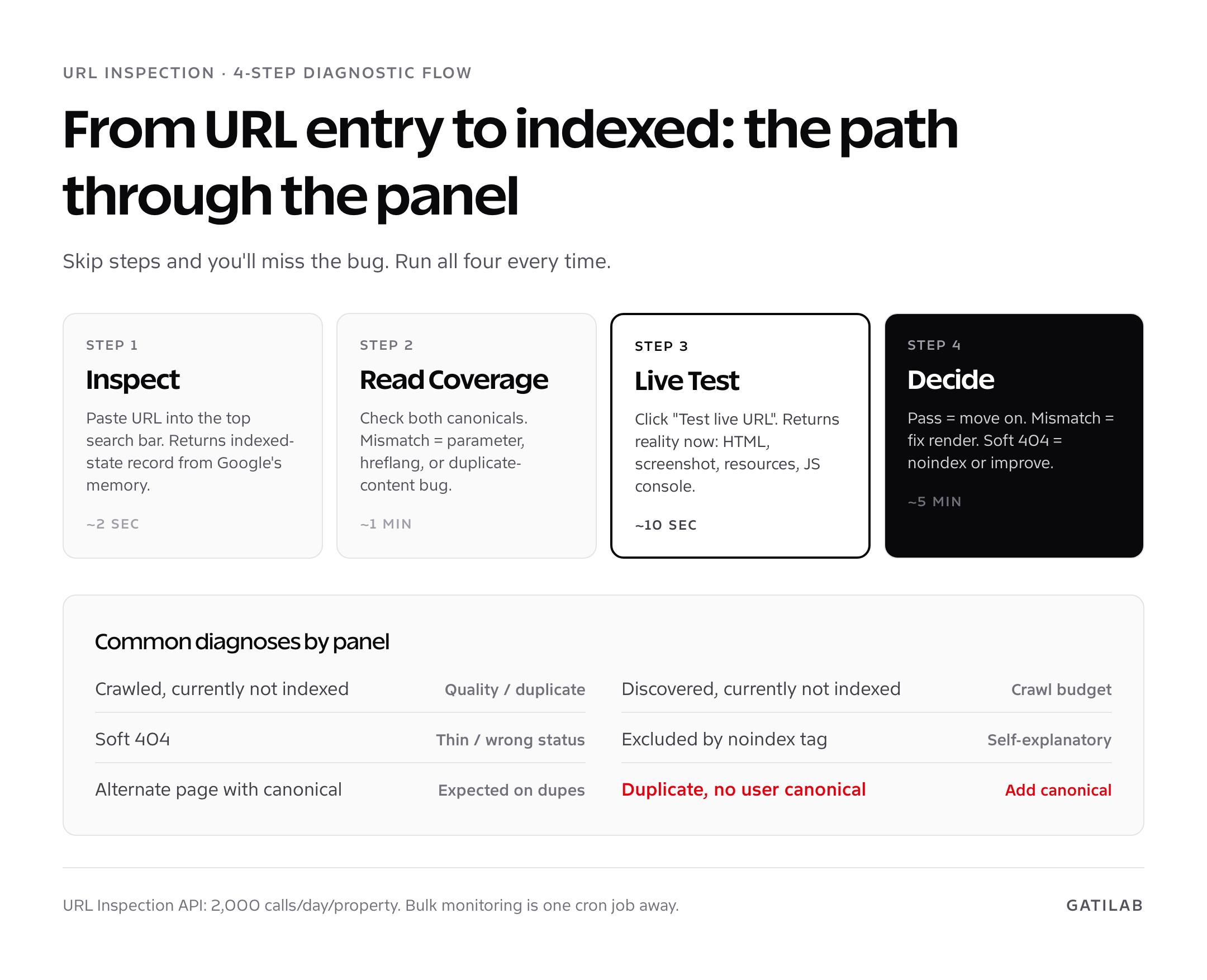
Treat the Live Test as a four-step ritual on any URL that matters: HTML, screenshot, page resources, JS console. Five minutes of inspection now prevents a month of “why isn’t this page indexed” mystery later.
Request indexing: limits, behaviour, and when it actually helps
Once a URL passes Live Test, the “Request indexing” button appears. Clicking it adds the URL to a priority crawl queue. Google does not guarantee inclusion, only that the URL will be re-crawled sooner than its natural schedule. The crawl typically happens within hours; the indexing decision can take days.
- Quota: Google enforces a soft daily limit, generally accepted as 10 to 12 manual requests per property per day. Hit the limit and you’ll see “Quota exceeded”.
- What it does well: nudging a single high-priority page that just shipped, pushing a corrected post after fixing a noindex bug, prompting re-crawl after a major content rewrite.
- What it doesn’t do: bulk indexing. If you have 500 fresh URLs, request indexing is the wrong tool. Use a fresh sitemap submission and IndexNow if your stack supports it.
- What it can’t fix: a URL that fails an indexing check. If Coverage says “Excluded by noindex”, request indexing won’t help; remove the noindex first.
I use request indexing for individual high-priority URLs only. For volume, I rely on a healthy XML sitemap, internal links from high-authority pages, and IndexNow for sites on Bing-aware stacks. For a step-by-step audit that uses URL Inspection alongside the broader indexing pipeline, see my website audit walkthrough.
Common GSC URL inspection tool errors and what they mean
Almost every error message in URL Inspection maps cleanly to a fix. The list below covers the eight I see weekly.
- “URL is not on Google” with successful Live Test: URL is reachable but unindexed. Wait, request indexing, check sitemap inclusion.
- “Crawled, currently not indexed”: Google saw the page but chose not to index it. Almost always a quality or duplicate-content signal. Improve the page, add internal links, or merge with a stronger URL.
- “Discovered, currently not indexed”: Google found the URL but hasn’t crawled it. Usually a crawl-budget issue on large sites; sometimes a slow server. Check Crawl Stats in Settings.
- “Alternate page with proper canonical tag”: Google picked a different canonical. Expected on duplicates, problem if it’s an unwanted consolidation.
- “Duplicate without user-selected canonical”: You haven’t declared a canonical. Add one.
- “Soft 404”: The URL returns 200 OK but Google thinks the content is thin or matches the 404 pattern. Either fix the page or return a real 404.
- “Page with redirect”: URL is a redirect, the destination is what gets indexed. Check the chain length and final target.
- “Excluded by ‘noindex’ tag”: Self-explanatory. Remove the tag if you want it indexed.
For 404 and soft-404 errors specifically, my walkthrough on fixing 404 errors in Google Search Console covers the redirect strategy and the difference between hard 404s, soft 404s, and 410s in detail.
URL Inspection API access: 2,000 inspections per day per property
The URL Inspection API, generally available since January 2022, exposes the same data as the dashboard. The endpoint is POST /v1/urlInspection/index:inspect on the Search Console API. Authenticated calls return a JSON object with the indexStatusResult, mobileUsabilityResult, richResultsResult, and ampResult fields. The data matches the UI exactly.
- Quota: 2,000 calls per day per property, 600 per minute. Plenty for ad-hoc audits, not enough for full-site monitoring on a 50,000-URL site.
- What it returns: coverage state, last crawl, page fetch result, robots state, indexability, user-declared and Google-selected canonicals, crawled-as user agent, structured data, mobile usability.
- What it does not return: the live test or the rendered HTML / screenshot. The API exposes the indexed state only, not the on-demand Live Test surface.
- Use cases: daily monitoring of money pages, automated alerts when a Google-selected canonical changes, regression checks after a deploy.
I run a Cloud Run job nightly that inspects every URL in a property’s “money” list (typically 200-500 URLs), stores the result in BigQuery, and pings Slack if the indexability state, canonical, or page fetch result changes since the previous night. The script is under 60 lines of Python. For the SEO tools I run alongside this monitoring, see the SEO tools roundup.
Three GSC URL inspection tool anti-patterns to drop today
- Reading only the green tick. “URL is on Google” is the answer to one specific question (is the URL indexed?) and ignores 90% of what URL Inspection actually tells you. Always open Coverage and check the canonical lines.
- Mass-clicking request indexing on every new post. The quota is meaningful and the impact on a properly internally-linked site is small. Save manual indexing requests for high-priority URLs that genuinely warrant a nudge.
- Trusting the indexed-state HTML for fresh deploys. The indexed HTML can be days or weeks old. After a major content or structure change, run the Live Test, never trust the stored version, and only re-request indexing once the live test confirms the new content.
Ten things to inspect with URL Inspection right now
- Your homepage. Confirm canonical is the bare domain, not a parameterised version.
- Your highest-traffic blog post. Confirm rendered HTML contains the H1 and primary keyword.
- Your sitemap.xml URL. Confirm Google reads it and there is no fetch error.
- Three random product or category pages. Look for accidental noindex from staging exports.
- The most recent post you published. Confirm Live Test succeeds and request indexing.
- A URL with parameters from your analytics tracker. Confirm Google-selected canonical strips the parameters.
- Your top-converting landing page. Compare rendered DOM to live page; flag any consent-banner blocking.
- An old URL you redirected. Confirm Google sees the 301 and final destination.
- A URL on a subdomain. Confirm subdomain coverage in your domain property.
- A URL with structured data. Open the Enhancements drawer and check the rich-results validation.
Run the list once per quarter. It catches roughly 80% of indexing issues before they become traffic problems. For the broader CRO and tooling stack I pair with this audit cadence, see my CRO tools roundup and SEO for startups guide.
Domain property vs URL-prefix property: what the GSC URL inspection tool can see
The scope of inspection depends on how you verified the property. Search Console offers two property types and they affect the URL Inspection tool in subtle but important ways.
- Domain property: verified via DNS TXT record. Covers every protocol (http, https), every subdomain (www, non-www, app, blog), and every path. One property, every URL.
- URL-prefix property: verified via HTML file upload, meta tag, Google Analytics, or Tag Manager. Covers only URLs starting with the exact prefix you verified.
https://example.com/blog/will not let you inspecthttps://example.com/orhttp://example.com/blog/.
If you can verify a domain property, do it. Every audit gets easier, every report combines subdomain data, and request indexing GSC accepts works across the entire host without you switching properties. Founders who start with URL-prefix verification almost always end up reverifying as a domain property within the first year.
Reading the rendered HTML, not just the source
Google indexes the rendered DOM, not the raw HTML your server returns. On any site with client-side JavaScript, the View Source view of the page can be radically different from what Google actually stores. The Google Search Console URL inspection panel surfaces this difference, but only if you know where to look.
- View Crawled Page > HTML shows the rendered HTML after Googlebot ran your JavaScript. This is the canonical source for “what Google indexed”.
- Live Test > View Tested Page > HTML shows the rendered HTML right now. Compare the two to detect render-blocking, hydration mismatches, or content that disappears after JS hydration.
- Search the rendered HTML for: your H1, primary keyword, canonical link, schema script tag, hreflang tags, robots meta. Anything missing from the rendered HTML is missing from the index.
I once spent three days helping a SaaS team figure out why their feature pages had no rich-result eligibility. The Schema script was in their React component but only mounted client-side after a useEffect. The crawled-page HTML showed no JSON-LD whatsoever. Five lines of getServerSideProps later, the schema was in the rendered HTML and Search Console started reporting “Eligible” within 48 hours. None of that was visible in any third-party SEO tool; only the GSC inspect URL panel exposed the truth.
Enhancements: structured data, mobile usability, breadcrumbs
The Enhancements drawer at the bottom of the URL Inspection panel is split into report types: Breadcrumbs, FAQ, Article, Product, HowTo, Video, and so on, depending on what schema your page declares. Each report shows whether Google detected the structured data, validated it against the schema, and considered the page eligible for the matching rich result.
- Eligible: the page passed validation and can earn the rich result when Google decides to show it.
- Eligible with warnings: required fields are present but recommended fields are missing. Add the recommended fields to maximise rich-result coverage.
- Not eligible: required fields are missing or invalid. Fix and re-test.
Eligibility is necessary but not sufficient. Google decides at query time whether to render a rich result. A page can be eligible for FAQ rich results for years and still never see one because the SERP shape doesn’t fit. Don’t read eligibility as guaranteed visibility.
The Referring page field: a hidden internal-link audit
Inside the Coverage drawer, expand “Page indexing” to see the Referring page field. Google reports the URL it used to discover your inspected URL. On large sites, this is a free internal-link audit. If a deep blog post’s only referring page is a sitemap, you have an internal-linking gap. If a money page’s referring page is an old archive index, you’re funnelling crawl signal through the wrong path.
I batch this for client audits: pull the top 20 money URLs, run inspection on each, capture the referring page in a sheet. Any URL whose referring page is not a top-level navigation node, hub, or category page goes on the internal-linking fix list. The exercise takes 20 minutes and surfaces architecture problems that take Ahrefs and Screaming Frog hours to detect.
Related Search Console workflows
URL Inspection is one surface in the broader Search Console toolkit. To read your ranking data correctly once URLs are indexed, my guide to Google Search Console keyword ranking explains average position, striking-distance buckets, and BigQuery exports. When indexing problems trace back to broken URLs, the 404 fix walkthrough covers the redirect logic that prevents URL Inspection from flooding with errors in the first place.
FAQ
What is the GSC URL inspection tool used for?
It returns Google’s full indexing record for any URL in a verified Search Console property: indexed state, last crawl, canonical decisions, rendered HTML, mobile usability, and structured-data validation, plus an on-demand Live Test that fetches the URL right now and shows you what Googlebot sees.
How long does request indexing take in Google Search Console?
The crawl usually happens within a few hours of the request. Indexing decisions can take anywhere from minutes to several days, and Google never guarantees inclusion. If the URL fails any indexing check, request indexing will not help.
What does ‘Crawled, currently not indexed’ mean?
Google fetched and rendered the page but chose not to add it to the index. The most common causes are thin content, near-duplicate content with another URL, weak internal linking, or insufficient overall site authority. Improve the page or merge it with a stronger URL.
Can I inspect competitor URLs?
No. The URL Inspection tool only works for URLs inside a property you have verified in Search Console. Inspecting any other URL returns ‘URL is not on Google’ with no diagnostic detail.
How many URLs can I inspect via the URL Inspection API?
2,000 calls per property per day, with a per-minute cap of 600. The API exposes indexed state and structured data, but does not run the Live Test. For monitoring small money-page lists, the quota is more than enough.
Why does the user-declared canonical differ from the Google-selected canonical?
Google overrode your canonical signal because it found stronger duplicate-consolidation evidence elsewhere. Common causes: hreflang conflicts, parameter handling, internal links pointing to a non-canonical URL, or hreflang mistakes. Audit the offending URLs and align all signals to the canonical you want.
What is the difference between Live Test and the indexed state?
The indexed state is Google’s last stored impression of the URL from the most recent crawl. Live Test fetches and renders the URL right now from your server. They diverge whenever you’ve shipped changes Google has not yet re-crawled, which is most of the time on large sites.
Can I bulk-inspect URLs in Google Search Console?
Not in the UI; it inspects one URL at a time. The URL Inspection API enables programmatic bulk inspection up to 2,000 calls per day per property. Beyond that, the Coverage report and the BigQuery bulk export of Search Console data are the right tools for site-wide indexing audits.
Tell Google you want more of this.
Add Gatilab as a preferred sourceOne tap, and this site shows up more often in your own Top Stories, AI Overviews and AI Mode. Remove it any time.