
How to Delete a Google Business Profile
You want the business off Google. It closed, it sold, it moved, or the review page has become a liability, and the button in front of you says Remove Business Profile. That button does less than its name promises. It deletes the photos, posts and review replies you added and ends your access, but the listing itself can stay on Maps and Search as an unclaimed place, with every review still attached.
So before you delete a Google Business Profile, decide what you actually want to happen: the business shown as closed, the listing gone from Maps, your name out of the manager list, or the profile handed to a buyer. Each of these is a different screen, and only one of them is the remove button. I’ve put 60+ clients on Google Business Profile across 200+ setups, so these screens are familiar ground, and the labels below are the ones Google shows right now rather than the ones from the old dashboard.
Which Option Does What
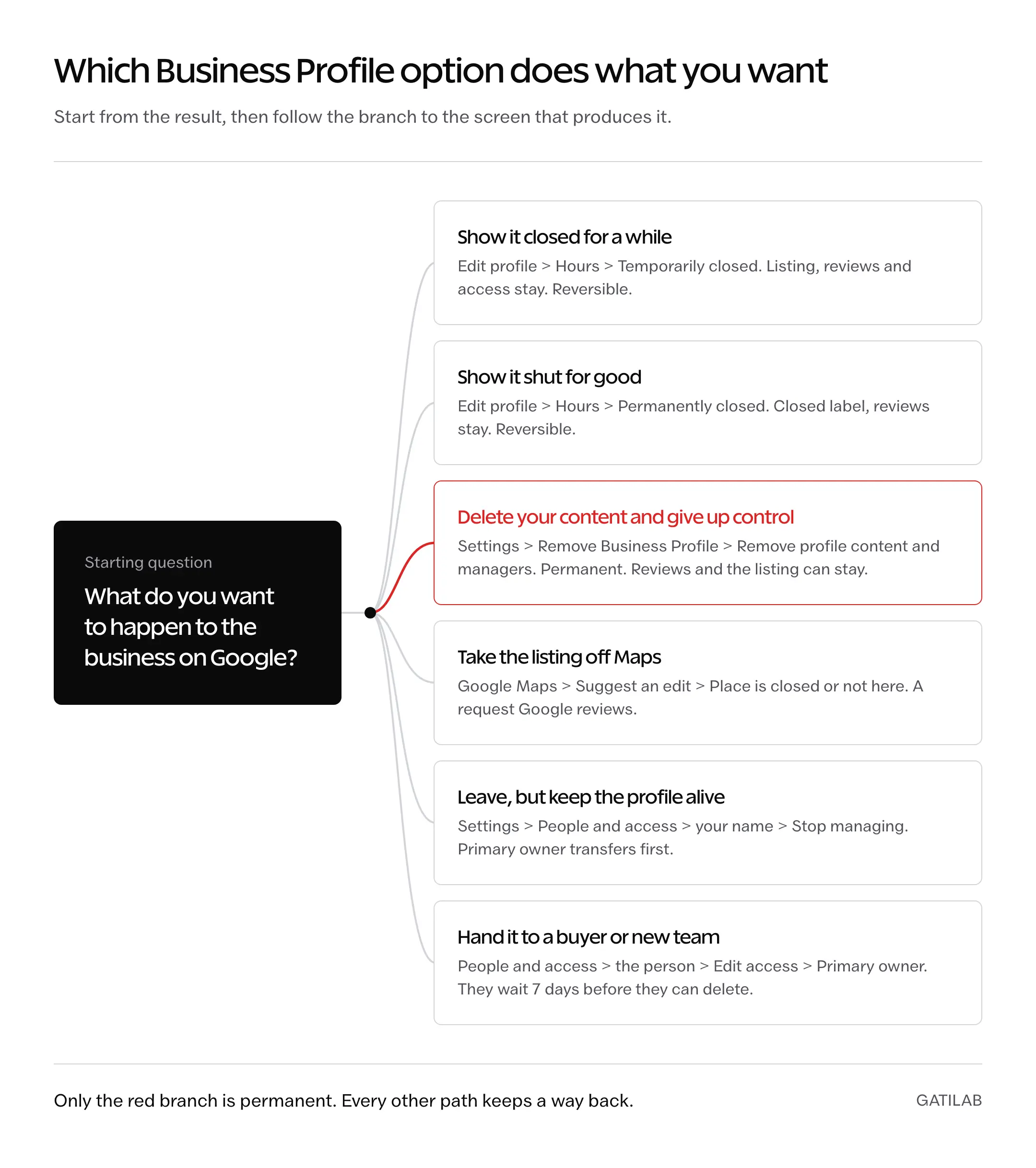
Google gives you 6 ways to retire a profile or step away from it, and the screens are not interchangeable. Pick by the result you want, because the word “remove” sits on a screen that can leave the listing exactly where it is.
| What you want | What to use | Who can do it | Can you undo it? |
|---|---|---|---|
| Show the business as closed for a while | Edit profile > Hours > Temporarily closed. The listing, reviews and your access all stay. | Any owner or manager | Yes, switch the hours back |
| Show the business as shut for good | Edit profile > Hours > Permanently closed. The listing stays with a “Permanently closed” label; reviews stay. | Any owner or manager | Yes, reopen it from the same screen |
| Delete your content and give up control | Business Profile settings > Remove Business Profile > Remove profile content and managers. Your posts, photos and replies go; reviews and the listing can stay. | Primary owner only, after 7 days as owner | No. You can re-verify later, but your content is gone |
| Take the listing off Maps and Search | Google Maps > Suggest an edit > Place is closed or not here. Google reviews the request. | Anyone signed in, owner or not | It’s a request, so it can be declined |
| Stop being a manager, keep the profile alive | Business Profile settings > People and access > your name > Stop managing. | Any owner or manager; the primary owner must transfer first | Yes, someone re-invites you |
| Hand it to a buyer or a new team | People and access > the person > Edit access > Primary owner. | Primary owner | The new owner can transfer it back |
Remove Business Profile removes your content and your access. It makes no promise about the public listing. Google’s own wording is that the business “might still show up on Search and Maps, unless it’s considered ineligible”. If the listing itself has to go, that request lives inside Google Maps, and it’s covered below.
How to Delete a Google Business Profile
This is the owner-side deletion, the one Google calls removing profile content and managers. Only the primary owner can run it, and anyone added as an owner or manager in the last 7 days has to wait those 7 days out first. There’s no confirmation email and no undo window, so read the step about the closed toggle before you start clicking.
- Sign in to the Google account that owns the profile and open your Business Profile. Searching the exact business name on Google brings up the management card, and business.google.com takes you to the same place.
- On the card, open the More menu (the 3 dots) and choose Business Profile settings.
- Choose Remove Business Profile.
- Choose Remove profile content and managers. The other option on this screen, Mark this business as closed, is the closure path explained further down, not a deletion.
- Decide whether to switch on Mark your business as permanently closed. With it on, whatever listing remains carries a “Permanently closed” label. With it off, the listing remains as an ordinary unclaimed place.
- Select Continue, then Remove, then Done.


If the management card doesn’t appear when you search the business, you’re signed in to the wrong Google account, or your access was removed. Switch accounts at accounts.google.com and search again. Google only lets the primary owner complete the removal, so a manager or a second owner has to ask the primary owner or take over primary ownership first.
What Google deletes and what stays
I want to be exact here, because this is where owners lose content they expected to keep. Google’s help page splits the outcome into 3 groups:
- Deleted for good: every post, photo, video and review reply added by any owner or manager, plus every owner and manager on the profile.
- Stays: customer reviews and other content customers added, such as their photos.
- Stays unless Google decides the business is ineligible: the listing itself on Search and Maps, now with nobody managing it.
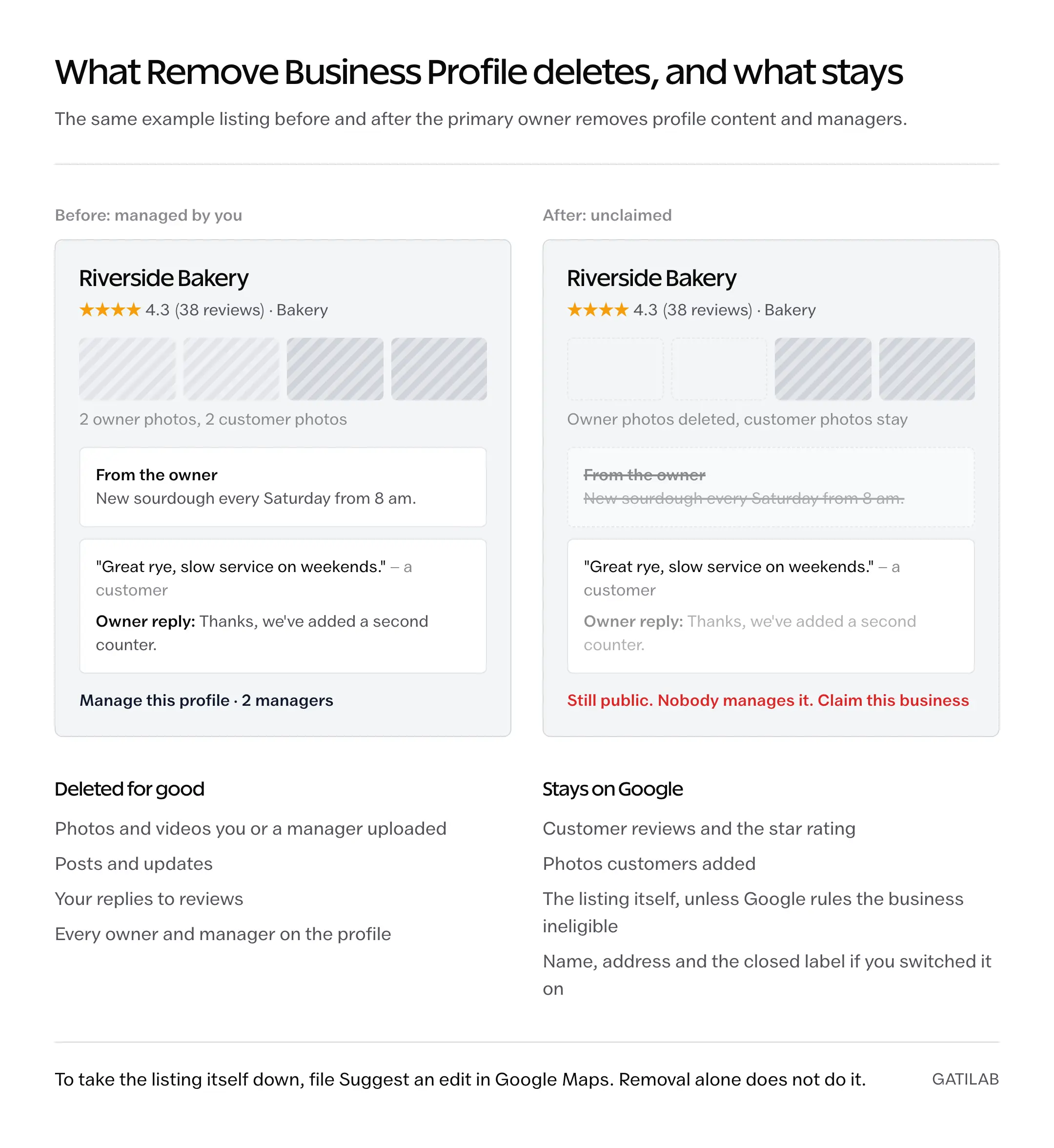
Google describes the removal as permanent and says the content “can’t be recovered or managed” afterwards. If you want to manage the listing again, you verify the business from scratch, and the old posts, photos and replies do not come back with it. The reviews will still be there, because these were never yours to delete.
Why the Listing Still Shows on Maps
I have read owners on Reddit say they removed the profile, waited a month and the business was still live on Maps. Nothing went wrong for them; that is how the two systems are built.
A Maps listing is Google’s public record that a place exists at an address. A Business Profile is the management layer you claim on top of that record, which is why the listing can exist before you claim it and why the Remove button talks about “profile content and managers” rather than the business. Removing the profile peels your layer off. The place record underneath stays until Google decides the place isn’t there any more, and nothing in the owner-side removal flow tells Google that. So the removal does exactly what the label says, and the listing keeps showing up, with the reviews, for anyone who searches the name or the address.
Telling Google the place is gone is a separate request, and it goes through Maps rather than through your profile.
How to Remove a Business From Google Maps
This works whether you own the profile or not, which also makes it the route for a listing an old agency or ex-employee controls. It’s a request. Google reviews it and may decline it.
- Open Google Maps on desktop or the Maps app, signed in to any Google account.
- Select the business.
- Choose Suggest an edit, then Place is closed or not here.
- Pick the reason that fits: Doesn’t exist here, Duplicate, Offensive, harmful or misleading, or Permanently closed.
- Select Submit. Google may email you with follow-up questions, and if the request is approved the business comes off Search and Maps.
The boundary to know before you file it: Google removes listings for businesses that never existed or aren’t eligible to be on Google at all. A business that genuinely traded and then shut is not in that group. For these, the reason you’ll pick is Permanently closed, and the result is a closed label on a listing that stays searchable. That label is the end state for a real business. If the listing is fraudulent or shows wrong contact details, Google points you to its business redressal complaint form instead of the Maps edit.
Mark the Business Closed Instead
For a renovation, a seasonal break or a shop that has shut, closure is the better tool, because the listing, the reviews and your access all stay under your control. Google offers two labels:
- Temporarily closed is for closures longer than 7 days, seasonal closures and closures with no end date. For a break of 7 days or less, Google says to use special hours instead.
- Permanently closed shows a “Permanently closed” label on Maps and Search. The listing may still appear for people who search for it, and you can reopen it later from the same screen.
Both live in the hours editor. Open your Business Profile, choose Edit profile, then Hours, select Edit next to Hours, pick Temporarily closed or Permanently closed, and save. The Remove Business Profile screen offers the same permanent closure as its first option, so you don’t need to go through removal to reach it.

If the real change is an address, a name or a category rather than a closure, edit the field instead of touching any of this. The Google Business Profile editor walkthrough covers each field and which edits send the profile back into review.
Remove Yourself or Hand It Over
When a business is sold, an agency contract ends or an employee leaves, the profile should change hands rather than be deleted. All of this sits under Business Profile settings, then People and access.
- To remove yourself: select your own name, choose Stop managing, then Confirm. Only your access ends; the profile is untouched. A primary owner can’t do this until primary ownership has been transferred to someone else.
- To transfer primary ownership: select the person, choose Edit next to Access, pick Primary owner and save. The new primary owner then waits 7 days before they can delete the profile, remove other users or transfer it again.
- To remove someone else: select the person and choose Remove person. Only owners can remove other owners and managers; a manager can’t.
If you have no access at all, because the profile sits in a former employee’s or agency’s account, go to business.google.com/add, enter the business name and address, and select the business when Google shows “Someone else may manage this Business Profile”. Choose Request Access and fill in the form. The current owner is emailed and has 3 days to respond. If nobody responds, your confirmation email may offer View request, then Verify, which lets you claim the profile yourself, though Google says this option isn’t always available. A service-area business with no storefront has to go through Google support for this instead.
Closing One Location of Many
Multi-location accounts do all of this in Business Profile Manager instead of the search card. Sign in, tick the businesses you want to act on, open Actions at the top right, and choose either Remove businesses then Remove, or Mark as temporarily closed or Mark as permanently closed then confirm in the dialog. The same rules apply per location: removal deletes owner content and managers but can leave the listing, and closure keeps everything.

Closing a branch is also an SEO decision, because the other branches, the store locator and the location schema on your site all reference it. The multi-location SEO playbook covers which profiles to close, which to merge and what to change on the website before you touch the profile.
Before You Click Remove
Removal is the one action on this page you can’t take back, so a few minutes of preparation are worth it.
- Save your own content. Download the photos and videos you uploaded and copy any posts or review replies you want to keep. Google deletes these permanently.
- Copy the reviews you’d reuse. They stay public on the listing, but once your access is gone you can’t reply to them or export them from the profile.
- Decide the closed toggle in advance. It appears mid-flow, and it decides whether the leftover listing says “Permanently closed” or looks open.
- Update the website. Remove the embedded map, update or drop the LocalBusiness schema and take the “find us on Google” links out of the header and footer.
- Check Google Ads. Location assets pull from the linked profile, so find the campaigns that use them and pause or replace these before the link breaks.
- Fix the other directories. The Apple Maps listing, Bing Places and the aggregators keep showing the old details until you change them there.
- Tell customers directly. Google won’t, and regulars will find the closed label after they’ve already driven over.
Can Deleting Remove Bad Reviews?
No. Reviews are customer content, and Google keeps them with the listing after you remove your profile. Deleting the profile removes your ability to reply to them and nothing else, which is the opposite of what an owner in that situation wants.
A review that breaks Google’s policies, such as spam, a conflict of interest or a review of a different business, can be reported from the review itself and sometimes comes down. A genuine bad review stays, and the useful move is a calm reply plus a steady flow of new reviews that outweigh it. The Google Business Profile local SEO guide covers the review process in detail. If the profile was suspended rather than reviewed badly, deletion makes the recovery harder; follow the suspended profile recovery guide instead.
Changed Your Mind
A profile marked closed reopens from the hours editor with everything intact. A removed profile can’t be restored. To manage the listing again you claim it and verify the business one more time, which is the same process as creating a Google Business Profile, and your old posts, photos and replies stay gone. If there is any doubt about shutting the business, the temporary closure costs nothing and keeps every option open.
FAQs on Deleting a Google Business Profile
How do I permanently close my business on Google?
Open your Business Profile, choose Edit profile, then Hours, select Edit next to Hours, pick Permanently closed and save. The listing stays on Maps with a “Permanently closed” label and keeps its reviews. You can reopen it from the same screen later.
How long does it take for a removed profile to disappear from Maps?
It may never disappear. Removing the profile deletes your content and access, and Google says the business might still show up on Search and Maps unless it is considered ineligible. To have the listing taken down, use Suggest an edit in Google Maps and pick Place is closed or not here. Google gives no processing time for that request.
How can I remove myself from a Google Business Profile?
Go to Business Profile settings, then People and access, select your own name, choose Stop managing and confirm. The profile stays as it is for the remaining owners. If you are the primary owner, transfer primary ownership to someone else first, because Google blocks the primary owner from leaving.
Will deleting my Business Profile remove my bad reviews?
No. Reviews are customer content and stay attached to the listing after you remove your profile. You only lose the ability to reply. Report a review that breaks Google’s policies from the review itself, and answer the rest with a reply and newer reviews.
How do I remove a permanently closed business from Google?
Usually you can’t. Google removes listings for businesses that never existed or are not eligible to be on Google. A real business that closed is marked Permanently closed and stays searchable with that label. If the listing is a duplicate or was never a real place, submit Suggest an edit, then Place is closed or not here, with the matching reason.
How do I delete a Business Profile that a former employee or agency owns?
Ask them to transfer primary ownership to you under People and access, or request access yourself at business.google.com/add. The current owner has 3 days to respond; after that your confirmation email may let you verify and claim the profile. Once you are primary owner, wait 7 days and then you can remove or close it.
Can I undo removing my Business Profile?
No. Google describes the removal of profile content and managers as permanent and says the content cannot be recovered. You can claim and verify the business again to manage it, but your old posts, photos and review replies will not return. If you are unsure, mark the business temporarily closed instead.
What is the difference between deleting and marking permanently closed?
Marking the business permanently closed keeps the listing, the reviews and your access, and adds a closed label that you can reverse. Deleting (Remove profile content and managers) permanently removes everything you and your managers added and ends your access, while the listing and its reviews can stay public with nobody managing them.
Can a competitor delete or close my profile?
They cannot delete it, because only the primary owner can remove profile content and managers. Anyone can suggest an edit on Maps, including marking the place closed, and Google sometimes accepts those suggestions. If that happens, reopen the business from the hours editor and keep the profile active so Google has a verified owner to trust over outside edits.
Tell Google you want more of this.
Add Gatilab as a preferred sourceOne tap, and this site shows up more often in your own Top Stories, AI Overviews and AI Mode. Remove it any time.