
Customers keep asking what’s coming next, and the real answer usually sits in a spreadsheet only your team can see. Share that sheet and you expose target dates, internal names and half-made decisions. Share nothing and the same feature request lands in your inbox every week.
A product roadmap template fixes this when it gives you two views of one list. We recommend an internal roadmap for planning, with the evidence, owner, effort and confidence behind every item. Next to it sits a public roadmap that shows only outcomes in 4 stages, with no dates. The free template below has both, with a worked example and a checklist for the public version.
What a Product Roadmap Template Should Include
A roadmap is the list of problems you have decided to solve, in the order you plan to solve them. The template needs enough columns to make that order easy to defend in a planning meeting.
These are the columns in the internal sheet and the question each one answers:
- Item: the work, in your team’s own words.
- Problem it solves: the problem in the customer’s words, ideally copied from a ticket or a request. It keeps the team building for a person instead of a feature list.
- Evidence: the number of tickets, requests or lost sales behind the item. Without it, one loud request and 20 quiet ones look the same.
- Stage: Under consideration, Planned, In progress or Shipped.
- Owner: the one person who moves the item forward.
- Effort and confidence: a rough S, M or L size, and how sure you are about the problem and the fix.
- Target window: a month or a quarter, for internal planning only.
- Show publicly, public title and what changes for the customer: the 3 columns that turn an internal row into a public one.
- Release note link: filled in once the item ships.
The evidence column is the one teams skip most often, and it is the one that settles most arguments about priority.
Internal vs Public Roadmap
Both roadmaps come from the same rows, but they answer different questions. The internal roadmap answers “what should we build next and why”. The public roadmap answers the customer’s question: “is my problem on your list, and where is it?”
| Field | Internal roadmap | Public roadmap |
|---|---|---|
| Title | The team’s working name | The outcome in the customer’s words |
| Dates | Target month or quarter | None |
| Evidence and revenue | Yes | No |
| Owner | A named person | No |
| Ideas you turned down | Kept, with the reason | Removed, or left in Under consideration |
| Update rhythm | Every planning meeting | Whenever an item changes stage |
Our advice is to keep one list and build the public view from it. Two separate documents drift apart quickly, and the public one is usually the copy that goes stale first.
The 4 Roadmap Stages
Stages tell customers where their request stands without promising a date. The template uses 4:
- Under consideration: ideas you are weighing. Every new request starts here.
- Planned: work you have decided to do.
- In progress: work that has started.
- Shipped: work that has been released, with a link to its release note.
Many teams know this layout as Now, Next and Later. In progress is Now, Planned is Next and Under consideration is Later. We add Shipped because it closes the loop for the people who asked, and it shows visitors that the roadmap actually moves.
Dates are the part we leave off a public roadmap. A date that slips turns into a broken promise in a customer’s eyes, while a stage that stays the same for a few weeks just reads as work in progress. When a release keeps slipping, our guide on when to ship a good enough product can help you decide what goes out first.
How to Fill In the Template
This is the order we would follow the first time you fill it in:
- One list for every request. Ideas from support tickets, sales calls, reviews and your own team all go into the Internal roadmap sheet. Your customer success and support people hear most of them first. A duplicate becomes one row with a higher evidence count.
- The problem in the customer’s words. “I want to take a deposit before I start work” tells the team more than “partial payments v2”.
- A stage for every row. Most rows start in Under consideration. An item moves to Planned once someone owns it and the team has decided to do it.
- Effort and confidence before order. A small, well-understood item with plenty of evidence usually goes first. A large item with low confidence usually needs research before it is planned.
- The public filter. Items a customer would recognize get Show publicly = Yes and a public title that names the outcome.
- The checklist. The public rows go through the Before you publish sheet, then into the Public roadmap sheet.
After the first pass, the template needs a short review at each planning meeting and a stage change whenever work starts or ships.
What to Leave Off a Public Roadmap
A public roadmap earns trust when it is specific about problems and quiet about internals. These are the things we keep off ours:
- Dates and quarters. Stages carry enough information, and they don’t expire.
- Internal names. Customers don’t know what “Project Atlas” or “payments refactor” means.
- Revenue, deals and client names. A custom deal for one account isn’t a roadmap item.
- Pure engineering work. A database migration matters to your team, but customers care about what it makes possible. If it makes a screen faster, the faster screen is the item.
- Anything framed as a promise you might break. Under consideration should read as “we’re weighing this”, so customers keep sending ideas without treating each one as a commitment.
The simplest test is the rewrite. “Refactor payment model” becomes “Deposits and partial payments”. If a row can’t be rewritten as an outcome a customer would ask for, it belongs on the internal sheet only.
A Public Roadmap in Practice
We run public roadmaps for most of our plugins on gauravtiwari.org/roadmap, and the Core Support board shows the template’s public sheet working on a live product.
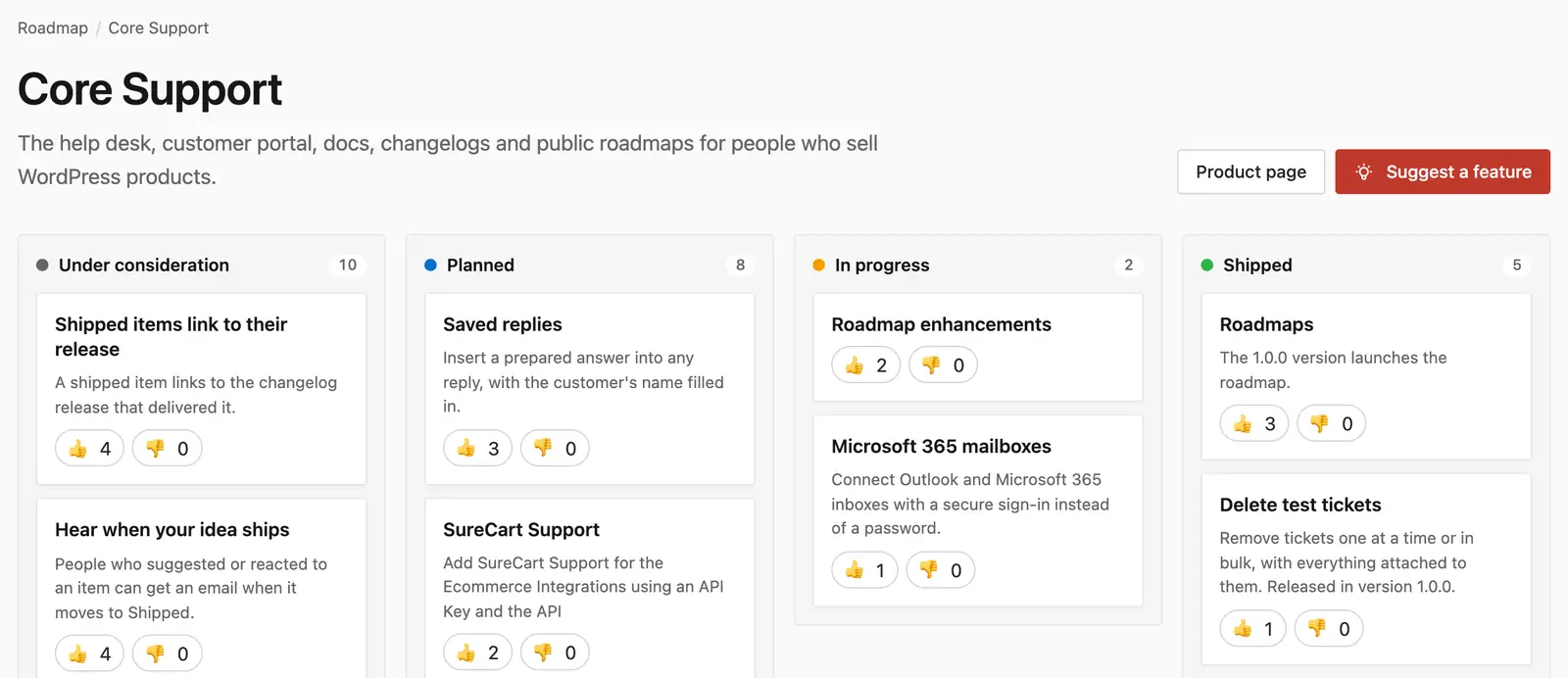
A few details on that board are worth copying:
- Most cards pair an outcome title with one sentence on what changes, such as “Connect Outlook and Microsoft 365 inboxes with a secure sign-in instead of a password.”
- Shipped cards name the version that delivered them, such as “Released in version 1.0.0.”
- Visitors react with a thumbs up or down, which gives the evidence column a number without running a survey.
- A Suggest a feature form sits under the board, and new ideas wait for review before they appear on it.
The column counts at the top also show visitors that the product is moving.
Running Your Roadmap in WordPress
A spreadsheet is enough while the roadmap lives inside your team. Once customers should see it, a page on your own site works better than a shared sheet, because people can react, suggest ideas and find it from search.
Core Support is the WordPress helpdesk plugin we built, and its Roadmaps module runs the board above. It puts the template’s public sheet on your own domain:
- A public roadmap for each product at /roadmap/, or at an address you choose.
- The same 4 stages as the template, with a board in wp-admin where you drag items between them.
- Thumbs up and down reactions and comments on every item.
- Feature requests that wait for your review before anyone else sees them.
- Password-protected items that show their title and reactions without the details.
Roadmaps are a module that starts switched off, so a site that doesn’t use them loads none of their code. The same plugin also runs tickets, docs and changelogs, which helps when a shipped item needs a release note. The public roadmaps guide walks through the setup.
FAQs on Product Roadmap Templates
The internal roadmap should be reviewed at every planning meeting, which for most small teams is every 2 weeks or once a month. The public roadmap only needs a change when an item moves to a new stage. A board that hasn’t moved in months reads as an abandoned product.
We would leave them off. Stages tell customers where their request stands, and a missed date costs more trust than a stage that stays put. If customers need timing for their own planning, a short note on one In progress item is safer than dates across the whole board.
A roadmap shows what you plan to build. A changelog records what you already shipped, version by version. The two meet at the Shipped stage, where each item should link to the release note that delivered it.
Yes. Service improvements or client-facing deliverables replace product features, and client requests become the evidence. The public sheet works well as a what’s new page for retainer clients.
Mostly. In progress maps to Now, Planned to Next and Under consideration to Later. The template adds Shipped so customers can see what has already arrived.
Where to Start
If you are starting from nothing, we would fill in the internal sheet first and publish the public version only once several items are genuinely Planned. A public roadmap with 2 cards on it looks emptier than having no roadmap at all.
Once it is live, it is wise to move items as soon as work starts or ships and to link every shipped item to its release note. For more planning formats, our free business templates collection is the next stop.
Tell Google you want more of this.
Add Gatilab as a preferred sourceOne tap, and this site shows up more often in your own Top Stories, AI Overviews and AI Mode. Remove it any time.