
EmDash plugins are easy to find, but it is hard to tell which ones are still maintained. The official registry lists 318 of them, and it shows each plugin’s permissions but no install counts. A plugin last updated in September sits next to one that shipped last week.
That matters because EmDash moves fast. It reached version 1.0 in late September 2026 and is already on 1.5, and some of the most-starred plugins still declare a version range that stops short of it. You often find that out only when the install fails.
Our advice is to start with the job, pick one plugin for it and check that it supports your EmDash version before you install. This list covers the 20 EmDash plugins we’d shortlist today, grouped by the job each one does.
You should know where we stand. We build 10 of these ourselves: Gatilab publishes 9 free, MIT-licensed plugins under the @gatilab scope on npm, plus Vendwick, a paid commerce plugin. We’ve run our own on EmDash test sites. For the other 10 we read the source, the documentation, the registry listings and the open issues, and we name the known problems.
The 20 plugins cover these jobs:
- Forms and leads: Core Forms, EmDash Forms and Lead Capture
- Email delivery: Emailit and EmDash SMTP
- SEO and indexing: SEO & Schema Markup and IndexNow
- Content blocks: Content Blocks, EmDash Embeds, Footnotes and Dynamic Dates
- Affiliate links and selling: Link Manager, Product Box and Vendwick
- Search, analytics and comments: EmDash AI Search, Analytics and EmDash AI Moderation
- Site management: Scripts Manager, EmDash Webhook Notifier and Coywolf Pack
Quick Comparisons

You can find your job in the second column and jump to that plugin. Every plugin here is free and MIT-licensed except Vendwick, which is paid.
| Plugin | Best for | Made by | Install |
|---|---|---|---|
| Core Forms | Forms written as plain HTML | Gatilab | npm |
| EmDash Forms | Building forms in the admin | EmDash team | npm |
| Lead Capture | Gated downloads for email signups | Gatilab | npm |
| Emailit | Sending EmDash’s email through Emailit | Gatilab | npm |
| EmDash SMTP | One plugin for 18 email providers | Mason James | Registry or npm |
| SEO & Schema Markup | Linked schema and redirects | Moorage | Registry or npm |
| IndexNow | Telling Bing and Yandex about changes | Tag Perfect | Registry or npm |
| Content Blocks | FAQ, callout, review and comparison blocks | Gatilab | npm |
| EmDash Embeds | YouTube, X, Bluesky and Gist embeds | EmDash team | npm |
| Footnotes | Numbered footnotes with previews | Gatilab | npm |
| Dynamic Dates | Dates that stay current in content | Gatilab | npm |
| Link Manager | Branded affiliate links with country rules | Gatilab | npm |
| Product Box | Product boxes with live Amazon prices | Gatilab | npm |
| Vendwick | Selling plugins, files and licenses | Gatilab | Download |
| EmDash AI Search | Site search with a ready modal | EmDash team | npm |
| Analytics | Traffic numbers inside the admin | Eisbachcode | Registry or npm |
| EmDash AI Moderation | Filtering comments with Llama Guard | EmDash team | npm |
| Scripts Manager | Per-page CSS, JavaScript and tracking code | Gatilab | npm |
| EmDash Webhook Notifier | Calling a URL when content changes | EmDash team | Registry or npm |
| Coywolf Pack | Redirects, page cache and backups | Coywolf | npm |
How EmDash Plugins Install
EmDash has two kinds of plugins, and the kind decides how you install one and how much you have to trust it.
- Sandboxed plugins come from the official EmDash plugin registry. You open Registry in the admin, review the permissions the plugin asks for and select Install. The plugin runs isolated from your site and can only do what you approved.
- Native plugins are npm packages. You add one to
astro.config.mjsand deploy the site again. A native plugin runs inside your site with full access, so it deserves the same care as any other npm dependency.
A native install looks like this:
// astro.config.mjs
import emdash from "emdash/astro";
import { coreForms } from "@gatilab/emdash-core-forms";

export default defineConfig({
	integrations: [emdash({ plugins: [coreForms()] })],
});
Most plugins that put something on the page are native. EmDash loads Astro rendering components, React admin screens and page code only from native plugins, so a content block or a forms plugin can’t ship as a sandboxed one.
There are three limits to keep in mind:
- Registry installs need a sandbox runner. On Cloudflare Workers that means the Workers Paid plan and a Worker Loader binding. On Node.js it means the
@emdash-cms/sandbox-workerdpackage. Without one you can browse the registry but not install from it. - First-party plugins are still on 0.x. EmDash says its own plugins may change between minor releases.
- Registry plugins are free for now. EmDash plans to add paid plugins later.
How We Picked
We compared plugins on what decides whether one will still work on your site in six months. Four things carried the most weight:
- EmDash version support. The plugin’s declared range should include EmDash 1.5, the current release.
- Recent releases. A plugin whose last release predates EmDash 1.0 has not been checked against the stable API.
- Permissions. A plugin should ask only for what its job needs. A footnotes plugin has no business making network requests.
- Stated limits. Good documentation says what the plugin does not do.
GitHub stars and npm downloads are weak signals here. EmDash itself has over 14,000 stars, while no third-party plugin we checked has more than 84. A brand-new package with daily releases can also show thousands of weekly downloads that are mostly mirrors.
Forms and Lead Capture
EmDash handles forms through plugins, so even a contact form needs one. The choice is mostly about who builds the forms: a developer writing HTML or an editor working in the admin.
Core Forms
Core Forms is our plugin for sites that want forms written as plain HTML with full control of the markup. You write the fields, and the plugin wraps them in a working form.
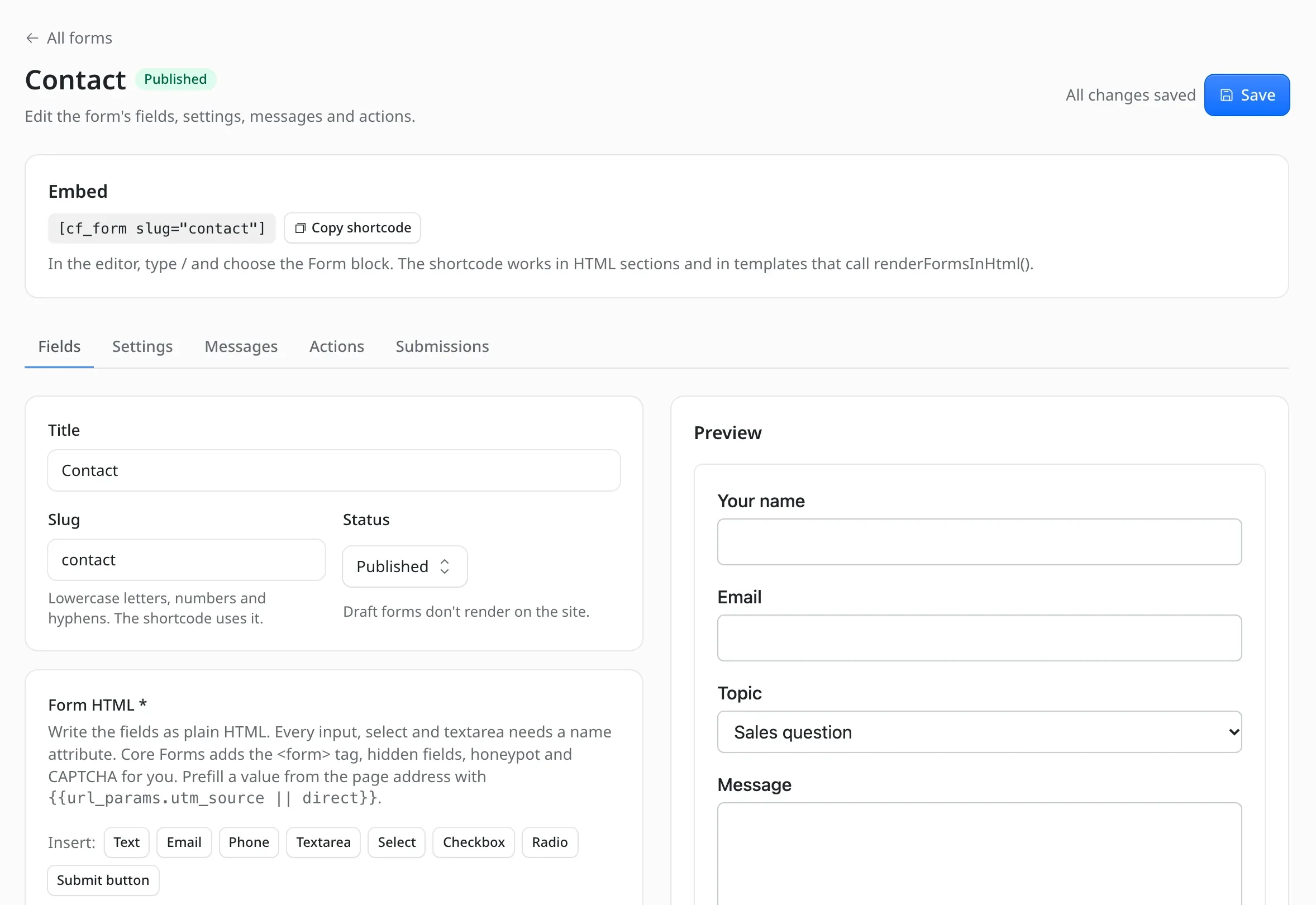
It handles the parts around the fields:
- Spam protection: a honeypot, rate limiting and a duplicate check, plus Turnstile, reCAPTCHA v3 or hCaptcha.
- Submission: AJAX with inline messages, plus a fallback that works without JavaScript.
- Inbox: stored submissions with CSV export.
- Actions: email, autoresponder and webhook actions that run after the visitor gets a response.
- WordPress import: exports from Core Forms for WordPress import as they are, with form ids, field names and messages intact.
It has no drag-and-drop builder, so someone on your team has to be comfortable with HTML. Email actions also need an email provider plugin. Install details are on the Core Forms for EmDash page.
EmDash Forms
The official forms plugin is the better choice when editors build forms in the admin without touching HTML. It ships as @emdash-cms/plugin-forms from the EmDash team.
- Fields: 13 field types, multi-page forms, conditional visibility and file uploads.
- Submissions: an inbox with read, starred and archived states, plus CSV and JSON export.
- Notifications: an email per submission or a daily digest, an autoresponder and a webhook URL per form.
- Spam protection: a honeypot or Cloudflare Turnstile.
It is still on 0.x, and the editor controls for digests, autoresponders, webhooks and conditions arrived only in the latest release. We’d expect a few more changes before it settles.
Lead Capture
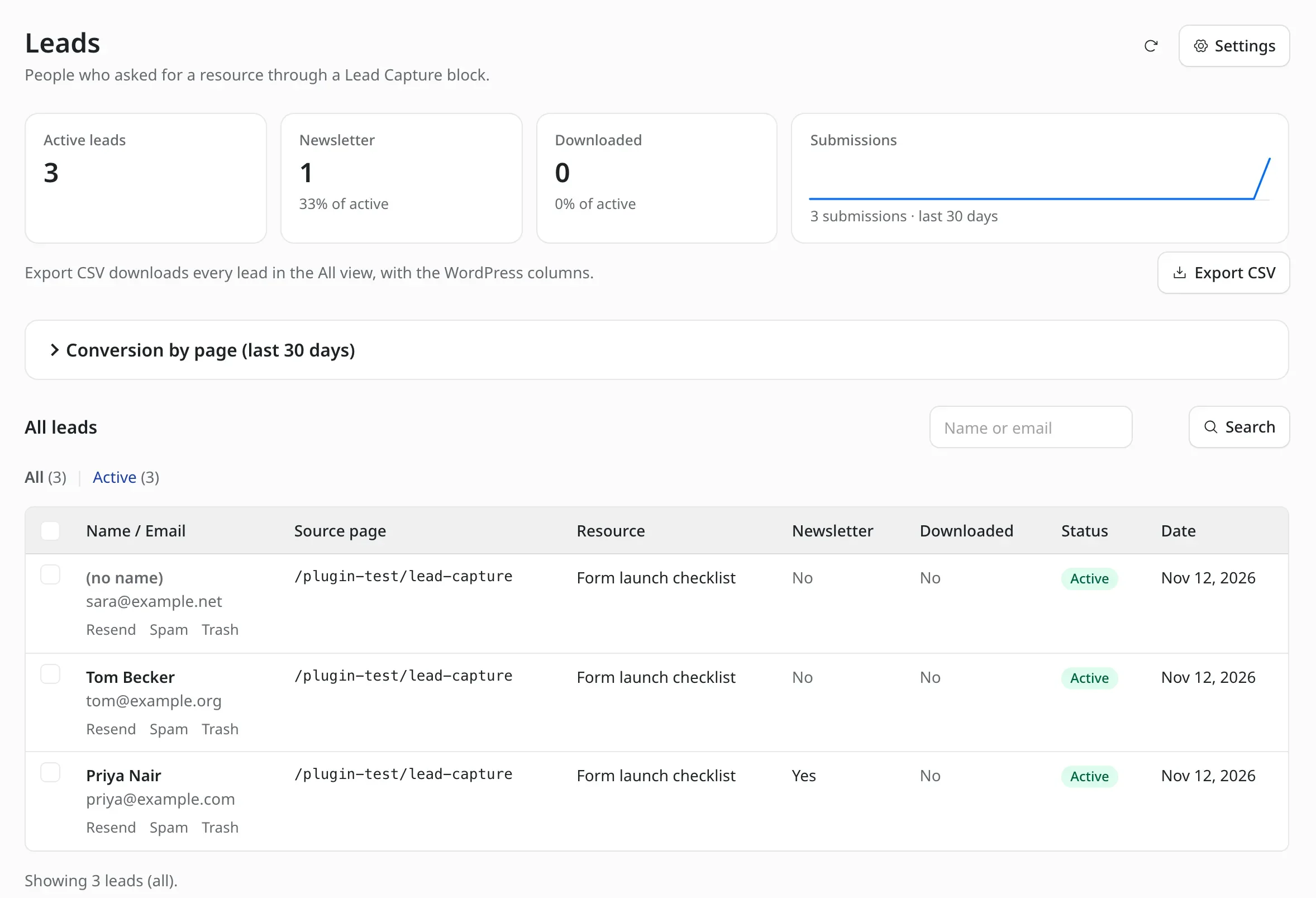
Lead Capture is our lead magnet block. A visitor enters an email address and gets a PDF, template or spreadsheet through a personal download link that expires.
- Gated files: the resource URL never appears in the page source.
- Double opt-in: leads can confirm by email before they receive the file.
- Newsletter forwarding: Mailchimp, Kit, MailerLite, Brevo, Beehiiv, SendFox or Emailit, with the consent wording stored beside each lead.
- Leads inbox: search, bulk actions, CSV export and privacy tools to export or erase a lead by email.
- Conversion stats: impressions and submissions per page per day.
The block’s styles build on the Marketers Delight theme’s form classes, so any other site imports one extra stylesheet. It also needs EMDASH_ENCRYPTION_KEY set, because it stores newsletter API keys encrypted. See the Lead Capture for EmDash page for setup.
Email Delivery
An email provider is the first plugin most EmDash sites need. Without one, EmDash can’t send invites, magic sign-in links or account recovery mail, and it only shows invite links for you to share by hand.
Emailit
Emailit for EmDash is our provider plugin for sites that send through Emailit. It delivers EmDash’s own mail and any email another plugin sends.
The API key, From name, From address and Reply-To are editable in the admin, and the key is stored encrypted. When it is the only email provider installed, EmDash selects it automatically.
It does one job for one service. You need an Emailit account and a sending domain verified there. The Emailit for EmDash page has the install steps.
EmDash SMTP
EmDash SMTP by Mason James is the pick if you already pay for another email service. One plugin covers 18 providers, including Amazon SES, Brevo, Mailgun, Postmark, Resend and SendGrid.
- Fallback: a primary and a fallback provider, so mail still goes out when one fails.
- Logs: private delivery logs in the admin.
- Two builds: a sandboxed build in the registry and a native build on npm. You choose one per site.
The registry build can’t connect to a custom SMTP server, because sandboxed plugins can’t open TCP sockets. Its last release was September 30, 2026, and an open issue reports that a message’s own Reply-To is ignored.
SEO and Indexing
EmDash outputs basic meta tags and one JSON-LD object on its own. These 2 plugins add the structured data and the search engine pings most content sites expect, and they work well together.
SEO & Schema Markup
SEO & Schema Markup by Moorage is the most current SEO plugin we found. It needs EmDash 1.5 and shipped its latest release in November 2026.
- Schema: one linked graph per page with Organization, Person or LocalBusiness, WebSite, WebPage, BreadcrumbList and BlogPosting.
- Index control: noindex and snippet limits per collection.
- Editor tools: a Google preview panel and a list of pages to fix.
- Redirects: CSV import from Redirection, Yoast SEO Premium or Rank Math.
Its documentation is clear about what it leaves out. It has no IndexNow and no keyword or readability scoring, and its schema doesn’t cover Product, Event or FAQ types. It doesn’t write titles, sitemaps or robots.txt either. Only one schema plugin can be active at a time.
IndexNow
IndexNow for EmDash by Tag Perfect tells search engines the moment a URL changes. It covers Bing, Yandex, Seznam, Naver and Yep.
It submits a URL when you publish, edit, unpublish or delete an entry, and it skips drafts and noindex entries. Failed submissions retry every 30 minutes, and a journal lets you resubmit every published URL at once.
Google doesn’t support IndexNow, so this plugin does nothing for Google indexing. You also have to serve the key file at your site root yourself. Its documentation lists testing through EmDash 1.3.1, though the declared range covers every 1.x release.
Content and Editor Blocks
EmDash stores content as Portable Text, and plugins add new block types to the editor’s slash menu. These 4 add the blocks and shortcodes that long articles and reviews need.
Content Blocks
Content Blocks is our set of 10 editorial blocks: FAQ, callout, expert opinion, stats, product review, pros and cons, comparison, checklist, social thread and related links.
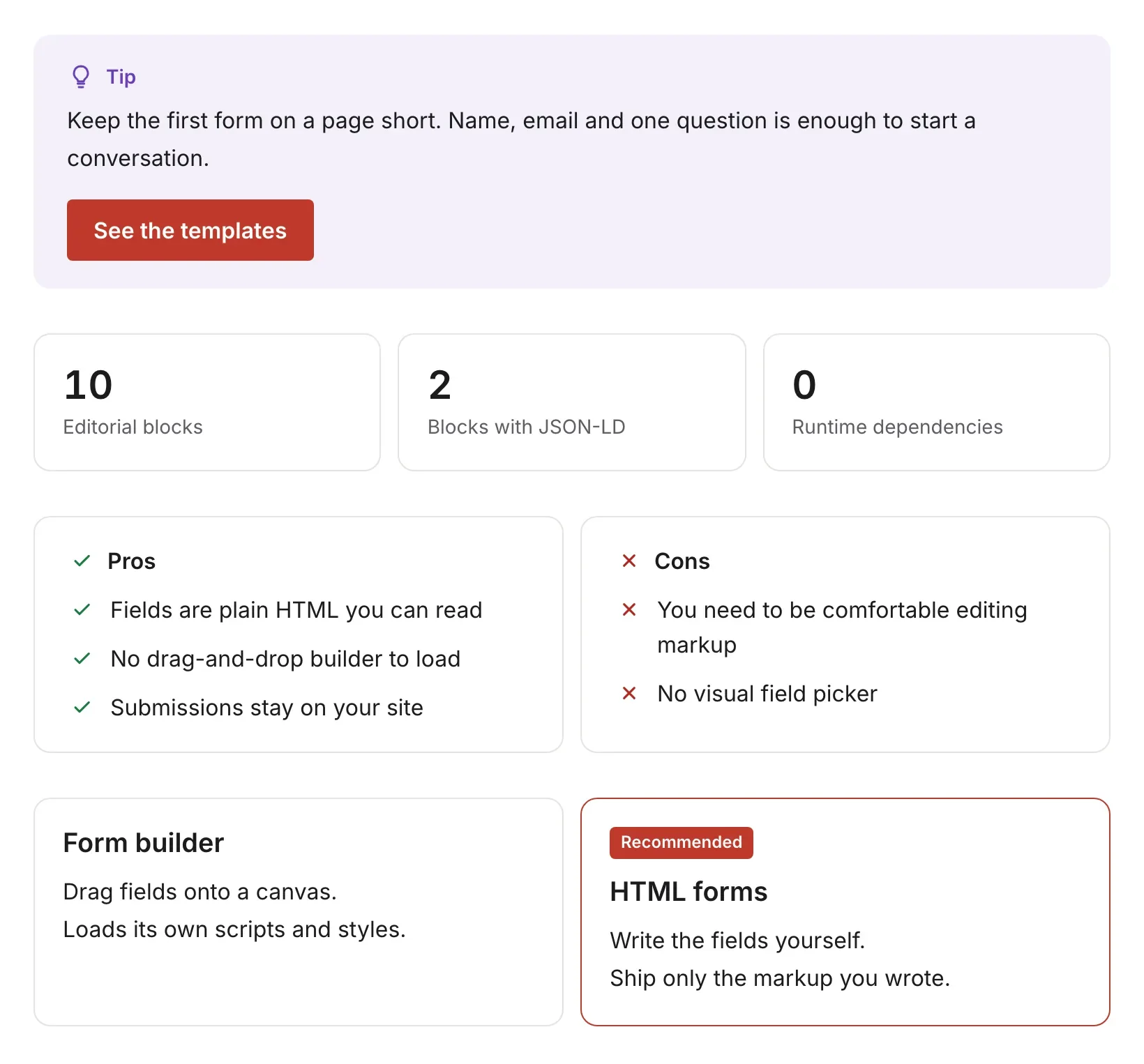
Each block ships an editor form and an Astro renderer, and the FAQ and product review blocks can output JSON-LD. The plugin declares no permissions, makes no network requests and has no runtime dependencies.
The designs are fixed, so you restyle them with CSS or override a single renderer with your own component. Field details are on the Content Blocks for EmDash page.
EmDash Embeds
The official Embeds plugin adds 7 embed blocks: YouTube, Vimeo, X posts, Bluesky posts, Mastodon posts, link previews and GitHub Gists. It asks for no permissions.
Bluesky embeds load a script and an iframe from embed.bsky.app. If your site sends a Content Security Policy, you have to allow that host or the embed stays blank.
Footnotes
Footnotes is our plugin for numbered, accessible footnotes. You type [fn]Your note[/fn] in a paragraph, and the reader gets a superscript number with a hover preview and a list at the end of the entry.
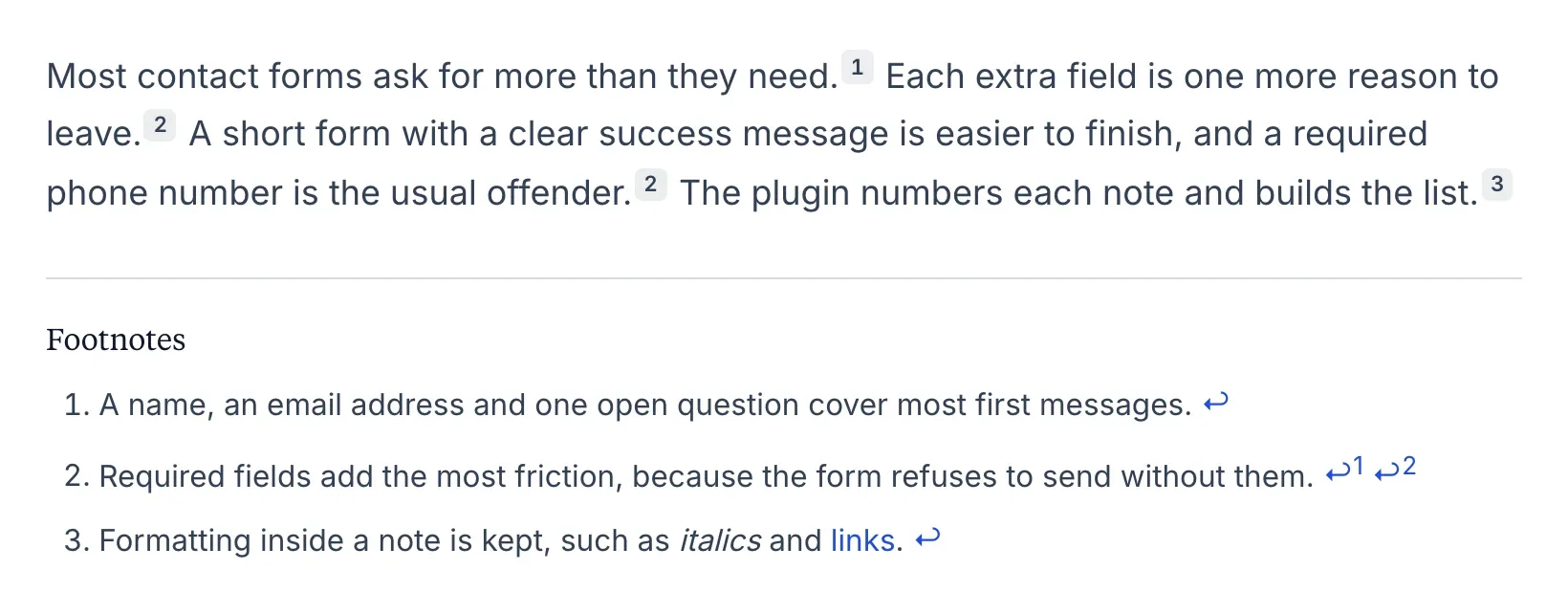
- Named notes: define a note once and cite it several times under one number.
- Preview styles: tooltip, margin sidenote or toggle.
- Numbering: decimal, roman, alphabetic or symbols.
- WordPress content: it reads the same shortcode and uses the same element ids as the Marketers Delight footnotes, so migrated articles keep their links.
EmDash has no global content filter, so your template has to render content with the plugin’s FootnotesPortableText component instead of the default one. It needs EmDash 1.4 or later. Setup is on the Footnotes for EmDash page.
Dynamic Dates
Dynamic Dates keeps dates in your content current without republishing. You write [year], [monthyear] or [age date="2008-01-01"] once, and the value resolves every time the page renders.
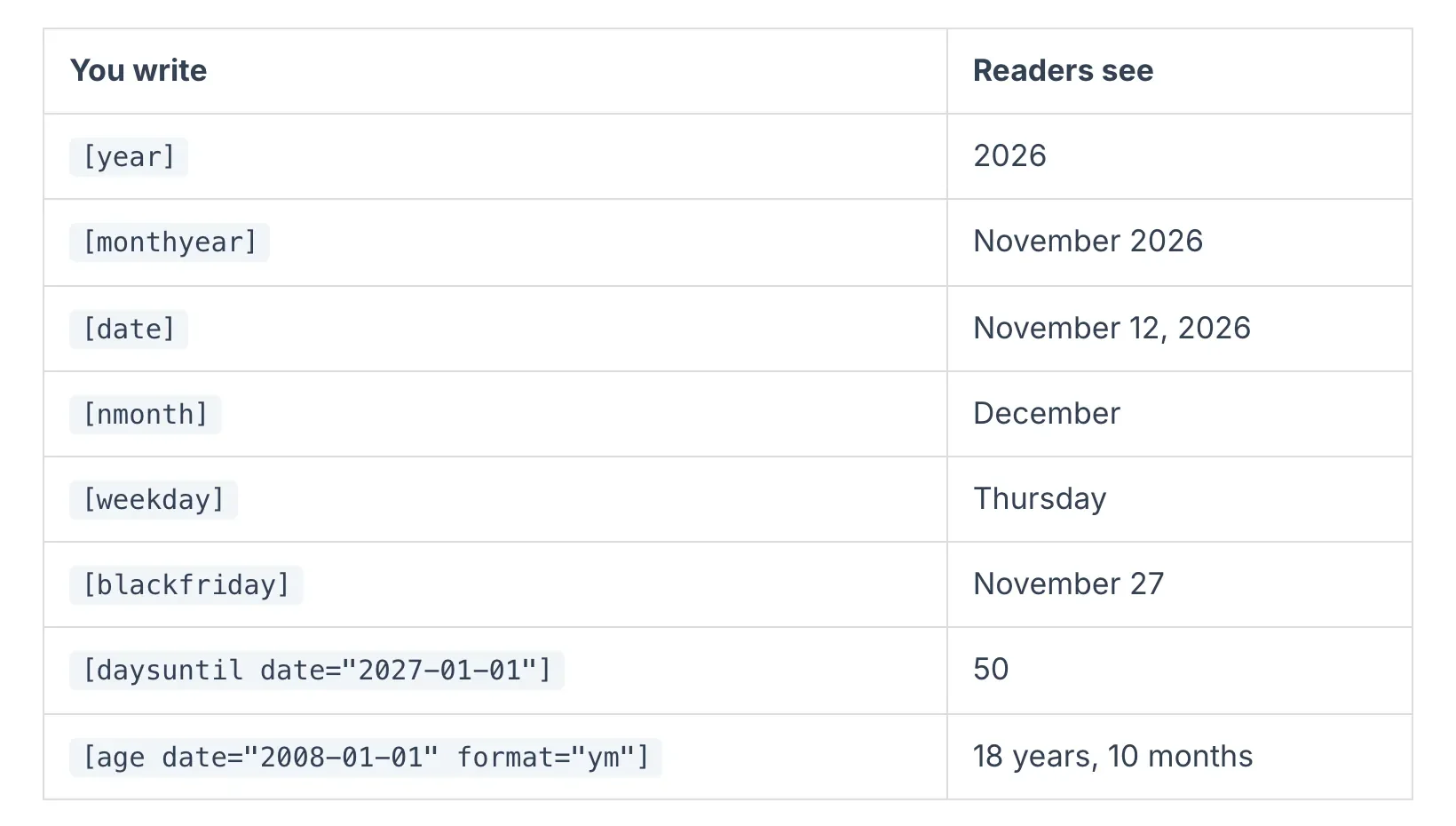
It is our port of the Dynamic Month & Year into Posts plugin for WordPress, with the same shortcodes and output formats. Migrated content renders as it did before. Shortcodes in meta descriptions and Open Graph tags resolve on their own.
Like Footnotes, it needs a template change: you swap the default content component for DynamicPortableText. EmDash doesn’t render the <title> tag, so you resolve that one in your layout. The Dynamic Dates for EmDash page lists every shortcode.
Affiliate Links and Selling
This is the thinnest area for EmDash plugins so far, and all 3 picks here are our own. They cover affiliate links, product boxes and a full store.
Link Manager
Link Manager is our plugin for branded short links such as yoursite.com/go/product. It is a port of GT Link Manager for WordPress, and that plugin’s links, categories, country rules and click history carry over.
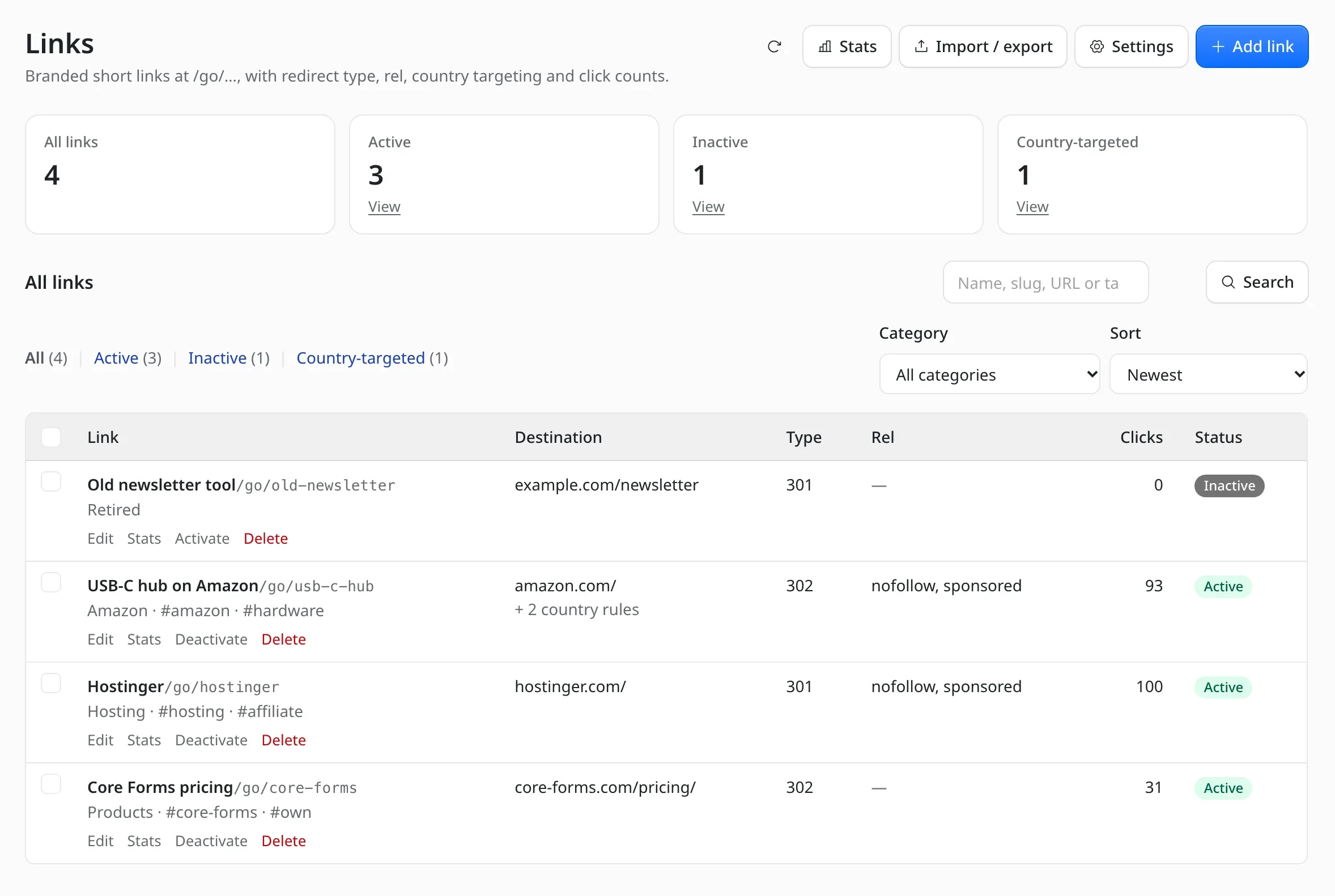
- Redirects: 301, 302 or 307 per link, with
nofollow,sponsoredandugcflags and an optional noindex header. - Country targeting: send India to amazon.in and the EU to amazon.de, using the country Cloudflare already provides.
- Click stats: date, country and referring host for each click, with no IP address, user agent or cookie stored.
- Admin tools: CSV import and export, a link picker in the editor and 4 MCP tools for AI agents.
It asks for no permissions. It needs EmDash 1.4 and Astro 7, and country targeting works best on Cloudflare Workers. On other hosts a CDN has to send a country header. Browsers also cache 301 redirects, so a country-targeted link should use 302 or 307.
If you’re still on WordPress, we compared the best affiliate link plugins for WordPress separately. The EmDash version is on the Link Manager for EmDash page.
Product Box
Product Box is our block for affiliate product cards: image, rating, features, spec chips, pricing and regional buy buttons, with Product JSON-LD.
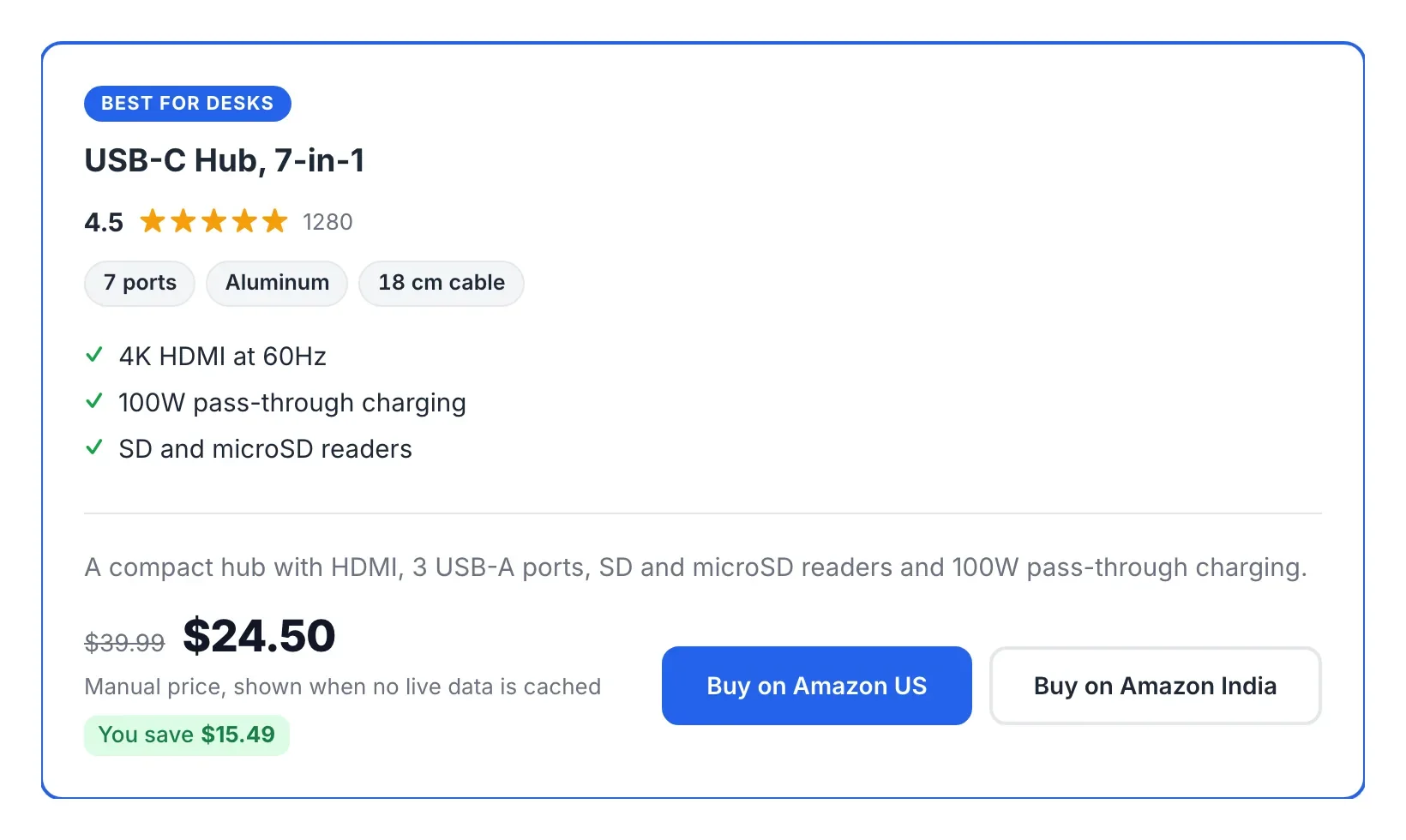
It can also show live Amazon prices for the US and India through the Amazon Creators API. A scheduled task refreshes prices in the background, so a page never waits on Amazon while it renders.
Amazon is the catch. It serves that API only to accounts with at least 10 qualifying sales in the trailing 30 days. Below that, every call fails and the boxes keep the prices you typed in. The plugin needs EmDash 1.4 or later, and the Product Box for EmDash page covers the Amazon setup.
Vendwick
Vendwick is our paid commerce plugin and license server for EmDash. It is built for developers and small studios who sell their own plugins, themes, files or services from the site they already run.
- Payments: hosted checkout on Stripe, PayPal, Razorpay and Polar, with signed webhooks.
- Selling: a cart, coupons, bundles, order bumps, tax, EU VAT reverse charge and subscriptions.
- Licensing: license keys and site activations, plus releases and updates for WordPress plugins and themes and for EmDash plugins.
- Back office: a customer portal, invoices, refunds, reports and 75 MCP tools.
It costs $59 a year or $249 once, and both licenses cover unlimited sites. It needs EmDash 1.5, an email provider plugin and a cron trigger. It installs from a download in your account, not from npm.
One limit matters before you take real money. The 4 gateways are covered by automated tests and a mock gateway, and live sandbox runs for each provider are still pending. We’d refund a test-mode order with your provider first.
Search, Analytics and Comments
These 3 plugins lean on Cloudflare services. They are a good fit if your EmDash site already runs there, and 1 of them won’t run anywhere else.
EmDash AI Search
The official AI Search plugin indexes your published content and author profiles into Cloudflare AI Search and keeps the index current as content changes.
It ships an AiSearch Astro component with a search button and a modal that opens on Cmd or Ctrl+K, plus a setup wizard in the admin. It works on Node.js too, through a Cloudflare API token.
The plugin is new, first published in late October 2026. The first index build takes about an hour per 7,000 records, and API token mode is capped at 1,200 requests per 5 minutes.
Analytics
Analytics by Eisbachcode brings Cloudflare Web Analytics numbers into the EmDash admin. You get a traffic widget on the dashboard, an Analytics page for 7, 30 or 90 days and view counts beside each entry in the editor.
Its own documentation calls these early releases. Referrers and countries cover only the last week, large sites catch up slowly, and Cloudflare Web Analytics is the only source for now. On Cloudflare, the author suggests planning for the Workers Paid plan.
If you’d rather load GA4 or Plausible with a consent banner, Moorage’s Analytics & Cookies plugin does that job. We also compared Google Analytics alternatives if you haven’t picked a tool yet.
EmDash AI Moderation
The official AI Moderation plugin screens comments with Llama Guard on Cloudflare Workers AI. It replaces EmDash’s built-in comment moderator.
It sorts comments into 7 categories, including spam, harassment and hate speech. You decide whether each category blocks a comment, holds it for review or lets it through. A test box in the settings shows how a sample comment would be judged.
It runs only on Cloudflare, because it needs a Workers AI binding.
Site Management
The last group covers the plumbing: custom code, outgoing webhooks, redirects, caching and backups.
Scripts Manager
Scripts Manager is our plugin for custom code. It adds CSS, JavaScript, head HTML and footer HTML to any single entry, plus site-wide code for the head, the start of the body and the footer.
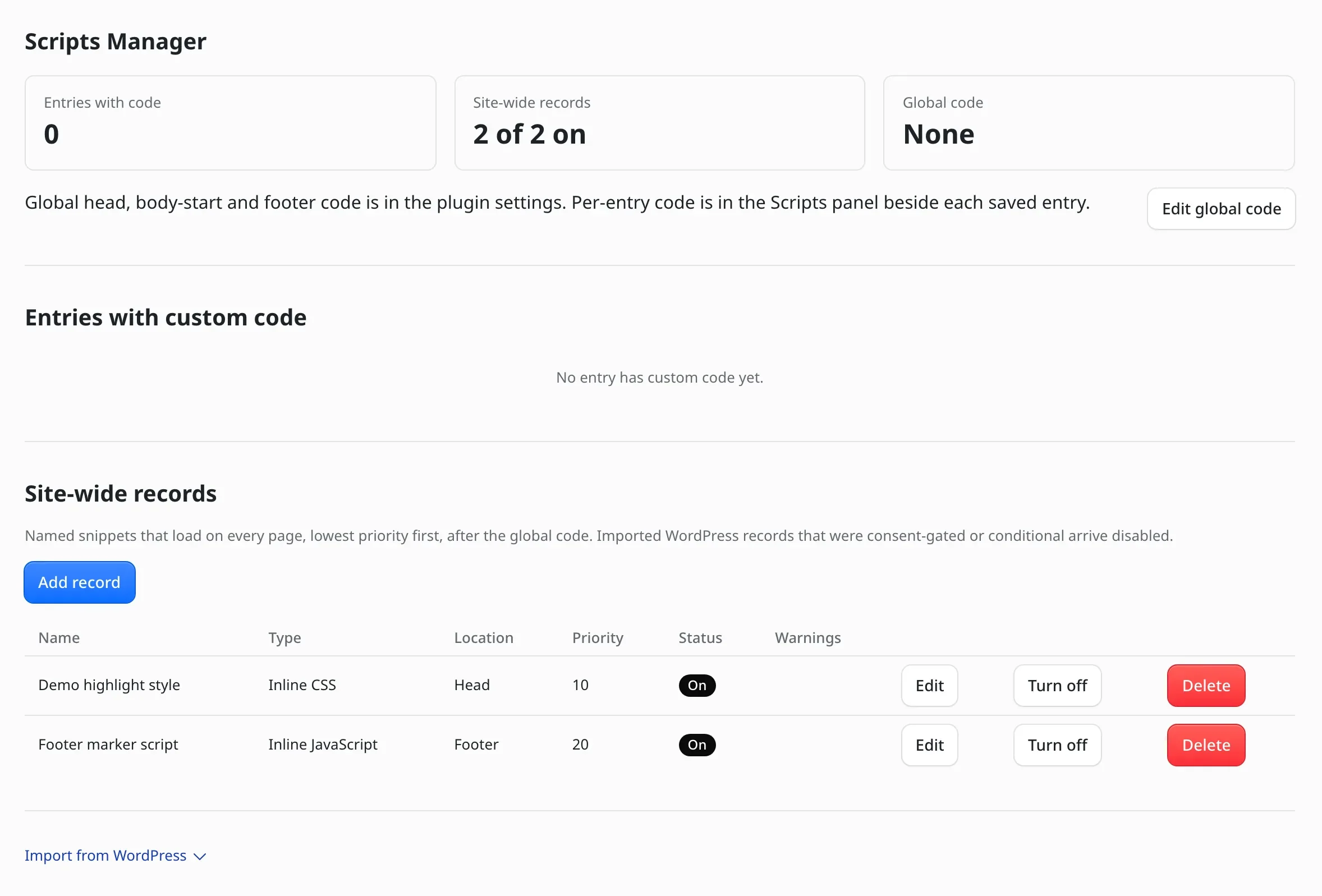
- Named records: reusable snippets with a location, a priority and a loading strategy.
- Fixed output order: global code always prints before an entry’s code, so an entry’s CSS can override it.
- Diagnostics: warnings for wrapper tags inside CSS,
document.write(), insecure URLs and blocking head scripts. - Admin only: only administrators can see or change the code.
EmDash lets only native plugins print code into public pages, so this one can’t come from the registry. It needs EmDash 1.4 or later. The Scripts Manager for EmDash page shows where each piece of code prints.
EmDash Webhook Notifier
The official Webhook Notifier sends a JSON request to a URL you choose whenever content is created, updated or deleted, or media is uploaded. It is the simplest way to trigger a rebuild, a Slack message or an automation.
It retries a failed delivery 3 times, supports a secret token and keeps a log of the last 500 deliveries. It is also one of the few first-party plugins you can install with one click from the registry.
It posts to a single URL. When we checked, the registry build was one release behind npm, and the newer release fixes a settings page error in sandboxed installs. If the settings page fails for you, we’d install the npm version.
Coywolf Pack
Coywolf Pack bundles about 27 optional modules into one native plugin. The ones we’d install it for are these:
- Redirect Manager: regex redirects and automatic redirects when a slug changes, with bulk import and export.
- Performance: an edge page cache with cache warming.
- Backups: database and media backups with restore.
- Search: as-you-type search on EmDash’s full-text index.
It runs only on Cloudflare Workers with D1 and R2, and only on EmDash 1.5 or later. It is also young. The repository opened in October 2026 and ships releases almost daily, so we’d pin an exact version and turn on only the modules you need. Its schema and link modules overlap with other plugins on this list.
Popular Plugins We Left Out
Three well-known plugins would be on most lists like this one. We left them out for now, and the reasons are specific:
- DashCommerce. It is the most-starred third-party EmDash plugin and a full Stripe store. Its declared version range stops below EmDash 1.5, and it needs a patch to EmDash core. We’d wait for a release that supports 1.5.
- Joost de Valk’s SEO plugin. It has the most stars of any EmDash SEO plugin, and its feature list is strong. It has had no release since June 18, 2026, and its declared range predates EmDash 1.0.
- Otta. This commerce plugin runs fully inside EmDash’s own storage and is under active development. Its documentation says storage shapes and settings may still change, so it is one to watch.
The community directory at emdashcms.org has also closed. It shut down after the official registry launched, so older guides that link to it now lead nowhere.
What to Install First
Your site type decides the order more than any ranking does. These are the sets we’d start with:
- Any new site: an email provider first, Emailit or EmDash SMTP, because sign-in links and invites depend on it.
- Blog or content site: SEO & Schema Markup, IndexNow and Content Blocks.
- Affiliate site: Link Manager, Product Box and Dynamic Dates.
- Lead generation site: Core Forms or EmDash Forms, plus Lead Capture.
- Selling your own software or files: Vendwick with an email provider.
- Moving from WordPress: the ports that keep your data. Core Forms, Link Manager, Dynamic Dates, Footnotes, Scripts Manager and Product Box all read their WordPress counterparts’ content.
If you’re still deciding on the platform itself, Gaurav Tiwari’s EmDash vs WordPress comparison covers what EmDash can and can’t replace yet.
FAQs on EmDash Plugins
What are the best EmDash plugins to start with?
We’d start with an email provider plugin such as Emailit or EmDash SMTP, because EmDash needs one to send invites and sign-in links. After that, most sites add an SEO plugin, a forms plugin and a set of content blocks.
Are EmDash plugins free?
Every plugin in the official registry is free for now, and EmDash has said it plans to add paid plugins. Of the 20 plugins in this list, 19 are free and MIT-licensed. Vendwick is the one paid plugin.
Where can I find EmDash plugins?
The official registry at plugins.emdashcms.com lists sandboxed plugins you can install from the admin. Native plugins are published on npm. The older community directory at emdashcms.org closed after the official registry launched.
Can I use WordPress plugins on EmDash?
No. EmDash plugins are TypeScript packages, and WordPress plugins are PHP. Some WordPress plugins have EmDash ports that read the same data, such as Core Forms, GT Link Manager and Dynamic Month & Year into Posts.
Do EmDash plugins work without Cloudflare?
Many do, because EmDash also runs on Node.js. It is wise to check each plugin first. In this list, EmDash AI Moderation and Coywolf Pack need Cloudflare, and Link Manager’s country targeting needs a CDN that sends a country header.
Are EmDash plugins safe to install?
Sandboxed plugins run isolated and can only use the permissions you approve at install. Native plugins run inside your site with full access, so we’d check who maintains one and read its changelog, as you would for any npm dependency.
Final Remarks
If you’re unsure, we’d install less. One plugin per job is enough, and every extra native plugin is more code running inside your site.
Before each install, we’d check two things: the EmDash version range the plugin declares and the date of its last release. Those two lines tell you more than a star count does.
Install steps for our 9 free plugins are on Gaurav Tiwari’s EmDash plugins page.
Tell Google you want more of this.
Add Gatilab as a preferred sourceOne tap, and this site shows up more often in your own Top Stories, AI Overviews and AI Mode. Remove it any time.