
How to Name Images for SEO: What the Filename Buys You
Open your media library and sort by filename. Somewhere in there is an IMG_4827.jpg, a DSCF1234.jpg, and a run of files called Screenshot 2026-04-14 at 10.47.31 AM.png. You already know you’re supposed to name images for SEO before they go up. What stays fuzzy is how much that habit is actually worth.
Sites land in 1 of 2 habits here, and both cost something. The first ships the camera default forever and files image SEO under problems for other people’s websites. The second reads one guideline, bulk-renames 4,000 existing files on a live site, and waits for an image-search bump that never shows up.
Google has said on the record which of those is closer to wrong.
Google calls the filename a very light clue
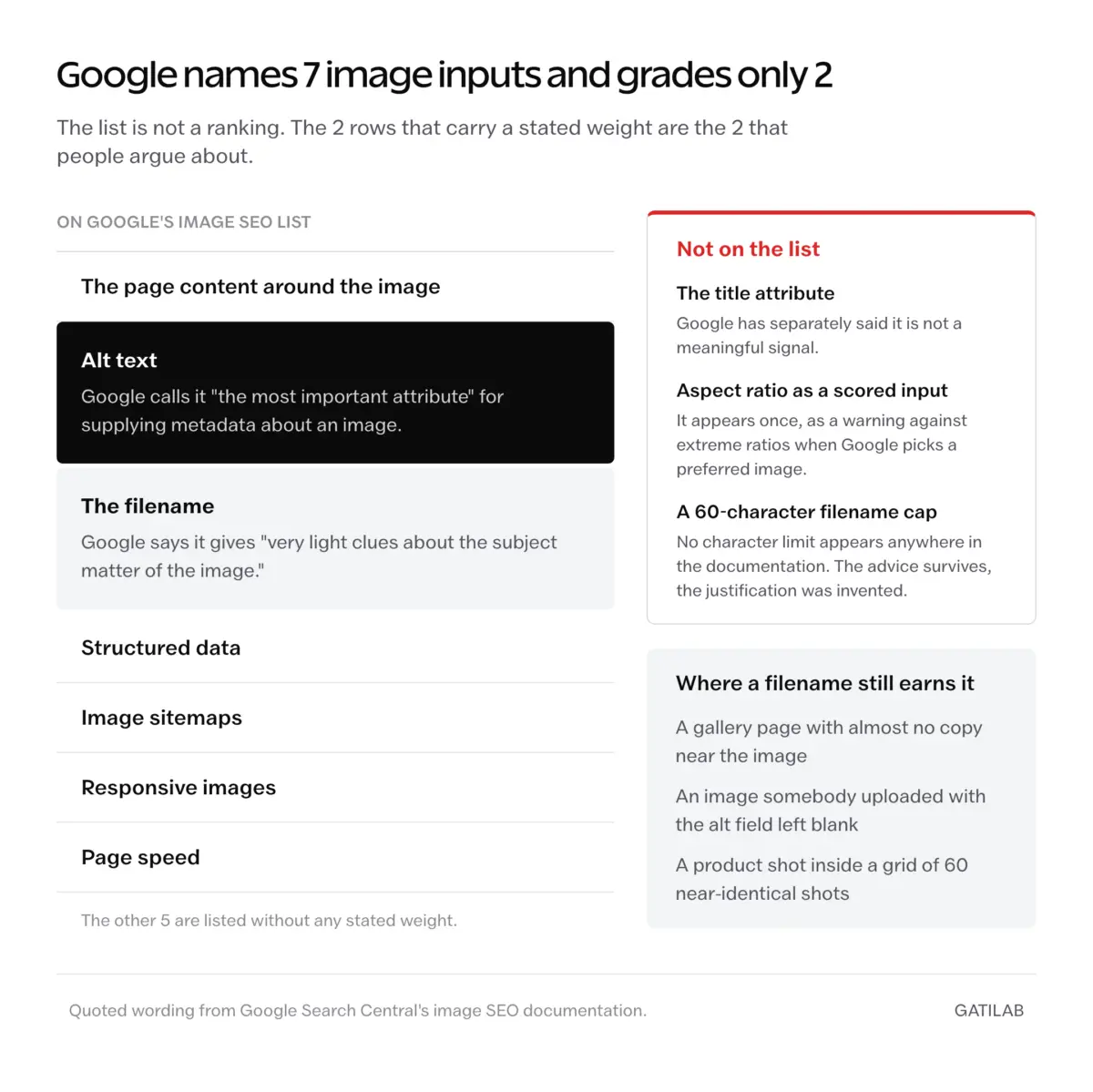
Google’s own documentation settles the weighting argument. Its image SEO guidance says a filename gives Google “very light clues about the subject matter of the image,” and on the same page calls alt text “the most important attribute” for supplying metadata about an image. Any guide telling you the filename outranks alt text is arguing with the source it cites.
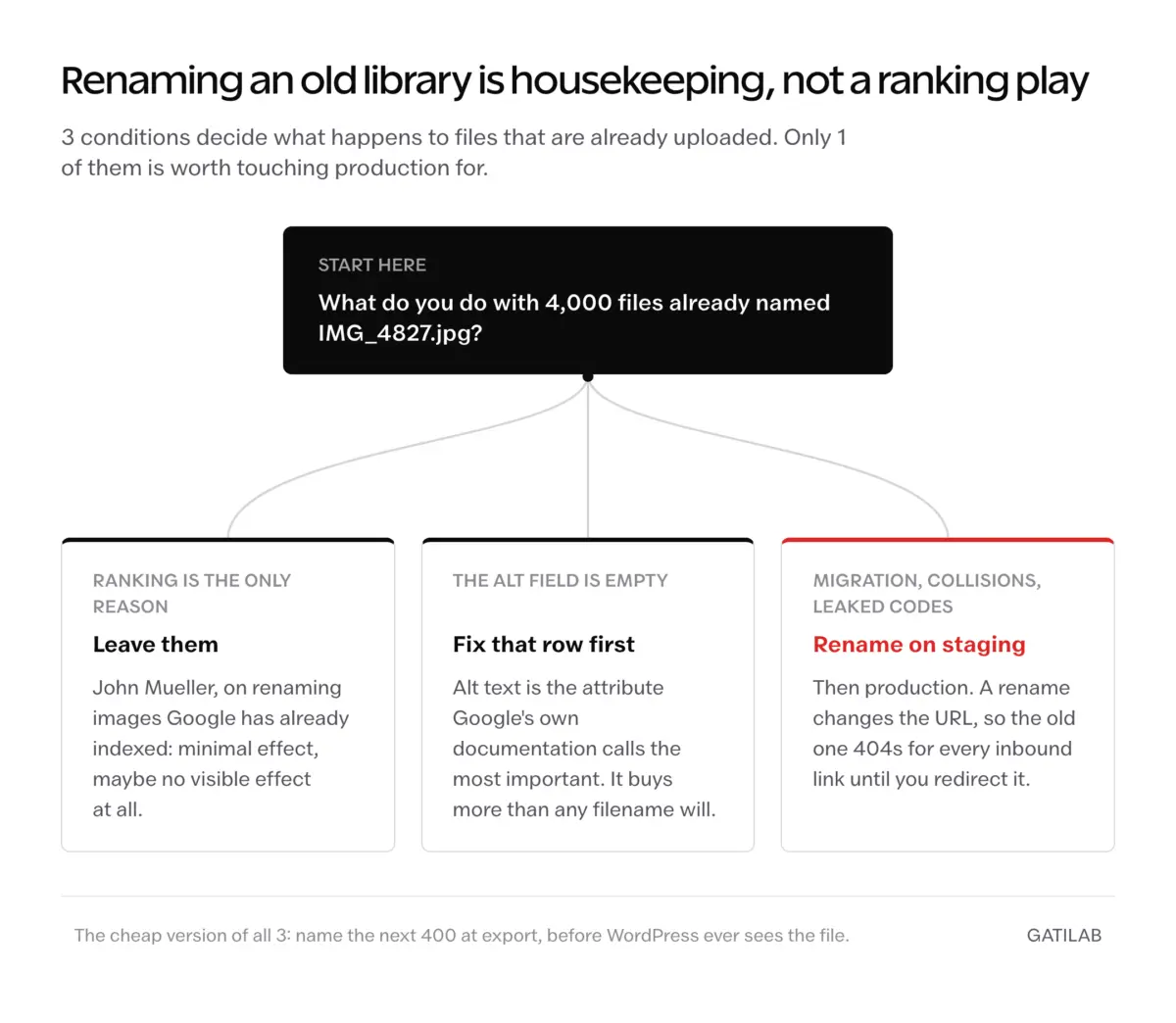
John Mueller took the same line on the Google Search Off the Record episode “Let’s talk image SEO,” published October 6, 2022. Descriptive filenames are recommended, he said, but you wouldn’t see a significant change if the alt text and the text around the image are already handled. On renaming images Google has already indexed, his answer was “minimal effect, maybe no visible effect at all.”
That is the whole honest basis for this article, and it also tells you what Google’s image documentation does and does not count. The listed inputs are:
- The page content around the image
- Alt text
- The filename
- Structured data
- Image sitemaps
- Responsive images
- Page speed
The title attribute is not on that list, and Google has separately said it isn’t a meaningful signal. Aspect ratio appears only as a warning against extreme ratios when Google picks a preferred image, not as something the indexer scores. If you’ve seen a longer list somewhere, the extra rows were added by whoever wrote the post.
So the filename is cheap insurance. It earns its keep exactly where the other signals are thin: a gallery page with almost no copy, an image somebody uploaded with the alt field blank, a product shot sitting in a grid of 60 near-identical product shots. On a well-written page with real alt text, it changes close to nothing.
Cheap, not decisive.
What a useful filename actually looks like
The rules below are boring on purpose. None of them is a lever, all of them are free, and the whole set fits in one habit at export time.
Describe the image, not the article
Answer the question someone would ask looking over your shoulder: what’s in this picture? Answer it in 3 to 6 words, connect them with hyphens, stop.
| Camera or tool default | What to ship instead |
|---|---|
| IMG_4827.jpg | macbook-pro-m4-desk-setup.jpg |
| DSCF1234.jpg | golden-retriever-puppy-grass.jpg |
| Screenshot 2026-04-14.png | wordpress-media-library-list-view.png |
| image-final-FINAL-v2.jpg | rank-math-keyword-tracker-interface.jpg |
Every good name in that column would work as a caption if you had to use it as one. That’s the test.
Hyphens, not underscores
Google’s URL structure guidance recommends hyphens instead of underscores for separating words, and the reason shows up in how the string gets read. blue_running_shoes.jpg arrives as one token. blue-running-shoes.jpg arrives as 3 words.
| Filename | Read as | What WordPress does at upload |
|---|---|---|
| blue-running-shoes.jpg | blue, running, shoes | Nothing. Ships as typed. |
| blue_running_shoes.jpg | bluerunningshoes | Nothing. Keeps the underscores. |
| blue running shoes.jpg | blue, running, shoes | Converts spaces to a single dash, so the URL is safe here even though it wouldn’t be everywhere. |
| BlueRunningShoes.jpg | Case-insensitive, fine | Does not lowercase, so the mixed case stays in the live URL. |
WordPress core’s sanitize_file_name() cleans the spaces for you, which is why the %20 horror story you’ve read elsewhere doesn’t happen on WordPress. It won’t fix the case, and it won’t fix underscores. Type it right and none of that matters.
Skip numbers, dates, and version tags
product-photo-2.jpg, hero-v3-final.jpg, and blog-image-2024-03-15.jpg spend characters on things nobody searches for. The exception is when the number is the subject: iphone-17-pro-review.jpg earns its digits because the model number is what the image is of. hero-image-5.jpg does not.
Short and descriptive, with no character count to hit
Google’s wording is “short, but descriptive.” There is no character limit anywhere in the documentation, and there’s no Google Images view that displays a raw filename or truncates one, so the 60-character cap you’ve seen quoted in a dozen guides has no source behind it. The advice survives. The justification was invented.
A working budget, which is a budget and not a rule:
subject-qualifier-context.ext, 3 to 6 words, lowercase, hyphens only, no dates, no version tags. Example: nike-pegasus-41-blue-side-view.jpg
Held consistently, that pattern also makes your own library searchable, which is the payoff you’ll actually feel. Ranking is the maybe. Finding the file in 4 seconds instead of 4 minutes is the certainty, and it matters more on product pages with dozens of near-identical shots than anywhere else.
Alt text is where the description belongs
The filename is a compressed tag. The alt text is a sentence, and Google says it’s the more important of the 2. They should be related and they should never be identical.
What lazy pairing looks like:
File: rank-math-keyword-tracker-wordpress-dashboard.jpg
Alt: “rank math keyword tracker wordpress dashboard”
What the pair is supposed to do:
File: rank-math-keyword-tracker-wordpress-dashboard.jpg
Alt: “Rank Math’s keyword tracker showing 12 tracked keywords with their ranking positions and monthly search volume, inside the WordPress dashboard.”
Same image, same filename. The second version adds the count, the columns, and the context, which is the specificity a filename physically can’t hold. It also reads as English to a screen reader instead of a hyphen chant.
Write the sentence.
Format and file weight move more than the name
If you’re going to spend attention on one file-level decision, spend it here. Page speed is on Google’s own list of image inputs. The filename is on the same list, and it’s the lighter one.
| Format | Best for | Size against JPEG |
|---|---|---|
| WebP | Most photos and graphics | Google’s figure is 25 to 34% smaller than a comparable JPEG at an equivalent SSIM quality index |
| AVIF | High-quality photography | AOMedia says file sizes can be less than half a JPEG’s; Netflix’s 2020 AVIF study reported significant reductions without publishing a single ratio |
| JPEG | Universal fallback | Baseline |
| PNG | Transparency, screenshots with fine text | Usually larger than JPEG |
| SVG | Icons, logos, simple diagrams | Vector, typically tiny |
Notice which cells carry a range and which carry a hedge. Anyone quoting a flat “AVIF is 40 to 50% smaller” is quoting nobody, because no primary source publishes that band.
The support question is settled, though. AVIF has shipped in every major browser since Edge 121 in January 2024, following Chrome in 2020, Firefox in 2021, and Safari in 2022, and it now reaches over 93% of users worldwide. Calling it a modern-browser experiment is 2 years out of date.
One correction worth having, because plenty of guides get it backwards: WordPress does not convert your uploads. WebP-by-default was merged and then pulled from WordPress 6.1 in September 2022 and never landed. Core accepts WebP uploads since 5.8 and AVIF uploads since 6.5, but a fresh install stores and serves an uploaded JPEG as a JPEG, with zero conversion. Automatic conversion needs the Modern Image Formats plugin or a third-party optimizer such as ShortPixel, Imagify, or EWWW.
Check yours before assuming.
On EWWW specifically: it’s a plugin, not a CDN. Edge delivery comes from its separate Easy IO service, a paid add-on tied to an ewww.io account. Cloudflare Images and Bunny CDN are actual CDNs; EWWW only belongs in that sentence with the Easy IO qualifier attached.
For file weight, no standards body and no vendor publishes a KB threshold, so treat any you see as somebody’s budget. The one we hold at Gatilab is under 100 KB for in-content images, under 200 KB for featured images, under 300 KB for a hero, and a re-compress or a format swap for anything past 500 KB. Google’s only nearby quantified numbers are the 50,000-pixel minimum for Article structured data and the 1200px width it asks for in Discover. Neither is a file-size rule, and if your budget is different because your photography is the product, keep yours. The rest of the weight problem is a site-wide speed question, not an image-naming one.
Renaming a library you already uploaded
Start from the expectation Mueller set: renaming indexed images has minimal effect. A bulk rename is not a traffic play, so run one only when there’s a second reason, like a migration, duplicate names colliding, filenames leaking a client’s internal codes, or a library nobody on the team can search.
Two plugins handle it without hand-editing the database.
Media File Renamer, by Jordy Meow at Meow Apps:
- 40,000+ active installs on the WordPress plugin directory
- Bulk renaming is in the free version, manually or automatically
- Paid tiers on the Meow Apps pricing page start at $39/year for 1 site and run through $49 for 5, $69 for 20, and $199 for 500, with lifetime licenses from $299
- Paid adds more auto-rename methods, AI Vision filename suggestions, WP-CLI support, anonymization, bulk directory moves, and metadata sync
Enable Media Replace, by ShortPixel:
- 600,000+ active installs, free
- Swaps the file sitting behind an existing attachment
- Its default replace method keeps the original URL, so nothing 404s
Bulk rename first on staging, then production. The paid tier matters less than the backup does.
One plugin to remove rather than install, because older guides still recommend it by name: Rename Media Files has been closed on the WordPress.org plugin directory since November 3, 2023, with the listed reason “Security Issue.” It cannot be downloaded, and the plugin API returns a closed status for the slug. If you inherited a site that still runs it, that’s a removal ticket, not a rename tool.
Before you touch anything, get the list. Most guides print wp media list for this step and it does not exist: the wp media command has exactly 4 subcommands, and they are fix-orientation, image-size, import, and regenerate. Any walkthrough that opens with wp media list fails at step 1 for everyone who runs it. The attachment list comes from the post command instead:
wp post list –post_type=attachment –format=csv –fields=ID,post_title,guid > media.csv
That gives you every attachment ID, title, and URL in one file you can sort in a spreadsheet. From there, the audit is a filter job. Flag any row where:
- The filename starts with
IMG_,DSC,Screenshot,photo-, orimage- - The filename is purely numeric or a hash string
- The filename contains underscores, spaces, or uppercase
- The alt text is missing, which you can check with
wp post meta list <id> --keys=_wp_attachment_image_alt
Sort the flagged rows by which pages actually get traffic, and fix from the top down. The missing alt text is the row worth fixing first, since that’s the attribute Google named as the important one. If you want the wider command vocabulary for this kind of cleanup, the WP-CLI cheat sheet covers the rest, and a rename that touches the database is a wp search-replace job followed by wp media regenerate.
AI search and images is guesswork right now
Nobody at OpenAI, Perplexity, or Anthropic publishes image-selection or image-citation criteria. Every “what AI search rewards from your images” checklist circulating right now traces back to marketing blogs citing each other, and the 800px minimum width those lists keep repeating has no source at all. The nearest real number belongs to Google Discover, which asks for images at least 1200px wide with max-image-preview:large, and Discover is a different system with different rules.
So treat the next 2 sentences as a bet rather than a mechanism. Descriptive filenames and full-sentence alt text probably help an image-capable model decide what a picture shows, for the same reason they help Google: they are the only text attached to the file. Original screenshots probably travel further than stock photography, because a screenshot depicts something a model can name.
Neither of those is confirmed, and any percentage attached to them would be made up. What is documented sits on the text side of the page, which is where the observable patterns in AI citations still live.
What renaming will not fix
The limits here are unusually clean, because Google stated most of them out loud.
- It won’t move an image Google has already indexed. Mueller’s phrasing was minimal effect, maybe none visible.
- It won’t rescue an image sitting on a page with no relevant text near it. Page content is the first input on Google’s list, and a filename can’t substitute for it.
- It changes the URL, which means the old URL 404s unless you redirect it. Inbound links, hotlinks, and existing Pinterest pins all point at the old one.
- Sitemap image metadata is not the backup lever people assume. Google deprecated
image:caption,image:geo_location,image:title, andimage:license, and they have had no effect on Google indexing or search features since August 6, 2022. Onlyimage:locstill does anything. Bing and Yandex still read some of the others, which is the only defensible reason to keep them. - On 2 of the platforms most often named as having a rename override, there isn’t one. Webflow’s Assets panel has no rename function, because the filename is baked into the CDN URL; the workaround is uploading a new file and swapping it in the Designer. Shopify filenames can’t be modified after upload either. Rename before upload or replace the image.
Read that list backwards and it becomes the argument for the habit. Almost everything expensive about image naming is a consequence of doing it late, and almost nothing about doing it early costs anything. Reverse image search will tell you where your existing files have already spread, which is worth knowing before you rename anything that other sites are hotlinking.
Fix forward.
What quietly ruins image filenames
None of these look like mistakes while you’re making them. That’s what makes them worth listing.
Naming every file after the article instead of the image. It feels keyword-efficient and it produces 8 near-identical strings on one page, none of which describes an actual picture. A filename that repeats your H1 tells Google what it already read at the top of the document.
Numbering a post’s images off a single phrase. When a page carries best-wordpress-seo-plugin-1.jpg through -7.jpg, the only thing that varies is a counter, and a counter is not a description. You’ve spent 7 filenames to say one thing once.
Renaming the file on your desktop after it’s uploaded. WordPress built the URL at upload time, so the local file changes and the live URL doesn’t. Now there are 2 names for 1 image and you’ll believe the wrong one next time you search.
Running a bulk rename straight on production. A rename that misses a database reference pulls images off live pages, and Google notices the 404s well before you notice the blank spots in a post you wrote 8 months ago.
Shipping the stock download name. Unsplash’s download endpoint hands you the photographer’s name plus the photo ID plus -unsplash, and right-click-saving off its CDN gives you the photo-1594737625785 hash form instead. Neither describes the photograph, and both are instantly recognizable as a file nobody looked at twice.
The routine that keeps this off your task list
All of the above collapses into 7 steps that happen at export, before WordPress ever sees the file.
- Export or save the image into one working folder
- Rename it in place: lowercase, hyphens, 3 to 6 descriptive words
- Compress it, and convert to WebP or AVIF if your optimizer isn’t doing that on upload
- Upload to the media library
- Write alt text as a full sentence with the specifics the filename couldn’t hold
- Add a caption only where the image needs context the surrounding paragraph doesn’t give it
- Place the image, and check that the first one on the page isn’t lazy-loaded
Step 7 needs less manual work than most guides suggest. WordPress 5.5 added loading="lazy" to nearly every content image, above the fold included, which hurt LCP; 5.9 fixed it in December 2021 by omitting the attribute on the first content image or iframe, tunable through the wp_omit_loading_attr_threshold filter. Since 6.3, core also adds fetchpriority="high" to the image it detects as the LCP candidate, meaning the first non-lazy image with no existing fetchpriority and more than 50,000 square pixels, and it never overrides an attribute you set yourself. Mark an image manually only when core picks the wrong one.
Call the whole routine 90 seconds an image once it’s habit, and most of that is the alt-text sentence and the compression pass. On a 5-image article, that’s under 8 minutes against the hours the writing took.
The filename was never the lever
Image filenames aren’t an underrated ranking factor, and the guides selling them as one are quoting Google against Google. They’re hygiene: the cheapest signal on the page, close to worthless where the rest of the page is strong, and genuinely useful where it isn’t.
Which reframes the decision. The question was never whether to rename 4,000 old files, because Google has already told you what that buys. The question is whether the next 400 go up named.
Name them at export. The library stops being something you clean up later.
Tell Google you want more of this.
Add Gatilab as a preferred sourceOne tap, and this site shows up more often in your own Top Stories, AI Overviews and AI Mode. Remove it any time.