
Linktree Alternatives: Switch Without Breaking Your Link
You are not looking for a better link page. You already have one that works. You are looking to leave, and the thing stopping you is that your handle is printed on a business card, sitting in 40 old captions, and stuck to a shop window.
So the question worth answering is not which Linktree alternatives look nicest. It’s which ones you can move to without breaking the link you have already spent a year distributing.
That reframes the shortlist considerably.
Why people actually leave
Almost nobody goes looking for Linktree alternatives because they dislike the templates. The reasons cluster into 4, and which one is yours decides where you should land.
- The data expires. Linktree’s free tier looks back 28 days. A post that went wide in March is uncitable by May, which matters the first time a brand asks for numbers.
- The useful reports cost $15. Location, device, most-clicked ranking and traffic-source detail all sit behind Linktree Pro, and exporting insights as a CSV needs the $35 Premium tier.
- The branding. Removing it is a paid feature almost everywhere, and on a page representing a business it reads as provisional.
- The price stopped matching the use. Paying $15 a month for a list of 5 links is a fine deal at 100,000 followers and an odd one at 2,000.
Notice that 3 of those 4 are about data rather than design. That is the pattern in this category: people arrive for the page and leave over the reporting.
The Linktree alternatives worth moving to
The right destination depends entirely on which reason above is yours. Prices are current list prices in USD and shift with region and billing term.
| If you are leaving because | Go to | Costs | What changes |
|---|---|---|---|
| The reports cost too much | Campsite.bio | $7/mo Pro | Views, clicks, referral and geo at roughly half the Pro rate you were paying |
| You just want it clean and cheap | Bio.link | Free, $6/mo Pro | Unlimited links with no forced branding on the free tier |
| You need numbers a sponsor accepts | Later Linkin.bio | Free to about $29/mo | Per-link CTR, device split, Excel export, UTM handoff into your own analytics |
| You started selling | Beacons | Free, $10/mo Creator Pro | Paid tier removes the 9% seller fee that makes free expensive |
| The page needs to do more | Taplink | About $6 to $8/mo | Forms, quiz blocks, booking, payments, Meta and TikTok pixel |
| You want to stop renting | Your own domain | Hosting you already pay for | Full retention and export, and you own the maintenance |
The cheapest genuine upgrade in this table is Campsite at $7, because it is the only one that hands you the geographic and referral breakdown without the tier you were trying to escape.
If you have not settled on the category yet, the fuller comparison of what each link in bio tool reports about clicks covers the decision this table assumes you have already made.
What actually breaks when you move
This is the part that stops people, and most of it is manageable if you know it is coming.
Your old URL stops resolving. Anything printed, embedded in an old caption, saved as a bookmark, or encoded in a QR code points at a page you no longer control, because Linktree keeps the handle when you go.
QR codes are the expensive version of that problem. A code printed on packaging, a menu, or signage encodes the destination permanently, so a code pointing at the old handle is dead the day you stop paying.
Your click history does not come with you. There is no export path into a competitor, and on the free tier there is not much history to lose anyway.
Scheduled or time-gated links usually do not survive the move, because each platform implements scheduling differently and none of them import each other’s rules.
None of that is fatal. All of it is worse if you discover it after switching.
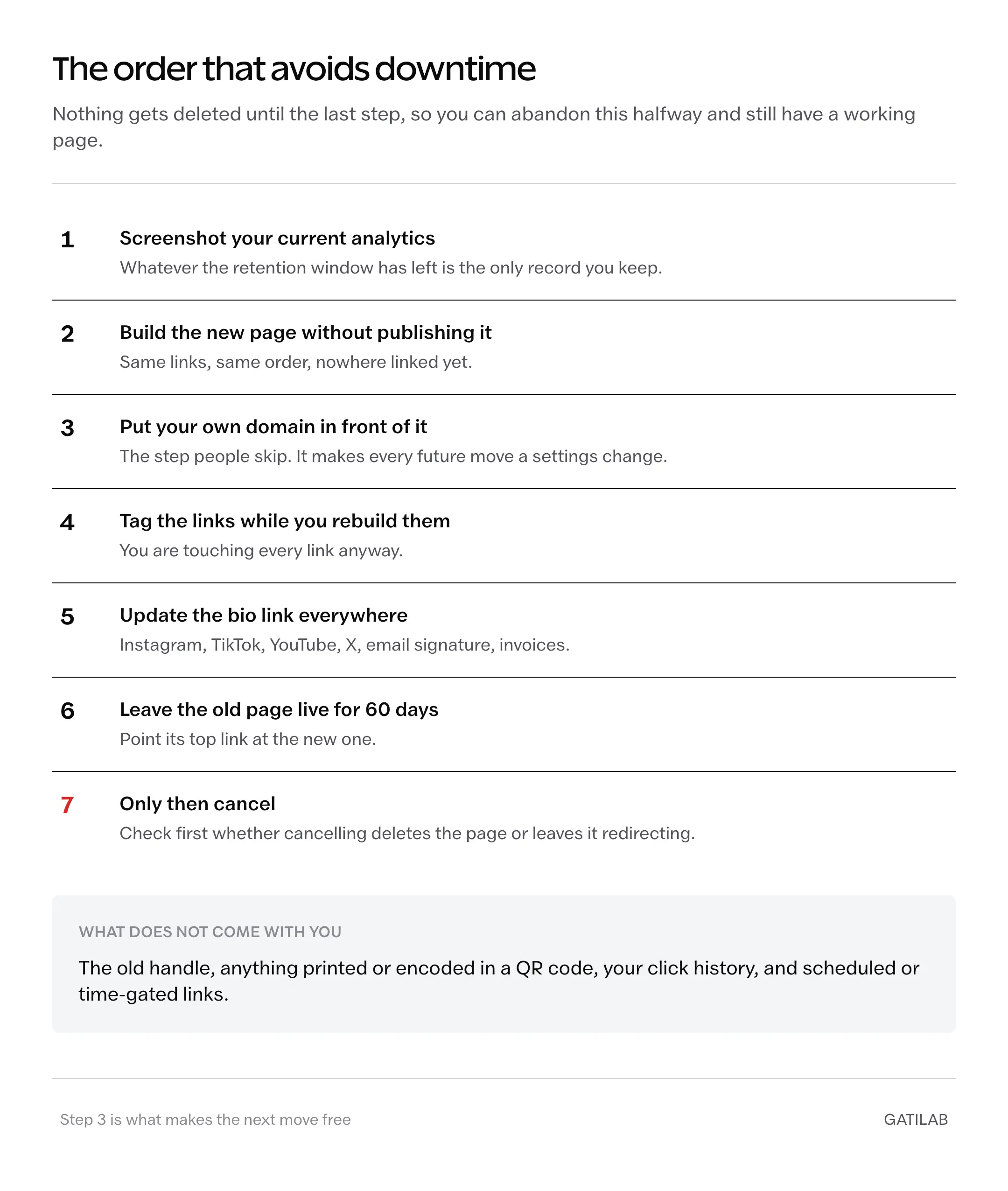
The move, in the order that avoids downtime
Do not delete anything until the last step. The whole point of this sequence is that you can abandon it halfway and still have a working page.
- Screenshot your current analytics. Whatever the retention window has left is the only record you will keep.
- Build the new page completely, on the new tool, without publishing it anywhere. Same links, same order.
- Put your own domain in front of it if the tool supports a custom domain. This is the step that makes every future move free, because the address becomes yours.
- Add UTM parameters to the links while you are rebuilding them. You are touching every link anyway, and it costs a minute each.
- Update the bio link on every platform: Instagram, TikTok, YouTube, X, email signature, invoices.
- Leave the old page live and pointing at the new one for at least 60 days. Most tools let you make the top link say the page has moved.
- Only then cancel. Check first whether cancelling removes the page entirely or leaves it on a free tier still redirecting.
Step 3 is the one people skip and regret. A custom domain converts this from a migration you repeat every 2 years into a settings change you make in an afternoon.
When staying is the right answer
Worth saying plainly, because switching guides rarely do.
If your page is just 5 links and you never open the analytics, the free Linktree tier you are on is doing its job and the 28-day window costs you nothing you were going to use. Moving is an afternoon of work to arrive somewhere functionally identical.
If your handle is already printed on physical material in any volume, the cost of switching is real and ongoing, and it is often cheaper to pay for the tier that annoys you than to reprint.
And if you are on a paid plan mainly for the custom domain, you have already solved the lock-in problem. Your address is yours, so the underlying tool is a swap you can make whenever, which is exactly the position worth being in.
Leaving is worth it when the reporting gap is costing you money or the branding is costing you credibility. Not because a newsletter said the alternative was cheaper.
What none of them fix
Every tool in this category shares the same ceiling, and no Linktree alternative raises it.
None of them tell you who clicked, as a named person, because platforms do not pass visitor identity to a destination site. That limit follows you to every alternative on this page.
None of them reliably survive the in-app browser. Instagram and TikTok open links inside their own browsers, which handle cookies differently, so returning visitors get counted as new on every platform equally.
And none of them make a page worth visiting. The tool decides what you can measure. It has never decided whether the links were worth tapping.
Questions people ask next
Bio.link, which gives unlimited links with no forced branding on its free plan. Campsite.bio is the better free option if you want click tracking you can build on, and its $7 Pro tier adds the geographic data Linktree charges $15 for.
Yes. The handle stays with Linktree, so anything printed, saved as a bookmark or encoded in a QR code stops resolving once you stop paying. That is the strongest argument for putting your own domain in front of whatever you use.
Links yes, by hand. Analytics no. There is no export path between these tools, so screenshot whatever the retention window still holds before you move.
At least 60 days, with its top link pointing at the new page. Check whether cancelling deletes the page outright or leaves it on a free tier still redirecting, because the 2 outcomes are very different.
Yes, and it is the step most people skip. A custom domain converts every future move from a migration into a settings change, and it also avoids the domain-reputation problems that get shortener links rejected.
Own the address, rent the page
The trap in this category is not the monthly fee. It’s that the thing you distribute, the address people save and print and type, belongs to a company whose pricing you do not control.
Switching tools while renting the address just moves the dependency. Putting your own domain in front of whatever you use dissolves it, and after that the choice of tool becomes what it should have been all along: a preference, reversible in an afternoon.
Buy the domain first. Then pick whichever page you like.
Tell Google you want more of this.
Add Gatilab as a preferred sourceOne tap, and this site shows up more often in your own Top Stories, AI Overviews and AI Mode. Remove it any time.