
Best Link in Bio Tools: 7 Compared on What They Tell You About Clicks
Your page got 4,000 views last month. Something like 300 people tapped a link. And when you open the analytics tab to find out which post sent them, or whether any of them were the audience a brand just paid you to reach, the screen gives you a number and nothing else.
That gap is why most people go shopping for link in bio tools in the first place. Not the templates.
Most creators land in one of 2 camps, and both get burned. The first picks on looks, moves in, builds a page worth screenshotting, then finds out 6 months later that the free plan quietly stopped remembering anything older than 4 weeks. The second refuses the category outright, drops a raw URL in the bio, and hands over every scrap of attribution to save $8 a month.
The useful question isn’t which one is prettiest. It’s which half of the category you need.
The short answer, by what you need
The shortlist below assumes you already know roughly what the page is for. If you don’t, skip to the split in the next section, because choosing between link in bio tools on the wrong criteria is the mistake that actually costs money.
| If you need | Pick | Why | Starts at |
|---|---|---|---|
| A page live today | Linktree | Fastest setup, no decisions to make | Free |
| Numbers a sponsor will accept | Later Linkin.bio | Per-link CTR, device split, Excel export, UTM into Google Analytics | Free |
| Location and referral data cheaply | Campsite.bio | Pro adds geo and referral for about half Linktree’s rate | $7/mo |
| A link list and nothing else | Bio.link | Unlimited links, no forced branding on free | Free |
| To sell digital products | Beacons | Paid tier removes the 9% seller fee | $10/mo |
| Bookings or lead capture | Taplink | Forms, quiz blocks, Meta and TikTok pixel | ~$6/mo |
| A real checkout | Stan Store | Zero platform transaction fees | $29/mo |
Every row above is a different job. The tools are not interchangeable, and the rest of this page is about why.
The category quietly split in two
Almost everything sold as a link in bio tool is now 1 of 2 different products wearing the same name.
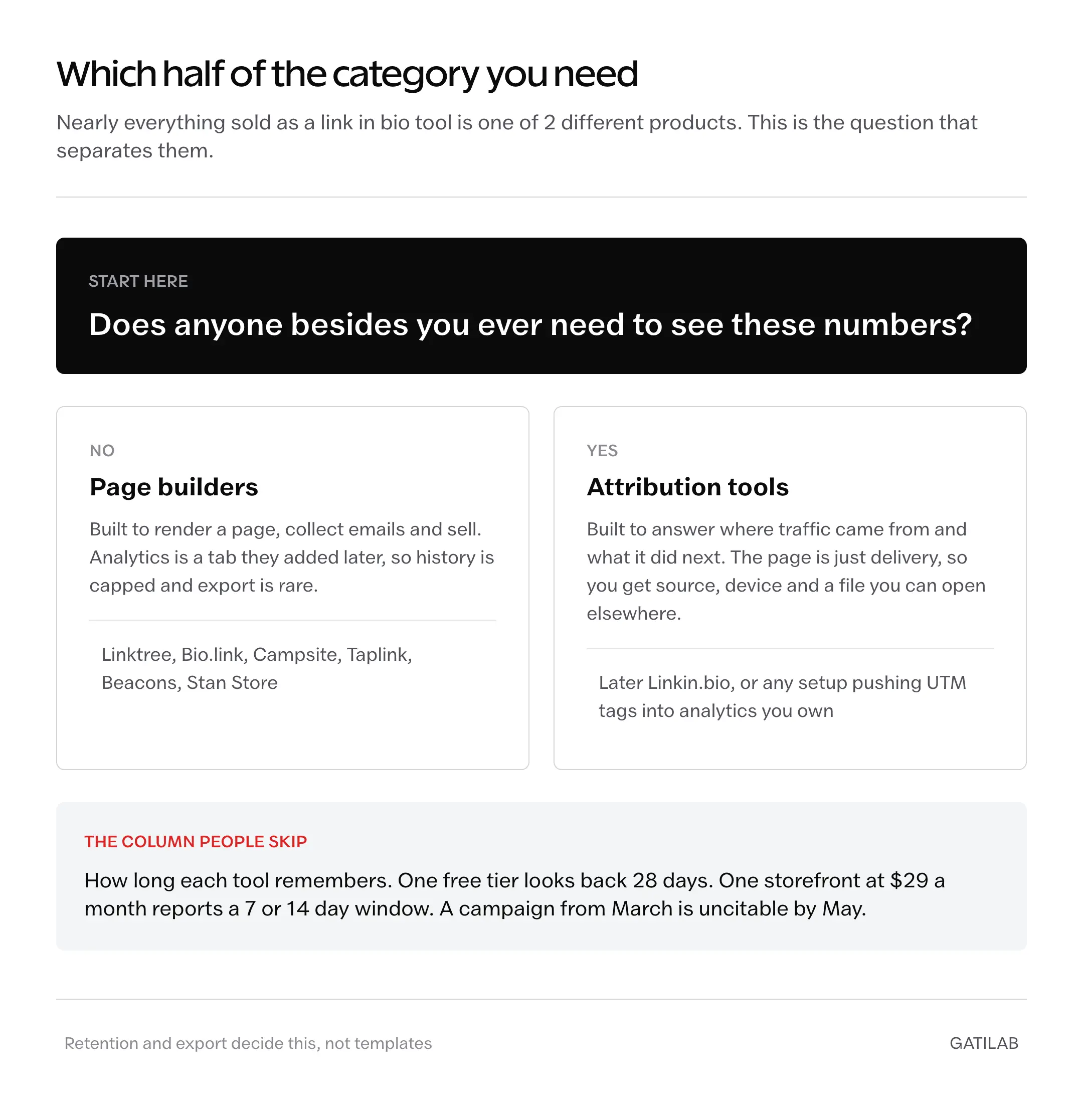
One half is page builders and storefronts. They exist to render a good-looking page, collect emails, and sell things. Analytics is a tab they added because customers kept asking. Linktree, Bio.link, Campsite, Taplink, Beacons, and Stan Store all live here.
The other half is attribution tools. They exist to answer where traffic came from and what it did next, and the page is just the delivery mechanism. Later’s Linkin.bio sits here, as does any setup that pushes UTM parameters into analytics you own.
Pick from the wrong half and no amount of theme customization fixes it.
The tell is what happens to your data. A page builder treats clicks as a vanity counter, so it caps history, gates the breakdowns behind upgrades, and rarely lets you export. An attribution tool treats clicks as the product, so it hands you the source, the device, and a file you can open somewhere else. Same page on the surface. Different contract underneath.
If you are still deciding whether any of this is answerable at all, the boundary is covered in what Instagram does and doesn’t report about link clicks.
What each link in bio tool shows about who clicked
Every tool here reports aggregate behavior, and none reports identity. That boundary is worth stating once before the table: no link in bio tool can tell you that a specific named person tapped your link, because the data never contains that in the first place.
What varies is how much of the aggregate you get, how long you keep it, and whether you can take it with you.
| Tool | Free plan reports | Paid adds | History kept | Export |
|---|---|---|---|---|
| Linktree | Views, unique views, clicks, unique clicks, click rate, sources | Location, device, most-clicked ranking, source detail (Pro, $15/mo) | 28 days free, 90 days Starter, 365 days Pro, lifetime Premium | CSV on Premium ($35/mo) |
| Later Linkin.bio | Per-link clicks, page views | CTR per link, traffic source, device segmentation | Not published | Excel |
| Beacons | Basic click and traffic counts | Real-time clicks, traffic and conversions (Creator Pro, $10/mo) | Not published | Not published |
| Campsite.bio | Basic click tracking | Views, clicks, referral, geo (Pro, $7/mo) | Not published | Not published |
| Bio.link | Basic click counts | Deeper analytics (Pro, $6/mo) | Not published | Not published |
| Taplink | Page views, link clicks | Meta and TikTok retargeting pixel | Not published | Not published |
| Stan Store | Store visits, leads, revenue | Facebook, Google Analytics, TikTok, Pinterest pixels (Creator Pro, $99/mo) | 7 or 14 days | Not published |
Retention is the column people skip and later regret. Linktree’s free tier looks back 28 days. Stan Store, at $29 a month, reports store visits over a 7 or 14 day window. If you’re assembling a case for a sponsor next quarter, both have already forgotten the campaign you wanted to cite.
Most of the others don’t publish a retention figure at all, which is its own answer.
The 7 tools, and who each one is for
Prices below are current list prices in USD. Several of these vendors bill in local currency or run regional pricing, so treat the figure as the shape of the plan rather than the exact number that lands on your card.
Linktree
The default, and still the right call for anyone who wants a working page in 10 minutes with no decisions to make.
Every plan reports total views, unique views, total clicks, unique clicks, click rate, and traffic sources. That covers the basic question of whether the page is doing anything.
The catch is where the useful breakdowns sit. Location, device type, most-clicked ranking, and traffic-source detail all need Linktree Pro at $15 a month. Exporting your insights as a CSV needs Premium at $35. And the free tier’s 28-day memory means a post that went wide in March can’t be cited in May.
Plans run Free, Starter at $8, Pro at $15, and Premium at $35 a month, with roughly 20% off annually.
Pay for it if you’re already there and want the location data. Leave if the export matters more than the convenience.
Later Linkin.bio
The pick when the page is a measuring instrument rather than a shop window.
It reports click volume per link, page views, click-through rate per link, traffic-source breakdown, and device segmentation, and it exports to Excel. It also passes UTM parameters into Google Analytics, and that handoff is what changes the ceiling: once a click lands in analytics you control, you can follow it to a signup or a sale instead of stopping at the tap.
That’s the entire argument for this half of the category, in one feature.
The tradeoff against Linktree is scope. You’re buying into Later’s broader social suite, and the page itself bends less than a dedicated builder’s. Plans start free and run to about $29 a month.
Choose it if you report to anyone. Brand partners accept a spreadsheet. They don’t accept a photo of a counter.
Beacons
The middle path for creators who sell but don’t want a full storefront platform.
The free plan is permanent and real: the page, a basic media kit, digital product sales, 1 course. It also carries a 9% seller fee, which is the actual price tag. On a $2,000 month that fee is $180, or 18 times the cost of the $10 Creator Pro plan that includes advanced analytics and drops the cut.
Beacons runs Creator Pro at $10 a month, Store Pro at $30, and Business Pro at $90, with roughly 2 months free on annual billing. The 2 higher tiers remove transaction fees entirely.
Do the multiplication before you accept the free tier. Free stops being free somewhere north of $115 in monthly sales.
Campsite.bio
The value pick when you want geographic and referral data without paying Linktree’s Pro rate for it.
The free plan covers unlimited links, themes, and basic click tracking. Pro at $7 a month adds a custom domain, email capture, branding removal, and analytics covering views, clicks, referral, and geo. That is close to what Linktree gates at $15.
Campsite also runs a Pro Teams tier at $15 for multiple profiles and a Pro+ tier at $24.
Roughly half the price for the breakdown that matters. You give up template range and editor polish.
Bio.link
The minimalist option, and the honest answer when you want a link list and nothing more.
The free plan gives unlimited links with no forced branding, which is rarer in this category than it should be. Pro at $6 a month adds a custom domain and deeper analytics.
Bio.link doesn’t support media embeds. That’s a real problem if you planned to surface video or product cards, and completely irrelevant if the page is 6 links and a photo.
Cheapest route to a clean page that isn’t advertising somebody else’s logo.
Taplink
The pick when the page has a job beyond routing, especially booking or lead capture.
It tracks page views and link clicks automatically. The more interesting piece is the built-in pixel manager for Meta and TikTok, which lets you retarget people who landed on the page. Add the form builder, quiz blocks, Stripe and PayPal payments, and booking widgets, and Taplink behaves more like a small site than a link list.
Paid tiers are inexpensive, commonly listed around $6 and $8 a month on annual billing. Confirm at checkout, because term length and region both move it.
The click reporting itself is thinner than Later’s. You’re buying what the page can do, not what it can tell you.
Stan Store
The storefront pick, and the one whose analytics disappoint most relative to price.
Creator runs $29 a month and Creator Pro $99, both with zero platform transaction fees. For a creator moving real volume in digital products, that fee structure alone can beat a 9% cut elsewhere.
The reporting is the soft spot. Built-in analytics cover store visits over the last 7 or 14 days, leads, and revenue. Tracking pixels for Facebook, Google Analytics, TikTok, and Pinterest are Stan Store Creator Pro only, at $99.
So $29 buys you a 2-week memory and no pixel. Buy it for the checkout, not the dashboard.
The self-hosted option nobody puts on these lists
If you already run a site, the page can live on your own domain with a branded link shortener handling redirects. Every click passes through infrastructure you control, so retention is however long you keep the logs, export is whatever the database will hand you, and no plan tier decides whether you are allowed to see the country column.
You inherit the maintenance, though. Something has to stay patched and online, and that something is you at 11pm.
Worth it when you already own the site and the traffic justifies the attention. Not worth it to save $8 a month.
What none of these will tell you
Worth being precise here, because plenty of pages in this category imply otherwise.
They can’t tell you who clicked, as in a named human being, because platforms don’t pass visitor identity to a destination site and privacy law wouldn’t allow the handover if they tried. You get counts, not people. The full reasoning behind that limit is worth reading once so you stop hunting for a setting that doesn’t exist.
They can’t reliably tell you which post drove a click unless you built that in yourself with distinct URLs or UTM parameters. The referrer usually arrives as “Instagram” and stops there.
They can’t survive the in-app browser cleanly. Instagram and TikTok open links inside their own browsers, which treat cookies and parameters differently from Safari or Chrome, so some tracking degrades and some returning visitors get counted as new.
And they can’t recover history you never kept. A 28-day window that expired in April is gone in May, and no upgrade restores it retroactively. That one costs people actual sponsorship money.
The mistakes that cost the most
The expensive errors in this category are quiet ones.
Picking on templates. The design is the part you’ll change 3 times in the first month and then stop thinking about, while the data policy is the part you’re married to. Choose on retention and export, then go make it pretty.
Staying free while selling. A 9% fee reads as harmless right up until you multiply it by a good month, and the paid tier is usually cheaper than the cut long before you notice.
Skipping UTM parameters because the tool has its own analytics. The tool’s numbers stop at the click. Yours can follow someone to the thing you actually care about, and tagging a link takes about a minute. The mechanics are in the guide to setting up an Instagram bio link properly.
Treating unique clicks as people. Unique is counted per browser session, not per human, and the in-app browser inflates it. Report totals when the number matters, and say which you used.
Never exporting. Data you can’t carry out belongs to the vendor, and tools get discontinued, repriced, and acquired. A quarterly CSV costs nothing and outlives all 3.
Questions people ask next
No. Platforms do not pass visitor identity to a destination site, so every tool in this category reports aggregate counts only. You can see how many people clicked, roughly where they were and what device they used, but never which named person tapped the link.
It is if you never open the analytics. The free tier reports views, clicks and click rate but only looks back 28 days, so a campaign from 3 months ago is gone. If you ever need to show a sponsor what a post did, that window is the reason to move.
Campsite.bio at about $7 a month. It adds geographic and referral data on its Pro plan, which is roughly what Linktree gates behind its $15 Pro tier. Bio.link is cheaper at $6 but is a link list only, with no media embeds.
Not always. Instagram has supported multiple links in the profile field for some time, so if you only need 3 or 4 destinations and no analytics, the native field may cover it. The tools earn their place when you want click data, a custom domain or a storefront.
Yes. There is no export path from one of these tools into another, so history stays with the tool that collected it. Screenshot or export whatever matters before you move, and expect to start the record again on the new one.
Pick the half, then the tool
The real division here isn’t free versus paid, and it isn’t pretty versus plain. It’s whether the tool treats your click data as a feature it can meter, or as the thing it exists to hand you.
Page builders meter it. That isn’t dishonest, it’s just what they are, and if you want an attractive page with a few links on it, you will never once feel the meter. Attribution tools hand it over, and charge you in flexibility instead.
One question sorts the shortlist: does anyone besides you ever need to see these numbers?
If yes, buy the export. If no, buy the page you’ll enjoy updating.
Tell Google you want more of this.
Add Gatilab as a preferred sourceOne tap, and this site shows up more often in your own Top Stories, AI Overviews and AI Mode. Remove it any time.