
How Search Engines Work: Crawling, Indexing, and Ranking Explained
Since 2008, I’ve watched Google evolve from a simple link-counting machine into something that genuinely understands what people mean when they type a query. And here’s what surprises me most: the fundamentals haven’t changed as much as you’d think. Google still crawls pages, stores them in an index, and ranks them based on relevance and authority. The technology behind each step has gotten wildly more sophisticated, but the pipeline itself is the same one Larry Page and Sergey Brin built in a Stanford dorm room.
If you run a website and you don’t understand how this pipeline works, you’re guessing. Every SEO decision you make, from your site structure to your content strategy to your link building, connects back to crawling, indexing, and ranking. And the most common problems on a struggling site usually aren’t fancy algorithm penalties. They’re basic crawling and indexing issues that could’ve been fixed in an afternoon.
This is the guide I wish someone had handed me back in 2008 when I was building my first WordPress sites and wondering why Google wouldn’t show them in search results. I’ll walk you through exactly how search engines discover your pages, decide whether to store them, and figure out where to rank them. No jargon without explanation. No theory without practical application.
The Three Pillars: Crawling, Indexing, and Ranking
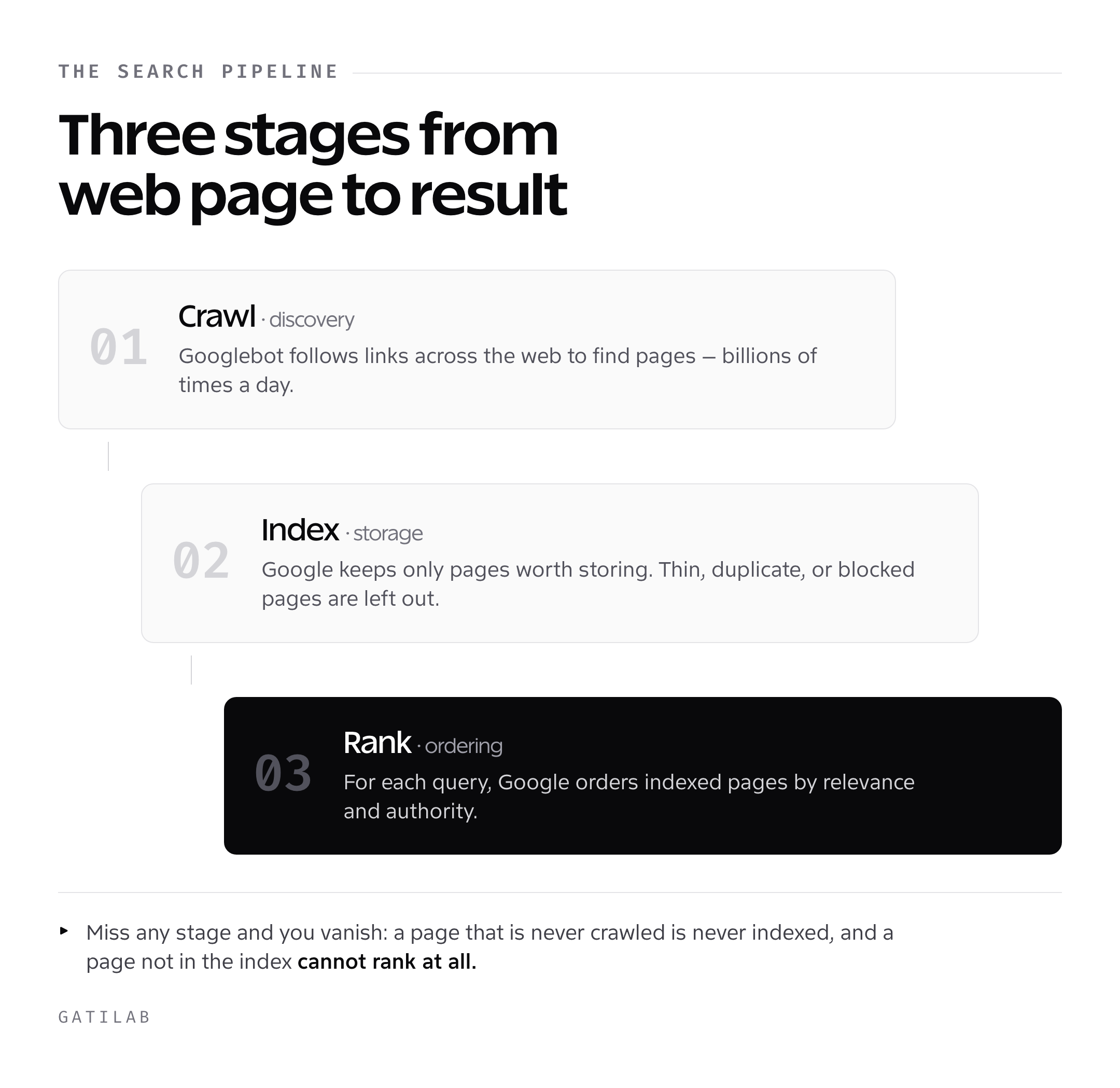
Think of Google like a massive library. But unlike a normal library where books show up on a shelf, Google has to go out and find every book on the planet, decide which ones are worth keeping, and then figure out which one to hand you when you ask a question. That’s the entire search engine pipeline in three steps.
Crawling: Finding Your Pages
Crawling is discovery. Google sends out automated programs called crawlers (you’ll also hear them called spiders or bots) to follow links across the web. The most famous one is Googlebot. It starts with a list of known URLs, visits each page, reads the content, and follows every link it finds to discover new pages. It’s doing this billions of times a day, across every corner of the internet.
Indexing: Storing What Matters
Once Googlebot visits a page, Google decides whether to add it to its index. The index is Google’s database of all the pages it considers worth storing. Not everything makes the cut. Thin content, duplicate pages, and pages blocked by robots.txt all get left out. If your page isn’t in the index, it simply cannot appear in search results. Period.
Ranking: Deciding the Order
When someone types a query, Google doesn’t search the live web. It searches its index. Then it applies hundreds of ranking factors to decide which pages best answer that specific query. This happens in milliseconds. The ranking algorithm considers everything from content relevance to backlink authority to user experience signals. And it’s different for every single query.
These three stages are sequential. If crawling fails, indexing never happens. If indexing fails, ranking is impossible. Spending thousands on content and link building won’t help if Googlebot can’t even access half your site. Fix the pipeline in order, and everything downstream gets better.
How Web Crawlers Discover Your Pages
Googlebot is relentless. It’s constantly crawling the web, following links from page to page like a reader clicking through Wikipedia at 2 AM. But it’s not random. Google is strategic about where it sends its crawlers and how often.
How Googlebot Finds New Pages
There are three main ways Google discovers a new URL. First, it follows links from pages it already knows about. If a high-authority site links to your new blog post, Googlebot will find it fast, sometimes within hours. Second, you can submit your sitemap through Google Search Console. This is basically handing Google a map of your site and saying “here’s everything I want you to know about.” Third, Google picks up URLs from browser data, Chrome usage patterns, and other sources it doesn’t fully disclose.
In my experience, the fastest way to get a new page crawled is a combination of internal linking and sitemap submission. When I publish a new post, I add internal links from 2-3 existing high-traffic pages and submit the URL in Search Console. That gives Googlebot two routes to the page instead of waiting for it to stumble across one.
Crawl Budget: Why It Matters
Crawl budget is how many pages Googlebot will crawl on your site within a given timeframe. For small sites with under 1,000 pages, this rarely matters. Google will crawl everything without breaking a sweat. But for larger sites, especially e-commerce stores with tens of thousands of product pages, crawl budget becomes critical.
Faceted navigation is the classic example. Filter and sort options on a store with thousands of products can create millions of junk URLs, and Googlebot wastes its time on those instead of your real product pages. The fix is to block those parameter URLs with robots.txt and clean up the internal linking so crawlers spend their time on pages that can rank.
Google determines crawl budget based on two things: crawl rate limit (how fast it can crawl without overloading your server) and crawl demand (how much Google wants to crawl your site based on popularity and freshness). A faster server with fresh, linked content gets crawled more aggressively.
Making Your Site Crawlable
If you’re running WordPress, you’re already in good shape. WordPress generates clean HTML that Googlebot can read easily. But there are a few things I always check on every client site. Your robots.txt file should not block important directories. Your XML sitemap should be submitted in Google Search Console and updated automatically (Yoast SEO or Rank Math handles this). Your internal linking should connect every important page within 3 clicks of the homepage. And your site should load fast enough that Googlebot doesn’t time out mid-crawl.
One thing I see constantly: people accidentally blocking their entire site with a “Disallow: /” in robots.txt that was left over from their staging environment. I check robots.txt on every single audit. It takes 10 seconds and can save you months of invisible damage.
How Google Indexes Your Content
Getting crawled is step one. Getting indexed is step two, and it’s where things get interesting. Just because Googlebot visited your page doesn’t mean Google will add it to the index. Google is selective, and it’s gotten more selective every year.
What Gets Indexed (And What Doesn’t)
Google wants to index pages that provide unique value. If your page is a thin 200-word post that says the same thing as 50 other pages on the web, Google will likely skip it. Duplicate content, whether it’s copied from another site or duplicated across your own URLs, gets filtered out. Pages behind login walls, pages blocked by noindex tags, and pages with server errors all stay out of the index.
A detailed, original article has a much better chance of getting indexed than a short, generic post on a topic that existing pages already cover well. Google’s quality bar for indexing has gone up significantly since the helpful content updates.
How Google Processes Your Pages
When Googlebot fetches your page, it doesn’t just read the HTML. It renders the page, executing JavaScript and CSS to see the page the way a real user would. This is critical if you’re using JavaScript frameworks like React or Vue. Google has gotten much better at rendering JavaScript content in 2026, but it still adds a delay. Pages built with server-side rendering or static HTML get indexed faster than JavaScript-heavy single-page applications.
Google also analyzes the structure of your content. It looks at your title tag, meta description, heading hierarchy, image alt text, and the actual body content. It identifies entities (people, places, concepts) and understands relationships between them. If you write an article about “WordPress caching,” Google knows it’s related to website performance, page speed, and server response time. This entity understanding is how Google matches your content to queries you never explicitly targeted.
Mobile-First Indexing
Google now uses mobile-first indexing for all sites, a switch it finished in 2023. This means Google crawls and indexes the mobile version of your page, not the desktop version. If your mobile site is missing content, has broken layouts, or loads slowly on a phone, that’s what Google sees. By 2026, there’s really no excuse. Mobile devices accounted for about 59% of worldwide web traffic in StatCounter data for September 2026. If your site doesn’t work perfectly on a phone, you’ve got bigger problems than SEO.
For WordPress users, this is mostly handled by your theme. But you still need to test it. Google retired its Mobile-Friendly Test and the Search Console mobile usability report in December 2023, so I’d run a Lighthouse audit through PageSpeed Insights or Chrome DevTools, use URL Inspection in Search Console to see how Googlebot renders the page, and then check it on a real phone. Common issues include text that’s too small, clickable elements too close together, and content wider than the screen. These are easy fixes that make a real difference.
Google’s Ranking Algorithm: What Actually Determines Position
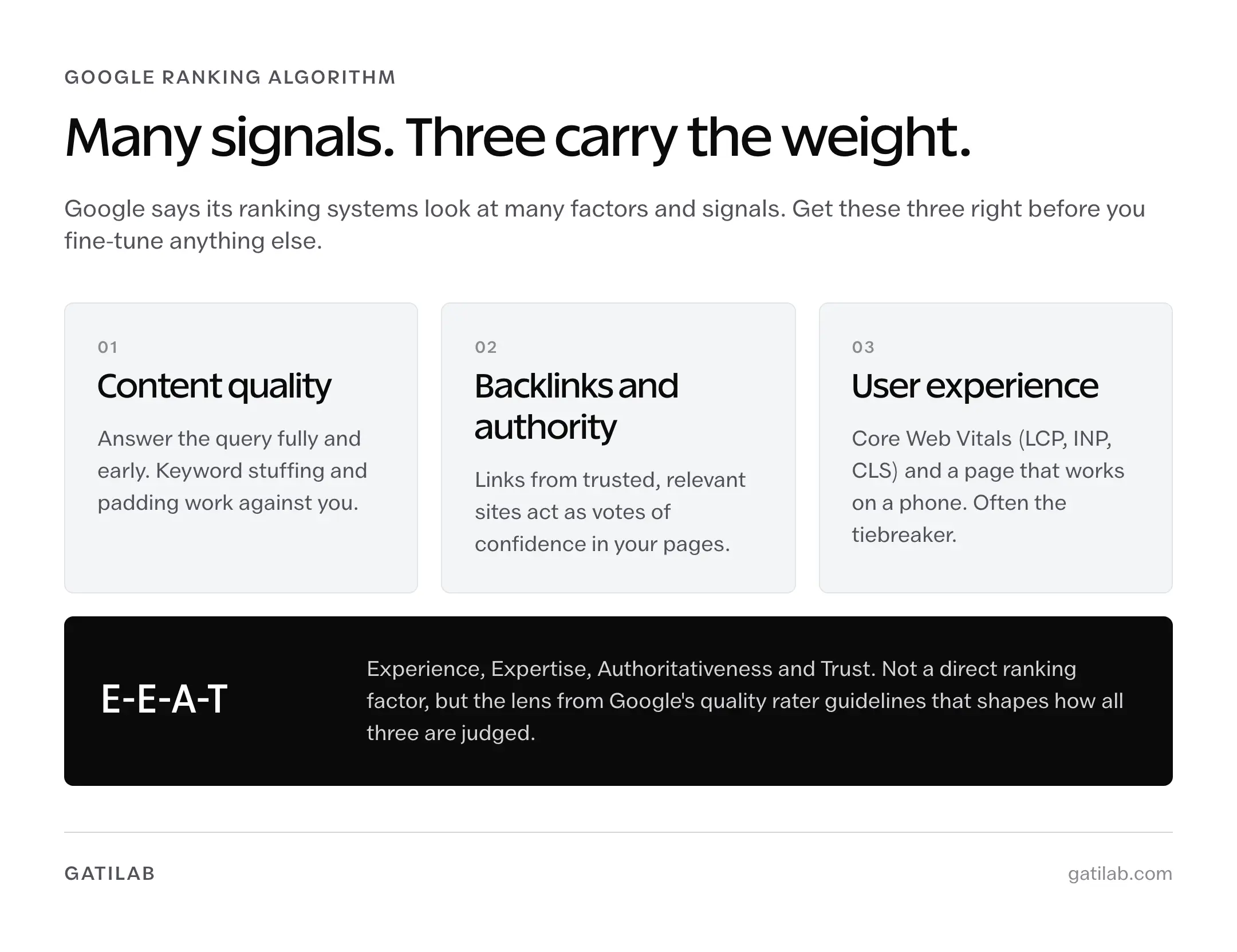
This is where most people’s eyes glaze over, but stay with me. Google doesn’t publish a current count of its ranking factors. Its own explanation of how ranking works says its systems look at many factors and signals, and the over-200 figure you’ll still see quoted is an old one. But since 2008, I’ve found that most of your ranking success comes down to three things: content quality, backlinks, and user experience. Everything else is fine-tuning.
Content Relevance and Quality
Google’s primary job is matching search queries with the most relevant, helpful content. It’s using natural language processing (NLP) models that have gotten incredibly good at understanding meaning, not just keywords. In 2026, keyword stuffing doesn’t just fail to work. It actively hurts you. Google can tell when you’re writing for an algorithm instead of a person.
What works is writing content that thoroughly answers the question behind a search query. If someone searches “how search engines work,” they want a clear, complete explanation. Not a 300-word overview. Not a 10,000-word academic paper. Something in between that covers the topic without padding. Google measures this through engagement signals, bounce rates, and how often users click back to search results after visiting your page (pogo-sticking).
That’s why I put the answer first. A page that answers the core question in the first 200 words and then goes deeper serves the searcher far better than one that buries the answer under 500 words of introduction. Get to the point. Then expand.
Backlinks and Authority
Backlinks are still the strongest off-page ranking factor in 2026. A backlink is when another website links to your page. Google treats each backlink as a vote of confidence. But not all votes are equal. A link from a high-authority site like Forbes or a major university carries far more weight than a link from a random blog with 10 visitors a month.
The original PageRank algorithm that Google was built on calculated authority based on the quantity and quality of incoming links. PageRank as a visible metric is long gone (Google killed the public toolbar score in 2016), but the underlying concept is still core to how Google ranks pages. Modern link analysis is far more sophisticated, factoring in relevance, anchor text diversity, link velocity, and whether links appear natural or manipulated.
I’ll be direct: building quality backlinks is the hardest part of SEO. It takes time, relationships, and genuinely good content that people want to reference. There are no shortcuts that don’t carry risk. I’ve seen sites obliterated by Google penalties after buying links from PBNs (private blog networks). If someone promises you 100 backlinks for $500, run.
E-E-A-T: Experience, Expertise, Authority, Trust
Google’s quality rater guidelines emphasize E-E-A-T, which stands for Experience, Expertise, Authoritativeness, and Trustworthiness. This isn’t a direct ranking factor in the algorithm, but it shapes how Google evaluates content quality. Pages written by people with demonstrable experience rank better than generic content written by anonymous authors.
This is why I sign every article on gauravtiwari.org with my name and include my background. It’s why I back my claims with specific examples and sources. Google’s systems are designed to surface content from people who actually know what they’re talking about, especially for YMYL (Your Money or Your Life) topics like health, finance, and legal advice.
For your site, this means having clear author bios, linking to credentials where relevant, and most importantly, writing from genuine experience. Google is getting better at detecting AI-generated fluff that sounds authoritative but says nothing specific. Real experience shows through in the details.
User Experience Signals
Google has made user experience a direct ranking factor through Core Web Vitals. These are three specific metrics: Largest Contentful Paint (LCP, how fast your main content loads), Interaction to Next Paint (INP, how responsive your site is to clicks), and Cumulative Layout Shift (CLS, how stable your layout is while loading).
The impact of Core Web Vitals is real but not overwhelming. Sites with poor Core Web Vitals can still rank well when their content and links are strong enough to compensate. But when two pages are roughly equal in content and authority, the one with better user experience wins. It’s a tiebreaker, not a dealbreaker, but tiebreakers add up across hundreds of queries.
On WordPress, getting good Core Web Vitals scores comes down to quality hosting, a lightweight theme, image optimization, and a caching plugin like FlyingPress or WP Rocket. I’ve written about this extensively, and most sites can get to all-green scores with a weekend of focused work.
Understanding Search Intent
Search intent is the reason behind a query. It’s what the person actually wants when they type something into Google. And understanding it is the difference between content that ranks and content that sits on page 5 forever.
The Four Types of Search Intent
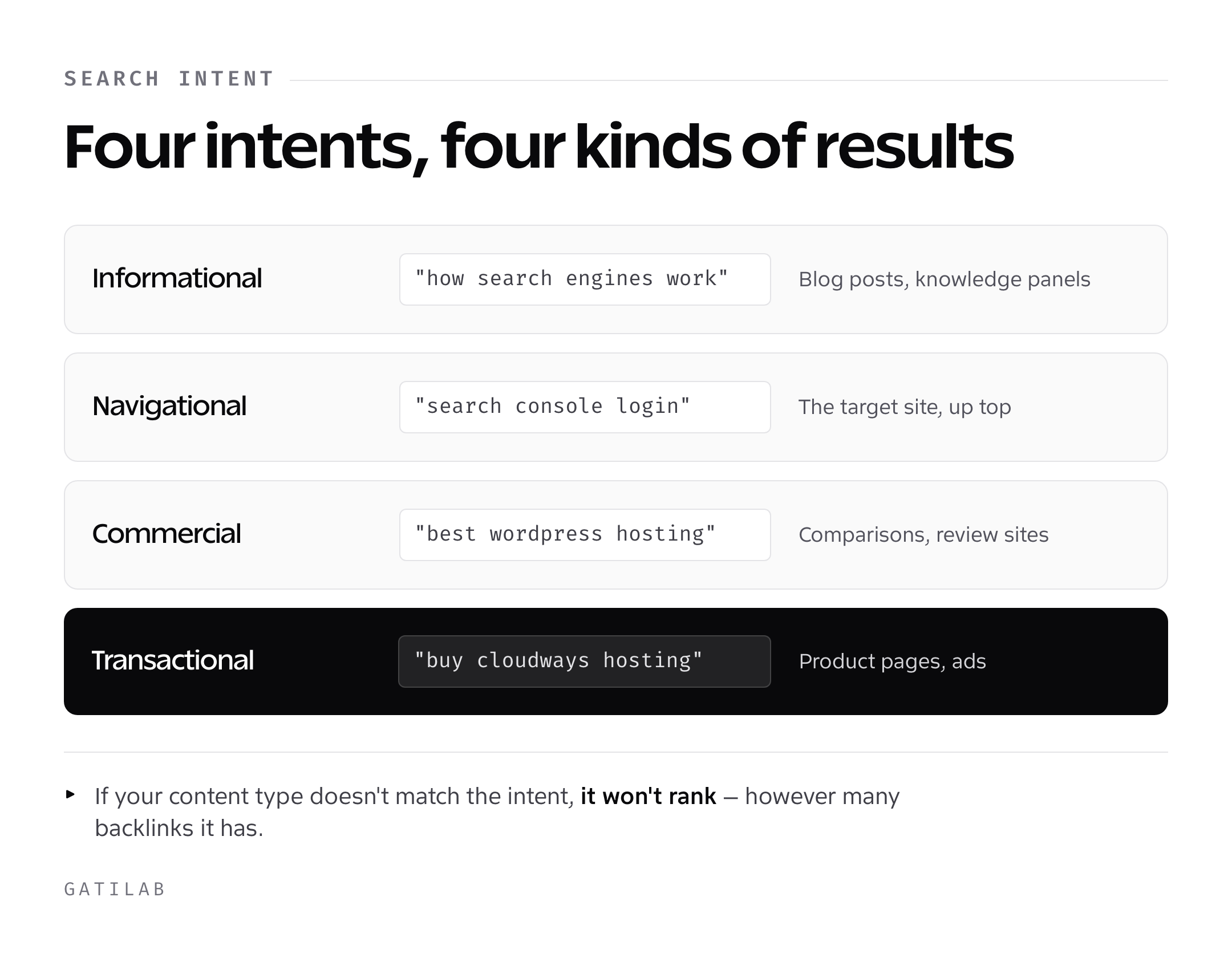
Google categorizes queries into four main types. Informational queries are when someone wants to learn something (“how search engines work”). Navigational queries are when someone wants to find a specific site (“Google Search Console login”). Commercial queries are when someone is researching before a purchase (“best WordPress hosting 2026”). And transactional queries are when someone is ready to buy or take action (“buy Cloudways hosting”).
Each type triggers different search results. Informational queries show blog posts and knowledge panels. Navigational queries show the target website prominently. Commercial queries show comparison articles and review sites. Transactional queries show product pages and ads. If your content type doesn’t match the intent behind the query, you won’t rank. I don’t care how many backlinks you have.
How Google Matches Intent to Results
Google figures out intent by analyzing the query itself and looking at what types of results users engage with most. It’s a feedback loop. If Google shows product pages for a query and everyone clicks back to search results, Google learns that people wanted informational content instead and adjusts accordingly.
Take a query like “email marketing software.” A detailed comparison blog post looks like a sensible fit. But if the SERP (search engine results page) is dominated by landing pages from Mailchimp, Kit, and other tools, the intent is navigational and transactional, not informational. A narrower target like “best email marketing software for small business” is where comparison content actually matches the intent.
SERP Features by Intent
Google doesn’t just show ten blue links anymore. Depending on the intent, you’ll see featured snippets, People Also Ask boxes, knowledge panels, video carousels, local packs, and shopping results. Understanding which features appear for your target queries tells you exactly what type of content to create.
For informational queries like “how search engines work,” you’ll typically see a featured snippet, People Also Ask, and long-form articles. This tells me Google wants a thorough, well-structured explanation. For local queries like “SEO agency near me,” you’ll see a map pack and local listings. Creating a blog post for that query would be pointless. Match your content format to what Google is already showing. It’s telling you exactly what it wants.
What This Means for Your SEO Strategy
Understanding how search engines work isn’t academic. It directly shapes what you should do on your site right now. Here’s how I translate the crawling, indexing, and ranking pipeline into practical action for every client.
Build a Crawlable Site Architecture
Your site structure should make it easy for Googlebot to find every important page. I use a flat architecture where every page is within 3 clicks of the homepage. Your navigation should link to your main category pages. Each category page should link to individual posts or product pages. And every post should have 3-5 internal links pointing to related content.
In WordPress, I set up category pages as content hubs. The category page itself has unique introductory content (not just a list of posts), and each post within that category links back to the hub and to 2-3 sibling posts. This creates a tight internal linking structure that Googlebot can follow easily and that passes authority efficiently. Fixing internal linking is often the quickest way to get orphaned pages discovered and indexed.
Create Content Worth Indexing
Stop publishing thin, generic content. Google’s indexing quality bar in 2026 is higher than it’s ever been. Every page you publish should offer something unique: original data, personal experience, a fresh angle, or depth that competing pages don’t have. If you can’t articulate what makes your page different from the top 5 results, don’t publish it yet.
I follow a simple rule: every article should pass the “so what?” test. After reading any paragraph, a reader should know something specific they didn’t know before. If a paragraph could be deleted without losing anything useful, delete it.
Build Authority Through Links
Link building is a long game. The approach I recommend to every client is creating content so useful that people link to it naturally, then supplementing that with targeted outreach. Original research, in-depth guides, and free tools generate links passively over time. Guest posting on relevant sites and building relationships with other creators in your space accelerates the process.
Focus on getting links from sites that are topically relevant to yours. Ten links from SEO and WordPress blogs are worth more than 100 links from random directories. And always prioritize editorial links (someone chose to link to you because your content was valuable) over manufactured links (you placed them yourself in comments, forums, or paid placements).
Match Content to User Intent
Before you write anything, search your target keyword in Google and study the results. What type of content ranks? Blog posts or product pages? Short answers or long guides? Lists or narratives? Then create content that matches that format while being better than what’s already there. This single step will improve your rankings more than any technical SEO trick.
I spend 15 minutes analyzing the SERP before I write any article. I look at the top 5 results, note their word count, structure, and angle, and then plan something that covers the topic more completely or from a more useful perspective. This research phase saves hours of wasted effort creating content that never had a chance of ranking.
Frequently Asked Questions
How long does it take Google to index a new page?
It varies. Some pages get indexed within hours, while Google says crawling can take anywhere from a few days to a few weeks. The fastest way is to submit the URL in Google Search Console and add internal links from existing high-traffic pages. Sites with higher authority and regular publishing schedules get indexed faster because Googlebot visits them more frequently.
Does Google crawl every page on the internet?
No. Google is selective about what it crawls based on crawl budget and perceived value. Small sites under 1,000 pages typically get fully crawled. Larger sites may have pages that Googlebot rarely visits or skips entirely. You can check which pages Google has crawled using the URL Inspection tool in Search Console.
What’s the difference between crawling and indexing?
Crawling is when Googlebot visits your page and reads its content. Indexing is when Google decides to store that page in its database. A page can be crawled but not indexed if Google considers the content low-quality, duplicate, or not valuable enough. Think of crawling as Google reading your resume, and indexing as Google keeping it on file.
How many ranking factors does Google use?
Google doesn’t publish a current count. It says its systems look at many factors and signals, and the over-200 figure you’ll see quoted is an old one. In practice, the ones that matter most are content relevance, backlink quality and quantity, and user experience signals like Core Web Vitals. I’ve been building on the web since 2008, and most ranking success still comes from getting those three right. Everything else is fine-tuning.
Can I pay Google to rank higher in organic search results?
No. Organic rankings can’t be bought. Google Ads lets you pay for placement at the top of search results, but those are labeled as ads and are separate from organic results. The only way to rank higher organically is by improving your content quality, building backlinks, and ensuring solid technical SEO. Anyone who claims they can guarantee #1 rankings is lying.
Is SEO still worth it in 2026 with AI overviews?
Absolutely. AI overviews have changed how some queries display results, but they still pull information from ranked web pages. Sites that rank well organically are the sources Google’s AI cites. Click patterns have shifted for some queries, so watch your Search Console data closely, but the fundamentals of getting crawled, indexed and ranked haven’t changed.
Do search engines other than Google matter?
Google held about 90% of the worldwide search market in September 2026 and Bing about 5%, according to StatCounter. Bing also feeds results to AI tools like Copilot. For most sites, optimizing for Google covers you everywhere else because the fundamentals are the same. I focus on Google first and don’t worry about engine-specific optimization unless a client has a specific audience on Bing or DuckDuckGo.
How often does Google update its ranking algorithm?
Google makes thousands of small changes every year and several major core updates. In 2025, Google confirmed 3 core updates (March, June and December) plus an August spam update on its Search Status Dashboard, along with numerous smaller changes. I monitor these through Search Console data and industry trackers like Semrush Sensor. The best protection against algorithm updates is building a site with genuinely helpful content rather than chasing algorithmic tricks.
Here’s what I want you to take away from all of this. Search engines aren’t mysterious black boxes. They follow a logical pipeline: find pages, store the good ones, rank them by relevance and authority. Every SEO tactic you’ll ever use connects back to one of those three stages. Fix your crawling first. Make sure your content is worth indexing. Then work on building the authority and relevance signals that push your rankings up.
If you’re just starting out, open Google Search Console right now. Check your Page indexing report. See how many of your pages Google has actually indexed. That single number tells you more about your site’s SEO health than any keyword ranking tracker. If less than 80% of your important pages are indexed, you’ve got work to do before worrying about rankings.
I’ve been building and optimizing websites since 2008. The tools have changed, the algorithm has evolved, and AI has entered the picture. But the core question Google is trying to answer hasn’t changed: “What’s the best page on the internet for this specific query?” Make your page the honest answer to that question, and the rankings will follow.
Tell Google you want more of this.
Add Gatilab as a preferred sourceOne tap, and this site shows up more often in your own Top Stories, AI Overviews and AI Mode. Remove it any time.