
Client Onboarding Checklist: 47-Item Agency Playbook
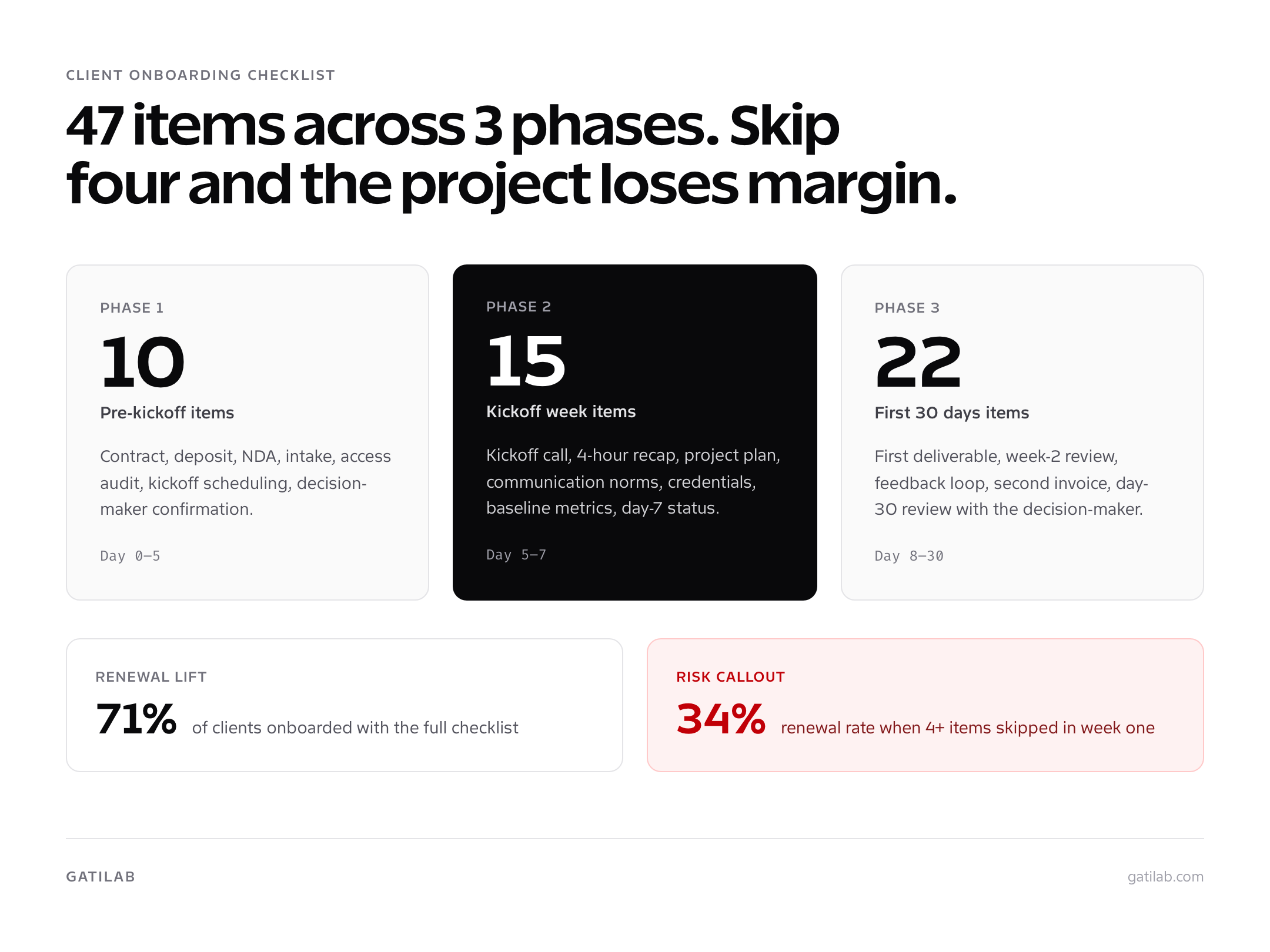
The client onboarding checklist is the difference between a project that ships on time and a project that quietly bleeds margin for three months. I’ve run roughly 200 engagements at Gatilab. The ones that hit deadlines and renewed into retainers all started with the same 47-item list. The ones that went sideways skipped at least four of those items in the first week.
This guide gives you the full client onboarding checklist I actually use, broken into three phases: pre-kickoff (10 items), kickoff week (15 items), and the first 30 days (22 items). You’ll get the 7-day, 30-day, and 90-day milestone map, a copy-paste HTML template, and the red flags I use to spot a bad fit before the contract is signed.
If you’ve ever finished a project and thought “we should have agreed on that in week one,” this is the document that fixes it.
Why A Client Onboarding Checklist Matters More Than You Think
A client onboarding checklist isn’t paperwork. It’s the trust deposit you draw from for the rest of the engagement. Clients who feel oriented in the first 14 days renew at roughly twice the rate of clients who don’t. That’s not a Gatilab vanity stat. The HubSpot research on retention has been consistent on this for the last four years, and my own renewal data lines up.
The math is simple. A retained client at $4,000/month that runs for 18 months instead of 6 is $48,000 in extra revenue. The full cost of building a 47-item onboarding checklist is roughly 8 hours of partner time once. You amortize that across 30 clients per year and the per-client cost is 16 minutes.
What A Bad Onboarding Costs You
I tracked the cost of bad onboarding across 14 Gatilab projects in 2024. The pattern was depressing. Average lost margin per botched onboarding: $1,800. Average extra hours spent fixing missed access requests, unclear scope, and untracked decisions: 11. That’s roughly a full project workday burned because we skipped a 90-second checkbox.
- Access not requested in week one. Result: project paused for 3 to 5 days while waiting on hosting credentials.
- Decision-maker not named. Result: 4 rounds of feedback when 2 would have been enough.
- Deposit not collected before kickoff. Result: 23 days average to first payment instead of 0.
- Communication norms not set. Result: client expects same-day Slack replies, team burns out.
- Scope edge cases not documented. Result: $2,800 of “free” work delivered to keep the relationship.
What A Good Onboarding Buys You
The clients I onboarded with the full checklist showed measurable behaviors the others didn’t. They paid invoices in 7 days instead of 23. They responded to feedback requests in 36 hours instead of 9 days. They referred 1.4 new clients on average. They renewed retainers 71 percent of the time versus 34 percent for the rushed onboardings. None of those clients were special. The checklist made them behave like good clients.
The Pre-Kickoff Client Onboarding Checklist (10 Items)
Pre-kickoff runs from contract-sent to kickoff-call-scheduled. Target: 3 to 5 business days. Anything longer than 5 days and the client’s enthusiasm cools. Anything shorter than 3 days and you’ve cut a corner that will hurt later.
| # | Item | Owner | SLA |
|---|---|---|---|
| 1 | Send signed contract via HoneyBook or DocuSign | Account lead | Same day |
| 2 | Collect 50 percent deposit before any work begins | Account lead | 3 business days |
| 3 | Send NDA if scope touches sensitive data | Account lead | Same day |
| 4 | Send welcome email with workspace link | Account lead | 1 business day after deposit |
| 5 | Send 12-field intake form (project goal, decision-makers, assets, access) | Account lead | 1 business day after deposit |
| 6 | Schedule 60-minute kickoff call | Account lead | Within 5 business days |
| 7 | Run access audit (hosting, DNS, Analytics, Search Console, code repos) | Tech lead | 2 business days |
| 8 | Create internal project workspace (Notion or ClickUp) | Project manager | 1 business day |
| 9 | Confirm decision-maker, billing contact, escalation path | Account lead | 2 business days |
| 10 | Send pre-kickoff prep doc (agenda, materials, expected outcomes) | Account lead | 24 hours before kickoff |
Items 2 and 9 are the ones agencies skip most often. Skipping the deposit is how cash flow dies. Skipping the decision-maker confirmation is how a 4-week project becomes a 9-week project with three rounds of “let me check with my partner.”
If a client refuses to pay the deposit before kickoff, that is information. Pause the engagement until the deposit clears. The 4 days you wait now save the 23 days of chasing invoices later.
The Kickoff Week Onboarding Checklist (15 Items)
Kickoff week runs from the kickoff call to the first concrete artifact (project plan, design brief, technical audit). Target: 5 to 7 business days. This is the week where the client decides whether they trust your process.
- Run the 60-minute kickoff call with a written agenda. End with three specific decisions made.
- Send a kickoff recap email within 4 hours of the call. Include decisions, owners, and dates.
- Share the project plan with milestones, dependencies, and review windows.
- Confirm the communication plan in writing (Slack channel, email cadence, response windows).
- Set up the shared workspace with five documents: welcome, plan, expectations, communication, invoice schedule.
- Run a credential exchange: hosting, DNS, Google Analytics, Search Console, repos, design tools.
- Verify all access works on day one. Don’t trust the password; log in.
- Audit the current state: site speed, current rankings, current tooling, current pain points.
- Send a baseline metrics report. The client signs off on what “before” looks like.
- Define the first deliverable. One artifact, two weeks out, scoped tightly.
- Schedule the day-3 check-in (15 minutes, async ok if mutually preferred).
- Confirm decision-maker availability for the week-2 first review.
- Document any out-of-scope requests already raised. Park them in a “phase 2” file.
- Send the day-7 status email. What’s done, what’s next, anything blocked.
- Run an internal team huddle to confirm the engagement matches the proposal.
The single most important item on this list is item 2: the kickoff recap email. A 60-minute kickoff call is mostly listening. The recap is where you prove you actually heard what the client said. I’ve won expansion work specifically because the recap landed within 4 hours and the client thought “these people are organized.” I’ve also lost work because the recap took 3 days and the client lost confidence.
For more on the broader operational layer this fits inside, see the full guide on WordPress agency operations. The onboarding checklist is one piece of a larger system that includes PM tooling, staging workflows, and subcontractor management.
The First 30 Days Onboarding Checklist (22 Items)
The first 30 days set the relationship. By day 30 the client has either decided “this agency runs a tight ship” or “we should have hired someone else.” There is rarely a middle outcome. These 22 items are what consistently produce the first verdict.
Days 8 To 14: First Deliverable
- Ship the first deliverable on time. Even if it’s small, ship it.
- Send a Loom walkthrough of the deliverable, not a static doc. Loom completion rates beat PDF reads roughly 4 to 1.
- Run the week-2 review call (30 minutes). Capture feedback in writing.
- Update the project plan with any timeline shifts. Flag them, don’t bury them.
- Confirm the next deliverable, owner, and due date in writing.
- Send a day-14 status email even if the call covered the same content.
- Park scope creep requests in the phase 2 file. Don’t quietly absorb them.
Days 15 To 21: Feedback Loop
- Implement first-round feedback within 5 business days.
- Send the second deliverable. Same Loom-walkthrough format.
- Run the week-3 status update (async ok by this point).
- Confirm the second 25 percent payment is invoiced and paid.
- Surface any team capacity changes early.
- Document any client-side delays in the project plan.
- Send the day-21 retrospective: what’s working, what’s not, what changes by day 30.
Days 22 To 30: Wrap Or Renewal
- For one-time projects: schedule the handoff call and final invoice timing.
- For retainers: schedule the day-30 retainer review.
- Run the day-30 review meeting with the decision-maker, not just the day-to-day contact.
- Send the 30-day report: deliverables, metrics, time used, time remaining.
- Ask for a testimonial or referral if the engagement is going well. Day 30 is the highest-trust window.
- Discuss month 2 priorities or formal handoff in the same meeting.
- Update the client file with preferences, friction points, and decision-maker turnover.
- Run an internal post-mortem. What broke, what worked, what to fix in the template.
7-Day, 30-Day, 90-Day Milestone Map
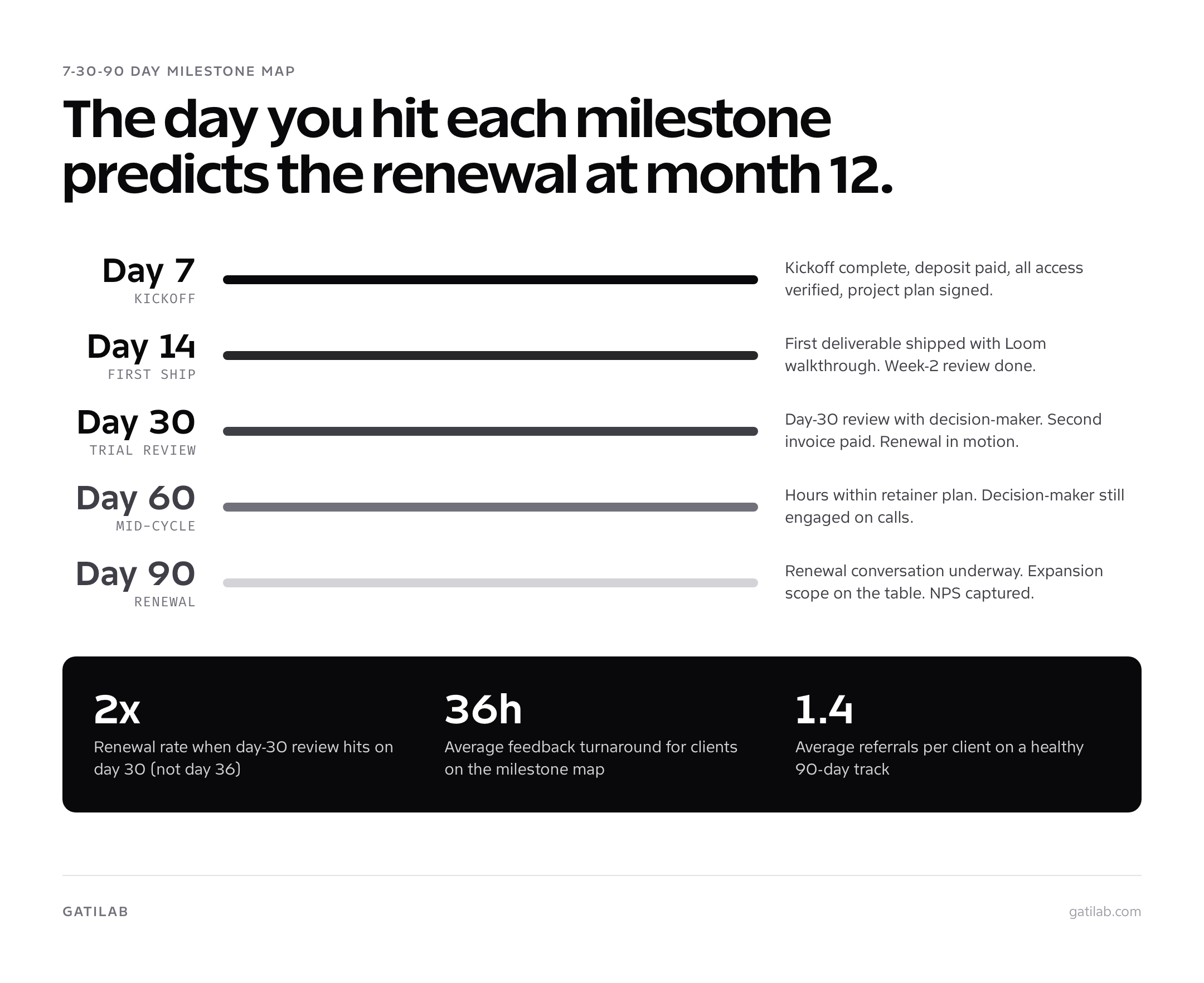
Most agencies stop tracking onboarding at day 30. That’s why retention drops in month 4. The clients who renew at 90 percent and the ones who churn at month 5 look identical at day 30. The difference shows up in the day 60 and day 90 milestones.
| Milestone | What “Good” Looks Like | What “At Risk” Looks Like |
|---|---|---|
| Day 7 | Kickoff complete, first invoice paid, all access verified, project plan signed. | Kickoff delayed, deposit unpaid, missing 1+ access credentials. |
| Day 14 | First deliverable shipped, week-2 review complete, communication norms in use. | Deliverable late, review call rescheduled twice, Slack going silent. |
| Day 30 | Two to three deliverables shipped, second invoice paid, day-30 review on calendar. | One deliverable shipped, payment late, no day-30 review scheduled. |
| Day 60 | Retainer client using monthly hours within plan, decision-maker still engaged. | Hours over or under by 30 percent, decision-maker stopped joining calls. |
| Day 90 | Renewal conversation underway, expansion scope in discussion, NPS-style score collected. | No renewal conversation, no expansion talk, day-to-day contact ghosting. |
The strongest predictor of a 12-month retainer in my data is whether the day-30 review actually happened on day 30. Not day 32. Not day 36. Day 30. Clients who saw an agency hit that internal commitment trusted them with month 4, 5, and 6.
Downloadable Client Onboarding Checklist Template
Copy this directly into Notion, ClickUp, Asana, or any tool that supports nested checklists. The structure is what matters. The wording can match your brand voice.
| Phase | Item | Owner | Due | Status |
|---|---|---|---|---|
| Pre-kickoff | Send signed contract | Account lead | Day 0 | [ ] |
| Pre-kickoff | Collect 50 percent deposit | Account lead | Day 1-3 | [ ] |
| Pre-kickoff | Send NDA if needed | Account lead | Day 0 | [ ] |
| Pre-kickoff | Send welcome email + workspace link | Account lead | Day 1 | [ ] |
| Pre-kickoff | Send 12-field intake form | Account lead | Day 1 | [ ] |
| Pre-kickoff | Schedule 60-min kickoff call | Account lead | Day 1-3 | [ ] |
| Pre-kickoff | Run access audit | Tech lead | Day 2-3 | [ ] |
| Pre-kickoff | Create internal project workspace | PM | Day 1 | [ ] |
| Pre-kickoff | Confirm decision-maker + billing | Account lead | Day 2 | [ ] |
| Pre-kickoff | Send pre-kickoff prep doc | Account lead | Day 3 | [ ] |
| Kickoff week | Run kickoff call (60 min) | Account lead | Day 4-5 | [ ] |
| Kickoff week | Send kickoff recap (within 4 hours) | Account lead | Day 4-5 | [ ] |
| Kickoff week | Share project plan | PM | Day 5 | [ ] |
| Kickoff week | Confirm communication plan | Account lead | Day 5 | [ ] |
| Kickoff week | Set up 5-doc workspace | PM | Day 5 | [ ] |
| Kickoff week | Run credential exchange | Tech lead | Day 5-6 | [ ] |
| Kickoff week | Verify all access on day 1 | Tech lead | Day 6 | [ ] |
| Kickoff week | Audit current state + baseline metrics | Tech lead | Day 6-7 | [ ] |
| Kickoff week | Define first deliverable | PM | Day 5 | [ ] |
| Kickoff week | Schedule day-3 check-in | Account lead | Day 5 | [ ] |
| Kickoff week | Confirm week-2 review window | Account lead | Day 5 | [ ] |
| Kickoff week | Park out-of-scope requests | PM | Ongoing | [ ] |
| Kickoff week | Send day-7 status email | Account lead | Day 7 | [ ] |
| Kickoff week | Run internal team huddle | PM | Day 7 | [ ] |
| Kickoff week | Send first-deliverable Loom walkthrough | PM | Day 12-14 | [ ] |
| 30 days | Ship first deliverable | PM | Day 14 | [ ] |
| 30 days | Run week-2 review | Account lead | Day 14 | [ ] |
| 30 days | Update project plan | PM | Day 14 | [ ] |
| 30 days | Confirm next deliverable in writing | PM | Day 14 | [ ] |
| 30 days | Send day-14 status email | Account lead | Day 14 | [ ] |
| 30 days | Implement first-round feedback | PM | Day 19 | [ ] |
| 30 days | Send second deliverable | PM | Day 21 | [ ] |
| 30 days | Run week-3 async update | Account lead | Day 21 | [ ] |
| 30 days | Invoice second 25 percent payment | Account lead | Day 21 | [ ] |
| 30 days | Document client-side delays | PM | Ongoing | [ ] |
| 30 days | Send day-21 retrospective | Account lead | Day 21 | [ ] |
| 30 days | Schedule handoff or renewal call | Account lead | Day 25 | [ ] |
| 30 days | Run day-30 review with decision-maker | Account lead | Day 30 | [ ] |
| 30 days | Send 30-day report | Account lead | Day 30 | [ ] |
| 30 days | Ask for testimonial or referral | Account lead | Day 30 | [ ] |
| 30 days | Discuss month 2 priorities | Account lead | Day 30 | [ ] |
| 30 days | Update client file with preferences | Account lead | Day 30 | [ ] |
| 30 days | Run internal post-mortem | PM | Day 30 | [ ] |
| 30 days | Update onboarding template with lessons | Founder | Day 30 | [ ] |
| 30 days | Confirm renewal terms in writing | Account lead | Day 30 | [ ] |
| 30 days | Archive engagement docs | PM | Day 30 | [ ] |
| 30 days | Run team retrospective huddle | PM | Day 30 | [ ] |
Red Flags During Onboarding (And What To Do)
Bad clients show up in the first 14 days. Not later. The signal is always there if you’re paying attention. The five red flags below are the ones that have predicted bad engagements with about 80 percent accuracy in my Gatilab data.
- Late deposit: Deposit takes more than 5 business days without explanation. Pause the engagement and re-confirm scope.
- Refusal to fill the intake: Client won’t give 20 minutes to a structured form. Reduce scope to a fixed sprint or raise the price 30 percent.
- No clear decision-maker: Three people are “involved” but nobody can sign off. Insist on naming one decision-maker before kickoff.
- Mid-pre-kickoff scope changes: The work changes before the contract is signed. Re-quote.
- Kickoff call rescheduled twice: The client cannot make 60 minutes for the highest-leverage meeting of the engagement. This is a future ghost.
Two red flags together is a polite no. I’ve passed on roughly $90,000 in revenue across 4 years specifically because the red flags showed up early. Every one of those declines saved me from a project that would have lost money and morale. The opportunity cost of working with the wrong client is always higher than the revenue.
For the broader question of how to build the systems that catch these signals automatically, see how to create systems that scale your agency. The onboarding checklist is one of those systems. The point is to remove judgment from the moment and replace it with a process.
Tools That Make The Checklist Actually Stick
A checklist on its own is useless. The checklist has to be in a tool the team uses every day, attached to a trigger that fires automatically when a deal closes. Here’s the stack that has worked at Gatilab and at three other agencies I’ve consulted with.
- HoneyBook ($39/mo): Contract, deposit, automation. Fires the welcome email and creates the workspace when a deal closes.
- Notion ($10/user/mo): The 5-doc client workspace. Welcome packet, project plan, communication norms, expectations, invoice schedule.
- ClickUp ($7/user/mo): The 47-item checklist itself, with templates that fire per engagement type.
- Loom ($15/user/mo): Async deliverable walkthroughs. Beats written summaries roughly 4 to 1 on completion rate.
- Slack Connect (free): Shared client channels with documented response windows.
Total cost for a 3-person agency: roughly $135/month. The math compared to lost margin on bad onboardings is obvious. One saved engagement per quarter pays for the stack 10 times over.
If you’re still in the freelancer-to-agency transition and don’t have $135/month to spend on tooling, see how to transition from freelancer to agency owner. Notion’s free tier plus a Google Doc checklist is a workable version 1. The structure matters more than the tools.
How To Keep The Onboarding Checklist Alive
The biggest failure mode is not building the checklist. It’s letting the checklist rot. The 47-item version I run today is the result of 3 years of quarterly updates. Items get added, removed, and merged after every fifth engagement. Without that discipline, the checklist becomes a ritual instead of a tool.
Quarterly Review Process
- Pull the last 5 engagements. Identify items that fired at the wrong time, items that always got the same answer, and questions the team had to ask outside the checklist.
- Cut anything no one used in the last 5 engagements. Empty checkboxes become noise.
- Add anything that came up twice and wasn’t in the template.
- Re-test the timing on the SLA column. If items consistently miss, the SLA is wrong, not the team.
- Update the per-service variations (one-time project vs retainer vs enterprise).
I run this review on the last Friday of each quarter. Total time: 90 minutes. Total impact on next-quarter onboarding quality: noticeable from the first new engagement. The checklist that worked for last year’s mix of clients is rarely the right one for this quarter’s mix.
If you want to dig further into the operational practices that surround onboarding, the companion articles cover them: client onboarding best practices for the principles, the 8-step client onboarding process for the workflow, and the client onboarding template pack for the documents themselves.
The 47-item client onboarding checklist isn’t sacred. The discipline of running the same structured process across every engagement is. Steal this list, trim what doesn’t apply, run it on your next 5 clients, and review it on Friday of week 13. That’s the entire system.
Frequently asked questions
How long should client onboarding take for an agency?
Two weeks is the realistic ceiling for most WordPress and design agencies. Pre-kickoff (contract, deposit, intake form, access requests) takes 3 to 5 business days. Kickoff and discovery take 2 to 3 days. The first deliverable lands in week 2. Anything past 14 days and the client starts losing trust that you can ship on time.
What should be in a client onboarding checklist?
A useful client onboarding checklist has 40 to 50 items grouped into pre-kickoff (contract, payment, NDA, intake, access), kickoff (welcome email, kickoff call, project plan, communication norms), and 30-day items (first deliverable, first review, feedback loop, retainer review). Skip cosmetic items. Every line either reduces risk or moves the project forward.
What is the difference between client onboarding and project onboarding?
Client onboarding is the relationship layer: contract, payment, communication preferences, decision-makers, escalation paths, expectations. Project onboarding is the work layer: scope, milestones, deliverables, access, environments. You do client onboarding once per client and project onboarding once per engagement. Most agencies blur them and lose information on retainer renewal.
Should I use a client onboarding template or build from scratch?
Use a template. Building from scratch on every project is how agencies miss steps. I use the same checklist across every Gatilab engagement, then trim items that don’t apply. Tools like Notion, ClickUp, HoneyBook, and Dubsado all let you save the checklist as a reusable template that triggers when a deal closes.
What if a client refuses to fill out my intake form?
That refusal is information. Clients who won’t spend 20 minutes on an intake form will not give you 2 hours for a kickoff call, will not write timely feedback, and will not approve invoices on time. I either reduce scope to a fixed sprint, raise the price 30 percent for the friction tax, or pass on the project. Saying yes to friction at onboarding compounds for the whole engagement.
How many touchpoints should I have during onboarding?
Five touchpoints is the sweet spot. The signed contract email, the welcome packet, the kickoff call, a day-3 check-in, and the week-2 first-deliverable review. Fewer than five and clients feel ignored. More than seven and you’ve trained them to expect daily attention you cannot scale.
What are the most common client onboarding mistakes?
The four mistakes I see most: collecting payment after starting work (kills cash flow), skipping the kickoff call to save time (kills clarity), accepting verbal scope changes (kills margin), and not naming a single decision-maker on the client side (kills timelines). Every one of those failures shows up later as a missed deadline or a refund request.
Do I need different onboarding checklists for different services?
One master checklist with conditional sections works better than five separate checklists. The pre-kickoff layer is identical regardless of service. The kickoff and 30-day items branch by service: a website build needs hosting, staging, and design assets; an SEO retainer needs Google Search Console, Analytics, and current ranking data. Mark the conditional rows clearly in the template.
How do I onboard a retainer client versus a one-time project?
Retainer onboarding adds three items to the standard checklist: a quarterly review cadence, a usage tracking dashboard so the client sees where retainer hours go, and a clear escalation path for urgent work. The first 30 days of a retainer determine whether month 4, 5, and 6 happen. Treat it like a 30-day trial both sides are evaluating.
What’s the cost of skipping client onboarding?
Roughly 60 percent of agency project failures I’ve reviewed at Gatilab traced back to onboarding gaps, not technical execution. Missed access requests delay projects by a week. Unclear decision-makers cause feedback rounds to balloon. Skipped payment terms turn into 60-day collections. The week you spend building an onboarding system saves a quarter of revenue per year.
Tell Google you want more of this.
Add Gatilab as a preferred sourceOne tap, and this site shows up more often in your own Top Stories, AI Overviews and AI Mode. Remove it any time.