
Client Onboarding Template: Free Agency Templates to Copy
A client onboarding template is what separates an agency that runs a clean engagement from one that reinvents the wheel every time a contract is signed. I’ve used the same client onboarding template across roughly 200 Gatilab engagements. The structure stays identical. Only the content inside changes per client. Total per-engagement setup time: 35 minutes instead of 3 hours.
This guide gives you the full template pack: welcome packet, kickoff agenda, intake form, expectations doc, and communication plan. Copy-paste HTML for each one. Customization rules so you can match your voice. Tooling notes for Notion, ClickUp, HoneyBook, and Dubsado. And the quarterly review process that keeps the templates from rotting.
If you’ve been writing onboarding documents from scratch on every project, this is the document that ends that pain.
What A Good Client Onboarding Template Includes
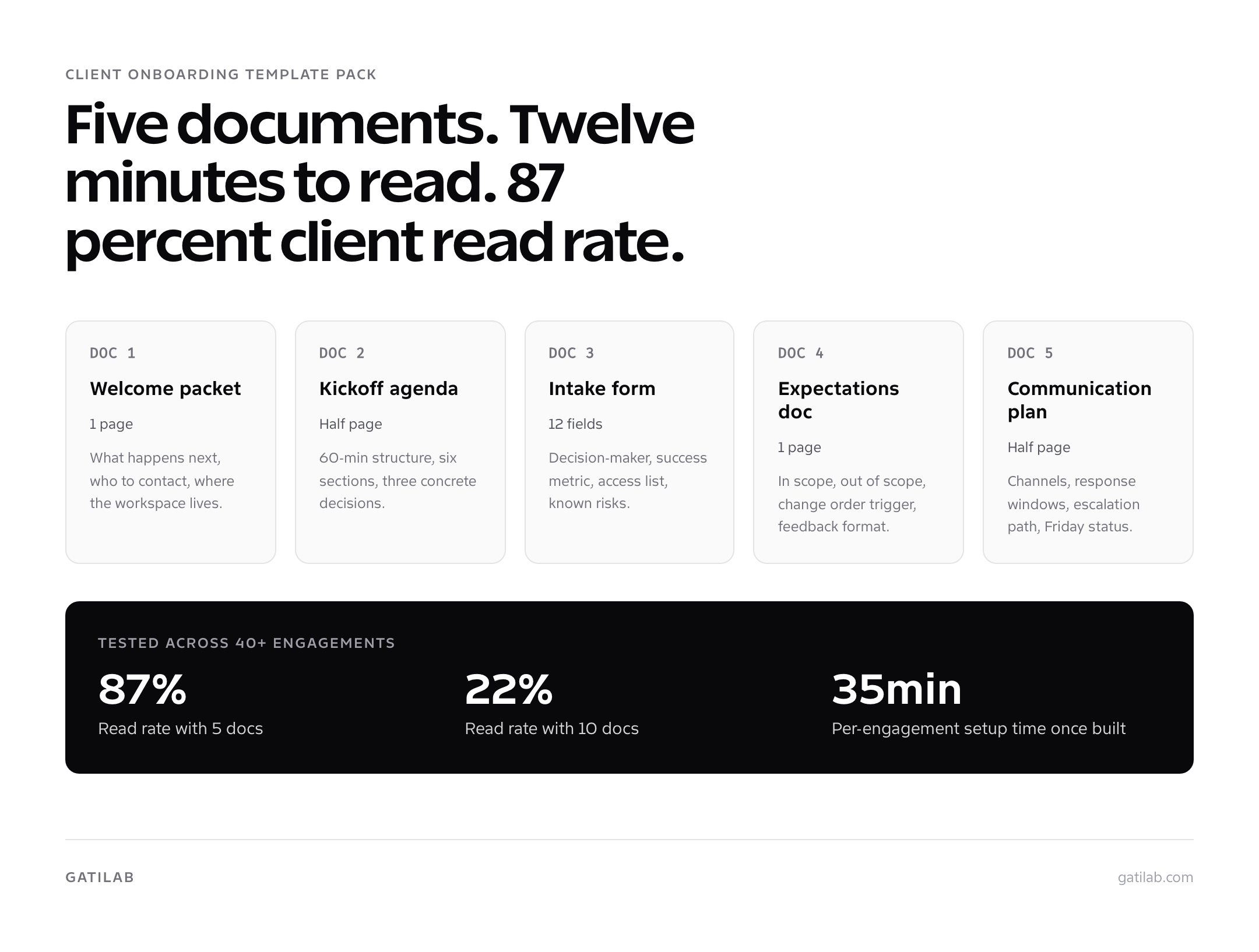
A useful client onboarding template has five components: welcome packet, kickoff agenda, intake form, expectations doc, and communication plan. Each one is a separate document. Combining all five into one giant PDF kills the read rate and removes the ability to update them independently.
I tested 3-document, 5-document, and 10-document versions across 40+ engagements. The 10-doc version had a 22 percent client read rate. The 5-doc version hit 87 percent. The 3-doc version left obvious gaps that turned into mid-project conflict. Five is the structural sweet spot.
| Document | Length | Purpose | When To Send |
|---|---|---|---|
| Welcome packet | 1 page | Orient the client to what happens next | Day 1 |
| Kickoff agenda | Half page | Structure the 60-minute kickoff call | 24 hours before kickoff |
| Intake form | 12 fields | Capture project data before the call | Day 1, due day 3 |
| Expectations doc | 1 page | Define scope, change orders, feedback | Day 5, before kickoff |
| Communication plan | Half page | Channels, response windows, escalation | Day 5, before kickoff |
The total time for the client to read all five documents is roughly 12 minutes. That’s the budget you have. Anything longer and the read rate collapses.
Template 1: Welcome Packet
The welcome packet is the first impression after the contract is signed. Its job is to tell the client what happens next, without overloading them with policies or team bios. Keep it under 250 words.
| Section | Content |
|---|---|
| Greeting | “Welcome to [Agency Name]. We’re glad to be working with you on [Project].” |
| What’s next | “Over the next 14 days we’ll move through 5 steps: discovery, kickoff, setup, first deliverable, first review.” |
| Your team | Account lead (name, email), project manager (name, email), technical lead (name, email). |
| Workspace | “Everything lives at [Notion link]. Bookmark it. We update it, you update it, no email attachments.” |
| Action items | “Two things to do this week: 1) Fill the intake form ([link]) by October 22, 2026. 2) Schedule the kickoff call ([Calendly link]).” |
| Response window | “We reply to Slack and email within 4 business hours, Monday to Friday.” |
| Sign-off | Account lead’s name + a line on availability for week 1 questions. |
The non-obvious choice here is “Action items” near the end. Clients skim. Putting the two action items at the bottom (right above the sign-off) catches the skim eye. Putting them in the middle of the email gets them missed.
Template 2: Kickoff Agenda
The 60-minute kickoff is the highest-leverage hour in the engagement. The agenda below is what consistently produces three concrete decisions and a clean recap. Send the agenda 24 hours before the call so the client can prep.
| Time | Topic | Owner | Output |
|---|---|---|---|
| 0-5 min | Introductions and context | Account lead | Warm-up, not robotic |
| 5-15 min | Walk through intake responses | Account lead | Confirm the success metric |
| 15-30 min | Project plan and milestones | Project manager | Timeline visual reviewed |
| 30-40 min | Communication norms and decisions | Account lead | Decision-maker confirmed |
| 40-50 min | Open questions from client | Client | Don’t rush this section |
| 50-60 min | Three decisions, next steps | Account lead | Owners + dates named |
Send the kickoff recap within 4 hours of the call. Not next day. Recap captures the three decisions, the next steps, the owners, and the dates. Sending it fast proves you actually heard the client.
Template 3: Client Onboarding Intake Form
The intake form is where you collect structured data before the kickoff. Twelve fields is the sweet spot. More than 15 and clients abandon the form. Fewer than 10 and you’ll have to chase information later. Build this in Tally, Typeform, Notion forms, or whatever your stack supports.
If your agency site runs on WordPress, Core Forms can turn this intake into a form with conditional fields, attachments, and a stored submission record. Collect the names of systems that need access, not passwords or recovery codes.
| # | Field | Type | Required |
|---|---|---|---|
| 1 | Company name + URL | Short text | Yes |
| 2 | Primary contact (name, email, role) | Short text | Yes |
| 3 | Secondary contact | Short text | Optional |
| 4 | Decision-maker (one person, not a team) | Short text | Yes |
| 5 | Billing contact | Short text | Yes |
| 6 | Project goal in one sentence | Long text | Yes |
| 7 | Success metric (the one number) | Long text | Yes |
| 8 | Timeline constraints | Long text | Optional |
| 9 | Brand assets location | Short text | Optional |
| 10 | Existing tools we’ll touch | Multi-select | Yes |
| 11 | Access list (credentials needed) | Long text | Yes |
| 12 | Known risks or concerns | Long text | Optional |
Field 7 is the one most often skipped and the most often missed in the kickoff. Without a single agreed-upon success metric (“400 organic visits/month by month 6,” “checkout abandonment under 30 percent”), the day-30 review becomes a debate about whether the project worked. With it, the conversation is data-first.
If a client refuses to fill the intake form, that’s a red flag. Clients who won’t spend 20 minutes on structured data will not give you 2 hours of focused feedback in week 2.
Template 4: Expectations Doc
The expectations doc defines what’s in scope, what’s out of scope, what triggers a change order, and what feedback looks like. One page. The most important page in the entire client onboarding template pack because it’s the document you point at when scope creep shows up.
| Section | What To Include |
|---|---|
| In scope | Specific deliverables. List by name. “5 page templates, 3 rounds of revisions, mobile + desktop.” |
| Out of scope | Items that often surface mid-project. “Email design, ad copy, additional pages beyond the 5.” |
| Change order trigger | “Anything not in the in-scope list requires a change order with revised pricing.” |
| Feedback format | “Consolidated feedback per round, in writing, within 5 business days.” |
| Approval format | “Decision-maker (named in intake field 4) approves in writing before we move forward.” |
| Cancellation policy | “30 days notice for retainer; deposit non-refundable for one-time projects.” |
| Acknowledgement | “By replying to the welcome email, you acknowledge these expectations.” |
The acknowledgement line at the bottom is the part most agencies skip. Without explicit acknowledgement, the expectations doc is a wishlist. With acknowledgement on record, it’s an enforceable agreement. Three engagements at Gatilab were saved from refund disputes specifically because the expectations doc was acknowledged in writing.
Template 5: Communication Plan
The communication plan documents channels, response windows, and the escalation path. Half a page. This is the single document that eliminates roughly 70 percent of mid-project conflict because both sides have on-record agreement on when responses are due.
| Topic | Default | When To Use |
|---|---|---|
| Slack channel | Slack Connect, response within 4 business hours | Quick questions, status pings |
| Response within 1 business day | Decisions, sign-offs, formal updates | |
| Loom | Async walkthroughs of deliverables | Every first deliverable |
| Zoom | Scheduled, with written agenda | Kickoff, day-14 review, day-30 review |
| Friday status email | Every Friday by 5pm local | Weekly cadence |
| Escalation path | Account lead -> agency owner | Anything urgent or stuck |
The “response within 4 business hours” line is what trains both sides to the right rhythm. Without it, clients expect immediate replies and feel ignored when they don’t come. With it, the rhythm is set on day one and conflict around responsiveness drops to almost zero.
Client Onboarding Template Pack (PDF and Word)
All five templates above are collected in one downloadable pack, in the order you actually use them during the first thirty days.
- A day-by-day onboarding timeline from signature through to the 30-day check-in
- The welcome letter, intake questionnaire, access checklist, and kickoff agenda as ready-to-send documents
- A roles and escalation table that forces a single named approver
- The 30-day check-in script, including the five questions worth asking
Free to use, edit, and put your own logo on for client work.
Customizing The Client Onboarding Template
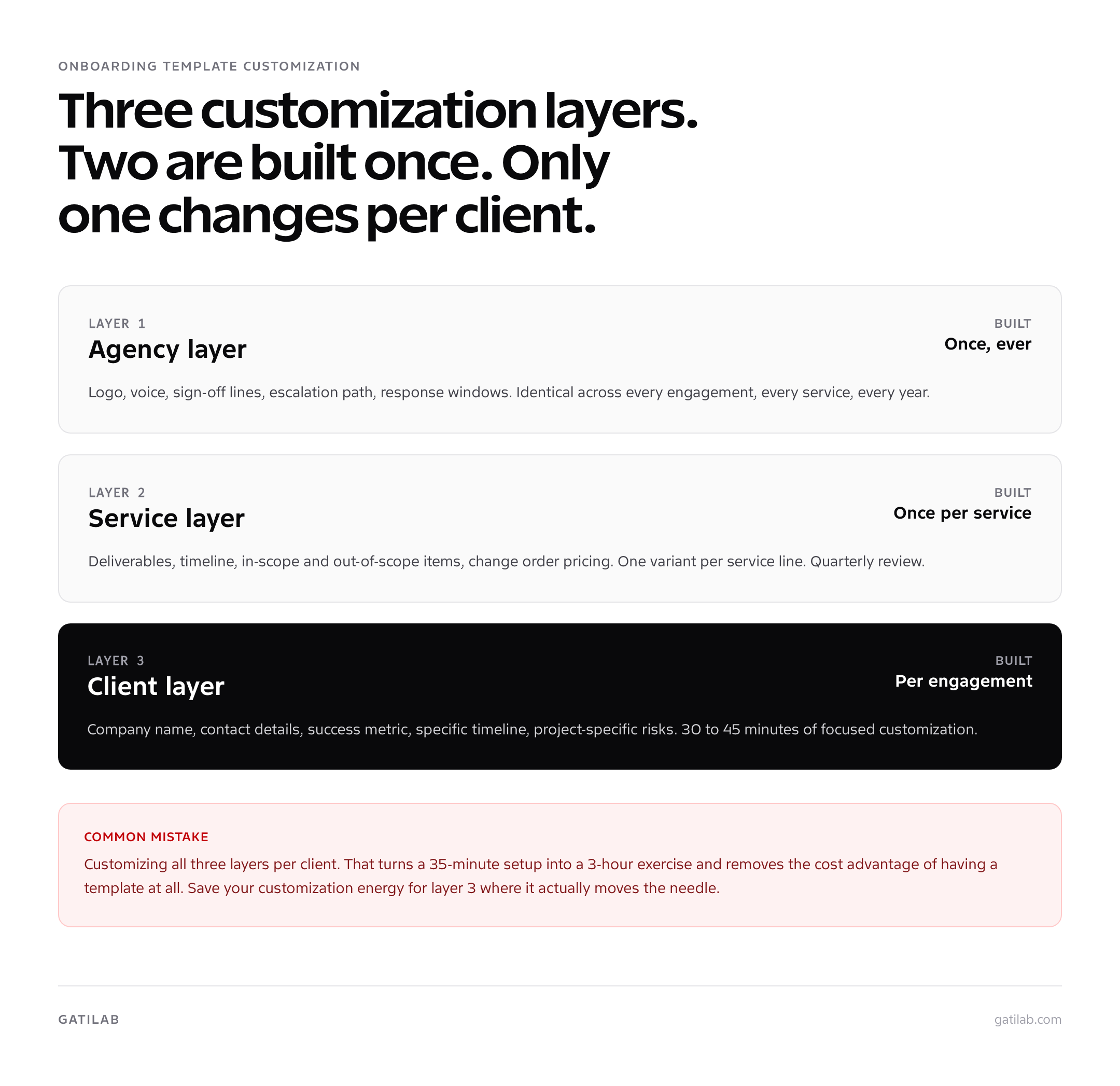
Three layers of customization. Build the agency layer once. Build the service layer once per service. Customize only the client layer per engagement.
- Agency layer (build once): Logo, voice, sign-off lines, escalation path, response windows. This stays identical across every engagement.
- Service layer (build per service): Deliverables, timeline, in-scope and out-of-scope items, change order pricing. Build one variant for website builds, one for SEO retainers, one for ad management, etc.
- Client layer (per engagement, 30-45 minutes): Company name, contact details, success metric, specific timeline, project-specific risks. This is the only layer you customize per client.
Most agencies make the mistake of customizing all three layers per client. That’s how a 35-minute setup becomes a 3-hour exercise. The agency layer should never change. The service layer should only change quarterly. Save your customization energy for the client layer where it actually moves the needle.
For more on building these systems once and reusing them, see how to create systems that scale your agency. The template pack is one system. Pricing, capacity planning, and subcontractor management are the others.
Tools That Support The Client Onboarding Template Pack
The template pack works in any tool that supports shared documents and forms. The four below are what I’ve used at Gatilab and recommend in roughly that order.
| Tool | Best For | Cost | Note |
|---|---|---|---|
| Notion | 5-doc workspace with comments | $10/user/mo | Best for shared workspaces; clients can comment inline |
| ClickUp | Checklist + task templates | $7/user/mo | Best for the 47-item checklist template; auto-fires per engagement type |
| HoneyBook | Contract + deposit + automation | $39/mo flat | Fires the welcome email and creates the workspace when a deal closes |
| Dubsado | HoneyBook alternative | $40/mo flat | More customization, steeper learning curve |
Tally and Typeform are both good for the intake form specifically. Tally is free up to 1,000 submissions/month and integrates with Notion. Typeform has a better completion rate (roughly 4 percent higher in my testing) but starts at $25/month.
If you’re earlier in the agency journey and the tooling budget is tight, Notion’s free tier plus a Google Doc and a Tally form is a workable version 1. The structure of the template pack matters more than the tool. For more on the right tooling at each agency stage, see from freelancer to agency: what nobody tells you.
Downloadable HTML Version Of The Onboarding Template
Copy the HTML table below into your team wiki, your Notion workspace, or your client portal. The structure is what matters. The wording can match your brand voice.
| Doc | Section | Owner | SLA |
|---|---|---|---|
| Welcome packet | Greeting + what’s next + team | Account lead | Day 1 |
| Welcome packet | Workspace link + action items | Account lead | Day 1 |
| Welcome packet | Response window + sign-off | Account lead | Day 1 |
| Kickoff agenda | 6-section 60-minute structure | Account lead | 24h before kickoff |
| Intake form | 12 fields per the table above | Account lead | Sent day 1, due day 3 |
| Expectations doc | In/out of scope + change orders | Account lead | Day 5, before kickoff |
| Expectations doc | Feedback + approval + cancellation | Account lead | Day 5, before kickoff |
| Communication plan | Channels + response windows | Account lead | Day 5, before kickoff |
| Communication plan | Friday status + escalation path | Account lead | Day 5, before kickoff |
| All five | Acknowledgement reply on record | Client | Before kickoff |
A Real Onboarding Template Walkthrough
Here’s what the full template pack looks like in practice on a real Gatilab engagement (anonymized). A $22,000 WordPress build with a 10-week timeline, single decision-maker, regional ecommerce client.
Day 0 (contract signed, deposit paid same day): HoneyBook automation fires the welcome packet. The client gets an email with the Notion workspace link, the Calendly kickoff link, and the Tally intake form link. Time to set up: zero, because the templates are already built.
Day 2 (intake completed): the 12 fields come back filled. Field 7 (success metric) reads “checkout abandonment under 35 percent within 90 days of launch.” That single answer changes the entire kickoff agenda; we now have a measurable target instead of a vague “improve conversions.”
Day 5 (kickoff): 60-minute call ends with three concrete decisions on cart UX, payment provider, and analytics setup. Recap email lands at hour 3 with all three decisions, the next deliverable, and the day-14 review on the calendar. Client replies “looks great, agreed” within 90 minutes. This is the trust deposit forming in real time.
Day 14 (first deliverable): cart wireframes shipped with a 5-minute Loom walkthrough. Feedback comes back in 41 hours, in writing, in the workspace, no email threads. Day 30 review confirms the engagement is on track and the second invoice is paid in 4 days.
None of this is unusual. It’s what happens consistently when the template pack carries the weight of structure and the team focuses on the work. For more on managing this kind of engagement alongside others without burning out, see managing multiple clients without burning out.
Quarterly Review Of The Onboarding Template Pack
The biggest failure mode is not building the template pack. It’s letting it rot. The version I run at Gatilab today is the result of years of quarterly updates. Items get added, removed, and merged after every fifth engagement.
- Pull the last 5 engagements. Identify questions that came up late, documents the client never opened, fields that always got the same answer.
- Cut anything no one used in the last 5 engagements. Empty fields become noise.
- Add anything that came up twice and wasn’t in the template.
- Re-test the structure on the next new engagement before rolling the changes everywhere.
- Update the per-service variations if a service has changed.
Total time per quarterly review: 90 minutes. Total impact on next-quarter engagement quality: noticeable from the first new client. The template that worked for last quarter’s client mix is rarely the best one for this quarter’s mix.
How The Onboarding Template Helps Retention
The client onboarding template isn’t decorative. It’s load-bearing. Templates reduce the cognitive load on the client. They know what to expect because the structure is consistent across communications. They know who to contact because it’s documented. They know when feedback is due because the timeline is visible.
Clients renew because the experience felt deliberate. The template is roughly half of why retention works. The other half is the cadence and the team’s ability to ship deliverables on time. Without the template, even strong execution gets undermined by avoidable confusion. With the template, even average execution feels professional.
For the broader retention picture, see the companion guides: the 47-item client onboarding checklist for the operational layer, 12 client onboarding best practices for the principles, and the 8-step client onboarding process for the workflow that turns the templates into real engagements. If you’re scaling and need to handle more clients without adding hours, also see how to productize agency services.
A client onboarding template is not paperwork. It’s the structural skeleton that lets the team focus on the work and the client focus on the outcomes. Build the 5 documents once. Customize the client layer in 35 minutes per engagement. Review quarterly. Watch the renewal rate climb.
How The Onboarding Template Pack Evolved
The 5-document onboarding template pack didn’t start at 5 documents. The first version, around 2021, was a single Google Doc titled “client kickoff.” It worked for the first handful of clients and then started failing in specific, traceable ways.
By the 12th engagement, the kickoff doc had ballooned to 23 sections. Clients were skimming everything. The completion rate on the embedded intake questions dropped below 40 percent. Splitting the kickoff doc into a welcome packet plus a separate intake form was the first restructure. The intake completion rate jumped to 81 percent within the next 5 engagements.
The expectations doc broke off in 2022 after two engagements went into refund disputes. In both cases the scope was technically defined in the contract, but the contract was a 14-page legal document the client read once and never referenced. A one-page expectations doc, written in the client’s language, with explicit examples of “this is in scope” and “this triggers a change order,” ended that pattern. No refund disputes since.
The communication plan was the last document to join the pack, in 2023. It came out of analyzing 6 months of Slack messages across 8 client channels. The pattern was clear: 70 percent of mid-project conflict was about response times, channel preferences, and “I sent you something on email and didn’t hear back.” A half-page document setting the norms eliminated almost all of that friction.
When To Customize Versus When To Keep The Template Identical
The instinct to customize a client onboarding template per engagement is strong and almost always wrong. The structure should stay identical. Only specific content fields should change.
Keep identical: the section headings, the order of documents, the question structure in the intake form, the format of the kickoff agenda, the response window language, the escalation path. Changing any of these means the team has to re-learn each engagement, and the operational efficiency benefit of the template disappears.
Customize: the company name, the named contacts, the success metric (always different per client), the specific deliverables in the in-scope list, the timeline dates, the project-specific risks, the named decision-maker. These fields exist precisely so the structure can stay rigid.
The agencies that get the most leverage from a template pack run it like a well-designed form: rigid where it benefits the team, flexible where it benefits the client. The agencies that struggle treat every engagement as bespoke and burn out the team writing custom versions of documents that don’t need customization.
Frequently asked questions
What should be in a client onboarding template?
Five components: welcome packet (who we are, what to expect, contact info), kickoff agenda (60-minute structure), intake form (project details, decision-makers, assets), expectations doc (scope, timeline, communication norms), and communication plan (channels, response windows, escalation path). Each one is a separate document. Combining them into one giant PDF kills the read rate.
Can I use a free client onboarding template?
Yes. The template structure matters more than the source. The five-document pack in this article is what I use at Gatilab. Notion has free templates. ClickUp offers client-onboarding templates; check the required views and automations against your plan. HoneyBook and Dubsado include built-in templates as part of the subscription. Pick a structure, then customize the language to your voice.
How do I customize a client onboarding template?
Three layers of customization: agency layer (logo, voice, sign-off), service layer (deliverables, timeline, terms specific to the service), and client layer (company name, project specifics, decision-makers). I build the agency and service layers once, then duplicate and edit the client layer for every new engagement. Total customization time per client: 30 to 45 minutes.
Should the onboarding template be a PDF, doc, or workspace?
Workspace beats both. PDFs are for legal documents (contract, MSA, NDA). Editable docs work for one-time projects. A shared Notion or ClickUp workspace works best because the client can comment, ask questions, and track status without email threads. I haven’t sent a PDF onboarding packet in three years.
What goes in a client onboarding form template?
Twelve fields: company name, primary contact, secondary contact, decision-maker, billing contact, project goal, success metric, timeline constraints, brand assets, existing tools, access list, and known risks. More than 15 fields and clients abandon the form. Fewer than 10 and you’ll have to chase information later. The 12-field form has the best completion rate I’ve measured.
How do I share the onboarding template with clients?
Send a single link to the workspace in the welcome email. Inside the workspace, list each document as a sub-page. Pin the kickoff call link at the top. Don’t attach the documents to email. Clients lose attachments. They keep links to workspaces, which means the documents stay accessible when they need to reference them at month 3 or month 6.
How often should I update my onboarding template?
Quarterly. After every fifth engagement, I review the onboarding template for friction points: questions that came up late, documents the client never opened, fields that always got the same answer. I cut what no one used and add what I had to explain twice. The template that worked last year is rarely the best one for this quarter.
What tools support client onboarding templates?
Notion (workspace and docs), ClickUp (checklist and tasks), HoneyBook (contract, deposit, automation), Dubsado (similar to HoneyBook), Bonsai (lighter alternative), and Plutio (all-in-one). Notion plus ClickUp plus HoneyBook is the stack I’d recommend for any new agency. Pick simpler tools first; you can always add specialization later.
Can I send the same template to every client?
Send the same structure with different content. The five documents stay the same shape across every engagement; the content inside changes per client. Sending a 100 percent identical template (down to the company name) is the fastest way to look unprofessional. Sending a 100 percent custom template every time is the fastest way to burn out.
How does an onboarding template help retention?
Templates reduce the cognitive load on the client. They know what to expect because the structure is consistent. They know who to contact because it’s documented. They know when feedback is due because the timeline is visible. Clients renew because the experience felt deliberate. The template is not the whole reason for retention, but it is roughly half the reason.
Tell Google you want more of this.
Add Gatilab as a preferred sourceOne tap, and this site shows up more often in your own Top Stories, AI Overviews and AI Mode. Remove it any time.