
How to Change Affiliate Links Across WordPress Posts
You can change affiliate links across WordPress posts from one place when those posts use a managed URL. The public link stays the same while you replace the merchant destination behind it.
If the posts contain direct merchant links, the first change still requires a careful migration. A link manager cannot update URLs it doesn’t manage, and a broad database replacement can damage more than the links you intended to change.
GT Link Manager is our free WordPress plugin for branded links and redirects. It keeps destinations in a central library so later merchant changes don’t require another edit to every article.
Inventory the Existing URLs
Identify the exact merchant URLs in use before replacing them. A homepage link and a deep link to one product may have different purposes, even if they belong to the same merchant.
Your inventory should include:
- The current URL and the page where it appears.
- Its visible anchor text.
- The intended replacement destination.
- Affiliate or campaign parameters that must survive.
- Whether the affiliate program permits the proposed redirect.
Keep a backup of the affected content. WordPress posts can contain block attributes and serialized data as well as ordinary HTML links, so a database-wide text replacement needs a tool that understands those structures.
Create a Managed Destination
Choose a public path that describes the destination accurately. A path such as /go/example-tool/ is easier to maintain than one containing a temporary discount or a price.
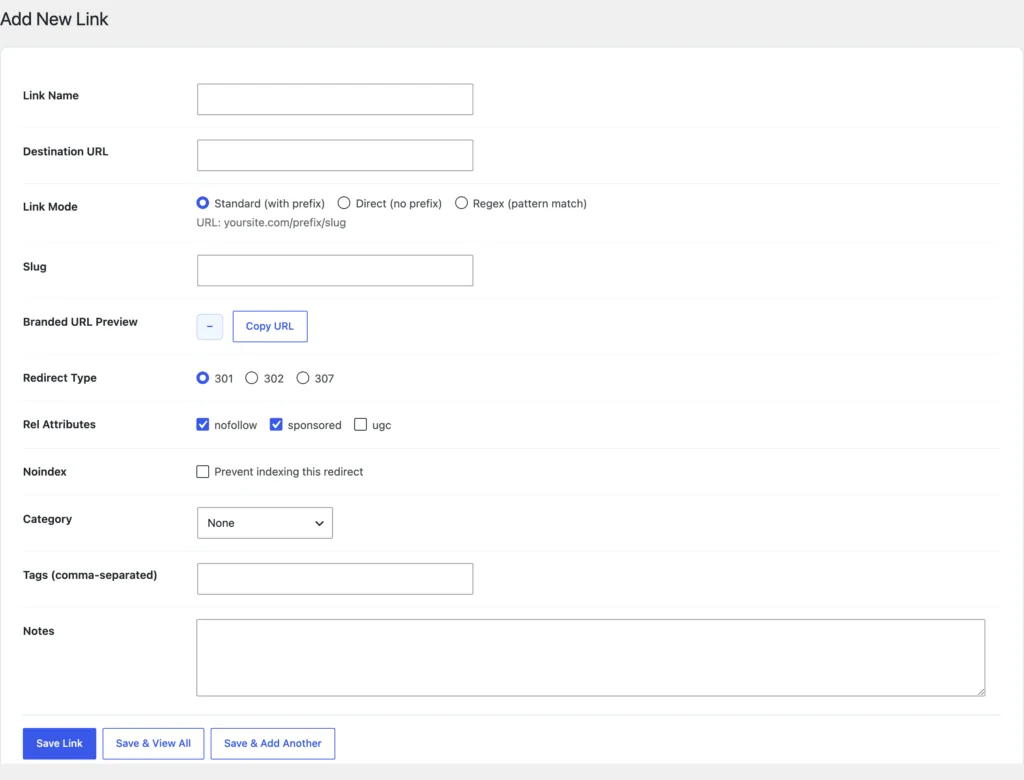
In GT Link Manager, create the link with its destination and appropriate redirect settings. Check the destination before placing the new managed URL into articles.
I would usually avoid a permanently cached redirect for an affiliate destination expected to change. The correct status depends on the use case; a temporary redirect makes a different promise from a permanent move. Existing SEO redirects should not be changed casually to match an affiliate-link preference.
Replace Only the Intended Links
For a small number of posts, editing the links in the Block Editor is often the simplest route. Keep the anchor wording unless the product or recommendation has also changed.
For a larger migration, prepare an explicit old-to-new mapping and run a dry-run report. Review the affected pages before applying it. The mapping should distinguish links that happen to share a merchant domain but lead to different products.
Preserve useful link attributes. Paid and affiliate relationships should be identified appropriately, and redirecting a URL doesn’t remove the need for disclosure in the article.
Check Tracking and Destination
A redirect reaching the merchant homepage can still be wrong. Verify the product destination and the parameters the program uses for attribution.
Check one representative URL from each type:
- A plain managed link.
- A link with a query string.
- A deep product link.
- Any country-specific destination.
- An older path that existing posts still use.
Click counts show requests to the redirect. They do not establish that a sale was attributed to you, because bots, repeat clicks and the merchant’s attribution rules can all affect the numbers.
You can use the editable affiliate links across wordpress posts worksheet to record your settings and checks. It is a CSV file you can open in a spreadsheet.
Make the Next Merchant Change Smaller
Once the posts use a managed route, future changes can happen in the link library. Update the destination, check the resulting response and confirm that any cache in front of the route isn’t serving an old redirect.
If a merchant closes its program, review the recommendation itself as well as the URL. Sending the old anchor to an unrelated offer may preserve a working link while misleading the reader.
Start with one merchant and a checked mapping. GT Link Manager is a useful fit when the ongoing problem is keeping approved destinations consistent across your WordPress content.
Tell Google you want more of this.
Add Gatilab as a preferred sourceOne tap, and this site shows up more often in your own Top Stories, AI Overviews and AI Mode. Remove it any time.