
GT Link Manager Free WordPress Redirect Plugin
Keep the public link stable when its destination changes.GT Link Manager is a free WordPress redirect plugin for branded links, country-based destinations, migration, and optional click reporting. A reusable URL on your own domain can point to a destination that you update centrally when an offer or resource moves.
That separation matters in a growing content library. Replacing one saved destination is easier to manage than finding every appearance of a long merchant URL. It also gives editors an organized library instead of asking each writer to reconstruct the correct link from memory.
Purchases and downloads are handled by gauravtiwari.org.

- Platform
- WordPress
- Download & Account
- gauravtiwari.org
What GT Link Manager Does
Choose the capabilities that support your actual workflow. Each has a different job to do.
Redirects and Country Rules
Create links under a chosen prefix or configure prefix-free paths. Select supported redirect modes and country destinations using a trusted CDN or server header. Missing country information needs a sensible default; routing should not depend on a guess.
An Organized Link Library
Use categories, tags, notes, search, Quick Edit, and bulk actions to maintain the catalog. Editor integration helps insert managed links into content. CSV presets and manual mapping support migrations from compatible exports.
Optional Reporting
Basic lifetime counts and Advanced Analytics are separate opt-in controls. Advanced reports can show trends, referring pages, and configured breakdowns, with retention choices. They count eligible redirect requests, not verified purchases or unique people.
Inside the Product
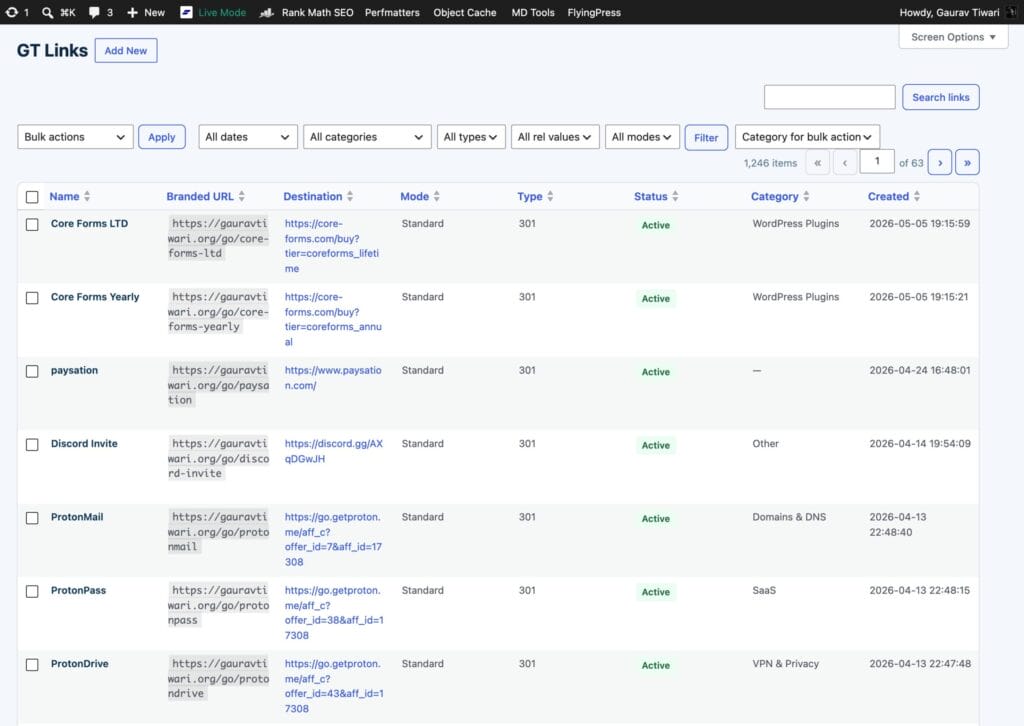
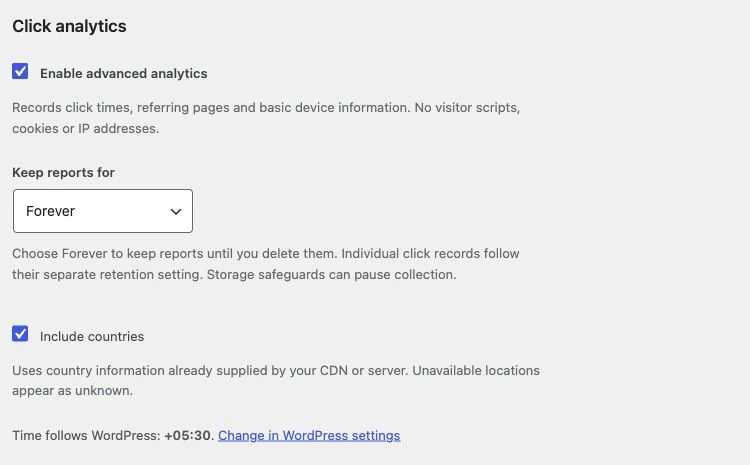
Select an image to view it at full size.
An Affiliate Link Used Across a Publication
Suppose several articles recommend the same tool. Create one branded link with a clear name and the approved destination, then insert that managed URL into each relevant article. If the merchant changes its offer path, update the destination once after checking the new route.
If regional destinations are necessary, define the supported country rules and a global fallback. Review the route from the site’s trusted location data. Do not describe a regional offer to every visitor if the destination or merchant eligibility differs by country.
Turn on analytics only when you have a question it can answer, such as which referring articles generate redirect activity. Use merchant or order reporting for sales. A click count by itself does not establish revenue, conversion rate, or the number of individual readers.
A stable link is useful only if someone still owns the destination and its meaning.
How to Get Started
Start with a staging copy and a representative task, then extend the setup once the complete path makes sense.
Choose the Link Structure
Set a prefix and naming convention that will remain understandable as the library grows. Check for collisions with existing pages.
Create or Import Links
Add a destination or map a CSV export. Review duplicate handling, source fields, and a small sample before a large migration.
Place the Managed URL
Insert the link through the editor integration or the approved content workflow. Preserve necessary relationship attributes and disclosure.
Maintain Routes and Reports
Check destinations when offers change. Enable the reporting you need and choose a retention period appropriate to the site.
Before You Go Live
Use these checks for the parts of the workflow this product affects.
- Use a useful default route when country data is absent.
- Count redirect activity separately from sales.
- Export the library before moving to another tool.
- Keep an active redirect handler when changing plugins.
Is It Right for Your Site?
Consider the working requirements alongside the design or feature list.
When It Fits
GT Link Manager fits affiliate publishers, resource libraries, and businesses that reuse important destinations across WordPress content. It is useful when central ownership and migration matter more than merely shortening a URL.
Know the Limits
Advanced Analytics currently supports single-site installations and needs working scheduled jobs. The plugin does not build bio-link pages, automatically link keywords, or provide split testing and link rotation. Country rules depend on trustworthy infrastructure headers.
Requirements
Requires WordPress 6.4 or newer and PHP 8.0 or newer. Check your permalink structure and any existing redirect rules before migration. Scheduled tasks support report maintenance.
Download and License Details
GT Link Manager is free and open source. The WordPress.org edition has no premium tier or required license key. Visit its official product page on gauravtiwari.org for the current installation route, documentation, and support options.
Gatilab explains the product and its practical use. The original product page on gauravtiwari.org handles the current offer, checkout or installation route, account access, and product support.
GT Link Manager training course
Need help implementing the site around it? Explore Gatilab’s WordPress development services. Implementation work is separate from the product download or license.
Common Questions
A few remaining details before you choose the product.
Does deactivation remove my links?
Deactivation keeps stored records, but this plugin stops handling their redirects. Uninstall removes data only when the relevant deletion option is enabled. Export before changing the handler.
Do reports track individual visitors?
The documented analytics avoids visitor JavaScript, cookies, IP storage, and raw user-agent storage. Reports still represent eligible requests, and missing referrers or paused collection can create gaps.
Is external geolocation required?
No separate geolocation lookup is required. Country rules use a trusted CDN or server header. Your origin must not accept a visitor-forged country value as trusted input.
Create a Managed Link
Choose a frequently reused destination, give it a clear branded path, and keep the source of truth in WordPress.
Continue to the original product page for the current offer and next steps.