
15 Best Social Media Scheduling Tools for 2026: Pricing, Features, and Honest Trade-offs
Social media scheduling in 2026 is mostly about reach loss management. Reach is down on every major platform, the algorithms hate links, and the cost of one bad week of posting is higher than it’s ever been. The right scheduler doesn’t just queue posts; it tells you what’s working, what flopped, and which platform deserves more of your time this quarter. The wrong one charges you $99/month to do what Buffer’s $6 plan does, just with a worse calendar.
I’ve personally used 11 of the 15 tools in this guide on either client work or my own brand. The rest I tested for at least two weeks each on real accounts, not demo data. Pricing is current as of October 2026, features reflect each platform’s 2026 release notes, and every “where it breaks down” is a problem I or a client actually hit. There’s no single best tool here, only the right tool for the kind of content you make and the team that makes it.
Table of Contents
How I evaluated each tool
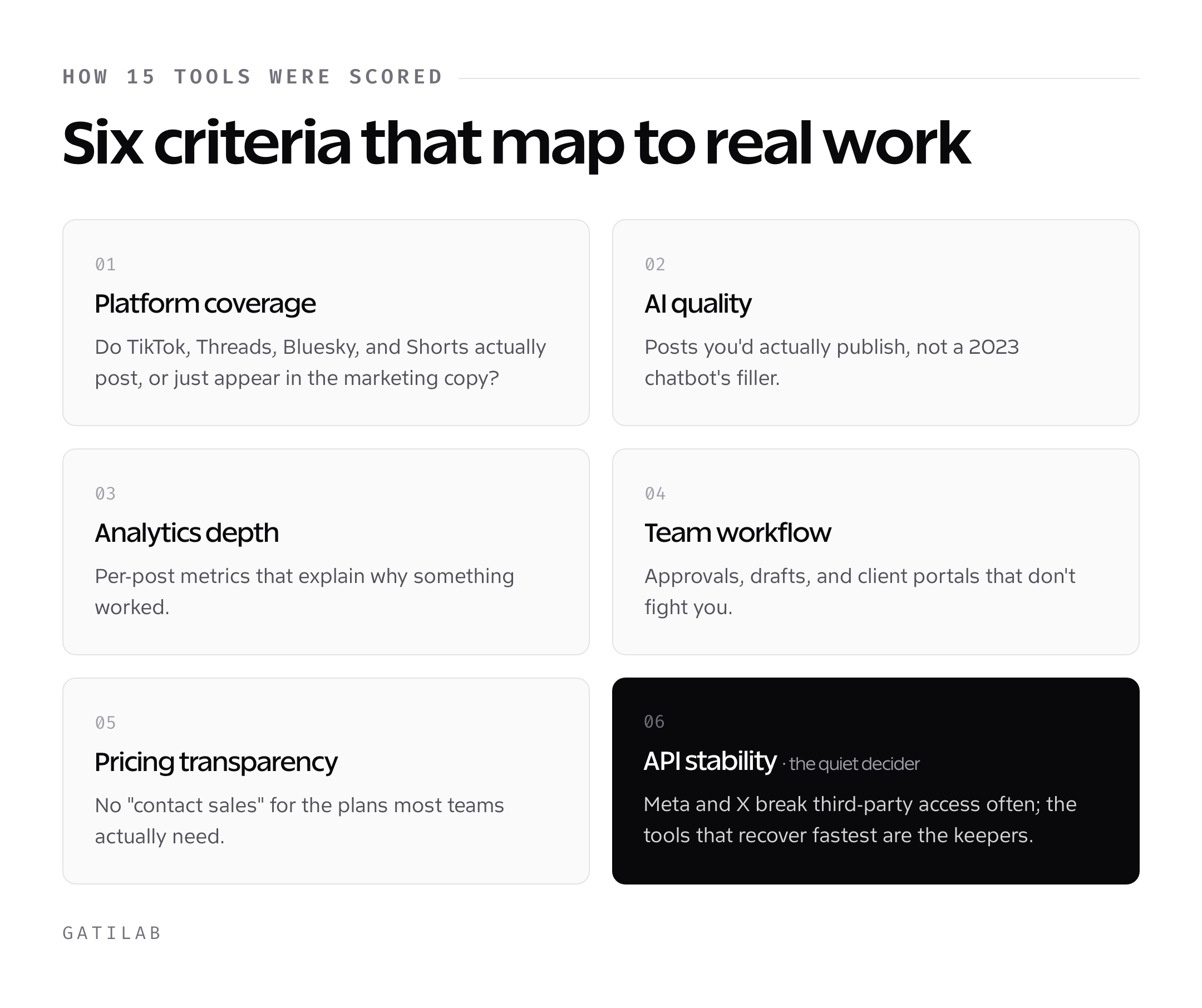
I scored every tool against six criteria that map to real-world social work: actual platform coverage (do TikTok, Threads, Bluesky, YouTube Shorts work or just appear in marketing copy), AI quality (does it generate posts I’d actually publish, or does it sound like a 2023 chatbot), analytics depth (per-post metrics that explain why something worked), team workflow (approvals, drafts, client portals), pricing transparency (no “contact sales” for plans most teams need), and stability of the API connections to each platform. The last one matters more than reviewers admit. Meta and X regularly break third-party access; the tools that recover fastest are the ones I keep recommending.
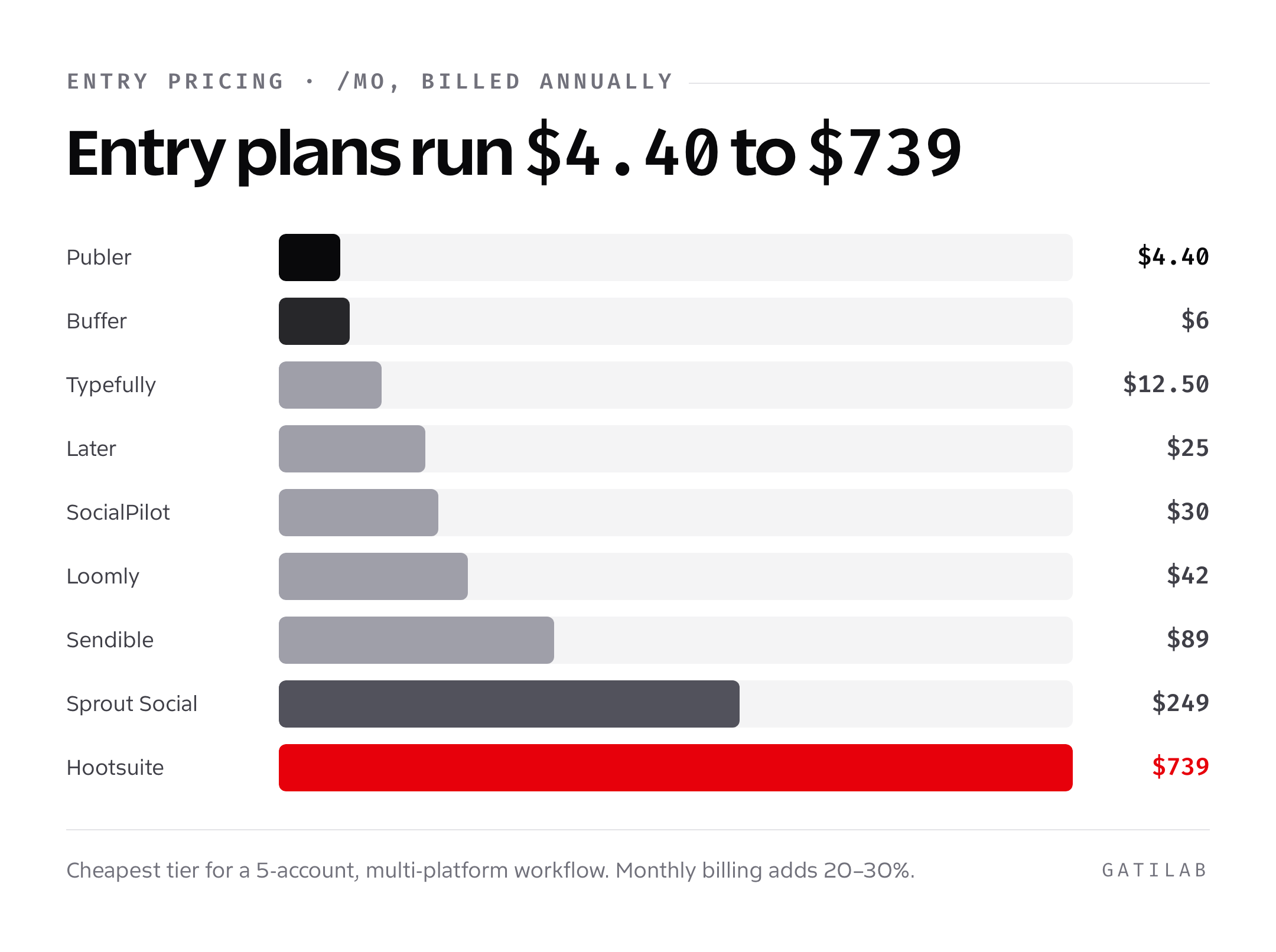
Pricing throughout this guide is the public price per month, billed annually, on the cheapest tier that handles a 5-account multi-platform workflow. Monthly billing typically adds 20-30%. Where a tool has a free plan that’s actually usable (not just a demo), I’ve called it out.
One pricing pattern worth understanding before you read further: most tools charge per user, a few charge per social account, and a couple charge a flat agency rate. The difference matters. Per-user (Asana-style) punishes growing teams. Per-social-account (Buffer, Publer) punishes brands with many accounts but few editors. Flat-rate agency tiers (SocialPilot Agency+, Sendible Scale) protect agencies from both directions but require a baseline volume to make sense. Your team’s shape decides which pricing model is friendly. Get this wrong on month one and you’ll be migrating again by month six.
The other thing reviewers undersell: API stability. Meta breaks publishing connections roughly twice a quarter, X has changed its API tier structure four times since 2023, and TikTok’s Content Posting API rolls out new features unevenly across regions. The tools that recover fastest from breakage are the ones with engineering teams larger than 20 (Buffer, Hootsuite, Sprout, Later) or actively-maintained open-source roots (Postiz). Younger or smaller tools sometimes leave you reposting manually for 2-5 days when a platform shifts auth flow. Worth weighing if your social calendar can’t tolerate a missed week.
1. Buffer
Buffer is the tool I recommend by default to anyone managing fewer than 10 channels who values calm UI over feature density. The 2024-2025 redesign turned Buffer from a scheduler into a publishing-plus-creation tool: AI Assistant for drafting, Start Page for link-in-bio, Analyze for native analytics, and proper Instagram, TikTok, YouTube Shorts, Threads, Bluesky, Mastodon, and Pinterest support. The free plan covers 3 channels and 10 scheduled posts each, which is enough for a side project.
Pricing is the cleanest in the category: $6 per channel per month on Essentials (no minimum), $12 per channel for Team (unlimited users, drafts, approvals), $120/month flat for Agency (10 channels, plus $6 per additional). Where it shines: clarity. Where it breaks down: enterprise reporting. If your boss wants 30-page PDFs comparing 12 brands across 8 platforms, Buffer’s Analyze module is too lightweight. Use Sprout or Hootsuite for that.
Pick Buffer if: you’re a solo creator, founder, or small marketing team that wants the cleanest publishing UI and per-channel pricing instead of per-seat. The companion tool distribution playbook covers how to structure the actual posts.
2. Hootsuite
Hootsuite is the dinosaur that refuses to die, and the 2025 OwlyAI rebuild gave it a real second wind. The streams view (multiple platforms in side-by-side columns) is still the best way to monitor inbound mentions and DMs across 10+ accounts at once, and the bulk scheduling is mature. The catch: pricing. Professional starts at $99/month for 1 user and 10 social accounts, Team is $249/month for 3 users, Business is $739/month for 5 users. Enterprise is quote-only.
Where it shines: organizations that already use Hootsuite (procurement-friendly, SOC 2, training program) and need broad coverage with serious analytics. Where it breaks down: anyone under 20 social accounts is overpaying. The free plan was killed in 2023 and the trial is short. Hootsuite is genuinely useful at enterprise scale; below that, it’s a $1,200/year bill for what Buffer does at $200.
Pick Hootsuite if: you manage 15+ social accounts, you need streams-based monitoring, and the budget exists. Anyone smaller should keep walking.
3. Later
Later is the Instagram-and-TikTok-first scheduler that built a small empire on visual planning. The drag-and-drop visual planner shows your Instagram grid before you publish, which is the fastest way to keep a feed visually coherent. Later’s 2024 acquisition of Mavely turned it into a creator-economy hybrid: scheduling, link-in-bio (Linkin.bio), and a creator marketplace for paid partnerships, all in one product.
Pricing is per user per month: Starter $25 (1 user, 5 social profiles), Growth $45 (3 users, 15 profiles), Advanced $80 (6 users, 30 profiles). Free plan caps at 1 set of profiles and 10 posts per month. Where it shines: visual brands and creators on Instagram, TikTok, Pinterest. Where it breaks down: text-heavy platforms. Later’s LinkedIn and X workflows feel like afterthoughts; if those are your primary channels, look elsewhere.
Pick Later if: Instagram and TikTok drive most of your revenue, you’re a creator or DTC brand, and grid planning matters.
4. Sprout Social
Sprout Social is the answer when an enterprise marketing team asks for “the best” tool and budget isn’t the binding constraint. The reporting is genuinely the best in the category: cross-channel benchmarks, sentiment analysis, listening dashboards that catch competitor moves in near real time, and presentation-ready PDFs out of the box. The Sprout Social acquisition of Tagger Media (2023) turned it into an influencer marketing platform too.
Pricing is brutal: Standard $249/user/month, Professional $399/user/month, Advanced $499/user/month, Enterprise quote-only, all billed annually with a 30-day free trial. Listening is a paid add-on. A 5-person team on Professional is $24,000/year. Where it shines: enterprise B2B brands, regulated industries, agencies pitching to enterprise clients. Where it breaks down: anything smaller than 50-person company. The product is excellent; the price is built for procurement, not founders.
Pick Sprout Social if: you have a real social ops team, you need defensible reporting for the C-suite, and the budget has zero question marks.
5. Loomly
Loomly is the underrated middle of the market: cheaper than Sprout, deeper than Buffer, and built around a content workflow with proper approvals. The “post ideas” generator (now AI-driven) is genuinely useful for clients who hand you a brand without giving you a single content theme to work from. Calendar view, post mockups by platform, version control, and integrated approvals built for agency-client back-and-forth.
Pricing: Base $42/month (2 users, 10 social accounts), Standard $80/month (6 users, 20 accounts), Advanced $175/month (14 users, 35 accounts), Premium $369/month (30 users, 50 accounts). Where it shines: small-to-mid agencies that need approval workflows and don’t want Sprout’s price tag. Where it breaks down: solo creators (the per-user model wastes money) and listening-heavy use cases (Loomly’s listening is shallow).
Pick Loomly if: you’re an agency managing 5-20 client brands and you need real approval workflows. My agency transition guide covers the operational pieces around tools like this.
6. MeetEdgar
MeetEdgar is built around one specific idea: your evergreen content should keep posting itself. You build a categorized library (tips, quotes, blog posts, testimonials), Edgar pulls from each category on a schedule, and your queue refills indefinitely. The 2024 redesign added AI variations (one library item produces 5 differently-worded posts) and proper TikTok plus Bluesky support.
Pricing: Eddie Plan $29.99/month (5 social accounts, 4 weekly automations), Edgar Plan $49.99/month (25 accounts, unlimited automations). No free plan, 7-day trial. Where it shines: solopreneurs and small businesses with a stable evergreen library that doesn’t need fresh content every day. Where it breaks down: news-driven brands. If your content is reactive, Edgar’s recycle-forever model will make you look out of touch.
Pick MeetEdgar if: your business has 50+ pieces of evergreen content (blog posts, tips, quotes) and you’d rather automate distribution than write fresh posts daily.
7. Publer
Publer is the best price-to-feature ratio I’ve found in 2026. It’s not the prettiest, but it covers Facebook, Instagram, TikTok, X, LinkedIn, YouTube, Pinterest, Threads, Bluesky, Telegram, Mastodon, Google Business Profile, and even WordPress publishing from a single dashboard. AI Assist handles drafting and image generation, watermarking is built in, and analytics include cross-platform reports that Buffer charges extra for.
Pricing is per social account per month: Free covers 3 accounts with limits, Professional is $4.40 per social account, Business is $9.60 per social account. A 10-account workflow on Business is $96/month, which is what you’d pay Hootsuite for one user. Where it shines: budget-constrained teams that need broad platform coverage. Where it breaks down: enterprise reporting and listening, which Publer doesn’t really do.
Pick Publer if: you want one tool to publish to 8+ platforms, AI features matter, and your budget is under $100/month.
8. SocialPilot
SocialPilot is the agency tool that doesn’t market itself like one. White-label client reports (your logo, your domain, your colors), a true client management portal where each brand has its own workspace, and bulk scheduling that handles 500 posts at once via CSV upload. The 2025 SocialPilot Reviews module added Google and Facebook review monitoring, which most agencies were duct-taping together.
SocialPilot’s annual-billing prices are $25.50/month for Essentials (7 accounts, 1 user), $42.50 for Standard (15 accounts, 3 users), $85 for Premium (25 accounts, 6 users) and $170 for Ultimate (50 accounts, unlimited users). It primarily handles publishing and social account management. Pair it with Brand24 when wider brand-mention monitoring is part of the brief.
Pick SocialPilot if: you’re an agency that needs white-label reports and per-client workspaces without paying Sprout pricing.
9. CoSchedule
CoSchedule is the only tool on this list that started as a marketing calendar and added scheduling, rather than the reverse. The Marketing Suite ties social posts to blog content, email campaigns, paid ads, and product launches in a single calendar, which is genuinely useful for content-led B2B teams. The Headline Studio (CoSchedule’s headline analyzer, now AI-powered) is bundled.
Pricing: Social Calendar Free (1 user, 2 accounts, 15 posts), Social Calendar Pro $29/user/month, Marketing Calendar starts at $19/user/month, Marketing Suite is quote-only. Where it shines: content marketing teams that need one calendar for everything. Where it breaks down: pure social workflows. If you’re not also coordinating blogs, email, and paid, CoSchedule is overkill compared to Buffer or Publer.
Pick CoSchedule if: you run integrated content marketing (blog plus email plus social plus ads) from one team and want one calendar.
10. Sendible
Sendible is the agency-focused alternative to Hootsuite that costs roughly half as much. The product covers Facebook, Instagram, X, LinkedIn, TikTok, YouTube, Pinterest, Threads, Google Business Profile, plus blog publishing to WordPress, Medium, Tumblr, and Blogger. Client dashboards, content libraries shared across brands, and the Smart Compose AI for post drafting are all included on the entry-level paid tier.
Pricing: Creator $29/month (1 user, 6 profiles), Traction $89/month (4 users, 24 profiles), Scale $199/month (7 users, 49 profiles), Custom plans above. Where it shines: small-to-mid agencies serving 10-30 client brands. Where it breaks down: solo creators. The Creator tier is the only solo-friendly option, and it’s outclassed by Buffer at the same price point.
Pick Sendible if: you’re an agency wanting Hootsuite-style streams and reporting without Hootsuite’s $99 entry price.
11. Postiz
Postiz is the open-source dark horse and my pick for technical founders. The hosted plan is competitive on price ($29/month for 5 channels on Standard, $39/month for 10 channels on Pro), but the real story is the self-hosted option: clone the GitHub repo, deploy to your own server, and pay zero per month forever. AI features, scheduling for Facebook, Instagram, X, LinkedIn, YouTube, TikTok, Threads, Bluesky, Mastodon, Pinterest, Reddit, Dribbble, and Discord, plus a public API.
Where it shines: open-source-first teams, agencies that want to white-label without per-seat fees, technical founders. Where it breaks down: support and stability. It’s a smaller team behind it, the platform changes more often than Buffer, and self-hosted means you own the broken-API problem when Meta changes auth flow at 3am. The hosted version smooths most of that out.
Pick Postiz if: you want self-hosted control or you’re a technical team comfortable with the trade-offs of a younger product.
12. Tweet Hunter
Tweet Hunter is X-only, but it’s the best X-only tool I’ve used. The product wraps three things: a viral-tweet inspiration database (millions of high-performing posts you can search by topic), an AI thread and tweet generator trained on what works on X specifically, and a scheduler with auto-DM, auto-retweet, and engagement automation. The TweetHunter and Taplio bundle (same parent company, Lasso) covers X plus LinkedIn together.
Pricing: Plan $49/month, Pro $99/month (analytics, premium AI), Team $199/month. Annual billing knocks 20-30% off. Where it shines: solo founders, indie creators, and B2B operators who treat X as a top-of-funnel channel. Where it breaks down: anyone who isn’t all-in on X. If your strategy is multi-platform, you’re paying for features you won’t use.
Pick Tweet Hunter if: X is 50%+ of your social strategy and you’ll use the inspiration database weekly.
13. Typefully
Typefully is the writer’s tool. Clean editor, distraction-free composing, real-time preview of how your post will look on X, LinkedIn, Threads, Bluesky, and Mastodon, and a tweet-storm composer that handles the threading logic so you can focus on the words. The 2024 addition of LinkedIn-specific scheduling and Bluesky native posting closed the multi-platform gap.
Pricing: Free (3 drafts, 1 scheduled post at a time), Starter $12.50/month (unlimited drafts, 4 social accounts), Premium $29/month (10 accounts, AI features, analytics), Team $99/month (10 users). Where it shines: writers, indie creators, and operators who treat X and LinkedIn as the main channels. Where it breaks down: visual brands. Typefully has minimal Instagram, TikTok, or Pinterest support; it’s intentionally text-first.
Pick Typefully if: your social strategy is text-first (X, LinkedIn, Threads, Bluesky) and you’ll appreciate a writing-focused UI over a feature-stuffed dashboard.
14. Metricool
Metricool is the analytics-and-scheduling hybrid that punches above its price. Native support for Facebook, Instagram, TikTok, X, LinkedIn, YouTube, Pinterest, Threads, Twitch, Google Business Profile, plus integrated Google and Facebook ads tracking, plus a real competitor analysis module that pulls public engagement data. AI generation, hashtag research, and automated reports come standard.
Pricing: Free (1 brand, basic analytics), Starter $22/month (5 brands, 50 connections), Advanced $54/month (10 brands, 100 connections), Custom from $129/month. All annual. Where it shines: data-curious solos and small agencies who want both publishing and proper analytics in one tool. Where it breaks down: workflows. Metricool’s approval and team features are functional but not best-in-class; if approval flow matters more than analytics, Loomly fits better.
Pick Metricool if: analytics depth matters to you, you’re managing multiple brands, and you want one tool covering scheduling plus paid plus competitor data.
15. Iconosquare
Iconosquare is the visual-platform specialist: Instagram, TikTok, Facebook, LinkedIn, YouTube, X, Pinterest, with the deepest Instagram and TikTok analytics in this guide. The competitor benchmarking module compares your engagement, reach, and follower growth against named competitors in the same time window, which helps you separate “we’re doing badly” from “the whole vertical is doing badly.”
Pricing: Single $39/month (3 social profiles), Teams $79/month (5 profiles, 2 users), Custom from $139/month. 14-day free trial, no permanent free plan. Where it shines: brands and agencies running visual-first campaigns where benchmarking matters. Where it breaks down: text-heavy platforms. LinkedIn and X analytics are functional but not the depth Iconosquare brings to Instagram or TikTok.
Pick Iconosquare if: Instagram and TikTok are your primary growth channels and you want the deepest native analytics outside of Sprout.
A note on AI features in 2026
Almost every tool above shipped AI features in 2024 or 2025, and the marketing pages now spend more space on AI than on scheduling. The reality is messier. AI post generation works for first drafts, headline variations, and rephrasing for different platforms; it does not replace a human who understands your brand. The posts I’ve seen go viral in the past 18 months almost never came from raw AI output. They came from a human idea, run through AI to compress, then re-edited by hand. Use AI features as a co-writer, not an autopilot.
The genuinely useful AI features in 2026 are the unsexy ones: smart hashtag suggestions (Metricool, Iconosquare), automatic alt-text generation for accessibility (Buffer, Publer), and best-time-to-post recommendations based on your account’s actual data (Later, Sprout). Those save 5-15 minutes per post without diluting your voice. Skip any tool that pitches AI as a one-click “post for me” magic button; the output is almost always generic, and audiences notice within a week.
How to pick the right tool
Three questions decide this for almost every team. First, how many social profiles, multiplied by how many people will edit them, multiplied by whether you need approvals. That number sets the price floor. Second, what platforms are 80% of your work. Visual-first (Instagram, TikTok, Pinterest) and text-first (X, LinkedIn, Threads, Bluesky) point at different tools, and trying to pick a “balanced” tool usually means you’re underserved on both sides. Third, do you actually need analytics, or are you just told you do. Most teams check analytics monthly at best; paying for Sprout’s reporting when you’ll glance at it 12 times a year is a bad trade.
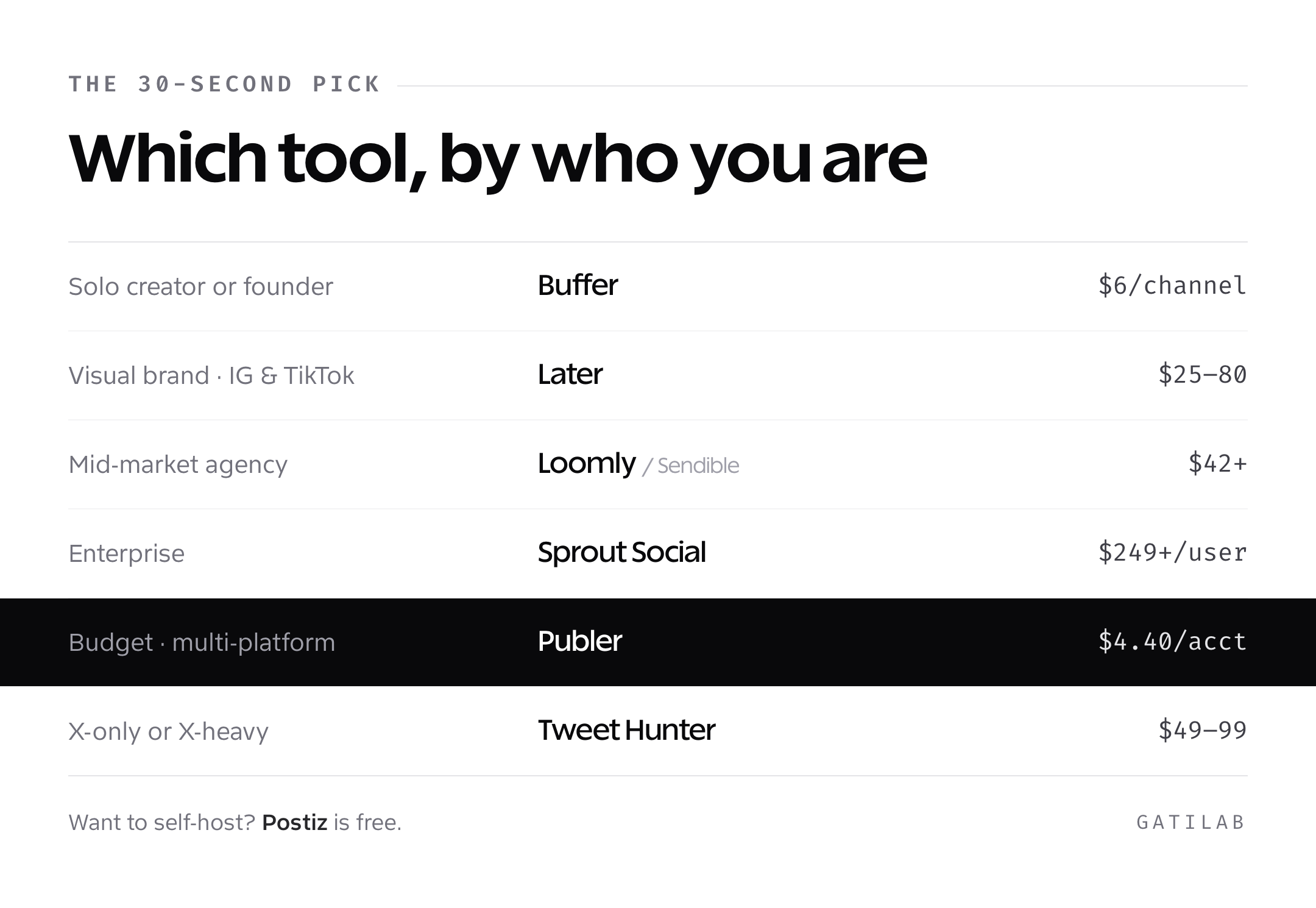
If you skipped the deep dives, here’s the 30-second pick. Solo creator or small business: Buffer. Visual brand on Instagram and TikTok: Later. Mid-market agency: Loomly or Sendible. Enterprise: Sprout Social. Budget-constrained multi-platform: Publer. Self-hosted: Postiz. X-focused: Tweet Hunter. Writing-focused: Typefully. Analytics-curious: Metricool or Iconosquare. Evergreen recycler: MeetEdgar. Integrated content team: CoSchedule. White-label agency: SocialPilot.
- Solo creator or founder: Buffer ($6/channel) or Typefully Starter ($12.50)
- Visual-first brand: Later ($25-80) or Iconosquare ($39+)
- Mid-market agency: Loomly ($42-369), Sendible ($89+), or SocialPilot ($30-200)
- Enterprise: Sprout Social ($249+/user) or Hootsuite Business ($739+)
- Budget-constrained multi-platform: Publer ($4.40/account) or Metricool ($22+)
- X-only or X-heavy: Tweet Hunter ($49-99) plus Typefully ($12.50+)
- Self-hosted preference: Postiz (self-hosted free, $29 hosted)
- Evergreen content recycling: MeetEdgar ($29.99-49.99)
- Integrated content marketing team: CoSchedule Marketing Suite (quote)
The single biggest mistake I see teams make: picking the most powerful tool when they need the simplest one. Sprout and Hootsuite are excellent products that get blamed for being slow when really the team was 3 people who only needed Buffer. Match the tool to the team, not to the marketing claims. For a broader view of how scheduling fits into your overall social media marketing strategy, the channels and metrics matter more than the tool you queue posts in.
The second-biggest mistake: switching tools too often. Every migration costs 2-4 weeks of throughput while your team relearns the UI, rebuilds approval flows, reconnects accounts, and rebuilds reports. If you’re switching once a year, you’re spending a full month per year on tool migration instead of audience growth. Pick a tool that fits your team’s shape for the next 18 months, not the one with the loudest current marketing.
One more pattern I see in agency clients: paying for a Cadillac scheduler and ignoring the thing that actually moves business outcomes, which is the post itself. A good $6/month scheduler with a content calendar your team will actually fill is worth more than a $300/month tool that intimidates everyone into posting nothing. The brands I’ve seen win on social in the past three years all share the same trait: a sustainable cadence of decent posts beats a rare cadence of perfect ones. Pick the tool that helps you ship consistently, not the one that promises to make every post a banger.
Frequently asked questions
The right scheduler is the one your team will actually open daily. Pick the smallest tool that handles your real workflow, give it a 30-day trial with one live brand, and switch only if the gain is obvious. The biggest gains in social aren’t in the tool, they’re in the post-by-post discipline of writing things people actually want to read. The scheduler just makes sure those posts ship on time.
Tell Google you want more of this.
Add Gatilab as a preferred sourceOne tap, and this site shows up more often in your own Top Stories, AI Overviews and AI Mode. Remove it any time.