
AI for Customer Support: Automation Tools, Use Cases, and ROI
I get why AI customer support automation looks like an easy win. Most support inboxes fill up with the same handful of questions, and every one of them takes a person’s time, so a bot that answers them sounds like free capacity.
The trouble starts when the bot answers something it shouldn’t, or traps a customer who needed a person. That is how a cheap fix turns into lost customers. My advice is simple: give AI the questions your published docs already answer, and keep the handoff to a human one click away.
The State of AI Customer Support
AI customer support has moved through four broad stages, and most tools you’ll compare today still belong to one of them:
- Rule-based chatbots follow decision trees: if the customer says X, reply with Y. They’re rigid and limited, but predictable, and still useful for simple flows.
- Intent-based systems use natural language processing to match a question to a predefined intent and its answer. They handle different phrasings better.
- Large language model (LLM) support uses models from providers such as OpenAI and Anthropic to write answers from context. It copes with unexpected questions and needs firm guardrails.
- Hybrid systems let the LLM handle the conversation while structured systems handle actions and escalation. Most serious setups land here.
The best support automation doesn’t feel like talking to a bot. It feels like getting a fast, correct answer, which is what the customer wanted in the first place.
Where AI Excels in Support
AI does well on questions with a known, documented answer. These are the usual ones:
- Account access. AI can explain the reset steps and trigger the reset email through your account system. Your account system still does the identity check.
- Order status. “Where is my package?” needs a lookup and a clear reply. AI connected to your order system answers faster than a person clicking through the same screens.
- FAQ answers. Product specs, return policies, business hours and anything else with a written, correct answer.
- Appointment scheduling. Checking availability, booking a slot, sending the confirmation and handling a reschedule.
- Basic troubleshooting. Guided steps such as “Is the light blinking or solid?” work well when the procedure is standard.
- Collecting details before a handoff. Even when AI can’t solve the problem, it can gather the order number, the error and the page, so the person who picks it up starts ahead.
These jobs share three traits: a defined process, few branches and an answer that is clearly right or wrong. AI handles them well because it is fast, never skips a step and doesn’t have bad days.
Where AI Struggles

AI struggles where judgment, empathy or unusual context decide the outcome:
- Emotional situations. An angry or anxious customer wants to be heard by a person. AI can imitate the words, but a sensitive case deserves a human.
- Complex technical issues. Creative troubleshooting and deep system knowledge still need human expertise. AI can assist, but it shouldn’t lead.
- Ambiguous requests. “I need help with my thing” gives AI too little to work with. People are better at clarifying questions that don’t feel like an interrogation.
- High-stakes decisions. Refunds, account closures and compensation have real business impact and need a person’s sign-off.
- Edge cases. A situation outside the usual patterns produces unpredictable answers. A person notices when something is “weird” and adapts.
- Long, multi-turn conversations. Threads that span many messages and refer back to earlier ones still trip AI systems up.
Knowing these limits is what prevents the chatbot loops customers hate. Design the system around what AI does well and hand off the rest gracefully.
Designing Your AI Support System
The order matters here, because each step depends on the one before it:
- Start with ticket analysis. Sort your recent tickets before adding anything. How many are simple procedural questions, and how many need judgment? That split sets your priorities.
- Map where customers ask. Website, app or email – each channel may need a different setup. A chat widget and an email responder are different jobs.
- Define escalation paths. Decide when AI hands off: certain keywords, negative sentiment, a direct request for a person or a failed answer. Make that handoff smooth for the customer.
- Build the knowledge first. AI is only as good as its information. If your documentation is thin or outdated, fix that before adding AI.
- Plan for hybrid flows. Most conversations go best with AI on first contact and information gathering, then a person for the resolution.
Implementation Approaches
AI can sit in five places in a support operation, and each one carries a different risk:
- Website or app chatbots catch questions before they become tickets. They work well for self-service questions and frustrate people when built poorly.
- Email automation reads incoming email, sorts it, answers simple questions and routes the rest. It’s slower than chat, but customers write more detail in email.
- Voice AI handles phone calls with speech recognition. It has improved a lot and still struggles with accents, background noise and complex calls.
- Agent assistance helps your team instead of talking to customers: suggested replies, relevant docs and summaries of earlier conversations.
- Ticket triage sorts, prioritizes and routes incoming tickets. It doesn’t resolve anything, but your team resolves faster.
Most companies do best starting with agent assistance and email automation before real-time chat or voice. The risk is lower and the results show up sooner.
Answer Questions From Your Website Content
A website-content chatbot is most useful for questions whose answers already exist in your published material. It can help visitors find a setup instruction or understand a product limit, but it should not invent an account-specific answer from general documentation.
Alpha Chat is our free WordPress AI chatbot. It uses indexed website content and can show source cards with an answer. The plugin still requires suitable provider configuration, and provider usage costs are separate from a free plugin download.
Start with a small set of questions your published pages can answer. Include an unsupported question as well as the straightforward ones; that reveals whether the bot admits the boundary or fills the gap with a plausible response.
- A setup question should point to the relevant instruction.
- A pricing question should agree with the current public offer.
- A compatibility question should retain the product’s qualification.
- A private order question should move to an authenticated support route.
- An unanswered question should receive a useful contact option.
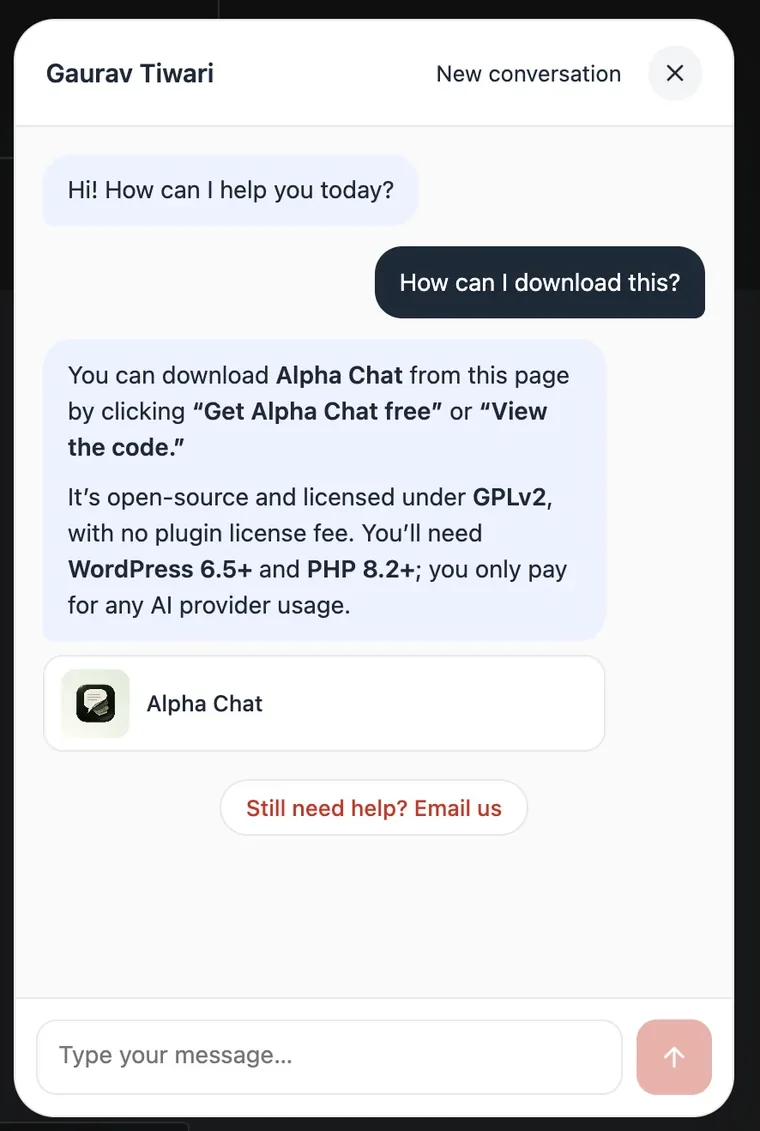
The source card deserves its own check. A link beside an answer is only useful if the linked page actually supports the statement. If the answer combines several pages, ensure it hasn’t joined details that apply to different products or plans.
Index freshness matters after a policy or product change. Check that the chatbot is using the current content and that its retrieval scope excludes information visitors shouldn’t receive. A public chatbot should not become an indirect route to private posts or customer records.
You should also separate answering a question from taking an action. Explaining the password-reset procedure is different from verifying identity and resetting an account. General text generation cannot replace the permissions and audit trail required for those actions.
Measure useful resolutions and appropriate handoffs, not only the number of conversations that ended without a human reply. A visitor giving up can look like a contained conversation if the measurement ignores the outcome.
If repeated public-information questions are consuming support time, evaluate Alpha Chat with a short set of known answers and deliberate unknowns before expanding its role.
When the Chat Has to Become a Ticket
A chatbot that can only answer, or only email the site admin, leaves a gap at the exact moment a customer needs a person. The conversation ends, the customer writes in again and someone asks them to repeat everything.
That gap is why I built Core Support, a helpdesk plugin for WordPress. It puts a ticket inbox, a customer portal, a knowledge base and an AI chatbot on your own site. The chat and the person who takes over work from the same records.
Its chatbot is built around that handoff:
- It answers from your own content. It learns your docs and posts, plus store products from WooCommerce, FluentCart or Easy Digital Downloads, and links the pages it used.
- It runs on your own API key. You pay your AI provider for what the chat uses. A daily token budget caps that spend, and once it runs out the chat offers a ticket instead.
- Talk to a person is always one click away. It turns the conversation into a ticket with the full transcript and the page the visitor was on, so nobody asks the customer to start over.
- You set the answer rules. Answer length, the topics it may cover and your own rules keep it on topic.
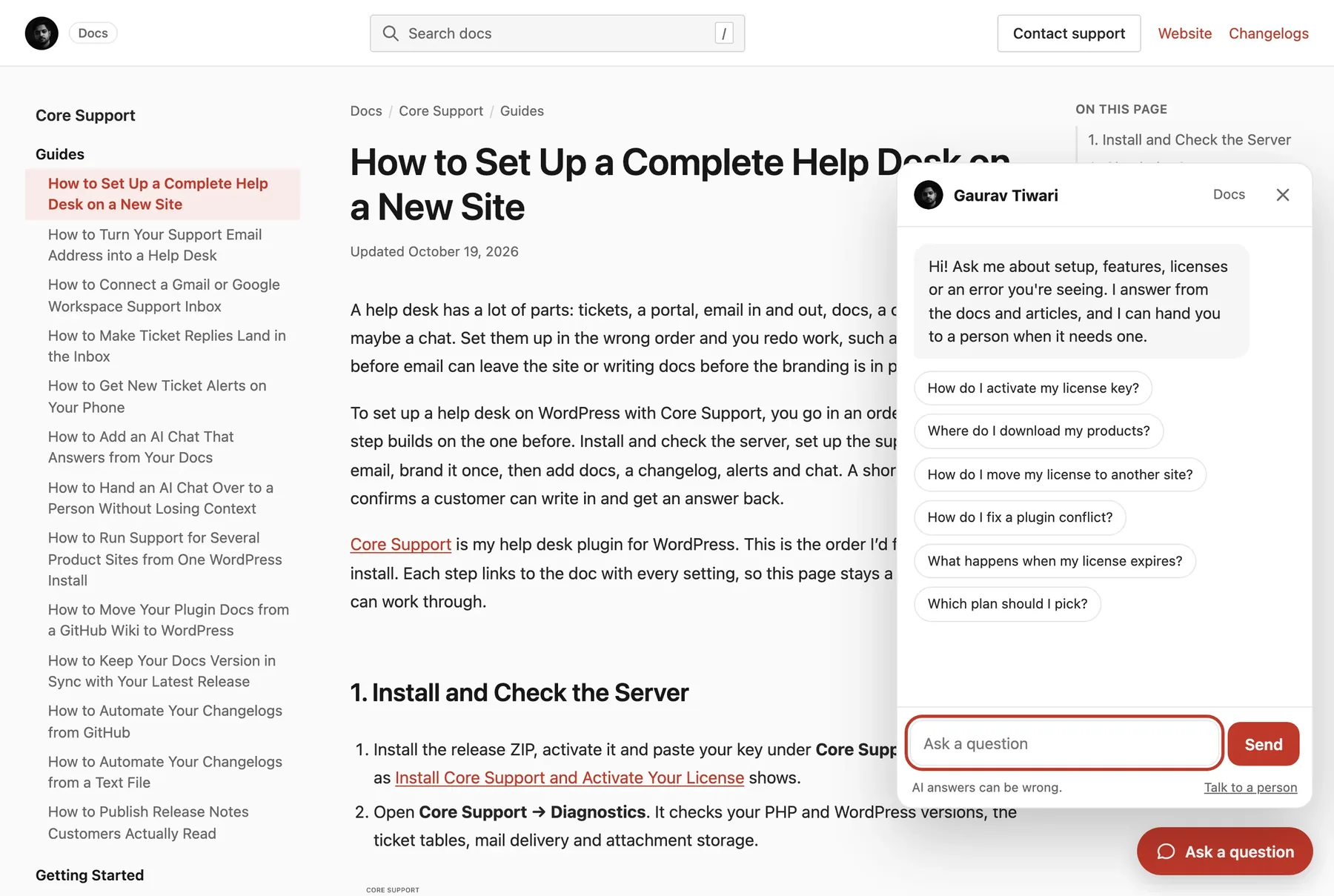
The screen I’d open every week is docs insights. It lists searches that found nothing and pages readers marked as unhelpful, which tells you exactly which answer to write next. Better docs make the chatbot better too, because that is what it answers from.
Core Support costs $199 once for unlimited sites and agents. It makes sense when chat is one part of a support desk you want to own. If you only need a free chatbot that answers from your pages, Alpha Chat is the lighter choice.
Measuring Success

The number that matters most is whether the customer got an answer. These are the measures worth watching:
- Resolution rate. The share of conversations AI resolves without a person. Confirm it with the customer instead of trusting the bot’s own verdict. SaaS metrics frameworks help put support efficiency in context.
- First response time. AI should cut waiting sharply. If customers still wait hours for a first reply, something is wrong.
- Customer satisfaction (CSAT). Survey customers after AI conversations and compare with your human-only baseline. If AI scores lower, find out why.
- Escalation rate. How often AI hands off to a person. Too high means AI isn’t useful; too low may mean it isn’t escalating when it should.
- Deflection rate. The share of potential tickets that never became tickets because AI answered them. This is your cost-savings number.
- Containment vs. abandonment. Customers who got an answer versus customers who gave up. High abandonment is a red flag.
- Time to resolution. Total time from first contact to a solved problem. AI should shorten it for simple issues without stretching it for complex ones.
Common Pitfalls
Most failed AI support projects fail in one of these ways:
- Forcing AI when a person is needed. Nothing frustrates customers more than a chatbot loop with no way out. Make the path to a person obvious.
- Over-promising. “Our AI assistant can help with anything!” sets an expectation AI can’t meet. Be clear about what it handles.
- Dropping the context. A customer who just spent 10 minutes describing the problem shouldn’t repeat it after the handoff. Pass the conversation forward.
- Set and forget. AI support needs knowledge base updates and regular review. It gets worse without maintenance.
- Putting cost ahead of experience. AI is cheaper, but if aggressive automation drives customers away, the savings are imaginary. Consider how automation affects customer lifetime value.
- Skipping edge cases in testing. AI does well on common questions in a demo. Real customers find every edge case, so test with real variety before launch.
The Human Layer
AI automation changes what your support team does all day:
- Complex problem solvers focus on issues that need judgment, creativity and empathy.
- AI trainers and reviewers read AI conversations, update the knowledge base and refine the answers.
- Escalation handlers take the hard cases when AI fails, so they need more than routine support skills.
- Customer advocates decide what’s right for the customer when the policy says otherwise. AI can’t make that call.
The best customer success teams use AI to remove the drudgery so people can focus on relationships and hard problems.
Choosing AI Support Tools
The options fall into five groups:
- AI agents that plug into a help desk, such as Intercom’s Fin and Tidio’s Lyro. Both can work with a help desk you already use.
- Help desks with AI built in, such as Zendesk, Freshdesk and HubSpot Service Hub. Integration is tight, and customization stops where the vendor’s settings stop.
- WordPress helpdesk plugins, such as Core Support, keep tickets, docs and the chatbot in your own WordPress database and bill AI to your own API key. The trade is that the plugin runs on your hosting.
- LLM APIs from OpenAI, Anthropic and others for a custom build. You get more control and more development work. Understanding AI limitations helps set realistic expectations.
- Vertical solutions built for one industry, such as healthcare, financial services or ecommerce, with compliance and domain knowledge included.
Whichever group you pick, compare tools on these points:
- Integration with the tools you already use
- Pricing model: per conversation, per agent, per AI resolution or flat
- Where tickets and customer data are stored
- Security and compliance features
- How the knowledge base is managed and kept current
- Analytics and reporting
Implementation Timeline
Phase 1 (Weeks 1-4): Foundation
- Analyze current support tickets
- Document common queries and responses
- Build or clean up knowledge base
- Select tooling
Phase 2 (Weeks 5-8): Basic Automation
- Implement simple FAQ responses
- Set up ticket categorization and routing
- Train AI on knowledge base
- Configure escalation triggers
Phase 3 (Weeks 9-12): Expansion
- Add complex workflows (order status, account changes)
- Integrate with backend systems
- Refine based on early performance data
- Expand channel coverage
Phase 4 (Ongoing): Optimization
- Regular performance reviews
- Knowledge base updates
- Response quality improvements
- New use case identification
Start small, prove value, then expand. Resist the temptation to automate everything at once.
Future Directions
These are the areas moving fastest in AI support:
- Proactive support. AI that spots a problem before the customer reports it and reaches out first. Many AI chatbot tools are already moving this way.
- Personalization. Answers shaped by the customer’s history, preferences and way of writing.
- Multimodal understanding. AI that reads screenshots, photos and video to diagnose a problem.
- Shared conversations. AI and a person working together in the same conversation in real time.
- Predictive routing. AI that sends each issue to the person best suited to it, based on skills and history.
The goal is support where customers get fast, accurate help whether they’re talking to AI, a person or both.
Final Remarks
If you’re unsure where to begin, I’d start with your last few weeks of tickets. Pick the questions your docs already answer well, let AI take those and keep a person one click away for everything else.
Then read the conversations the bot handed over. They show you which docs to write next, and that does more for your support than switching to a newer model.
What types of customer support queries can AI handle?
AI excels at password resets, order status inquiries, FAQ responses, appointment scheduling, basic troubleshooting, and data collection. These are procedural tasks with well-defined processes and objective correct answers.
When should AI customer support escalate to humans?
Escalate for emotional situations, complex technical issues, ambiguous requests, high-stakes decisions, edge cases, and when customers explicitly request human help. Build clear escalation triggers into your system.
How do you measure AI customer support success?
Key metrics include resolution rate (issues solved without humans), first response time, customer satisfaction scores, escalation rate, deflection rate, and time to resolution. Compare against human-only baselines.
What’s the difference between rule-based and AI-powered chatbots?
Rule-based chatbots follow decision trees with if-then logic. AI-powered chatbots use natural language processing and machine learning to understand intent and generate contextual responses. AI is more flexible but requires more setup and monitoring.
How long does it take to implement AI customer support?
A basic implementation takes 8-12 weeks: 4 weeks for foundation and analysis, 4 weeks for initial automation, then ongoing refinement. Complex implementations with multiple channels and deep integrations take longer. Start small and expand.
Tell Google you want more of this.
Add Gatilab as a preferred sourceOne tap, and this site shows up more often in your own Top Stories, AI Overviews and AI Mode. Remove it any time.