
GT Page Blocks Builder Free WordPress Plugin
Keep custom page sections close to their source.GT Page Blocks Builder is a code-oriented WordPress section builder for HTML, CSS, and JavaScript. Its Gutenberg block and visual workbench edit the same page content, so you can move between source code, section navigation, and the page preview without maintaining a separate copy of the design.
The central decision is ownership. A one-off landing section belongs to its page; a reusable notice may belong in a shared library. Choosing that deliberately makes later changes easier to understand and prevents a small edit from unexpectedly reaching several live pages.
Purchases and downloads are handled by gauravtiwari.org.

- Platform
- WordPress
- Download & Account
- gauravtiwari.org
What GT Page Blocks Builder Does
Choose the capabilities that support your actual workflow. Each has a different job to do.
A Workbench for Sections
Edit separate HTML, CSS, and JavaScript panes, rename and reorder sections, and review supported text edits in the preview. Responsive preview widths help during authoring. Ordinary WordPress blocks can remain in the document and be edited in Gutenberg.
Copies and Shared Library Blocks
Insert an independent copy when a page needs its own version, or link a published library section when every placement should share changes. Library metadata, usage information, and revisions help manage that distinction. A revision is useful recovery, but it is not a complete site backup.
Delivery and Automation Controls
Choose inline CSS or a per-section file and set JavaScript placement independently. Authenticated REST routes and WP-CLI support repeatable work. Optional AI editing uses your own provider keys; the plugin does not include a bundled MCP server.
Inside the Product
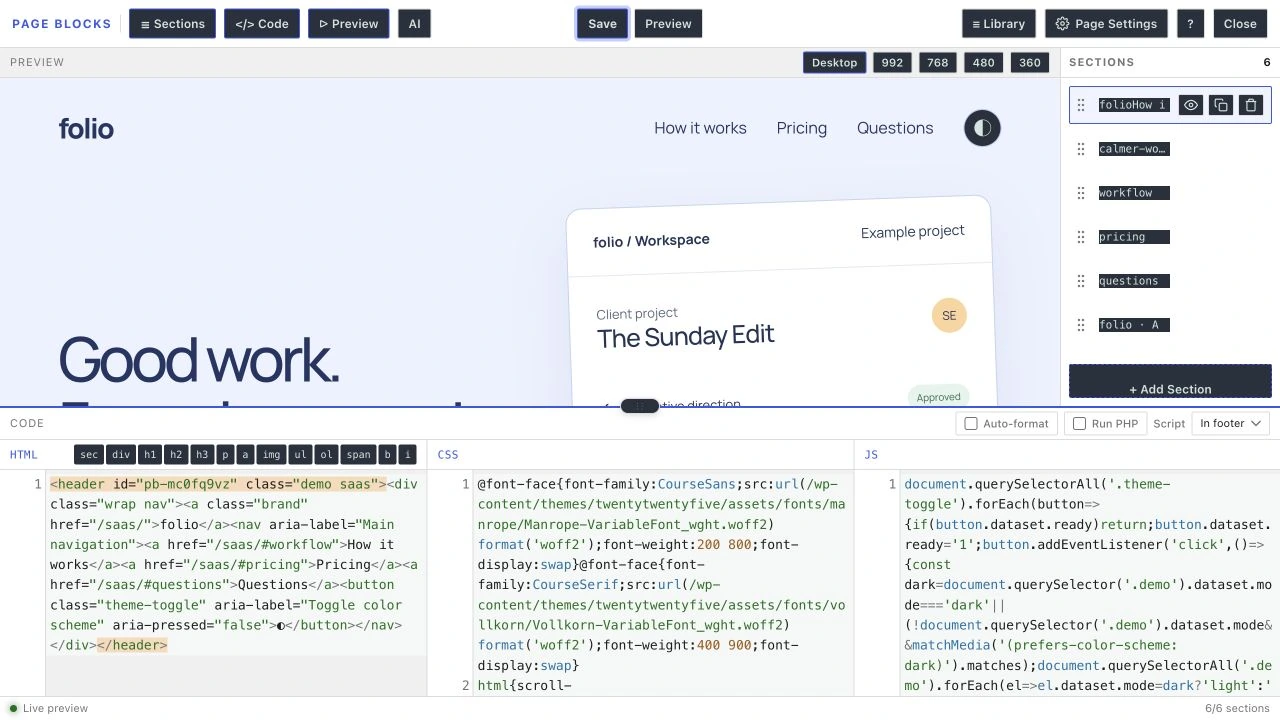
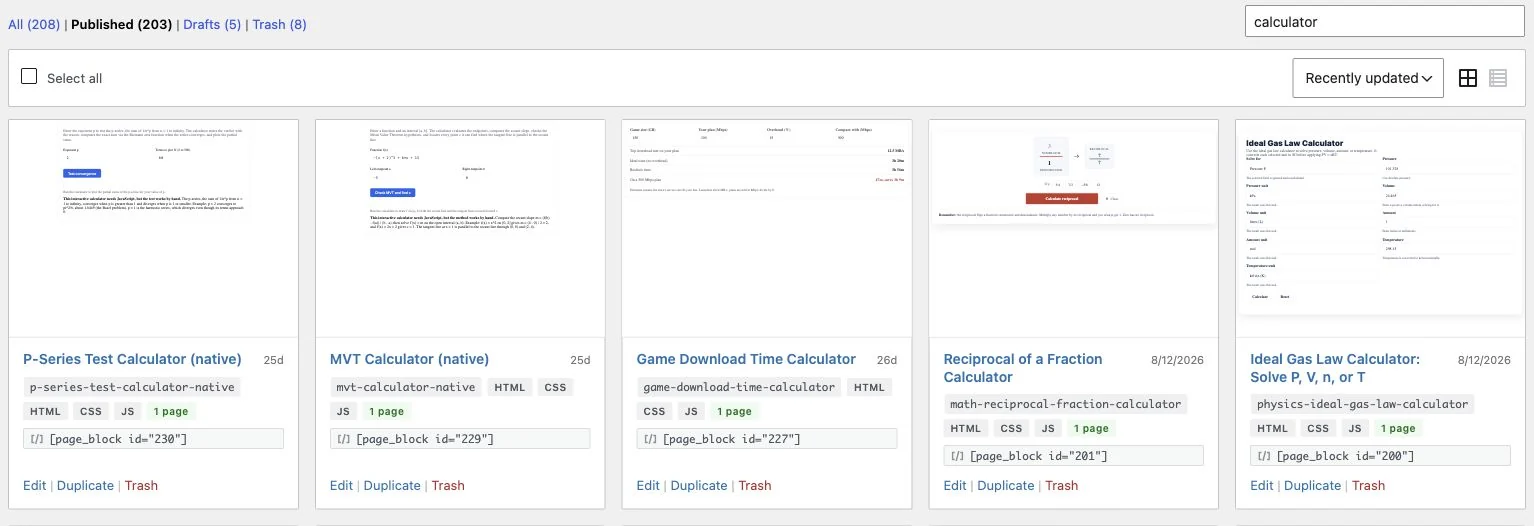
Select an image to view it at full size.
A Product Page With a Shared Notice
Imagine a product page with its own hero, feature explanation, and purchase section. Those sections should remain page-owned because the copy and styling are specific to that product. A site-wide support notice has a different job: you may want a single change to reach every page using it.
Keep the product sections as inline Page Blocks. Use a linked library block for the notice only after checking its placements and publication state. When a campaign needs a special variation, insert an independent copy instead of changing the shared original.
This gives the team a clear answer to a common maintenance question: what else will change if I save this? The visual editor does not remove that responsibility, but the library and page ownership model makes it easier to manage.
Editable source is valuable when the next person can tell which section owns the change.
How to Get Started
Start with a staging copy and a representative task, then extend the setup once the complete path makes sense.
Choose the Page and Template
Enable the intended post type and choose a suitable theme template. The builder plugin is independent of Marketers Delight; the isolated PBB Template is a separate theme capability.
Build Named Sections
Write semantic HTML and keep CSS scoped to the page or section. Give each section a clear name so the navigator reflects the content.
Decide What Is Shared
Keep unique content inline. Use a library link only where a shared update is intentional, and inspect all existing placements before editing it.
Review and Save
Check the code and the whole page context. Export section data before large replacements, and review AI suggestions before saving them.
Before You Go Live
Use these checks for the parts of the workflow this product affects.
- Keep ordinary HTML sections free of unnecessary PHP execution.
- Make JavaScript safe when a section appears more than once.
- Do not assume another plugin widget works inside an isolated template.
- Export or rebuild sections before removing their rendering plugin.
Is It Right for Your Site?
Consider the working requirements alongside the design or feature list.
When It Fits
Page Blocks Builder fits developers and technically comfortable editors who want to author or review custom code inside WordPress. It works well for distinct landing sections, controlled interactive components, and reusable source-based layouts.
Know the Limits
It is not a purely visual design tool for a team that never wants to see code. Saved source remains in the database after deactivation, but dynamic Page Blocks and library shortcodes still need the plugin to render. Your own scripts, media, and CSS determine the public page cost.
Requirements
Requires WordPress 6.0 or newer and PHP 8.1 or newer. AI is optional and billed separately by the chosen provider. Theme regions need an actual theme call; assigning a region name alone does not insert it into a template.
Download and License Details
The section builder, reusable library, Gutenberg block, and optional AI tools are included in the free plugin. Download and update access are handled through gauravtiwari.org. A store update key enables the protected update route.
Gatilab explains the product and its practical use. The original product page on gauravtiwari.org handles the current offer, checkout or installation route, account access, and product support.
Need help implementing the site around it? Explore Gatilab’s custom WordPress plugin development services. Implementation work is separate from the product download or license.
Common Questions
A few remaining details before you choose the product.
Is PBB Template required?
No. The plugin can work with other page templates and themes. PBB Template is a separate isolated canvas offered by the supporting theme, with its own asset rules.
Will disabling the plugin leave a finished static page?
No. The source stays stored, but the dynamic blocks depend on the plugin to render. Plan an export or conversion before removing it.
Do I need an AI subscription?
No. You can write every section yourself. If you enable the optional AI tools, provider accounts and usage charges are separate from the free plugin.
Build a Section You Can Maintain
Start with one useful section, keep the source readable, and choose shared ownership only where it belongs.
Continue to the original product page for the current offer and next steps.