
Core Bookings WordPress Booking Plugin
Turn service availability into bookable time.Core Bookings is a WordPress booking plugin for appointments and group sessions. You define the service, staff availability, booking rules, and customer fields on your own site, then offer the booking block or a standalone service page.
The calendar is only part of the decision. A usable booking flow also needs time between sessions, clear timezones, sensible cancellation limits, and reliable reminders. Core Bookings brings those controls together so the availability a customer sees reflects the way the service actually runs.
Purchases and downloads are handled by gauravtiwari.org.

- Platform
- WordPress
- Download & Account
- gauravtiwari.org
What Core Bookings Does
Choose the capabilities that support your actual workflow. Each has a different job to do.
Availability With Boundaries
Set weekly hours, time-off ranges, minimum notice, booking windows, and buffers. A free slot in a calendar is not always time you can deliver a service; these settings turn raw availability into an offer you can keep.
Individual and Group Services
Create one-to-one appointments or group sessions with seat limits. Each service has its own duration, assigned staff, and payment rules. Keep an individual consultation separate from a workshop so the capacity and customer expectations are clear.
Customer Changes and Follow-Up
Private management links let customers reschedule or cancel within your cutoff. Confirmation and reminder emails support the booking, while the dashboard keeps upcoming appointments and delivery issues visible. Your site’s mail configuration and scheduled jobs remain part of the system.
Inside the Product
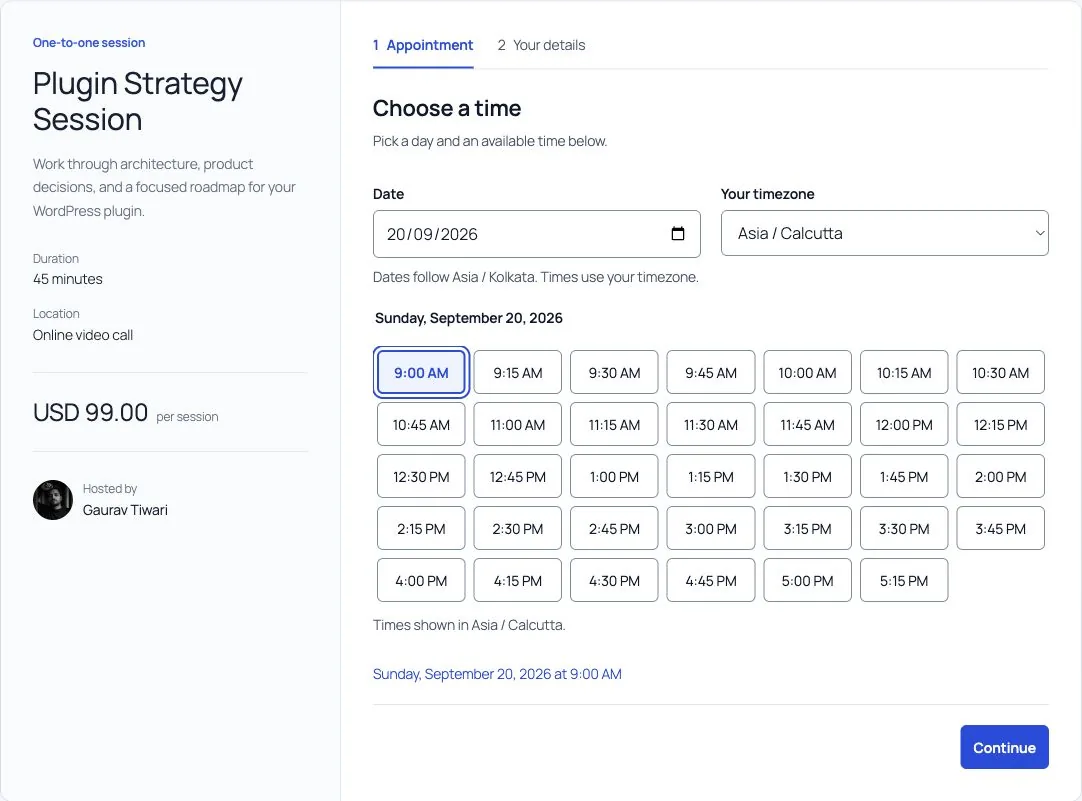
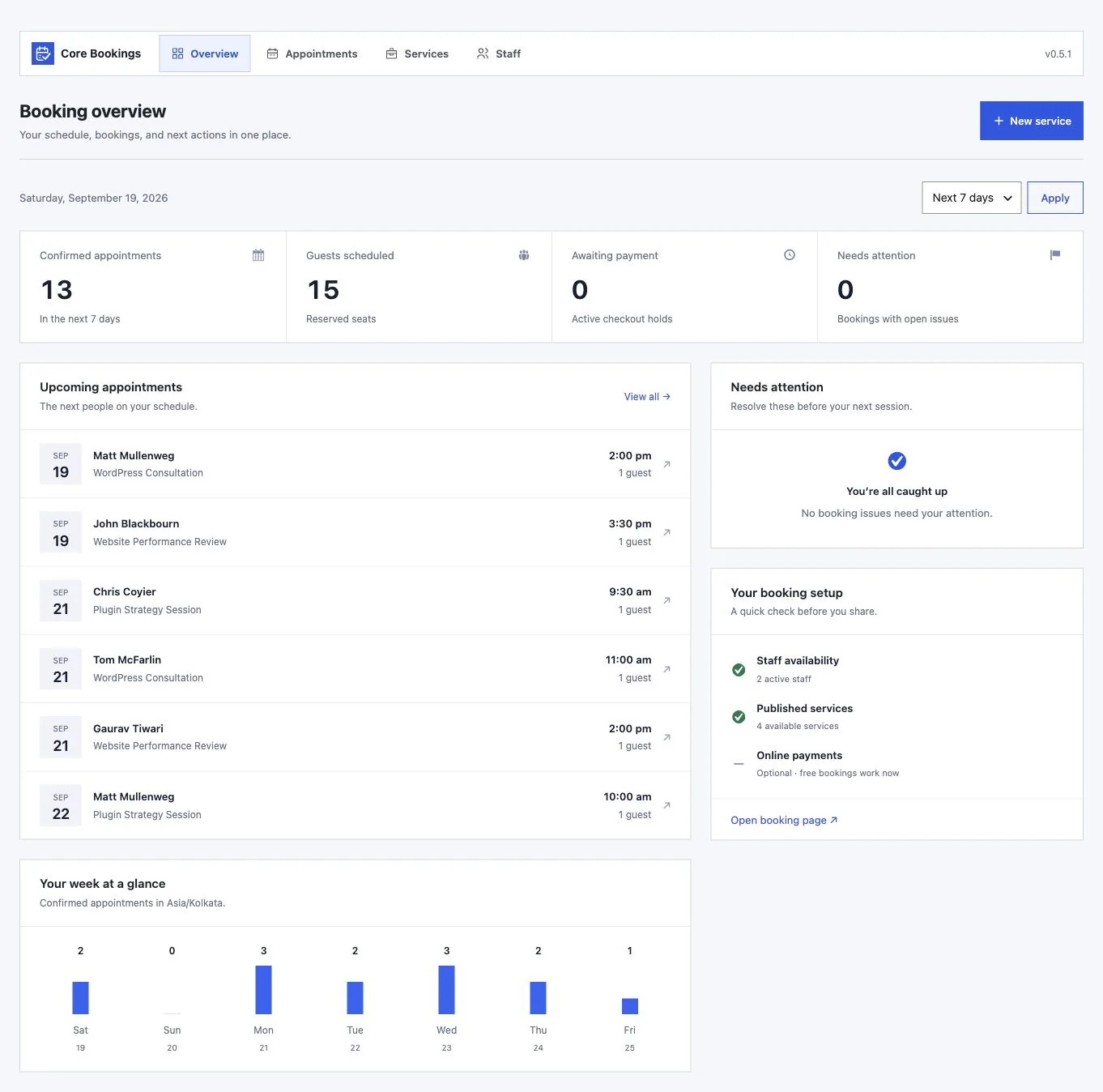
Select an image to view it at full size.
A Consultant With Two Services
Imagine a consultant offering a short discovery call and a longer paid review. Create separate services, assign the correct duration, and reserve a buffer after the review for notes. Set minimum notice so a visitor cannot book work you have no time to prepare for.
A group workshop needs a different rule: seats, not just a single appointment slot. Define its capacity and explain what customers should bring. For either service, make the cancellation cutoff visible before a customer commits, then keep the private management link in the confirmation.
The benefit is a schedule that expresses operational limits. It still depends on the hours and exceptions you enter, so review holidays, time off, and timezone settings as part of routine administration.
Protect preparation time first. A calendar full of poorly spaced bookings is not a workable schedule.
How to Get Started
Start with a staging copy and a representative task, then extend the setup once the complete path makes sense.
Describe the Service
Choose duration, staff, capacity, and the information required from the customer. Give each distinct offer its own service.
Set Availability
Add working hours, time off, buffers, minimum notice, and the booking window. Review the site’s timezone before sharing times.
Publish the Booking Route
Place the native WordPress block or share the standalone service page. Customize wording and fields around the service.
Follow a Full Appointment
Try the customer journey on staging, including confirmation, rescheduling, cancellation, and reminders. Check scheduled jobs and email delivery.
Before You Go Live
Use these checks for the parts of the workflow this product affects.
- Keep appointment cancellation separate from payment refunds.
- Review timezone conversions with the customers you serve.
- Use seat limits for group services.
- Check duplicate and conflict warnings before importing appointments.
Is It Right for Your Site?
Consider the working requirements alongside the design or feature list.
When It Fits
Core Bookings fits consultants, coaches, service businesses, and workshop organizers who want booking administration in WordPress. It is especially useful when availability and customer self-service belong on the same site as the service description.
Know the Limits
Cancelling an appointment does not refund a payment; refunds are handled separately. Imported appointments do not send booking notifications. Calendar credentials and private customer links remain specific to each site, so a migration needs review rather than a blind copy.
Requirements
Requires WordPress 6.9 or newer, PHP 8.3 with Sodium, and MySQL or MariaDB using InnoDB. Reminder delivery depends on working scheduled jobs and mail configuration.
Download and License Details
Core Bookings currently offers a paid lifetime license during beta. See the current amount and terms on gauravtiwari.org. The advertised lifetime offer covers unlimited sites and lifetime updates; the store supplies the ZIP and license key.
Gatilab explains the product and its practical use. The original product page on gauravtiwari.org handles the current offer, checkout or installation route, account access, and product support.
Need help implementing the site around it? Explore Gatilab’s WordPress development services. Implementation work is separate from the product download or license.
Common Questions
A few remaining details before you choose the product.
Can I move bookings from another service?
The plugin supports Core Bookings JSON exports and mapped CSV appointment imports, including Calendly and Acuity exports. Review staff, service, timezone, duplicate, and conflict mappings before applying an import.
Can customers change their own appointments?
Yes. Private links support rescheduling and cancellation within the cutoff you configure. Set that cutoff to match the notice your business actually needs.
Does buying the plugin collect customer payments automatically?
The plugin license purchases the software. Your services have their own payment rules and configuration. Check the complete booking and payment path for your setup before accepting real appointments.
Make Your Services Bookable
Start with the service you already deliver reliably, then add availability and customer rules around it.
Continue to the original product page for the current offer and next steps.