
Google Hacks: Search Operators, Tools and Fun Tricks
Half the Google hacks lists you’ll find still tell you to use cache: and related:, and both have been dead for a while, so the first thing a list like this owes you is a tested split between what works and what doesn’t. The operators below were checked against live Google results, and the ones that no longer do anything are in their own table with the date Google retired them. The second half of the page covers the other kind of Google hack, the timers, coin flips, games and Easter eggs that Google builds into the search box, because those are what most people searching “google hacks” are after.
A quick orientation before the list. A search operator is a word or symbol you type into the query, like site:, that changes which pages Google returns. A built-in tool is something Google shows instead of results, like a timer. An Easter egg is a joke Google hid in the results page. All three count as Google tricks, and they are three different things, which is why the page is in three parts.
Google Search Operators That Still Work
Google documents only a handful of operators on its own help page: quotes, the minus sign, site:, filetype:, before: and after:. A second group, such as intitle: and inurl:, is undocumented but still filters results reliably. One rule applies to all of them: no space between the operator and the term. site:gatilab.com works; site: gatilab.com is a normal search for the word “site”.
site:
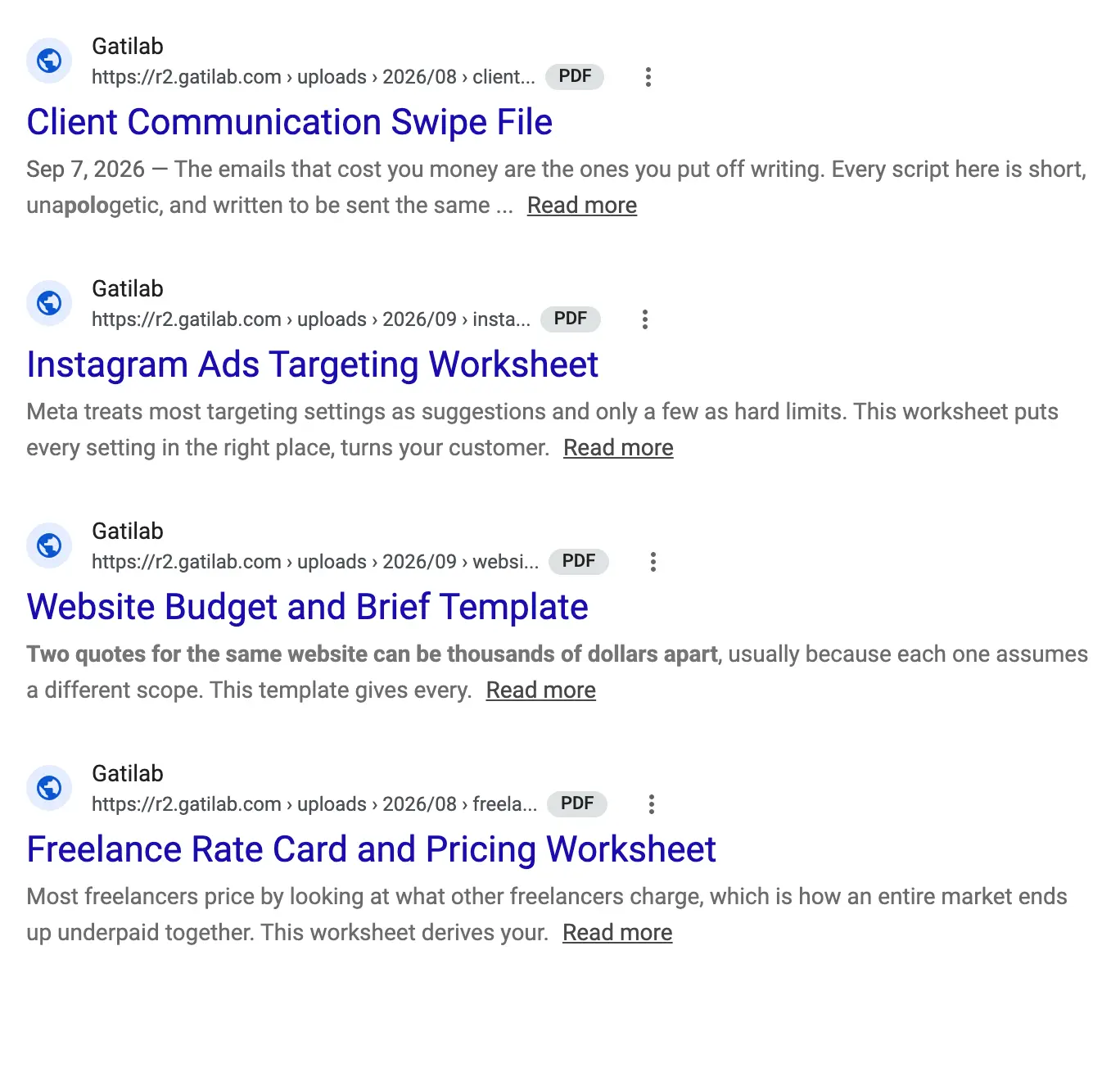
site:gatilab.com seo returns pages on gatilab.com that mention SEO, and site:hubspot.com/blog inbound narrows to one folder. It’s the operator I’d keep if I could keep only one, because it turns Google into a search box for any site that has none, shows you how much a competitor has already published on a topic, and tells you what Google has indexed from your own domain. A bare domain covers its subdomains too, so site:gatilab.com includes r2.gatilab.com.
Quotes, the minus sign, OR and the wildcard
"exact phrase"makes Google match the words in that order, without synonyms. It’s the fastest way to check whether a sentence from your article has been copied, and the fastest way to find a quote you half remember.-wordremoves pages containing the word:seo tools -ahrefs -semrush. The minus sits directly against the word;- worddoes nothing.ORin capitals, or the pipe|, matches either term:"content marketing" OR "inbound marketing" guide. Lowercase “or” is treated as an ordinary word.*inside quotes stands for one or more missing words:"the * of content marketing"finds the future, the state and the death of it.
intitle:, allintitle:, inurl:, allinurl: and intext:
These restrict the match to one part of the page. intitle:"affiliate marketing" needs the phrase in the title tag; allintitle:beginner affiliate marketing guide needs every word there. inurl:write-for-us and allinurl: do the same for the URL, and intext: for the body. Google doesn’t document any of them, but they still filter, and allintitle: is a useful rough gauge of how many pages are built around a phrase before you spend money on a keyword tool. A phrase with a few dozen allintitle: results is a different fight from one with 20,000.
filetype: and ext:
filetype:pdf "content marketing strategy" returns only PDFs: agency decks, conference slides, the research reports nobody links to. Google documents filetype:, and ext: is an undocumented alias that behaves the same. Combined with site: it lists every document a domain has let Google index, which is why site:.edu filetype:pdf "marketing budget" is a research technique and site:yourdomain.com filetype:xlsx is a security check you should run on your own site once in a while.
before: and after:
These are Google’s documented date filters, and they do what people wrongly expect the number range to do. wordpress caching after:2025-06-01 before:2025-12-31 returns pages Google dates to that window; a bare year works too, as in after:2025. For freshness checks and for finding what was written about a topic in a specific month, they replace the desktop-only Tools menu date picker, and they work on mobile where the picker doesn’t exist.
Number ranges, define:, AROUND(X) and the image operators
camera $200..$400matches numbers in that range on the page. It’s for prices, specs and measurements, not dates:2022..2024finds pages that mention those numbers, which is not the same as pages published then.define:transientor justdefine transientputs a dictionary card at the top.content AROUND(3) marketingasks for pages where the two words appear within 3 words of each other. It’s undocumented and Google quietly falls back to normal results when nothing matches, so treat it as a nudge rather than a filter.imagesize:1200x800andsrc:https://example.com/image.pngwork only in Google Images. The second finds pages that embed a specific image file, which is how you track where a product shot or an infographic has been reused.
Google Search Operators That No Longer Work
A dead operator fails quietly. Google doesn’t show an error; it treats the operator as a word and returns ordinary results, so you can spend 20 minutes thinking you narrowed a query when you didn’t. These are the ones to stop using, with the date each one went.
| Operator | What it did | Status | Use instead |
|---|---|---|---|
+word | Forced a word to appear | Removed in October 2011 | Quotes around the word |
~word | Included synonyms | Removed in 2013; Google now does this by default | Nothing needed |
link: | Listed pages linking to a URL | Google told people to stop using it in January 2017; it now returns plain keyword matches | The Links report in Search Console, or a backlink tool |
info: | Showed a summary card for a URL | Dead | Search the URL in quotes |
related: | Listed sites Google thought were similar | Removed in August 2023 | A competitor analysis tool, or intitle: searches on your main topics |
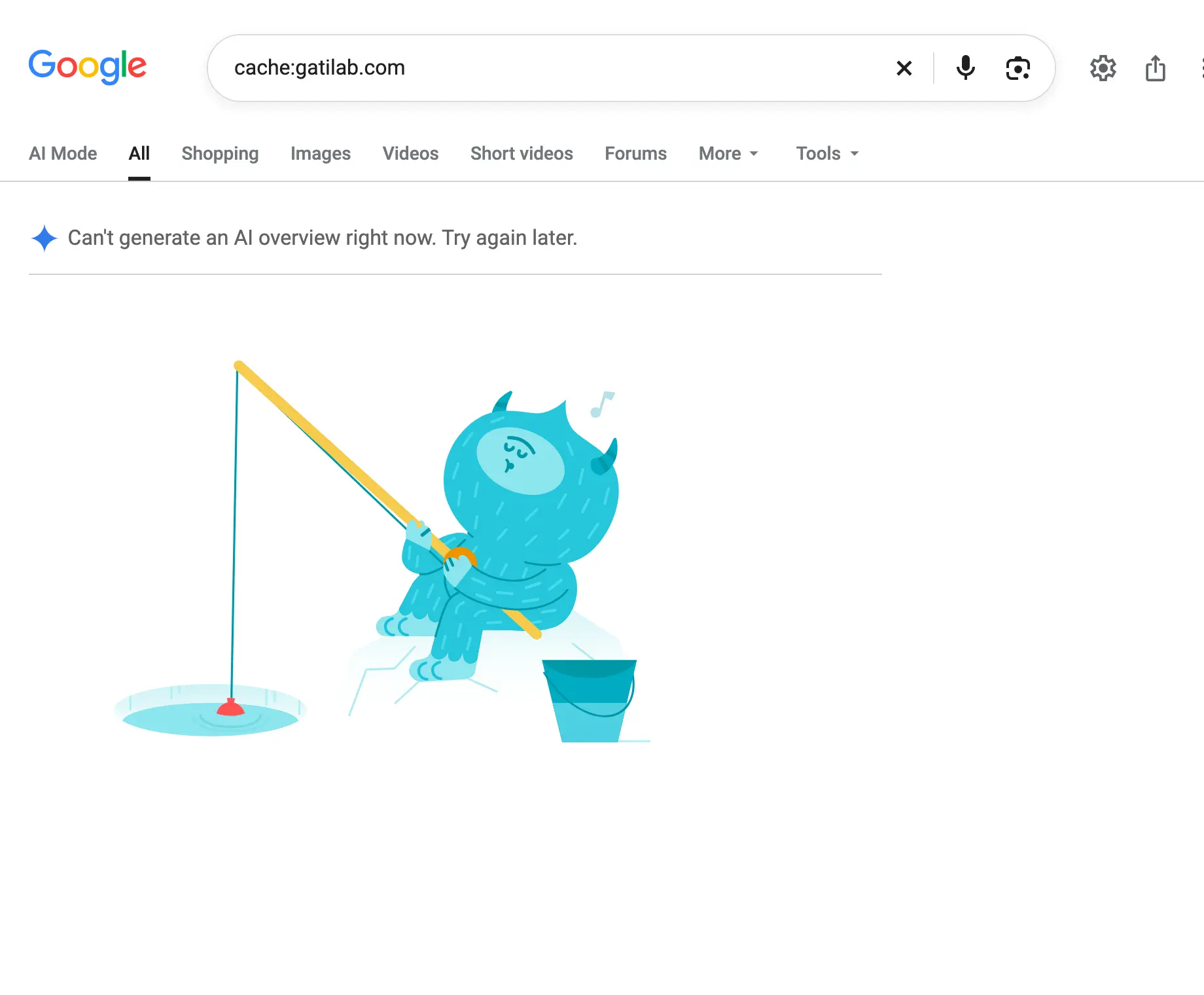
cache: | Opened Google’s stored copy of a page | Cached pages left the results in February 2024 and the operator stopped working in September 2024; it now returns no results at all | The Wayback Machine, which Google links from About this result |
phonebook:, # | Phone listings, hashtag search | Dead | Nothing |
daterange:, inanchor: | Julian date ranges, anchor text | Unreliable to dead | before: and after:; a backlink tool for anchors |
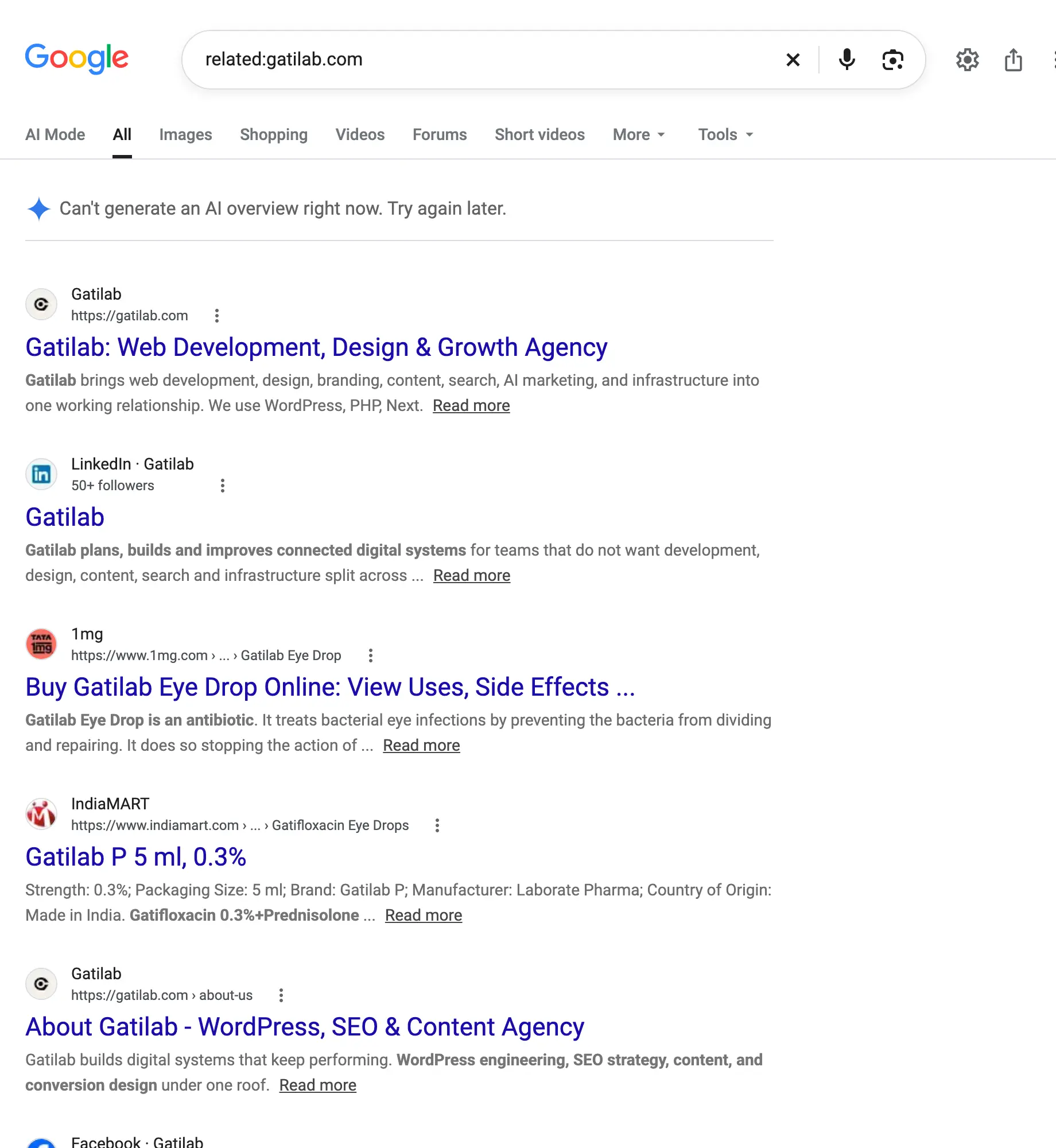
The related: result above is what a dead operator looks like in practice. Google ignored the operator, searched for the word “gatilab”, and returned the agency’s own pages next to an eye drop of the same name. A list that still recommends related: for competitor research hasn’t been checked since 2023.
Operator Recipes for SEO Research
Operators earn their keep when you stack them. Each recipe below is a working query; replace the bracketed part with your own topic.
| Job | Query |
|---|---|
| Guest post targets | "write for us" OR "guest post guidelines" [niche] -site:medium.com -site:linkedin.com |
| Resource page targets | inurl:resources OR inurl:links [niche] |
| What a competitor has published on a topic | site:competitor.com intitle:[topic], run once per competitor |
| Rough keyword difficulty | allintitle:"[exact phrase]" |
| Primary-source documents | site:.edu filetype:pdf "[topic]" after:2024 -template -example |
| Unlinked brand mentions | "[brand name]" -site:yourbrand.com, then Tools > Past month |
| Reddit threads on a question | site:reddit.com "[question phrase]" |
| Copied content | "[a distinctive sentence from your article]" |
| Everything by one author on one site | "by [author name]" site:[publication.com] |
Two notes on the recipes. The competitor comparison has to be two queries, because two site: operators in one query are ANDed and return nothing; a page can’t be on both domains. And the guest post recipe finds pages, not quality: the sites that advertise “write for us” loudest are often the ones you’d least want a link from, so run the candidates through the backlink building guide’s checks before you pitch. For the keyword side, allintitle: is a starting signal, and the keyword research process covers what to do once a phrase looks winnable. For the backlinks the dead link: operator used to show, the Search Console links report is free and complete for your own site, and a competitor analysis needs a paid index for anyone else’s.
Built-In Google Tools
These aren’t operators. Type the word and Google shows a working tool above the results instead of a list of websites that offer one. Every entry below is on Google’s own tips page.
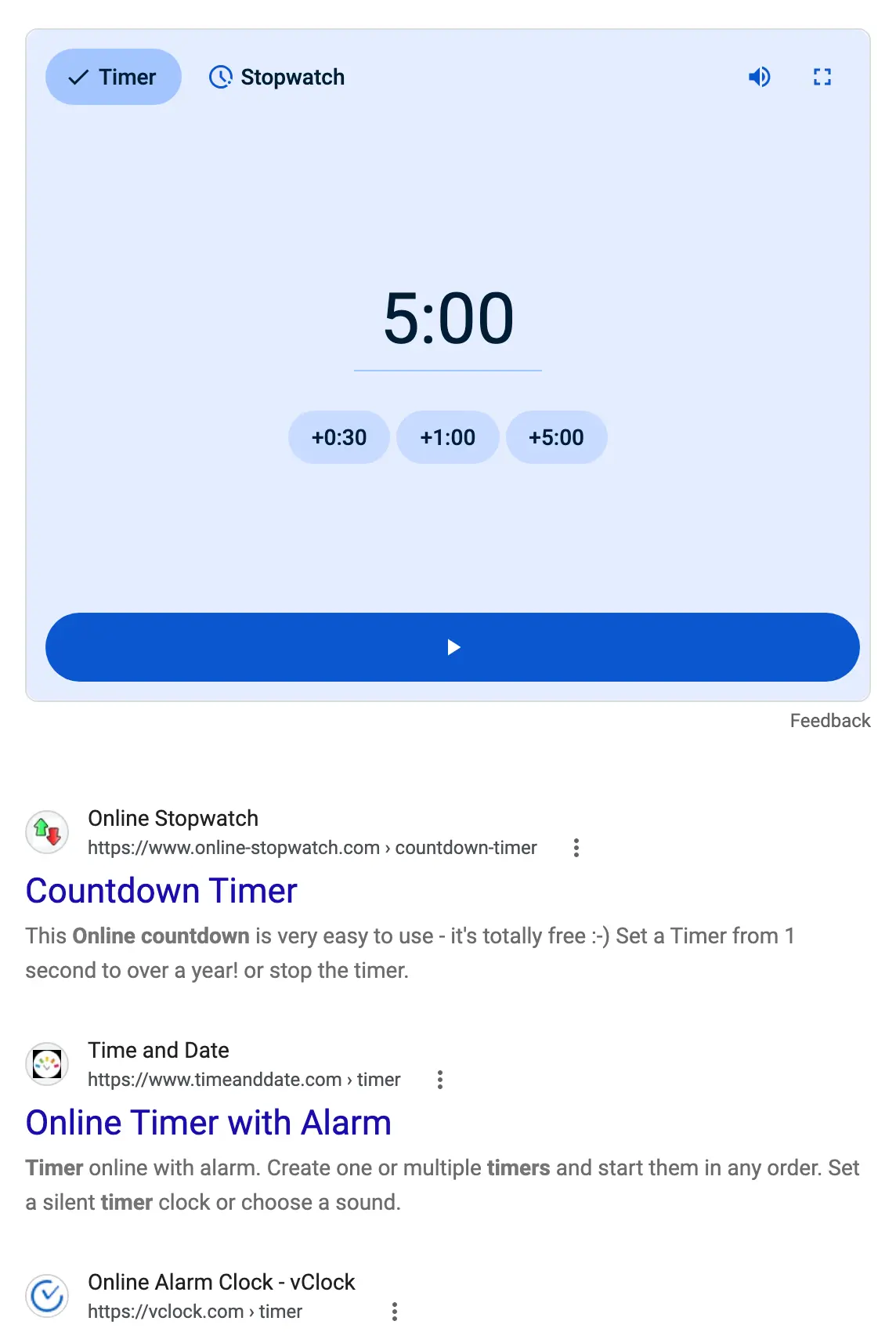
- timer and stopwatch: a countdown or a stopwatch with an alarm.
timer 10 minutesstarts it preset. - calculator, or any sum typed straight in, like
15*79. tip calculator splits a bill. - flip a coin, spinner, roll dice (or
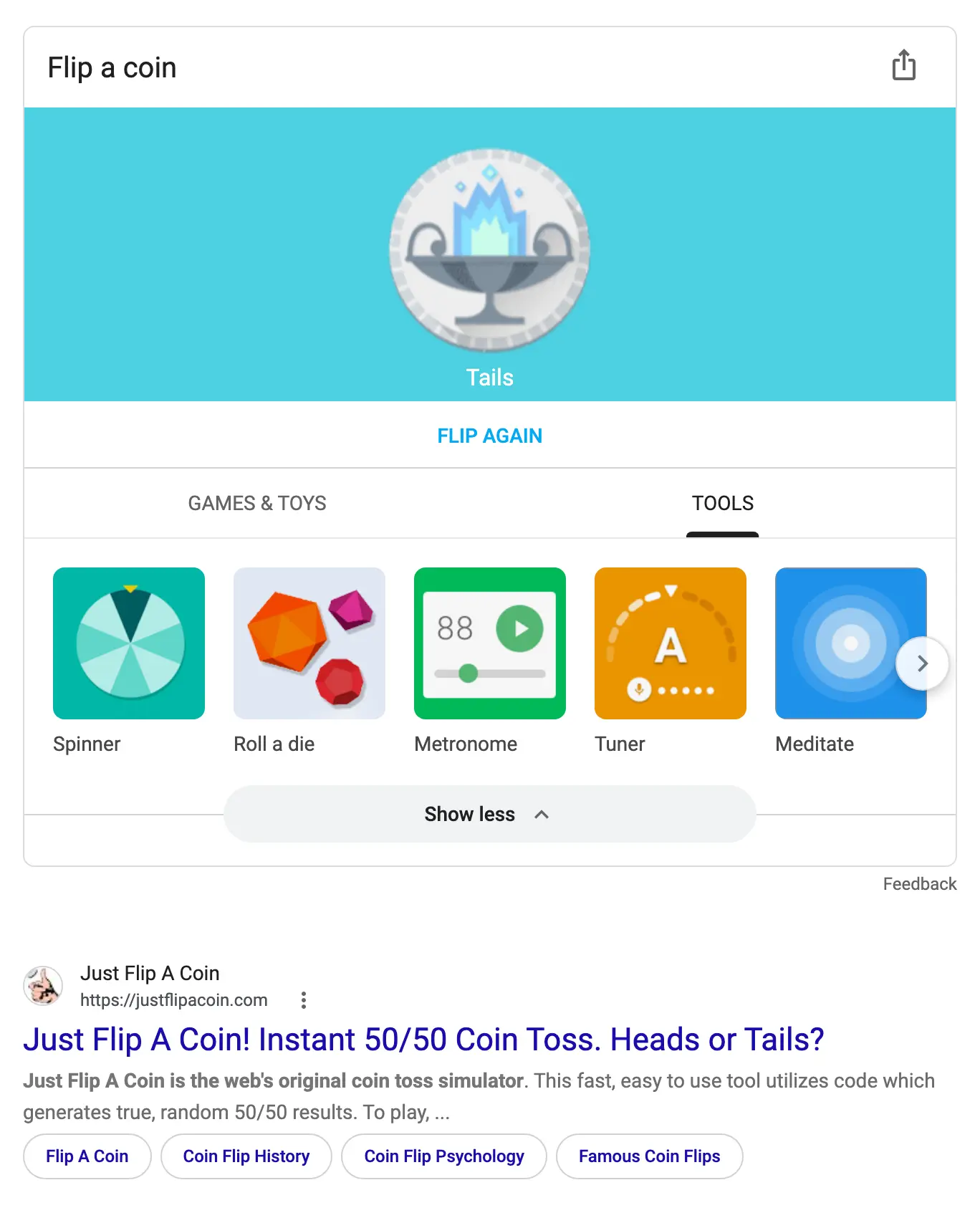
roll a d20) and random number generator. The coin flip card opens a strip of the other tools underneath it, which is the easiest way to see the whole set. - metronome, tuner (it listens through the mic) and color picker.
- 29 gbp to usd, 5 miles in km, or any unit or currency conversion in plain words.
- weather in [city], sunset, time in Tokyo when it’s 9am here.
- A flight number for its status, a courier tracking number for the parcel, a stock ticker for the price.
- define [word], covered above, and [word] translate or translate hello to hindi for a translation card.
Two more live behind buttons rather than words. Hum to search sits behind the microphone icon in the Google app: tap it, hum the tune for 10 or 15 seconds, and it names the song. And Google Lens, the camera icon in the search bar, has absorbed what used to be reverse image search, so dropping a photo in finds where else it appears, translates signs and solves the maths problem in a textbook photo.
Google Easter Eggs That Still Work
This is the part of “google hacks” that gets 1.5 million views on a YouTube video, and the part Google’s own help pages won’t tell you about. All of these were live on google.com at the time of writing; they tend to work in a browser rather than in the Google app.
- do a barrel roll: the whole results page spins 360 degrees once. It’s a Star Fox reference from 2011 and still the most searched trick on the list.
- askew (or tilt): the page leans a few degrees to the right and stays there.
- 67: added in 2025, the screen gives a brief wobble, a nod to the hand gesture that went around schools that year. It works on desktop and mobile.
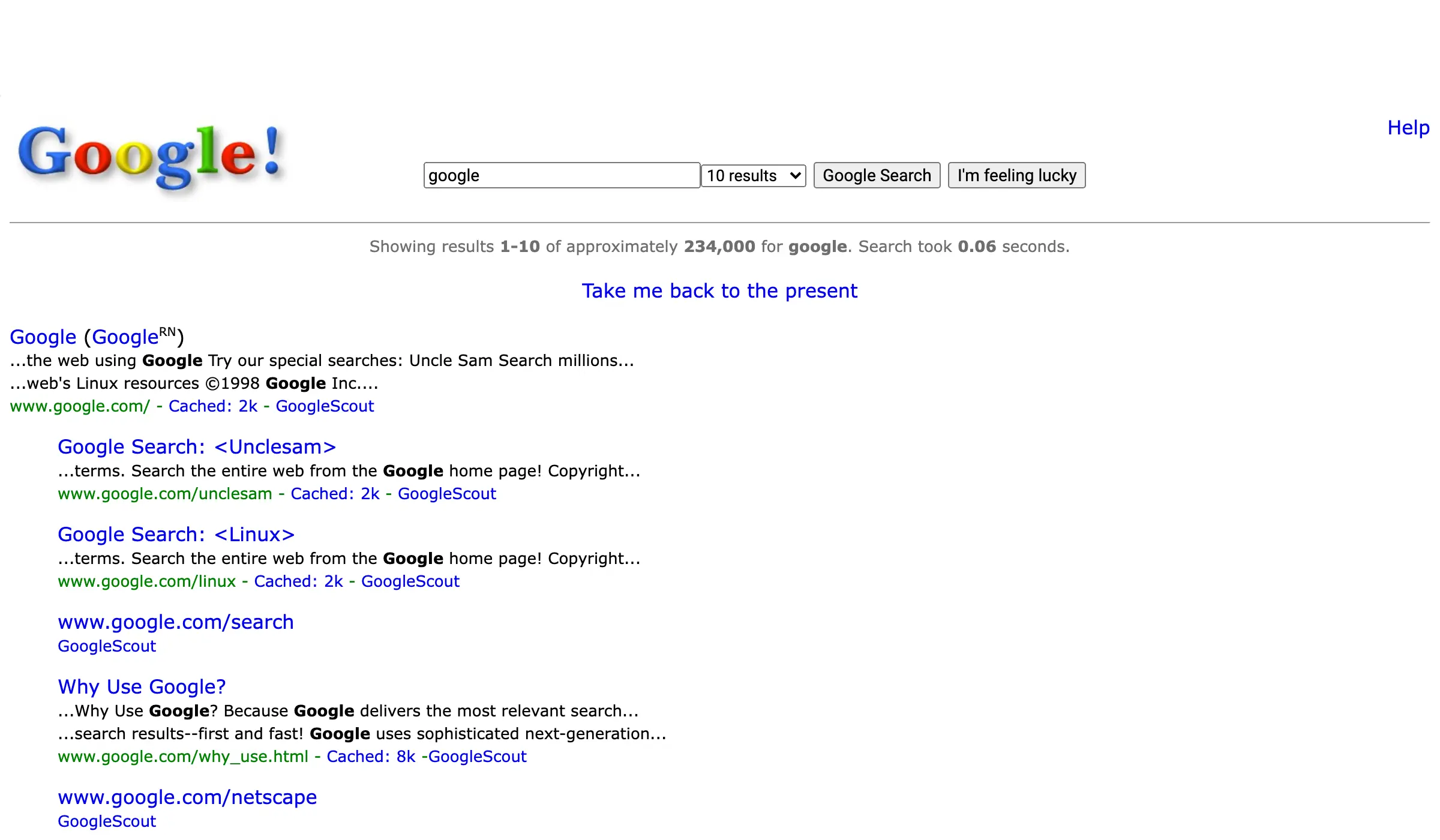
- google in 1998: the results page redraws itself in Google’s original 1998 layout, exclamation mark in the logo and all, with a “Take me back to the present” link.
- recursion: Google asks “Did you mean: recursion”, forever.
- anagram: Google asks “Did you mean: nag a ram”.
- blink html: the results page includes samples of blinking text, the way the old HTML tag did it.
- dvd screensaver: the Google logo in the corner bounces around the screen like the old DVD player idle animation.
- super mario bros: a flashing question block in the knowledge panel pays out a coin when you click it.
- pac-man, tic tac toe, snake, minesweeper and solitaire: each one opens a playable game in the results.
- text adventure: open the browser’s developer console on that results page and a text game is waiting.
A few that people still search for are gone from Google itself. Zerg Rush, Google Gravity and the Thanos snap no longer run on google.com; the versions you’ll find are on the fan site elgooG, which rebuilds retired tricks, and the 2019 Friends character tricks were a limited campaign. If a video promises a “secret dark Google trick”, it’s almost always one of these fan recreations.
Hide AI Overviews With the Web Filter
The question that comes up more often than any operator now is how to get plain results back. Google has a filter for it. After any search, open More in the row of tabs under the search box and choose Web; the page reloads as a list of links with no AI Overview, no video block, no shopping module. The same view is one URL parameter, udm=14, so google.com/search?q=wordpress+caching&udm=14 goes straight there, and you can save that pattern as a custom search engine in Chrome or Firefox to make it the default. Google has never documented the parameter, which means it can change without notice, but it has held since May 2024.
The operators above still work inside the Web filter, and inside Google’s regular results. They do not work in AI Mode, which treats a query as a question to answer rather than a filter to apply; if you need a filtered list, use the regular results and the guide to how AI Overviews choose sources explains what the AI layer is doing instead.
About This Result and the Wayback Link
The 3-dot menu next to any result opens “About this result”, which shows how Google describes the source and, since September 2024, a link to the Internet Archive’s Wayback Machine copy of the page under “More about this page”. That link is the official replacement for the dead cache: operator, and it’s often a better one, because the archive keeps years of snapshots rather than a single recent copy. The same menu on an image result opens “About this image”, which shows where the image first appeared and any metadata about how it was made.
What Google Dorking Is
Some of the “google hacks” searches are looking for Google dorking, which is the same operators used to find things that were never meant to be public: exposed admin panels, open directories, config files, spreadsheets of customer data that a server indexed by mistake. The queries are not illegal in themselves, Google indexed the pages, but accessing a system you aren’t authorized to use is, in India under the IT Act and in the US under the Computer Fraud and Abuse Act, and “it was in Google” has not been accepted as a defense. This page doesn’t publish a dork list for that reason. The defensive use is worth knowing, though: run site:yourdomain.com filetype:pdf, filetype:xlsx and inurl:wp-content/uploads against your own site once a quarter and see what you’ve been serving to the world.
Common Mistakes With Google Operators
- A space after the colon or the minus.
site:domain.comand-wordwork;site: domain.comand- wordare plain searches. - Lowercase
or. OnlyORin capitals, or|, is the operator. - Using
2022..2024as a date filter. It matches numbers, not publish dates; useafter:2022 before:2025. - Two
site:operators in one query. They AND together and return nothing. - Trusting a quiet failure. If a query with an operator returns results that look unfiltered, test the operator on something you know, like
site:gatilab.com, before you trust the rest. - Expecting operators to work in AI Mode or in a voice search. They don’t; use the regular results.
FAQs on Google Hacks
What is the coolest Google trick right now?
Type “do a barrel roll” into Google and the results page spins once; it has been the most searched Google trick for over a decade. The newest is “67”, added in 2025, which makes the screen wobble. For something useful rather than funny, search “flip a coin”: the card that appears opens a strip of Google’s other built-in tools, from a timer and a metronome to a spinner and a tuner.
Which Google Easter eggs still work?
On google.com in a browser: do a barrel roll, askew, 67, google in 1998, recursion, anagram, blink html, dvd screensaver, super mario bros, and the playable games pac-man, tic tac toe, snake, minesweeper and solitaire. Zerg Rush, Google Gravity and the Thanos snap no longer run on Google itself; the versions online are recreations on the fan site elgooG.
What is the Google 67 trick?
Search “67” (or “6-7”) on Google and the results page gives a short wobble, a reference to the hand gesture that spread in 2025. It works on desktop and on mobile, and it is one of the few Easter eggs Google has added recently.
Do Google search operators still work in 2026?
Yes, in regular search results. Google documents quotes, the minus sign, site:, filetype:, before: and after:, and undocumented operators such as intitle:, inurl:, intext: and allintitle: still filter reliably. The dead ones are +, ~, link:, info:, related: (removed August 2023) and cache: (stopped working in 2024). Operators do not work in AI Mode.
Why is Google ignoring my quotes or operators?
Usually one of 4 things: a space after the colon or the minus sign, a lowercase “or”, a dead operator such as related: that Google now reads as a plain word, or a query with no exact matches, where Google falls back to normal results. For strict matching, open Tools, change All results to Verbatim, and keep each phrase in its own quotes.
How do I turn off AI Overviews in Google search?
Run the search, open More in the row of tabs under the search box and choose Web. That view shows plain links with no AI Overview. The same view is the URL parameter udm=14, which you can add to any Google search URL or save as a custom search engine in your browser so it becomes the default. Google has not documented the parameter, so it could change.
Is Google dorking illegal?
Running the searches is not; the pages are in Google’s public index. Using what you find to access a system, account or file you are not authorized to use is, under India’s IT Act, the US Computer Fraud and Abuse Act and similar laws elsewhere. The safe use is checking your own domain with site: and filetype: searches to see what your server has exposed.
What replaced the Google cache: operator?
The Wayback Machine link inside About this result. Click the 3-dot menu next to any result, then More about this page, and Google links to the Internet Archive’s stored copies, which it added in September 2024 after retiring cached pages. The archive usually has many snapshots of a page where Google’s cache had one.
Final Remarks
The useful core of Google hacks is smaller than the listicles suggest and more durable than the forum threads fear: quotes, the minus sign, site:, filetype:, intitle: and the two date operators cover almost every research job, and they all still filter results when you type them without spaces into the regular search. The dead ones are dead, the fun ones are fun, and the Web filter gives you back the results page the operators were designed for. Learn the 7 that matter and test any other one before you build a workflow on it.
Tell Google you want more of this.
Add Gatilab as a preferred sourceOne tap, and this site shows up more often in your own Top Stories, AI Overviews and AI Mode. Remove it any time.