
Moz Pro vs Semrush: Features, Data and Pricing Compared
Semrush is the better pick for agencies, PPC teams and anyone who needs deep competitor research. Moz Pro is the better pick for one or two sites, for people new to SEO and for anyone who reports Domain Authority. The gap is widest on keyword data: Semrush’s database holds about 28.8 billion keywords against Moz’s 1.25 billion.
Price runs the other way. Moz Pro starts at $49 a month for a single site and $99 for Standard, while the Semrush SEO plan costs $139 and its paid search, traffic and local tools come as extra toolkits. So the real question is whether your work needs Semrush’s depth often enough to pay for it.
Semrush is a broad marketing platform that covers SEO, AI visibility, paid search and competitor research, sold as a core SEO plan plus optional toolkits. Moz Pro is a simpler SEO suite with keyword research, link data, site crawls, rank tracking and AI visibility tracking, best known for its Domain Authority score.
The Quick Verdict
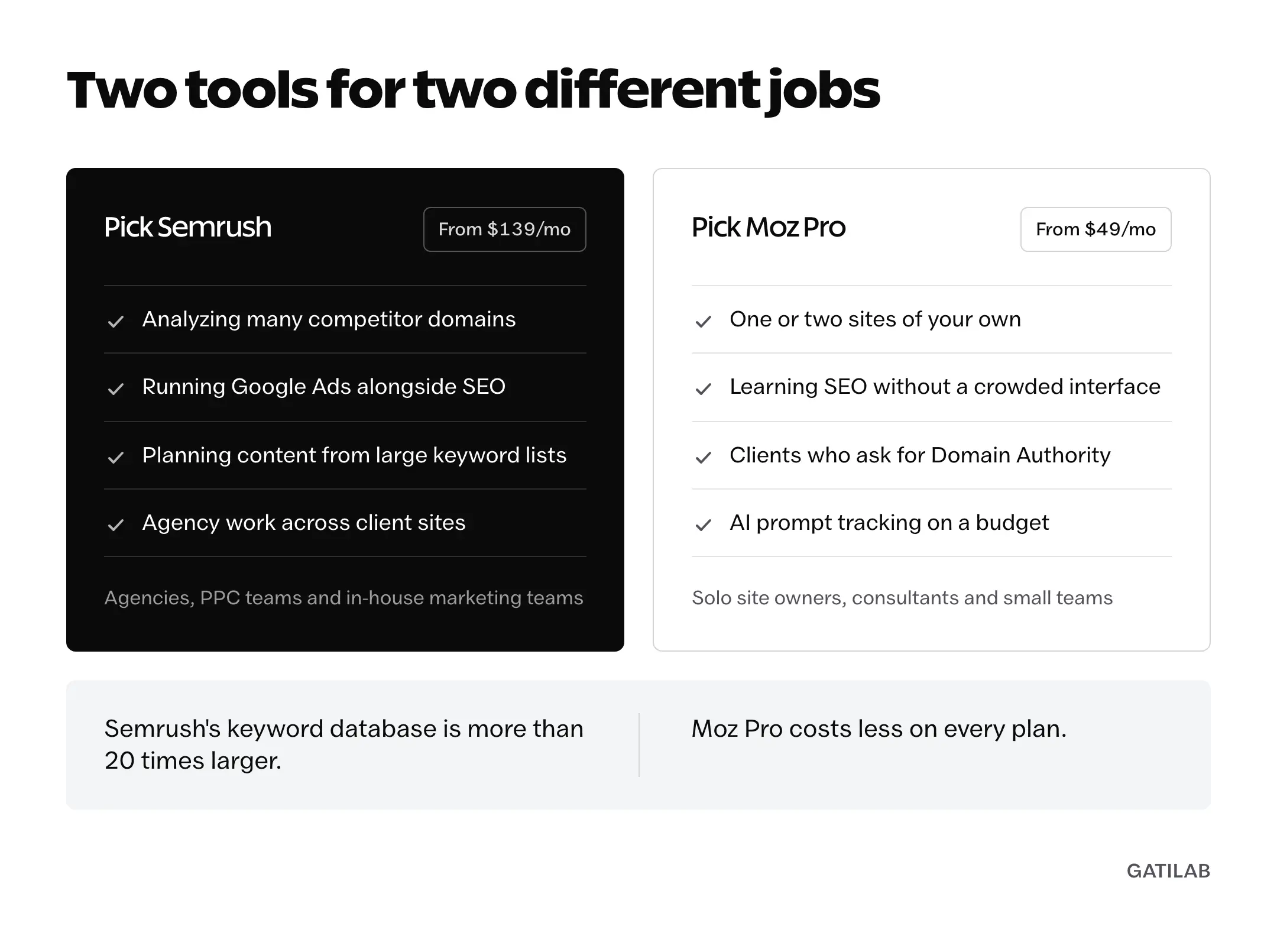
The right pick depends on how much of your work happens outside your own site:
- Semrush fits agencies, in-house teams and anyone analyzing many competitor domains, running Google Ads or building content plans from large keyword lists.
- Moz Pro fits solo site owners, small in-house teams and consultants whose clients already know Domain Authority. Its $49 and $99 plans cover most of what a single site needs.
- If backlinks are your main job, look at Ahrefs as well, since link and content research sit at the center of its workflow.
Moz Pro vs Semrush at a Glance
The table compares both tools on the same fields. Prices are monthly list prices in USD, and data figures are what each vendor publishes about itself.
| Factor | Moz Pro | Semrush |
|---|---|---|
| Lowest paid plan | Starter, $49 | SEO, $139 |
| Full SEO suite from | Standard, $99 | SEO, $139 |
| Free option | MozBar, free tools and a 7-day Medium trial | Free plan, 10 reports a day |
| Keyword data (vendor figure) | 1.25B+ keyword suggestions | 28.8B keywords, 142 databases |
| Backlink data (vendor figure) | 45.5T links | 43T+ backlinks |
| Entry-suite tracking | 300 keywords, 3 sites | 500 keywords daily, 5 websites |
| AI visibility | 150 to 600 prompts from Standard | 50 to 200 prompts from Starter |
| PPC research | Not included | Advertising toolkit, sold separately |
| API access | Separate Moz API | Advanced only, MCP from Starter |
| Rank tracking updates | Weekly | Daily |
| JavaScript rendering in audits | No | From Pro+ |
| Signature metric | Domain Authority | Authority Score |
| Annual saving | 20% | Up to 17% |
| Best for | Single sites, beginners, DA reporting | Agencies, PPC teams, competitor research |
Moz Pro vs Semrush Pricing
Moz Pro is cheaper at every level, and the gap is biggest at the bottom:
| Tool | Plan | Monthly | What You Get |
|---|---|---|---|
| Moz Pro | Starter | $49 | One website, 50 tracked keywords |
| Moz Pro | Standard | $99 | 3 sites, 300 tracked keywords, 400K pages crawled a month |
| Moz Pro | Medium | $179 | 10 sites, 1,500 tracked keywords, 2M pages crawled a month |
| Moz Pro | Large | $299 | 25 sites, 3,000 tracked keywords, 5M pages crawled a month |
| Semrush | SEO | $139 | 5 websites, 500 tracked keywords |
| Semrush | Starter | $199 | 5 websites, 500 keywords, 50 AI prompts |
| Semrush | Pro+ | $299 | 15 websites, 1,500 keywords, 100 AI prompts |
| Semrush | Advanced | $549 | 40 websites, 5,000 keywords, 200 AI prompts, API |
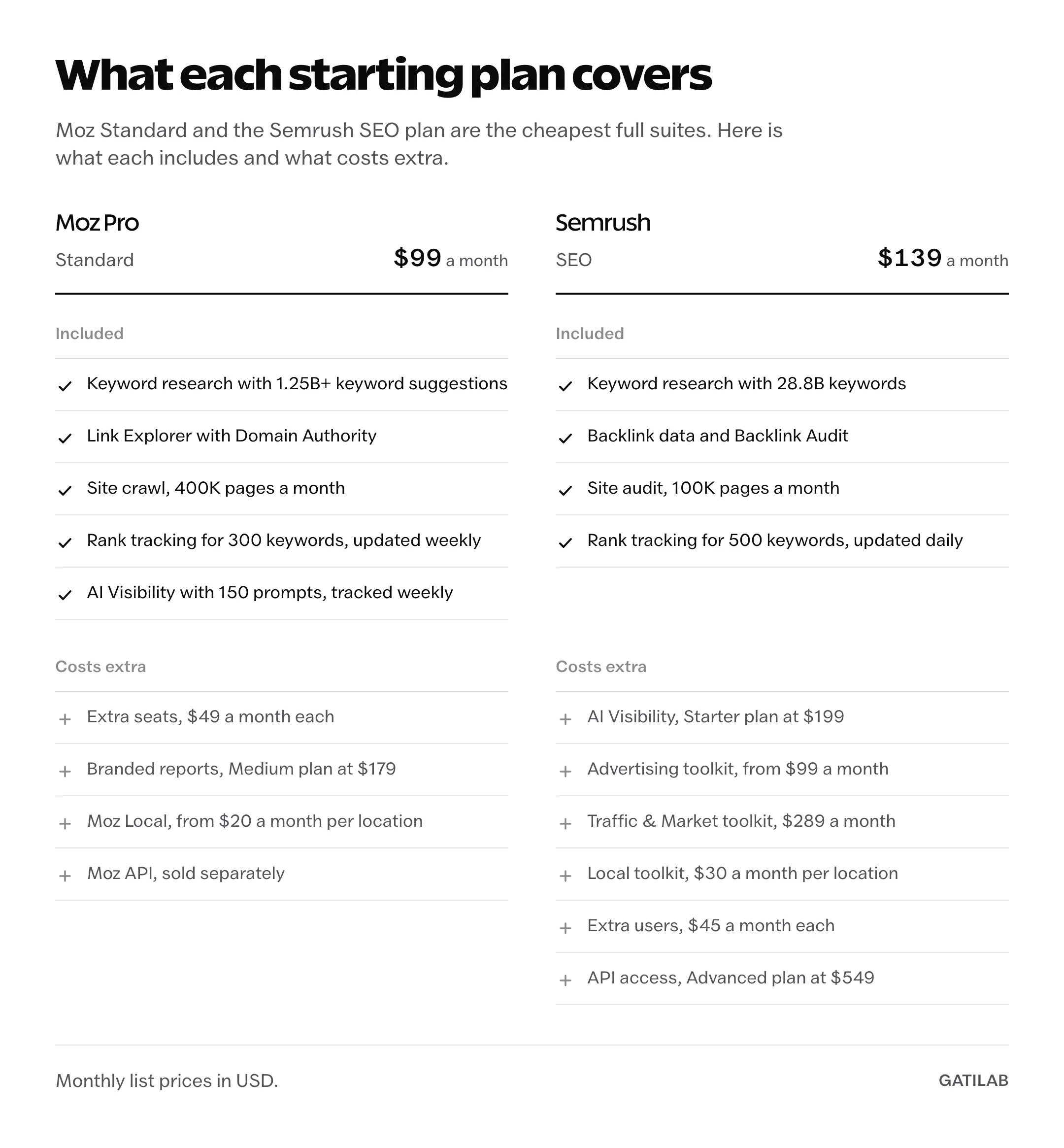
The cheapest way in is Moz’s Starter plan at $49 a month, which covers one website, or Semrush’s free plan with 10 reports a day. The cheapest full suite is Moz Standard at $99, which tracks 300 keywords across 3 sites and crawls 400,000 pages a month. The Semrush SEO plan at $139 tracks 500 keywords daily across 5 websites.
Semrush’s extra toolkits change the math for some teams. The Advertising toolkit starts at $99 a month, Traffic & Market costs $289 and Local costs $30 a month per location. Moz keeps its extras separate too: Moz Local starts at $20 a month per location and the Moz API is its own product.
Seats differ as well. Moz includes 1 seat on Starter and Standard, 2 on Medium and 3 on Large, with extra seats at $49 a month. Every Semrush plan includes 1 user, and extra users cost $45 a month on the SEO and Starter plans. Semrush offers a 7-day free trial on its SEO, Starter and Pro+ plans, and Moz offers a 7-day trial of its Medium plan with a card on file.
Annual billing saves 20% on Moz and up to 17% on Semrush.
Keyword Research
Keyword data is where Semrush pulls ahead most clearly. Semrush reports about 28.8 billion keywords across 142 geographic databases. Moz lists 1.25 billion keyword suggestions across 170 Google search engines in Keyword Explorer. Both figures count keywords, so the comparison is fair, and the gap is more than 20 to 1.
That gap matters most for long-tail research and markets outside the main English-speaking countries, where a smaller database is more likely to return nothing at all. For US head terms, both tools have the data you need, and Moz Keyword Explorer adds a Priority score that blends volume, difficulty and click-through rate into one number, which is handy when you’re sorting a short list.
Semrush’s Keyword Magic Tool labels the search intent of every keyword and groups large lists by topic, which helps when you’re building clusters from thousands of terms. Keyword difficulty scores don’t carry over between the two, because each tool uses its own formula. It is wise to pick one tool’s scale and stay with it.
Backlink Data
Both tools publish huge link figures, in different units, so neither total settles the question:
- Semrush reports more than 43 trillion backlinks and says its backlink data refreshes every 15 minutes.
- Moz says Link Explorer covers 45.5 trillion links across 8.7 trillion URLs and 1 billion domains.
Moz’s link data carries Domain Authority, Page Authority and Spam Score, and DA is still the number many publishers and clients ask for in outreach. Semrush uses Authority Score, a different calculation, so the two shouldn’t be compared directly. For cleaning up a link profile, Semrush’s Backlink Audit gives each link a Toxicity Score from 0 to 100 and sorts links into toxic, potentially toxic and non-toxic, which makes a disavow list easier to build.
For your own site, the free Links report in Google Search Console is worth checking alongside either tool, because it lists links Google itself has recorded.
Site Audits
Both tools crawl your site and flag technical issues, and the allowances decide how much of a large site each audit covers:
- Moz crawls 400,000 pages a month on Standard, 2 million on Medium and 5 million on Large.
- Semrush audits 100,000 pages a month on its SEO and Starter plans, 300,000 on Pro+ and 1 million on Advanced.
Semrush can render JavaScript in its audits from the Pro+ plan. Moz can’t, and its help pages say its crawler has trouble parsing JavaScript, so a site built on React or Next.js will look emptier to Moz than it does to Google. Moz also crawls each campaign once a week.
Moz’s crawl allowance is generous for the price, which makes Medium at $179 a sensible pick for consultants who audit many small sites. Before fixing anything an audit flags as serious, it is a good idea to confirm it in Search Console’s URL Inspection tool.
Rank Tracking
Both tools track rankings by location and device, and the plan decides how many keywords you can follow:
- Moz updates rankings weekly and tracks 50 keywords on Starter, 300 on Standard, 1,500 on Medium and 3,000 on Large.
- Semrush tracks 500 keywords daily on its SEO and Starter plans, 1,500 on Pro+ and 5,000 on Advanced.
The bigger difference is frequency. Semrush updates rankings daily on every plan and Moz updates weekly, so a drop shows up in Semrush the next day and in Moz up to a week later. For client reporting or campaigns where timing matters, that alone can decide the choice.
Rank accuracy itself depends mostly on the settings, the location, device and search engine you choose, and on how often the tool checks. A tool set to “United States, desktop” will often disagree with what you see on your phone, and neither number is wrong.
AI Visibility Tracking
Both tools now track how a brand shows up in AI answers, and both include it in the plan price:
- Moz includes AI Visibility dashboards with weekly prompt tracking from its Standard plan: 150 prompts on Standard, 300 on Medium and 600 on Large, across GPT, Gemini, Google AI Mode and Perplexity.
- Semrush builds AI Visibility into its SEO + AI Search plans, with 50 tracked prompts on Starter, 100 on Pro+ and 200 on Advanced, covering ChatGPT, Google AI Mode, Gemini, Perplexity and SearchGPT.
Moz includes more prompts for less money here. My roundup of AI visibility tools covers dedicated options if AI search is the main reason you’re shopping.
Ease of Use
Moz Pro is the easier tool to learn. It does fewer things, so someone new to SEO can focus on the few numbers that matter without a crowded menu in the way.
Semrush covers far more ground, including paid search and market research, so its menus take longer to learn even though each tool inside is straightforward. That breadth is the reason to buy it, and also the reason a solo site owner can end up paying for a lot of screens they never open.
Reporting, Local SEO and API
These extras often decide the choice for agencies:
- Reporting: Semrush sells report add-ons, and its Pro Report add-on at $20 a month includes white-labeling. Moz includes branded reports with your logo on its Medium and Large plans.
- Local SEO: Moz Local is a separate product from $20 a month per location. Semrush’s Local toolkit is also sold separately, at $30 a month per location.
- API: Moz sells the Moz API separately from Moz Pro. Semrush includes API access only on the Advanced plan, while MCP access starts on Starter.
Which Should You Choose?
Find the row that matches your work. The second column is the plan I’d start with.
| Your Situation | Start With | Why |
|---|---|---|
| One site, new to SEO | Moz Pro Starter or Standard | Lowest price and the simplest interface |
| Consultant auditing many small sites | Moz Pro Medium | 2M pages crawled a month for $179 |
| Clients who report Domain Authority | Moz Pro Standard | DA comes from Moz, so the numbers match what clients see |
| Agency with many client domains | Semrush Pro+ | 15 websites, 1,500 keywords and deeper competitor research |
| Team running Google Ads and SEO | Semrush plus the Advertising toolkit | Paid search research beside SEO |
| Tracking AI answers on a budget | Moz Pro Standard | 150 weekly prompts included for $99 |
| Reporting rankings to clients daily | Semrush SEO or Pro+ | Daily rank updates on every plan |
What About Ahrefs?
Both Moz Pro and Semrush compete with Ahrefs, which is the stronger choice when backlink research and content research fill most of your week. For a head-to-head on that pair, see my Moz Pro vs Ahrefs comparison, and Semrush vs Ahrefs vs Moz puts all three side by side.
My Recommendation
For a single site or someone in their first year of SEO, I would start with Moz Pro. The $99 Standard plan covers keyword research, rank tracking, site crawls and AI visibility, the $49 Starter plan covers the basics for one site without AI tracking, and the simpler interface keeps the focus on the work rather than the tool.
For an agency, or any team that runs paid search next to SEO, I would pick Semrush. The keyword database is far larger and the competitor research goes deeper, and those two things are what client work leans on every week. Price the toolkits you’ll use before you commit, because the $139 SEO plan is only the starting point.
It is easy to overbuy SEO tools. A smaller plan you open every day is worth more than a bigger one you log into once a month.
FAQs on Moz Pro vs Semrush
Is Moz Pro better than Semrush?
Moz Pro is better for single sites, beginners and anyone who reports Domain Authority, and it costs less. Semrush is better for agencies, PPC teams and deep competitor research, mainly because its keyword database is more than 20 times larger.
Which is cheaper, Moz Pro or Semrush?
Moz Pro. Its plans start at $49 a month for one website and $99 for Standard, while Semrush starts at $139 for the SEO plan and sells its paid search, traffic and local tools separately.
Does Semrush have more keyword data than Moz?
Yes. Semrush reports about 28.8 billion keywords across 142 databases, against 1.25 billion keyword suggestions in Moz Keyword Explorer. The difference shows up most in long-tail research and in markets outside the main English-speaking countries.
Is Moz Domain Authority accurate?
Domain Authority is Moz’s own score, so Moz is the only accurate source for it. It predicts how well a site is likely to rank based on link data. It isn’t a Google metric, so it is best used to compare sites with each other inside Moz.
Does Semrush include PPC research?
Semrush offers deep paid search research, including competitor ad copy, paid keywords and ad history, through its Advertising toolkit, which is sold separately from the SEO plans. Moz Pro doesn’t focus on paid search.
Which is easier to learn, Moz Pro or Semrush?
Moz Pro. It does fewer things, so there is less to learn before the reports become useful. Semrush covers far more ground, so its menus take longer to learn.
Can I use Moz Pro and Semrush together?
You can, but it rarely pays off. The base cost is $238 a month for Moz Standard plus the Semrush SEO plan, and both cover keyword research, rank tracking and site audits. It makes sense mainly when you need Semrush’s competitor or paid search data and your clients also expect Domain Authority reports.
Tell Google you want more of this.
Add Gatilab as a preferred sourceOne tap, and this site shows up more often in your own Top Stories, AI Overviews and AI Mode. Remove it any time.