
Moz Pro vs Ahrefs: Data, Price, Which One Actually Wins in 2026
Ahrefs wins on backlink data depth, keyword index size, and site audits on JavaScript-heavy sites. Moz Pro wins on beginner UX, Domain Authority as a shared industry metric, and lower entry pricing. If you’re doing serious SEO work for clients or your own site, get Ahrefs. If you’re new to SEO and need gentler onboarding, start with Moz.
That’s the compressed answer. Below is the detailed breakdown across the seven factors that actually drive the decision: backlink index, keyword database, rank tracking, site audit, UI and workflow, pricing, and where each tool has real gaps.
Data points below come from each tool’s own published data pages and pricing pages, checked in October 2026.
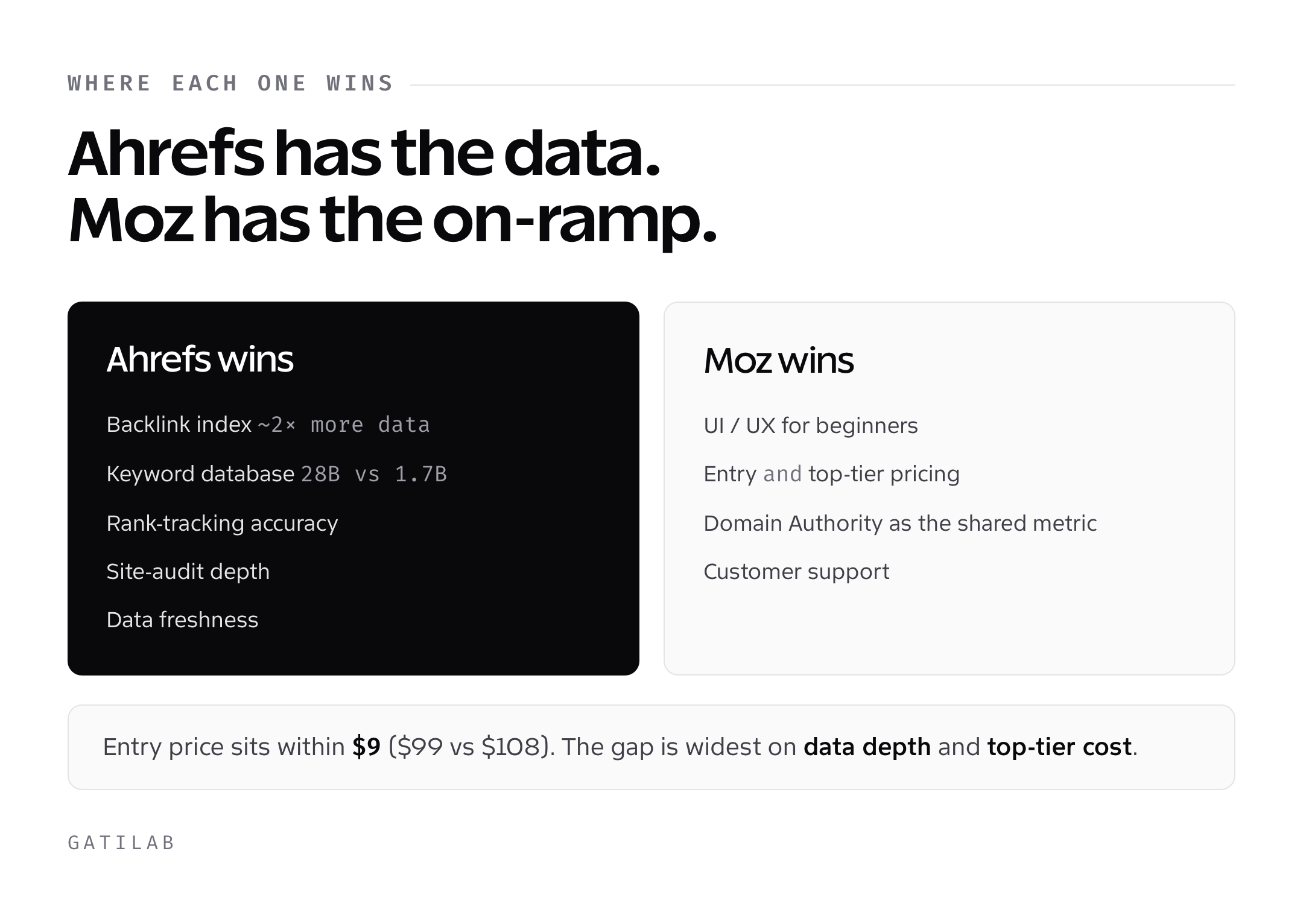
The short verdict
| Factor | Winner | Margin |
|---|---|---|
| Backlink index size | Ahrefs | Large (fresher live index, updated every 15-30 minutes) |
| Keyword database | Ahrefs | Large (Ahrefs 28.7B vs Moz 1.25B) |
| Rank tracking limits | Ahrefs | Small (750 vs 300 keywords on the entry suites) |
| Site audit depth | Ahrefs | Medium |
| UI/UX for beginners | Moz | Medium |
| Entry-level pricing | Moz | Small ($99 Moz Standard vs $129 Ahrefs Lite) |
| Higher-tier pricing | Moz | Significant |
| Data freshness | Ahrefs | Medium |
| Domain Authority as shared metric | Moz | Industry standard |
| Customer support | Moz | Small |
Backlink data: the single biggest gap
This is where the two tools diverge most.
Ahrefs backlink index (as of October 2026):
- 35 trillion external backlink records in its history
- About 5 million pages crawled every minute
- Updates every 15-30 minutes for newly discovered links
- Historical data back to 2013 (select domains)
Moz backlink index:
- Over 40 trillion links in Link Explorer (Moz’s own count, not directly comparable to Ahrefs’ live index)
- Crawl rate not publicly disclosed but significantly smaller than Ahrefs
- No published refresh interval for the live index
- Link data is less granular (no timestamp per discovery for most links)
When you need every link pointing at a site, index freshness decides what you see. Ahrefs refreshes its live index every 15-30 minutes, so newly discovered links can show up sooner than they do in Moz, which doesn’t publish a comparable refresh interval. For outreach, disavow cleanup, and competitor analysis, that gap matters.
Moz’s advantage: Domain Authority. Domain Authority is Moz’s own metric, and it’s become the shared industry reference number. When a PR agency says “that site has a DA of 72,” they mean Moz. Ahrefs has Domain Rating, which is similar but not interchangeable. If your clients or partners reference DA, you need Moz in your workflow even if Ahrefs is your primary tool.
Keyword research depth
Ahrefs’ keyword database is about 23 times larger than Moz’s.
Ahrefs: 28.7 billion keywords across 217 locations, updated monthly with new query discovery.
Moz: 1.25 billion+ keywords primarily focused on major English-speaking markets plus top EU countries.
The practical difference:
- Long-tail keywords: the larger index returns far more suggestions per seed term
- International keywords: Ahrefs covers markets Moz doesn’t (India, Brazil, Indonesia at depth)
- Question keywords: Both tools have decent PAA scraping, but Ahrefs has better phrase match volume
- Zero-search-volume keywords: Ahrefs indexes them; Moz filters them out by default
For English-speaking US-focused content, Moz’s keyword coverage is adequate for most use cases. For international SEO, e-commerce with long-tail product queries, or content programs targeting zero-volume topical authority keywords, Moz falls short.
Data accuracy: On identical seed terms, Ahrefs and Moz often report different search volumes. Neither is “correct”: both estimate based on clickstream and search data. If you run Google Ads, check both against Keyword Planner data from your own campaigns before you trust either.
Rank tracking
Both tools update tracked rankings weekly. The differences are in features and limits.
Ahrefs Rank Tracker:
- Updates tracked keywords weekly on every plan
- SERP feature tracking (featured snippets, PAA, AI Overviews, local pack)
- Geographic granularity: country, state, city, zip for US; country and region for most others
- Competitor tracking built-in (adds competitor domains to every keyword)
- SERP history back 12 months on higher plans
Moz Rank Tracking:
- Updates tracked keywords weekly
- SERP feature tracking exists but less granular than Ahrefs
- Geographic: country and city only; no state or zip granularity
- Competitor tracking requires separate campaign setup
- SERP history 6 months on most plans
Neither tool offers daily rank updates, so if daily movement matters, Semrush is the one to look at. For weekly or monthly reporting, both trackers do the job, and Ahrefs tracks more keywords on its entry plan.
One Moz feature that actually beats Ahrefs: Tag-based reporting. Moz lets you tag keywords and filter by tag in reports. Ahrefs doesn’t. For agency workflows where you track different keyword sets for different pages or topic clusters, Moz’s tagging is genuinely useful.
Site audit
Both tools crawl your site and flag technical SEO issues. Depth differs.
Ahrefs Site Audit:
- 100,000 to 1.5 million crawl credits a month, depending on plan
- Scans for 170+ SEO issues across technical, on-page, content, and performance
- JavaScript rendering option (crawls sites as Googlebot would)
- Core Web Vitals data pulled in (CrUX)
- Prioritized issue list with impact scoring
Moz Site Audit (Moz Pro):
- 400,000 to 5 million pages crawled a month, depending on plan
- No JavaScript rendering (static HTML crawl only)
- Core Web Vitals tracked separately, not integrated into audit
- Less sophisticated prioritization
For modern JavaScript-heavy sites (React, Vue, Next.js), Ahrefs’ JS rendering option is essential. Moz’s static crawl misses content and links on SPA-style sites, which can flag false errors or miss real issues.
For traditional WordPress/HTML sites, Moz’s audit catches the major issues (broken links, missing meta, duplicate content, slow pages). It’s just less thorough.
UI and workflow
This is where Moz actually wins for some users.
Moz Pro UI:
- Simpler navigation (fewer menu options)
- Dashboards designed for non-expert users
- Clear “next action” prompts throughout
- Integrated education (links to Moz Academy directly from data views)
- Slower to load complex queries but less overwhelming
Ahrefs UI:
- Dense with data (every screen packs in more information)
- Assumes the user knows what they’re looking for
- Faster query response times on large datasets
- Less guidance; more power
- Steep learning curve for new SEOs
If you’re new to SEO, Moz is gentler. The onboarding walks you through what each metric means. Ahrefs assumes you know the difference between Domain Rating, URL Rating, and Ahrefs Rank, and doesn’t explain unless you hunt for help docs.
If you’re experienced and doing heavy analysis, Ahrefs’ density is a feature, not a bug. You can pull 5 data views on one screen without clicking through dashboards.
Pricing in 2026
Price is where Moz looks attractive, and the gap widens as you scale. Moz Pro starts at $49/month for Starter and $99/month for Standard; Ahrefs starts at $29/month for Starter and $129/month for Lite.
| Tier | Moz Pro | Ahrefs | Winner |
|---|---|---|---|
| Core | Standard (300 tracked keywords, 1 user) | Lite (750 tracked keywords, 1 user) | Moz on price, Ahrefs on keywords |
| Mid | Medium (1,500 keywords, 2 users) | Standard (2,000 keywords, 1 user) | Moz (cheaper, extra seat) |
| Upper | Large (3,000 keywords, 3 users) | Advanced (5,000 keywords, 1 user) | Depends on seats vs keywords |
| Enterprise | Custom quote | Enterprise, annual commitment | Ask both |
| Extra users | 1 to 3 included by plan | Paid add-on per user | Moz |
| API access | Separate Moz API plans | API and MCP access from Lite up | Ahrefs |
Annual billing: Moz saves 20% and Ahrefs up to 17%. Free trial: Moz offers a 7-day trial of its Medium plan; Ahrefs doesn’t run trials, but Ahrefs Free gives site owners limited Site Explorer and Site Audit access.
The real pricing gap: seats. Moz Large is $299/month with 3 users included; Ahrefs Advanced is $449/month with 1 user, and every extra Ahrefs seat is a paid add-on. For agencies with several team members, Moz is the cheaper option. But you pay with smaller data depth and fewer tracked keywords per plan.
Where each tool has real gaps
Ahrefs gaps:
- Limited on-page content scoring (Surfer, Clearscope do this better)
- No white-label reporting built-in (agencies need third-party tools)
- Local SEO is limited to GBP Monitor, still in beta (Yext or BrightLocal go deeper)
Moz Pro gaps:
- Backlink data is noticeably smaller and slower to update
- No API for power users on mid-tier plans
- Site audit lacks JS rendering
- International keyword coverage is thin outside US/UK/CA/AU
- No search volume for zero-volume queries (filters them out)
Neither tool is complete. Both work best as part of a multi-tool stack.
Who should pick what
Pick Ahrefs if:
- You’re an agency serving 10+ active clients
- You do international SEO outside English markets
- You rely on backlink data for outreach or disavow
- You work with JavaScript-heavy sites
- Your budget supports $129+/month and you want maximum data
Pick Moz Pro if:
- You’re new to SEO and need gentler onboarding
- Domain Authority is a metric your clients track
- You need heavy per-seat access for a team
- You work primarily on US-focused English content
- You want white-label-friendly monthly reports at a lower cost
- Your budget is $99-$179/month
Pick both if:
- You’re running an in-house SEO team at a large site
- You need Moz for DA benchmarking and agency client reporting
- You need Ahrefs for backlink and keyword depth
- Combined cost of roughly $230-$430/month is acceptable
A common agency setup runs both: Ahrefs for analysis, Moz for client-facing DA reports. Neither tool is a complete substitute for the other.
What both tools don’t do well
Local SEO. Neither Moz Pro nor Ahrefs handles multi-location Google Business Profile tracking, citation management, or local keyword research at a professional level. Use BrightLocal or Yext for local work.
Content optimization. Ahrefs’ AI Content Helper and Moz’s AI Content Briefs are newer additions with tight quotas on lower plans. Surfer, Clearscope, Frase, and MarketMuse still go deeper. You’ll want one of those in addition.
AI SEO / GEO. Both now track AI visibility: Ahrefs through Brand Radar and tracked AI prompts, Moz through AI Visibility Dashboards that follow GPT, Gemini, Google AI Mode, and Perplexity. Prompt quotas are small on the entry plans (5 tracked prompts on Ahrefs Lite, 150 on Moz Standard), so heavy GEO work still means a higher tier or a dedicated tool.
Technical SEO at scale. For enterprise sites with 1M+ pages, both tools hit crawl limits and workflow issues. Screaming Frog (desktop) or Botify (enterprise SaaS) are better for technical audits at scale.
My recommendation
If you’re picking one tool and you’re not a complete beginner: Ahrefs. The data depth closes enough gaps to justify the extra cost for anyone doing real SEO work.
If you’re a beginner or solo site owner on a tight budget: Moz Pro Starter ($49/month) or Standard ($99/month) covers the core workflow for one site.
If you’re running an agency: Both. Ahrefs for the work, Moz for DA benchmarks and reporting. Total cost of roughly $230-$430/month is about one client’s monthly fee.
One tool I haven’t mentioned: Semrush. For a three-way comparison of the biggest SEO platforms, see Semrush vs Ahrefs vs Moz. Semrush sits between Moz and Ahrefs on most factors and wins on a few unique ones (site audit, keyword competition, advertising research).
Is Ahrefs or Moz more accurate for backlink data?
Ahrefs refreshes its live backlink index every 15-30 minutes and crawls about 5 million pages a minute, so new links show up sooner. Moz reports over 40 trillion links in Link Explorer but updates less frequently. For outreach, disavow audits, and competitor analysis, Ahrefs is the more reliable source.
Does Moz have Domain Authority and Ahrefs have Domain Rating?
Yes. Domain Authority (DA) is Moz’s proprietary metric, scored 0-100. Domain Rating (DR) is Ahrefs’ equivalent, also scored 0-100. They measure similar things (link-based site authority) but aren’t interchangeable. DA is the shared industry reference metric, especially in PR and guest posting.
Which tool has more keywords?
Ahrefs’ keyword database has 28.7 billion keywords across 217 locations. Moz’s database has 1.25 billion+ keywords focused on major English-speaking markets and top EU countries. Ahrefs wins significantly on international, long-tail, and question-based keyword coverage.
Is Moz Pro cheaper than Ahrefs?
Yes, at every matching tier. Moz Standard is $99/month against $129/month for Ahrefs Lite, and Moz Large is $299/month against $449/month for Ahrefs Advanced. Ahrefs includes more tracked keywords per plan, while Moz includes more user seats.
Which tool is better for beginners?
Moz Pro. Its UI is gentler, onboarding is clearer, and integrated education helps new SEOs understand each metric. Ahrefs assumes the user knows SEO terminology and has a steeper learning curve. Beginners often start with Moz, then upgrade to Ahrefs once their workflow is mature.
Can I use both Moz and Ahrefs together?
Yes, and many agencies do. Common workflow: Ahrefs for analysis (backlinks, keywords, rank tracking), Moz for client-facing reports and Domain Authority benchmarking. Running both costs roughly $230-$430/month at the core and mid tiers.
Does Ahrefs or Moz have better site audit?
Ahrefs. It scans for 170+ SEO issues, supports JavaScript rendering, and integrates Core Web Vitals directly into the audit. Moz’s audit crawls static HTML only. For modern JS-heavy sites, Ahrefs’ audit is essential; for traditional HTML sites, Moz’s audit is adequate.
Which tool has a longer free trial?
Moz Pro offers a 7-day free trial of its Medium plan. Ahrefs doesn’t run free trials; site owners can use Ahrefs Free for limited Site Explorer and Site Audit access on their own site. If you want to test a full paid feature set before committing, Moz is the easier tool to trial.
Next steps
If you haven’t committed yet:
- Start Moz Pro’s 7-day free trial (Medium plan). Use it on real work, not a demo project.
- Use Ahrefs Free on your own site, or pay for one month of Lite. Hit it hard on the specific tasks you do most (keyword research, backlink audit, rank tracking).
- Compare results on the same 10 queries, 3 client domains, 5 competitor sites.
- Pick the tool whose answers you trust more for your workflow.
If you’re an agency and can afford both, skip the A/B test and subscribe to both. The decision isn’t which tool is better in the abstract. It’s which tool you’ll actually use enough to justify the subscription.
The SEO tool market in 2026 is mature. Moz Pro and Ahrefs are both production-grade. Neither will ruin your SEO. The question is margin. Ahrefs gives you more margin on data depth. Moz gives you more margin on budget and beginner ergonomics. Pick the margin that matters for your work.
Tell Google you want more of this.
Add Gatilab as a preferred sourceOne tap, and this site shows up more often in your own Top Stories, AI Overviews and AI Mode. Remove it any time.