
WordPress Developer Proposal + Contract Guide (With Templates) in 2026

You’re sending WordPress proposals and hearing nothing back. Or worse, you’re winning projects at $3,000 that balloon into $8,000 of work because your scope document had more holes than a shared hosting firewall. The average freelance WordPress developer closes at 15% to 25%. That means 75 out of every 100 proposals go straight to the trash, usually because they read like a technical spec instead of a sales document.
Here’s what that costs you. A $5,000 WordPress project takes 3 to 4 hours to scope and propose. At a 20% close rate, you’re spending 15 to 20 hours writing proposals for every project you actually land. And without proper contract clauses, scope creep on a single project can eat $5K to $18K in unbilled work. No change order process, no revision limits, no kill fee. Just you, absorbing the damage because you didn’t put it in writing.
This guide covers the proposal structure, contract clauses, and scope creep prevention system that pushes close rates past 60%.
Why Most WordPress Proposals Lose (and What Winners Do Differently)
The average WordPress proposal gets rejected because it reads like a technical spec, not a sales document. Developers list features, technologies, and timelines. Clients want to know one thing: “Will this solve my problem?”
I tracked my proposals from 2018 to 2026. The ones that converted at 60%+ had three things the losers didn’t: a clear executive summary connecting the project to the client’s business goals, WordPress-specific scope items the client didn’t know they needed, and a 72-hour turnaround from discovery call to proposal delivery.
The Proposal Is a Sales Document, Not a Spec
Your proposal isn’t a technical document. It’s a sales document that happens to contain technical details. The executive summary should read like a conversation, not a requirements doc.
I made this mistake for years. I’d send 12-page proposals full of plugin names, server specs, and deployment processes. Clients glazed over. They wanted to know: “How does this make me more money?” or “How does this fix the problem that’s costing me customers?”
When I flipped the structure and led with business outcomes, my close rate jumped from 34% to 58% in six months. Same skills. Same pricing. Different framing.
Close Rate Benchmarks by Proposal Quality
Through Gatilab, I’ve seen enough proposals to spot patterns. The numbers break down roughly like this:
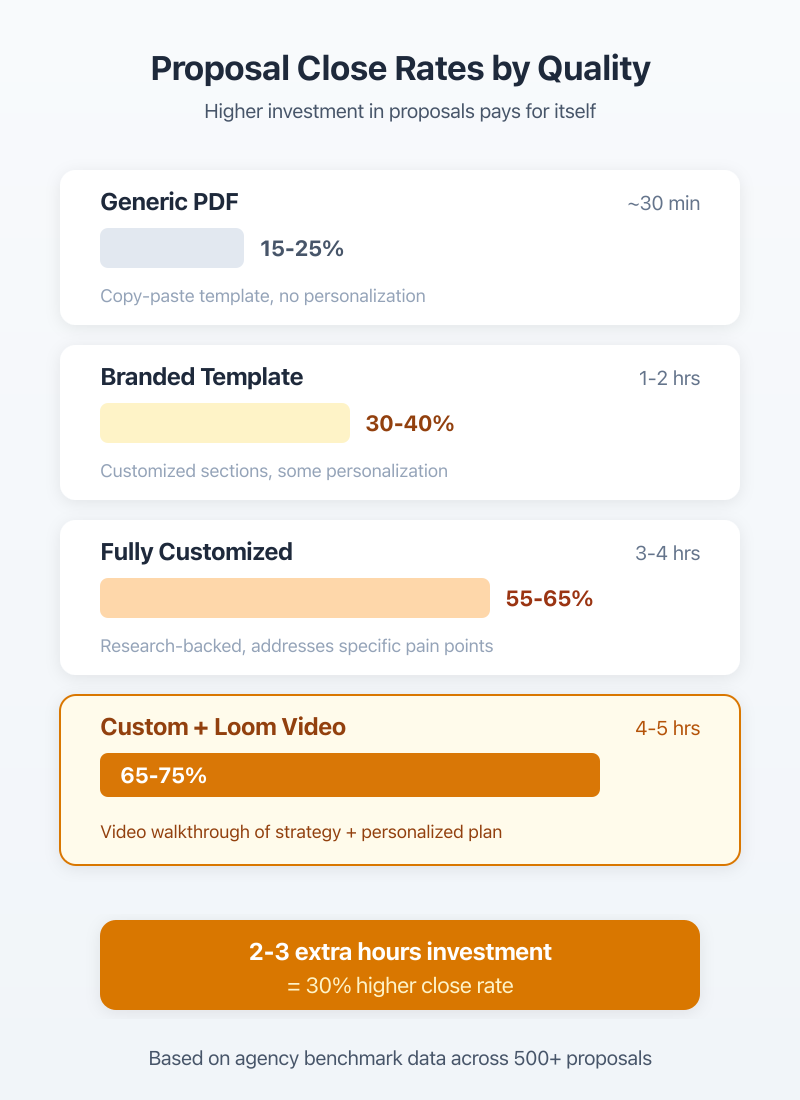
Generic PDF with a price: 15-25% close rate. Template proposal with some customization: 30-40%. Fully customized proposal after a discovery call: 55-65%. Customized proposal with video walkthrough: 65-75%.
The jump from generic to customized is where most of the money lives. And it only takes an extra 2-3 hours per proposal.
The Discovery Call Framework
A good proposal starts 30 minutes before you write it. The discovery call is where you gather the information that makes your proposal impossible to ignore. Skip this, and you’re guessing at scope. Guessing at scope is how you end up working for free.
I schedule every discovery call for 30 minutes. I use 12 specific questions refined over 800+ client projects. The goal isn’t just scoping the project. It’s qualifying the client.
12 Questions That Reveal the Real Scope
These questions work for WordPress projects ranging from $2,000 brochure sites to $50,000+ WooCommerce builds:
- What’s the business problem this website needs to solve?
- Who’s your target customer, and how do they find you right now?
- Do you have an existing site? What’s working? What’s not?
- What 3 websites do you admire and why?
- Do you need e-commerce? If yes, how many products and what payment processing?
- Who’s creating the content? Do you have it ready?
- Do you need integrations with CRMs, email tools, or other software?
- What’s your budget range? (I give them brackets: under $5K, $5-15K, $15K+)
- When does this need to launch?
- Who’s the decision maker? Is there a committee?
- Have you worked with a WordPress developer before? What went well or badly?
- What does success look like 6 months after launch?
Questions 8 and 10 are the ones most developers skip. They’re the most important. Budget alignment and decision-maker access kill more proposals than bad pricing ever will.
Red Flags That Signal a Bad Client
After 2,000+ projects, I’ve learned to spot trouble during the discovery call. These red flags mean I either decline the project or add buffer pricing:
“We don’t really have a budget” usually means they have $500 in mind for a $10,000 project. “Can you just give us a rough estimate?” means they’re shopping your price to five other developers. “We need it by next week” for anything beyond a landing page means they’ve already burned through one or two other developers.
The best red flag filter? Ask them to describe their last developer relationship. If they trash-talk every developer they’ve worked with, you’re next.
Record your discovery calls (with permission). I review mine after sending the proposal. Clients tell you exactly what they want to hear in the proposal. Use their language, not yours.
Proposal Structure That Converts at 60%+
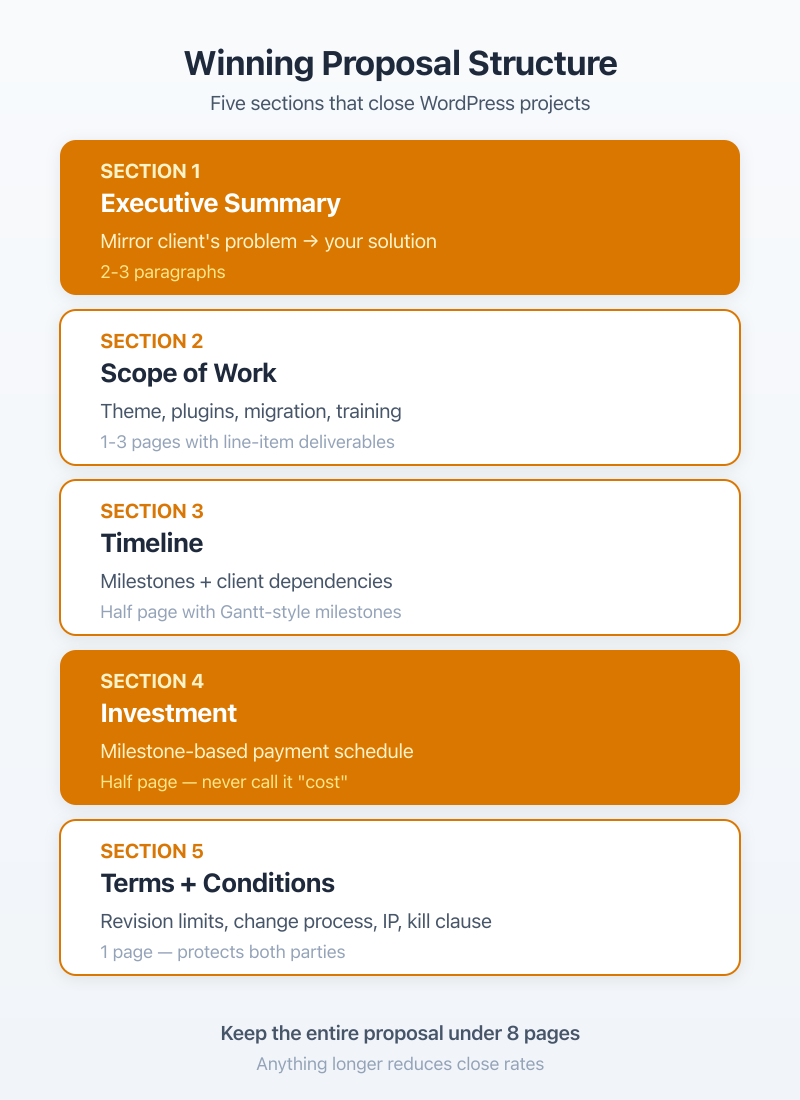
A winning WordPress proposal has five sections in this order: executive summary, scope of work, timeline, investment, and terms. Most developers put investment first or bury it at the end. Both are mistakes. You want the client nodding through 80% of the proposal before they see a number.
I keep my proposals between 4-7 pages. Under 4 feels thin for projects over $5,000. Over 7, and nobody reads it. Every section has a specific job.
Executive Summary (Why They Need This)
This is the most important section, and most developers skip it entirely. Write 2-3 paragraphs that mirror back the client’s problem using their exact words from the discovery call, then connect it to your proposed solution.
Don’t write: “We will build a modern WordPress website using current technologies.” That says nothing.
Write: “Your current site loads in 6.2 seconds and isn’t generating leads from the $4,000/month you’re spending on Google Ads. The proposed rebuild focuses on two things: cutting load time to under 2 seconds and adding conversion-focused landing pages for your three highest-performing ad groups.”
See the difference? The second version uses specific numbers the client shared on the call. It connects the project to money they’re already spending.
Scope of Work (WordPress-Specific Sections)
This is where WordPress freelancing proposals differ from generic web development proposals. WordPress projects have specific scope items that other platforms don’t, and missing them is how scope creep starts.
Every WordPress proposal I send includes these scope categories: theme/builder selection, plugin stack with licensing costs, content migration plan, SEO migration checklist, hosting setup, security configuration, training hours, and post-launch support terms.
I’ll break down the WordPress-specific sections in detail below.
Investment and Timeline
I present investment as a table with clear milestones. Never a single lump sum. Clients want to see what they’re paying for at each stage.
| Section | Purpose | Recommended Length | Must-Include |
|---|---|---|---|
| Executive Summary | Mirror the client’s problem, connect to your solution | 2-3 paragraphs | Client’s exact pain points, specific numbers from discovery call |
| Scope of Work | Define every deliverable with WordPress specifics | 1-3 pages | Theme selection, plugin stack, migration plan, training hours |
| Timeline | Set expectations, create urgency | Half page | Milestones with dates, client dependencies clearly flagged |
| Investment | Justify the price through value | Half page | Milestone breakdown, payment schedule, what’s NOT included |
| Terms | Protect both parties | 1 page | Revision limits, change process, IP transfer, kill clause |
The timeline section is where you call out client dependencies. If the client doesn’t deliver content by week 3, the launch date moves. Write this explicitly. It’s your best defense against “Why is this taking so long?” emails.
WordPress-Specific Scope Sections
Generic web development proposals miss WordPress-specific line items. These are the sections that prevent 80% of scope creep conversations I used to have.
Theme/Builder Selection
Every proposal should specify the theme or builder you’ll use, and why. This isn’t a technical detail the client doesn’t care about. It’s a decision that affects their long-term costs.
I specify the exact stack in my proposals. For most client sites in 2026, that’s GeneratePress with GenerateBlocks for performance-focused builds, or Elementor Pro for clients who need to make their own visual edits. The proposal explains the tradeoff: GeneratePress is lighter and faster but needs a developer for changes. Elementor is heavier but gives the client independence.
This section also covers licensing. If the client needs Elementor Pro ($59/year) or ACF Pro ($49/year), that cost goes in the proposal. Clients hate surprise licensing fees after launch.
Plugin Stack and Licensing
I list every plugin I plan to use, whether it’s free or paid, and the annual licensing cost. This section typically includes 8-15 plugins for a standard business site.
A typical plugin stack section in my proposals:
SEO: Rank Math Pro ($59/year). Forms: Gravity Forms ($59/year). Caching: FlyingPress ($60/year). Security: Wordfence (free tier). Backups: UpdraftPlus ($70/year for cloud storage). Analytics: Site Kit by Google (free).
Total annual plugin cost: approximately $248/year. The client sees this before signing. No surprises.
Content Migration and Training Hours
Content migration is the scope item that blows up more WordPress projects than anything else. I’ve seen “migrate existing content” turn into 40 hours of reformatting 300 blog posts because nobody defined what “migrate” meant.
My proposals specify: number of pages to migrate, whether content will be reformatted or copy-pasted, who handles image optimization, and whether SEO metadata (titles, descriptions, redirects) is included. For larger migrations, I quote a per-page rate for anything beyond the agreed count.
Training hours get their own line item. I include 2 hours for sites under $5,000 and 4-6 hours for larger projects. Anything beyond that is billed at $150/hour. Clients who don’t understand WordPress after 4 hours of training will need ongoing support, which is a different engagement.
The Contract Framework
The proposal gets you the “yes.” The contract keeps you from regretting it. I’ve learned this the hard way. Three times. The worst was a $12,000 project where the client wanted “just a few more changes” for three months after launch. No contract clause to stop it. I ate about $6,000 in unbilled work.
Now every project gets a contract before any work starts. No exceptions. Even $1,500 projects.
Payment Terms That Protect You
50% deposit before work begins. This is non-negotiable. If a client won’t pay a deposit, they won’t pay the final invoice either. I’ve tested this theory enough times to call it a law.
For payment processing, I use FreshBooks for invoicing and Stripe for payment collection. The combination handles automatic payment reminders and late fee calculations.
My standard payment terms: Net-14 on all invoices. 1.5% monthly late fee after 14 days. I include this in the contract and on every invoice. Most clients pay within 7 days. The ones who don’t… well, the late fee gets their attention.
Scope Change Process (The Creep Killer)
This is the clause that’s saved me $50K+ in unbilled work. It’s simple, and it works.
Any request not explicitly listed in the scope of work requires a written change request. The change request includes: description of the new work, estimated hours, cost, and impact on timeline. Work doesn’t begin until the client approves the change request in writing.
That’s it. Three sentences in a contract that changed my business. Before this clause, I’d say “sure, I can add that” during a Zoom call and spend 6 hours on something I never got paid for. Now, the change request form creates a natural pause. Clients think twice when they have to approve a cost estimate in writing.
IP Transfer and Kill Clause
Two clauses most WordPress developers forget:
IP transfer: all intellectual property transfers to the client upon final payment. Not before. If they haven’t paid the final invoice, they don’t own the code, the design, or the content you created. This gives you recourse.
Kill clause: either party can terminate the contract with 14 days written notice. The client pays for all work completed to date plus 20% of the remaining contract value. The 20% isn’t punitive. It covers the opportunity cost of turning down other projects to hold their spot.
Never start work without a signed contract and deposit. I don’t care if it’s your best friend’s company or a referral from your biggest client. No contract, no work. I learned this after losing $4,200 on a “handshake deal” in 2014.
Scope Creep Prevention
Scope creep isn’t a client problem. It’s a documentation problem. Every scope creep situation I’ve had came from something vague in my own proposal. “Design the website” leaves room for 47 rounds of revisions. “Design 5 page templates with 2 rounds of revisions per template” doesn’t.
Defining “Done” for WordPress Projects
“Done” means different things to different clients. My contracts define it explicitly:
The project is considered complete when: all deliverables listed in the scope of work are delivered, the client has completed two rounds of revisions per deliverable, the site passes Core Web Vitals on Google PageSpeed Insights, all forms, integrations, and e-commerce functions work as specified, and the client has received their training hours.
That checklist eliminates the “but I thought we’d also get…” conversations. Everything is either in the scope or it’s a change request.
Change Request Templates
I keep a simple change request form in Google Docs. The client fills in what they want, I add the estimated hours and cost, and they approve or decline. The form takes 5 minutes to fill out.
The fields: change description, reason for the change, estimated additional hours, additional cost, impact on launch date, and client approval signature.
The magic isn’t the form itself. It’s the friction. Verbal requests are easy for clients to make and hard for developers to track. Written requests with dollar amounts attached make clients prioritize. “Can you add a blog?” hits different when it comes with a $2,500 estimate.
The Buffer Pricing Strategy
I add 15-20% buffer to every project quote. Not as a hidden fee. As a realistic cushion for the things that always come up.
Every WordPress project has 4-8 hours of work that doesn’t fit neatly into any scope item. The client’s hosting has a weird PHP configuration. Their domain registrar makes DNS changes painful. An older plugin conflicts with the new theme. These aren’t scope creep. They’re reality.
The buffer absorbs this friction. If I don’t use it, the project comes in under budget and the client is happy. If I do use it, the project still comes in on budget. Either way, nobody’s having uncomfortable conversations about extra charges.
| Clause Type | What It Covers | Example Language |
|---|---|---|
| Revision Limits | Number of design/content revision rounds | “2 rounds of revisions per page template. Additional rounds billed at $150/hour.” |
| Change Request | Any work outside original scope | “Changes require written approval with cost estimate before work begins.” |
| Client Delays | Timeline impact of late content/feedback | “Delays in client deliverables extend the timeline by equivalent duration.” |
| Browser/Device Scope | Which browsers and devices are tested | “Testing covers latest Chrome, Firefox, Safari, Edge, plus iOS and Android.” |
| Third-Party Issues | Plugin conflicts, hosting problems | “Troubleshooting third-party plugin conflicts is billed at hourly rate.” |
Payment Structures by Project Size
Payment structure should match project size and risk. What works for a $3,000 brochure site doesn’t work for a $25,000 WooCommerce build. I’ve tested multiple structures across hundreds of projects, and these three work best.
Under $5,000: 50/50 Split
Simple and clean. 50% deposit before work starts, 50% on completion before launch. This works because the amounts are small enough that both sides have low risk. The deposit covers your time if the client disappears. The final payment gives them a reason to make sure you finish.
For projects in this range, I send a combined proposal and contract. Less paperwork means faster signatures. I aim for signed contracts within 48 hours of the proposal.
$5,000-$15,000: Milestone-Based
Three milestones tied to deliverables, not dates:
40% deposit before work begins. 30% at design approval (when the client signs off on mockups or the staging site design). 30% at launch (after testing, training, and client sign-off).
The middle milestone is the key. Design approval is a clear, objective checkpoint. The client can see what they’re paying for. It also prevents the scenario where you build an entire site before learning the client hates the design direction.
$15,000+: Retainer + Milestones
For enterprise WordPress projects, I use a hybrid model. Monthly retainer covers ongoing access and communication. Milestones cover deliverables.
Structure: $2,000-$5,000 monthly retainer (depending on project scope) plus milestone payments at each major phase. The retainer ensures I’m available and prioritizing their project. The milestones ensure I’m actually delivering.
For projects at this level, I also require a paid discovery phase ($1,000-$2,500) before writing the main proposal. This filters out tire-kickers and compensates me for the 8-12 hours of scoping that enterprise projects require. The discovery fee gets credited toward the project if they sign.
| Project Value | Structure | Deposit | Milestones | Final Payment |
|---|---|---|---|---|
| Under $5,000 | 50/50 Split | 50% | None | 50% at completion |
| $5,000-$15,000 | Milestone-Based | 40% | 30% at design approval | 30% at launch |
| $15,000+ | Retainer + Milestones | Monthly retainer | Phase-based milestones | Final milestone at launch |
Tools for Proposals and Contracts
You don’t need expensive software to send good proposals. But the right tool saves 3-5 hours per proposal and makes you look more professional. I’ve tested most of the options on the market.
Proposal Software
Three tools worth considering in 2026:
Bonsai ($25/month) handles proposals, contracts, and invoicing in one platform. Best for solo WordPress developers who want one tool for everything. The contract templates are strong, and the e-signature is built in. I use Bonsai for contracts and invoicing on most projects.
HoneyBook ($19/month) focuses on the client experience. Branded client portals, scheduling, and proposal tracking. Better for agencies or developers who want a polished client-facing workflow. The proposal analytics (tracking when clients open and how long they spend on each section) are useful for follow-up timing.
Better Proposals ($19/month) creates the most visually impressive proposals. If your close rate depends on presentation and you’re pitching design-heavy projects, this is the one. The templates are polished, and the analytics are detailed.
For simple projects under $5,000? A well-formatted Google Doc works fine. I used Google Docs exclusively for my first 500+ projects. Don’t let tool shopping delay your first proposals.
| Tool | Monthly Cost | Best For | E-Signature | Key Advantage |
|---|---|---|---|---|
| Bonsai | $25 | Solo developers | Built-in | All-in-one: proposals, contracts, invoicing |
| HoneyBook | $19 | Client experience | Built-in | Branded portals and analytics |
| Better Proposals | $19 | Design-heavy pitches | Built-in | Best-looking templates |
| PandaDoc | $35 | Agencies with teams | Built-in | Team collaboration and approval workflows |
| Google Docs | Free | Simple projects | No (use DocuSign) | Zero learning curve |
E-Signature and Document Management
If you’re using Google Docs for proposals, you’ll need a separate e-signature tool. DocuSign ($10/month) is the standard, and clients trust it. PandaDoc ($35/month) combines document creation with e-signatures if you want one tool.
For invoicing and accounting, FreshBooks handles everything from invoice creation to payment processing to expense tracking. It connects to Stripe for credit card payments, which is how most of my clients prefer to pay.## From Sent to Signed: The Follow-Up Sequence
Sending the proposal isn’t the finish line. It’s the halfway point. About 40% of my signed contracts come from follow-up. Not aggressive follow-up. Strategic timing based on what I’ve tracked over hundreds of proposals.
Timing the Follow-Up
My follow-up sequence after sending a proposal:
Day 1: Send the proposal with a short video walkthrough (2-3 minutes using Loom). This alone increased my close rate by about 12%.
Day 3: Short email checking if they have questions. No pressure. Just: “Had a chance to review? Happy to jump on a quick call if anything needs clarification.”
Day 7: If no response, send a value-add email. Share a relevant case study or article that connects to their project. This keeps you helpful, not pushy.
Day 14: Final follow-up. Direct but respectful: “I’m planning my project schedule for the next quarter. Would love to include your project. Let me know if you’d like to move forward or if the timing doesn’t work.”
After day 14, I stop. If they haven’t responded to four touchpoints, they’re not ready. I add them to a quarterly check-in list instead.
Handling Price Objections
“That’s more than we expected” is the most common response to WordPress proposals. Here’s how I handle it, and how you should too:
First, don’t drop your price. I made this mistake for years. Dropping your price teaches clients that your initial price was inflated. Instead, adjust scope.
“I understand the budget concern. We can reduce the scope to [specific items removed] and bring the investment down to [lower number]. The trade-off is [what they lose]. Which approach works better for your situation?”
This reframes the conversation from “your price is too high” to “what’s the right scope for your budget.” The client makes the decision. You keep your hourly rate intact.
For clients focused on pricing their work correctly, tracking your actual hours per project for 6 months will reveal your true effective rate. Most WordPress developers are surprised (and not in a good way) by what they actually earn per hour.
I also set a proposal expiry. Every proposal is valid for 7 days. After that, pricing may change. This creates natural urgency without being pushy. About 25% of my proposals get signed on day 6 or 7. The deadline works.
Frequently Asked Questions
How much should a WordPress developer charge for a proposal?
Proposals should be free for projects under $15,000. For enterprise projects ($15K+), charge a $500-$1,500 discovery fee that gets credited toward the project if they sign. This filters tire-kickers and values your time on complex scoping. I started charging discovery fees in 2020, and my enterprise close rate went from 40% to 68% because only serious buyers made it past that step.
What should a WordPress development contract include?
At minimum: scope of work with specific deliverables, payment schedule with deposit requirement, revision limits (I use 2 rounds per deliverable), scope change process with written approval, IP transfer clause tied to final payment, kill clause with payment for work completed, hosting and maintenance terms post-launch, and timeline with client-dependency callouts. Missing any of these creates openings for disputes.
How do you prevent scope creep in WordPress projects?
Three mechanisms work together: a specific scope document that defines “done” with measurable criteria, a change request form that requires written client approval with a cost estimate before any new work begins, and 15-20% buffer pricing built into your original quote. I’ve saved $50K+ in unbilled work with these clauses over 800+ projects through Gatilab.
How long should a WordPress project proposal take to write?
A quality proposal takes 2-4 hours after a discovery call. Use templates for recurring sections (payment terms, revision policy, hosting setup) and customize the executive summary and scope for each client. I aim for 48-hour turnaround from discovery call to proposal delivery. Faster than that and you look eager. Slower and the client’s excitement fades.
What payment terms work best for WordPress freelancers?
50% deposit before work begins, non-negotiable. For larger projects ($10K+), use milestones: 40% deposit, 30% at design approval, 30% at launch. Net-14 payment terms with 1.5% monthly late fees. Process payments through Stripe via FreshBooks for automatic reminders. Never start work without a deposit. I made that mistake exactly three times before making it a hard rule.
Should WordPress developers use Bonsai or HoneyBook?
Bonsai ($25/month) is better for solo developers who need contracts, invoicing, and proposals in one tool. HoneyBook ($19/month) is better for client-facing experience with branded portals. Better Proposals ($19/month) creates the most polished proposal documents. I use Bonsai for contracts and FreshBooks for invoicing. Pick based on your bottleneck: if it’s contracts, go Bonsai. If it’s client experience, go HoneyBook.
Your proposal and contract are the foundation of every project relationship. Get them right, and you’ll spend your time building WordPress sites instead of arguing about scope, chasing invoices, or eating unpaid work.
Start with the discovery call questions. Build your proposal template around the structure above. Add the scope creep clause to your contract. These three changes took my close rate from 34% to 62% and eliminated the worst parts of freelancing. They’ll do the same for you.