
How to Sell WordPress Maintenance Plans (The Business Side) in 2026

Your WordPress revenue looks like a heart monitor. A $5,000 project lands and you feel great for six weeks. Then nothing. You spend the next month scrambling for the next build, burning hours on proposals that go nowhere, and watching your savings account shrink. Feast-or-famine freelancing isn’t a phase you grow out of. It’s a structural problem with the project-only model.
Look, 30,000 WordPress sites get hacked every day according to Sucuri. Core updates break plugins monthly. Clients who skip maintenance end up paying $5,000-$25,000 for disaster recovery. Every site you build needs ongoing care, and those same clients will happily pay $99-$499/month for someone to handle it. But here’s the thing. You already know that. Every guide about maintenance plans tells you what to include. Updates, backups, security. Nobody talks about the part that actually matters: how to sell it without sounding pushy, when to pitch it, and what to say when the client says “I’ll just do it myself.”
This guide covers the selling side. Pitch timing, objection handling, tier pricing psychology, and the onboarding flow that keeps churn below 5%.
Why Maintenance Plans Are the Best Revenue in WordPress
Maintenance revenue is the single best income stream in the WordPress business. It’s predictable, it compounds monthly, and it doesn’t require you to constantly hunt for new clients. One maintenance client paying $249/month for 3 years is worth $8,964, more than most one-time website builds.
Recurring Revenue vs Project Revenue
Project revenue is lumpy. You land a $5,000 build, feel good for six weeks, then spend the next month scrambling for the next one. Your income graph looks like a heart monitor. Recurring revenue from maintenance plans is a flat line that goes up. Every new client adds to the base.
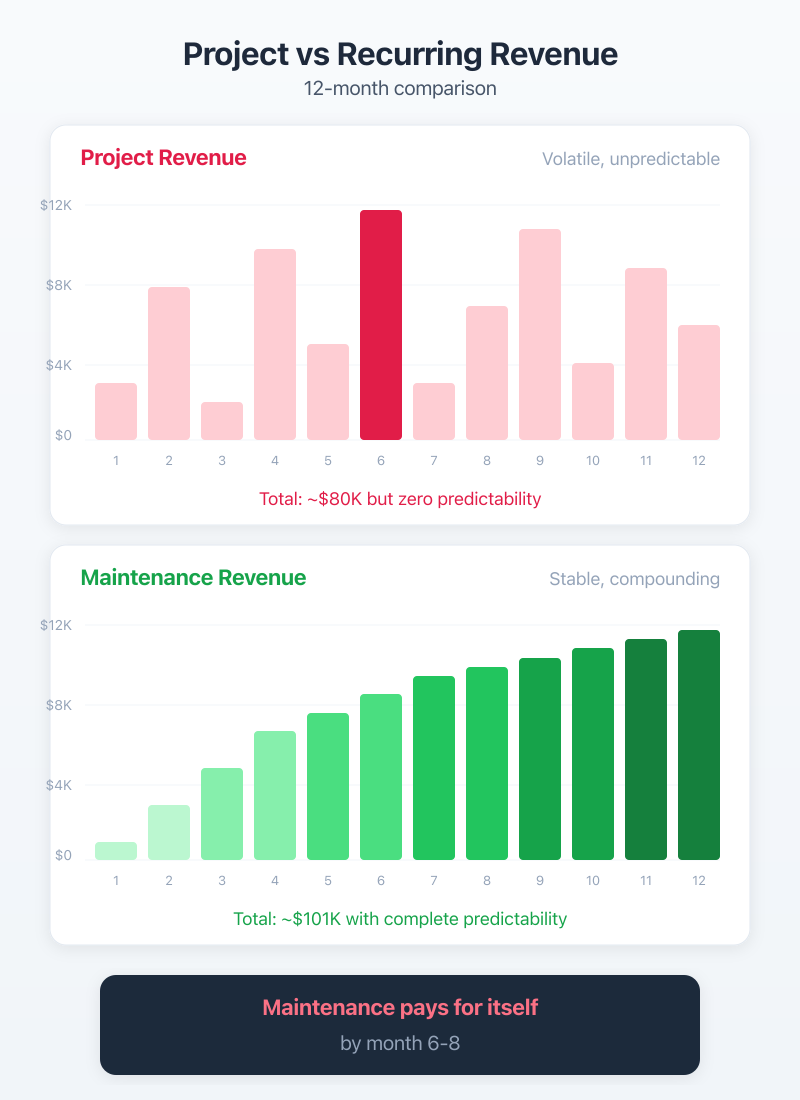
Here’s the math that changed how I run Gatilab. A $5,000 website project takes roughly 4-6 weeks. A $249/month maintenance plan takes maybe 2-3 hours per month once you’ve got systems in place. After 20 months, that maintenance client has paid you more than the original project. And you’re still getting paid next month.
The compounding effect is what gets people. You sign 3 maintenance clients this month, 2 next month, 4 the month after. Even if you lose one along the way, your base keeps growing. By month 12, you’ve got 25-30 clients and $6,000-$7,000 in monthly revenue that shows up whether you work on new projects or not.
The Real Numbers from My Maintenance Business
I’ll share the actual breakdown from Gatilab. These aren’t hypothetical numbers.
| Clients | Avg MRR/Client | Monthly Revenue | Annual Revenue | Profit Margin |
|---|---|---|---|---|
| 10 | $199 | $1,990 | $23,880 | ~75% |
| 25 | $219 | $5,475 | $65,700 | ~72% |
| 50 | $229 | $11,450 | $137,400 | ~68% |
| 100 | $239 | $23,900 | $286,800 | ~60% |
The average goes up over time because your newer clients tend to join at higher tiers. And profit margin dips as you scale because you’re hiring help. But even at 100 clients with a 60% margin, you’re netting $170K+ in profit from maintenance alone.
The important part: this took 24 months to build. Not 24 days. If anyone tells you maintenance revenue happens overnight, they’re selling you a course, not running a business.
Building Maintenance Tiers That Actually Sell
Three tiers is the sweet spot. Not two, not five. Three. This is pricing psychology 101, anchoring. The middle tier sells the most because it looks reasonable next to the expensive one and more complete than the cheap one. At Gatilab, roughly 60% of maintenance clients pick the Standard tier.
The Three-Tier Model ($99 / $249 / $499)
I’ve tested different price points over the years. Figuring out what to charge is half the battle. Started at $49/$99/$199. That was too cheap and attracted clients who didn’t value the service. Moved to $99/$249/$499 in 2022 and close rates actually went up. Higher prices signal higher value, especially when you’re positioning maintenance as business protection.
The key is making each tier obviously different. If your tiers feel like the same service with slightly more stuff, clients just pick the cheapest one. Each tier needs a clear “this is who it’s for” identity.
What to Include at Each Level
| Feature | Basic ($99/mo) | Standard ($249/mo) | Premium ($499/mo) |
|---|---|---|---|
| Core, Theme, Plugin Updates | Weekly | Twice weekly | Same-day |
| Backups | Weekly (off-site) | Daily (off-site) | Real-time (off-site) |
| Security Scanning | Weekly | Daily | Continuous |
| Uptime Monitoring | Every 5 min | Every 1 min | Every 1 min |
| Malware Removal | Not included | Included | Priority response |
| Performance Checks | Monthly | Bi-weekly | Weekly |
| Development Hours | 0 | 2 hrs/month | 5 hrs/month |
| Monthly Report | Basic PDF | Detailed + call | Detailed + strategy call |
| Response Time | 48 hours | 24 hours | 4 hours (business) |
| Quarterly Strategy Call | No | No | Yes |
| WooCommerce Support | No | Add-on ($50/mo) | Included |
A couple of things to notice. The Basic tier is intentionally bare-bones. It covers the “I just want someone keeping my site updated” client. No development hours, no malware removal. It exists partly to make the Standard tier look like a no-brainer.
The Standard tier at $249/month is where the value sits. Two development hours, daily backups, malware removal included. For a business owner running a WordPress site that generates leads or revenue, this is cheap insurance.
The Premium tier at $499/month is for WooCommerce stores and businesses where downtime costs real money. The 4-hour response time and 5 development hours per month justify the price. If your client’s WooCommerce store does $50K/month in sales, $499 for guaranteed uptime is nothing.
If a client runs WooCommerce, always pitch the Premium tier first. E-commerce sites need faster updates, real-time backups, and priority response times. A 4-hour outage on a store doing $2K/day costs the client $333. Your $499/month plan pays for itself with a single prevented outage.
When to Pitch Maintenance (Timing Is Everything)
The best time to sell a maintenance plan is at project handoff, not after the site launches, not two months later, and definitely not when something breaks. At Gatilab, our close rate jumps from 15% to 65% based purely on when we bring up maintenance.
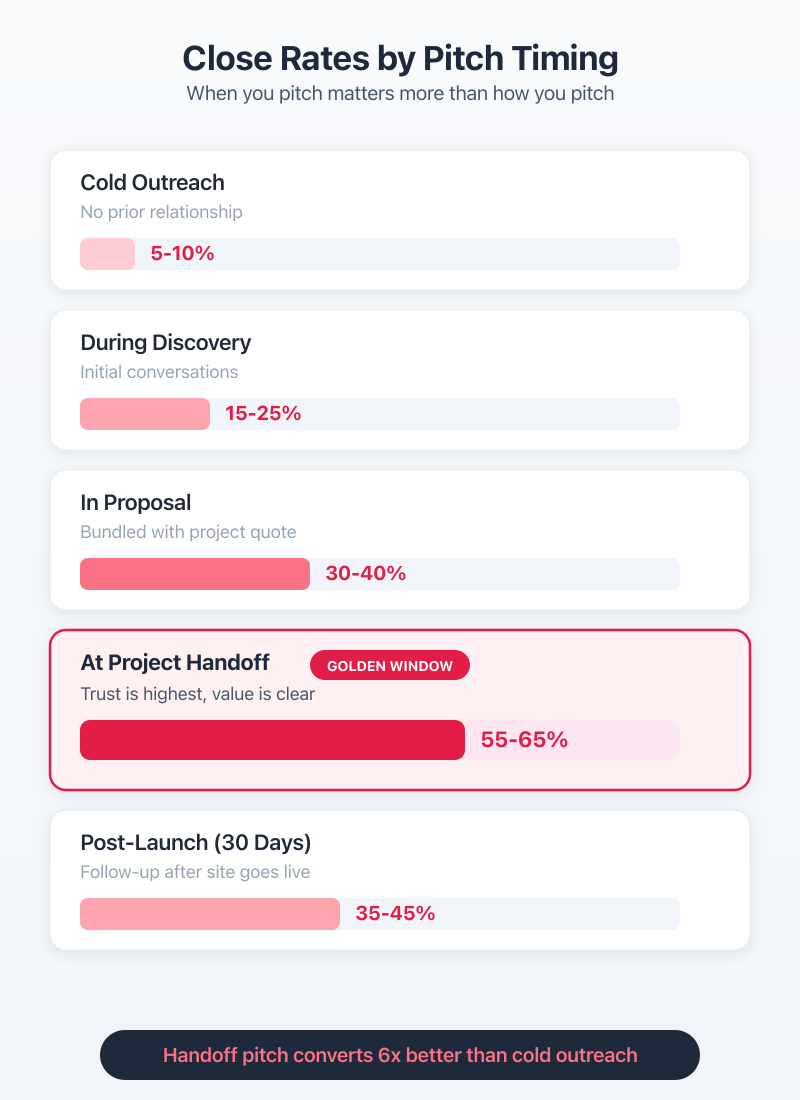
| Pitch Timing | Average Close Rate | Best Approach |
|---|---|---|
| Cold outreach (no prior work) | 5-10% | Lead with security audit results |
| During discovery call | 15-25% | Mention it as part of ongoing relationship |
| In the project proposal | 30-40% | Include as a line item with project cost |
| At project handoff | 55-65% | Frame as natural next step |
| First 30 days post-launch | 35-45% | Reference early wins and monitoring data |
During the Project Discovery Call
Plant the seed early. Don’t hard-sell maintenance during discovery. Just mention it exists. Something like: “We also handle ongoing maintenance after launch, but we can talk about that when the site’s ready.”
That one sentence does two things. It tells the client you’re thinking long-term, and it normalizes the idea that websites need ongoing care. By the time you actually pitch the plan at handoff, it’s not a surprise. They’ve been expecting it.
I include a single line in every project proposal at Gatilab: “Post-launch maintenance plans available starting at $99/month.” No details, no pressure. Just a breadcrumb. About 30-40% of clients ask about it before the project even starts.
At Project Handoff, The Golden Window
This is where you close. The client just watched you build their site. They’ve seen how much work goes into WordPress. They’re thinking about all the things that could go wrong. And you’ve got an advantage you’ll never have again: you just proved you’re competent.
Here’s what happens at Gatilab handoffs. We do a 30-minute Loom walkthrough of the finished site. At the end, we say: “Your site’s live. Here’s what happens now if nothing changes. Plugins will need updates, WordPress will release security patches, your SSL will need renewal, and eventually something will break. Most of our clients move to a maintenance plan at this point. Want me to walk you through the options?”
That’s it. No pressure. Just reality. And 55-65% of the time, they say yes.
The Pitch Script That Converts
Selling maintenance isn’t about features. Nobody gets excited about plugin updates. It’s about framing. The same service pitched two different ways gets wildly different results.
Framing Maintenance as Insurance, Not Expense
This is the single most important shift in how you pitch. Stop selling maintenance as a list of tasks. Start selling it as protection against disaster.
Here’s the framework I use: “Sucuri reports that over 30,000 websites get hacked every single day in 2026. The average cost of recovering a hacked WordPress site runs between $5,000 and $25,000 depending on the damage. Our Standard plan at $249/month means you never have to worry about that.”
That reframe turns $249/month from “a lot for updates” into “cheap compared to the alternative.” Insurance companies have used this framing for centuries. It works because it’s true.
You can strengthen the pitch with real numbers specific to the client. If they run a WooCommerce store, calculate their daily revenue and show what a single day of downtime costs. If they generate leads through the site, estimate the cost per lead and what losing a week of form submissions means. Make it concrete.
Handling the “I’ll Just Do It Myself” Objection
You’ll hear this from about 40% of prospects. And honestly? Some of them will do it themselves. For a month. Maybe two. Then life gets busy, updates pile up, and they call you in a panic because their site got hacked.
My response: “You absolutely can. Most of our maintenance clients started that way. They’d update plugins once a month, forget about backups, and eventually something broke. The Standard plan means you don’t have to think about it. But if you’d rather handle it yourself, I’d recommend at least setting up Wordfence for security and UpdraftPlus for backups. Here’s a quick guide.”
I actually send them a guide. And I follow up in 90 days. About 25% of the “I’ll do it myself” crowd becomes maintenance clients within 6 months. They just needed to experience the hassle first.
Telling a client they can’t maintain their own site is condescending and kills trust. Instead, help them try. Give them a Wordfence setup guide, recommend UpdraftPlus for backups, and follow up in 90 days. The ones who struggle will come back, and they’ll trust you more because you didn’t pressure them.
Onboarding New Maintenance Clients
A bad onboarding experience kills more maintenance relationships than bad service does. The first 30 days set the tone for everything. If clients feel confused or ignored after signing up, they’ll cancel before you’ve even done anything meaningful.
The Welcome Packet
Every new maintenance client at Gatilab gets a welcome packet within 24 hours of signing. It’s a Google Workspace document (we use Google Docs, not PDF, because it’s easier to update) that covers:
- What’s included in their specific tier
- How to reach us (email for non-urgent, phone for emergencies)
- Expected response times
- What counts as “maintenance” vs. billable development work
- The monthly report schedule
- Login credentials we need from them (hosting, domain registrar)
That last point is important. Getting credentials from clients is like pulling teeth. The welcome packet has a simple checklist with screenshots showing exactly where to find each credential. We use ClickUp to track onboarding tasks so nothing falls through the cracks.
The welcome packet also includes a 5-minute Loom video walking them through what happens next. Clients who watch the video ask 80% fewer questions in the first week.
First 30 Days, Setting Expectations
The first month is your audition. Even though they’ve already signed up, clients are watching to see if they made the right call. Here’s the Gatilab 30-day onboarding sequence:
Day 1: Send welcome packet. Request credentials. Set up the site in ManageWP.
Day 3: Complete site audit. Document current state: plugin versions, PHP version, WordPress version, backup status, security status, performance baseline (PageSpeed score, TTFB).
Day 7: Send the first status update. Even if nothing needed fixing, tell them what you checked. “We reviewed your 23 plugins, ran a security scan (clean), and established a backup schedule. Everything looks good.”
Day 14: Check in. Ask if they have any pending site changes or concerns. This email generates more goodwill than any technical work you’ll do.
Day 30: Send the first full monthly report. Include the audit baseline and current metrics. Show that things are either stable or improved. This is the moment where most clients decide they’re staying.
Most maintenance providers go silent after the sale. Don’t. The first 30 days should have more communication than any month that follows.
Tools That Run Your Maintenance Business
You can’t manage 30+ WordPress sites by logging into each one individually. The toolstack matters, and it matters early. I’ve tested most of the options over the years. Here’s what actually works and what it costs.
Site Management (ManageWP vs MainWP)
This is the core decision. Everything else builds around your site management platform.
ManageWP (owned by GoDaddy) is the SaaS option. $2.80 per site per month gets you everything: bulk updates, backups, security scans, performance checks, uptime monitoring, and client reporting. It’s hosted, so there’s nothing to install on your end. The dashboard is clean, the client reports look professional, and it just works.
MainWP is the self-hosted alternative. The core plugin is free. You install it on your own WordPress site and connect client sites via a child plugin. Extensions add functionality: backups, security, reporting. The total cost depends on which extensions you buy, but it can be significantly cheaper than ManageWP at scale.
I use ManageWP at Gatilab. I’ve used MainWP too. Here’s why I stuck with ManageWP: reliability. When you’re managing 50+ client sites, you don’t want to also maintain the tool that maintains the sites. ManageWP’s infrastructure is someone else’s problem. That’s worth $2.80 per site.
But if you’re bootstrapping and managing under 20 sites, MainWP is a legitimate choice. The free core plus a few paid extensions will run you about $1-$1.50 per site per month. Just know that you’re adding another system to maintain.
Billing and Client Communication
| Tool | Cost/Site/Month | What It Covers | Free Alternative |
|---|---|---|---|
| ManageWP | $2.80 | Updates, backups, security, monitoring, reports | MainWP (self-hosted) |
| BlogVault | $2.40 | Real-time backups, staging, migrations | UpdraftPlus (manual) |
| Sucuri | $16.60 | WAF, malware cleanup, DDoS protection | Wordfence (free tier) |
| UptimeRobot | Free (50 monitors) | Uptime monitoring, alerts | Jetpack Monitor |
| FreshBooks | ~$1.50 (allocated) | Invoicing, recurring billing, time tracking | Stripe Billing |
For billing and invoicing, FreshBooks handles our recurring invoices. Set it up once per client, and it bills automatically every month. The client gets a professional invoice, you get paid on time, and nobody has to remember anything. It costs about $33/month for the Growing plan, which covers up to 500 clients. Spread across 25 clients, that’s $1.32 per site.
For security monitoring on client sites, Sucuri is the premium choice. Their firewall and CDN combo at $199/year per site is expensive but worth it for high-value clients on the Premium tier. For Basic and Standard tier clients, Wordfence’s free tier covers security scanning and basic firewall rules.
Communication lives in email and Loom. I don’t use a separate client portal or ticketing system under 50 clients. It adds complexity without adding value at that scale. Clients email us, we respond within the SLA. Simple.
Reducing Churn Below 5%
Average churn for WordPress maintenance plans is 8-12% per month across the industry. That means you’re losing roughly 1 in 10 clients every month. At Gatilab, our churn sits around 3.5%. The difference comes down to one thing: proving value visibly.
Clients don’t cancel because your service is bad. They cancel because they can’t see what you’re doing. If you’re quietly keeping their site running perfectly, they start wondering why they’re paying you. Ironic, right? The better you are at prevention, the less visible your work becomes.
Monthly Reports That Prove Value
Your monthly report is the most important retention tool you have. Not the backups. Not the updates. The report. Because the report is the only thing the client actually sees.
At Gatilab, we use ManageWP’s client report feature as the foundation. But we add context that makes the numbers meaningful. Here’s what our Standard tier report includes:
Updates completed. Not just “23 updates performed.” We list the plugins, note any that required testing after update, and flag any that we held back due to known compatibility issues.
Security summary. Scans run, threats blocked (Wordfence or Sucuri data), login attempts blocked. The big number here is blocked attacks. Even a basic WordPress site gets hundreds of brute-force attempts per month. Showing clients that number justifies the security portion of your fee overnight.
Uptime stats. UptimeRobot data showing uptime percentage and any incidents. 99.9% uptime looks great in a report. And when there was an incident, explaining what happened and how you resolved it builds trust.
Performance metrics. TTFB, PageSpeed score, any changes month-over-month. If performance improved, highlight it. If it dipped, explain why and what you’re doing about it.
Development hours used. For Standard and Premium clients, show what you worked on during their allotted hours. Even if they didn’t request anything, log the proactive work you did.
Reports go out on the first business day of every month. No exceptions. Consistency builds trust more than any individual report ever will.
Quarterly Business Reviews
For Premium tier clients, we do a 30-minute quarterly video call. This is where retention really happens. The QBR isn’t about maintenance. It’s about their business.
We review Google Analytics trends, discuss upcoming site changes, talk about what’s working and what isn’t. Sometimes we suggest new features or improvements that would fall under a separate project. Yes, this generates upsell revenue. But the primary purpose is making the client feel like you’re invested in their success, not just their website.
Clients who get quarterly reviews have a churn rate of under 2% at Gatilab. The 30 minutes per quarter pays for itself many times over.
Scaling Past 50 Maintenance Clients
Around 40-50 clients is where solo maintenance breaks down. Not because the technical work is overwhelming. ManageWP handles most of that. It breaks down because client communication scales linearly. 50 clients means 50 monthly reports to customize, 50 inboxes worth of requests, and a constant stream of “quick questions” that each take 15 minutes.
Hiring Your First Support Tech
Your first maintenance hire should be a support technician, not a developer. Most maintenance work is updates, backups, monitoring, and responding to non-technical client questions. You don’t need a senior developer for that.
At Gatilab, our first maintenance hire cost $1,200/month. That’s a part-time remote tech working about 25 hours per week. They handle:
- Running weekly and daily updates via ManageWP
- Responding to Basic tier client requests within 48 hours
- Generating and customizing monthly reports
- Monitoring uptime alerts and escalating real issues
- Basic troubleshooting (plugin conflicts, WordPress errors)
I handle Standard and Premium client communication, all development work, security incidents, and quarterly reviews. This split works up to about 80-100 clients before you need another hire.
Where to find maintenance techs: WordPress job boards, WP Developers Facebook group, and referrals from other agency owners. Look for someone who’s managed WordPress sites for at least 2 years and understands the plugin ecosystem. You can find solid candidates in the $800-$1,500/month range depending on their experience and location.
Standard Operating Procedures
You can’t scale maintenance without documented SOPs. Every repeatable task needs a written process and a Loom video walkthrough. This isn’t optional. It’s the difference between “only I can do this” and “anyone on the team can handle this.”
Here’s what we document at Gatilab:
Update procedures. Step-by-step for running updates on a single site and in bulk. Includes: check staging first for Premium clients, take a backup before updating, test critical pages after update, roll back if anything breaks.
Backup verification. How to verify that backups are actually working. Not just “backup completed” but downloading a backup monthly and confirming it restores correctly. BlogVault makes this easier with test restores.
Security incident response. What to do when a site gets hacked: isolate, notify client, scan for malware, clean infected files, identify entry point, patch vulnerability, restore from clean backup if needed, submit for review.
Client onboarding. The entire 30-day sequence documented with email templates, ClickUp task templates, and Loom scripts.
Monthly reporting. How to generate, customize, and send reports for each tier.
Every SOP follows the same format: purpose, tools needed, step-by-step instructions, common problems and solutions, who to escalate to. New team members go through the SOP library during their first week. By week two, they’re handling Basic tier clients independently.
This documentation took me about 40 hours to create. It saved at least 200 hours in the first year alone. And it made hiring the second tech infinitely easier because the playbook already existed.
Frequently Asked Questions
How much should I charge for WordPress maintenance?
Most WordPress maintenance plans range from $99/month for basic updates and backups to $499/month for premium support with priority response times. The sweet spot is $249/month for a standard tier covering updates, security monitoring, performance checks, and 2 hours of development time. Price based on the value you deliver, not the hours you spend.
What should a WordPress maintenance plan include?
At minimum: core, theme, and plugin updates, daily backups with off-site storage, security scanning and malware removal, uptime monitoring, and monthly performance checks. Premium tiers add priority support, development hours, and quarterly strategy calls. The key is making each tier obviously different so clients can self-select based on their needs.
How do I convince clients they need WordPress maintenance?
Frame it as insurance, not expense. Show the cost of a hacked site ($5,000-$25,000 in recovery according to Sucuri). Reference the 30,000 websites hacked daily stat. Then present your $249/month plan as the cheaper alternative to disaster recovery. Pitch at project handoff when your credibility is highest and close rates hit 55-65%.
What tools do WordPress maintenance companies use?
ManageWP ($2.80/site/month) or MainWP (free, self-hosted) for bulk site management. BlogVault or UpdraftPlus for backups. Sucuri or Wordfence for security. UptimeRobot for free uptime monitoring. FreshBooks or Stripe for recurring billing. The total tooling cost runs $3-$7 per site per month depending on your stack.
How many maintenance clients can one person manage?
A solo developer can manage 30-50 maintenance clients with proper tooling like ManageWP, automated backups, and monitoring alerts. Beyond 50 clients, you need a dedicated support technician ($800-$1,500/month). At 100+ clients, you need documented SOPs and a small team to maintain service quality.
What is the average churn rate for WordPress maintenance plans?
Industry average is 8-12% monthly churn. Well-run maintenance businesses with monthly reports and quarterly reviews achieve 3-5% churn. The key is proving value visibly through detailed monthly reports. Clients who can see what you’re doing cancel far less than clients who just trust that things are working.
Should I offer a free trial for maintenance plans?
No. Free trials attract people who don’t value the service. Instead, offer the first month at a discount (20-30% off) or include the first month free when they sign an annual contract. At Gatilab, annual contracts with one month free have a 40% take rate and dramatically reduce churn because clients commit upfront.
What I’d Do If I Were Starting Over
If I were building a maintenance business from scratch in 2026, I’d do three things differently than I did in 2019.
First, I’d start selling maintenance from day one. Not after I’d built 10 websites. From the very first project. Every WordPress freelancing client gets the pitch at handoff. No exceptions.
Second, I’d pick ManageWP immediately instead of trying to cobble together free tools for the first year. The $2.80 per site per month is nothing compared to the time you waste managing sites manually. That’s money I wish I’d spent earlier.
Third, I’d write SOPs before I needed them. By the time I hit 40 clients and desperately needed help, I had zero documentation. Training my first hire took twice as long as it should have because everything lived in my head.
The maintenance business model works. I’ve watched it work at Gatilab, and I’ve seen other WordPress businesses build it successfully too. The hard part isn’t the service. It’s the discipline to pitch consistently, report transparently, and build systems before you think you need them.
Start with your next project handoff. Mention maintenance. See what happens. You might be surprised how many clients have been waiting for you to offer it.