
How Much Does Google Ads Cost?
You want a number before you commit a budget, and every page you open hedges. Google’s own pricing page says you decide what to spend, which is true and useless when you’re trying to tell a client or a partner what Google Ads cost looks like. So here are the numbers. Across 13,474 US search campaigns measured from April 2025 to March 2026, the average click cost $5.42 and the average lead cost $66.69. There is no minimum spend, Search campaigns charge per click, and your monthly bill can’t exceed your daily budget multiplied by 30.4.
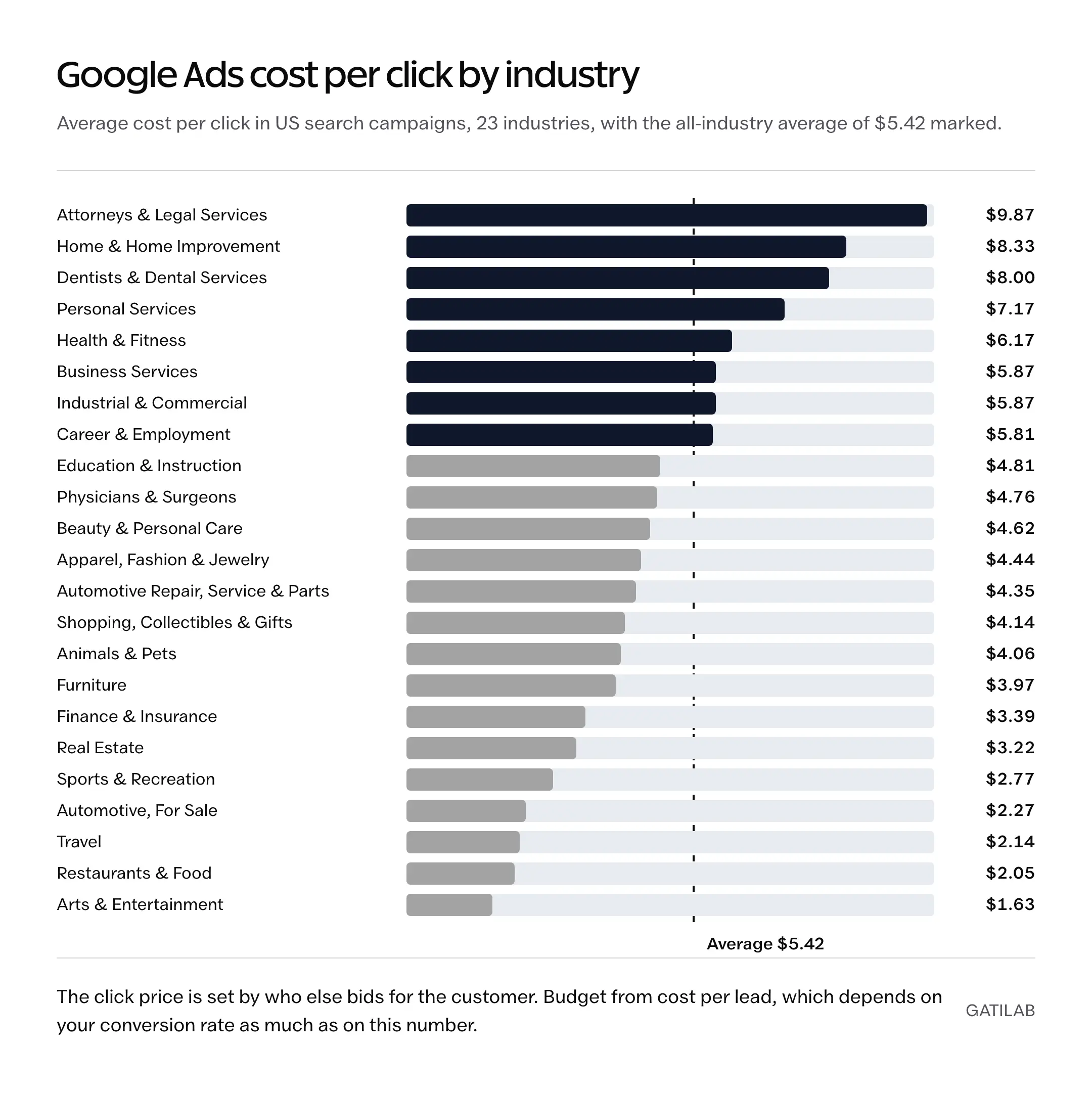
Those averages hide a 6x spread between industries, from $1.63 a click in arts and entertainment to $9.87 for attorneys, and the number that matters to you sits inside that spread. Before you set a budget, you need your industry’s row, the unit each campaign type charges for, and the way Google turns a daily budget into a monthly bill, because the bill is where most of the surprises live.
Want a real number for your own account? Gatilab’s Google Ads management service starts with an account audit and a 30-day plan, so the budget question gets answered from your data.
Google Ads Cost at a Glance
These are the figures I’d put in front of anyone asking the question for the first time. The benchmarks come from the 2026 WordStream by LocaliQ search advertising report, and the billing rules come from Google’s own help pages.
- No minimum spend. Google states there is no minimum spending commitment; you set the budget and can change it any day.
- Average cost per click: $5.42 across US search campaigns, from $1.63 in arts and entertainment to $9.87 for attorneys and legal services.
- Average cost per lead: $66.69, and 2026 is the first year since before 2020 in which that number fell.
- Average click-through rate: 6.64%. Average conversion rate: 8.18%.
- Monthly spending limit: your average daily budget x 30.4. A $20 daily budget caps the month at $608.
- Billing: Google charges your card when you hit a payment threshold or on the 1st of the month, whichever comes first. The threshold starts low and rises as you spend.
- India: Google India bills in rupees and adds 18% GST on top of the ad spend.
How Google Ads Pricing Works
Every eligible search runs an auction, and the price of a click comes out of that auction rather than from a rate card. You set a maximum cost per click, or let an automated bidding strategy set it, and Google decides which ads show and what each click costs using your bid together with auction-time ad quality (expected click-through rate, ad relevance and landing page experience), the Ad Rank thresholds, how competitive the auction is and the context of the search.
The part worth remembering is how the final price is set. Google’s wording is that you pay what’s minimally required to clear the Ad Rank thresholds and beat the advertiser immediately below you, which is why the actual cost per click is often well below your maximum bid. Three details follow from that rule:
- Appearing above the organic results costs more than appearing below them, even when nobody is bidding right under you, because the threshold for the top positions is higher.
- Your actual cost per click can go above your maximum bid if Enhanced CPC or a bid adjustment is switched on. “You never pay more than your max bid” is only true for plain manual bidding.
- Better ad quality lowers what you need to bid to clear the same threshold, which is the real reason relevance work pays off.
You will still find the old “Ad Rank = bid x Quality Score” formula on plenty of pages. Google retired that model years ago. The Quality Score you see in the account, the 1 to 10 number at keyword level, is a diagnostic that summarizes the same three quality signals; Google says plainly that it is not an input in the auction. Improve the signals and the auction rewards you, but there is no fixed discount for moving from a 6 to a 7.
Google Ads Cost Per Click by Industry
Industry is the biggest single predictor of what a click costs you, because it sets who you’re bidding against and what a customer is worth to them. A law firm that earns thousands from one case can afford a $9.87 click; a restaurant can’t, and the auction prices reflect that. The table covers 23 industries from the 2026 report, with the lead cost that results once conversion rate is factored in.
| Industry | Avg. CPC | Avg. CTR | Avg. conversion rate | Avg. cost per lead |
|---|---|---|---|---|
| Attorneys & Legal Services | $9.87 | 5.87% | 5.55% | $131.63 |
| Home & Home Improvement | $8.33 | 6.47% | 8.05% | $90.92 |
| Dentists & Dental Services | $8.00 | 5.66% | 10.67% | $72.97 |
| Personal Services | $7.17 | 7.16% | 12.34% | $54.60 |
| Health & Fitness | $6.17 | 5.81% | 6.94% | $67.36 |
| Business Services | $5.87 | 6.10% | 4.85% | $93.69 |
| Industrial & Commercial | $5.87 | 6.57% | 8.20% | $75.19 |
| Career & Employment | $5.81 | 5.88% | 3.05% | $67.36 |
| Education & Instruction | $4.81 | 7.56% | 13.14% | $77.48 |
| Physicians & Surgeons | $4.76 | 6.61% | 12.43% | $40.04 |
| Beauty & Personal Care | $4.62 | 6.75% | 10.35% | $39.25 |
| Apparel, Fashion & Jewelry | $4.44 | 6.64% | 4.50% | $97.51 |
| Automotive Repair, Service & Parts | $4.35 | 5.56% | 15.51% | $29.96 |
| Shopping, Collectibles & Gifts | $4.14 | 8.28% | 4.01% | $49.40 |
| Animals & Pets | $4.06 | 7.49% | 16.22% | $31.50 |
| Furniture | $3.97 | 6.57% | 2.99% | $106.70 |
| Finance & Insurance | $3.39 | 9.83% | 2.64% | $74.44 |
| Real Estate | $3.22 | 7.61% | 3.70% | $102.51 |
| Sports & Recreation | $2.77 | 8.75% | 7.69% | $44.26 |
| Automotive, For Sale | $2.27 | 8.28% | 6.01% | $44.26 |
| Travel | $2.14 | 9.32% | 5.83% | $44.70 |
| Restaurants & Food | $2.05 | 6.83% | 8.05% | $30.57 |
| Arts & Entertainment | $1.63 | 12.75% | 5.91% | $26.84 |
| All industries | $5.42 | 6.64% | 8.18% | $66.69 |
The figures are from the 2026 search advertising benchmarks by LocaliQ and WordStream, which cover Google Ads and Microsoft Ads search campaigns in the US. Two things in the table are more useful than the CPC column. Furniture and real estate have cheap clicks and expensive leads, because under 4% of those clicks convert, while automotive repair pays $4.35 a click and gets a lead for under $30 because 15.51% of visitors act. The cost per lead column is the one to budget from.
The report covers the US. Prices in other markets differ, and the part worth carrying over is the ranking and the lesson that the conversion rate does more to your lead cost than the click price does.
What You Pay For by Campaign Type
Search charges per click. The other campaign types charge for a different unit, which is why a cost per click benchmark says nothing about a YouTube budget.
- Search: cost per click. Manual CPC, or a Smart Bidding strategy such as target CPA or target ROAS that sets bids per auction toward your goal.
- Shopping: cost per click on a product ad, fed by your Merchant Center product data instead of keywords. Manual CPC, Maximize clicks, Maximize conversion value and target ROAS are the options.
- Display: cost per click, or viewable CPM, where you pay for every 1,000 times the ad is shown and counted as viewable. This is the “cost per 1,000 impressions” people ask about, and Google publishes no average for it; the rate comes out of the auction like everything else.
- Video (YouTube): cost per view, where you pay for views and other video interactions rather than clicks.
- Performance Max: Smart Bidding on conversion probability, with an optional CPA or ROAS target. One campaign runs across YouTube, Display, Search, Discover, Gmail and Maps, and Google moves the budget toward whatever converts.
If you sell locally and want to pay per lead instead of per click, Local Services Ads are a different product with their own pricing, and they sit above the regular ads for trades like plumbing and legal.
How Much Does Google Ads Cost Per Month?
You control this one directly. Each campaign has an average daily budget, and Google’s rule is that over a month you’ll spend no more than 30.4 times that figure. On a busy day a campaign may spend up to twice its daily budget to catch traffic, but Google credits any overdelivery so the monthly limit holds.
- $10 a day caps the month at $304
- $20 a day caps the month at $608
- $50 a day caps the month at $1,520
- $100 a day caps the month at $3,040
- Rs 500 a day caps the month at Rs 15,200, plus 18% GST in India
The question behind “how much per month” is usually “is $10 a day enough”, and the arithmetic answers it. At the $5.42 average CPC, $304 buys about 56 clicks a month, and at the 8.18% average conversion rate those clicks produce 4 or 5 leads. In a narrow local niche with cheaper clicks, say automotive repair at $4.35 and 15.51%, the same money produces about 70 clicks and 10 or 11 leads, which is enough to learn from. In legal at $9.87 and 5.55%, it buys 31 clicks and 1 or 2 leads, which tells you nothing for months. The budget has to be large enough to produce a few dozen conversions before you can judge the campaign at all.
Google has a budget estimator on its Google Ads site that takes your industry and location and tells you the daily range the middle 50% of advertisers in that combination spend. It’s the closest thing to a published price list, and it’s a better starting point than any national average, including the ones above.
Calculate a Google Ads Budget From Your Own Numbers
Benchmarks tell you whether a click price is plausible. Your own margin tells you what you can afford to pay, and that number should set the budget. Work backwards from the customers you need:
| Planning input (example) | Value |
|---|---|
| Qualified leads needed this month | 20 |
| Lead-to-customer rate | 25% |
| Customers expected | 5 |
| Maximum affordable cost per customer | $400 |
| Maximum ad spend (5 x $400) | $2,000 |
| Landing page conversion rate | 5% |
| Clicks needed for 20 leads (20 / 5%) | 400 |
| Maximum affordable CPC ($2,000 / 400) | $5 |
Now compare that $5 ceiling with your industry’s row in the table above. A home improvement contractor facing $8.33 clicks can’t make this plan work at a 5% conversion rate; the lead costs $167 and the customer $667. The same contractor at the industry’s 8.05% conversion rate pays $103 a lead and $414 a customer, which is close enough to test. That is the whole case for spending on the landing page before spending more on clicks, and it’s why conversion tracking has to be in place from day 1, because without it you can’t see which of these numbers you’re actually getting.
Add agency fees, sales time and tools when the decision needs a fully loaded cost. A $400 customer on paper is a $520 customer once a $600 monthly management fee is spread across 5 of them.
How Google Bills You
Most accounts run on automatic payments. Google charges the card on file in two situations: when your accrued costs reach a payment threshold, and on the 1st of each month for whatever is outstanding. The threshold is the part that confuses people. It starts at a low amount, and each time you hit it before the month ends, Google raises it to the next level, up to a maximum that varies by country and currency. Google’s own examples run $50, then $200, then $350, then $500 for a US account.
So a $500 charge that shows up without warning means the account has spent $500 since the last charge, and the threshold has climbed to that level because you keep reaching it. You can be charged several times in one month on a busy account, and a charge can run slightly over the threshold when costs accrue fast. The current threshold and the likely date of the next charge sit under Billing, then Summary, on the “Next automatic payment” card. Some US advertisers can raise the threshold themselves, which means fewer, larger charges, or opt out of automatic increases.
Google Ads Cost in India
The auction works the same way in India, with rupee bids and rupee budgets, and three things change on the bill.
- GST is added on top of the ad spend. Google India Private Limited is the billing entity, and it charges 18% GST: IGST at 18%, or CGST and SGST at 9% each when the billing state and the service state match. A Rs 15,200 month costs Rs 17,936.
- A GSTIN is mandatory for business accounts and optional for individual accounts. Register the business account with the GSTIN from the start so the input credit is usable.
- New advertisers get a matched credit. At the time of writing Google India’s offer tiers are Rs 20,000, Rs 40,000 and Rs 60,000 of ad credit for spending the same amount in the first 60 days. The amounts change, and the credit lands in the billing summary after Google’s eligibility checks, so treat it as a bonus rather than a budget.
Google’s budget estimator has an India version that quotes the daily range in rupees for your industry and city, which is the fastest way to replace the US averages with something local. Ask your CA about TDS on ad spend if the business is subject to a tax audit; that depends on your situation and not on Google.
Agency and Management Fees
Ad spend goes to Google. Management is a separate cost, and it comes in three shapes: a flat monthly fee, a percentage of spend, or a performance arrangement tied to leads or revenue. Percentage models reward the agency for spending more, flat fees reward them for finishing the work, and the honest comparison is what’s included. Conversion tracking, landing pages, search term cleanup and reporting are either in the fee or they’re extras that show up later. Gatilab publishes its scope on the Google Ads management page; whoever you hire, get the fee and the inclusions in writing before the first campaign goes live.
How to Lower Google Ads Cost
The number to lower is the cost per qualified lead, and most of the saving comes from removing waste in the account rather than from bidding tricks.
- Split brand, generic and competitor queries into separate campaigns. Brand clicks are cheap and would have come anyway, so they flatter every blended number.
- Read the search terms report weekly and add negatives. Irrelevant clicks are the most expensive ones you buy.
- Match the keyword, the ad and the landing page to the same intent. This is where the auction-time quality signals come from, and it’s cheaper than raising bids.
- Fix the landing page before touching bids. A move from 5% to 8% conversion cuts cost per lead by more than a third at the same click price. A purpose-built landing page is usually the highest-return spend in the account.
- Use location and schedule bid adjustments only after the account has enough conversions to show a real pattern. There is no universal evening or weekend discount.
- Change one thing at a time. Bids, creative, targeting and landing pages changed together leave you unable to say what worked.
If the question is whether to spend this money on ads or on search ranking instead, the honest answer depends on how fast you need demand and how long you can wait; the SEO vs paid ads comparison works through that decision.
FAQs on Google Ads Cost
How much does Google Ads cost per month?
You decide. Google caps a campaign’s monthly spend at 30.4 times its average daily budget and has no minimum, so $10 a day comes to at most $304 a month and $100 a day to $3,040. The useful question is how many conversions that buys in your industry; Google’s budget estimator shows the daily range the middle 50% of advertisers in your industry and location spend.
Is $10 a day enough for Google Ads?
It depends on the click price in your industry. $10 a day is about $304 a month, which buys roughly 56 clicks at the $5.42 US average and 4 or 5 leads at the 8.18% average conversion rate. In a cheaper niche such as automotive repair that is 10 or more leads and enough to learn from; in legal, at $9.87 a click, it is 1 or 2 leads and too little to judge anything.
How much does Google Ads cost per 1,000 impressions?
Only Display campaigns bill per 1,000 impressions, using viewable CPM, where you pay each time the ad is shown 1,000 times and counted as viewable. Google publishes no average for it; the rate comes out of the auction. Search campaigns charge per click, Video campaigns per view, and Shopping per click.
Does Google Ads have a minimum spend?
No. Google states there is no minimum spending commitment. You set the average daily budget per campaign, you can change or pause it on any day, and you pay only for the clicks, views or viewable impressions your ads actually get.
Why did Google Ads charge me $500?
Because your account reached its payment threshold. On automatic payments Google charges whenever accrued costs hit the threshold or on the 1st of the month, and the threshold rises each time you reach it before month end, in Google’s examples from $50 to $200, $350 and then $500. A $500 charge means $500 of ads has run since the last charge. The current threshold is shown under Billing, then Summary.
How much should a small business spend on Google Ads per month?
Enough to produce a few dozen conversions in the first month or two, because below that you cannot tell a good campaign from a bad one. Work it out from your numbers: customers needed, the lead-to-customer rate, the most you can pay per customer, and your landing page conversion rate give you a maximum click price and a monthly ceiling. For many local services that lands between $500 and $2,000 a month; check it against Google’s budget estimator for your city.
How much does Google Ads cost in India?
Bids and budgets are in rupees and the same auction sets the click price. Google India Private Limited adds 18% GST to the ad spend (IGST, or CGST and SGST at 9% each), a GSTIN is mandatory for business accounts, and new advertisers can earn a matched credit, currently in tiers of Rs 20,000, Rs 40,000 and Rs 60,000 for spending the same amount in the first 60 days. Google’s India budget estimator quotes daily ranges in rupees by industry and city.
How much do agencies charge to manage Google Ads?
Management is charged separately from ad spend, as a flat monthly fee, a percentage of spend, or a performance fee tied to leads or revenue. The fee itself matters less than what it includes: conversion tracking, landing pages, search term cleanup and reporting are either part of it or they are extras. Get the fee and the inclusions in writing before the first campaign runs.
Does a higher Quality Score guarantee a fixed CPC discount?
No. Quality Score is a 1 to 10 diagnostic that summarizes expected click-through rate, ad relevance and landing page experience; Google says it is not an input in the auction. Improving those signals lowers what you need to bid to clear the Ad Rank thresholds, but there is no set percentage saved per point.
Final Remarks
Google Ads costs what the auction in your industry and city charges, and that number is knowable before you spend: $5.42 a click on average in the US, more in legal and home services, less in travel and food, and nothing at all until someone clicks. Set the daily budget from the customers you need and the margin you have, run Google’s estimator for your own market, and keep the conversion rate ahead of the click price. The accounts that feel expensive are almost always the ones measuring clicks instead of customers.
Tell Google you want more of this.
Add Gatilab as a preferred sourceOne tap, and this site shows up more often in your own Top Stories, AI Overviews and AI Mode. Remove it any time.