
Constant Contact vs Mailchimp: Prices, Limits and Nonprofits
Constant Contact vs Mailchimp looks like a simple price check until you put both quotes side by side. The plan names don’t line up, the contact tiers break at different points and one of the two bills the same person twice if they sit in two audiences. Many comparisons still repeat an old claim that Constant Contact gets cheaper past 2,500 contacts, and on the plans most small businesses buy, it doesn’t.
The short answer is this. Mailchimp costs less like for like on its entry and middle plans once you pass 500 contacts, by $5 to $45 a month. Constant Contact costs less on Premium at every list size, includes phone support on every plan, has event ticketing built in and gives nonprofits up to 30% off when they prepay. I’d pick Mailchimp for a store or a team that lives in automation, and Constant Contact for an event-led business, a nonprofit or anyone who wants to call a person when a campaign goes wrong.
Mailchimp is an email and SMS marketing platform owned by Intuit, with a permanent free plan and automation flows on its paid tiers. Constant Contact is an email, social and event marketing platform built for small businesses and nonprofits, sold only as paid plans after a 30-day trial. All prices below are US list prices in USD as of October 2026, billed monthly, before promotions.
Constant Contact vs Mailchimp at a Glance
These are the differences that change the bill or the day to day work. Everything else, from drag-and-drop editors to 300+ integrations, both tools have.
| Decision Factor | Mailchimp | Constant Contact |
|---|---|---|
| Free option | Free plan: 250 contacts, 500 sends a month | 30-day trial with 100 sends; no free plan |
| Entry price at 500 contacts | Essentials $13 | Lite $12 |
| Cheaper like for like | Essentials and Standard from 2,500 contacts up | Premium at every list size |
| Monthly sends (entry / middle / top) | 10x / 12x / 15x contacts | 10x / 12x / 24x contacts |
| Users (entry / middle / top) | 3 / 5 / unlimited | 1 / 3 / unlimited |
| What you’re billed on | Contacts across all audiences, unsubscribed included | Active contacts, at the highest count in the billing period |
| Phone support | Premium only | Every plan |
| Event registration and ticketing | Not built in | Every plan |
| Nonprofit discount | 15% | 20% with 6-month prepay, 30% with 12-month prepay |
| Reporting | Custom reports on Standard and Premium | Basic on Lite; open and click detail on Standard and Premium |
Constant Contact vs Mailchimp Pricing
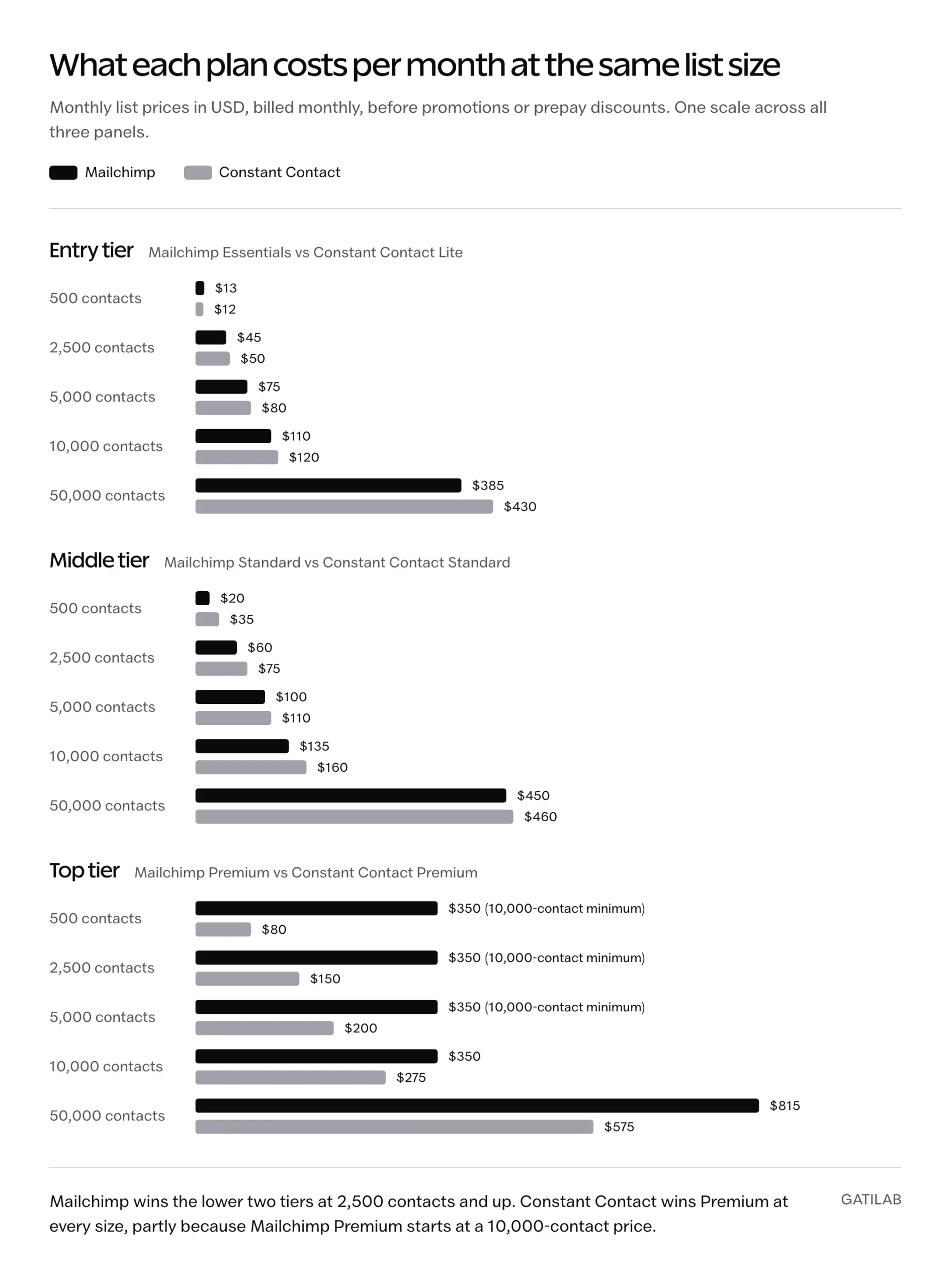
Both tools price by list size, so the only fair comparison is the same contact count on the matching plan level. I’ve paired Mailchimp Essentials with Constant Contact Lite, Standard with Standard and Premium with Premium, using the Mailchimp pricing page and the tier schedule on Constant Contact’s pricing page.
| Contacts | Mailchimp Essentials | Constant Contact Lite | Mailchimp Standard | Constant Contact Standard | Mailchimp Premium | Constant Contact Premium |
|---|---|---|---|---|---|---|
| 500 | $13 | $12 | $20 | $35 | $350 (10,000-contact minimum) | $80 |
| 2,500 | $45 | $50 | $60 | $75 | $350 (10,000-contact minimum) | $150 |
| 5,000 | $75 | $80 | $100 | $110 | $350 (10,000-contact minimum) | $200 |
| 10,000 | $110 | $120 | $135 | $160 | $350 | $275 |
| 50,000 | $385 | $430 | $450 | $460 | $815 | $575 |
So the old “Constant Contact gets cheaper at 2,500 contacts” rule is wrong on both lower tiers. Constant Contact Lite wins only at 500 contacts, by $1. On Premium the picture flips, because Mailchimp Premium starts at a 10,000-contact price of $350 and Constant Contact Premium starts at $80. A 3,000-person list that needs Premium features pays $200 a month on Constant Contact and $350 on Mailchimp.
The sticker price is only part of the bill. These plan rules decide whether you stay on it:
- Mailchimp’s monthly send limit is 10 times your contact tier on Essentials, 12 times on Standard and 15 times on Premium. Go over and Mailchimp adds an overage charge to the bill.
- Constant Contact allows 10 times on Lite, 12 times on Standard and 24 times on Premium, and charges $0.002 per extra email, which is $2 per 1,000 sends.
- Mailchimp Essentials stops at 50,000 contacts and Standard at 100,000. Constant Contact keeps the same three plans at every tier.
- Constant Contact takes 15% off if you prepay 12 months. Prepayments are non-refundable, though every new plan has a 30-day money-back guarantee.
- Mailchimp’s US offers at the time of writing are a 14-day free trial of Standard and 15% off the first 12 months for lists of 10,000 or more. Its offers change often and differ by country, so price the regular rate, not the promotion.
- Indian checkouts show regional rupee prices before tax. Mailchimp Standard is ₹1,265 a month at 500 contacts and ₹8,360 at 10,000, against ₹2,888 and ₹13,200 for Constant Contact Standard, so Mailchimp’s lead on the middle tier is wider in India than in the US.
A 5,000-contact list with a weekly newsletter uses about 20,000 to 25,000 sends a month. That fits comfortably inside the entry plan on either tool. Daily senders and heavy automation users are the ones who should check the multiplier before the price.
How Each One Counts Your Contacts
This is where a cheaper sticker price can turn into a bigger bill. The two tools count contacts in different ways, and the difference is substantial for anyone with more than one list.
Mailchimp treats each audience separately. Its audience guidance says billing is based on the total contacts across all your audiences, so one person in two audiences is billed twice. Unsubscribed and non-subscribed contacts also count until you archive them.
Constant Contact bills on active contacts, the people you can still email, and its lists are just groupings of those contacts. Its billing guide adds a catch of its own: your tier is set by the highest number of active contacts during the billing period, and deleting contacts doesn’t lower it.
Take a business with 3,000 people split across a customers audience and a newsletter audience that overlap completely:
- In 1 Mailchimp audience, 3,000 contacts sit in the 5,000 tier: Standard costs $100.
- In 2 Mailchimp audiences, the same people count as 6,000 contacts and land in the 10,000 tier: Standard costs $135.
- On Constant Contact, 3,000 active contacts sit in the 5,000 tier however many lists they’re on: Standard costs $110.
The duplicate audience alone makes Mailchimp the more expensive tool here. If you choose Mailchimp, it is wise to run one audience and split it with tags, groups and segments, which is what Mailchimp itself recommends.
Mailchimp Free Plan and Constant Contact Trial
Mailchimp is still free, but the free plan is much smaller than the 500-contact and 2,000-contact limits you’ll see quoted on older pages. According to Mailchimp’s plan documentation, the Free plan includes:
- Up to 250 contacts.
- 500 sends a month, with no more than 250 in a day.
- 1 audience and 1 user.
- A limited set of templates and basic reporting.
- Email support for the first 30 days, then the Mailchimp Assistant chatbot only.
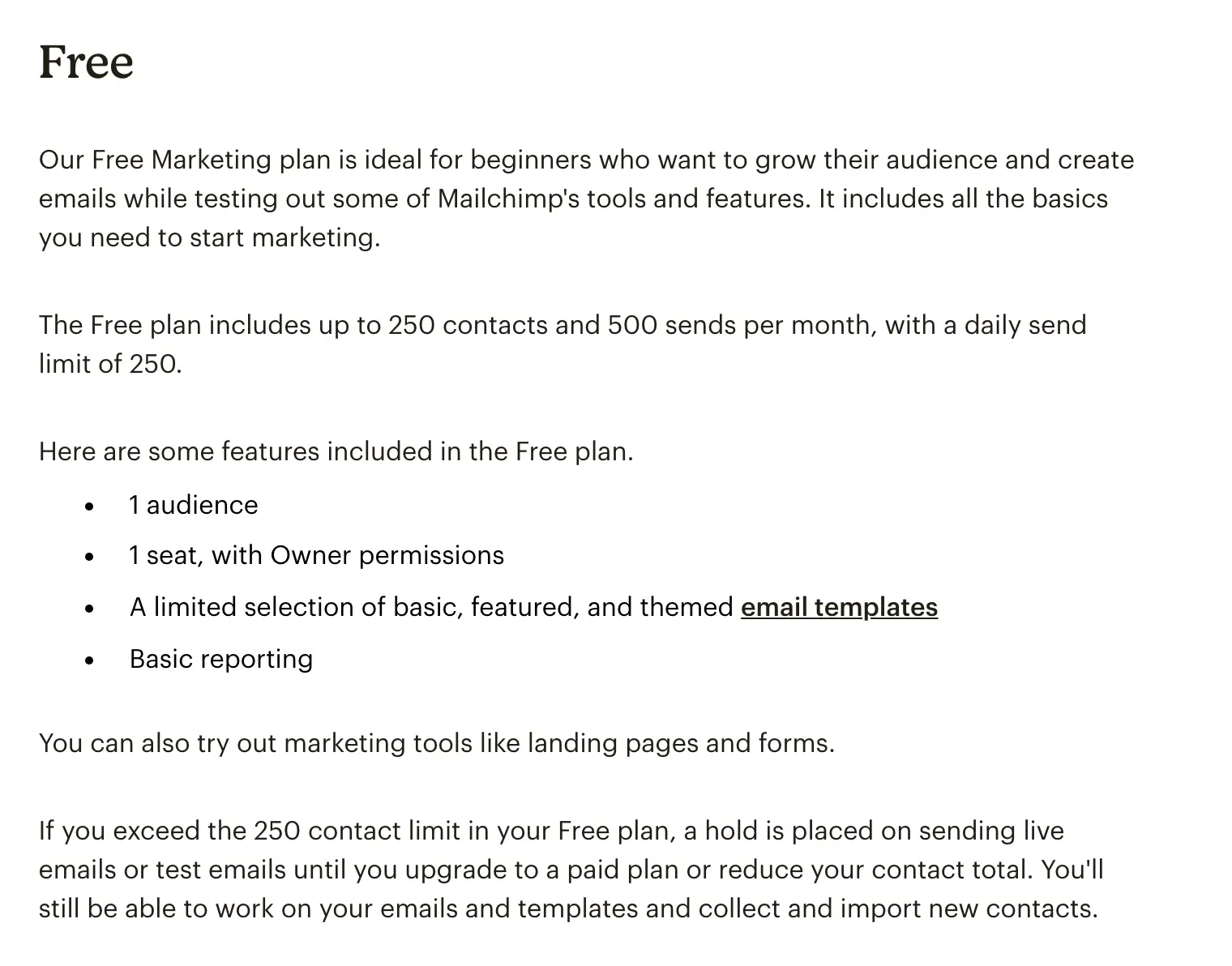
Go past 250 contacts and Mailchimp holds all sending until you upgrade or trim the list. At 250 subscribers, 2 campaigns use the whole monthly allowance, so the free plan is a place to learn the tool, not to run a business newsletter.
Constant Contact has no free plan. Its trial runs for 30 days, needs no credit card and includes 100 email sends in total, according to Constant Contact’s own community team. You can build automations, landing pages and events during the trial, but they only go live after you pay. That makes the trial good for testing the editor and the event builder, and too small for a launch.
Constant Contact vs Mailchimp for Nonprofits
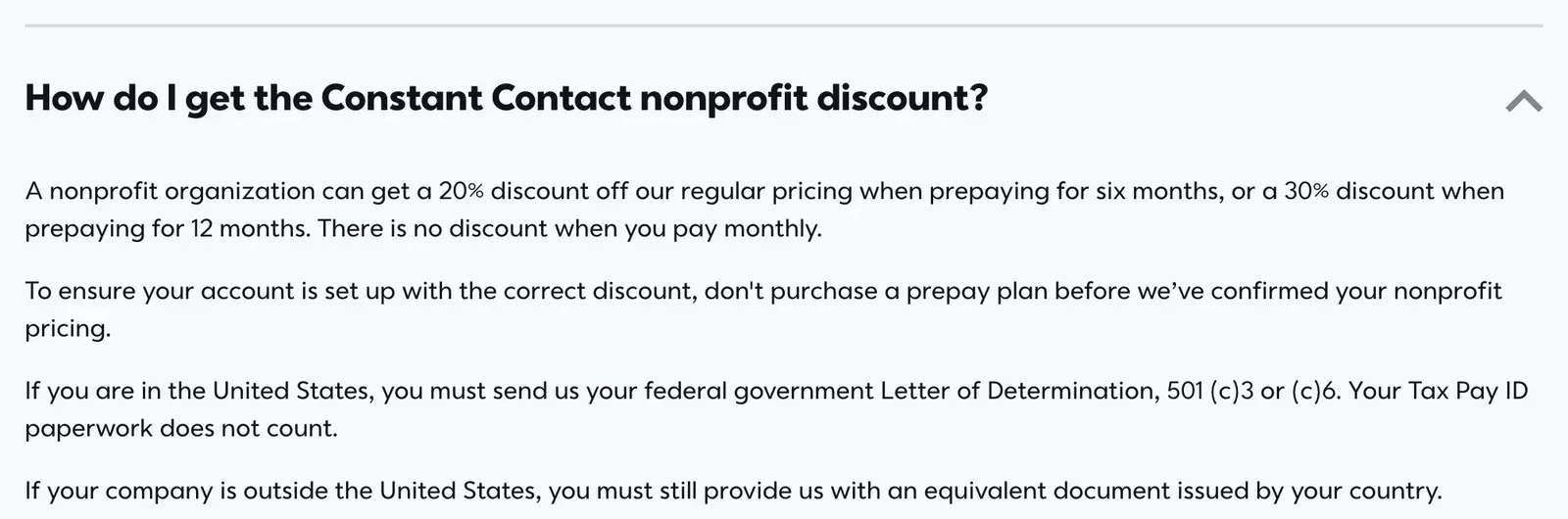
Nonprofits get a discount on both, but the two discounts work differently. Mailchimp gives 15% to nonprofits and charities: you sign up for a free account and send the Billing team your username and a link to your organization’s website. Constant Contact ties its discount to prepaying.
- 20% off regular pricing with a 6-month prepay.
- 30% off with a 12-month prepay.
- No nonprofit discount on monthly billing.
- US organizations must send an IRS determination letter for 501(c)(3) or 501(c)(6) status; others send their country’s equivalent.
- Constant Contact asks you not to buy a prepay plan until it has confirmed your nonprofit pricing.
Here is what that does to the Standard tier when a nonprofit prepays 12 months on Constant Contact and pays monthly on Mailchimp:
- 2,500 contacts: Mailchimp $51 a month, Constant Contact $52.50.
- 5,000 contacts: Mailchimp $85, Constant Contact $77.
- 10,000 contacts: Mailchimp $114.75, Constant Contact $112.
- 10,000 contacts on Premium: Mailchimp $297.50, Constant Contact $192.50.
On Standard the discounts roughly cancel out the price gap, so a nonprofit should decide on features. Constant Contact pulls ahead for most charities because fundraisers, galas and volunteer drives need registration and payments, and those come with every Constant Contact plan. The catch is cash flow: the 30% only applies if you can pay a year upfront, and Constant Contact doesn’t refund a prepayment if you cancel partway through the term.
Automation and Segmentation
Mailchimp is the stronger automation tool on the middle tier, and the gap shows as soon as you need more than a welcome email. Mailchimp renamed its Customer Journey Builder to Marketing Automation Flows in June 2025, and the limits now sit like this:
- Mailchimp Essentials: automation flows with up to 4 steps and single-email automations.
- Mailchimp Standard and Premium: up to 200 flows, flow templates, advanced and predictive segments, dynamic content.
- Constant Contact Lite: 1 automation template and 1 custom segment.
- Constant Contact Standard: 3 automation templates, automatic resend to non-openers and 10 custom segments.
- Constant Contact Premium: unlimited templates, custom automations, ecommerce templates, unlimited segments and dynamic content.
To match Mailchimp Standard’s custom flows on Constant Contact, you need Premium. At 5,000 contacts that is $100 on Mailchimp against $200 on Constant Contact, which is the main reason I point automation-heavy teams to Mailchimp. Before buying either, map one workflow you actually need, such as a signup that triggers a welcome series and a follow-up for people who clicked, and check that the plan you’re pricing can build it.
Online stores should also check which product and order events each integration passes through. If ecommerce flows are the main job, our Mailchimp vs Klaviyo comparison covers that decision in more depth.
Events and Customer Support
Events are the clearest reason to choose Constant Contact. Every plan, including Lite, can build an event page, send invitations, sell tickets with promo codes, collect RSVPs, take payments through Stripe or PayPal and check attendees in. Mailchimp has no registration or ticketing product, so an event-led business ends up paying for a second tool such as Eventbrite and syncing attendees back.
Support follows the same split between the two:
- Constant Contact: live phone and chat on every plan, with a dedicated priority support team on Premium.
- Mailchimp Free: email support for the first 30 days, then the chatbot.
- Mailchimp Essentials and Standard: 24/7 email and chat.
- Mailchimp Premium: phone support in English only, as listed in Mailchimp’s support options.
For an owner who wants to talk a problem through, phone access on a $12 plan is a substantial difference, because Mailchimp’s cheapest plan with phone support is $350.
Email Deliverability
Both tools deliver well enough that your own list and domain setup will matter more than the platform. The last independent seed-list test that included both is EmailToolTester’s round from January 2024, which sent the same emails through 15 providers to inboxes at more than 30 mailbox providers:
- Constant Contact: 91.7% delivered, 2nd of 15.
- Mailchimp: 89.5% delivered.
- Average across all 15 providers: 83.1%.
- Main inbox only, excluding tabs such as Gmail Promotions: Constant Contact 84.2%, Mailchimp 79.0%.
- Spam folder: Constant Contact 2.5%, Mailchimp 6.7%.
That result is dated, and there won’t be a newer one from the same source. EmailToolTester stopped publishing seed-list rankings after that round because the results swung with test timing and seed lists, and it now rates providers on their deliverability features instead. Constant Contact advertises a 98% inbox rate from a 2025 Validity test, but that is a vendor figure on a different method, so it can’t be set against the numbers above.
If your emails land in spam on either tool, the platform is rarely the first thing to fix. Before switching, you should:
- Authenticate your sending domain with SPF, DKIM and DMARC through the provider’s setup.
- Send only to people who opted in, and remove addresses that keep bouncing.
- Stop mailing contacts who haven’t opened or clicked in months.
- Keep the unsubscribe link easy to find, so people leave instead of reporting spam.
Our email deliverability guide covers each of those steps in detail.
Migrating Between Platforms
Moving contacts is the easy part. The work that goes wrong is suppression history and automations, because neither tool imports the other’s flows. A clean move looks like this:
- Export contacts with their tags, custom fields and subscription status.
- Import unsubscribed and bounced addresses as suppressed, never as subscribed.
- Rebuild your templates and the automations that use them.
- Authenticate your sending domain on the new platform.
- Swap your signup forms and test every tracking link.
- Send to your most engaged contacts first, then widen the list over a few campaigns.
On standard plans both tools send from shared IP pools, so you don’t inherit a cold dedicated IP. What carries over is your domain’s reputation, which is why the engaged-first rollout matters more than the platform you land on.
Which Should You Choose?
Mailchimp should be your pick when automation and price on the lower tiers matter most:
- You run an online store or a funnel with multi-step flows.
- Your list is under 250 contacts and you want to start free.
- You can keep everyone in one audience and you’re fine with chat support.
Constant Contact should be your pick when the work around the email matters more than the email itself:
- You run events, classes or fundraisers and want ticketing in the same account.
- You’re a nonprofit that can prepay a year.
- You need Premium-level automation on a list under 50,000.
- You want to phone a person without paying $350 a month for the privilege.
If neither fits, you are probably buying for a different job. A paid newsletter needs a publishing platform, and our comparison of newsletter platforms by business model covers those, while the wider list of email marketing software includes cheaper senders for plain broadcast email.
Whichever you choose, price it at the list size you expect in 12 months and build your most common campaign and automation in the trial before you pay. If you’d rather have the account, domain authentication and first automations set up for you, our newsletter setup service handles that on either platform.
FAQs on Constant Contact vs Mailchimp
Is Mailchimp cheaper than Constant Contact?
Yes on the entry and middle plans from 2,500 contacts up. At 5,000 contacts, Mailchimp Standard is $100 a month and Constant Contact Standard is $110. Constant Contact is cheaper on Premium at every list size, and Mailchimp loses its lead if the same people sit in more than one audience.
Is Mailchimp still free?
Yes. The Free plan covers up to 250 contacts and 500 sends a month, with a daily limit of 250, 1 audience and 1 user. Sending pauses if you go over 250 contacts until you upgrade or trim the list.
Does Constant Contact have a free plan?
No. Constant Contact offers a 30-day free trial with no credit card and 100 email sends in total. After that, Lite starts at $12 a month for up to 500 contacts.
Which is better for nonprofits, Constant Contact or Mailchimp?
Constant Contact suits most nonprofits that can prepay a year, because it takes 30% off a 12-month prepay and includes event registration and online payments on every plan. Mailchimp’s 15% nonprofit discount works on monthly billing, which helps an organization that can’t pay upfront.
Does Mailchimp charge twice for a contact in two audiences?
Yes. Mailchimp bills on the total contacts across all audiences, so the same email address in 2 audiences counts as 2 contacts. Keeping one audience and splitting it with tags or groups avoids this. Constant Contact counts each active contact once.
Which has better email deliverability?
In EmailToolTester’s January 2024 test, the last one it published, Constant Contact delivered 91.7% of emails and Mailchimp 89.5%, both above the 83.1% average. Domain authentication and list quality affect your inbox placement more than that gap.
Why do Mailchimp emails go to spam?
Usually because of the sender rather than the platform: a sending domain without SPF, DKIM and DMARC, old or purchased contacts, or low engagement. Fix those before switching, because the same problems follow you to Constant Contact.
Does Mailchimp have event ticketing?
No. Mailchimp has no event registration or ticketing product, so event-led businesses pair it with a separate tool such as Eventbrite. Constant Contact includes event pages, tickets, RSVPs and payments on every plan.
Tell Google you want more of this.
Add Gatilab as a preferred sourceOne tap, and this site shows up more often in your own Top Stories, AI Overviews and AI Mode. Remove it any time.