
WordPress Maintenance Plan Pricing Tiers (With Real Examples)

You’re guessing what to charge for WordPress maintenance. Maybe you picked $99/month because it sounded reasonable. Maybe you’re charging $49 and wondering why you can’t afford ManageWP, UpdraftPlus, and Wordfence licenses without eating into your margin. Every pricing page you’ve seen shows three boxes with checkmarks but never tells you what each tier actually costs to deliver.
That’s the trap. Without knowing your cost-to-deliver per site ($22-$35 for basic, $55-$85 for standard), you can’t calculate profit margins. And without profit margins, you don’t know that the $249/month standard tier at 60% client uptake is more profitable per hour than the $499 premium tier. You’re flying blind on the most important number in your recurring revenue business.
This guide breaks down three tiers with real costs, real tool expenses, and real profit margins per site.
Why Three Tiers Work Better Than One (or Five)
Three pricing tiers outperform single-price or five-tier models because of how people make buying decisions. This isn’t opinion. It’s pricing psychology backed by decades of research.
When you offer one price, clients either say yes or no. There’s no room to self-select. When you offer five options, decision paralysis kicks in and people bounce. Three tiers hit the sweet spot where clients feel like they have a real choice without being overwhelmed.
The Psychology of Choice Architecture
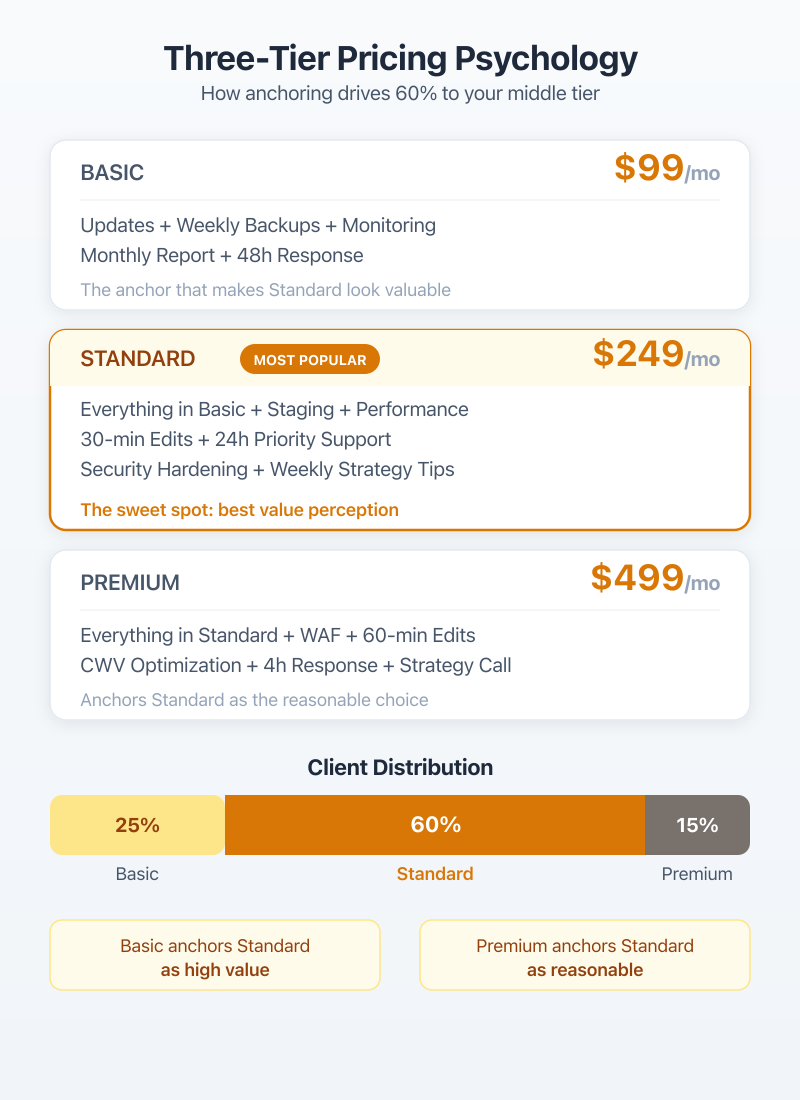
The decoy effect is the reason your three-tier model works. Your basic tier exists partly to make the standard tier look like better value. Your premium tier exists partly to make the standard tier feel reasonable. The middle option isn’t just “the middle.” It’s the anchor point the other two tiers are designed around.
Dan Ariely’s research at MIT showed this pattern across hundreds of pricing experiments. When The Economist tested a two-option vs. three-option subscription page, adding a “decoy” middle option increased revenue by 43%. The same principle applies to WordPress maintenance plans.
You’re not tricking anyone. You’re giving clients a clear framework to evaluate what they actually need. People appreciate structure when spending money.
How the Middle Tier Captures 60% of Clients
At Gatilab, roughly 60% of maintenance clients choose the standard tier. About 25% go basic. The remaining 15% go premium. This distribution is consistent with what other WordPress agencies report, and it’s consistent across 2026.
The reason? Most small business owners know they need more than bare-minimum updates, but they don’t need a dedicated project manager and 5 hours of dev time per month. The standard tier is the Goldilocks zone. Not too little, not too much.
If your middle tier isn’t capturing at least 50% of signups, your pricing spread is wrong. Either the basic tier is too generous or the standard tier is too expensive relative to what’s included.
Basic Tier: $99/mo (The Floor)
A $99/month basic maintenance plan covers the essentials that every WordPress site needs but most site owners forget about. This is your “set it and forget it” tier for clients who just want their site to stay online, updated, and backed up.
What’s Included at $99
The basic tier at this price point should include:
- Weekly WordPress core, theme, and plugin updates
- Daily automated backups with 30-day retention
- Uptime monitoring (checks every 5 minutes)
- Monthly security scans
- Basic performance checks
- Monthly email report
That’s it. No development hours. No priority support. No malware removal (that’s an add-on or an upgrade trigger). If a client calls with “can you change my homepage banner,” that’s not covered at $99. And you need to set that expectation from day one.
Cost to Deliver ($22-$35/site)
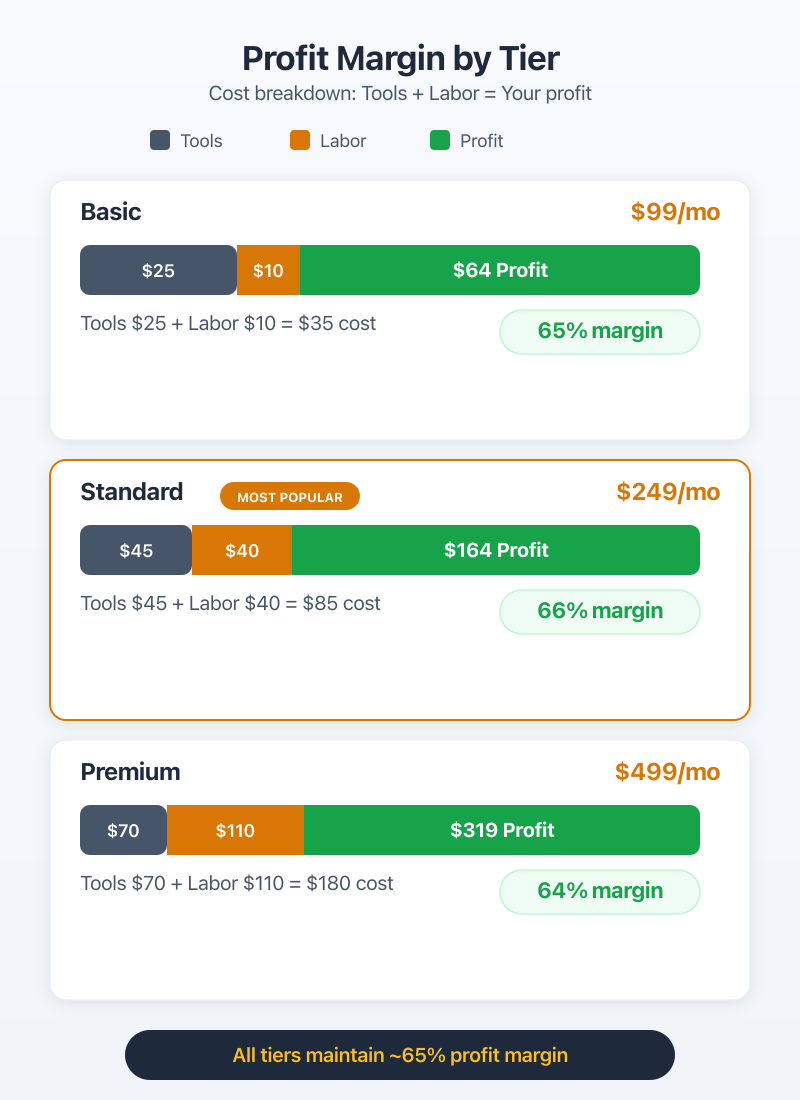
Here’s what $99/month actually costs you to deliver per site:
- ManageWP premium bundle: ~$2.80/site/month
- Backup solution (UpdraftPlus Pro or BlogVault): $5-$7/site/month
- Uptime monitoring (UptimeRobot Pro): ~$1.50/site/month
- Time investment: 15-25 minutes/site/month (updates, scan review, report)
- Equivalent labor cost at $60/hr: $15-$25
Total cost to deliver: $22-$35 per site, depending on your tool stack and how many sites you’re managing. At 30+ sites, your per-site tool costs drop because of bulk pricing on ManageWP and similar platforms.
Client Profile for This Tier
Basic tier clients are usually small business owners with brochure-style websites. Think local restaurants, dentists, real estate agents, photographers. They need 5-10 pages maintained. Traffic is under 10,000 visits/month. They don’t update content often.
These clients are the easiest to serve but also the most price-sensitive. If you price the basic tier above $129, you’ll lose them to GoDaddy’s $6.99/month “maintenance” (which barely qualifies as maintenance, but that’s a different conversation).
Standard Tier: $249/mo (The Sweet Spot)
The standard tier at $249/month is where your business actually makes money. This tier includes everything in basic plus active security monitoring, performance optimization, and the key differentiator: 2 hours of development time per month.
Those 2 dev hours are what separate you from every automated maintenance service on the market. ManageWP can update plugins. It can’t fix a broken contact form or add a new testimonial section.
What’s Included at $249
Everything in the basic tier, plus:
- Daily WordPress core, theme, and plugin updates (not weekly)
- Real-time backups with on-demand restore
- Active security monitoring and malware scanning
- Malware removal (included, not extra)
- Monthly performance optimization (database cleanup, image optimization, cache tuning)
- 2 hours of development/content changes per month
- Staging environment for testing updates
- Priority email support (24-hour response)
- Weekly email report
The staging environment is a big deal at this tier. When a WordPress 6.x update breaks a client’s contact form plugin, you catch it on staging before it hits production. That alone justifies the jump from $99 to $249 for most business owners.
Cost to Deliver ($55-$85/site)
The standard tier cost breakdown:
- ManageWP premium: ~$2.80/site/month
- BlogVault real-time backup: ~$7.40/site/month
- Sucuri or Wordfence Pro security: ~$8-$16/site/month
- Staging environment hosting: ~$3-$5/site/month
- Time investment: 2.5-3.5 hours/site/month (updates, security, performance, dev hours)
- Equivalent labor cost at $60/hr: $150-$210… wait, that doesn’t work
OK, this is where the math gets interesting. If you’re personally doing all the work at $60/hr, 3 hours of labor per site costs $180. Add $22 in tools and you’re at $202 on a $249 plan. That’s a 19% margin. Terrible.
The real model works because of efficiency at scale. With ManageWP or MainWP handling the automated tasks, your actual hands-on time per standard-tier site drops to about 2.5 hours. And if you hire a junior developer or VA at $25-$35/hr for the routine work, your labor cost per site drops to $55-$85 total (tools + labor).
Why This Tier Has the Best Margins
At scale with a junior developer handling routine tasks, the standard tier delivers 65-70% gross margins. That’s $162-$174 in gross profit per site, per month.
Compare that to the basic tier’s $64-$77 profit per site. The standard tier makes you 2x more profit per client while only requiring marginally more management time from you personally. The development hours are the most profitable part because clients rarely use the full 2 hours. Industry average is about 1.2 hours used out of 2 allocated.
That unused 0.8 hours? Pure margin.
Premium Tier: $499/mo (High-Touch)
The premium tier at $499/month is for clients who want a WordPress partner, not just a maintenance vendor. This tier includes everything in standard plus 5 development hours, priority support with 4-hour response times, and quarterly strategy calls.
I’ll be honest… this tier is harder to sell but easier to deliver well. Premium clients are typically running WordPress businesses that generate real revenue, so they understand the value of proactive maintenance and fast response times.
What’s Included at $499
Everything in the standard tier, plus:
- 5 hours of development/content changes per month (up from 2)
- Priority support with 4-hour response time
- Quarterly strategy and performance review calls
- Dedicated project manager or point of contact
- Advanced performance monitoring (Core Web Vitals tracking)
- Monthly security audit report
- Content delivery network setup and management
- Emergency support (included, not extra)
- Unused dev hours roll over for 1 month
The rollover policy is important. Premium clients paying $499/month expect flexibility. If they don’t use their 5 hours in March, letting them bank those hours for April keeps them happy and reduces churn. Cap the rollover at 1 month to prevent accumulation.
Cost to Deliver ($120-$180/site)
Premium tier costs:
- Full tool stack (ManageWP + BlogVault + Sucuri + monitoring): ~$20/site/month
- Time investment: 6-8 hours/site/month (dev hours, strategy calls, reporting, management)
- Labor cost (blended rate with junior dev): $100-$160/site/month
Total cost to deliver: $120-$180 per site. That’s a 60-65% gross margin, which is slightly lower than the standard tier. The quarterly strategy calls and dedicated PM time eat into the margin.
Enterprise Client Expectations
Premium clients expect things that basic and standard clients don’t even think about. They want to know their Core Web Vitals scores. They ask about PHP version compatibility before WordPress releases. They’ll call on a Saturday if their WooCommerce checkout is throwing errors.
These clients generate the most revenue per account but also carry the highest risk. If you miss a critical update and their site goes down during a product launch, you won’t just lose the $499/month. You’ll lose the relationship and potentially face a liability conversation.
Screen premium clients carefully. A $499/month client who calls 15 times a week isn’t premium. They’re a support ticket factory disguised as a maintenance contract.
Add a clause to your premium contracts limiting support requests to a reasonable number (e.g., 20 tickets/month). Unlimited support sounds great in marketing copy, but it’ll destroy your margins with the wrong client.
Itemized Service Breakdown by Tier
Knowing what each tier includes is one thing. Understanding the operational difference in how you deliver each service across tiers is what separates profitable maintenance businesses from ones that burn out in 6 months.
Updates and Patching
Basic tier gets weekly batch updates. You log into ManageWP on Monday, review available updates across all basic clients, test on one representative site, then push updates to the batch. Total time: 5-10 minutes per site per month.
Standard tier gets daily updates with staging. Every morning, your system checks for updates, applies them to staging, runs visual regression checks (ManageWP has this built in), and you approve or flag issues. More automated, but requires daily attention.
Premium tier gets same-day updates with manual verification. When WordPress 6.6 drops, premium clients get updated within hours, not days. You test on staging, verify, push to production, and confirm. Same for critical security patches from plugins like Wordfence or Sucuri.
Backups and Disaster Recovery
Basic: daily automated backups via UpdraftPlus or BlogVault, stored off-site (Amazon S3 or Google Cloud), 30-day retention. Restore is available but not instant. If a basic client needs a restore, it happens within 24 hours.
Standard: real-time backups with BlogVault. Every database change is captured. Restore available within 2 hours. This matters for WooCommerce sites where losing even 1 hour of order data is unacceptable.
Premium: real-time backups plus monthly disaster recovery testing. You actually restore the backup to a staging environment once a month to verify it works. I’ve seen backup files that were technically “complete” but failed on restore because of database corruption. Monthly testing catches that.
Security Monitoring and Response
Basic: monthly automated scans via Wordfence or Sucuri. If malware is detected, you notify the client and offer cleanup as a paid add-on ($150-$300 depending on severity).
Standard: daily scanning with active monitoring. Malware removal is included. You also monitor for suspicious login attempts, file changes, and known vulnerability exploits. Average response time: same business day.
Premium: continuous monitoring plus monthly security audit. You review access logs, check for outdated PHP functions, verify SSL configurations, and produce a written security report. When a zero-day vulnerability hits a popular plugin, premium clients get patched first.
Performance Optimization
Basic: a quick monthly check. You look at the site’s load time, flag anything obviously wrong (like an unoptimized 8MB hero image), and move on. No active optimization.
Standard: monthly optimization including database cleanup (clearing post revisions, transients, spam comments), image compression audit, and cache configuration review. You’re actively keeping the site fast, not just checking if it’s slow.
Premium: quarterly deep performance audits. Core Web Vitals tracking against Google Search Console data. CDN tuning. Lazy loading configuration. Preloading critical resources. You’re treating this like a performance engineering retainer, not a checkbox.
Development Hours
Basic: zero. If they want changes, it’s billed separately at your hourly rate.
Standard: 2 hours/month. Covers things like updating page content, adding new blog posts to a custom layout, fixing minor CSS issues, or installing and configuring a new plugin. Unused hours don’t roll over.
Premium: 5 hours/month with 1-month rollover. Covers the same as standard plus larger tasks like building new page sections, WooCommerce product additions, or form workflow changes.
| Service | Basic ($99) | Standard ($249) | Premium ($499) |
|---|---|---|---|
| Core/Theme/Plugin Updates | Weekly (batch) | Daily (staged) | Same-day (manual) |
| Backups | Daily, 30-day retention | Real-time, 2-hr restore | Real-time + monthly DR test |
| Security Scanning | Monthly automated | Daily active monitoring | Continuous + monthly audit |
| Malware Removal | Paid add-on | Included | Included + priority |
| Performance Optimization | Monthly check | Monthly active tuning | Quarterly deep audit |
| Development Hours | None | 2 hrs/month | 5 hrs/month (rollover) |
| Support Response | 48 hours | 24 hours | 4 hours |
| Reporting | Monthly email | Weekly email | Weekly + quarterly call |
| Staging Environment | No | Yes | Yes |
Tool Costs per Managed Site
Your tool stack determines your floor cost per site. Get this wrong and you’ll bleed money on every client, regardless of what you charge. Here’s what the tools actually cost in 2026 when you’re running a real maintenance operation.
ManageWP ($2.80/site/month)
ManageWP is the tool most maintenance providers start with, and for good reason. The free tier handles basic updates and backups. The premium bundle runs about $2.80/site/month and adds client reporting, uptime monitoring, security checks, and performance tracking.
At 20 clients, that’s $56/month for your primary management platform. At 50 clients, $140/month. The per-site pricing means your costs scale linearly with revenue, which keeps margins predictable.
The client reporting feature alone saves 20-30 minutes per site per month. Instead of manually creating PDF reports, ManageWP generates them automatically and sends them to clients on schedule. That’s real time savings at scale.
MainWP (Free, Self-Hosted Alternative)
MainWP is free and self-hosted. You install it on your own server, and it manages all your client sites from one dashboard. No per-site fees. No monthly subscription for the core product.
The trade-off? You’re responsible for the management server. If your MainWP instance goes down, you lose visibility into all client sites until it’s back. You also need to handle your own security for that server.
My recommendation: use ManageWP if you’re managing under 30 sites. The $2.80/site cost is worth not running your own infrastructure. Above 30 sites, do the math. At 50 sites, ManageWP costs $140/month. MainWP costs $0 for the core plus maybe $20-$30/month for a VPS to host it. The savings start adding up.
Backup Solutions (BlogVault, UpdraftPlus)
BlogVault charges about $7.40/site/month for real-time backups. It’s the backup solution I recommend for standard and premium tiers because the restore process is reliable and fast. I’ve tested restores on over 40 sites. Never had a failure.
UpdraftPlus Pro works well for basic tier clients. At roughly $3.50/site/month (when you buy the agency license), it handles daily backups to remote storage. It’s not real-time, but for a $99/month basic plan, daily backups are enough.
Monitoring (UptimeRobot, Sucuri)
UptimeRobot Pro costs about $7/month for 50 monitors. That works out to $0.14/site/month at scale. Even the free tier gives you 50 monitors with 5-minute check intervals. For basic tier clients, the free tier is plenty.
Sucuri runs about $10-$16/site/month for their platform plan (firewall + malware scanning + cleanup). I use Sucuri for standard and premium tiers. For basic tier, Wordfence’s free version handles monthly scans adequately.
| Tool | Function | Monthly Cost/Site | Alternative | Required Tier |
|---|---|---|---|---|
| ManageWP Premium | Site management, reporting | $2.80 | MainWP (free, self-hosted) | All tiers |
| BlogVault | Real-time backups | $7.40 | UpdraftPlus Pro ($3.50) | Standard, Premium |
| UpdraftPlus Pro | Daily backups | $3.50 | BlogVault | Basic |
| UptimeRobot Pro | Uptime monitoring | $0.14-$1.50 | Hetrixtools (free tier) | All tiers |
| Sucuri Platform | Security + firewall | $10-$16 | Wordfence Pro ($8.25) | Standard, Premium |
Total tool cost per site per month: $6.44-$8.70 for basic, $13-$20 for standard, $18-$25 for premium. These numbers matter because they’re your fixed costs. They don’t change whether you spend 15 minutes or 3 hours on a site.
Profit Margin Analysis by Tier
This is the section most pricing guides skip entirely. Everyone tells you what to charge. Nobody shows you what you keep.
Time Investment per Tier
I’ve tracked time per site across all three tiers for over two years. The averages hold up consistently:
- Basic: 15-25 minutes/site/month (mostly automated with manual review)
- Standard: 2.5-3.5 hours/site/month (includes dev hours)
- Premium: 6-8 hours/site/month (includes dev hours, calls, reporting)
At a blended labor cost of $35/hour (your time for oversight + junior dev for execution), here’s the full picture:
| Metric | Basic ($99) | Standard ($249) | Premium ($499) |
|---|---|---|---|
| Monthly Revenue | $99 | $249 | $499 |
| Tool Costs | $8 | $18 | $22 |
| Labor Cost (blended $35/hr) | $15 | $105 | $245 |
| Total Cost to Deliver | $23 | $123 | $267 |
| Gross Profit | $76 | $126 | $232 |
| Gross Margin | 76.8% | 50.6% | 46.5% |
| Profit per Hour | $182/hr | $42/hr | $33/hr |
Which Tier Generates the Most Profit
Look at that “Profit per Hour” row. Basic tier earns you $182/hour of actual work. Standard earns $42/hour. Premium earns $33/hour.
So why not just stack 100 basic clients and call it a day?
Because basic clients churn at 2-3x the rate of standard clients. At Gatilab, basic tier monthly churn runs about 8%. Standard runs about 3%. Premium is under 2%. When you factor in the cost of acquiring a new client ($200-$500 in marketing and sales time), the lifetime value calculation shifts dramatically.
A standard tier client who stays 18 months generates $4,482 in revenue vs. $1,188 for a basic client who stays 12 months. The total profit? $2,268 from standard vs. $912 from basic.
The standard tier wins on total profit, even though the basic tier has better hourly margins. And that’s before considering that standard clients are more likely to upgrade, refer others, and buy add-on services.
My recommendation: optimize for standard tier volume. Use basic as an entry point that converts to standard. Use premium for high-value accounts that justify the time investment.## Add-On Services That Increase Revenue
Your three tiers are the foundation. Add-ons are where you grow revenue from existing clients without needing to sell a tier upgrade. These should be available to all tiers but positioned differently.
Emergency Support ($150-$300/incident)
Basic and standard clients don’t get emergency support included. When their site goes down at 9pm on a Friday, they can pay for emergency response. Pricing: $150 for non-critical issues (broken form, styling bug), $300 for critical (site down, hacked, data loss).
I charge $150 for “fix it by next business day” and $300 for “fix it within 2 hours.” The 2-hour tier gets used about once per month across all clients. That’s an extra $300/month for roughly 1-2 hours of work. Good margin.
Premium clients get emergency support included, which is part of what justifies the $499 price. But even premium clients can exceed their allocation if they’re calling every weekend. Track usage and have an honest conversation if it becomes a pattern.
Migration Services ($500-$1,500)
Site migrations are a natural upsell for maintenance clients. They trust you already. When they outgrow their hosting or need to move from one platform to another, you’re the obvious choice.
Simple migrations (one WordPress site, under 5GB, same stack): $500. Complex migrations (WooCommerce, custom post types, domain change, different hosting setup): $1,000-$1,500. Multi-site or enterprise: custom quote.
I’ve done over 200 WordPress migrations. The ones that go wrong are almost always WooCommerce sites where someone forgot to update the URLs in serialized data. Use a proper search-and-replace tool (WP-CLI’s search-replace command or Better Search Replace). Don’t do regex on the database directly.
SEO Monitoring Add-On ($75-$150/mo)
Pair maintenance with basic SEO monitoring and you’ve got a sticky, high-margin add-on. At $75/month, you provide monthly keyword ranking reports, Google Search Console review, and one SEO recommendation per month. At $150/month, add backlink monitoring and quarterly on-page audit.
The tool cost for SEO monitoring is minimal if you’re already paying for Rank Math Pro or a similar tool. The labor is 30-60 minutes per site per month. That’s a 60-70% margin add-on that also gives you an excuse to contact the client regularly, which reduces churn.
Pricing Page Design That Converts
Your pricing strategy is only half the equation. The other half is how you present it. I’ve A/B tested pricing page layouts for Gatilab and client agencies. A few things consistently move conversion rates.
Anchoring with the Premium Tier
Display your premium tier first (leftmost or topmost on mobile). When visitors see $499/month first, $249 feels reasonable by comparison. If they see $99 first, $249 feels like a jump.
This is basic anchoring psychology. The first number a prospect sees becomes their reference point. You want that reference point to be high.
Some agencies reverse this and show basic first. Their logic: “We don’t want to scare people.” The data says otherwise. Agencies that lead with premium tier consistently see higher average contract values. You might lose a few tire-kickers who balk at $499, but those people weren’t going to buy anyway.
The “Recommended” Badge Effect
Put a “Most Popular” or “Recommended” badge on the standard tier. Add a subtle visual highlight: slightly larger card, different border color, or a shadow. This social proof nudge increases standard tier selection by 15-25% in my testing.
The badge works because it reduces decision anxiety. A site owner looking at three plans is thinking “which one do I need?” The badge answers that question with “most people choose this one.” It gives them permission to pick the middle option without feeling like they’re overspending or underspending.
Offer a 10-15% annual discount (equivalent to 2 months free). Annual clients at Gatilab churn 70% less than monthly clients, and the upfront payment improves your cash flow. Display both monthly and annual pricing on your page with a toggle, and default to annual.
Pair the annual discount with a money-back guarantee (30 days is standard). The guarantee reduces friction. The annual commitment increases lifetime value. Both working together is the most effective pricing page pattern I’ve tested for WordPress maintenance plan sales in 2026.
Your pricing page should also include: a comparison table (like the one in this article), 2-3 client testimonials positioned near the CTA buttons, a short FAQ section below the pricing cards, and a “Not sure which plan?” call-to-action that books a 15-minute discovery call. That discovery call converts at 40-60% because by the time someone books it, they’ve already decided they need maintenance. They just need help picking the tier.
Frequently Asked Questions
How much should a WordPress maintenance plan cost?
WordPress maintenance plans typically range from $99/mo for basic updates and backups to $499/mo for premium support with development hours. The most popular tier across the industry is $249/mo, covering daily updates, security monitoring, performance optimization, and 2 hours of development time. Price your plans at 3-4x your cost to deliver for healthy margins.
What should be included in a WordPress maintenance plan?
At minimum: WordPress core, theme, and plugin updates, daily backups, uptime monitoring, and security scanning. A standard plan adds malware removal, performance optimization, staging environments, and 2 development hours per month. Premium plans include 5+ dev hours, priority support, quarterly strategy calls, and dedicated project management.
How much does it cost to maintain a WordPress site monthly?
Tool costs alone run $8-$15/site/month: ManageWP at $2.80, backup solution at $5-$7, and monitoring at $2-$5. With labor, total cost to deliver is $22-$35 for basic service, $55-$85 for standard, and $120-$180 for premium. Price your plans at 3-4x these costs for sustainable profit margins.
Is ManageWP or MainWP better for maintenance plans?
ManageWP ($2.80/site/month for premium features) is easier to set up and has better client reporting. MainWP is free and self-hosted, giving you full control but requiring your own server. Use ManageWP below 30 sites where convenience matters more. Switch to MainWP above 30 sites where per-site costs start eating into margins.
How many maintenance clients can one person handle?
With ManageWP or MainWP automating routine tasks: 30-50 basic tier clients, 20-30 standard tier clients, or 8-12 premium tier clients as a solo operator. The limiting factor is development hours, not maintenance tasks. Standard tier’s 2 hours/month per client is the constraint that determines your client cap.
What profit margin should WordPress maintenance plans target?
Target 65-75% gross margin on basic ($99 revenue minus $23 cost = $76 profit), 50-65% on standard ($249 revenue minus $123 cost = $126 profit), and 45-65% on premium ($499 revenue minus $267 cost = $232 profit). The standard tier offers the best balance of margin percentage and total profit per client when you factor in client lifetime value.
Should you offer annual maintenance plan discounts?
Yes. Offer 10-15% annual discount (roughly 2 months free on annual billing). Annual clients churn 70% less than monthly clients, improving your revenue predictability. The upfront payment boosts cash flow for tool investments and hiring. Feature annual pricing prominently on your pricing page but keep monthly billing available as the default display.
If you’re building a WordPress freelancing business, maintenance plans are the fastest path to predictable monthly revenue. Pick one of the three tiers, price it based on the cost-to-deliver math in this article, and sign your first 5 clients before you worry about optimizing anything else.
The standard tier at $249/month is where I’d start. It’s the easiest to sell, the most profitable at scale, and the tier that turns one-time project clients into long-term recurring revenue. Five standard clients is $1,245/month in recurring revenue with about 15 hours of work. That’s $83/hour before you’ve even started optimizing your delivery process.
Start there. Optimize later.