
How to Set Up a WordPress Maintenance Business

Here’s the problem with building WordPress websites for a living: you finish a project, get paid, and then start from zero looking for the next one. It’s a feast-or-famine cycle that burns people out.
Maintenance plans fix that.
I run Gatilab, a WordPress agency. And the maintenance side of the business is what keeps the lights on between big projects. Every month, predictable revenue shows up whether I land a new client or not. It’s the smartest business model in the WordPress space.
In this guide, I’ll show you exactly how to set up a WordPress maintenance business. What services to offer, how to price them, what tools to use, how to find clients, and how to scale from a few sites to 50 or more.
This isn’t a technical guide. It’s a business guide. Let’s talk about the money.
What Services to Offer
Your maintenance plans should cover everything a WordPress site needs to stay healthy, secure, and fast. Here’s the standard list:
Core, Theme, and Plugin Updates
This is the foundation. WordPress releases updates regularly, and so do themes and plugins. Outdated software is the number one reason WordPress sites get hacked.
You’ll run updates weekly or biweekly. Not daily (too risky without testing). And not monthly (too slow for security patches). I do updates every Tuesday for all client sites. It takes about 2 hours when you’ve got the right tools.
Backups
Every client site needs automated daily backups stored off-site. Not on the same server. If the server goes down or gets hacked, backups stored on it are useless.
I keep 30 days of daily backups and 12 months of monthly backups. That might sound like overkill, but I’ve had clients come to me saying “something broke 3 weeks ago and we just noticed.” You need that history.
Security Monitoring
This includes malware scanning, firewall rules, login protection, and file integrity monitoring. You’re watching for signs of trouble before they turn into disasters.
Most of this runs automatically. You check the reports, investigate anything suspicious, and clean up infections if they happen.
Uptime Monitoring
If a client’s site goes down at 2 AM, you should know about it before they do. Uptime monitoring pings the site every few minutes and alerts you if it’s unreachable.
Fast response to downtime is one of the biggest things that separates amateur maintenance from professional service. When a client gets a “your site is back up” email before they even knew it was down, you’ve earned their trust.
Performance Optimization
This is the value-add that justifies higher pricing. Monthly performance checks, image optimization, database cleanup, caching configuration, and Core Web Vitals monitoring.
Sites slow down over time. Post revisions pile up, the database gets bloated, new plugins add weight. Regular performance maintenance keeps things running smoothly.
Monthly Reports
Clients want to know what they’re paying for. Send a monthly report showing what updates were applied, backup status, uptime percentage, security scan results, and any performance improvements.
This isn’t just good communication. It’s your insurance against cancellations. When clients see the report and realize how much is happening behind the scenes, they don’t question the invoice.
Content Edits (Optional)
Some plans include a certain number of content changes per month. Small things like text updates, image swaps, or adding a new page. I include 30 minutes of content edits in my mid-tier plan and 60 minutes in the top tier. This is popular with small business owners who don’t want to log into WordPress at all.
Pricing Models That Work
I’ve tested a lot of pricing structures over the years. Three tiers works best. Less than three and you don’t give people options. More than three and you create decision paralysis.
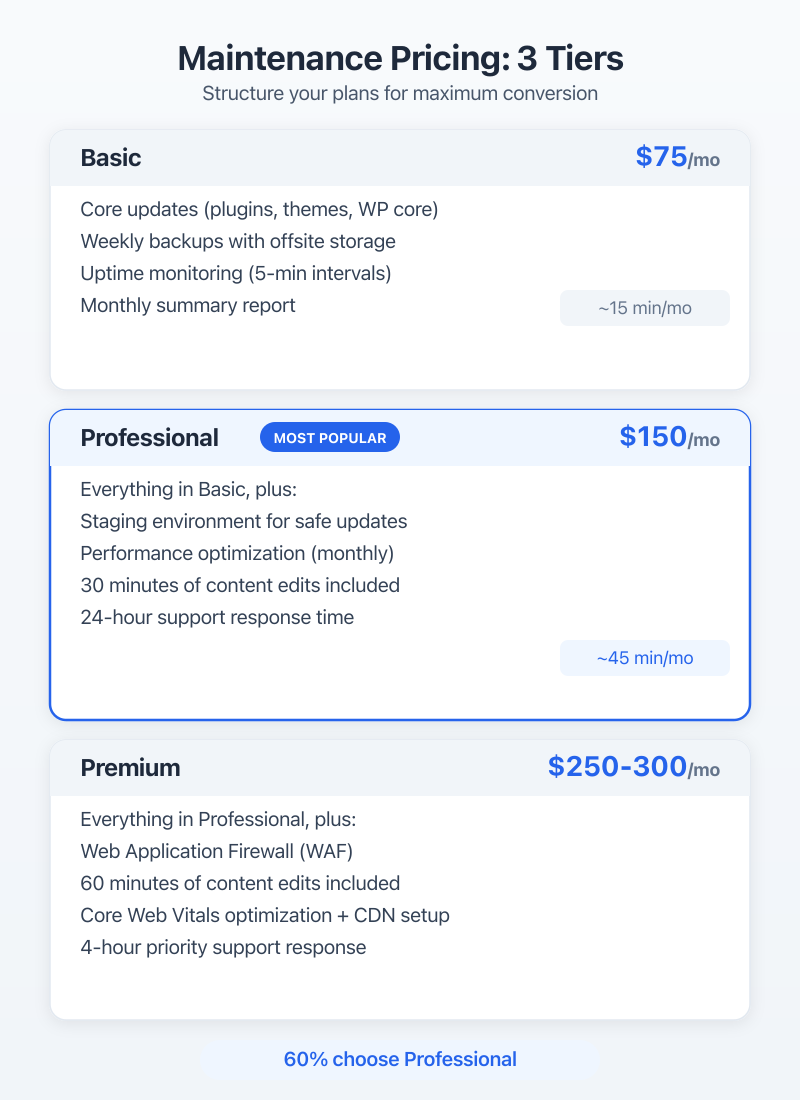
Basic Plan: $75/month
This is your entry-level plan. It covers the essentials:
- Weekly core, theme, and plugin updates
- Daily automated backups (30-day retention)
- Security monitoring and malware scanning
- Uptime monitoring (5-minute intervals)
- Monthly summary report
- Email support (48-hour response time)
This plan is for clients with simple sites who just want the peace of mind that someone’s watching things. Brochure sites, simple blogs, portfolios.
Your time investment: About 15-20 minutes per site per month once everything’s automated.
Professional Plan: $150/month
This is where most clients land. Everything in Basic, plus:
- Biweekly updates with staging testing
- Off-site backups (30-day daily + 12-month monthly)
- Monthly performance optimization
- Database cleanup and optimization
- 30 minutes of content edits per month
- Priority email support (24-hour response time)
- Quarterly performance review call
The staging testing is what sets this apart from Basic. Instead of pushing updates directly to the live site, you test them on a staging copy first. That catches conflicts before they affect the live site.
Your time investment: About 30-45 minutes per site per month.
Premium Plan: $250-300/month
This is the VIP plan. Everything in Professional, plus:
- Weekly updates with staging testing
- Real-time security monitoring with WAF (Web Application Firewall)
- 60 minutes of content edits per month
- Monthly Core Web Vitals optimization
- Priority phone and email support (4-hour response time)
- CDN setup and management
- Monthly strategy call
This plan is for businesses that depend on their website. E-commerce sites, lead generation sites, membership sites. They can’t afford downtime or slow performance.
Your time investment: About 60-90 minutes per site per month.
Annual Discounts
Offer a 10-15% discount for annual prepayment. This improves your cash flow and reduces churn. A client who pays $1,530 upfront for a year ($150/month x 12 with 15% off) is much less likely to cancel than someone paying month to month.
Custom Plans
Some clients need more than your top tier. Maybe they have 10 sites, or they need daily content updates, or they want 24/7 phone support. Don’t turn them away. Build a custom quote. These custom deals are often your most profitable clients.
Tools You’ll Need
You can’t manage 20+ WordPress sites by logging into each one individually. You need tools that centralize everything.
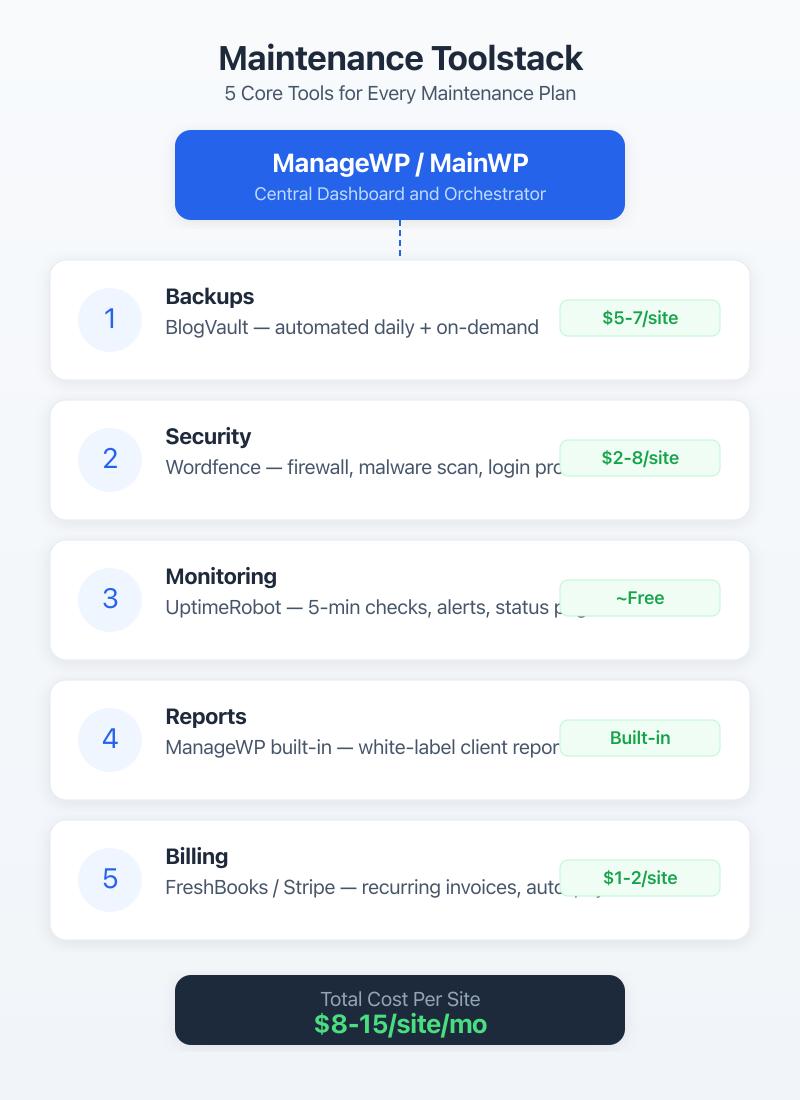
Site Management: ManageWP or MainWP
ManageWP is a cloud-based dashboard that lets you manage all your WordPress sites from one place. Updates, backups, security scans, performance checks, uptime monitoring, and client reports. It has a free tier and paid add-ons. I’ve used it for years. It’s reliable and the reporting feature alone saves me hours every month.
MainWP is the self-hosted alternative. You install it on your own WordPress site and connect all your client sites. It’s free and open-source, with premium extensions for extra features. If you want full control over your data and don’t mind hosting the dashboard yourself, MainWP is solid.
Pick one. Don’t try to use both. I’d recommend ManageWP if you’re just starting out because the setup is faster and there’s less to manage.
Backups: BlogVault or UpdraftPlus
ManageWP and MainWP both have backup features, but I like having a dedicated backup solution as a second layer.
BlogVault does incremental backups (only backs up what’s changed), stores everything off-site, and has one-click restore. It also includes staging, migration, and security features. It’s $89/year per site, so factor that into your pricing.
UpdraftPlus is the budget option. The free version is solid for basic backups to Google Drive, Dropbox, or S3. The premium version adds incremental backups, migration tools, and priority support.
Uptime Monitoring: UptimeRobot or Better Uptime
UptimeRobot has a free plan that monitors up to 50 sites with 5-minute intervals. That’s enough for most maintenance businesses. The paid plan ($7/month) gets you 1-minute intervals and more monitors.
Better Uptime is fancier with status pages and incident management. It’s more expensive but looks more professional if you want to give clients their own status page.
Security: Wordfence or Sucuri
Wordfence is my go-to. The free version gives you a firewall, malware scanner, and login security. The premium version ($119/year per site) adds real-time firewall rules, country blocking, and priority support.
Sucuri offers a cloud-based WAF that sits in front of the site. It’s better for sites that need DDoS protection or have been hacked before. Plans start at $199/year.
Reporting
Most management tools have built-in reporting. ManageWP’s client reports are good enough for most people. If you want something fancier, look into Jetrails or build custom reports with Google Data Studio.
How to Find Your First 5 Clients
The hardest part is getting started. Here’s where your first clients will come from:
Your Existing Clients
If you’ve built any WordPress sites, those clients need maintenance. Email every past client and offer a maintenance plan. Something like:
“Hey [Name], I wanted to check in on your website. WordPress has released 15 updates since we launched your site, and some of them are security patches. I’ve started offering monthly maintenance plans to make sure sites stay secure, updated, and fast. Want me to send you the details?”
You’d be surprised how many people say yes. I converted about 40% of my past clients when I first introduced maintenance plans.
Local Businesses
Walk into local businesses and look for WordPress sites. You can check by viewing the page source and looking for wp-content in the code. Or use a tool like BuiltWith.
Most small businesses have WordPress sites built by a freelancer who disappeared. They have no idea their site hasn’t been updated in 2 years. That’s your pitch.
Web Designer Referrals
Connect with web designers and developers who don’t offer maintenance. They build sites and move on. Partner with them: they refer clients to you for maintenance, and you refer clients to them for redesigns.
This is a win for everyone. The designer doesn’t have to deal with ongoing support, the client gets proper maintenance, and you get recurring revenue.
Freelance Platforms
Sites like Upwork and Codeable have clients looking for ongoing WordPress maintenance. The competition is higher and margins are lower, but it’s a good way to fill your pipeline early on.
Content Marketing
Write about WordPress maintenance on your website. “How to tell if your WordPress site has been hacked.” “Why your WordPress site is slow.” “What happens when you don’t update WordPress.” These posts attract business owners who Google their problems. They find your article, realize they need help, and hire you.
This is a longer-term strategy, but it compounds over time. Some of my best clients found me through blog posts I wrote years ago.
Client Onboarding Process
A smooth onboarding process makes you look professional and catches problems before they start.
Step 1: Site Audit
Before you take on a site, audit it. Check for malware, outdated software, broken links, performance issues, and backup status. I use a checklist with about 30 items.
If the site has serious problems (active malware, heavily outdated core, broken functionality), charge a one-time cleanup fee before starting the maintenance plan. Don’t absorb that cost into your monthly price.
Step 2: Get Access
You’ll need admin access to WordPress, hosting control panel access, and domain registrar access. Create a standardized intake form that collects all of this in one shot.
Always create your own admin account. Don’t use the client’s login. And use a strong, unique password stored in a password manager.
Step 3: Install Your Tools
Set up your management tool connection, backup solution, security plugin, and uptime monitoring. Run an initial full backup before you touch anything.
Step 4: Sign the Agreement
Have a clear service agreement that spells out:
- What’s included in the plan
- What’s NOT included (new features, redesigns, third-party integrations)
- Response times for different issue types
- Billing terms and cancellation policy
- Liability limitations
Don’t skip this. I’ve seen maintenance providers get burned by clients expecting unlimited development work as part of a $75/month plan. The agreement protects both of you.
Step 5: First Month Baseline
In the first month, establish a baseline. Run all pending updates (on staging first if the plan includes it), optimize the database, configure caching, and document the site’s current state. This gives you something to measure against in future reports.
Scaling from 5 to 50+ Clients
Getting to 5 clients is about hustle. Getting to 50 is about systems.
Automate Everything You Can
Updates, backups, security scans, uptime checks, and reports should all run automatically. Your job is to review the results and handle exceptions. If you’re manually logging into each site to run updates, you won’t scale past 10 clients without burning out.
Create SOPs (Standard Operating Procedures)
Document every process. How to onboard a new client. How to handle a hacked site. How to run monthly performance optimization. How to generate and send reports.
SOPs do two things: they make sure nothing falls through the cracks, and they make it possible to hire help.
Hire Help
Once you’re past 25-30 sites, consider hiring a part-time virtual assistant or junior developer to handle routine tasks. Updates, reports, and basic content edits don’t require senior-level skills. Free yourself up for client communication, problem-solving, and sales.
Raise Your Prices
As demand grows, raise your prices for new clients. Your early clients at $75/month are fine, but new clients should be paying $100-125 for the same plan. Grandpa pricing for loyal clients, market pricing for new ones.
Batch Your Work
Don’t check sites randomly throughout the week. Set specific days for specific tasks:
- Monday: Review weekend uptime alerts and security scans
- Tuesday: Run all updates across client sites
- Wednesday: Handle content edit requests
- Thursday: Performance optimization
- Friday: Generate and send monthly reports (for clients due that week)
Batching is more efficient than context-switching between tasks.
Common Mistakes to Avoid
I’ve made most of these mistakes myself, so you don’t have to.
Underpricing
Don’t charge $30/month because you’re scared no one will pay more. At $30/month, you need 50 clients just to make $18,000/year. That’s not a business. That’s a hobby that stresses you out.
Your minimum should be $75/month. If someone balks at that, they’re not your client. The businesses that value their websites will pay for proper maintenance.
No Contracts
A verbal agreement is worth the paper it’s printed on. Always have a signed service agreement. It protects you when clients expect unlimited work, and it gives clients clarity on what they’re getting.
Doing Updates Without Testing
One bad plugin update can take down a site. If you’re on a plan that includes staging, always test updates there first. If you’re on the basic plan, at least run a backup immediately before updating.
Scope Creep
“Can you just add a new page?” “Can you just change this feature?” “Can you just…” These small requests add up fast. If it’s not in the plan, it’s either an upsell or a separate project. Be friendly but firm.
Manual Everything
If you’re still manually logging into 15 WordPress dashboards every week, stop. Get ManageWP or MainWP set up today. The time you save in the first month will pay for the tool ten times over.
The Numbers: What You Can Actually Earn
Let’s run some real numbers.
10 clients at $100/month average:
$1,000/month. About 10-15 hours of actual work. That’s a solid side income.
25 clients at $125/month average:
$3,125/month. About 25-30 hours of work. This is a full-time freelance income for many people.
50 clients at $150/month average:
$7,500/month. You’ll need some help at this point, but even after paying a part-time VA ($1,000-1,500/month), you’re looking at $6,000+ in monthly profit.
100 clients at $150/month average:
$15,000/month. This is a real business. You’ll have 1-2 employees, solid SOPs, and a machine that runs whether you’re on vacation or not.
The beauty of maintenance revenue is that it compounds. Every new client adds to your monthly baseline. You’re not starting over every month. After 2-3 years of steady growth, you’ve built something that generates income even when you take a week off.
Wrap Up
A WordPress maintenance business is the most reliable way to build recurring revenue in the WordPress ecosystem. The work is predictable, the tools exist to automate most of it, and the demand isn’t going anywhere. Every WordPress site needs maintenance. Most site owners don’t want to do it themselves.
Start with your existing clients. Set up ManageWP or MainWP. Create three pricing tiers. Get a service agreement in place. And start signing people up.
Your first 5 clients will take the most effort. After that, referrals and reputation do the heavy lifting. In a year, you could have 25-30 clients and a reliable monthly income that doesn’t depend on landing the next big project.
The best time to start was last year. The second best time is today.