
WordPress Agency Operations: PM, Client Onboarding, Toolstack in 2026

Your WordPress agency can build beautiful sites. But you’re drowning in Slack messages from eight clients, your staging workflow is “whoever pushes last wins,” and that two-week project just quietly became six weeks. Nobody talks about this at WordCamps. Everyone’s showing off their Elementor builds while their operations are held together with duct tape and Google Sheets.
This is where agencies stall. Somewhere between 5 and 15 active projects, the chaos becomes unsustainable. You can’t keep every deadline, every client preference, and every developer’s availability in your head anymore. ClickUp costs $7/user/month. Linear costs $8. Notion costs $8. But picking the wrong PM tool for a WordPress agency means migrating everything again in six months, and that’s just one piece of the operations puzzle.
This guide covers the full playbook: PM tools, client onboarding, staging workflows, and subcontractor management that actually scales past the 10-project wall.
Why Operations Kill More WordPress Agencies Than Bad Code
Bad operations don’t announce themselves. They compound quietly. A missed deadline here, a confused client there, a subcontractor who didn’t get the brief. Each one is survivable on its own. Stack enough of them together over six months, and you’ve lost three clients and your best developer.
At Gatilab, I tracked why projects went sideways. After about 200 projects, the pattern was clear: 80% of project failures had nothing to do with technical ability. They were communication gaps, unclear scope, missed handoffs, and approval bottlenecks. The code was fine. The process around the code was broken.
The Capacity Problem
Every WordPress agency hits a wall somewhere between 5 and 15 active projects. Below five, you can keep everything in your head. Above fifteen, you’ve usually hired enough people to build real systems. But that middle zone? That’s where agencies die.
You’re too busy to build processes, and you don’t have processes because you’re too busy. I spent two years in that trap at Gatilab. Taking on projects I shouldn’t have, context-switching between eight client Slack channels, and wondering why my profit margins kept shrinking despite charging more.
The fix wasn’t working harder. It was spending a full week building the operations layer I’d been avoiding. One week of setup saved me roughly 10 hours per week going forward. The math was embarrassing once I actually did it.
Operations as a Competitive Advantage
When your onboarding is clean, clients trust you from day one. When your staging workflow is predictable, developers don’t step on each other. When your communication cadence is automatic, clients stop asking “what’s the status?” every other day.
I’ve won projects specifically because prospects asked about my process during the pitch. Not my portfolio. Not my rates. My process. Agencies that can describe exactly how a project moves from signed contract to launched site win more deals than agencies with prettier portfolios.
Project Management for WordPress Agencies
ClickUp is the best PM tool for WordPress agencies managing multiple client projects in 2026. It handles everything from task tracking to time logging to client-facing views, and it costs $7/user/month. I’ve tried the alternatives. This is where I landed after testing four different tools over three years.
The PM tool decision matters more than most agencies realize. It’s the central nervous system of your operation. Get it wrong, and you’ll either outgrow the tool or drown in features you don’t need. WordPress agencies have specific needs: per-client spaces, milestone tracking, time logging for profitability, and views simple enough that non-technical clients can check progress without calling you.
ClickUp for WordPress Agencies (My Pick)
I moved Gatilab to ClickUp in 2022 after outgrowing Trello. The difference was immediate. Each client gets a Space. Each project gets a Folder. Tasks follow a standard workflow: Backlog, In Progress, In Review, Client Approval, Done.
What sold me: ClickUp’s custom statuses per Space. WordPress maintenance clients need different workflow stages than full website builds. In ClickUp, my maintenance Space has statuses like “Scheduled,” “In Progress,” “QA,” and “Deployed.” My development Space has “Discovery,” “Design Approval,” “Development,” “Staging Review,” and “Launch Prep.” Same tool, different workflows.
The time tracking is built in, so I don’t need a separate Harvest or Toggl subscription. At $7/user/month for the Unlimited plan, it’s the best value in the category for teams under 20 people.
Linear for Dev-Heavy Teams
If your agency is 80%+ developers and you live in GitHub, Linear might be the better pick at $8/user/month. Linear’s GitHub integration is tighter than ClickUp’s. Issues sync bidirectionally with pull requests, and the sprint workflow feels natural if your team already thinks in cycles.
The tradeoff: Linear isn’t built for client-facing work. There’s no good way to give clients a portal view. You’ll need a separate tool (Notion, Google Docs, or a client portal plugin) for client communication. For a pure development shop that handles client comms separately, that’s fine. For a full-service agency, it’s one more tool to maintain.
Notion for Documentation-First Agencies
Notion at $8/user/month tries to be everything: PM tool, wiki, docs, and database. Some agencies make it work. The ones that succeed usually have a strong documentation culture already.
Notion’s biggest strength for WordPress agencies is its wiki functionality. SOPs, brand guidelines, hosting credentials, plugin documentation… it all lives in one searchable place. The PM features (databases with Kanban views, timelines, and filters) are adequate but not best-in-class.
I’ve seen agencies try Notion for PM and switch within six months because the project management side lacks automations and native time tracking. Use Notion for documentation. Use something else for task management.
| Tool | Monthly Cost/User | WordPress Integration | Best For | Learning Curve |
|—|—|—|—|—|
| ClickUp | $7 | Webhooks, Zapier, API | Full-service agencies | Moderate (1-2 weeks) |
| Linear | $8 | Native GitHub sync | Dev-heavy teams | Low (2-3 days) |
| Notion | $8 | Zapier, API | Documentation-first teams | Moderate (1-2 weeks) |
| Asana | $10.99 | Zapier, API | Enterprise agencies | Low (3-5 days) |
| Trello | $5 | Power-Ups | Solo freelancers, small teams | Very low (1 day) |
Client Onboarding That Scales
A structured onboarding process should take exactly 4 business days from signed contract to project kickoff in your PM tool. I’ve refined this at Gatilab across hundreds of client projects, and four days is the sweet spot. Faster than that, and you skip steps that come back to bite you. Slower, and the client’s excitement fades.
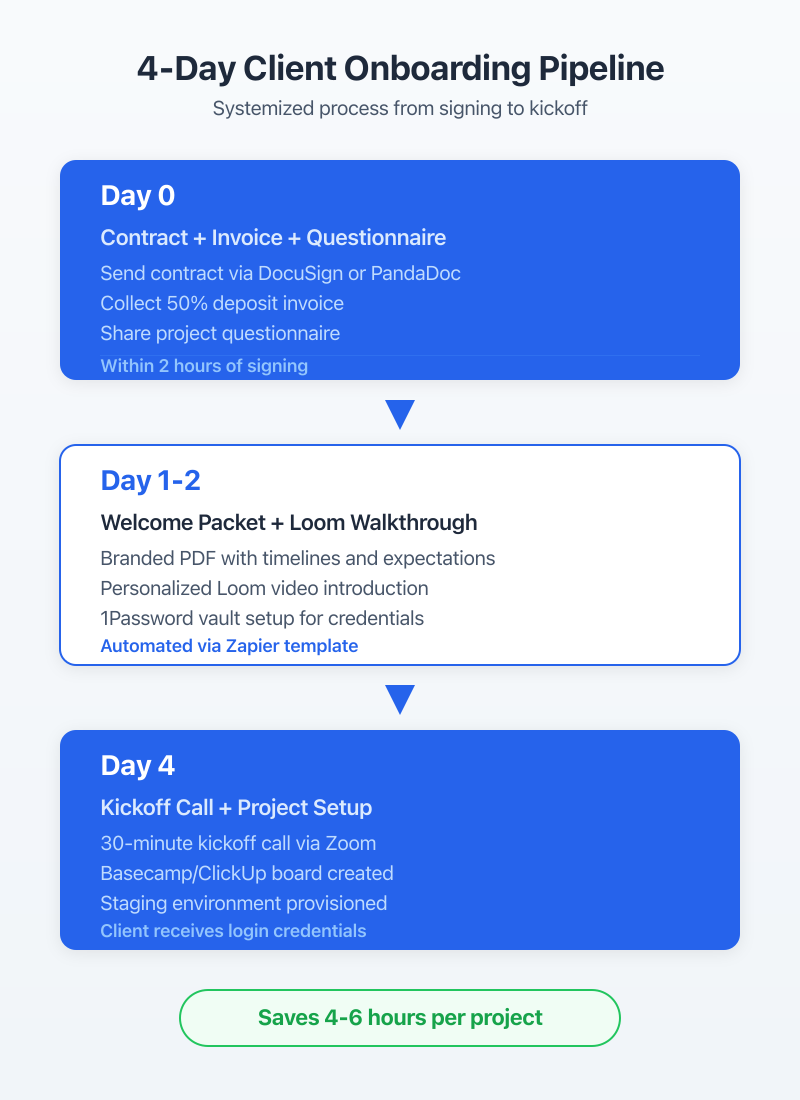
Most agencies wing onboarding. They send a contract, collect a deposit, and jump straight into development. Then three weeks later, they’re chasing the client for brand assets, hosting credentials, and content. All of that should be collected before a single line of code is written.
The Onboarding Questionnaire
Day one: the client gets an automated Google Forms questionnaire within two hours of signing the contract. Not a week later. Not “when we get around to it.” Two hours, triggered by the contract signing notification.
The questionnaire covers four categories:
Business context. What does the business do? Who’s the target customer? What’s the primary goal for this website (leads, sales, information)? What do you like and dislike about your current site?
Technical details. Current hosting provider and plan. Domain registrar. Existing email setup. Any third-party integrations (CRM, email marketing, payment processors)?
Brand assets. Logo files (vector preferred). Brand colors (hex codes). Font preferences. Photography or stock photo direction.
Content readiness. Who’s providing the copy? Is the content written or does it need to be created? How many pages? Any existing content to migrate?
This questionnaire has saved me more hours than any tool I’ve ever purchased. When the project starts, I already have everything.
Welcome Packet and Access Collection
Day two: the client receives a welcome packet. I use Loom to record a 3-minute personalized video walking them through the project timeline, communication expectations, and what they need to provide. Below the Loom embed, there’s a PDF with everything in writing.
The same email includes a secure link (I use a shared 1Password vault for agency credentials, but LastPass or Bitwarden work too) where clients submit their hosting login, domain registrar access, and any other credentials.
Never accept credentials via email. Ever. Not even once. One breach and you’re liable for every client whose password was in that inbox.
Kickoff Call Framework (30 Minutes, Not 90)
Day four: the kickoff call. Thirty minutes. Not sixty. Not ninety. Thirty.
Why thirty? Because the questionnaire already collected the information most agencies spend the first hour gathering. The kickoff call is for three things only:
- Confirm priorities. “Based on your questionnaire, here’s what I understand as the top three goals. Am I right?”
- Set communication expectations. “Updates go out every Friday. Questions go to ClickUp or email, not text messages. Turnaround on feedback is 48 hours.”
- Align on timeline. Walk through the project milestones with specific dates.
If you need more than thirty minutes, your questionnaire isn’t collecting enough information.
| Step | Timing | Owner | Tool | Template |
|—|—|—|—|—|
| Send contract + invoice | Day 0 | Account manager | HelloSign + FreshBooks | Contract template |
| Onboarding questionnaire | Day 0 (within 2 hrs) | Automated | Google Forms | Questionnaire template |
| Welcome packet + Loom | Day 1-2 | Account manager | Loom + Google Docs | Welcome packet PDF |
| Credential collection | Day 2-3 | Client | 1Password shared vault | Access checklist |
| Kickoff call | Day 4 | Project lead | Google Meet/Zoom | 30-min agenda template |
| Project setup in PM tool | Day 4 (post-call) | Project lead | ClickUp | Project template |
Templatize everything. In ClickUp, I have a project template that auto-creates all tasks, milestones, and checklists when I duplicate it for a new client. The first five minutes of every project are identical. That consistency is what lets you handle 10+ projects without losing your mind.
Staging and Development Workflow
Every WordPress project at Gatilab follows a three-environment pipeline: local development in LocalWP, staging on Cloudways, and production deployment via Git. No exceptions. Not for “quick fixes.” Not for “small changes.” The pipeline exists because I learned the hard way what happens when you edit production directly.
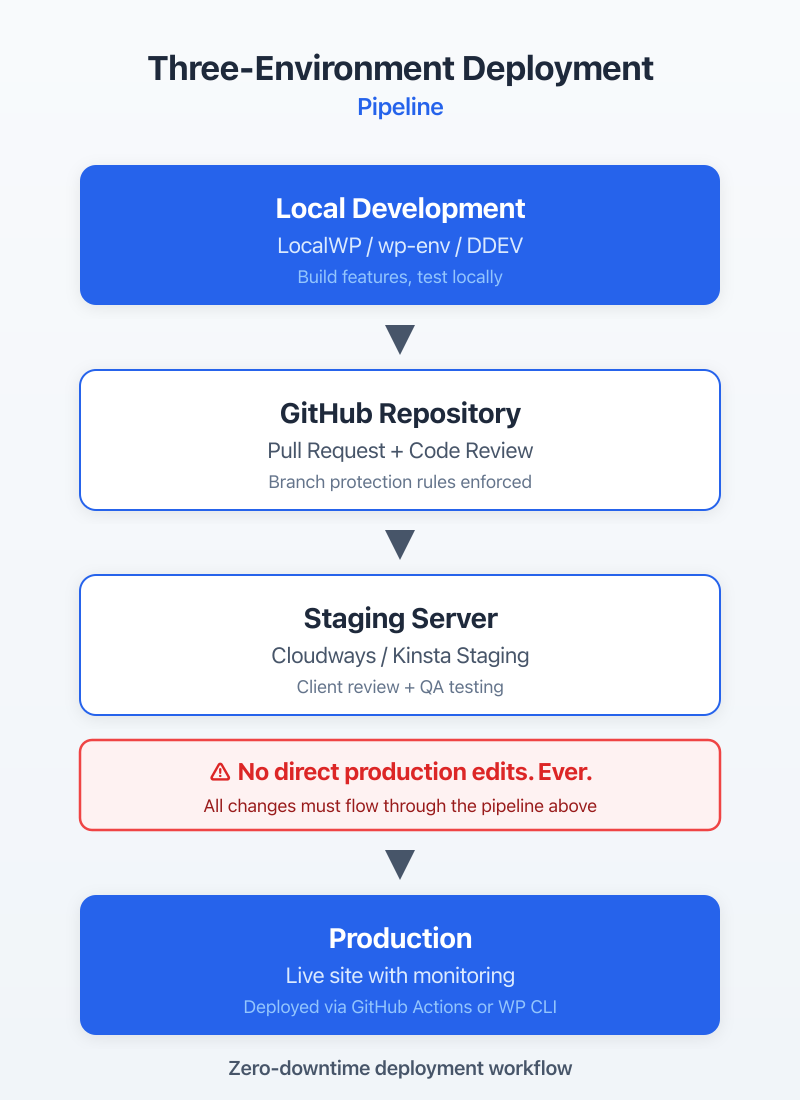
This workflow adds maybe 10 minutes per deployment. It’s prevented hundreds of hours of emergency fixes over the years. That math works for me.
Local to Staging to Production Pipeline
LocalWP is the local development environment I recommend for WordPress agencies. It’s free, it handles multiple sites cleanly, and it runs on Mac, Windows, and Linux. Each developer on the team gets their own local environment. They build and test locally before anything touches a shared server.
From local, code gets pushed to a Git repository (I use GitHub, but GitLab and Bitbucket work the same way). The staging environment on Cloudways pulls from the staging branch. Production deploys from the main branch.
The key rule: nobody pushes directly to main. All changes go through a pull request, get reviewed, merge to staging, get client approval, then merge to main for production deployment.
Client Approval on Staging Sites
Staging sites need to be client-accessible but not public. On Cloudways, I password-protect staging environments and give clients a single login. WP Engine has built-in staging with a similar setup.
For client feedback on staging, I use a combination of Loom recordings (for walkthrough context) and a simple Google Sheet where clients can log feedback by page. I’ve tried dedicated feedback tools like Atarim and BugHerd. They work well for agencies with enough volume to justify the subscription ($20-$50/month). For most agencies under 15 active projects, a structured Google Sheet does the job.
The approval workflow: client reviews staging, logs feedback in the sheet, we make changes, client reviews again. Maximum two revision rounds are included in the project scope. Anything beyond that is a change order. Setting that boundary in the contract prevents scope creep from eating your margins.
Version Control for WordPress (Git + Deployment)
Git for WordPress isn’t optional in 2026. Even if you’re a solo developer. Here’s why: without version control, you can’t roll back a broken update. You can’t track who changed what. You can’t run code review before changes go live.
My setup: Git tracks the wp-content directory (themes, plugins, and mu-plugins). Core WordPress files and uploads are excluded via .gitignore. Database changes sync through WP Migrate or WP CLI exports.
For deployment, DeployBot connects to your Git repo and pushes changes to your server automatically when code merges to the target branch. GitHub Actions is a free alternative if you’re comfortable writing YAML workflows. Both work. DeployBot is simpler to set up. GitHub Actions is more flexible and free.
Client Communication Protocols
Weekly Friday updates sent by 3pm are the single most effective client retention tool I’ve found. Not monthly. Not “when there’s something to report.” Every Friday, every client, no exceptions. This cadence, combined with Slack for async questions and email for formal decisions, covers 95% of client communication needs.
Bad communication is the number one reason clients fire agencies. Not bad work. Bad communication. I’ve seen agencies deliver technically excellent sites and still lose the client because the client felt “in the dark.” The fix is boringly simple: tell people what’s happening, consistently, before they have to ask.
Weekly Updates (Template)
Every Friday, each active client gets a structured update. It takes about five minutes per client to write. Here’s the template I use:
Subject: [Client Name] Weekly Update, [Date]
Completed this week: 2-3 bullet points of what got done. Specific pages, features, or fixes.
In progress: What’s being worked on now and expected completion.
Needs your input: Any blockers waiting on the client. Be direct about what you need and by when.
Next week’s plan: What’s coming next.
That’s it. Four sections. Five minutes. Clients love it because they never have to wonder what’s happening. I set a recurring ClickUp task every Friday at 2pm so it doesn’t get skipped.
Slack vs Email: Where Each Works
Slack at $7.25/user/month works for quick questions, casual updates, and async conversations. Email works for formal decisions, approvals, and anything that needs a paper trail.
The rule I give every client at kickoff: “Use Slack for anything that doesn’t need a formal record. Use email for approvals, scope changes, and anything involving money.” This prevents the nightmare scenario where an important scope change gets buried in a Slack thread that nobody can find three weeks later.
One more thing: don’t put clients in your internal Slack workspace. Create a separate workspace or use Slack Connect channels. Your team needs a space to talk freely without clients seeing every internal discussion.
Scope Change Communication
Scope changes kill agency profitability. Not because clients are unreasonable, but because agencies don’t have a clear process for handling them.
My scope change process at Gatilab:
- Client requests something outside the original scope
- I acknowledge the request within 24 hours (“Got it, let me scope this out”)
- Within 48 hours, I send a formal change order: description of the change, estimated hours, cost, and impact on timeline
- Client approves in writing (email reply is fine) before work begins
- The change order gets added as a new task group in ClickUp
The key: never say “sure, we can add that” in a Slack message and start working. Always run it through the formal process. It protects both sides.
Subcontractor Management
Finding reliable WordPress subcontractors takes time, but Codeable and vetted referrals from other agency owners are the two channels that consistently produce quality developers. I’ve tried Upwork, Fiverr, and cold outreach. The hit rate on Codeable is roughly 3x higher than general freelance platforms for WordPress-specific work.
At Gatilab, subcontractors handle about 40% of development work. Managing them well is the difference between scaling your agency and just adding more chaos. The systems here took me years to refine. Don’t skip them.
Finding and Vetting WordPress Subcontractors
Codeable pre-vets WordPress developers, which saves you the screening step. Rates are higher ($70-$120/hour) but the quality floor is higher too. For ongoing relationships, I’ve found the best subcontractors through referrals from other agency owners in WordPress communities like Post Status and WP Slack groups.
My vetting process for new subcontractors: a paid trial project. Not a free test. A real, small project ($500-$1,000) with clear deliverables. I evaluate code quality, communication, and deadline adherence. If all three pass, they go into my roster.
I keep a spreadsheet of vetted subcontractors with their specialties (WooCommerce, custom plugins, performance optimization, design implementation), rates, availability, and reliability rating. When a project needs extra hands, I check the spreadsheet before posting anywhere public.
Task Assignment and Code Review
Every subcontractor task gets a brief in ClickUp with five elements:
- What to build (specific deliverable, not vague direction)
- Acceptance criteria (how I’ll know it’s done correctly)
- Reference links (design files, similar examples, documentation)
- Deadline (specific date and time, accounting for review time)
- Budget cap (maximum hours or flat fee)
Code review happens on GitHub before anything touches staging. Every pull request gets reviewed for code quality, WordPress coding standards, security basics (no direct database queries without prepared statements, no unescaped output), and performance (no unnecessary database calls in loops).
Payment and Invoicing
I pay subcontractors within 7 days of approved work. No net-30. No net-60. Seven days. This is non-negotiable.
Why? Because reliable payment builds loyalty. The best subcontractors have options. If you pay late, they’ll prioritize clients who pay on time. I’ve had subcontractors tell me they reserve their best availability windows for Gatilab specifically because they know payment is fast and reliable.
For larger projects, I use milestone-based payments. 30% at project start, 40% at staging delivery, 30% at launch. Never pay 100% upfront. Never withhold everything until the end. Both extremes create bad incentives.
FreshBooks handles subcontractor invoicing on my end. Each subcontractor submits their invoice, I match it against the ClickUp task, and payment goes out via Wise (for international contractors) or direct deposit (for domestic).
Quality Assurance Workflow
Every WordPress site gets a 47-point QA check before launch, covering functionality, cross-browser testing, performance, security, and accessibility. I built this checklist after a launch went wrong in 2019. A contact form wasn’t working on Safari. The client found it. Not us. That was the last time we launched without a formal QA process.
QA isn’t a phase you bolt on at the end. It’s woven into the entire development process. But the pre-launch checklist is the final safety net, and it catches something on almost every project.
Pre-Launch Checklist
| Category | Check Item | Tool | Pass/Fail Criteria |
|—|—|—|—|
| Functionality | All forms submit correctly | Manual testing | Submissions received in email/CRM |
| Functionality | All links work (no 404s) | Screaming Frog / Broken Link Checker | Zero broken internal links |
| Functionality | E-commerce checkout flow | Manual testing | Complete test purchase successful |
| SEO | Meta titles and descriptions set | Rank Math | All pages have unique meta |
| SEO | XML sitemap generated and submitted | Rank Math + Google Search Console | Sitemap accessible, no errors |
| SEO | Redirects from old URLs configured | Rank Math / .htaccess | All old URLs redirect properly |
| Content | No placeholder/lorem ipsum text | Manual review | Zero placeholder content |
| Content | Images optimized and alt text added | ShortPixel + manual review | All images under 200KB, alt text present |
| Performance | PageSpeed score above 85 | Google PageSpeed Insights | Mobile and desktop above 85 |
| Performance | TTFB under 600ms | GTmetrix | Consistent across 3 tests |
| Security | SSL certificate active | Browser check | Padlock icon, no mixed content |
| Security | Default admin username changed | Manual check | No “admin” username exists |
| Security | File permissions correct | WP CLI | 644 for files, 755 for directories |
| Accessibility | Heading hierarchy correct | WAVE tool | No skipped heading levels |
| Accessibility | Color contrast passes WCAG AA | WebAIM Contrast Checker | 4.5:1 ratio minimum for text |
| Legal | Privacy policy page exists and linked | Manual check | Accessible from footer |
| Legal | Cookie consent configured | CookieYes or equivalent | Banner displays, preferences work |
Cross-Browser and Device Testing
BrowserStack at $29/month lets you test on real devices without maintaining a device lab. I test every site on Chrome, Firefox, Safari, and Edge on desktop. On mobile, I test Safari on iOS and Chrome on Android. That covers about 95% of typical client audiences.
The specific things that break across browsers: CSS Grid and Flexbox edge cases in Safari, custom font rendering differences, and form styling inconsistencies. I keep a running list of browser-specific bugs I’ve encountered, and my developers check those first.
For responsive testing, I check five breakpoints: 375px (iPhone SE), 428px (iPhone Pro Max), 768px (iPad portrait), 1024px (iPad landscape), and 1440px (standard desktop). If it works at these five widths, it works everywhere.
Performance and Security Audit
Performance targets for every launch: PageSpeed above 85 on mobile, TTFB under 600ms, LCP under 2.5 seconds. I use GTmetrix for waterfall analysis and Google PageSpeed Insights for the Core Web Vitals check.
Security audit before launch: update all plugins and themes to latest versions, remove unused plugins and themes, verify file permissions, check for exposed debug logs, and run a malware scan with Sucuri SiteCheck (free). If the site handles sensitive data (e-commerce, healthcare, membership), I also run the OWASP top 10 checklist against the custom code.
Build your QA checklist into a ClickUp template. When you create a launch task, the checklist auto-populates. Each item gets checked off by the developer, then verified by a second person. That two-person verification catches things a single reviewer always misses.
Financial Operations
Track project profitability per project, not per month. Monthly P&L statements tell you if the agency is profitable overall. Per-project profitability tells you which types of projects make money and which ones quietly drain it. I use FreshBooks for invoicing and expense tracking, and a custom Google Sheet for per-project profitability analysis.
Money management is where most technical founders struggle. I did. For the first two years of Gatilab, I knew we were “making money” but couldn’t tell you which project types were actually profitable. Turns out, our small maintenance retainers had 60% margins while our custom development projects were running at 25%. That insight changed how I priced and which projects I pursued.
Invoicing and Payment Terms
FreshBooks handles all client invoicing at Gatilab. It costs $17/month for the basic plan and integrates with Stripe for online payments. Net-15 payment terms for all clients. Not net-30. I switched from net-30 to net-15 in 2021 and average payment time dropped from 34 days to 18 days.
Invoice structure for projects: 50% deposit before work begins, 25% at staging delivery, 25% at launch. For maintenance plans, monthly auto-billing via Stripe subscriptions. No manual invoicing for recurring revenue.
The deposit policy is non-negotiable. I’ve had exactly two clients push back on paying 50% upfront in the last three years. Both eventually agreed. If a client won’t put down a deposit, that tells you something about how the rest of the project will go.
Project Profitability Tracking
Every project gets tracked: quoted hours vs. actual hours. Revenue minus subcontractor costs, tool costs, and internal time (valued at a standard internal hourly rate). The formula is simple:
Gross margin = (Revenue – Direct Costs) / Revenue
Target: 40-50% gross margin per project. Below 40%, the project wasn’t priced right or scope crept. Above 50%, you might be underdelivering or could be charging less to win more work.
I review these numbers in a Google Sheet with one row per project. Columns: client name, project type, quoted amount, actual revenue (including change orders), total hours, subcontractor costs, gross margin percentage, and notes on what went well or poorly.
After 50+ projects tracked this way, patterns emerge. Custom WooCommerce builds consistently hit 35% margins (too low). Branding-to-WordPress projects hit 55% (sweet spot). WordPress maintenance retainers hit 65% (the real money). These numbers guided my decision to focus more on retainer relationships.
Quarterly Business Reviews
Every quarter, I spend half a day reviewing agency finances. Revenue by project type. Average project margin. Client retention rate. Subcontractor utilization. Tool costs. Overhead.
This isn’t glamorous work. But it’s the reason Gatilab has stayed profitable through market downturns. When you know your numbers, you can make decisions based on data instead of gut feeling. “Should I hire a full-time developer or keep using subcontractors?” becomes a math problem, not a guess.
The quarterly review also forces me to audit the toolstack. Am I paying for tools nobody’s using? Can I consolidate two tools into one? Last quarter, I cancelled three subscriptions ($127/month) that we’d been paying for out of habit. That’s $1,524/year recovered in a 30-minute audit.
The Complete WordPress Agency Toolstack
The full agency toolstack costs $250-$450/month for a 3-5 person team managing 10-15 active projects. That’s roughly $25-$45 per active project per month in overhead. If your average project value is $3,000+, the tools pay for themselves many times over. The goal isn’t finding the cheapest tools. It’s finding the right tools and not paying for ones you don’t use.
I’ve gone through phases of tool maximalism (subscribed to everything) and tool minimalism (tried to do everything in Notion). The sweet spot is a focused toolstack where each tool does one thing well and integrates with the others.
By Function: What Tool Does What
| Function | Tool | Monthly Cost | Alternative | Necessity Level |
|—|—|—|—|—|
| Project Management | ClickUp (Unlimited) | $7/user | Asana ($10.99/user) | Required |
| Client Invoicing | FreshBooks (Plus) | $33 | QuickBooks ($30) | Required |
| Hosting Management | Cloudways | $14+ (per app) | WP Engine ($20+) | Required |
| Communication (Internal) | Slack (Pro) | $7.25/user | Microsoft Teams (free) | Required |
| Version Control | GitHub (Team) | $4/user | GitLab (free) | Required |
| Local Development | LocalWP | Free | DevKinsta (free) | Required |
| Video Communication | Loom (Business) | $12.50/user | Free Loom plan | Important |
| Password Management | 1Password (Teams) | $7.99/user | Bitwarden ($6/user) | Important |
| Browser Testing | BrowserStack | $29 | LambdaTest ($15) | Important |
| Design Handoff | Figma (Professional) | $15/editor | Free Figma plan | Important |
| Deployment | DeployBot | $15 | GitHub Actions (free) | Nice to Have |
| Time Tracking | ClickUp (built-in) | Included | Toggl ($9/user) | Important |
| Contract/eSign | HelloSign | $15 | PandaDoc ($19) | Important |
| SEO Monitoring | Rank Math (Pro) | $5.75 | Yoast ($8.25) | Important |
Total Monthly Cost and ROI
For a three-person agency, here’s the real math:
Required tools: ClickUp ($21) + FreshBooks ($33) + Cloudways (~$56 for 4 apps) + Slack ($21.75) + GitHub ($12) + LocalWP (free) = ~$144/month
Important tools: Loom ($37.50) + 1Password ($24) + BrowserStack ($29) + Figma ($15) + HelloSign ($15) + Rank Math ($5.75) = ~$126/month
Total: ~$270/month for a fully operational WordPress agency toolstack.
If your agency bills $10,000/month (very achievable at 3-4 active projects), that toolstack is 2.7% of revenue. For context, most service businesses spend 5-8% on operational tools. You’re already lean.
The ROI calculation I use: how many hours per month does this tool save? Multiply by your effective hourly rate. ClickUp alone saves me roughly 8 hours/month in project coordination and status updates. At $100/hour effective rate, that’s $800/month in recovered time from a $21 tool. The math works on almost every tool in this list.
Don’t add tools proactively. Add them when you feel a specific pain. “We keep losing track of client feedback” is a reason to add a tool. “BrowserStack looks cool” is not. Every new tool adds cognitive overhead. Only accept that overhead when the pain of not having the tool is clear.
Frequently Asked Questions
What project management tool is best for WordPress agencies?
ClickUp for agencies managing multiple client projects simultaneously ($7/user/month). It handles per-client spaces, milestone tracking, time logging, and client-facing views. Linear ($8/user/month) is better for developer-heavy teams who want native GitHub integration and sprint workflows. Notion ($8/user/month) works for documentation-first agencies who want a single tool for PM and knowledge base.
How do you onboard WordPress clients efficiently?
A three-step process taking 4 business days. Day one: automated Google Forms questionnaire collecting business goals, brand assets, and hosting access. Day two: welcome packet with a personalized Loom video and PDF overview. Day four: 30-minute kickoff call covering priorities, communication expectations, and timeline. Everything is templatized so it scales.
What staging workflow should WordPress agencies use?
Local development in LocalWP, then Git push to a staging environment on Cloudways or WP Engine. Client reviews the staging site and logs feedback. After approval, code merges to the main branch and deploys to production. Use DeployBot or GitHub Actions for automated deployments. Keep staging environments identical to production in PHP version, plugins, and server configuration.
How do you manage WordPress subcontractors?
Clear briefs in ClickUp with five elements: what to build, acceptance criteria, references, deadline, and budget cap. Mandatory code review on GitHub before anything touches staging. Milestone-based payments (30/40/30 split) instead of hourly without caps. Pay within 7 days of approved work. Find subcontractors through Codeable and vetted referrals from other agency owners.
What is the average toolstack cost for a WordPress agency?
$250-$450/month for a 3-5 person team covers all essentials: PM tool ($21-$55), hosting management ($56-$100), communication ($22-$36), invoicing ($30-$50), and development tools ($15-$50). This supports 10-15 active client projects. Scale costs with team size, not project count. Most tools have per-user pricing, so adding projects doesn’t increase your tool spend.
How do you track WordPress project profitability?
Track quoted hours vs. actual hours per project using ClickUp’s built-in time tracking. Calculate gross margin: (Revenue minus Direct Costs) divided by Revenue. Target 40-50% gross margin per project. Use FreshBooks for invoicing and a Google Sheet for per-project profitability analysis. Review numbers quarterly and adjust pricing for project types that consistently fall below 40% margin.
The agencies that thrive in 2026 aren’t the ones with the fanciest code or the biggest portfolios. They’re the ones where the operations run so smoothly that the team can focus on what actually matters: building great WordPress sites for clients who trust them.
If you’re running a WordPress agency and everything depends on your memory, start with one system. Pick the area that causes the most pain, whether that’s PM, onboarding, or communication, and build a repeatable process around it. Then move to the next one. Within three months, you’ll wonder how you ever operated without it.
I’m still refining these systems at Gatilab after 800+ projects. The operations layer is never “done.” But having one, even an imperfect one, is the difference between an agency that grows and a freelance practice that never scales.