
SaaS Pricing Models: Per Seat vs Usage-Based vs Flat Rate Compared
Pricing is the hardest decision in SaaS. Get it wrong, and you either leave money on the table or price yourself out of deals. Most founders agonize over features and marketing while treating pricing as an afterthought. That’s backward. Your pricing model affects everything from sales cycles to customer success to long-term revenue growth.
I’ve analyzed pricing strategies across hundreds of SaaS products over the years. Some patterns work. Others fail predictably. The right model depends on your product, market, and growth strategy. This guide breaks down the major pricing approaches and helps you choose. For deeper SaaS strategy, my SaaS marketing guide covers the full picture.
The Three Main Pricing Models
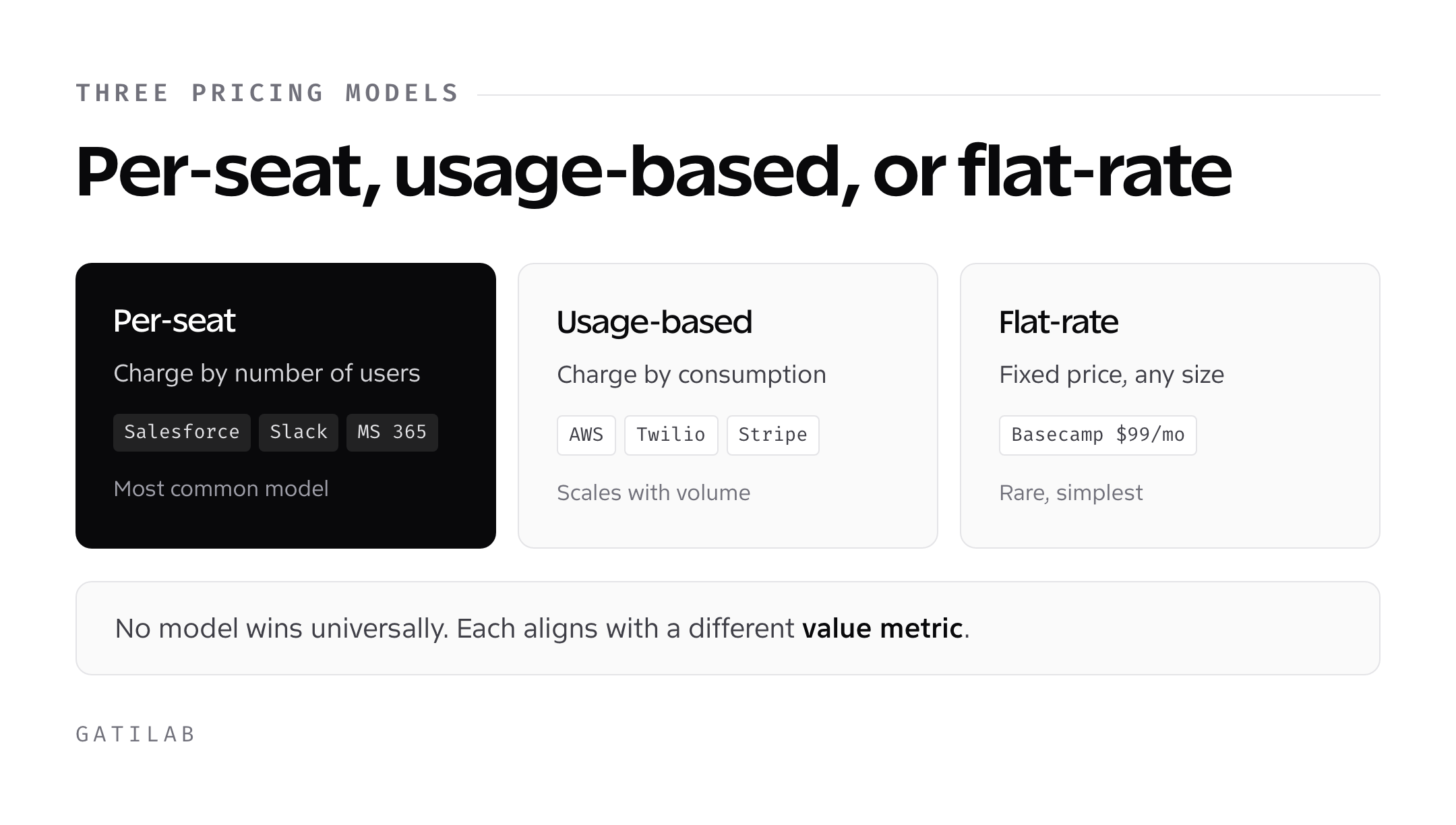
SaaS pricing falls into three broad categories: per-seat, usage-based, and flat-rate. Each has variants and hybrids, but these are the foundations.
Per-seat pricing charges based on the number of users. More employees using the software means higher bills. This is the most common SaaS model. Salesforce, Slack, and Microsoft 365 use it.
Usage-based pricing charges based on consumption. More API calls, more storage, more transactions means higher bills. AWS, Twilio, and Stripe use this model.
Flat-rate pricing charges a fixed amount regardless of users or usage. Basecamp famously charges $99/month for unlimited users. Simpler to understand but rare in SaaS.
No model is universally better. Each aligns with different value propositions, customer types, and business dynamics.
Per-Seat Pricing Explained
Per-seat pricing ties revenue directly to the number of users. If you charge $20 per user per month, ten users cost $200. Simple math for customers and predictable scaling for you. For CRM software examples of this model, see my best CRM software comparison.
Why it works:
The logic is intuitive. More people using the software means more value delivered. A company with 100 employees gets more from project management software than a company with 5. Per-seat pricing captures that difference.
Revenue grows as customers grow. When a 10-person startup becomes a 100-person company, your revenue 10x automatically. No negotiations, no upgrades needed. This creates natural expansion revenue.
Sales conversations are straightforward. Customers understand “how much per user” easily. No complex calculations or usage estimations required.
The challenges:
Customers game the system. They share logins, underreport users, or delay adding seats. “Active user” definitions become contentious. Do you charge for occasional users? What about integrations that technically count as seats?
High per-seat costs discourage adoption. If adding a team member costs money, managers hesitate. This limits viral spread within organizations. A department might love your product but struggle to get budget for more seats.
Value doesn’t always correlate with users. A 20-person engineering team might extract more value from your developer tool than a 200-person company using it casually. Per-seat pricing ignores this.
When to use per-seat:
Per-seat works best when each user represents meaningful value. Collaboration tools, communication platforms, CRMs, and productivity software fit naturally. If the value clearly scales with the number of people using it, per-seat makes sense. For project management examples, check project management tools for teams.
It works poorly for tools used heavily by a few people. Developer tools, analytics platforms, and administrative software often don’t scale with headcount. One power user might generate more value than fifty casual ones.
Usage-Based Pricing Explained
Usage-based pricing charges for what customers actually consume. More API calls, more storage, more processed transactions. The bill reflects actual usage.
Why it works:
It aligns cost with value perfectly. Customers only pay for what they use. A startup making 100 API calls pays little. An enterprise making millions pays proportionally more. No arguments about whether the price is fair, the usage justifies it.
Low barrier to entry. Customers can start small and scale. No need to commit to a large upfront cost. This reduces friction in the sales process, especially for self-service products.
Revenue expands naturally with customer success. When customers succeed, they use more. More usage means more revenue for you without renegotiating contracts. The incentives align beautifully.
The challenges:
Revenue becomes unpredictable. If usage drops, revenue drops. Seasonal businesses cause seasonal revenue. Economic downturns hit immediately as customers reduce consumption.
Billing complexity frustrates customers. “How much will this cost?” becomes impossible to answer precisely. Customers fear bill shock. Enterprise buyers with strict budgets struggle to predict expenses.
Gaming still happens. Customers optimize to minimize usage rather than maximize value. They might cache aggressively, batch requests, or avoid features to save costs. This can hurt your product’s effectiveness.
When to use usage-based:
Usage-based works when the marginal cost to you scales with usage. API companies, cloud infrastructure, and data processing services fit naturally. If serving more usage costs you more (compute, storage, bandwidth), usage-based pricing transfers that directly to customers.
It works poorly when costs are mostly fixed. If adding customers costs you almost nothing extra, usage-based pricing leaves money on the table during low-usage periods. Hosting providers like those in my managed cloud hosting guide exemplify usage-based models well.
Flat-Rate Pricing Explained
Flat-rate pricing charges everyone the same amount regardless of usage or team size. One price. Simple.
Why it works:
Ultimate simplicity. No calculator needed. No surprises. The price is the price. This removes friction from purchasing decisions.
Encourages full adoption. With unlimited users, there’s no barrier to rolling out company-wide. No seat-counting discussions with finance. Everyone who could benefit can use it.
Predictable revenue for you, predictable costs for customers. Both sides know exactly what to expect. Long-term budgeting becomes trivial.
The challenges:
You lose upside from large customers. A 10-person company and a 10,000-person company pay the same. You’re massively undercharging the enterprise.
Price points are constrained. You can’t charge $10 (too cheap for serious tools) or $10,000 (only enterprises would consider it). You’re stuck in a middle range that might not fit your market.
Attracting enterprises is hard. Without tiered pricing, you can’t offer enterprise features at premium prices. Large companies expect account management, SLAs, and premium support, things that flat-rate pricing doesn’t naturally accommodate.
When to use flat-rate:
Flat-rate works for products targeting a consistent customer profile. If your customers are all roughly the same size with similar needs, one price makes sense. It also works for deliberately positioning against complex competitors: “Unlike [competitor], we have one simple price.”
It works poorly when you serve diverse customer sizes. If you want startups and enterprises using the same product, flat-rate forces you to choose which to optimize for. Understanding these tradeoffs is crucial, especially when covered in best SaaS tools for brand marketing.
Hybrid Models
Most successful SaaS companies blend these approaches.
Per-seat with usage limits: Charge per user, but include usage caps. Going over triggers additional charges. This is common in email marketing platforms.
Tiered flat-rate: Multiple flat-rate options with different feature sets. The $29 plan has fewer features than the $99 plan. Technically flat-rate within each tier, but tiered overall.
Usage-based with minimums: Charge for usage, but with a minimum monthly spend. This protects revenue from low-usage periods.
Per-seat with usage pricing: Charge per seat for access, plus usage charges for consumption. Enterprise software often works this way.
HubSpot combines per-seat pricing with tier-based feature access and usage limits on certain features. Complex, but it captures value at multiple points.
How to Choose Your Model
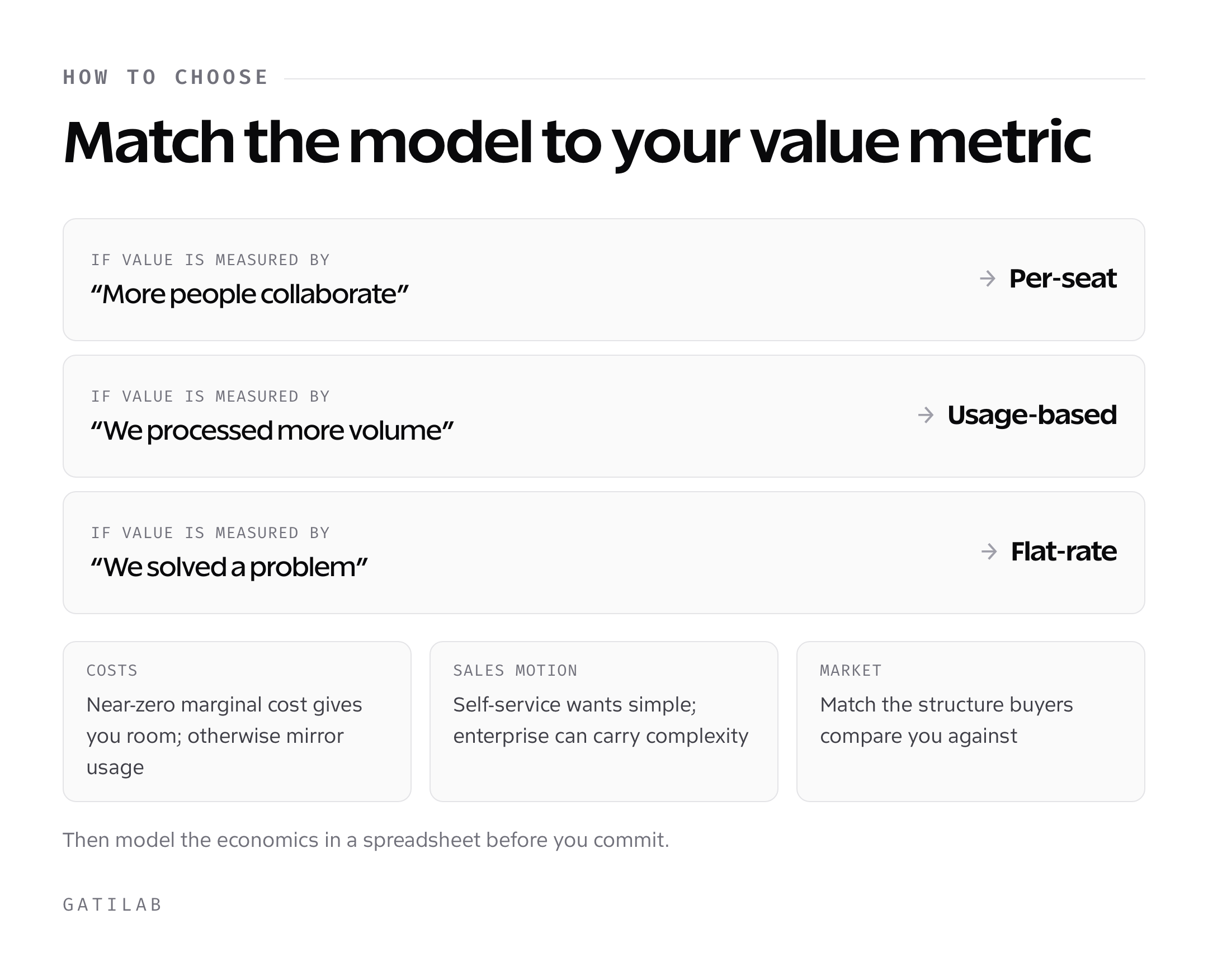
Start with your value metric. How do customers measure the value they get? If it’s “more employees can collaborate,” per-seat fits. If it’s “we processed more transactions,” usage-based fits. If it’s “we solved a problem,” flat-rate might work.
Consider your costs. If serving more users or usage costs you more, your pricing should reflect that. If marginal costs are nearly zero, you have more flexibility.
Look at your market. What do competitors charge? What do customers expect? Radical pricing innovation can work, but it also creates friction. Customers comparing you to competitors expect similar structures.
Think about your sales motion. Self-service favors simple pricing. Complex enterprise sales can handle complex pricing. Match your model to how you sell.
Model the economics. Build a spreadsheet. Project revenue under different models with realistic customer scenarios. Which generates more revenue? Which aligns better with your costs?
Common Pricing Mistakes
Pricing too low. Most SaaS products are underpriced. Founders fear losing deals and set prices low. Then they struggle with profitability. You can always lower prices later. Raising them is much harder.
Too many tiers. Three pricing tiers work. Five or seven confuse customers. Each tier should serve a distinct customer profile with clear reasons to choose it.
Feature-gated pricing that frustrates. Putting essential features behind expensive tiers annoys customers. They feel nickel-and-dimed. Gate genuinely premium features, not basic functionality.
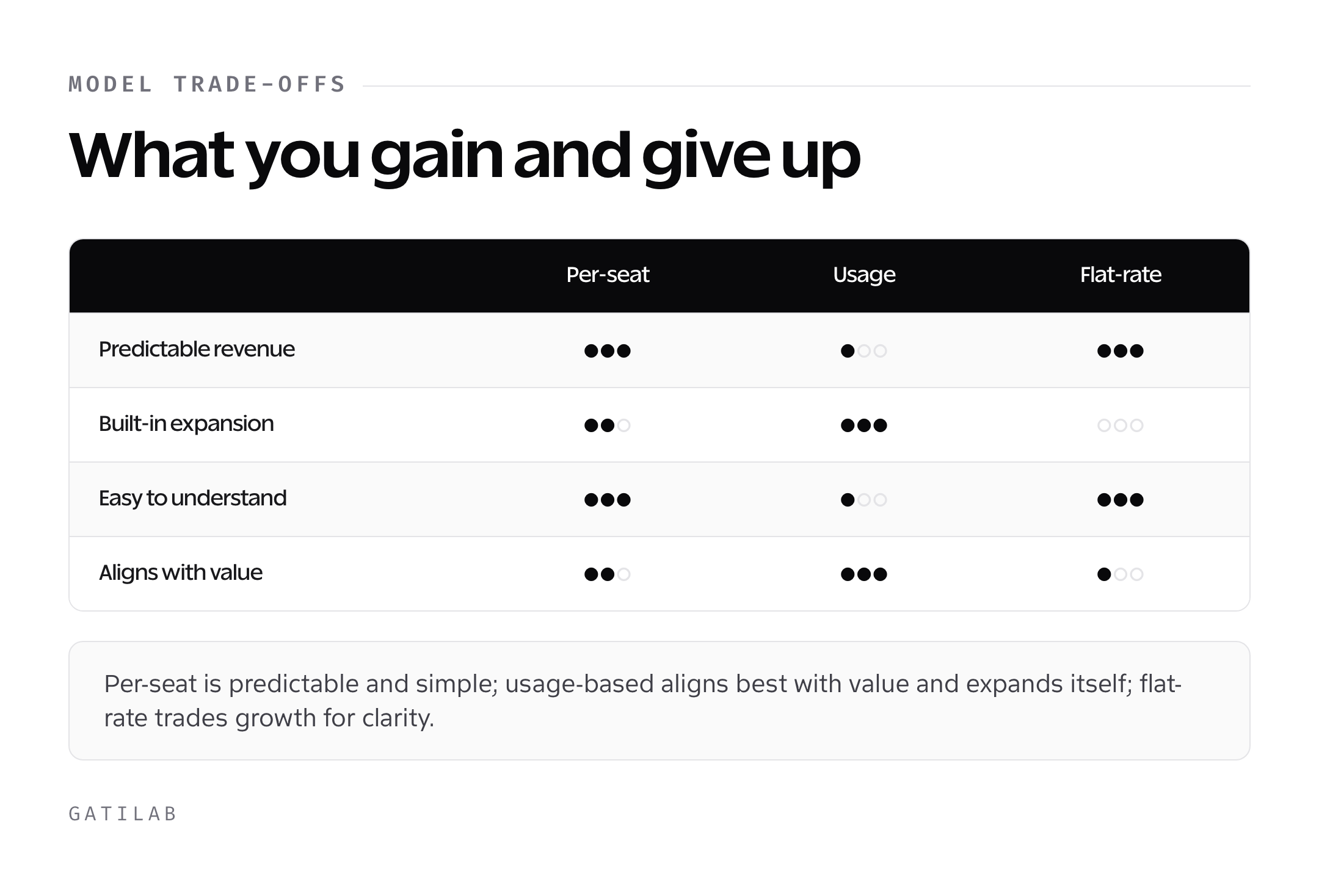
Ignoring expansion revenue. The initial sale is just the beginning. How will customers pay more over time? Per-seat pricing captures this naturally. Flat-rate doesn’t. Build expansion into your model.
Copying competitors blindly. Their pricing fits their business, not yours. Understand why they price that way before copying. Maybe they have different costs, different target customers, or made poor decisions themselves.
Implementing and Testing Pricing
Grandfather existing customers. When changing prices, honor existing agreements. This builds trust and prevents churn. New pricing applies to new customers only.
Test with new customers first. Don’t overhaul pricing based on theory. Try new prices with a segment of new signups. Measure conversion and revenue impact.
Watch leading indicators. Conversion rates, trial-to-paid rates, and average contract values tell you if pricing works. Don’t wait for long-term retention data to make adjustments.
Have a pricing page that sells. Your pricing page is one of the most visited pages. Make it clear, compelling, and easy to understand. Confused visitors don’t become customers.
The Psychological Dimension
Anchor high. Show the expensive option first. Other options seem reasonable by comparison. Many enterprise SaaS companies list their most expensive tier prominently.
Highlight recommended tier. Label one option as “Most Popular” or “Best Value.” This guides undecided customers toward your preferred option.
Use round numbers or precise numbers strategically. $99 feels like a deal compared to $100. $4,500/year feels more considered than $4,487/year. Match the precision to your brand positioning.
Annual discounts work. Offering 2 months free for annual payment is standard. This improves cash flow and reduces churn (annual customers are less likely to cancel mid-term).
Re-evaluating Over Time
Pricing isn’t permanent. As your product evolves, your pricing should too.
Review annually. At minimum, assess whether your pricing still makes sense once a year. Customer profiles change. Competitors evolve. Your costs shift.
Track willingness to pay. Survey customers and prospects about price sensitivity. What would they pay more for? What features don’t justify premium prices?
Monitor competitive moves. When competitors change pricing, consider your response. You don’t have to match them, but understand how the market shifts.
Segment your data. Which customer segments convert at which price points? Which expand revenue most? Let data guide pricing evolution.
Enterprise vs Self-Service Pricing
Different markets require different approaches.
Self-service pricing:
- Must be simple and transparent
- Pricing page sells without sales assistance
- Lower price points, higher volume
- Credit card payments dominate
- Price sensitivity higher
Enterprise pricing:
- Can be complex and customized
- Sales team explains and negotiates
- Higher price points, lower volume
- Contract negotiations expected
- Value-based pricing more accepted
Many SaaS companies run both motions. Self-service for smaller customers, enterprise sales for larger ones. This requires separate pricing strategies for each segment.
Freemium Considerations
Should you offer a free tier?
Freemium pros:
- Lowers barrier to adoption
- Creates viral potential
- Builds user base before converting
- Works well for products with network effects
Freemium cons:
- Free users have support costs
- Conversion rates are often low (2-5%)
- Can attract wrong customers
- Devalues the product perception
Freemium works when: free users provide value (network effects, word-of-mouth) and conversion to paid is predictable. It fails when free users just consume resources.
International Pricing
Selling globally adds complexity.
Purchasing power parity: $50/month is affordable in the US but expensive in India. Many companies adjust prices by region, sometimes dramatically.
Currency display: Show prices in local currency when possible. $50 converted to ₹4,200 at checkout creates friction.
Payment methods: Credit cards dominate in some regions. Bank transfers, local payment methods, or mobile payments dominate in others.
Tax implications: VAT, sales tax, and digital service taxes vary by country. Factor these into pricing decisions.
The Pricing Page
Your pricing page is a conversion point.
Be clear. Confused visitors don’t convert. Make what they get at each price point obvious.
Show value. Feature lists matter less than outcomes. What will customers achieve at each tier?
Address objections. FAQs, testimonials, and guarantees reduce friction.
Have a clear CTA. What should visitors do next? Make the path obvious.
Test and iterate. Your pricing page is never done. A/B test headlines, layouts, and price presentation.
What is the most common SaaS pricing model?
Per-seat pricing is the most common model. It charges based on the number of users and works well for collaboration, productivity, and communication tools where value scales with team size.
When should I use usage-based pricing?
Use usage-based pricing when your costs scale with usage (API calls, storage, transactions) and when customers have widely varying consumption levels. It works well for infrastructure, developer tools, and data processing services.
What are the risks of flat-rate pricing?
Flat-rate pricing means you lose potential revenue from large customers who would pay more. It also makes it hard to offer enterprise features at premium prices and limits your ability to capture expansion revenue.
How many pricing tiers should a SaaS product have?
Three tiers is the sweet spot for most SaaS products. Each tier should serve a distinct customer profile. More than four or five tiers creates confusion and makes the purchase decision harder.
Should I offer annual discounts?
Yes, offering two months free for annual payment is standard practice. This improves your cash flow, reduces churn (annual customers are less likely to cancel), and increases customer commitment to your product.
Tell Google you want more of this.
Add Gatilab as a preferred sourceOne tap, and this site shows up more often in your own Top Stories, AI Overviews and AI Mode. Remove it any time.