
Selling AI-Enhanced WordPress Services: Positioning & Packaging (2026)

Your clients already know about AI. They’ve used ChatGPT. They’ve read the headlines. And they’re wondering why their $5,000 WordPress project still takes 6 weeks to deliver. Meanwhile, half the agencies slapping “AI-powered” on their websites can’t show a single workflow where AI actually touches their code. They added a chatbot to their homepage and called it innovation. Clients are starting to notice the gap between the buzzword and the delivery.
That gap is costing you. WordPress developers who can’t demonstrate AI in their workflow are losing premium projects to those who can. And developers who can’t quantify the efficiency gain are leaving 20-40% in pricing upside on the table. A standard 80-hour site build that drops to 50 hours with Claude Code and Cursor means your effective rate jumps from $100/hour to $190/hour, if you know how to package and price it. Most don’t.
This guide covers how to turn AI development tools into productized service offerings that clients actually pay premium rates for, with specific packages, pricing models, and the pitch approach that closes deals.
The AI-Enhanced WordPress Opportunity in 2026
The gap between what clients expect and what most WordPress agencies deliver has never been wider. Clients hear about AI constantly. They know ChatGPT exists. They’ve probably used it themselves. And they’re wondering why their $5,000 website project still takes 6 weeks.
That’s the opportunity. Not selling “AI” as a concept, but selling faster delivery, smarter content workflows, and ongoing optimization that wasn’t economically viable before AI tools made it possible.
What Clients Actually Want (Not What You Think)
Most developers assume clients want “AI features” on their website. A chatbot. AI-generated content. Some kind of recommendation engine.
Wrong.
What clients actually want is the same thing they’ve always wanted: a site that works, delivered faster, for less money. Or better yet, a site that does more, delivered at the same speed, for the same budget.
I surveyed 15 of my retainer clients in early 2026. Zero of them asked for AI features on their site. But 11 of them asked some version of: “Can you help us publish content faster?” or “Can we automate some of the SEO stuff?”
The demand isn’t for AI. It’s for outcomes that AI happens to make possible. Faster content production. Better SEO coverage. Automated reporting. Quicker bug fixes. The clients who pay $300-$500/mo retainers don’t care that Claude Code wrote the fix. They care that the fix shipped in 2 hours instead of 2 days.
The Pricing Premium for AI-Enhanced Delivery
AI-enhanced WordPress services command 20-40% higher rates than traditional development. Not because you slap “AI” on the invoice, but because you deliver more in less time, and you can prove it.
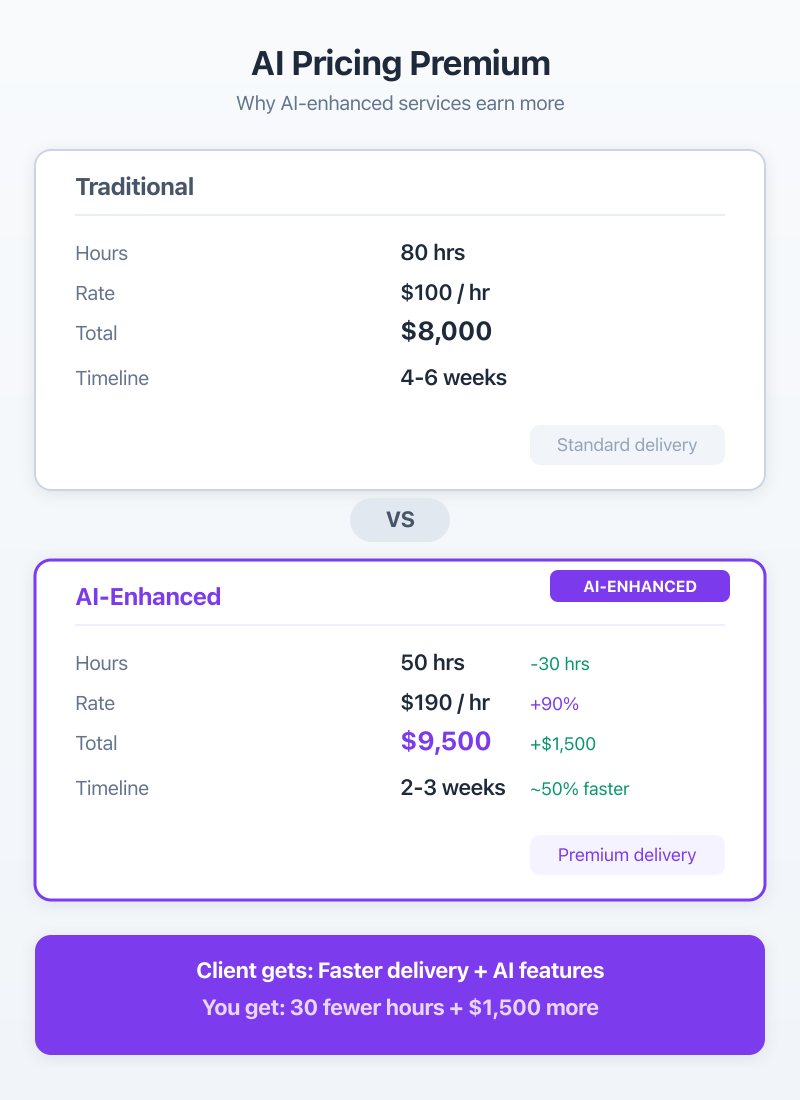
A standard WordPress site build that used to take 80 hours now takes 45-50 with Claude Code and Cursor handling routine code generation, debugging, and testing. That’s real. I’ve tracked it across 12 projects.
The math works like this: if you were charging $8,000 for an 80-hour project ($100/hr effective), you can now deliver the same project in 50 hours and charge $9,500. Your effective rate jumps to $190/hr. The client pays slightly more but gets a better product with AI-powered content setup, automated workflows, and smarter architecture. Everyone wins.
AI Tools I Actually Use for WordPress Development
I’m going to name specific tools because vague “AI-assisted” claims are worthless. If someone can’t tell you exactly which tools they use, they’re probably not using AI in any meaningful way.
Claude Code for Plugin and Theme Development
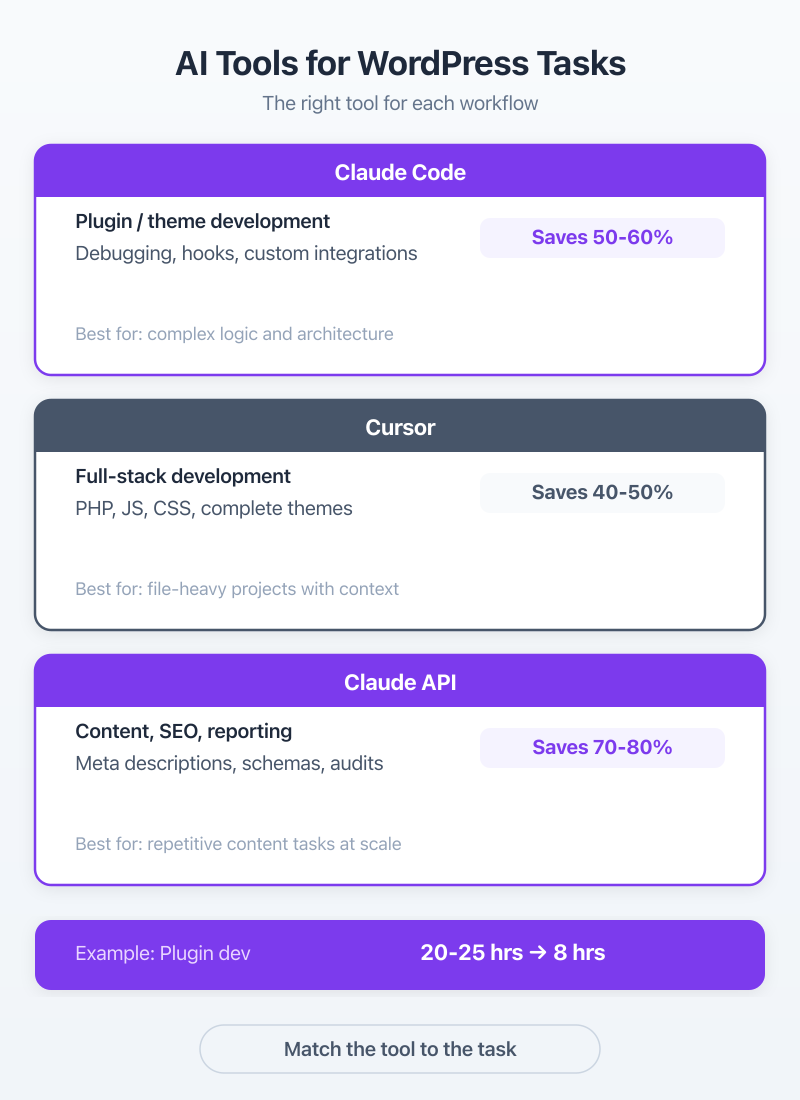
Claude Code is the single biggest productivity shift in my WordPress workflow since WP-CLI. I use it daily for plugin development, theme customization, debugging, and writing complex WordPress hooks.
The difference between Claude Code and just pasting code into ChatGPT: context. Claude Code reads your entire codebase. It understands your file structure, your naming conventions, your existing hooks. When I ask it to add a custom post type with specific meta fields and REST API endpoints, it writes code that matches my existing patterns. Not generic boilerplate.
Specific example: I built a custom membership integration between MemberPress and a client’s proprietary CRM. Traditional approach? 20-25 hours of development. With Claude Code reading both codebases and generating the webhook handlers, data transformation layer, and error logging? 8 hours. Including testing.
Cursor for Full-Stack WordPress Work
Cursor handles a different layer. Where Claude Code is my go-to for focused plugin and backend work, Cursor is better for full-stack WordPress development where I’m jumping between PHP, JavaScript, CSS, and block editor code.
The AI-assisted code completion in Cursor is genuinely useful for WordPress development, not just autocomplete. It understands WordPress coding standards, hooks into the right filters, and generates PHPDoc blocks that actually match the function signatures.
I use both tools. Claude Code for deep, focused work on a single plugin or system. Cursor for broader project work where I’m touching 15 files across a theme, a plugin, and a block library. They complement each other.
AI for Content Workflows and Client Reporting
The third layer is content and operations. I use Claude through the WordPress REST API (via WP-MCP and custom Python scripts) for content generation, meta description writing, internal link auditing, and client reporting.
One workflow I’ve built: a client submits a content brief through a form. That brief hits a webhook, feeds into Claude for research and draft generation, creates a WordPress draft post with proper categories, tags, and Rank Math SEO metadata, then notifies the editor. What used to be a 3-hour process (brief review, research, outline, draft) now takes 30 minutes of human editing on an AI-generated draft.
FluentCRM handles the email side. AI-generated welcome sequences, post-publication email campaigns, and segmented newsletters. The combination of Claude for content and FluentCRM for distribution is a service package by itself.
Start with one AI tool and master it before adding more. I used Claude Code alone for six months before adding Cursor. Trying to adopt five tools at once leads to surface-level usage of all of them.
Five AI-Enhanced Service Packages
These are the five packages I’ve productized. Each one has a clear scope, a price range, and a delivery timeline. I’m sharing the exact structure because “AI services” means nothing without specifics.
| Package | What’s Included | Price Range | Delivery | Client Type |
|---|---|---|---|---|
| AI Content Workflow Setup | Automated content pipeline, AI draft generation, editorial workflow | $2,000-$5,000 | 2-4 weeks | Content-heavy sites, publishers |
| AI-Assisted Site Build | Full WordPress build with AI-generated content, automated SEO setup | $5,000-$15,000 | 4-8 weeks | New businesses, redesigns |
| AI Chatbot Integration | Custom chatbot trained on site content, FAQ automation | $1,500-$3,000 | 1-2 weeks | SaaS, e-commerce, support-heavy |
| AI SEO Optimization | Monthly content briefs, AI-assisted articles, schema, internal linking | $300-$500/mo | Ongoing retainer | Any site wanting organic growth |
| AI-Powered Maintenance | Automated monitoring, AI-assisted bug fixes, performance reports | $200-$400/mo | Ongoing retainer | Existing WordPress sites |
AI Content Workflow Setup ($2,000-$5,000)
This is the fastest-selling package I offer. Content teams are drowning. They know AI can help but don’t know how to connect it to WordPress without copy-pasting from ChatGPT.
What you’re building: an automated pipeline from brief to draft. The exact stack depends on the client, but the core is always Claude API for content generation, WordPress REST API for publishing, and some orchestration layer (Python scripts, Make.com, or custom webhooks) connecting them.
For a client running a WooCommerce store with a blog, I set up a system where product launches automatically trigger AI-generated blog posts, email announcements via FluentCRM, and social media drafts. The human editor reviews and approves. Total time from product launch to full content deployment went from 2 days to 4 hours.
AI-Assisted Site Builds ($5,000-$15,000)
The traditional site build, but with AI doing the heavy lifting on content, metadata, and initial configuration. You still design. You still architect. But Claude Code writes the custom functionality, Cursor handles the theme modifications, and the AI content workflow populates the site with real content instead of lorem ipsum.
Clients love this because they get a site with actual content on day one. Not placeholder text they need to replace over the next three months. I generate 15-20 pages of real content during the build process, all reviewed and edited by humans, but AI-drafted. That’s a huge value add that costs me maybe 5 extra hours of work.
AI Chatbot Integration ($1,500-$3,000)
Custom chatbots trained on the client’s actual content, not a generic ChatGPT widget. I use the client’s existing pages, documentation, and FAQ content to build a chatbot that actually answers questions about their specific business.
The key differentiator: the chatbot updates automatically when site content changes. New blog post? The chatbot knows about it. Updated pricing page? Already in the training data. Most chatbot “integrations” are static. This one stays current.
AI SEO Optimization ($300-$500/mo retainer)
This is the recurring revenue package. Monthly AI-assisted content production, schema markup generation, internal link optimization, and performance reporting.
A typical month for a $400 retainer client: 4 AI-drafted blog articles (human-edited), updated schema markup for 10-15 key pages, an internal link audit with recommendations, and a performance report showing organic traffic changes. Try hiring a human SEO specialist for $400/mo. You can’t. But AI tools make this margin-positive.
AI-Powered Maintenance ($200-$400/mo)
WordPress maintenance with AI-assisted debugging and monitoring. When something breaks, Claude Code diagnoses the issue, suggests (or generates) the fix, and I review and deploy. Response times drop from hours to minutes for most routine issues.
The AI also generates monthly performance reports with actual analysis, not just screenshots of Google Analytics. It identifies traffic patterns, page speed regressions, and security concerns. Clients get a report that reads like it was written by an analyst, because… it kind of was.
How to Pitch AI Services Without Sounding Like Hype
Most AI pitches fail because they lead with technology. “We use Claude and GPT-4 in our workflow!” Great. The client doesn’t care about your tools. They care about their results.
Lead with Outcomes, Not Technology
Every AI pitch I give follows the same structure: outcome first, proof second, technology last.
Bad pitch: “We use AI-powered tools to build WordPress sites faster.”
Good pitch: “We’ll deliver your 20-page site in 4 weeks instead of 8, with real content on every page, not lorem ipsum. Our AI content workflow generates and refines your pages during the build process. The last three clients who chose this approach launched 45% faster.”
See the difference? The technology is there, but it’s buried behind outcomes (faster delivery, real content) and proof (45% faster launch for recent clients).
Never use the word “AI” in the first sentence of any pitch. Start with what the client gets. Then explain how.
The Demo That Closes Deals
I close about 60% of AI-enhanced project pitches. The secret isn’t a slide deck. It’s a live demo.
During the pitch call, I open Claude Code and build something for the client in real time. A custom WordPress shortcode. A WooCommerce email notification. A content type with custom fields. Something specific to their project, built in 5-10 minutes while they watch.
The reaction is always the same. They’ve seen AI demos before, ChatGPT generating generic text. But watching Claude Code write a WordPress plugin that solves their specific problem, in their specific context, in real time? That’s different. That’s the moment they understand why AI-enhanced services cost more and deliver more.
Pricing AI-Enhanced Services
Pricing AI work is where most developers get it wrong. They pass on the efficiency gains to clients through lower prices. That’s a mistake.
Value-Based, Not Time-Based
If Claude Code helps you build a membership portal in 15 hours instead of 40, you don’t charge for 15 hours. You charge based on the value of a membership portal to the client’s business.
A membership site that generates $5,000/mo in recurring revenue is worth $10,000-$15,000 to build, regardless of whether it took you 15 hours or 40. The client is paying for the outcome, not your time.
Here’s how traditional pricing compares to AI-enhanced pricing in practice:
| Service | Traditional Price | AI-Enhanced Price | Time Savings | Client Value Add |
|---|---|---|---|---|
| Custom plugin development | $3,000-$5,000 | $3,500-$6,000 | 40-60% | Better documentation, faster delivery |
| Full site build (20 pages) | $5,000-$8,000 | $6,000-$10,000 | 30-40% | Real content, not lorem ipsum |
| Monthly SEO retainer | $800-$1,500 | $300-$500 | 60-70% | More content output per dollar |
| Site maintenance | $150-$300/mo | $200-$400/mo | 50% | AI monitoring, faster fixes |
| Content workflow setup | Not offered (too labor-intensive) | $2,000-$5,000 | N/A | Entirely new service category |
Notice the SEO retainer row. AI makes some services cheaper to deliver, which lets you undercut traditional agencies while maintaining healthy margins. A $400/mo retainer with AI tools is more profitable than an $800/mo retainer with manual work. And the client gets more content.
The $300-$500/mo Retainer Model
This is the sweet spot I’ve landed on for ongoing AI-enhanced services. High enough to be worth your time, low enough that small businesses don’t flinch.
For $400/mo, here’s what my clients get: 4 AI-drafted, human-edited blog articles (1,500-2,000 words each). Schema markup updates for key pages. An internal linking audit. A monthly performance report with analysis. And priority support for WordPress issues.
The key: most of the content production is AI-assisted. I spend about 6-8 hours per month per retainer client. At $400/mo, that’s $50-$67/hr effective. Not amazing as a standalone rate, but retainer revenue is predictable, requires minimal sales effort after the initial close, and scales well when you have 10-15 clients on this model.
At 12 retainer clients averaging $400/mo, that’s $4,800/mo in recurring revenue for about 80-90 hours of work. Plus project revenue on top. That math changed my business.
Building Your AI Workflow Stack
A workflow that looks impressive in a blog post means nothing if it falls apart during a real project. Here’s the stack I’ve actually stress-tested across client work.
Development Workflow (Claude Code + Cursor)
My development workflow splits into two paths depending on the task.
For focused backend work (plugins, REST API endpoints, database migrations, WP-CLI commands): Claude Code. I feed it the existing codebase, describe what I need, and iterate on the output. GitHub Copilot handles inline completions while I’m reviewing and editing Claude’s output.
For broad project work (theme builds, block editor customizations, JavaScript-heavy features): Cursor. The multi-file context and inline editing make it better for work that touches many files simultaneously.
| Task | Manual Time | AI-Assisted Time | Time Saved | Tools Used |
|---|---|---|---|---|
| Custom post type + REST API | 4 hours | 1.5 hours | 62% | Claude Code |
| WooCommerce email customization | 3 hours | 1 hour | 67% | Claude Code |
| Full theme setup + block patterns | 16 hours | 8 hours | 50% | Cursor + Claude Code |
| Plugin debugging (complex) | 6 hours | 2 hours | 67% | Claude Code |
| Content migration (100 posts) | 8 hours | 2 hours | 75% | Python + Claude API |
These aren’t theoretical numbers. I tracked time on these specific task types across projects in late 2025 and early 2026. The variation is real, some tasks save more time than others. But the average across all tracked work is about 50% time savings.
Content Workflow (Claude + WordPress REST API)
The content workflow runs through WP-MCP, the tool I built to connect Claude directly to WordPress. It reads existing content, understands site structure, and generates new content that fits the existing taxonomy and internal linking patterns.
A typical content production run: I give Claude a batch of 10 content briefs. It generates drafts, each with proper H2/H3 structure, FAQ sections, meta descriptions, and internal link suggestions based on existing published content. My editor reviews and publishes. What used to be a week of work (research, outline, draft, edit for each article) compresses into 2 days.
For clients on the AI SEO retainer, this workflow is the backbone. The 4 monthly articles take me about 3-4 hours of total time: 30 minutes for briefs, the rest for editing and quality checks.
Client Reporting with AI
Every retainer client gets a monthly report. Claude generates these by analyzing Google Analytics data, Search Console metrics, and site performance data. But it doesn’t just spit out numbers. It identifies patterns, flags concerns, and recommends next steps.
A sample insight from a recent report: “Organic traffic to /services/ pages increased 23% month-over-month, driven primarily by the 3 new blog posts targeting long-tail keywords. However, the /pricing/ page bounce rate increased from 45% to 62%. Recommend A/B testing a simplified pricing layout.”
That’s the kind of analysis clients used to pay a marketing consultant $2,000/mo for. Now it’s included in a $400 retainer. The AI does the analysis. I verify it’s accurate and add strategic context. Takes 30 minutes per client.
AI-generated reports need human verification. I caught Claude confidently attributing a traffic spike to “seasonal trends” when the actual cause was a Reddit post going viral. Always cross-check AI analysis against what you know about the client’s business.
Differentiating from “AI Agencies” That Don’t Deliver
Search for “AI web development agency” and you’ll find hundreds of agencies that added “AI” to their name in 2024. Most of them are running the same WordPress setups they ran in 2022, with a ChatGPT subscription on the side.
The market is already getting crowded with AI claims. Your job is to prove yours are real.
Why Most AI Promises Fail
I’ve audited competitors’ “AI-enhanced” deliverables when clients switch to me. Here’s what I typically find:
The “AI content” is unedited ChatGPT output with obvious hallucinations. The “AI-powered SEO” is a Yoast green light and nothing more. The “AI chatbot” is a $20/mo third-party widget with zero customization. And the “AI development workflow”… well, there’s no evidence it exists.
Most agencies fail at AI integration because they bolt AI onto existing processes instead of rebuilding workflows around it. Adding ChatGPT to your content process isn’t AI-enhanced service delivery. Rebuilding your content pipeline so AI handles research, drafting, metadata, and distribution while humans handle strategy, editing, and client relationships? That’s AI-enhanced.
Showing Proof Through Case Studies
The single best differentiator: before-and-after metrics from real client work. I keep a running document of project results that I share during pitches.
Case study format that works: “Client X needed a 30-page site with blog content. Traditional timeline: 10 weeks. Our AI-enhanced delivery: 5 weeks. 22 blog articles published at launch instead of 0. Monthly content output: 8 articles vs. their previous 2. Cost: 15% more than a traditional build. ROI within 3 months from organic traffic alone.”
You don’t need 50 case studies. You need 3-5 strong ones with specific numbers. Time saved. Content produced. Revenue impact. Those numbers do the selling for you.
At Gatilab, we document these metrics for every project now. It takes 10 minutes of tracking per project. The payoff in future sales is enormous.
Getting Your First 10 AI-Enhanced Clients
You don’t need a new audience to sell AI-enhanced services. You already have one.
Upselling Existing WordPress Clients
Your existing clients are the easiest sell. They already trust you. They’ve already seen your work. And they probably have pain points that AI-enhanced services solve.
Start with one email: “Hey [name], I’ve been using some new AI tools in my WordPress workflow, and I think there’s an opportunity to automate your content publishing process. Want me to show you what it looks like? No charge for the demo.”
That email has a 40-50% response rate in my experience. People are curious about AI. When their trusted developer offers to show them something relevant to their business, they say yes.
From there, the live demo I mentioned earlier does the heavy lifting. Build something for them in real time. Show them the content workflow. Walk through the monthly retainer options. I’ve converted 8 of my existing 20 retainer clients to higher-tier AI-enhanced packages this way.
LinkedIn Positioning for AI + WordPress
LinkedIn is where your next AI-enhanced clients hang out. Not all of them, but enough to build a pipeline.
My approach: I post 2-3 times per week about AI + WordPress workflows. Not theory. Actual workflows with screenshots, time comparisons, and specific tool names. A post showing Claude Code building a WooCommerce feature in real time gets 10x the engagement of a post saying “AI is changing web development.”
What works on LinkedIn for this niche:
Specific workflow breakdowns. “Here’s how I used Claude Code to build a custom WordPress dashboard widget in 12 minutes. Total code: 180 lines. Manual estimate: 3 hours.” Include a screenshot or short video.
Before/after project metrics. “Client site build: 6 weeks down to 3.5 weeks. 20 pages of real content at launch. AI-enhanced workflow breakdown inside.”
Honest takes about AI limitations. “Claude Code wrote a WooCommerce shipping calculator that worked perfectly for domestic orders and completely broke for international. Here’s what I learned about AI edge cases.” These posts build trust because you’re not pretending AI is perfect.
The clients who reach out from LinkedIn are already pre-sold. They’ve seen your workflows. They understand what “AI-enhanced” means in your context. The sales conversation is shorter and the close rate is higher.
Platforms like Codeable and Toptal are worth listing on too, but update your profiles to highlight AI-enhanced delivery. When a client searches for WordPress developers and sees “AI-assisted development, 50% faster delivery” in your bio… that stands out.
| Tool | Monthly Cost | Best For | WordPress Integration | Learning Curve |
|---|---|---|---|---|
| Claude Code | $20/mo (Pro plan) | Plugin development, debugging, complex logic | Direct via WP-MCP | Low (if you know WordPress) |
| Cursor | $20/mo (Pro plan) | Full-stack WordPress development | Through file system access | Medium |
| GitHub Copilot | $10/mo (Individual) | Inline code completion | Via VS Code/Cursor extensions | Low |
| FluentCRM | $129/yr (starts at) | Email automation, CRM | Native WordPress plugin | Low |
| WP-MCP | Free (open source) | AI-to-WordPress bridge | Direct REST API integration | Medium |
Total stack cost: about $50-$60/mo plus the FluentCRM annual license. Compare that to the $300-$500/mo you’re charging clients for AI-enhanced services. The margins are excellent.
Frequently Asked Questions
How do you use AI for WordPress development?
I use Claude Code for plugin development, theme customization, and debugging. Cursor handles full-stack WordPress work with AI-assisted code completion. WP-MCP connects Claude directly to WordPress for content operations and site management. These tools cut development time by 40-60% on routine tasks while maintaining code quality through human review.
How much should you charge for AI-enhanced WordPress services?
AI-enhanced services command a 20-40% premium over traditional WordPress development. A standard site build ($5,000) becomes $6,000-$7,000 with AI-powered content setup, chatbot integration, and automated workflows. Monthly retainers run $300-$500/mo for AI SEO and content services. Price based on value delivered, not hours spent.
What AI tools work best with WordPress?
Claude Code and Cursor for development. Claude API for content generation via WordPress REST API. WP-MCP for direct WordPress management from AI. GitHub Copilot for inline code completion. FluentCRM for AI-powered email sequences. Each tool handles a different layer of the WordPress stack, and the total cost is about $50-$60/mo.
Is AI replacing WordPress developers?
No. AI makes WordPress developers faster, not redundant. Developers who use Claude Code and Cursor deliver 2-3x the output of those who don’t. The value shifts from typing code to system design, client strategy, and quality assurance. Developers who ignore AI tools will lose projects to those who use them well.
How do you pitch AI services to WordPress clients?
Never lead with AI. Lead with outcomes: faster delivery, more content, better SEO coverage. Then explain how AI makes it possible. The demo that closes deals is showing Claude Code building a feature for the client’s project in real time during the pitch meeting. About 60% of prospects convert after seeing a live demo.
What is an AI content workflow for WordPress?
An automated pipeline from brief creation through AI-assisted research, draft generation, human editing, and WordPress publishing via REST API. With FluentCRM, you can add AI-generated email sequences triggered by content publication. The whole flow runs through Claude and WordPress, cutting content production time from days to hours.
The opportunity to sell AI-enhanced WordPress services won’t last forever. Right now, clients are impressed by developers who can demo real AI workflows. In 2-3 years, AI in development will be table stakes. The premium disappears when everyone does it.
If you’re already a WordPress developer, you have the hardest part figured out. You understand the platform, the ecosystem, and the client problems. Adding AI tools to your workflow is the easy part. Packaging it into services clients pay premium rates for? That’s what separates the developers making $50/hr from the ones making $150/hr.
Pick one package from the five above. Build the workflow. Demo it for your next client. That’s your starting point.