
Productized WordPress Services Guide: Fixed-Scope Builds, Speed Packages, WaaS (2026)

You’re a WordPress developer spending 45 minutes on discovery calls, 3 hours writing custom proposals, and then watching half your leads ghost anyway. Your effective hourly rate on sales work alone is negative. And the projects you do close? Scope creep turns a $5,000 quote into 80 hours of work at $62.50/hour. That’s not a business. That’s an expensive job.
The math gets worse every month. Custom quoting means feast-or-famine revenue, unpredictable workload, and zero leverage. You can’t hire because every project is different. You can’t raise rates because clients compare your custom quote to cheaper freelancers on Upwork. And you definitely can’t take a week off without your pipeline drying up.
This guide breaks down three productized WordPress service models that fix all of it: $2,500 fixed-scope site builds, $499 speed optimization packages, and $150-$300/month WordPress as a Service (WaaS). Real pricing, real margins, real delivery timelines from running these at Gatilab.
What Productized Services Mean for WordPress Developers
A productized service is a fixed-scope, fixed-price offering you sell the same way every time. Instead of scoping each project individually, you define the package once: “$2,500 for a 5-page business site delivered in 10 days.” Same deliverables, same timeline, same price for every client who buys it.
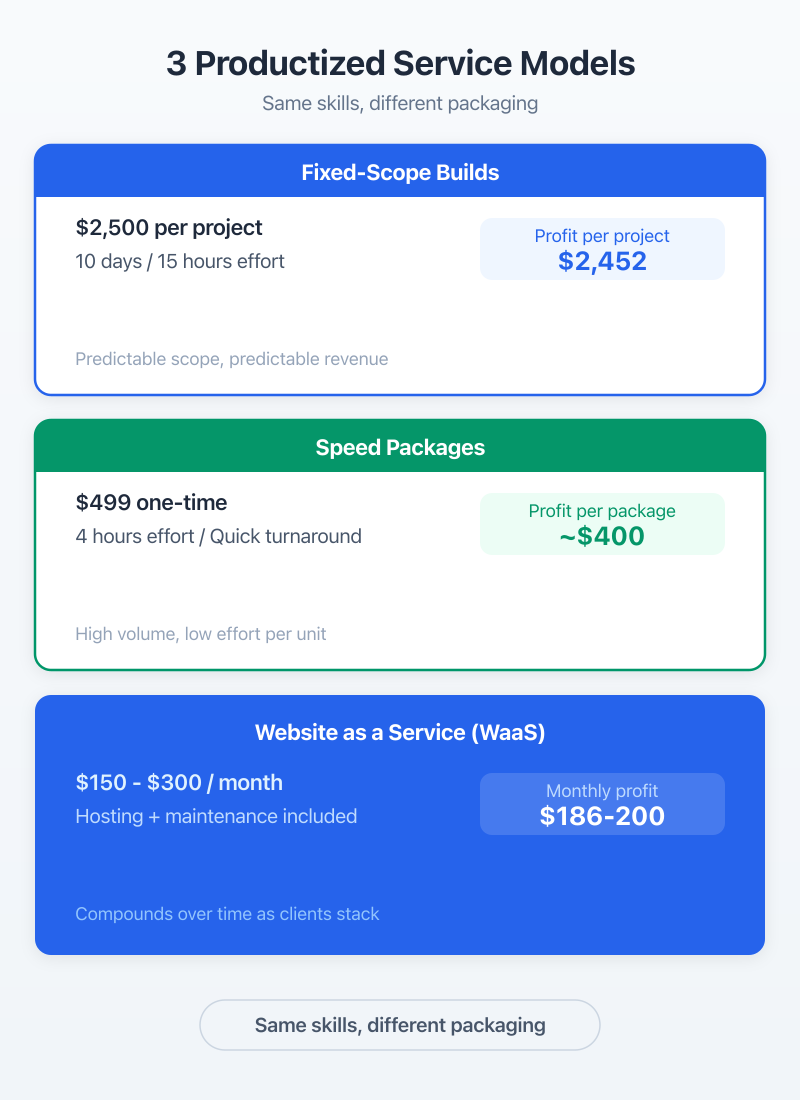
This is the opposite of how most WordPress freelancers operate. The traditional model is custom quoting, where you spend hours understanding requirements, writing proposals, and negotiating scope. Productized services flip that. The scope is the product. Clients self-select based on whether your package fits their needs.
Custom Projects vs Productized: The Key Shift
Custom WordPress projects average $5,000 to $15,000 at Gatilab, take 4 to 8 weeks, and require constant client communication throughout. Productized builds at $2,500 take 10 days with communication limited to two touchpoints: kickoff questionnaire and delivery review.
The mental shift is hard. You feel like you’re leaving money on the table by charging less. But when you run the math on hours invested per dollar earned, productized wins. A $10,000 custom project that takes 80 hours of total work (including calls, revisions, and project management) pays $125/hour. A $2,500 productized build that takes 15 hours of actual work pays $167/hour. And you can do three of them per month.
Why Productized Services Scale (and Custom Doesn’t)
Custom work scales linearly. More revenue means more hours. That’s it. You can raise rates, but there’s a ceiling before clients push back.
Productized services scale in three ways. First, you build SOPs that let you hire junior developers to handle delivery while you focus on sales. Second, templates and starter kits cut production time with every iteration. Third, recurring models like WaaS compound monthly. Ten WaaS clients at $225/month is $2,250 in recurring revenue. Fifty clients is $11,250. Every new client stacks on top of what you already have.
I learned this the expensive way. For three years at Gatilab, I ran custom projects exclusively. Revenue was good some months, terrible others. The moment I added productized packages alongside custom work, monthly revenue stabilized within two quarters.
Model 1: Fixed-Scope Site Builds ($2,500 in 10 Days)
The fixed-scope site build is the simplest productized model to launch. You define exactly what a client gets, price it, and deliver the same package every time. At Gatilab, our standard package is a 5-page business site on GeneratePress with GenerateBlocks for layouts, delivered in 10 business days for $2,500.
That price point works for a specific reason. Below $2,000, your margins disappear after tool costs, hosting setup, and the inevitable “quick question” emails. Above $5,000, clients expect custom design, unlimited revisions, and strategy consulting. $2,500 is the sweet spot where clients perceive real value and you maintain a healthy margin.
What’s Included (and What’s Explicitly Not)
The “not included” list is more important than the “included” list. This is where custom projects blow up. Scope creep starts with “Can you also…” and ends with you working 40 hours on a project you quoted for 15.
Included Not Included Add-On Price 5 pages (Home, About, Services, Contact, Blog) E-commerce / WooCommerce $1,500+ GeneratePress theme + GenerateBlocks setup Custom plugin development $500+ Mobile-responsive design Content writing (client provides) $150/page Contact form (WPForms or similar) SEO campaign or keyword research $300 Basic on-page SEO setup (Rank Math) Third-party integrations $200+ Speed optimization (sub-3s load time) Ongoing maintenance $150/mo SSL + security hardening Logo design or branding $400 Google Analytics 4 setup Additional pages beyond 5 $200/page
That table goes on the sales page. Word for word. No ambiguity. When a client asks “Does this include a blog redesign?” you point to the table. When they ask “Can you add a booking system?” you point to the add-on column. The table sells the package AND protects your scope.
The 10-Day Delivery Process
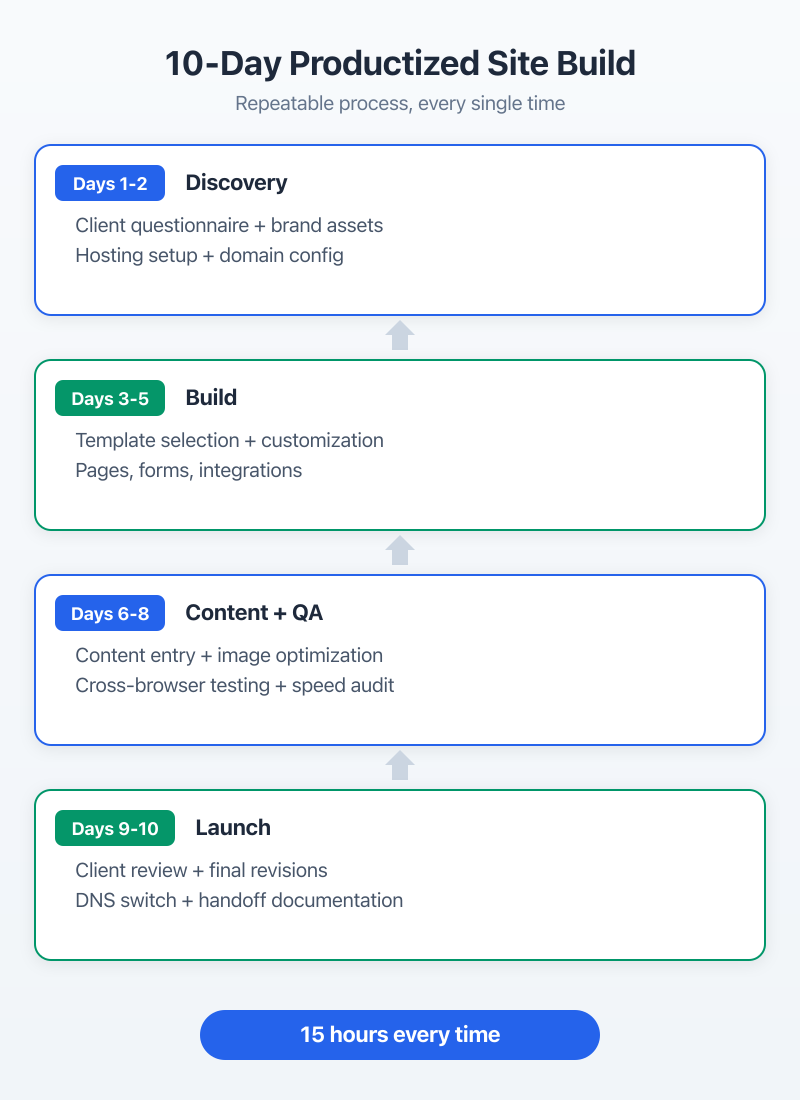
Ten business days, not ten calendar days. The timeline breaks down into four phases:
Days 1-2: Discovery and Setup. Client fills out a structured questionnaire (built in Google Forms) covering brand colors, content, page structure preferences, and competitor sites they like. You set up hosting, install WordPress, configure GeneratePress, and build the site skeleton. No calls during this phase. The questionnaire captures everything you need.
Days 3-5: Design and Build. This is where templates save you. I have seven GenerateBlocks starter layouts for common business types: agency, consultant, SaaS, local service, restaurant, portfolio, and e-commerce (for the upsell). Starting from a template cuts design time from 8 hours to 3. You customize colors, fonts, imagery, and content placement.
Days 6-8: Content, Testing, and Refinement. Client-provided content goes in. You handle formatting, image optimization, and internal linking. Test across devices using BrowserStack. Run speed tests with GTmetrix. Check accessibility basics. Fix anything that breaks.
Days 9-10: Review and Launch. Client gets a staging link for review. One round of revisions (defined in the contract). Then DNS migration, final testing, and handoff documentation. Done.
The whole process runs on a ClickUp board with templated tasks. Every new project gets the same checklist. Nothing gets missed because the process is the same every time.
Economics: Cost, Margin, Volume
At $2,500 per build, here’s the math:
Direct costs per project:
- Hosting setup and first month: $15 (on Cloudways)
- GeneratePress + GenerateBlocks license allocation: ~$8/site (annual licenses spread across builds)
- Stock imagery: $25 average
- Total direct cost: ~$48
Time investment: 12 to 15 hours per build with templates. At $2,500 revenue, that’s $167 to $208 per hour effective rate.
Monthly capacity (solo): 3 to 4 builds per month = $7,500 to $10,000 revenue. That’s a sustainable pace without burning out. Push beyond 4 builds solo and quality drops.
With one junior developer ($1,200/month): 6 to 8 builds per month = $15,000 to $20,000 revenue. Junior handles Days 3-5 build work. You handle Days 1-2 setup and Days 9-10 client-facing delivery.
Model 2: Speed Optimization Packages ($499 One-Time)
WordPress speed optimization is the highest-ROI productized service you can offer. The deliverables are clear, results are measurable, and clients see the improvement immediately. A $499 package takes 3 to 4 hours to deliver. That’s $125 to $165 per hour, and the work converts to maintenance plan upsells at a 30% to 40% rate.
I tested pricing from $299 to $799. Below $400, clients don’t take it seriously. They assume a cheap service means basic work. Above $600, they start comparing you to agencies charging $2,000+ for “performance audits” and expect the same level of reporting. $499 is the number that closes consistently.
The Audit + Fix Framework
Every speed optimization follows the same six-step process. No exceptions, no improvising.
Step 1: Baseline audit. Run the site through Google PageSpeed Insights, GTmetrix, and WebPageTest. Screenshot everything. Record Largest Contentful Paint (LCP), Cumulative Layout Shift (CLS), and Interaction to Next Paint (INP). These numbers are your “before” proof.
Step 2: Image optimization. This alone fixes 40% to 60% of speed issues. Convert images to WebP, set proper dimensions, enable lazy loading. Most WordPress sites serve 2MB+ of unoptimized images on every page load.
Step 3: Caching and compression. Install and configure WP Rocket (or FlyingPress, depending on the site). Enable page caching, browser caching, GZIP compression, and minification. WP Rocket handles 90% of this in one plugin.
Step 4: CDN setup. Configure Cloudflare free tier or, for clients on Cloudways, enable their built-in CDN. A CDN cuts load times for visitors outside the server’s region by 40% to 70%.
Step 5: Database cleanup. Remove post revisions, transients, spam comments, and orphaned metadata. Optimize database tables. On sites older than 2 years, this can reduce database size by 30% to 50%.
Step 6: Delivery report. Run the same tests from Step 1. Screenshot the new scores. Build a before/after comparison document showing every metric improvement.
Tools and Deliverables
Optimization Tool Used Expected Improvement Time Required Image optimization ShortPixel + WebP conversion 30-60% page weight reduction 30-45 min Caching setup WP Rocket 40-70% faster load time 20-30 min CDN configuration Cloudflare 40-70% faster for remote visitors 15-20 min Code minification WP Rocket + Perfmatters 10-20% smaller page size 15-20 min Database cleanup WP-Optimize 20-40% faster queries 10-15 min Render-blocking removal Perfmatters Improved LCP by 0.5-1.5s 20-30 min
Total time: 2 to 3 hours of actual work. Budget 4 hours including the audit report. The client gets a PDF report showing before/after Core Web Vitals scores, a list of every change made, and recommendations for ongoing performance.
Upselling to Maintenance After Speed Fixes
This is where the speed package becomes a client acquisition tool. After delivering results, every client gets this pitch: “Your site is fast now. But WordPress updates, plugin updates, and content changes will degrade performance over time. A $150/month maintenance plan keeps these numbers where they are.”
At Gatilab, 35% of speed optimization clients convert to monthly maintenance within 30 days. Another 10% convert within 90 days after they notice performance dropping. That’s a 45% lifetime conversion rate from a one-time $499 service to recurring revenue.
The speed package isn’t just profitable on its own. It’s the top of your funnel for WaaS.
Pro tip: The speed report as a sales tool
Send the before/after speed report to the client with one line: ‘Here is what we improved. To keep these results, I recommend our monthly maintenance plan.’ Attach the maintenance plan details. Don’t hard-sell. The report does the selling for you.
Model 3: WordPress as a Service ($150-$300/mo)
WaaS is the productized model with the best long-term economics but the slowest ramp-up. You bundle hosting, maintenance, security monitoring, backups, and a fixed number of small monthly changes into one subscription. Clients pay $150 to $300 per month for a fully managed WordPress site without touching the technical side.
The compounding math is what makes WaaS attractive. Ten clients at $225/month average is $2,250 in monthly recurring revenue. That takes 3 to 6 months to build. But once those clients are in, the revenue repeats every month while you add more. Fifty clients is $11,250/month. One hundred is $22,500/month.
WaaS Delivery Model
The WaaS bundle at Gatilab includes three tiers:
Basic ($150/month): Managed hosting on Cloudways, daily backups, WordPress core and plugin updates, uptime monitoring, security scanning, SSL management, and 30 minutes of small changes per month.
Standard ($225/month): Everything in Basic plus weekly performance checks, monthly speed reports, 1 hour of content updates or small changes, and priority support with 4-hour response time.
Premium ($300/month): Everything in Standard plus 2 hours of monthly development time, quarterly design refresh recommendations, SEO monitoring via Rank Math, and a dedicated Slack channel.
Most clients land on Standard. The Basic tier exists to capture price-sensitive clients who’d otherwise manage their own sites. Premium is for clients who want a fractional CTO without paying agency rates.
Hosting + Maintenance + Small Changes Bundle
The hosting component is key. When you control hosting, you control the client relationship. If clients host their own site and just pay for maintenance, they can leave any month with zero friction. When you host their site on your Cloudways account or a reseller setup through RunCloud, switching providers means migrating their entire site. That’s not vendor lock-in. That’s operational convenience. They don’t want to deal with hosting, and you provide a better hosting environment than they’d set up themselves.
Cost structure per WaaS client:
- Hosting (Cloudways, per-app pricing): $14 to $28/month
- ManageWP dashboard (per-site): $0 to $8/month depending on add-ons
- Your time (updates, monitoring, small changes): 30 to 90 minutes/month
- Tools allocation (security scanning, backup plugins): ~$3/month
At $225/month revenue and $25 to $39 in hard costs, your margin is $186 to $200 per client. At 50 clients, that’s a gross margin of $9,300 to $10,000/month before your time cost. If updates and monitoring take 1 hour per client per month on average, you’ll need help at around 20 to 25 clients.
Client Acquisition for WaaS
WaaS clients come from three channels, ranked by conversion rate:
1. Existing project clients (60% conversion). Every fixed-scope build and speed optimization client hears about WaaS. “Your site is built. Want me to keep it running?” Most say yes because they just experienced your quality of work.
2. Referrals (25% conversion). Happy WaaS clients refer other small business owners. One referral program that works: one month free for every referred client who stays 3+ months.
3. Cold outreach to local businesses (5% to 8% conversion). Run a PageSpeed test on local businesses’ sites. Email them the results with an offer: “Your site loads in 7.2 seconds. I can get it under 2 seconds and keep it there for $225/month.” Low conversion rate, but the pipeline is huge. Every city has thousands of businesses with slow WordPress sites.
Clients Monthly Revenue Annual Revenue Team Needed Net Monthly Profit 10 $2,250 $27,000 Solo ~$1,850 25 $5,625 $67,500 Solo + part-time VA ~$4,200 50 $11,250 $135,000 Solo + 1 junior dev ~$7,800 100 $22,500 $270,000 2 devs + PM ~$12,500
The net profit column accounts for hosting costs, tool subscriptions, and team salaries. At 100 clients, you’re running a real business with real overhead, but the margins stay healthy because WaaS is fundamentally a high-margin model.
Pricing Productized WordPress Services
Getting pricing right in 2026 is the difference between a service that sells and one that sits on your website collecting dust. I’ve tested multiple price points across all three models and the patterns are consistent.
Cost-Plus vs Value-Based for Packages
Cost-plus pricing means calculating your costs, adding a margin, and setting the price. Value-based means pricing based on what the outcome is worth to the client. For productized services, value-based wins every time.
A $2,500 site build costs you maybe $50 in direct expenses and 15 hours of labor. Cost-plus at $100/hour would price the package at $1,550. But the client isn’t buying 15 hours of labor. They’re buying a professional business site that helps them close deals. That’s worth $5,000 to $15,000 to most businesses. Your $2,500 price feels like a bargain against that value.
Speed optimization is the same. Your cost: 4 hours of work and $0 in direct expenses (tools are already in your stack). Value to the client: faster site, better search rankings, higher conversions. A $499 price point is easy to justify when you can show a client that a 1-second improvement in load time increases conversions by 7% (Google’s data, not mine).
Price Anchoring with Custom Project Quotes
Price anchoring is the most effective sales technique for productized services. It’s simple: show the custom project price first, then show the productized price.
“A custom WordPress site with discovery sessions, custom design, and unlimited revisions starts at $8,000 to $12,000 and takes 6 to 8 weeks. Or you can get our Starter Business Package: 5-page site on a proven framework, delivered in 10 days, for $2,500.”
The $8,000 number makes $2,500 feel small. The 6-week timeline makes 10 days feel fast. The “unlimited revisions” caveat (which sounds great but kills projects) makes “one round of revisions” sound refreshingly clear.
I keep both options on the services page. Some clients genuinely need custom work. Let them self-select. The clients who choose the productized option are usually easier to work with because they value efficiency over endless customization.
Building Delivery SOPs
Standard Operating Procedures are what separate a productized service from a freelancer winging it. Without SOPs, every project relies on your memory and energy level that day. With SOPs, a junior developer can deliver the same quality you would.
Templated Site Builds
Every fixed-scope build at Gatilab starts from a GeneratePress + GenerateBlocks starter template. I’ve built seven industry-specific templates that cover 80% of client requests. The remaining 20% require light customization, not a from-scratch build.
The template includes: global colors and typography configured in GeneratePress, header and footer layouts in GenerateBlocks, homepage sections (hero, features, testimonials, CTA), inner page layouts (about, services, contact), and pre-configured Rank Math SEO settings.
Each template lives in a ClickUp document with screenshots, setup instructions, and customization notes. A junior developer can go from “new project” to “ready for content” in 3 to 4 hours using these templates.
Speed Optimization Checklists
The speed optimization SOP is a 27-item checklist in ClickUp. Every item has: what to do, which tool to use, expected time, and what “done” looks like. No judgment calls. No “use your best judgment” steps.
A few items from the checklist:
- Run GTmetrix test, save waterfall screenshot (2 min)
- Run PageSpeed Insights for mobile and desktop, save reports (2 min)
- Check image formats, convert PNG/JPG to WebP using ShortPixel (15-20 min)
- Install and configure WP Rocket with specific settings document linked (10 min)
- Test Cloudflare integration, verify no caching conflicts (5 min)
The checklist is the product. Anyone who can follow instructions can deliver a speed optimization package that matches my quality. That’s the whole point.
Monthly WaaS Workflows
WaaS requires different SOPs because the work is ongoing, not project-based. I use ManageWP for multi-site management. It handles updates, backups, uptime monitoring, and security scans across all WaaS clients from one dashboard.
The monthly WaaS workflow:
- Week 1: Run all WordPress core and plugin updates via ManageWP. Check for visual regressions on key pages. Fix any compatibility issues.
- Week 2: Review security scan results. Update any flagged files. Verify SSL certificates haven’t expired.
- Week 3: Process client change requests. Most take 15 to 30 minutes each. Log time against the client’s monthly allocation.
- Week 4: Generate monthly reports (uptime, speed scores, updates applied, changes made). Send to clients via email.
This workflow takes 20 to 30 minutes per client per month for Basic tier. Standard tier adds the client change requests, which average 45 minutes. Premium adds development time on top.
Tools That Enable Productized Delivery
The right tool stack makes productized delivery possible. The wrong stack adds complexity that kills efficiency. I’ve tried dozens of configurations over the years. This is what stuck.
Site Templates and Starter Kits
GeneratePress + GenerateBlocks is my foundation for every productized build. GeneratePress is lightweight (under 30KB), hook-rich for customization, and outputs clean markup that performs well on Core Web Vitals. GenerateBlocks handles page layouts without the overhead of full page builders like Elementor or Divi.
I also use ACF Pro for custom fields on client sites that need structured content (team members, testimonials, pricing tables). ACF fields are part of the template, so the client can update content through clean admin interfaces instead of editing page builder blocks.
ManageWP/MainWP for WaaS at Scale
For WaaS, you need a centralized dashboard. Two options: ManageWP (cloud-based, SaaS model) and MainWP (self-hosted, open-source).
ManageWP costs $0 for basic features (updates, backups to your server) up to $8/site/month for premium features (client reports, SEO ranking, performance checks). It’s what I use because the cloud-based model means no server to maintain for the dashboard itself.
MainWP is free (self-hosted) with premium extensions. If you’re running 50+ sites and want to avoid per-site SaaS costs, MainWP on your own server saves money long term. The tradeoff: you manage the dashboard server yourself.
Below 25 WaaS clients, ManageWP is simpler. Above 50, run the cost comparison. Above 100, MainWP almost always wins on price.
Project Management for Repeatable Processes
ClickUp runs all project management at Gatilab. Every productized service has a template board. New project = duplicate the template. Tasks, checklists, due dates, and assignees are pre-configured. I’ve used Asana, Trello, and Notion for this. ClickUp’s template duplication feature is why I switched.
For smaller operations, Trello works fine. But once you’re running 6+ concurrent projects with a team, you need task dependencies and time tracking. ClickUp handles both.
Loom is the other tool I couldn’t run productized services without. Instead of writing long setup instructions, I record 3-minute Loom videos for each SOP step. New team members watch the videos, follow the checklist, and deliver consistent results on day one.
Marketing Productized WordPress Services
Building the service is half the work. Getting clients to buy it is the other half. And it’s a different skill than getting custom project leads.
Landing Pages That Convert
Productized services need dedicated landing pages, not a services page buried in your site navigation. Each model gets its own page with: the package name, price, what’s included (table format), what’s not included, delivery timeline, one or two before/after examples, and a clear CTA.
The CTA matters more than you think. “Get Started for $2,500” outperforms “Contact Us” by 3x in my testing. When the price is already on the page, asking for “contact” feels like a bait and switch. Make it transactional. Stripe checkout or Calendly booking link, nothing more.
Case Studies as Sales Tools
Case studies close more productized service deals than any other content. But they need to be specific.
Bad case study: “We built a great website for a local business. They loved it.”
Good case study: “We built a 5-page site for a Denver plumber in 8 days using our Starter Business Package. Their old site loaded in 6.8 seconds, the new one loads in 1.4 seconds. Organic traffic increased 34% in 90 days. Cost: $2,500.”
Numbers, timeline, outcome. That’s the formula. You need 3 to 5 case studies per productized model before the service really starts selling itself.
Invoice and payment processing through Stripe or FreshBooks simplifies the sales process. Productized services should feel like buying a product: see the price, click buy, get the thing. The more steps you add between “interested” and “paid,” the more people drop off.
Referral Programs
Former clients are your best marketing channel. A simple referral program works: refer a client who stays for 3+ months (for WaaS) or completes a project (for builds), and you get one month free or a $250 credit toward your next project.
At Gatilab, referrals account for about 40% of new WaaS clients. The cost of a $225 referral credit is nothing compared to the lifetime value of a WaaS client who stays 18+ months (average $4,050 in revenue).
Scaling and Hiring for Productized Models
Productized services are designed to scale beyond you. But timing the first hire wrong is the most common mistake I see WordPress freelancers make. Hire too early and the salary eats your margin. Hire too late and you’re burning out delivering everything yourself.
When to Hire for Each Model
Fixed-scope builds: Hire a junior developer when you’re consistently closing 3+ builds per month and turning away work. A junior developer in Southeast Asia or Eastern Europe costs $800 to $1,500/month and can handle the Days 3-5 build phase. You keep client communication and quality control.
Speed optimization: This stays solo the longest. A single person with good SOPs can deliver 15 to 20 speed packages per month. That’s $7,500 to $10,000 in monthly revenue. Only hire when you’re consistently booked 3+ weeks ahead.
WaaS: Hire a part-time virtual assistant at 15 to 20 WaaS clients ($3,375 to $4,500/month revenue). The VA handles update management, backup verification, and basic client requests. At 40+ clients, bring on a junior developer for the technical work.
Quality Control at Volume
The biggest risk when scaling productized services is quality degradation. You built the reputation. If a junior developer delivers sloppy work under your brand, you lose clients.
Three quality control systems that work:
1. Checklist completion verification. Every deliverable requires checklist screenshots showing each item marked complete. No screenshots, no delivery.
2. Pre-delivery review. You (or a senior team member) review every deliverable before it goes to the client. For site builds, that means checking the staging site. For speed packages, reviewing the before/after report. For WaaS, spot-checking 5 client sites per week.
3. Client satisfaction tracking. Send a 2-question survey after every delivery: “Did you get what you expected? (Yes/No)” and “Would you refer us? (Yes/No).” Track the numbers monthly. If satisfaction drops below 90%, stop taking new clients until you fix the quality issue.
I dropped one productized model in 2023: monthly blog content packages. The quality control was impossible. Writing is subjective, revision cycles spiraled, and client expectations varied wildly even with clear scope. Every other productized model I’ve run has defined, measurable deliverables. Content doesn’t. That’s why I dropped it.
The model I dropped (and why you should avoid it)
Monthly blog content packages at $500/month for 4 posts sounded great on paper. In practice, every client had different expectations for ‘quality.’ One round of revisions turned into three. The effective hourly rate dropped to $25. After six months, I shut it down and redirected those clients to recommended freelance writers instead. Stick to services with measurable, objective deliverables.
Frequently Asked Questions
What is a productized WordPress service?
A fixed-scope, fixed-price WordPress offering delivered through a repeatable process. Instead of custom quoting every project, you sell a defined package: ‘$2,500 for a 5-page business site in 10 days’ or ‘$499 speed optimization.’ The scope, price, and timeline are the same for every client.
How much should I charge for a productized WordPress site?
The sweet spot is $2,500 to $5,000 for small business sites with 5 to 10 pages. Price below $2,000 and margins disappear after hosting, tools, and time. Price above $5,000 and clients expect custom work. At Gatilab, $2,500 with a 10-day turnaround balances value and efficiency for both sides.
What is WordPress as a Service (WaaS)?
WaaS bundles hosting, maintenance, security, and small monthly changes into one subscription ($150 to $300/month). Clients get a fully managed WordPress site without dealing with technical details. You handle updates, backups, security, and 1 to 2 hours of small changes monthly. The recurring revenue model compounds as you add clients.
How many productized WordPress sites can you build per month?
A solo developer with templates and SOPs can deliver 3 to 4 productized sites per month ($7,500 to $10,000 revenue). With a junior developer handling the build phase, that scales to 6 to 8 sites ($15,000 to $20,000). Beyond 8 sites per month, you need a dedicated project manager to keep quality consistent.
Is speed optimization a good productized service?
Yes. WordPress speed optimization has clear deliverables, measurable results (PageSpeed scores, Core Web Vitals), and high perceived value. A $499 package that takes 3 to 4 hours to deliver generates $125 to $165/hour effective rate. It also converts to maintenance plan upsells at 30% to 40% in my experience at Gatilab.
How do you market productized WordPress services?
Dedicated landing pages with clear pricing, before/after case studies, and a simple ‘Buy Now’ or ‘Book a Call’ CTA. Referral programs and LinkedIn outreach work better than SEO for productized services. Your existing custom clients are your first 10 productized customers. Convert them before chasing new leads.
If you’re still quoting every WordPress project from scratch, pick one model and launch it this month. Don’t overthink the pricing, don’t perfect the landing page, and don’t wait until you have templates for every industry. Start with the speed optimization package if you want quick wins, or the fixed-scope build if you want higher revenue per project. Build the WaaS model on top of whichever you choose. The clients you serve with packages today become your recurring revenue tomorrow.
The SaaS tools already exist to run productized services at scale. The delivery frameworks are proven. The only thing between you and predictable WordPress revenue is the decision to stop selling your time by the hour and start selling outcomes by the package.