
Micro-SaaS Ideas for WordPress Developers (2026)

You’re a solid WordPress developer, and you’re stuck trading hours for dollars. Client work pays fine, but you can’t scale it. You can’t sell it. And the moment you stop working, the income stops too. Every WordPress freelancer hits this wall eventually.
Micro-SaaS is the way out, but generic “SaaS idea” lists are useless. They tell you to build project management tools or CRM platforms, ignoring the fact that WordPress developers already sit on top of a distribution channel most founders would kill for: the WordPress.org plugin repository, 60,000+ active plugins, and an ecosystem powering 43% of the web. The pain points are everywhere. Performance monitoring, client reporting, migration headaches, content operations. Big SaaS companies ignore these problems because the market looks “too small.” That’s exactly what makes them perfect for a $5K-$20K/month micro-SaaS.
Here are 12 WordPress-specific micro-SaaS ideas with realistic TAM calculations, tech stacks, and pricing models.
What Makes WordPress Micro-SaaS Different
WordPress micro-SaaS products have a built-in distribution channel that most SaaS founders would kill for: the WordPress.org plugin repository, 60,000+ active plugins, and a developer community that actively searches for solutions to specific problems.
The WordPress ecosystem serves 43% of all websites. That’s not a niche. That’s a continent. But within that continent, there are thousands of micro-niches where agencies, freelancers, and site owners hit the same walls repeatedly. Performance monitoring. Client reporting. Content operations. Migration headaches. Each one is a potential product.
The WordPress Ecosystem as a Distribution Channel
Most SaaS founders spend months figuring out distribution. Where do customers hang out? How do you reach them? WordPress developers already know. Your customers are on WordPress.org forums, in Facebook groups, on X/Twitter following #WordPress, and searching the plugin repository for solutions.
The plugin repository itself is a distribution engine. Ship a free plugin that solves 80% of the problem. Gate the remaining 20% behind a SaaS subscription. Freemius processes $10M+ annually using exactly this model for WordPress plugin monetization. ManageWP, Wordfence, and dozens of others proved the playbook works.
Plugin vs SaaS: When to Choose Each
This decision trips up most WordPress developers. You know how to build plugins. SaaS feels unfamiliar. But the revenue models are fundamentally different.
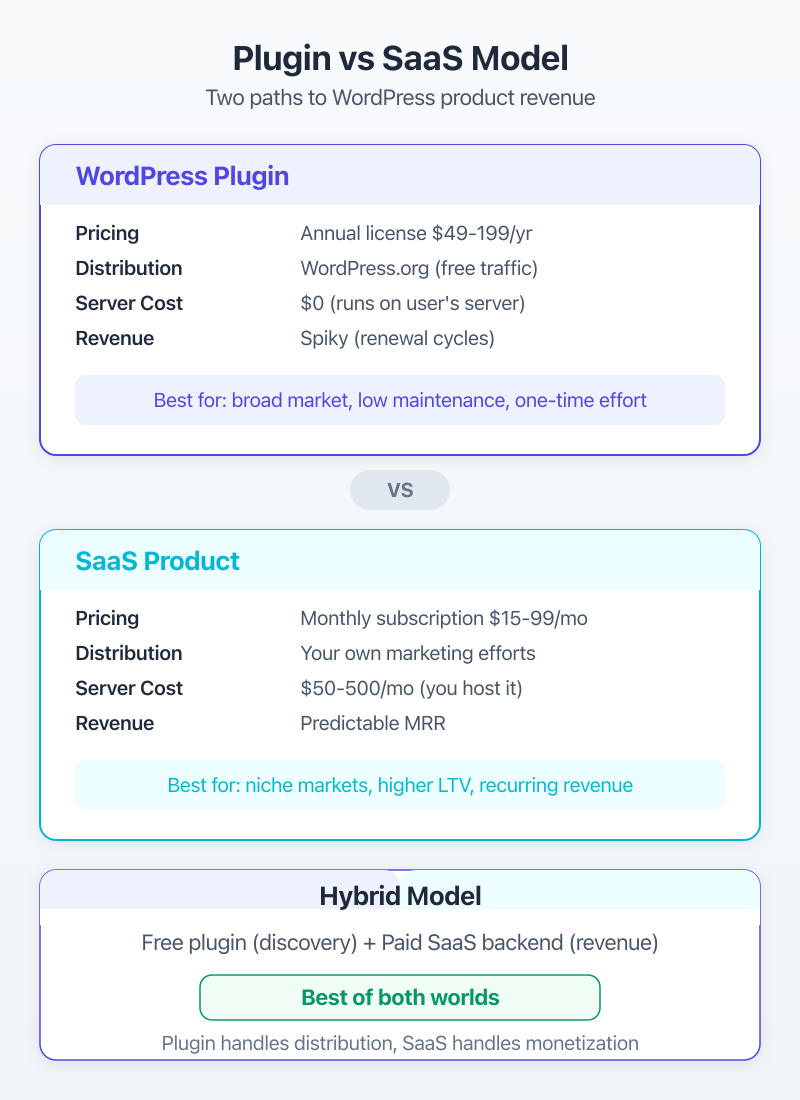
| Factor | WordPress Plugin | SaaS Product | Hybrid (Plugin + SaaS) |
|---|---|---|---|
| Revenue model | Annual license ($49-$199/yr) | Monthly subscription ($15-$99/mo) | Free plugin + paid SaaS tier |
| Distribution | WordPress.org repository | Your own marketing | Repository + marketing |
| Server costs | Zero (runs on client server) | $50-$500/mo (your infrastructure) | $50-$200/mo initially |
| Update control | Dependent on user updating | You control deployment | Backend updates instant |
| Revenue predictability | Spike at launch, renewal churn | Predictable MRR | Best of both |
| Support burden | High (different server configs) | Lower (your environment) | Medium |
My recommendation? Start hybrid. Ship a free WordPress plugin that connects to your SaaS backend. You get WordPress.org distribution AND recurring revenue. WP-MCP follows this model: a WordPress plugin handles the site connection, while the MCP protocol layer runs as a separate service.
How I Built WP-MCP and Raycast Extension
WP-MCP wasn’t a “business idea.” It was a frustration that kept showing up in my daily work. I was managing multiple WordPress sites and constantly switching between browser tabs, SSH terminals, and the WordPress admin to pull data, run commands, and make changes. Every context switch cost me 5-10 minutes.
Identifying the Pain Point
The MCP (Model Context Protocol) specification from Anthropic gave me the architecture I needed. Connect WordPress’s REST API to Claude, and suddenly I could manage sites through natural language. No more tab switching. No more remembering wp-cli command syntax. Just tell Claude what you need, and it pulls the data or makes the change.
The Raycast extension came from a similar itch. I wanted site health data, recent posts, and plugin status without opening a browser. Raycast’s extension API made that possible in a few hundred lines of TypeScript.
Both products share the same origin story that every successful micro-SaaS has: I built them for myself first.
Development with Claude Code in Weeks, Not Months
Here’s where 2026 changes the micro-SaaS math completely. I used Claude Code to scaffold WP-MCP’s core in under a week. Not a proof-of-concept. Working code that connected WordPress to Claude through the MCP protocol, handled authentication, and exposed site management tools.
Claude Code handled the boilerplate: REST API integration, error handling, authentication flows, TypeScript types. I focused on the product decisions: which WordPress operations to expose, how to structure the MCP tools, what the user experience should feel like.
This is the real unlock for WordPress developers building micro-SaaS in 2026. AI development tools compress timelines from months to weeks. An MVP that would’ve taken me 3-4 months in 2023 now takes 2-3 weeks. The barrier to entry just dropped by 80%.
If you’re a WordPress developer who’s never built a SaaS product, start with the hybrid model. Build a WordPress plugin first (you already know how), then add the SaaS layer. Your existing PHP and REST API skills transfer directly.
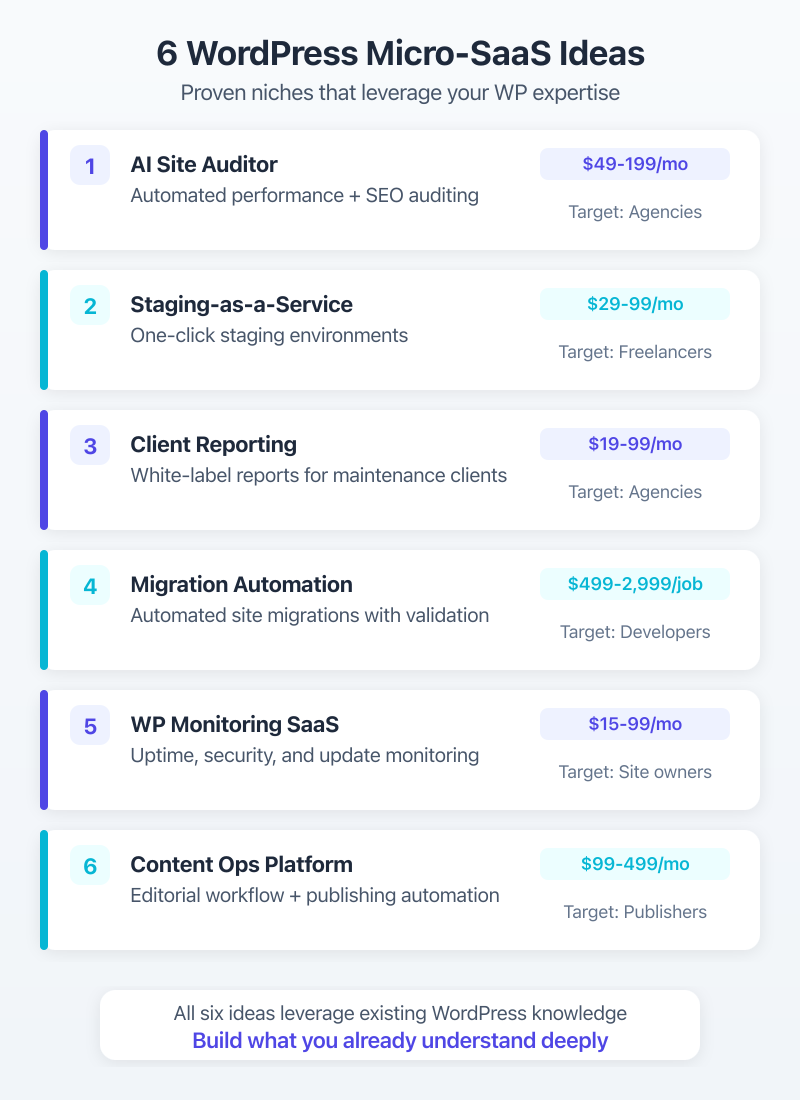
Idea 1: AI-Powered WordPress Site Auditor (SaaS)
An automated site auditor that combines Google PageSpeed Insights API, GTmetrix data, and AI-powered analysis to generate plain-English recommendations. Not another technical report. A prioritized action plan that non-technical site owners can actually follow.
The market is massive. There are 800+ million websites running WordPress. Even capturing 0.001% gives you 8,000 customers. At $49/month for the base plan, that’s $392K MRR. You won’t get there overnight, but the ceiling is real.
Market and Revenue Model
Existing tools like GTmetrix and PageSpeed Insights give you raw data. What they don’t do is translate that data into “here’s exactly what to change, in what order, and why.” That’s the AI layer.
Price it at three tiers: $49/month for 5 sites (freelancers), $99/month for 25 sites (small agencies), $199/month for unlimited sites (large agencies). The per-site pricing creates natural upgrade pressure as clients grow.
Tech Stack
Build the analysis engine in Node.js or Python. Use the Google PageSpeed Insights API (free tier: 25,000 queries/day) and the Claude API for generating recommendations. Store results in PostgreSQL. Frontend in Next.js. Host on Cloudways for the early stage, migrate to bare metal when you hit $5K MRR.
Idea 2: WordPress Staging-as-a-Service
Every WordPress agency needs staging environments. WP Engine includes them, Cloudways has them. But freelancers on shared hosting? Agencies managing sites across 10 different hosts? They’re either using janky local setups or paying for hosting they don’t need.
The Problem Agencies Face
A standalone staging service that works with ANY hosting provider would fill a gap I’ve watched agencies struggle with for years. Connect via SFTP or SSH, spin up a staging copy on your infrastructure, let the client review, push changes back. Simple concept, painful execution without proper tooling.
Pricing Model ($29-$99/mo)
$29/month for 3 staging sites, $49/month for 10, $99/month for 25. Add a per-staging-environment fee beyond the plan limit: $5/month each. This pricing undercuts managed hosting upgrades while providing better staging workflows.
Idea 3: Client Reporting Dashboard for WordPress Agencies
Agencies juggle ManageWP for updates, Google Analytics 4 for traffic, UptimeRobot for monitoring, and spreadsheets for everything else. A unified dashboard that pulls all this data into one white-labeled client view would save hours per week.
ManageWP + Analytics + Uptime in One View
The WordPress REST API gives you plugin status, post counts, and site health scores. GA4’s API handles traffic data. UptimeRobot’s API covers monitoring. Combine them into a single dashboard that auto-generates monthly client reports, and you’ve got something agencies will pay $19-$49/month for without thinking twice.
White-Label Pricing
$19/month for 10 sites (freelancers), $49/month for 50 sites (agencies), $99/month for unlimited with custom branding. The white-label angle is the moat. Agencies want to send reports with their logo, not yours.
Idea 4: WordPress Migration Automation Tool
All-in-One WP Migration has 5M+ active installs. It works for simple sites. But WordPress Multisite migrations? WooCommerce stores with 50,000 products? Sites with custom database tables? These break every free migration tool I’ve tested.
Beyond All-in-One Migration
Build a migration service that handles the edge cases: serialized data in custom tables, multisite network migrations, WooCommerce order history with custom meta, and cross-host DNS management. The existing migration plugins handle 80% of cases. Charge for the 20% that breaks everything.
Per-Migration Pricing
Skip monthly subscriptions for this one. Charge per migration: $29 for simple sites (under 2GB), $49 for WooCommerce stores, $99 for Multisite networks. Agencies doing 10+ migrations per month get a $199/month unlimited plan. This pricing aligns with value. Nobody wants to pay monthly for a tool they use twice a year.
Idea 5: Niche WordPress Booking/Scheduling Plugin-SaaS
Amelia and Bookly handle general booking. But vertical-specific booking, like appointment scheduling for tattoo studios, dog groomers, or music teachers, requires custom fields, specific workflow logic, and industry terminology that generic plugins can’t provide without heavy customization.
Vertical-Specific Booking
Pick one vertical. Just one. Tattoo studios need deposit collection, portfolio galleries tied to booking, and artist-specific availability. Dog groomers need pet profiles, breed-specific service durations, and vaccination tracking. Music teachers need instrument-specific scheduling, recital calendars, and practice assignment tracking.
Generic booking plugins try to serve everyone and end up serving no one well. A vertical-specific solution can charge $15-$49/month because it replaces both the booking plugin AND the manual workflows the business owner currently patches together.
SaaS Layer on Plugin Architecture
The WordPress plugin handles the frontend booking interface. Your SaaS backend manages the business logic: availability algorithms, payment processing through Stripe, SMS reminders, and analytics. This hybrid model lets you distribute through WordPress.org while keeping the revenue-generating features server-side.
Idea 6: WordPress Content Operations Platform
Editorial calendar plugins exist. AI writing tools exist. But a platform that combines editorial planning, AI-assisted drafts through the WordPress REST API, SEO optimization, and publishing workflows in one interface? That’s where the opportunity sits.
Editorial Calendar + AI Drafts + Publishing
Connect to a WordPress site’s REST API. Pull existing content, categories, and tags. Let content teams plan posts on a visual calendar, generate AI-assisted first drafts using the Claude API, run SEO checks against target keywords, and publish directly without ever opening the WordPress admin.
Integration with WordPress REST API
The WordPress REST API makes this possible without any plugin installation. OAuth authentication, post creation, media uploads, category management: it’s all available through standard endpoints. Your SaaS just becomes a better frontend for WordPress content management.
Price at $49/month for single-site content teams, $99/month for agencies managing 5 sites, $149/month for agencies managing 20+ sites. Content teams already pay $100+/month for tools like CoSchedule. A WordPress-native alternative at similar pricing with AI drafting included is a strong pitch.
Additional Ideas (7-12): Quick Breakdowns
The first six ideas got detailed treatment because they have the strongest combination of market demand, build feasibility, and revenue potential. These next six are equally valid but need less explanation.
| Idea | Market Size | Competition | Build Complexity | Revenue Model | Est. MRR Potential |
|---|---|---|---|---|---|
| AI Site Auditor | Large | Medium | Medium | $49-$199/mo tiers | $10K-$50K |
| Staging-as-a-Service | Medium | Low | High | $29-$99/mo tiers | $5K-$20K |
| Client Reporting | Medium | Medium | Medium | $19-$49/mo tiers | $5K-$15K |
| Migration Tool | Large | High | High | $29-$99 per migration | $3K-$10K |
| Niche Booking | Medium | Low | Medium | $15-$49/mo tiers | $5K-$20K |
| Content Operations | Large | Medium | High | $49-$149/mo tiers | $10K-$30K |
| Plugin License Mgmt | Small | Low | Medium | $29-$99/mo tiers | $3K-$10K |
| Performance Monitoring | Large | Medium | Medium | $19-$49/mo tiers | $5K-$15K |
| Client Portal | Medium | Low | Medium | $29-$79/mo tiers | $5K-$15K |
| Security Patching | Large | High | High | $19-$49/mo tiers | $5K-$20K |
| Form Analytics | Medium | Low | Low | $15-$39/mo tiers | $3K-$10K |
| AI Theme Customizer | Large | Low | Medium | $29-$99/mo tiers | $5K-$20K |
Plugin License Management Platform
Freemius dominates this space, but it takes a 7-27% revenue share. A flat-fee alternative at $29-$99/month for plugin developers who want to keep 100% of their revenue has a clear market. Build license key generation, activation tracking, update delivery, and a customer dashboard. WordPress plugin developers are the audience, and they’re vocal about Freemius’s commission structure.
WordPress Performance Monitoring SaaS
Not a one-time audit. Continuous monitoring. Track Core Web Vitals (LCP, CLS, INP) across all pages, alert when scores drop, and identify which plugin update caused the regression. $19/month for 5 sites, $49/month for 25 sites. Agencies managing 50+ WordPress sites would pay for this without blinking.
Client Portal for WordPress Agencies
A branded portal where clients log in to see their site status, submit support tickets, approve content, and view invoices. Integrate with Help Scout for ticketing, Stripe for invoicing, and the WordPress REST API for site data. $29-$79/month depending on features and client seats.
Automated WordPress Security Patching
Wordfence handles detection. What agencies need is automated, tested patching. When a vulnerability is disclosed, your service creates a staging copy, applies the patch, runs automated tests, and notifies the agency for approval before pushing to production. $19-$49/month per site.
WordPress Form Analytics SaaS
Every WordPress site has forms. Almost none track form field analytics: which fields cause abandonment, average completion time per field, where users hesitate. A lightweight JavaScript tracker that sends data to your SaaS dashboard. Connects with popular form plugins like Gravity Forms, WPForms, and Fluent Forms. $15-$39/month.
AI Theme Customization Service
Upload a design screenshot or describe what you want. AI generates a child theme with custom CSS, block patterns, and theme.json configuration for GeneratePress, Astra, or Kadence. Not a page builder. Clean, theme-native code. $29 per customization or $99/month for agencies needing multiple customizations.
Validating Your Micro-SaaS Idea
Don’t build for six months and then launch. Validate first. I’ve seen too many WordPress developers burn 500+ hours on products nobody wanted, and I’ve made that mistake myself.
The 48-Hour Validation Framework
Here’s the framework I’d follow for any of these 12 ideas:
Hours 1-4: Problem research. Search WordPress.org forums, Reddit r/WordPress, and Facebook groups for complaints related to your idea. Count threads. If 50+ people are complaining about the same problem in the last 12 months, the demand is real.
Hours 5-12: Landing page. Build a single-page site describing the product. Use a clear headline, 3-4 benefit bullets, pricing, and an email signup form. Don’t build the product. Don’t even write code. Tools like Carrd ($19/year) or a simple WordPress page work fine.
Hours 13-24: Targeted traffic. Spend $50-$100 on Facebook or LinkedIn ads targeting WordPress professionals. Post in relevant communities (IndieHackers, relevant subreddits, WordPress Slack channels). Share on X/Twitter with the #WordPress hashtag.
Hours 25-48: Measure. 50+ email signups in a week means real demand. 10-20 means mild interest. Under 10 means the idea needs reworking or your positioning was off.
Real user complaints are the best validation. WordPress.org support forums, Reddit, and Facebook groups are goldmines for identifying pain points that people will pay to solve. Don’t rely on your assumptions. Read what real users are frustrated about.
Building an MVP with Claude Code
Once validated, build the MVP in 2-4 weeks using Claude Code. Here’s the tech stack I’d recommend for most WordPress micro-SaaS products:
| Layer | Recommended Tools | Alternatives | Monthly Cost |
|---|---|---|---|
| Backend | Node.js + Express | Python + FastAPI, Laravel | $0 |
| Frontend | Next.js | Nuxt, SvelteKit | $0 |
| Database | PostgreSQL (Supabase) | MySQL, PlanetScale | $0-$25 |
| Hosting | Cloudways or Hetzner VPS | Railway, Render, Fly.io | $10-$50 |
| Auth | Clerk or NextAuth | Auth0, Supabase Auth | $0-$25 |
| Payments | Stripe | LemonSqueezy, Paddle | 2.9% + $0.30/tx |
| Amazon SES + MailerPress | Postmark, Resend | $1-$15 | |
| AI Layer | Claude API | GPT-4 API, Gemini API | $5-$50 |
| WP Integration | WordPress REST API | WP-CLI via SSH, GraphQL | $0 |
Total infrastructure cost for an MVP: $20-$150/month. That’s the beauty of micro-SaaS. You don’t need $50K in funding to start. You need a laptop, a validated idea, and a few weeks of focused building.
Claude Code handles the tedious parts: API integration boilerplate, database schemas, authentication flows, Stripe subscription management. You handle the product decisions. I built WP-MCP this way, and the development velocity was honestly surprising. What would have been weeks of boilerplate became hours of prompting and reviewing.
Revenue Milestones: From $0 to $10K MRR
The path from zero to $10K MRR isn’t mysterious. It’s methodical. I’ve watched it play out with WordPress freelancing businesses, plugin companies, and SaaS products, and the pattern is consistent.
First 10 Customers
Your first 10 customers won’t come from marketing. They’ll come from direct outreach. Here’s the playbook:
Month 1-2: Launch to your existing network. Post on X/Twitter, LinkedIn, and relevant WordPress communities. Offer a founding member discount (50% off forever). The goal isn’t revenue. It’s feedback. Those first 10 customers will tell you what’s broken, what’s missing, and what they’d pay more for.
Month 3-4: Write content. Case studies showing how your product saved time or money. Post them on your blog, distribute through WordPress developer communities. SEO takes months to compound. Start early.
Month 5-6: Hit $1K MRR. At $49/month average, that’s about 20 paying customers. If you’re not there by month 6, either the product isn’t solving a real problem or your positioning is off. Go back to validation.
Scaling Past $5K MRR
| MRR Target | Customers Needed (at $49/mo avg) | Primary Marketing Channel | Timeline |
|---|---|---|---|
| $1K | ~20 | Direct outreach, network | Month 3-6 |
| $3K | ~60 | Content marketing, WordPress.org | Month 6-9 |
| $5K | ~100 | SEO, community partnerships | Month 9-14 |
| $10K | ~200 | Paid ads, affiliate program | Month 14-24 |
The jump from $5K to $10K MRR is where most micro-SaaS products stall. You’ve exhausted your warm network. Organic growth is steady but slow. This is when you either add paid acquisition (Facebook/LinkedIn ads to WordPress professionals) or launch an affiliate program. WordPress developers and agencies love recommending tools they use. A 20-30% recurring commission turns your customers into your sales team.
Keep churn under 5% monthly. For WordPress micro-SaaS, that means obsessive support, monthly feature releases, and regular communication. A customer churning at $49/month costs you $588/year in lost revenue. Ten churned customers is $5,880. The math compounds fast.
Frequently Asked Questions
What is a micro-SaaS for WordPress?
A micro-SaaS is a small, focused software product that solves one specific WordPress pain point. Unlike full SaaS platforms, micro-SaaS products target niche audiences like WordPress agencies, WooCommerce stores, or content creators with a single core feature. Revenue typically ranges from $1K-$30K MRR with a small team or solo founder. Examples include WP-MCP (WordPress-to-AI connection), ManageWP (site management), and Freemius (plugin licensing).
How do you build a micro-SaaS with WordPress skills?
Use your WordPress REST API knowledge as the integration layer. Build the SaaS backend in Node.js or Python, connect to WordPress via REST API or WP-CLI. AI tools like Claude Code can scaffold the entire project in days instead of months. WP-MCP was built using exactly this approach: a WordPress plugin handles site connection, while the backend service runs independently.
How much money can a WordPress micro-SaaS make?
Successful WordPress micro-SaaS products generate $2,000-$20,000 MRR with 50-500 paying customers. WP Engine started as a micro-SaaS and grew into a $400M+ company. Freemius processes $10M+ annually. The WordPress ecosystem serves 43% of all websites, which means even tiny niches contain thousands of potential customers willing to pay $15-$99/month for the right solution.
What’s the difference between a WordPress plugin and micro-SaaS?
A plugin runs on the client’s server with a one-time or annual license fee. A SaaS runs on your server with monthly subscriptions. SaaS gives you recurring revenue, easier updates, and usage analytics. Plugins offer lower overhead and WordPress.org distribution. The hybrid model uses a free plugin as the client-side component and a SaaS as the backend, giving you both distribution and recurring revenue.
How long does it take to build a WordPress micro-SaaS?
MVP in 2-4 weeks using Claude Code and modern frameworks like Next.js and Node.js. A full product with onboarding, Stripe billing, and documentation takes 6-8 weeks. WP-MCP’s core functionality was built in under a week using Claude Code. AI development tools compress timelines dramatically compared to even two years ago.
How do you validate a micro-SaaS idea before building?
Use the 48-hour validation framework: create a landing page describing the product, spend $50-$100 on targeted ads to WordPress professionals on Facebook or LinkedIn, and measure email signups. 50+ signups in a week signals real demand. Also search WordPress.org support forums, Reddit, and Facebook groups for the specific pain point. Real user complaints are the strongest validation signal.
The WordPress ecosystem doesn’t need more page builders or SEO plugins. It needs developers who understand the daily frustrations of agencies, freelancers, and site owners, and who can turn those frustrations into focused, affordable SaaS products.
Pick one idea from this list. Validate it in 48 hours. Build the MVP in 2-4 weeks with Claude Code. Get your first 10 paying customers through direct outreach. That’s the path. It’s not complicated. The hard part is starting, and the tools available in 2026 make that easier than it’s ever been.
If you’re already building WordPress sites for clients, you have every skill you need to build a micro-SaaS. The REST API knowledge, the PHP experience, the understanding of what WordPress users actually struggle with… that’s your unfair advantage. Use it.