
Building and Selling WordPress Plugins as a Revenue Stream

You’ve seen the advice: “Build a WordPress plugin, list it on WordPress.org, earn passive income.” It sounds simple. WordPress powers 40%+ of the web. Millions of site owners install plugins every day. But nobody mentions the part where 1-3% of your free users actually convert to paid, where 5,000 active installs generates more support tickets than revenue, or where Freemius takes its cut before you see a dollar.
The “passive income from plugins” narrative skips the economics that matter. It skips the 18-month grind from first commit to first meaningful revenue. It skips the support load of 2-4 tickets per 1,000 users per week. It skips the reality that WordPress.org gives you free distribution but zero control over your listing, your reviews, or your update schedule. Most developers who ship a plugin expecting passive income abandon it within a year because the math never worked.
This guide covers the real economics of plugin revenue, from freemium conversion rates to annual renewal percentages, based on running plugins with 7,500+ active installs.
The Plugin Business Opportunity (and Its Honest Economics)
WordPress powers over 40% of the web, and its plugin ecosystem generates billions in annual revenue. But the distribution of that revenue is wildly uneven. The top 1% of plugins (WPForms, Elementor, Rank Math, WooCommerce extensions) capture most of the market. Everyone else fights for what’s left.
That doesn’t mean it’s not worth doing. It means you need realistic expectations.
With 7,500+ active users, my plugins generate meaningful revenue, but I’m not quitting client work over it. The real value is threefold: recurring income that grows while you sleep, a portfolio that attracts higher-paying client projects, and deep product-building experience that makes you a better developer.
Revenue Models: Free, Freemium, Premium-Only
Three paths. Each with different economics.
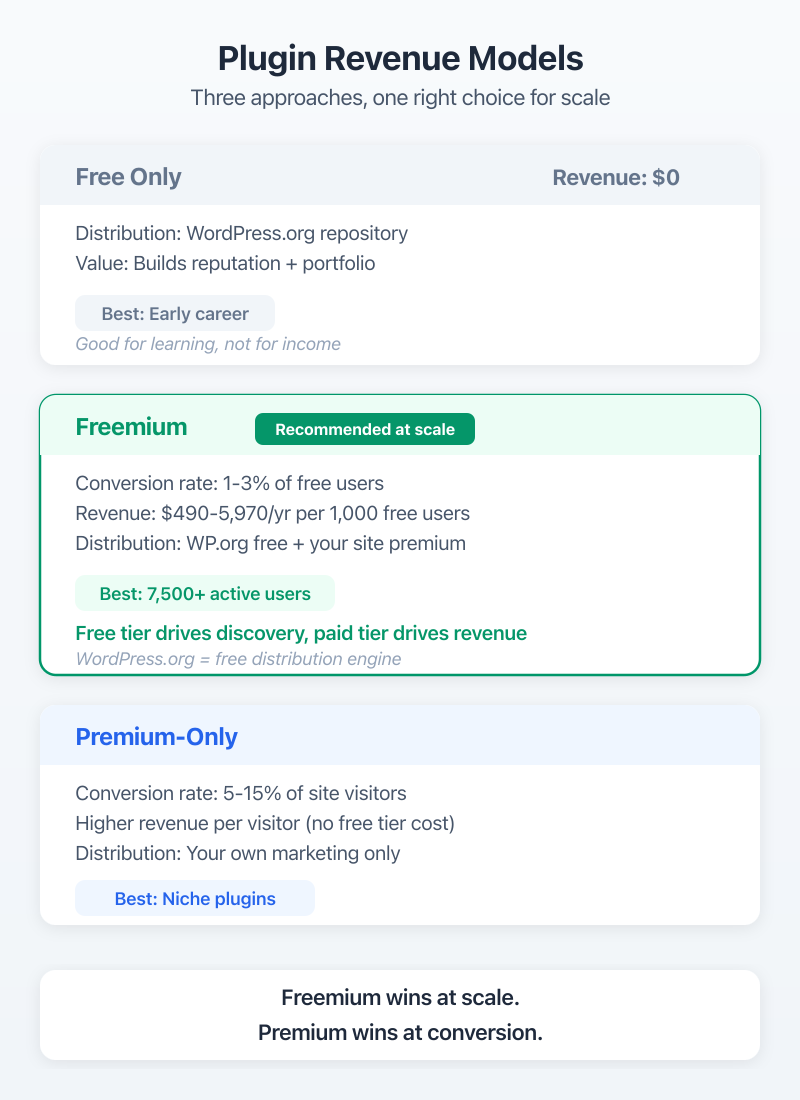
Free only means you’re building reputation, not revenue. Think of it as a marketing asset. Your plugin gets exposure on WordPress.org, drives traffic to your services, and proves you can ship products. Cost: your time and support hours.
Freemium is where most successful plugin businesses land. Free version on WordPress.org for distribution. Premium version sold through your site or Freemius for revenue. The conversion math is brutal (more on that below), but the model works at scale.
Premium-only skips the WordPress.org distribution channel entirely. You sell directly through Easy Digital Downloads or WooCommerce. Higher conversion rates because everyone who finds you is already a buyer. But you lose the organic traffic that WordPress.org provides for free.
What My 7,500+ Active Users Actually Generate
I won’t share exact revenue numbers, but I’ll share the ratios that matter. At 7,500+ active installs, with a freemium model and price points between $49-$149/year, the math works out to meaningful supplemental income. Not life-changing money. Not quit-your-job money. But enough to cover hosting, tools, and leave some profit.
The honest breakdown: about 70% of my plugin revenue comes from annual renewals. 20% from new conversions. 10% from lifetime license purchases. That renewal percentage is why annual licensing matters so much.
| Revenue Model | Free Users Needed | Conversion Rate | Revenue per 1K Users | Pros | Cons |
|---|---|---|---|---|---|
| Free Only | N/A | N/A | $0 | Reputation, portfolio, traffic | No direct revenue |
| Freemium | 5,000+ | 1-3% | $490-$5,970/year | WordPress.org traffic, scale | High support load, slow growth |
| Premium Only | N/A | 5-15% | Higher per visitor | No free support burden | No organic WordPress.org traffic |
Choosing What to Build (The Validation Framework)
The single biggest mistake I see developers make is building something nobody asked for. They spend six months on a plugin that solves an imaginary problem, launch it on WordPress.org, and get 50 active installs after a year. I’ve been close to making that mistake myself.
Validation comes before code. Always.
Solving Your Own Problem First
Both of my plugins started as solutions to problems I had on client projects. WP-MCP was born from needing a better way to connect AI tools with WordPress. The Raycast extension came from wanting faster access to WordPress admin functions.
That’s not a coincidence. The plugins with the highest retention rates on WordPress.org tend to come from developers scratching their own itch. You understand the problem deeply because you’ve lived with it. You know what “done” looks like because you’re the first user.
If you don’t have a problem to solve, you don’t have a plugin to build. Not yet.
Market Research on WordPress.org
Before writing a single line of PHP, spend a week on WordPress.org doing research. Search for your plugin idea. Count the competing plugins. Read their one-star reviews.
Those one-star reviews are gold. They tell you exactly what existing plugins get wrong. If you see the same complaint across 3-4 competing plugins, that’s your opening. That’s the feature gap your plugin fills.
Check the “Active installations” count on competing plugins. If the top plugin in your niche has 500 active installs, the market might be too small. If it has 500,000+, the market exists but competition is fierce. The sweet spot? Top competitor at 10,000-100,000 active installs. Big enough market, small enough that a better product can win.
Also check the “Last updated” date. If the top plugins haven’t been updated in 18+ months, the developers have moved on. That’s an opportunity.
Minimum Viable Plugin: What “Done” Looks Like
Your first release should do one thing well. Not ten things poorly.
For WP-MCP, the first version had three core features. That’s it. I could have spent another two months adding features, but shipping early taught me something critical: the features I thought users wanted weren’t the features they actually wanted. The support tickets and feature requests that came in after launch redirected my entire roadmap.
Ship when your plugin solves the core problem reliably. Add everything else based on actual user feedback.
Before you build, search the WordPress.org plugin directory for your idea. Read the 1-star reviews of the top 3 competitors. If you see the same complaint repeated across all of them, that’s your product opportunity. Build the thing they keep getting wrong.
WordPress.org vs Self-Hosted Distribution
This decision shapes your entire business model. Get it wrong and you’ll spend months rebuilding your distribution strategy. I’ve tested both approaches.
WordPress.org: Free Traffic, Zero Control
WordPress.org is the largest free distribution channel for plugins. Period. When you list a free plugin there, you get access to millions of WordPress users searching for solutions. My plugins got their first 1,000 active installs primarily through WordPress.org organic search.
The catch? You don’t control the platform. WordPress.org has strict guidelines, a manual review process for initial submissions (expect 1-4 weeks), and they can pull your plugin at any time. You also can’t sell premium features directly on WordPress.org. All monetization happens off-platform.
Distribution works through SVN (Subversion), not Git. If you’ve never used SVN… it’s annoying. But it’s manageable once you set up your deployment scripts.
Self-Hosted with EDD or WooCommerce
Selling directly from your own site using WooCommerce or similar plugins gives you full control. You set the prices, control the checkout experience, own the customer relationship, and keep more of the revenue.
Freemius is the third option that splits the difference. It handles licensing, payments, analytics, and deployment. You focus on building the plugin. They take a percentage (typically 7-27% depending on your plan). For solo developers without time to build licensing infrastructure, Freemius is worth the cut.
Hybrid Model That Works Best
The approach that’s worked best for me: free version on WordPress.org for distribution and organic growth. Premium version sold through my own site with Freemius handling licensing and payments.
WordPress.org drives discovery. Your site converts free users to paid. Freemius manages the licensing headaches so you can focus on code.
| Channel | Cost | Control | Traffic | Conversion Rate | Best For |
|---|---|---|---|---|---|
| WordPress.org | Free | Low | High (organic) | N/A (free only) | Discovery, free tier |
| Self-hosted (EDD/Woo) | $0-$200/year | Full | You drive it | 5-15% | Premium-only plugins |
| Freemius | 7-27% rev share | Medium | You drive it | 1-5% | Freemium with licensing |
| Hybrid (WP.org + Self) | Mixed | Medium-High | Organic + Direct | 1-3% free-to-paid | Scale-focused businesses |
Freemium Conversion Math
This is where most plugin businesses fail or succeed. The math is simple but unforgiving.
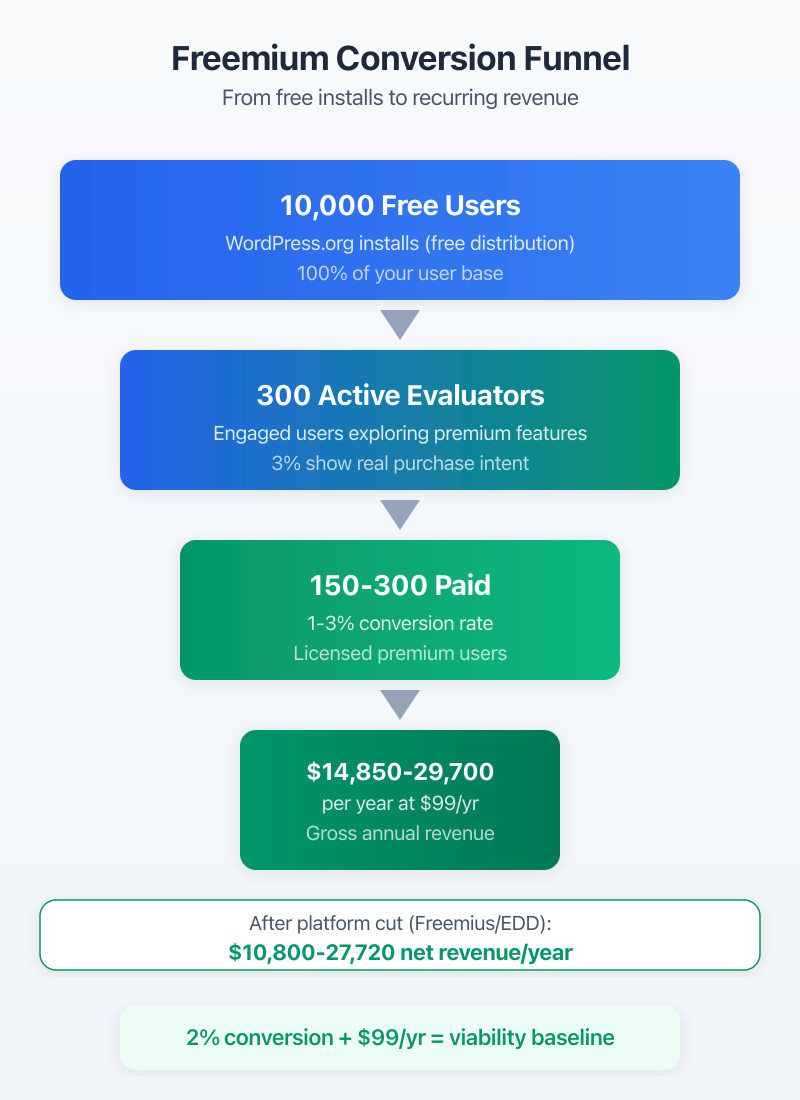
Typical Free-to-Paid Conversion Rates (1-3%)
A 1-3% conversion rate from free to paid is standard across the WordPress plugin industry. Freemius publishes aggregate data from thousands of plugins on their platform, and 1-3% is the range most plugins fall into. Above 3% is excellent. Below 1% means something is broken.
Let me put that in real numbers. If you have 10,000 active free users and a 2% conversion rate with a $99/year license, that’s 200 paying customers generating $19,800/year in ARR (annual recurring revenue). Subtract Freemius fees, hosting costs, and the hours you spend on support, and you’re looking at maybe $12,000-$15,000 in actual take-home.
At 5,000 active users with 1.5% conversion and $49/year pricing? That’s 75 customers at $3,675/year. Below minimum wage when you factor in development and support time.
The math only works at scale or at premium price points. Both require time.
What Drives Conversions
After watching my own conversion data for over a year, these are the factors that move the needle:
Feature gating matters most. The free version needs to be genuinely useful, but the premium features need to solve a pain point that free users hit regularly. If your free version is “too good,” nobody upgrades. If it’s too limited, nobody installs it.
In-app upgrade prompts convert 3-5x better than email campaigns. When a user clicks a premium feature in the WordPress admin and sees a clear explanation of what they’ll get, that’s the highest-converting moment. Not aggressive upsells. Just a clean, honest “this feature is available in Pro.”
Annual vs. monthly pricing affects conversion rates. Annual pricing with a clear per-month breakdown ($99/year, or about $8/month) converts better than showing $99 upfront. People anchor to the smaller number.
Social proof inside the plugin also helps. Showing “Join 7,500+ WordPress users” in the upgrade prompt adds credibility right where the buying decision happens.
Building the Plugin (Technical Decisions)
The technical choices you make in month one affect your support load in month twelve. I learned this the hard way.
Architecture Choices That Scale
Write your plugin as if someone else will maintain it. Because eventually, either someone else will, or you’ll come back to your own code six months later and not recognize it.
Use namespaces and autoloading. Follow the WordPress Coding Standards (WPCS). Build a settings API that won’t break when you add new options. Use custom post types or custom tables thoughtfully. If your plugin stores data, think about what happens when someone has 100,000 records instead of 100.
The biggest architecture mistake I see: plugins that hook into everything. If you’re adding 15 actions and 20 filters on every page load, your plugin is slowing down every site it runs on. Load your code only when it’s needed.
Using Claude Code and Cursor for Plugin Development
AI tools cut my plugin development time roughly in half. That’s not hyperbole, it’s tracked.
Claude Code handles the bulk of my development workflow now. I describe a feature, Claude writes the initial implementation, I review and refine. For boilerplate code (settings pages, REST API endpoints, database migrations), AI is 10x faster than writing from scratch.
Cursor is my daily IDE for plugin work. Its AI-powered autocomplete understands WordPress hooks and functions better than any tool I’ve used before. When I’m debugging a compatibility issue with another plugin, Cursor can analyze both codebases simultaneously.
GitHub Copilot is the third option. Good for autocomplete, less useful for complex WordPress-specific patterns.
The stack that works for me: Claude Code for feature planning and initial code generation, Cursor for daily development, and PHPUnit for testing.
Testing and WordPress Coding Standards
Run PHP_CodeSniffer with the WordPress-Extra ruleset on every commit. Set it up in your CI pipeline on GitHub. It catches 80% of the issues that would otherwise become support tickets.
PHPUnit testing matters more than most plugin developers think. You don’t need 100% code coverage. But you need tests for your core functionality, your settings API, and any data migration paths. When I skip tests on a feature, I regret it within two updates.
Test on at least three PHP versions (8.0, 8.1, 8.2) and two WordPress versions (current and previous major). Your users run everything. I’ve gotten support tickets from people running PHP 7.4 on WordPress 5.9. You can’t support everything, but you should know what breaks.
The Support Load Nobody Warns You About
OK, this is where I need to be upfront. Support is the hidden cost of the plugin business. Every guide talks about building and marketing. Nobody talks about the 8am email from a user who broke their site by running your plugin alongside a poorly-coded theme.
Support Tickets per 1,000 Active Users
From my experience: expect 15-25 support tickets per month per 1,000 active users for a well-documented plugin. Poorly documented? Double that.
At 7,500+ active users, that’s 110-185 tickets per month. Each ticket takes 10-30 minutes to resolve on average, including investigation, response, follow-up, and occasionally debugging the user’s specific setup.
Do the math: 150 tickets x 20 minutes = 50 hours per month on support alone. That’s more than a week of full-time work.
| Active Users | Monthly Tickets (Estimated) | Hours/Month on Support | Cost at $50/hr | Hire Threshold? |
|---|---|---|---|---|
| 1,000 | 15-25 | 5-8 | $250-$400 | No, handle yourself |
| 5,000 | 75-125 | 25-42 | $1,250-$2,100 | Consider part-time help |
| 10,000 | 150-250 | 50-83 | $2,500-$4,150 | Yes, hire support developer |
| 25,000 | 375-625 | 125-208 | $6,250-$10,400 | Full-time support team |
Setting Up Support Without Drowning
Keep free and premium support separate. WordPress.org forum for free users. Email or Freshdesk for premium. This isn’t about being unfair to free users. It’s about survival.
Free user support on WordPress.org is public, which means other users often answer questions before you do. That’s the community doing your support for you. Premium support should be faster (24-48 hour response time) and more thorough (you’ll sometimes log into their site to debug).
Create canned responses for your top 20 issues. I track every ticket category, and roughly 60% of questions fall into the same 10 patterns. Pre-written responses with screenshots save hours every week.
Documentation That Reduces Tickets by 60%
Good documentation is the best support tool you’ll ever build. After I rewrote my plugin’s docs from scratch (with step-by-step screenshots and short Loom videos for complex features), my ticket volume dropped by roughly 60%.
The structure that works: a Getting Started guide, individual feature docs, a Troubleshooting section with the top 10 issues, and a Changelog. Link to docs from inside the plugin, not just on your website. When a user encounters an error or hits a feature gate, show them a doc link right there in the admin.
Video walkthroughs on YouTube reduce support tickets faster than written docs. A 3-minute Loom video explaining your setup wizard prevents hundreds of “how do I get started?” tickets.
Marketing Your Plugin
Building a great plugin is maybe 40% of the work. The other 60%? Making sure people find it.
WordPress.org Listing Optimization
Your WordPress.org listing is your landing page. Treat it like one. The plugin title, short description, screenshots, and FAQ section all affect whether someone clicks “Install Now.”
The short description (150 characters max) is your headline. Make it specific. “Performance optimization plugin” tells me nothing. “Reduces page load time by 40% by lazy-loading images, deferring JS, and caching database queries” tells me everything.
Screenshots should show the plugin in action, not just settings pages. Users want to see what the plugin does, not how it’s configured. Include before/after comparisons if your plugin has a visual impact.
The FAQ section on your WordPress.org page directly affects search rankings within the directory. Answer the questions people actually ask in support. These are the same questions potential users search for before installing.
Content Marketing (Blog + YouTube)
Write about the problem your plugin solves, not about your plugin. If your plugin optimizes WooCommerce checkout, write guides about checkout abandonment, conversion rate optimization, and payment gateway comparisons. Those articles attract the exact audience who needs your plugin.
YouTube is underrated for plugin marketing. A well-produced tutorial showing your plugin solving a real problem gets shared in WordPress Facebook groups, developer communities, and Slack channels. I’ve seen a single YouTube video drive more installs than a month of blog content.
Affiliate Programs for Plugins
Once you have paying customers, set up an affiliate program. Freemius has a built-in affiliate system. So does Easy Digital Downloads.
Pay 20-30% commission on the first year. It sounds high, but those are customers you wouldn’t have gotten otherwise. WordPress bloggers, tutorial creators, and agency owners can become your best salespeople if the commission is worth their time.
AppSumo is another channel, though it comes with trade-offs. You’ll get a burst of users and revenue, but at steep discounts. And AppSumo users tend to need more support than organic users. Proceed carefully.
Pricing Strategies for WordPress Plugins
Pricing is where most developers leave money on the table. I’ve changed my pricing three times and learned something each time.
Annual vs Lifetime Licenses
Annual licensing generates predictable recurring revenue. Lifetime deals generate upfront cash but create perpetual support obligations. I recommend annual as your default, with lifetime as a premium option.
Look… I made the mistake of offering lifetime deals too cheaply early on. Those users still email me for support in 2026. Every ticket from a lifetime customer is support you’re providing for free, forever. If you offer lifetime, price it at 3-5x the annual rate. At $99/year, your lifetime option should be $299-$499. This self-selects committed users who value the product enough to pay a premium.
Site-Based Tiers (1/5/25/Unlimited)
Tiered pricing based on site count is the WordPress plugin industry standard. It works because different users have genuinely different needs.
A freelancer running their personal blog needs one license. An agency managing 20 client sites needs a multi-site plan. Price for the use case.
| Tier | Sites | Annual Price | Lifetime Price | Target Customer |
|---|---|---|---|---|
| Personal | 1 site | $49/year | $149 | Bloggers, personal sites |
| Professional | 5 sites | $99/year | $299 | Freelancers, small agencies |
| Business | 25 sites | $149/year | $399 | Agencies, developers |
| Unlimited | Unlimited | $199/year | $499 | Large agencies, enterprises |
Price Points That Convert ($49-$199/year)
The WordPress plugin market has well-established price expectations. Plugins priced below $29/year feel disposable. Plugins priced above $249/year face heavy scrutiny. The sweet spot is $49-$199/year depending on the complexity and value of your plugin.
My recommendation: start at the middle of your range and test upward. It’s easier to raise prices than to lower them. I started my premium tier at $49/year, tested $79, and settled on $99. The conversion rate barely changed. That pricing adjustment increased revenue by over 80% with no additional marketing effort.
Don’t compete on price. Compete on value, support quality, and update frequency. The plugins charging $199/year (like Gravity Forms, WPForms Elite) justify it with extensive features and reliable support. If your plugin saves agencies 5+ hours per week, $199/year is cheap.
Don’t offer lifetime deals at launch. You don’t know your support costs yet. Wait until you have 6+ months of support data before pricing a lifetime option. I offered $59 lifetime licenses early on and those users cost me more in ongoing support than they ever paid.
Scaling Beyond Your First Plugin
One plugin is a side project. Two or more plugins sharing an audience become a business.
Plugin Suite Strategy
The smartest plugin businesses don’t sell one product. They sell a suite. Look at how iThemes built a security plugin, a backup plugin, and a management plugin. Or how the team behind Jeremey Alford built a suite of related tools that cross-sell to the same audience.
The economics change dramatically with a suite. Your existing customers become your warmest leads for plugin #2. If you have 200 paying customers for plugin A and 30% of them also buy plugin B, you just added 60 customers with zero acquisition cost. That math compounds with each new product.
My approach with WP-MCP and the Raycast extension follows this pattern, though honestly, I’m still early in the suite-building phase. Both plugins serve WordPress developers who want faster workflows. Same audience, different tools.
When to Hire a Support Developer
The threshold is different for everyone, but here’s my framework: when support takes more than 20 hours per week consistently for three months, it’s time to hire.
At 10,000+ active users, you’re spending more time answering tickets than building features. That’s backwards. Your time is worth more writing code than explaining how to clear browser cache for the 400th time.
Start with a part-time contractor who knows WordPress. Pay $20-$35/hour depending on location and skill level. Give them your canned responses, your documentation, and admin access to a test environment. Most tier-1 support questions (installation issues, compatibility questions, basic setup) don’t need the developer. They need someone patient who can follow a troubleshooting checklist.
The goal is getting back to building. The product improves when you’re coding, not when you’re doing support.
If you’re a WordPress developer looking at your next career move, the product builder stage is where the real leverage lives. Client work trades time for money. Plugins trade effort upfront for recurring revenue that compounds. I’m still building both, and the plugin side gets more interesting every quarter.
Start with one problem. Build the minimum version. Ship it on WordPress.org. Then pay attention to what your users actually need, not what you think they need. That’s the whole strategy.
Frequently Asked Questions
How much money can you make selling WordPress plugins?
Realistic range: $500-$5,000/month for a well-executed niche plugin with 5,000-20,000 active users. Top plugins like WPForms and Elementor generate millions annually. My 7,500+ active users generate meaningful but not life-changing revenue. The math depends on a 1-3% free-to-paid conversion rate and price points between $49-$199/year.
Is it worth building a WordPress plugin in 2026?
Yes, if you solve a specific problem and can sustain 12+ months of development and support. The WordPress plugin market is mature but not saturated in niches. AI tools like Claude Code and Cursor cut development time by roughly 50%. The recurring revenue model makes plugins one of the best WordPress business models available.
How do you sell a WordPress plugin?
Two primary paths: list a free version on WordPress.org and sell the premium version through your own site, or go premium-only through WooCommerce or Easy Digital Downloads. Freemius simplifies licensing and payments for either model. WordPress.org drives organic discovery while content marketing and affiliate programs drive premium conversions.
What is a good conversion rate for a freemium WordPress plugin?
A 1-3% free-to-paid conversion rate is standard. Above 3% is excellent. Below 1% means your free version gives away too much or your premium features aren’t compelling enough. Plugins with clear pro feature gates (advanced settings, priority support, integrations) convert best. In-app upgrade prompts convert 3-5x better than email campaigns.
How do you handle support for a WordPress plugin?
Documentation first: a solid knowledge base with screenshots and Loom video walkthroughs reduces tickets by roughly 60%. Use Freshdesk or Help Scout for ticket management. Forum-based support on WordPress.org for free users, email support for premium. Budget 5-10 hours per week per 5,000 active users. Hire dedicated support help when you cross 10,000 active users.
Should WordPress plugins be priced annually or lifetime?
Annual licensing generates predictable recurring revenue and funds ongoing development. Lifetime deals generate upfront cash but create perpetual support obligations. Annual pricing at $49-$199/year is the safer default. Offer a high-priced lifetime option ($299-$499) that self-selects committed users. Don’t offer lifetime deals at launch until you understand your support costs.
What are the best tools for building WordPress plugins in 2026?
Claude Code for rapid development and debugging. Cursor for a full-stack IDE with AI assistance. GitHub for version control. PHPUnit and PHP_CodeSniffer with WordPress-Extra ruleset for testing and code quality. WordPress.org SVN for distribution. Freemius for licensing, payments, and analytics. This stack covers the entire plugin development lifecycle from first commit to first sale.